

Mijia Refrigerator Pro Multi-Door 546L FAQ
Basic Information
Q1. What are the selling points of the Mijia Refrigerator Pro Multi-Door 546L?
A: The Mijia Refrigerator Pro Multi-Door 546L features the following selling points:
1. It supports automatic ice making. The entire ice-making system features antibacterial protection and a 3-minute automatic cleaning function. The water tank, ice cube tray, and ice bin are removable for thorough cleaning.
2. Quick Ice produces ice in as little as 55 minutes, with an ice-making capacity of up to 1.128 kg per 24 hours. The Cross door version offers an ice storage capacity of up to 1.4 kg. The French door version offers an ice storage capacity of up to 1.8 kg.
3. It features a dual-system cooling design with independent evaporators and fans for the fridge and freezer compartments. Separate air circulation systems provide efficient cooling and freshness preservation, while temperature fluctuations in the fridge compartment are controlled within ±0.5 °C to help preserve the original freshness and taste of food.
4. The refrigerator uses a series-parallel cooling configuration to monitor and adjust the temperatures of both compartments in real time. Physical separation between the compartments prevents odor transfer, and both compartments are equipped with active odor removal modules.
5. The Mijia Refrigerator Pro Multi-Door 546L features an all-zone ion purification system that provides air purification in both the fridge and freezer compartments. Its ion Hygiene⁺ air purification technology uses high-voltage tip discharge and dielectric barrier discharge through composite asymmetric electrodes to generate ion wind, which drives air circulation through highly active honeycomb catalytic materials. Plasma generated by high-voltage discharge provides high reactivity, while the catalyst offers high reaction selectivity. This combination improves the adsorption and decomposition of volatile organic compounds (VOCs), promoting their conversion into oxidation products such as CO₂ and H₂O and enhancing odor removal.
6. It features two crisper drawers equipped with eco-friendly moisture-retaining membranes. Both lower drawers in the fridge compartment help maintain a high-humidity environment, reduce moisture loss from fruits and vegetables, and extend their freshness.
7. It supports -30°C Deep Freeze mode, which rapidly freezes food through the ice crystal formation zone and reduces juice loss to as little as 0.86%, helping preserve food quality during long-term storage. When the mode is enabled, the refrigerator monitors ambient temperature and humidity as well as the freezer compartment temperature. The cooling system then operates at high frequency to continuously deliver cooling capacity and quickly reach -30°C. The mode runs for up to 50 hours and can be activated again 24 hours after exiting.
8. It supports Holiday mode, which is an energy-saving mode designed for extended periods away from home. When enabled, the fridge compartment is automatically set to 15 °C, while the freezer compartment continues operating normally at the defined temperature.
9. It supports Google Assistant and Alexa voice control, as well as remote temperature adjustment through the app.
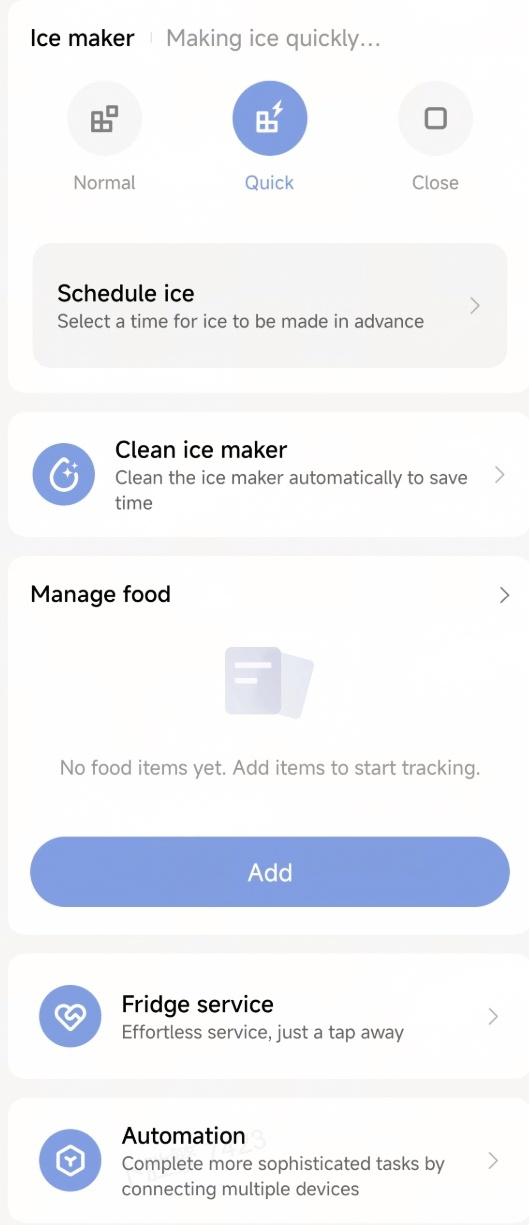
10. The Xiaomi Home App also provides three ice-making modes: Normal, Quick, and Close.
11. In addition, food information can be entered manually to record storage duration and provide reminders to consume stored food in a timely manner.
12. The ultra-thin design allows the refrigerator to fit seamlessly into kitchen cabinetry.
13. The fridge compartment features panoramic lighting, while the freezer compartment is also equipped with interior lighting for better visibility.
14. The French door version features a large drawer design for convenient storage and easy access to food. The Cross door version offers multiple storage zones for more precise food organization.
Q2. What is the energy efficiency rating of the Mijia Refrigerator Pro Multi-Door 546L?
A: The Mijia Refrigerator Pro Multi-Door 546L has an energy efficiency rating of Class E according to the new EU standard.
Q3. What colors are available for the Mijia Refrigerator Pro Multi-Door 546L?
A: The Mijia Refrigerator Pro Multi-Door 546L is available in Graphite Grey.
Q4: In which countries/regions is the Mijia Refrigerator Pro Multi-Door 546L available?
A: The Mijia Refrigerator Pro Multi-Door 546L is available in Europe.
Q5: Where to find the Mijia Refrigerator Pro Multi-Door 546L SN?
A: The refrigerator's SN can be found on the product packaging, inside the fridge compartment, and near the bottom of the back of the Mijia Refrigerator Pro Multi-Door 546L.
Q6: What accessories and components are included inside the Mijia Refrigerator Pro Multi-Door 546L?
A: The standard configurations of the Mijia Refrigerator Pro Multi-Door 546L include:
French door (MRF55ESGPDAAEU): 2 shelves in the fridge compartment, 3 drawers in the fridge compartment (1 standard drawer and 2 crisper drawers with an Eco Fresh film for separate dry and humid storage), 3+3 fridge compartment door bins, 2 large freezer drawers, 1 water tank, 1 ice bin, adjustable shelves, a glass cover for the crisper drawer, and a freezer handle light. It does not include an egg tray, an iFresh compartment, or freezer door bins.
Cross door (MRC55ESGPDAAEU): 2 shelves in the fridge compartment, 3 drawers in the fridge compartment (1 standard drawer and 2 crisper drawers), 3+3 fridge compartment door bins, 6 freezer drawers, 1 water tank, and 1 ice bin. It does not include an egg tray, an iFresh compartment, or freezer door bins.
Both models come with a user manual, adjustable feet, and door seals (including adjustment shims).
Q7. What refrigeration method does the Mijia Refrigerator Pro Multi-Door 546L use?
A: The Mijia Refrigerator Pro Multi-Door 546L uses a frost-free air-cooled refrigeration method.
Q8. Does the Mijia Refrigerator Pro Multi-Door 546L use an inverter compressor?
A: Yes, the Mijia Refrigerator Pro Multi-Door 546L uses an inverter compressor.
Q9. What is the noise level range of the Mijia Refrigerator Pro Multi-Door 546L?
A: The maximum noise level of the Mijia Refrigerator Pro Multi-Door 546L is 34 dB(A).
Note:
The refrigerator noise level was measured under standard conditions. In actual use, environmental noise or the refrigerator's placement can affect the noise level.
Q10. What is the adjustable temperature range for the fridge compartment of the Mijia Refrigerator Pro Multi-Door 546L?
A: The fridge compartment temperature range of the Mijia Refrigerator Pro Multi-Door 546L is from 2 °C to 8 °C.
Q11. What is the adjustable temperature range for the freezer compartment of the Mijia Refrigerator Pro Multi-Door 546L?
A: The freezer compartment temperature range of the Mijia Refrigerator Pro Multi-Door 546L is from -16 °C to -24 °C, while the deep freeze temperature can reach -30 °C.
Q12. What circulation system does the Mijia Refrigerator Pro Multi-Door 546L use?
A: The Mijia Refrigerator Pro Multi-Door 546L uses a dual-cycle refrigeration system.
Q13. Where is the power cord outlet located on the Mijia Refrigerator Pro Multi-Door 546L?
A: The power cord is connected to the upper left rear of the Mijia Refrigerator Pro Multi-Door 546L and is approximately 2 m long.
Q14. What is the length of the power cord of the Mijia Refrigerator Pro Multi-Door 546L?
A: The power cord of the Mijia Refrigerator Pro Multi-Door 546L is 2 meters long.
Q15. What is the operating ambient temperature range for the Mijia Refrigerator Pro Multi-Door 546L?
A: The operating ambient temperature range for the Mijia Refrigerator Pro Multi-Door 546L is from 10°C to 43 °C. Operating outside this range may affect the refrigeration performance of the appliance.
Q16. What certifications does the Mijia Refrigerator Pro Multi-Door 546L have?
A: Thank you for your interest in and support for Xiaomi.
Before leaving the factory, this product undergoes rigorous testing and inspection to ensure compliance with the applicable laws, regulations, technical requirements, and standards in the target market. Please feel confident in purchasing and using the product.
Q17. What is the climate class of the Mijia Refrigerator Pro Multi-Door 546L?
A: The climate class of the Mijia Refrigerator Pro Multi-Door 546L is SN, N, ST, T, which means it is suitable for extended temperate, temperate, subtropical, and tropical climates.
Q18. What type of refrigerant does the Mijia Refrigerator Pro Multi-Door 546L use?
A: The Mijia Refrigerator Pro Multi-Door 546L uses R600a refrigerant.
Q19: How much refrigerant does the Mijia Refrigerator Pro Multi-Door 546L contain?
A: The Mijia Refrigerator Pro Multi-Door 546L contains 70 g of refrigerant.
Q20: How often does the Mijia Refrigerator Pro Multi-Door 546L need to be refilled with refrigerant?
A: If there is no refrigerant leakage, the Mijia Refrigerator Pro Multi-Door 546L does not need additional refrigerant.
Q21. What is the freezing capacity of the Mijia Refrigerator Pro Multi-Door 546L?
A: The freezing capacity of the Mijia Refrigerator Pro Multi-Door 546L is 14 kg per 24 hours.
Q22: What is the rated cooling power of the Mijia Refrigerator Pro Multi-Door 546L?
A: The rated cooling power of the Mijia Refrigerator Pro Multi-Door 546L is 135 W.
Q23. What is the defrost power of the Mijia Refrigerator Pro Multi-Door 546L?
A: The defrost power of the fridge compartment of the Mijia Refrigerator Pro Multi-Door 546L is 23 W at 230 V, and the defrost power of the freezer compartment is 230 W at 230 V.
Q24: What is the standard power consumption of the Mijia Refrigerator Pro Multi-Door 546L?
A: The power consumption of the Mijia Refrigerator Pro Multi-Door 546L depends on the amount of food stored, the operating environment, and how frequently the doors are opened and closed. Therefore, a specific power consumption value cannot be provided.
Q25: How to check the power consumption of the Mijia Refrigerator Pro Multi-Door 546L in the Xiaomi Home App?
A: The Mijia Refrigerator Pro Multi-Door 546L does not support checking the power consumption in the Xiaomi Home App.
Q26: What is the annual energy consumption of the Mijia Refrigerator Pro Multi-Door 546L?
A: The annual energy consumption of the Mijia Refrigerator Pro Multi-Door 546L is 318 kWh/annum. However, actual power consumption depends on the amount of food stored, the operating environment, and how frequently the doors are opened and closed. Actual consumption may vary.
Q27: Where is the heat dissipation area of the Mijia Refrigerator Pro Multi-Door 546L?
A: The Mijia Refrigerator Pro Multi-Door 546L uses bottom-mounted heat dissipation, with the heat dissipation area located underneath the refrigerator.
Q28: What type of air circulation system does the Mijia Refrigerator Pro Multi-Door 546L use?
A: The fridge compartment uses wraparound side air outlets, while the freezer compartment uses vertical waterfall-style front air outlets.
Q29: What type of temperature control system does the Mijia Refrigerator Pro Multi-Door 546L use?
A: The Mijia Refrigerator Pro Multi-Door 546L uses electronic temperature control.
Q30. What is the maximum door opening angle of the Mijia Refrigerator Pro Multi-Door 546L?
A: The maximum door opening angle of the Mijia Refrigerator Pro Multi-Door 546L is 120 degrees.
Q31. What power plug specification does the Mijia Refrigerator Pro Multi-Door 546L use?
A: The Mijia Refrigerator Pro Multi-Door 546L uses a Type F power plug for the European market.
Q32. How can I check the manufacturing date of the Mijia Refrigerator Pro Multi-Door 546L?
A: You can find the serial number on the nameplate located on the side wall of the fridge compartment or on the label on the back of the Mijia Refrigerator Pro Multi-Door 546L.
Q33. Is the Mijia Refrigerator Pro Multi-Door 546L a frost-free refrigerator?
A: Yes, the Mijia Refrigerator Pro Multi-Door 546L uses frost-free air-cooled technology.
Q34: Does the Mijia Refrigerator Pro Multi-Door 546L require manual activation of the frost-free function? How can it be enabled?
A: The frost-free function of the Mijia Refrigerator Pro Multi-Door 546L works automatically and does not require manual activation.
Q35. What do the letters in the model number of the Mijia Refrigerator Pro Multi-Door 546L represent?
A: The model number for the Mijia Refrigerator Pro Multi-Door 546L (French door) is MRF55ESGPDAAEU, and the model number for the Mijia Refrigerator Pro Multi-Door 546L (Cross door) is MRC55ESGPDAAEU
1. MRF stands for Mijia refrigerator french door, and MRC stands for Mijia refrigerator cross door.
2. 55 represents the total capacity of 546 liters.
3. E: Energy efficiency class, new EU energy label class E
4. S stands for the color, Silver.
5. G indicates the door material: glass.
6. P indicates that the refrigerator uses inverter technology.
7. D indicates the dual-system cooling design.
8. A indicates automatic ice making.
9. A stands for the generation, which is the first generation.
10. EU stands for the region, which is Europe.
Dimensions and Weight
Q1. What is the total volume of the Mijia Refrigerator Pro Multi-Door 546L?
A: The total volume of the Mijia Refrigerator Pro Multi-Door 546L is 546 L.
Q2. What are the package dimensions of the Mijia Refrigerator Pro Multi-Door 546L?
A: The package dimensions of the Mijia Refrigerator Pro Multi-Door 546L are 951 mm in width, 654 mm in depth, and 2000 mm in height.
Q3. What are the product dimensions of the Mijia Refrigerator Pro Multi-Door 546L?
A: The product dimensions of the Mijia Refrigerator Pro Multi-Door 546L are 892 mm in width, 600 mm in depth, and 1912 mm in height.
Q4. What is the gross weight of the Mijia Refrigerator Pro Multi-Door 546L?
A: The gross weight of the Mijia Refrigerator Pro Multi-Door 546L (French door) is 136 kg, and the gross weight of the Mijia Refrigerator Pro Multi-Door 546L (Cross door) is 125 kg.
Q5. What is the net weight of the Mijia Refrigerator Pro Multi-Door 546L?
A: The net weight of the Mijia Refrigerator Pro Multi-Door 546L (French door) is 127 kg, and the net weight of the Mijia Refrigerator Pro Multi-Door 546L (Cross door) is 116 kg.
Q6. What is the fridge compartment volume of the Mijia Refrigerator Pro Multi-Door 546L?
A: The fridge compartment volume of the Mijia Refrigerator Pro Multi-Door 546L is 351 L.
Q7. What is the freezer compartment volume of the Mijia Refrigerator Pro Multi-Door 546L?
A: The freezer compartment volume of the Mijia Refrigerator Pro Multi-Door 546L is 195 L.
Screen Display
Q1. What is the display type of the Mijia Refrigerator Pro Multi-Door 546L?
A: The Mijia Refrigerator Pro Multi-Door 546L uses an internal LED display.
Q2. What to do if the Mijia Refrigerator Pro Multi-Door 546L cannot display the actual temperature?
A: The Mijia Refrigerator Pro Multi-Door 546L does not have a function to display the actual temperature. It only displays the set temperature.
Q3. What to do if the displayed temperature on the Mijia Refrigerator Pro Multi-Door 546L is inaccurate?
A: The temperature displayed on the Mijia Refrigerator Pro Multi-Door 546L for each compartment is the set temperature, not the actual temperature. There will inevitably be some difference between the set temperature and the actual temperature. Common reasons for inaccurate displayed temperature are listed below:
1. The refrigerator door is opened too frequently, which prevents the internal temperature from dropping normally. Please close the door and observe for a while.
2. A large amount of food was placed inside the refrigerator in a short period of time, which prevents the temperature from reaching the set level quickly. Please wait for the temperature to drop.
3. Food that is too hot was placed inside the refrigerator, which prevents the temperature from dropping quickly. Please wait for the temperature to drop.
4. The placed food is blocking the air outlet, causing the temperature in some areas not to reach the set temperature. Please move the food away from the rear wall.
5. The door seal is deformed, allowing warm air to enter the refrigerator. Please clean the door seal. Use a hairdryer to evenly heat the door seal, but be careful to use a low speed and avoid deforming the seal. Then, smooth out the seal by pressing it along the door frame. After it cools down, the door seal should be properly set.
6. If the issue persists, please request an after-sales service inspection.
Q4. What to do if the displayed temperature on the Mijia Refrigerator Pro Multi-Door 546L is flashing?
A: If the displayed temperature on the Mijia Refrigerator Pro Multi-Door 546L is flashing, please check if the power supply voltage is stable. Please wait for the voltage to stabilize and then observe the appliance again. If the issue persists, please request an after-sales service inspection.
Q5. What to do if the display of the Mijia Refrigerator Pro Multi-Door 546L does not turn on?
A: The display lights up after you set the temperature or open and close the door. It will automatically turn off after 25 seconds. Please touch a button or open the door to see if the screen lights up. If the issue persists, please request an after-sales service inspection.
Q6. What to do if the display on the Mijia Refrigerator Pro Multi-Door 546L is incomplete?
A: If the display on the Mijia Refrigerator Pro Multi-Door 546L is incomplete, please unplug the refrigerator for 3 to 5 minutes and then plug it back in. If the issue persists, please request an after-sales service inspection.
Q7. What to do if there is a difference between the displayed temperature and the actual temperature of the Mijia Refrigerator Pro Multi-Door 546L?
A: The displayed temperature is the set temperature, which will differ from the actual temperature. Additionally, because the compressor does not run continuously, there will be temperature fluctuations inside the refrigerator. This is normal.
Sensor
Q1. How many sensors does the Mijia Refrigerator Pro Multi-Door 546L have and what is their function?
A: The Mijia Refrigerator Pro Multi-Door 546L is equipped with temperature and humidity sensors, refrigerator compartment temperature sensors, freezer compartment temperature sensors, and defrost temperature sensors, which are mainly used to monitor the temperature in different compartments.
Q2. Where are the temperature sensors located in the Mijia Refrigerator Pro Multi-Door 546L?
A: The temperature sensors of the Mijia Refrigerator Pro Multi-Door 546L are located behind the air duct. During use, please do not place items close to the rear wall to avoid inaccurate sensor readings caused by the heat emitted from stored items.
Q3: Where is the humidity sensor located in the Mijia Refrigerator Pro Multi-Door 546L?
A: The humidity sensor is located in the top hinge box assembly of the Mijia Refrigerator Pro Multi-Door 546L.
Product Materials
Q1. What material is the inner wall of the Mijia Refrigerator Pro Multi-Door 546L made of?
A: For the Mijia Refrigerator Pro Multi-Door 546L, the refrigerator inner walls are made of CPP, and the door inner walls are made of HIPS.
Q2. What material are the fridge compartment shelves made of in the Mijia Refrigerator Pro Multi-Door 546L?
A: The fridge compartment shelves of the Mijia Refrigerator Pro Multi-Door 546L are made of tempered glass.
Q3. What material is used for the exterior shell of the Mijia Refrigerator Pro Multi-Door 546L?
A: The exterior shell of the Mijia Refrigerator Pro Multi-Door 546L is made of PCM steel.
Q4. What material is used for the doors of the Mijia Refrigerator Pro Multi-Door 546L?
A: The doors of the Mijia Refrigerator Pro Multi-Door 546L are made of glass, so refrigerator magnets cannot be attached to them.
Q5. What materials are the refrigerator pipes made of in the Mijia Refrigerator Pro Multi-Door 546L?
A: For the Mijia Refrigerator Pro Multi-Door 546L, the evaporator is made of aluminum, copper, and galvanized steel pipes, while the condenser is made of aluminum and galvanized steel pipes, and the connecting pipes are made of galvanized steel pipes.
Installation
Q1. What are the placement requirements for the Mijia Refrigerator Pro Multi-Door 546L?
A: The Mijia Refrigerator Pro Multi-Door 546L dissipates heat from the bottom and supports built-in installation with a flush fit. However, a clearance of at least 4 mm is required on each side and 8 mm at the top, depending on the location of the power socket.
Q2. How to adjust the balance of the Mijia Refrigerator Pro Multi-Door 546L?
A: The Mijia Refrigerator Pro Multi-Door 546L has adjustable feet on both sides at the bottom front of the appliance. You can turn them to adjust the height. Turning them to the left raises the height, and turning them to the right lowers the height. You should adjust the feet until the refrigerator is level.
Q3. Can the door opening direction of the Mijia Refrigerator Pro Multi-Door 546L be changed?
A: No, the door opening direction of the Mijia Refrigerator Pro Multi-Door 546L cannot be changed.
Q4. Does the Mijia Refrigerator Pro Multi-Door 546L require installation?
A: The Mijia Refrigerator Pro Multi-Door 546L does not require professional installation, but you need to level the feet before use.
Q5. Can the Mijia Refrigerator Pro Multi-Door 546L be installed as a built-in appliance?
A: The Mijia Refrigerator Pro Multi-Door 546L supports built-in installation with a flush fit. However, a clearance of at least 4 mm is required on each side and 8 mm at the top. The actual clearance should be adjusted according to the location of the power socket.
Q6. How to determine if the Mijia Refrigerator Pro Multi-Door 546L is level?
A: The Mijia Refrigerator Pro Multi-Door 546L is level if it does not wobble when you gently push it.
Q7. How to remove the door seal of the Mijia Refrigerator Pro Multi-Door 546L?
A: It is not recommended to remove the door seal by yourself. If you need to remove it, please request after-sales service.
Q8: Can the door seal of the Mijia Refrigerator Pro Multi-Door 546L be replaced?
A: Yes. After installation, check the door seal of the Mijia Refrigerator Pro Multi-Door 546L to ensure there are no gaps.
Q9. Can the Mijia Refrigerator Pro Multi-Door 546L be transported lying down?
A: It is not recommended to transport the Mijia Refrigerator Pro Multi-Door 546L lying down. If horizontal transport is unavoidable, you must ensure that the back of the appliance is facing down. After transport, you should let the refrigerator stand upright for at least 3 hours before powering it on.
Q10: How to move the Mijia Refrigerator Pro Multi-Door 546L?
A: The Mijia Refrigerator Pro Multi-Door 546L is equipped with wheels at the bottom. To move it, push it from the front toward the back.
Q11. Can the protective film on the Mijia Refrigerator Pro Multi-Door 546L be removed?
A: Yes, the protective film on the Mijia Refrigerator Pro Multi-Door 546L can be removed without affecting the use of the appliance. However, it is recommended to keep it on to avoid scratches caused by improper handling.
Q12. How much clearance is needed on the sides and back of the Mijia Refrigerator Pro Multi-Door 546L?
A: The Mijia Refrigerator Pro Multi-Door 546L requires a clearance of 4 mm on each side and 8 mm at the top.
Q13. What precautions should be taken when transporting the Mijia Refrigerator Pro Multi-Door 546L?
A: When transporting the Mijia Refrigerator Pro Multi-Door 546L, you should remove all internal accessories, including the shelves and drawers, and transport them separately to prevent them from falling due to bumps during transport. The refrigerator should be kept upright during transport, and you should avoid bumping it.
Q14. Can the Mijia Refrigerator Pro Multi-Door 546L be placed next to a heat source, such as a gas stove?
A: No, the Mijia Refrigerator Pro Multi-Door 546L should not be placed next to a heat source, as this will hinder the heat dissipation of the appliance and affect its refrigeration performance.
Q15. How long after moving the Mijia Refrigerator Pro Multi-Door 546L can it be powered on?
A: After moving the Mijia Refrigerator Pro Multi-Door 546L, it is recommended to let it stand upright for at least 3 hours before powering it on.
Q16. How to remove the shelves of the Mijia Refrigerator Pro Multi-Door 546L?
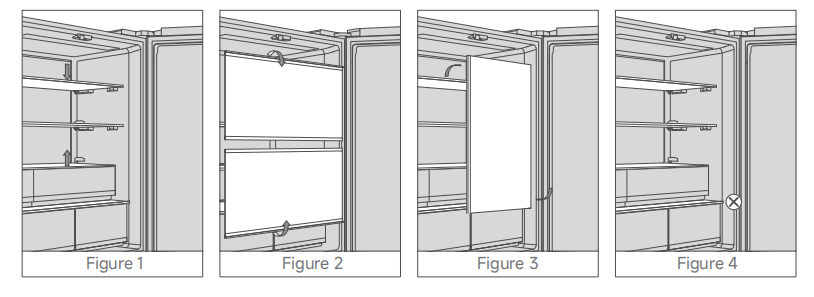
A: To remove the shelves of the Mijia Refrigerator Pro Multi-Door 546L, please refer to the following steps:
1. Open the fridge doors to the maximum angle, and press down the front end of a shelf (lift the lowest shelf upward) to release the clips at the rear end of the shelf from the slots (see Figure 1).
2. While pulling the glass shelf forward, rotate it downward (or upward for the lowest shelf). Hold it securely with both hands, allowing both ends of the shelf to rest in the gap between the refrigerator body and door (see Figure 2).
3. Keep the glass shelf parallel to the gap between the refrigerator body and door, and then rotate the glass shelf 90° to remove it (see Figure 3).
Note:
1. Follow the above steps in reverse order to reinstall the shelf.
2. Before removing a shelf, take off the door bins first to prevent damage during operation.
3. The bottom shelf in the fridge cannot be removed (see Figure 4). Do not attempt to remove it forcibly, as this may damage the refrigerator or leave scratches.
4. When the fridge/freezer is in normal use, ensure drawers, trays, and other parts are properly installed to avoid affecting cooling performance and usage experience.
Q17. How to remove the drawers of the Mijia Refrigerator Pro Multi-Door 546L?
A: The freezer and fridge drawers of the Mijia Refrigerator Pro Multi-Door 546L can be removed with the doors open at 90°. Simply pull the drawers straight out horizontally when the refrigerator doors are open at a 90° angle.
Q18. Is it normal for the Mijia Refrigerator Pro Multi-Door 546L to tilt backward after installation?
A: No, that is not normal. You should check if the floor is level, and you can try to adjust the two adjustable feet at the front bottom of the refrigerator to see if the issue can be resolved.
Q19. How to remove the door bins on the Mijia Refrigerator Pro Multi-Door 546L?
A: To remove a door bin from the Mijia Refrigerator Pro Multi-Door 546L, you can press the inner side of the door bin and then lift it upward.
Odor Related
Q1. What to do if there is an odor from a new Mijia Refrigerator Pro Multi-Door 546L?
A: When you first unpack the Mijia Refrigerator Pro Multi-Door 546L, there may be a slight odor. This is normal, as the odor comes from the internal components of the appliance. During transportation, the refrigerator is sealed inside the box, so the odor cannot escape. When you unpack and place the refrigerator, you can open the door and put the appliance in a well-ventilated area. The odor will gradually dissipate.
Q2. What to do if there is a burning smell coming from the Mijia Refrigerator Pro Multi-Door 546L?
A: If you smell a burning odor coming from the Mijia Refrigerator Pro Multi-Door 546L, please immediately unplug the appliance and request an after-sales service inspection.
Q3. What to do if there is flavor transfer between compartments in the Mijia Refrigerator Pro Multi-Door 546L?
A: Storing strongly scented food in the Mijia Refrigerator Pro Multi-Door 546L can cause flavor transfer. Before placing strongly scented food in the refrigerator, please wrap it properly in plastic wrap.
Q4. What to do if there is an odor coming from the exterior of Mijia Refrigerator Pro Multi-Door 546L?
A: If there is an odor on the exterior of the Mijia Refrigerator Pro Multi-Door 546L, you can wipe it clean with a damp cloth and use a mild detergent to clean the surface.
Odors from the Mijia Refrigerator Pro Multi-Door 546L typically fall into the following categories:
1. Plastic odor from a new appliance. When you first unpack the refrigerator, there may be a slight odor. This is normal, as the odor comes from the internal components of the appliance. During transportation, the refrigerator is sealed inside the box, so the odor cannot escape. When you unpack and place the refrigerator, you can open the door and put the appliance in a well-ventilated area. The odor will gradually dissipate.
2. Odor after using the appliance for a while. During use, if an odor appears inside the compartments, it is usually because some food has spoiled or strongly scented food was not sealed properly. It is recommended to seal any open food before placing it inside the refrigerator.
3. If food has spilled and has not been cleaned up for a long time, an odor may develop. If this happens, unplug the refrigerator, use a soft cloth or sponge dipped in diluted detergent to wipe the inner walls, shelves, drawers, and other components to remove stains and odors. After the odor has dissipated, plug the refrigerator back in for use.
4. Flavor transfer between compartments. Storing strongly scented food can cause flavor transfer. Before placing strongly scented food in the refrigerator, please wrap it properly in plastic wrap.
Q5: How do the odor removal and antibacterial functions work in the Mijia Refrigerator Pro Multi-Door 546L?
A: The Mijia Refrigerator Pro Multi-Door 546L uses an ion Hygiene⁺ air purification technology to remove odors and inhibit bacteria.
1. Ion wind promotes air circulation and improves odor removal. It is generated through high-voltage tip discharge and dielectric barrier discharge using composite asymmetric electrodes, driving air through highly active honeycomb catalytic materials.
2. The high reactivity of plasma generated by high-voltage discharge, combined with the high reaction selectivity of the catalyst, accelerates the adsorption and decomposition of volatile organic compounds (VOCs). This promotes their deep oxidation into products such as CO₂ and H₂O, improving odor removal performance.
Sound Related
Q1. What to do if there is noise when opening or closing the door of the Mijia Refrigerator Pro Multi-Door 546L?
A: If you hear noise when opening or closing the door of the Mijia Refrigerator Pro Multi-Door 546L, please check if there is any foreign object stuck in the door hinge. If you remove the object and the noise persists, please request an after-sales service inspection.
Q2. What sounds from the Mijia Refrigerator Pro Multi-Door 546L are considered normal, and what causes them?
A: The following sounds from the Mijia Refrigerator Pro Multi-Door 546L are considered normal:
1. A hissing sound is caused by the refrigerant flowing through the pipes.
2. A humming sound is the normal operating sound of the compressor.
3. A clicking or cracking sound is caused by the expansion and contraction of materials due to temperature changes.
Q3. What to do if the Mijia Refrigerator Pro Multi-Door 546L is operating loudly?
A: If the Mijia Refrigerator Pro Multi-Door 546L is operating loudly, please check the following points:
1. Setting the temperature too low can cause the compressor to run under a heavy load and produce noise.
2. Check if there are any items on the shelves or door bins that could cause resonance, such as glass bottles. Remove such items and observe.
3. Check if the refrigerator is placed on a wooden floor, which can amplify resonance. Please move the refrigerator to a solid floor.
4. The refrigerator may emit certain sounds during normal operation that are considered normal. A hissing sound is the refrigerant flowing through the pipes. A humming sound is the normal operating sound of the compressor. A clicking or cracking sound is caused by the expansion and contraction of materials due to temperature changes.
5. Check if the refrigerator is level. An unbalanced refrigerator can cause loud noise. To confirm, gently push the front, left, and right sides of the refrigerator and observe if the noise decreases. If the noise decreases, the refrigerator is not level. To fix this, turn the two adjustable feet at the front bottom of the refrigerator until the noise becomes quieter.
6. If the issue persists, please request an after-sales service inspection.
Function Usage
Q1. How to connect the Mijia Refrigerator Pro Multi-Door 546L to the Xiaomi Home App?
A: Please follow the instructions below to connect the Mijia Refrigerator Pro Multi-Door 546L to the Xiaomi Home App:
1. Scan the QR code in the user manual to download and install the Xiaomi Home App. If the App is already installed, you will be directed to the connection setup page. Alternatively, you can search for "Xiaomi Home" in the App Store to download and install it.
2. Open the Xiaomi Home App, tap the "+" icon in the upper right corner, and then follow the on-screen instructions to add your device.
Q2. How to adjust the fridge compartment temperature on the Mijia Refrigerator Pro Multi-Door 546L?
A: To adjust the fridge compartment temperature on the Mijia Refrigerator Pro Multi-Door 546L, please refer to the following steps:
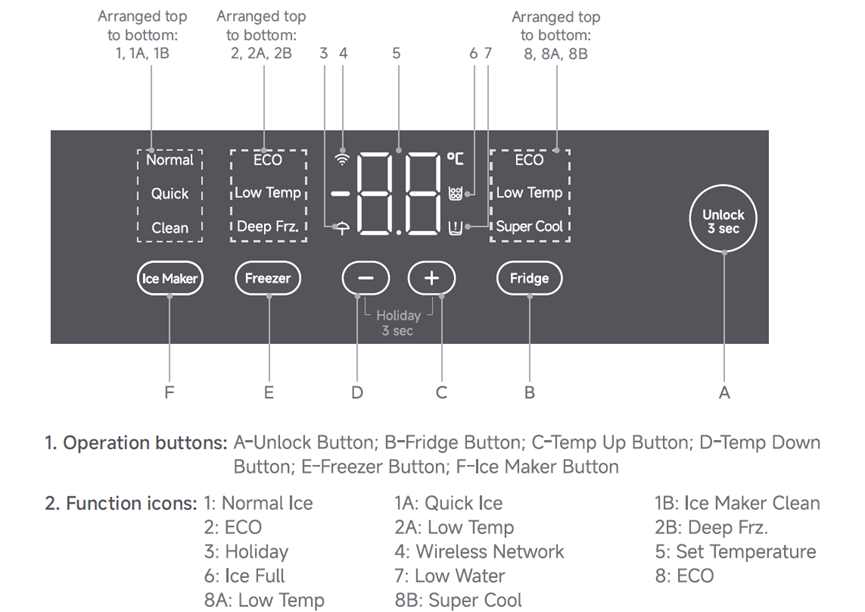
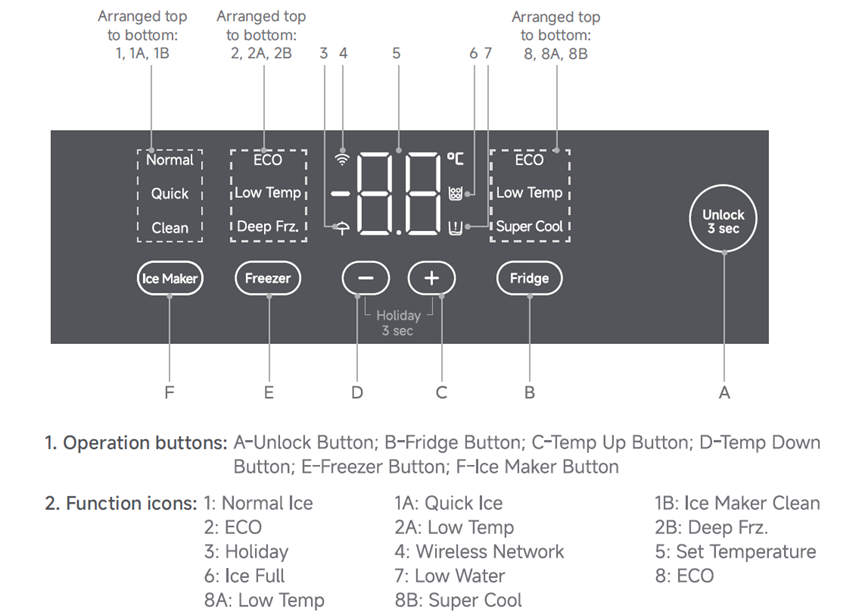
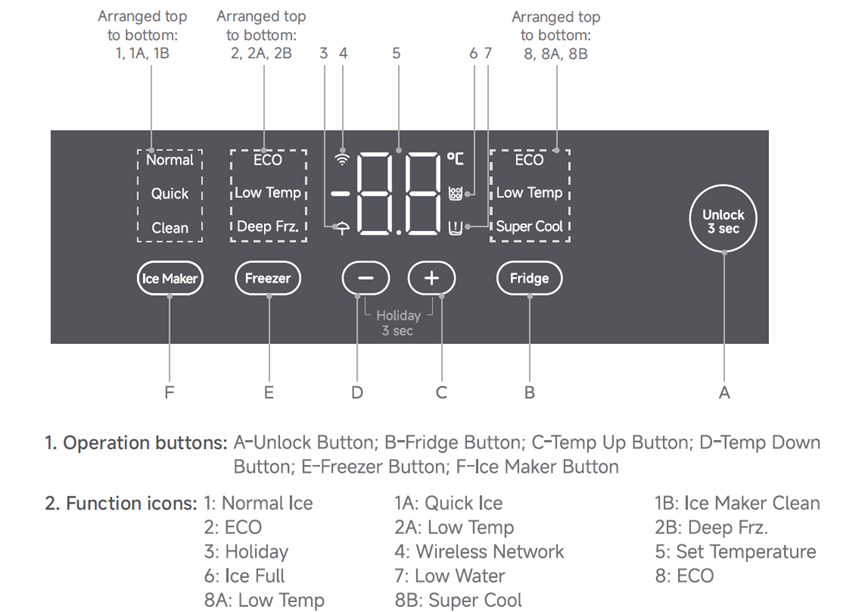
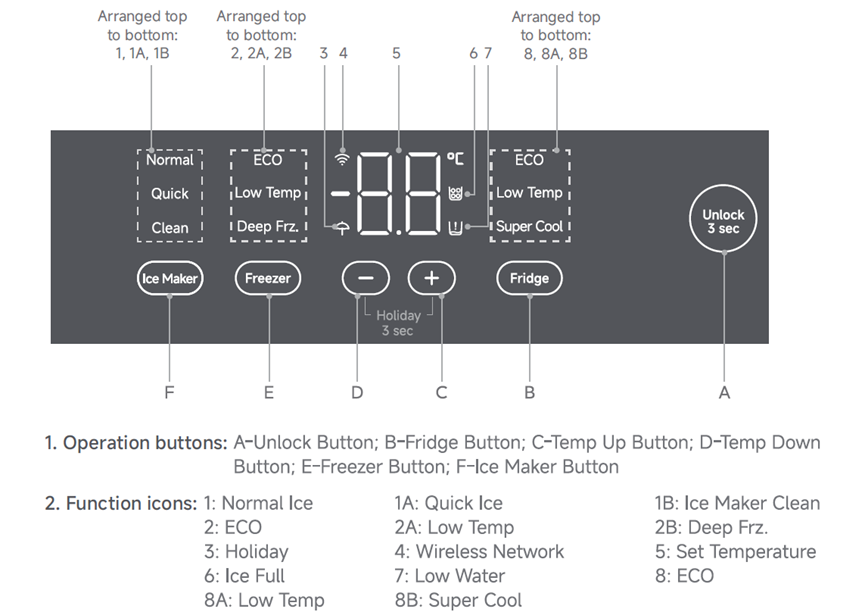
1. Press and hold the A-Unlock button to unlock the control panel, then tap the B-Fridge button to illuminate the refrigerator setting indicators.
2. Tap the B-Fridge button repeatedly to cycle through the following modes: ECO, Low Temp, Super Cool, ECO.
3. Tap the C-Temp Up or D-Temp Down button to manually adjust the temperature:
To increase the temperature: 2 °C → 3 °C → 4 °C → 5 °C → 6 °C → 7 °C → 8 °C.
To decrease the temperature: 8 °C → 7 °C → 6 °C → 5 °C → 4 °C → 3 °C → 2 °C.
4. Once a temperature is selected, the temperature icon blinks for 5 seconds, after which the setting is automatically confirmed.
Q3. How to adjust the freezer compartment temperature on the Mijia Refrigerator Pro Multi-Door 546L?
A: To adjust the freezer compartment temperature on the Mijia Refrigerator Pro Multi-Door 546L, please refer to the following steps:
1. After unlocking the control panel, tap the E-Freezer button to illuminate the freezer compartment setting indicators.
2. Tap the E-Freezer button repeatedly to cycle through the following modes: ECO, Low Temp, Deep Frz., ECO.
3. Tap the C-Temp Up or D-Temp Down button to manually adjust the temperature:
To increase the temperature: -24 °C → -23 °C → -22 °C → -21 °C → -20 °C → -19 °C → -18 °C → -17 °C → -16 °C.
To decrease the temperature: -16 °C → -17 °C → -18 °C → -19 °C → -20 °C → -21 °C → -22 °C → -23 °C → -24 °C.
4. Once a temperature is selected, the temperature icon blinks for 5 seconds, after which the setting is automatically confirmed.
Q4. How to set the temperature of the Mijia Refrigerator Pro Multi-Door 546L using the Xiaomi Home App?
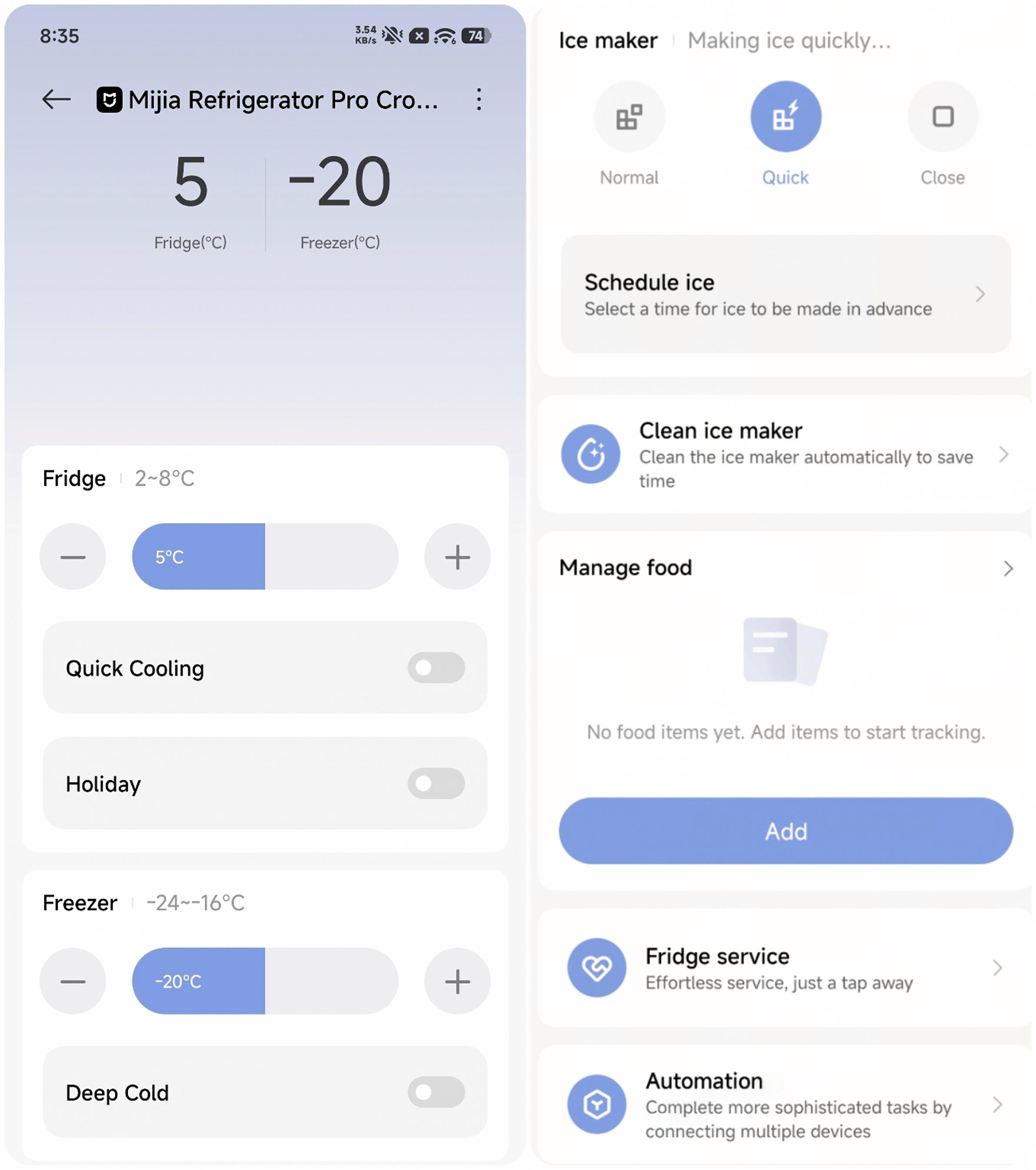
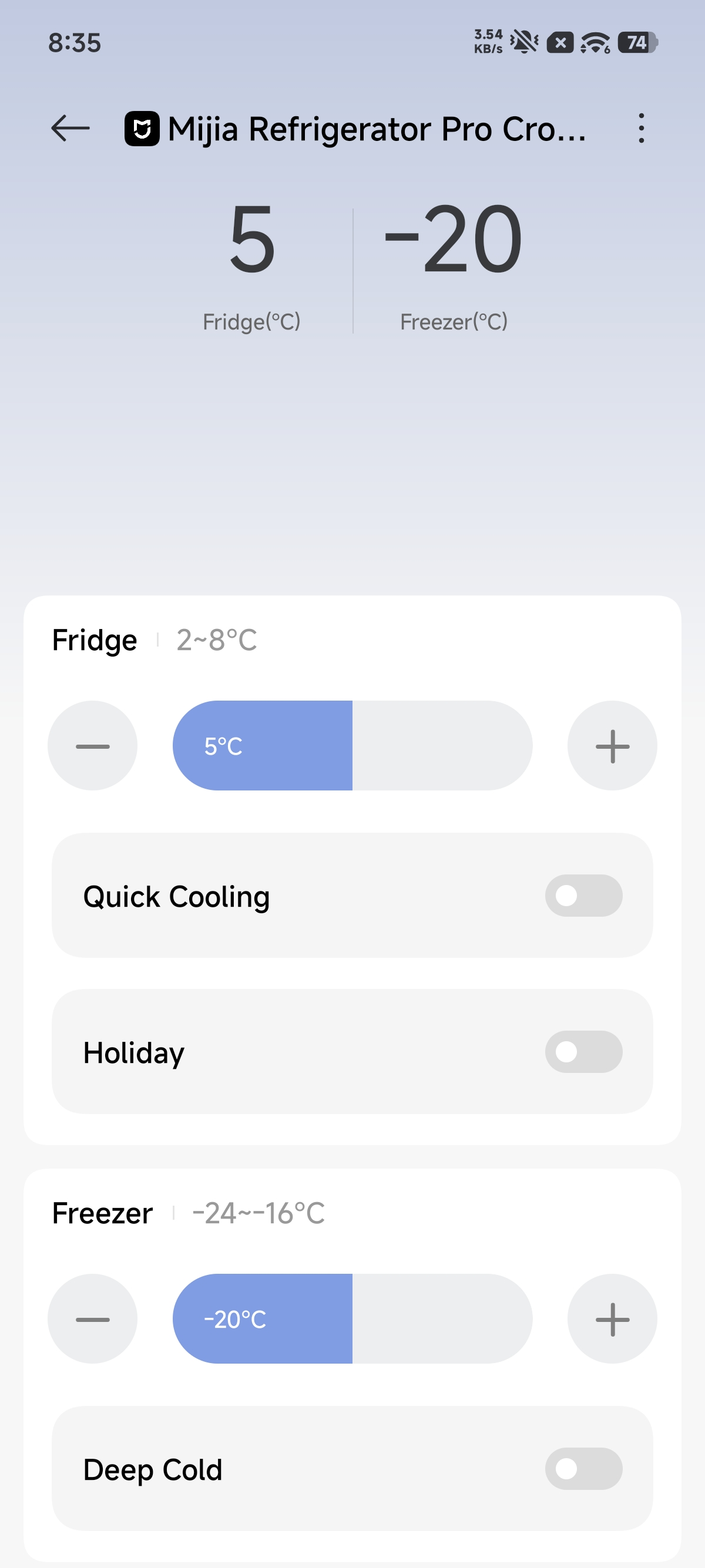
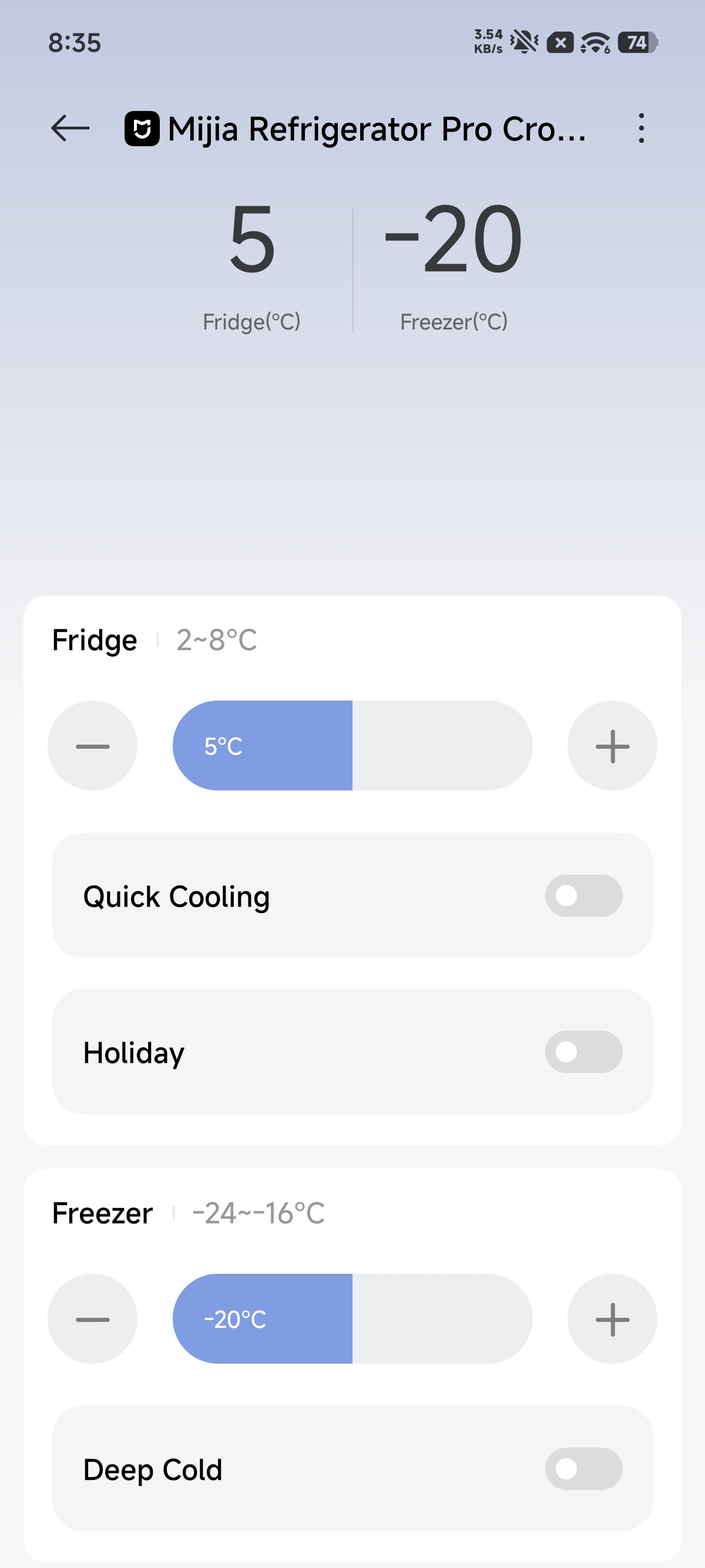
A: After connecting the Mijia Refrigerator Pro Multi-Door 546L to the Xiaomi Home App, you can control the temperature adjustment of the fridge and freezer compartments through the App. On the App's settings interface, you can adjust the refrigerator mode and temperature parameters by tapping the temperature addition or subtraction buttons or by sliding the temperature bar.
Q5. How to upgrade the firmware of the Mijia Refrigerator Pro Multi-Door 546L?
A: To upgrade the firmware of the Mijia Refrigerator Pro Multi-Door 546L, please follow the steps below:
1. Tap the [...] icon in the upper right corner of the refrigerator plugin page, then scroll down and select [Firmware update] to check the firmware version.
2. When a new version is available, an update prompt will appear in the [...] menu on the refrigerator plugin page. The firmware is continuously updated and optimized, so upgrading to the latest version is recommended for the best using experience.
Q6. How to use the panel lock function on the Mijia Refrigerator Pro Multi-Door 546L?
A: To use the panel lock function on the Mijia Refrigerator Pro Multi-Door 546L, you can press and hold the Unlock button for 3 seconds to enable or disable the control panel lock. The lock icon will turn on or off accordingly. When the lock function is enabled, all buttons except the Unlock button are disabled.
Q7. How to restore the Mijia Refrigerator Pro Multi-Door 546L to factory settings?
A: The Mijia Refrigerator Pro Multi-Door 546L does not support a factory reset for the entire unit. The temperature can be adjusted as needed.
Q8. How to use the Super Cool function on the Mijia Refrigerator Pro Multi-Door 546L?
A: To use the Super Cool function on the Mijia Refrigerator Pro Multi-Door 546L, please refer to the following methods:
1. After pressing and holding the A-Unlock button to unlock the control panel, tap the B-Fridge button to illuminate the fridge compartment setting indicators. Tap the B-Fridge button repeatedly to cycle through the following modes: ECO, Low Temp, Super Cool, ECO.
2. You can select the Quick Cooling mode in the Xiaomi Home App to activate it.
Q9: How to use the Quick Ice function on the Mijia Refrigerator Pro Multi-Door 546L?
A: To use the Quick Ice function on the Mijia Refrigerator Pro Multi-Door 546L, please refer to the following steps:
1. Press and hold the A-Unlock button to unlock the control panel.
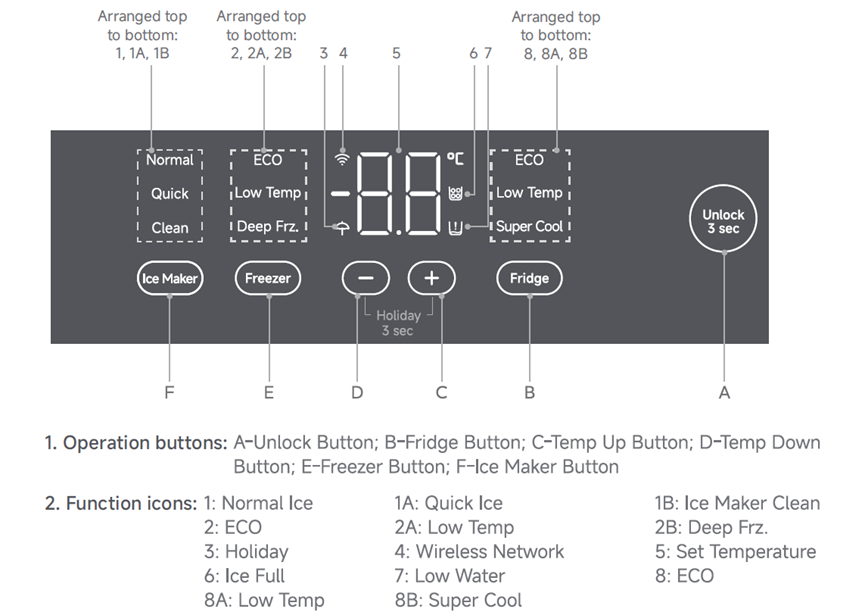
2. Tap the F-Ice Maker button to illuminate the refrigerator setting indicator.
3. Tap the F-Ice Maker button repeatedly to cycle through the following modes: Normal Ice, Quick Ice, Ice Maker Clean, Off, Normal Ice. Once Quick Ice mode is selected, the setting is automatically confirmed after 5 seconds.
When the ice-making function is set to Normal/Quick/Clean, the corresponding function indicator lights up, and the display shows "ON".
When the ice-making function is set to Off, all ice-making function indicators turn off, and the display shows "OF".
2. You can select [Quick] under [Ice Maker] in the Xiaomi Home App to activate the Quick Ice function.
Q10: What is Holiday mode on the Mijia Refrigerator Pro Multi-Door 546L, and what is it used for?
A: Holiday mode on the Mijia Refrigerator Pro Multi-Door 546L is an energy-saving mode designed for extended periods away from home. When enabled, the fridge compartment is automatically set to 15 °C, while the freezer compartment continues operating normally at the defined temperature. This helps reduce unnecessary cooling and energy consumption in the fridge compartment while maintaining normal frozen food storage conditions.
Q11: How to enable or disable Holiday mode on the Mijia Refrigerator Pro Multi-Door 546L?
A: To enable or disable Holiday mode on the Mijia Refrigerator Pro Multi-Door 546L, please refer to the following methods:
1. To enable or disable Holiday mode on the Mijia Refrigerator Pro Multi-Door 546L, open the Xiaomi Home App >> go to the refrigerator's device interface >> enable or disable [Holiday].
2. Tap and hold the C-Temp Up and D-Temp Down buttons on the control panel simultaneously for 3 seconds to activate the Holiday mode. Once activated, the fridge temperature is automatically set to 15 °C, while the freezer temperature can be adjusted as needed.
To exit (Holiday mode is exited when either of the following occurs):
(1). Tap and hold the C-Temp Up and D-Temp Down buttons simultaneously for 3 seconds again.
(2). Manually adjust the temperature of the fridge compartment.
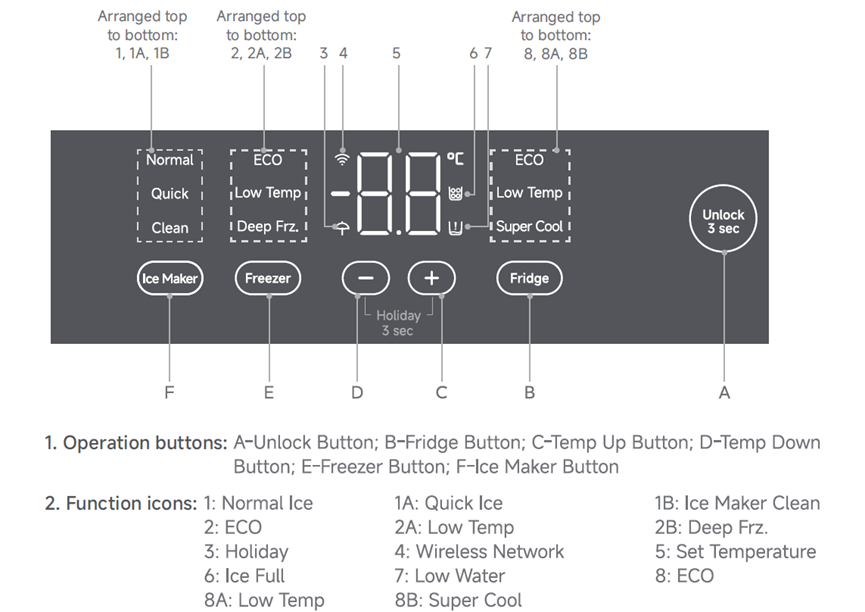
Note:
1. Setting a higher temperature will accelerate food spoilage. The auto mode is recommended.
2. 15 °C is relatively warm and not suitable for food storage. Empty the fridge before activating the Holiday mode.
Q12: What is the -30 °C Deep Freeze function on the Mijia Refrigerator Pro Multi-Door 546L, and what is it used for?
A: The -30 °C Deep Freeze function on the Mijia Refrigerator Pro Multi-Door 546L is a rapid deep-freezing mode. When enabled, the cooling system operates at a higher frequency to quickly lower the freezer compartment temperature to -30 °C. This allows food to pass rapidly through the maximum ice crystal formation zone (0 °C to -5 °C), forming smaller and more uniform ice crystals that help prevent cell membrane damage. The juice loss rate can be as low as 0.86%, helping preserve the food's texture and nutrients.
Q13: How to enable or disable the -30 °C Deep Freeze function on the Mijia Refrigerator Pro Multi-Door 546L?
A: To enable or disable the -30 °C Deep Freeze function on the Mijia Refrigerator Pro Multi-Door 546L, please refer to the following methods:
1. Unlock the display by pressing and holding A-Unlock for 3 seconds. Tap the E-Freezer button to light up the freezer setting indicator. Then, repeatedly tap the E-Freezer button to cycle through the available modes: ECO, Low Temp, Deep Frz. Select Deep Frz. to activate the -30 °C Deep Freeze function.
How to exit: Tap the E-Freezer button to switch to another mode and manually exit the Deep Freeze mode. If no manual operation is performed, the Deep Freeze mode automatically reverts to your original settings after 50 hours of continuous operation.
2. You can enable/disable [Deep Cold] under [Freezer] in the Xiaomi Home App.
Note:
1. When activated at an ambient temperature below 25 °C, this function enables the refrigerator to reach a minimum temperature of −30 °C under no-load conditions.
2. In Deep Freeze mode, opening a door may cause frost to form on the freezer drawers, ice maker, and other parts, which is normal. The frost will disappear naturally after the door is closed and the appliance runs for a period of time.
3. When the Deep Freeze and Quick Ice modes are activated simultaneously, Quick Ice runs first and exits after 6 hours, while Deep Freeze continues to run.
Cleaning and Maintenance
Q1. How to clean the exterior of the Mijia Refrigerator Pro Multi-Door 546L?
A: You can wipe the exterior housing with a clean damp cloth to remove dust and stains. For the surface of the refrigerator doors, you can use a mild detergent for cleaning, but be careful to avoid letting the detergent flow into the interior of the refrigerator. If there are scratches on the exterior shell, you can gently wipe them with toothpaste and then dry them with a clean cloth. This can help restore some shine and partially repair minor scratches.
Q2. How to clean the accessories and inner walls of the Mijia Refrigerator Pro Multi-Door 546L?
A: To clean the accessories and inner walls, please follow the steps below:
1. Use a soft cloth or sponge dipped in diluted detergent to wipe the inner wall, shelves, drawers, and other components to remove stains and odors. For stubborn stains, you can use a toothbrush with a small amount of detergent to clean them carefully.
2. Wipe off the detergent with a clean wet towel, and make sure no residue remains. Then dry the surfaces with a dry towel to prevent moisture from causing rust or bacterial growth.
3. Wipe the interior with a baking soda solution to further remove odors and disinfect the surfaces. After wiping, remove the baking soda solution with a clean wet towel and dry with a dry towel.
4. For the door seal, gently wipe it with a soft cloth dipped in white vinegar solution. The white vinegar not only removes dirt but also disinfects and deodorizes. After wiping, dry the door seal with a dry cloth to maintain its softness and elasticity, which ensures a proper sealing effect.
Q3. How often does the Mijia Refrigerator Pro Multi-Door 546L need manual defrosting?
A: The Mijia Refrigerator Pro Multi-Door 546L uses frost-free air-cooled technology and defrosts automatically, so manual defrosting is not required.
Q4: Where is the drain hole located in the Mijia Refrigerator Pro Multi-Door 546L?
A: The drain hole of the Mijia Refrigerator Pro Multi-Door 546L is located inside the air duct, near the lower center of the back of the refrigerator. Manual unclogging is not required.
Q5. How to unclog the drain hole of the Mijia Refrigerator Pro Multi-Door 546L?
A: The drain hole of the Mijia Refrigerator Pro Multi-Door 546L is located inside the air duct and does not require manual unclogging.
Q6. How to clean the door seal of the Mijia Refrigerator Pro Multi-Door 546L?
A: You can gently wipe the door seal of the Mijia Refrigerator Pro Multi-Door 546L with a soft cloth dipped in white vinegar solution. The white vinegar not only removes dirt but also disinfects and deodorizes. After wiping, dry the door seal with a dry cloth to maintain its softness and elasticity, which ensures a proper sealing effect.
If the door seal is slightly deformed or not sealing tightly, you can follow the steps below:
1. Use a hairdryer to evenly heat the door seal. Be careful to use a low speed and avoid deforming the seal.
2. Smooth out the seal by pressing it along the door frame.
3. Allow the seal to cool down and set properly.
Q7. How to clean the drip tray of the Mijia Refrigerator Pro Multi-Door 546L?
A: The water in the drip tray of the Mijia Refrigerator Pro Multi-Door 546L will evaporate naturally during normal operation, so cleaning is not required.
Q8. How to clean the deodorization block of the Mijia Refrigerator Pro Multi-Door 546L?
A: It is not recommended to clean the deodorization block yourself. The deodorization block is located inside the refrigerator and cannot be accessed for cleaning. If cleaning is necessary, please request after-sales service.
Q9: How to clean the doors of the Mijia Refrigerator Pro Multi-Door 546L?
A: To clean the doors of the Mijia Refrigerator Pro Multi-Door 546L, wipe the glass panels and door surfaces with a clean, soft cloth dampened with diluted neutral detergent, then dry them with a clean cloth. Avoid letting the detergent enter the fridge compartment. Do not use steel wool, abrasive cleaners, or strong acidic or alkaline cleaning agents, as they can scratch the glass panels.
Q10: How to clean the ice maker of the Mijia Refrigerator Pro Multi-Door 546L?
A: The ice maker of the Mijia Refrigerator Pro Multi-Door 546L can be cleaned as follows:
1. Automatic cleaning: With the panel unlocked, tap the Ice Maker button to light up the ice-maker setting indicator. Tap the button repeatedly to cycle through the ice-making settings: Normal Ice, Quick Ice, Ice Maker Clean, Off. Once Ice Maker Clean mode is selected, the setting is automatically confirmed after 5 seconds. The ice maker will automatically clean the water pipes for approximately 3 minutes. Cleaning once a month is recommended.
2. Manual deep cleaning: Remove the water tank, ice cube tray, and ice bin. Wash them with warm water (no hotter than 80 °C) and neutral detergent. Use a soft-bristled brush or toothpick to remove limescale from the water inlet. Allow all parts to dry completely before reinstalling them.
3. After cleaning: Discard the first 1–2 batches of ice. If the ice maker will not be used for an extended period, empty any remaining water and allow the components to dry before storage.
Does it help?
Yes
No