

Xiaomi Clip FAQ
Overview
Q1: What are the selling points of the Xiaomi Clip?
A: For your reference, here are the selling points of the Xiaomi Clip:
1. It features a lightweight design that ensures a secure, comfortable fit for extended wear.
2. An 11 mm dynamic driver delivers deep, powerful bass for an enhanced listening experience.
3. A 3-mic setup combined with VPU (Voice Pickup Unit) technology enables clear calls.
4. A sound leakage reduction design helps keep audio private and minimizes disturbance to others.
5. Instant voice note activation allows for quick and convenient voice recording on the go.
6. Long-lasting battery life provides extended usage without frequent charging.
Q2: Is the Xiaomi Clip dustproof and waterproof?
A: Yes, the earbuds of the Xiaomi Clip support IP57 dust and water resistance, while the charging case supports everyday water resistance, protecting against water splashes from all directions. It is not resistant to hot water, so it should not be worn while swimming or bathing, and vigorous exercise should be avoided to prevent sweat damage. If the earbuds get sweaty during use, they should be wiped dry promptly afterward.
Note:
1. The dust, splash, and water resistance features are not permanent and may decrease over time due to daily wear and tear.
2. Charging is prohibited when the earbuds are wet, and wearing them while swimming is strictly forbidden.
3. Damage caused by liquid immersion is not covered by the warranty.
4. The IP57 dust and water resistance conditions apply to the earbuds only, not the charging case.
5. The test conditions involved 1 meter of still water for 30 minutes, and the earbuds should not be used in high-pressure or high-speed water flows.
Q3: What are the dimensions and weight of the Xiaomi Clip?
A: The Xiaomi Clip has compact dimensions and a lightweight design for comfortable everyday use. The specific measurements are as follows:
1. The earbud dimensions are 28.15 × 18.98 × 24.98 mm.
2. The charging case dimensions are 51.13 × 51.13 × 30.07 mm, with a tolerance of ±1 mm.
3. The packaging dimensions are 100 × 100 × 42 mm, with a tolerance of ±1 mm.
4. The weight of a single earbud is approximately 5.5 g, with a tolerance of ±0.1 g.
5. The weight of the charging case is approximately 41.42 g, with a tolerance of ±0.1 g.
6. The packaging weight of the product is approximately 142 g, with a tolerance of ±4 g.
Appearance
Q1: What is the appearance of the Xiaomi Clip?
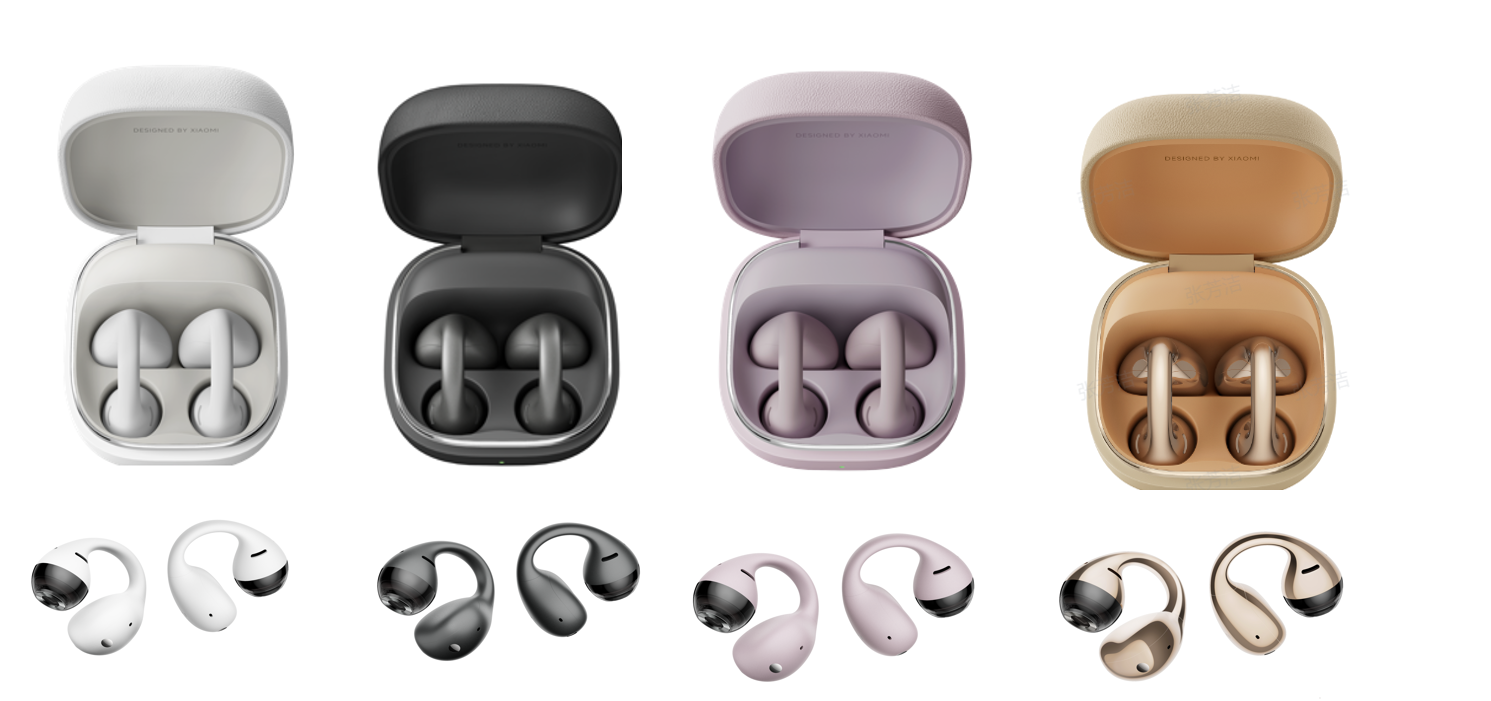
A: The Xiaomi Clip has four colors: white, black, purple, and gold.
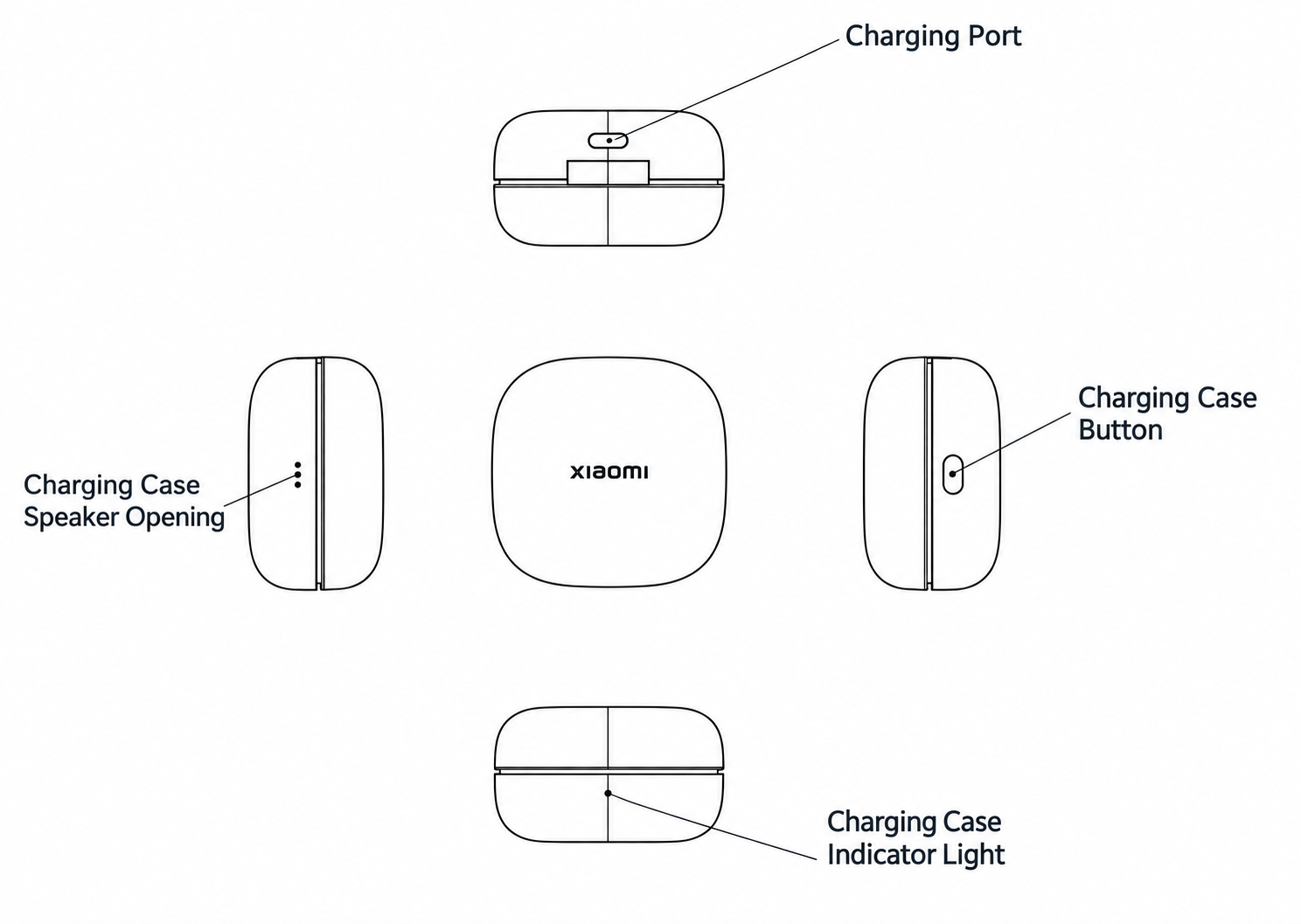
The front of the charging case has an indicator; the rear has a Type-C charging port; the right side has a power button; and the left side has speaker holes.
Q2: What are the colors of the Xiaomi Clip?
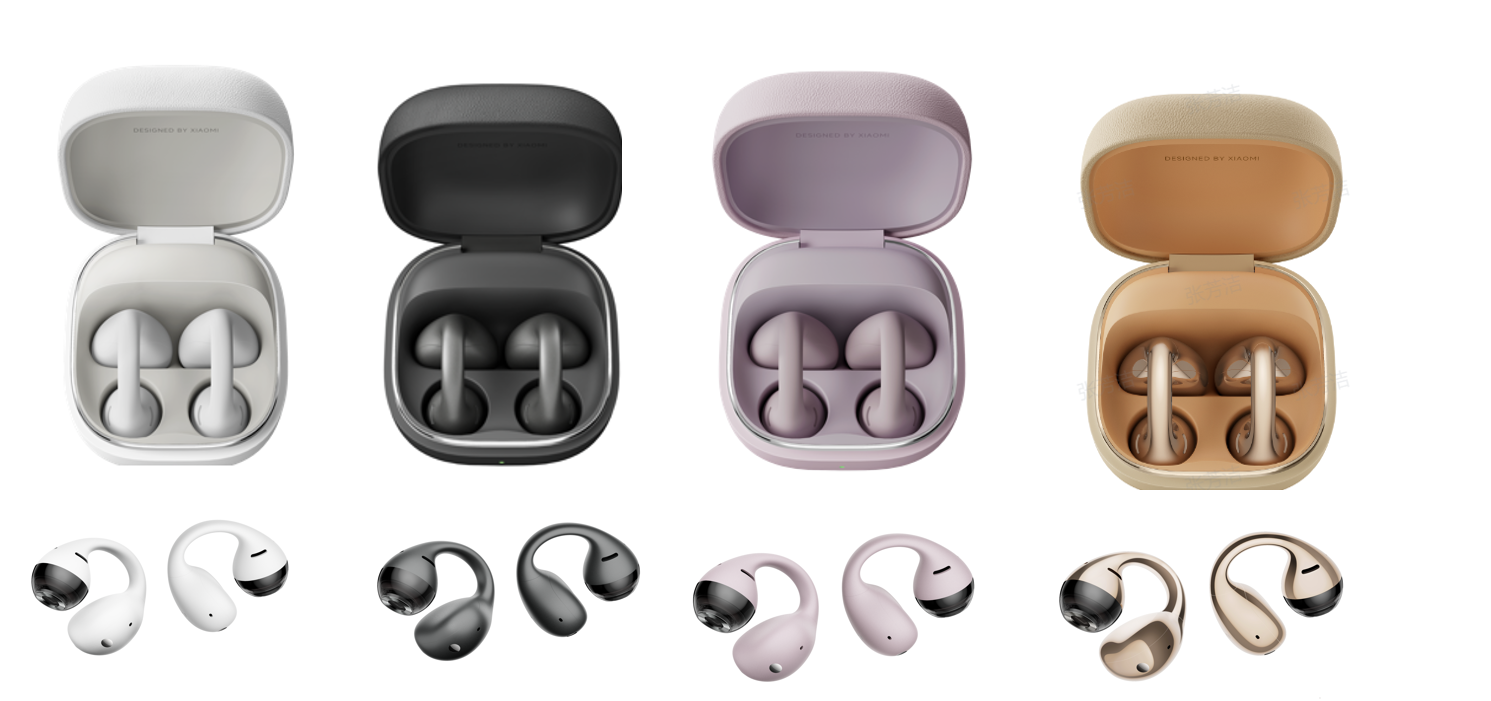
A: The Xiaomi Clip has four colors: white, black, purple, and gold.
Q3: What are the indicator statuses of the Xiaomi Clip charging case?
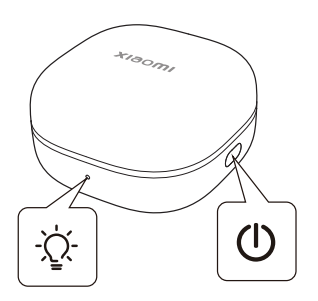
A: The charging case of the Xiaomi Clip uses a multi-color indicator to display battery level and pairing status. The charging case indicator displays in white, green, or orange.
The specific statuses are as follows:
1. When the case battery level is below 5%, the earbuds cannot be charged.
2. While the charging case is charging, a steady green light indicates the battery level is above 95%, while a steady orange light indicates the battery level is at or below 95%.
3. When the lid is opened and the case battery level is above 40%, the indicator shows green for 8 seconds before turning off; otherwise, it shows orange for 8 seconds before turning off.
4. When the lid is closed and the case battery level is above 40%, the indicator shows green for 5 seconds before turning off; otherwise, it shows orange for 5 seconds before turning off.
5. During pairing, the indicator enters a white flashing state, blinking twice per second until it successfully pairs with the phone, at which point it stays steady for 5 seconds before turning off. If no device is connected within 1 minute, the earbuds enter sleep mode, and the indicator turns off.
Q4: What to do if the Xiaomi Clip has scratches on the exterior?
A: The earbuds are made of PC and silicone, while the charging case is made of PC and organic silicone leather, both offering wear-resistant properties for daily use. But scratches may still occur in daily use. Minor scratches do not affect the function or lifespan of the earbuds. If scratches severely affect the appearance or function, please contact the local after-sales service for assistance.
For storage, avoid mixing the earbuds with sharp objects such as keys or metal accessories, as the organic silicone leather surface of the charging case is relatively more susceptible to damage.
Q5: Is the appearance of the Xiaomi Clip and the interior of the charging case prone to scratches?
A: The Xiaomi Clip and charging case are both made of PC material, which offers good friction resistance, and the surface is further enhanced with a wear-resistant finish. During normal daily use, repeatedly taking the earbuds in and out of the case and the regular contact friction inside the case generally do not leave scratches.
However, please note that if the earbuds are stored together with sharp or hard objects such as keys or sand, there is still a risk of scratches. It is recommended to store them separately to protect the appearance.
Q6: Why is the gap at the hinge of the Xiaomi Clip charging case so large?
A: The top and bottom covers of the charging case are connected by a hinge. To ensure smooth opening and closing, a certain reasonable clearance is designed between them, and the top cover will move within the hinge gap. This is a common phenomenon in such products. The product has passed strict appearance and function tests before leaving the factory, so please use it with confidence.
Bluetooth Related
Q1: What is the Bluetooth version of the Xiaomi Clip?
A: The Xiaomi Clip supports Bluetooth 5.4. It is compatible with both Android and iOS systems, supporting Android 7.0 and above, as well as iOS 14.0 and above. Please ensure your phone's system version is updated to the latest version.
Q2: What Bluetooth transmission protocol does the Xiaomi Clip support?
A: The Xiaomi Clip supports the following Bluetooth transmission specifications.
1. The transmission frequency is 2400–2483.5 MHz.
2. The transmission power/class is a maximum of 20 dBm, Class 1.
3. The Xiaomi Clip supports A2DP, AVRCP, HFP, and BLE.
Q3: What Bluetooth codecs does the Xiaomi Clip support?
A: The Xiaomi Clip supports AAC, SBC, and LHDC 5.0.
Q4: What is the Bluetooth transmission distance of the Xiaomi Clip?
A: The Bluetooth transmission distance of the Xiaomi Clip is 10 meters in an open, unobstructed space.
Touch and Button
Q1: Does the charging case of the Xiaomi Clip support buttons?
A: Yes, the charging case supports button operation. There is only one physical button on the right side of the charging case.
1. With the earbuds placed inside the case and the lid kept open, press and hold the button for 2 seconds until the indicator flashes to enter Bluetooth pairing mode.
2. With the earbuds placed inside the case and the lid kept open, press and hold the button for 10 seconds to restore factory settings. The indicator flashes slowly three times, then rapidly. The earbuds are reset and enter pairing mode.
Q2: How to connect the Xiaomi Clip to a new device?
A: To connect the Xiaomi Clip to a new device, please refer to the following steps:
1. Open the charging case lid and keep the earbuds inside the case with the lid open.
2. Press and hold the charging case button for 2 seconds until the indicator flashes, putting the earbuds into pairing mode.
3. Turn on Bluetooth on the device you want to pair with, search for the earbuds' name in the Bluetooth menu, and tap to connect.
Q3: How to force-pair the Xiaomi Clip with a device?
A: Forcing the Xiaomi Clip to pair with a device follows the same steps as connecting to a new device.
1. Open the charging case lid and keep the earbuds inside the case with the lid open.
2. Press and hold the charging case button for 2 seconds until the indicator flashes, putting the earbuds into pairing mode.
3. Turn on Bluetooth on the device you want to pair with, search for the earbuds' name in the Bluetooth menu, and tap to connect.
Q4: How to restore the Xiaomi Clip to the factory settings?
A: Remove the earbuds from the Bluetooth device list. Place them in the charging case with the lid open, then press and hold the charging case button for 10 seconds. The indicator flashes slowly three times, then rapidly. The earbuds are reset and enter pairing mode.
Q5: How to connect the Xiaomi Clip to two devices?
A: The Xiaomi Clip can maintain a connection with two Bluetooth devices at the same time. The dual-device connection feature is enabled by default.
1. Connect the earbuds to the first Bluetooth device.
2. Put the earbuds back into the charging case and keep the lid open.
3. Press and hold the charging case button for 2 seconds until the indicator flashes.
4. Pair and connect with the second device.
5. After pairing is complete, the earbuds will automatically connect to both the first and second devices simultaneously.
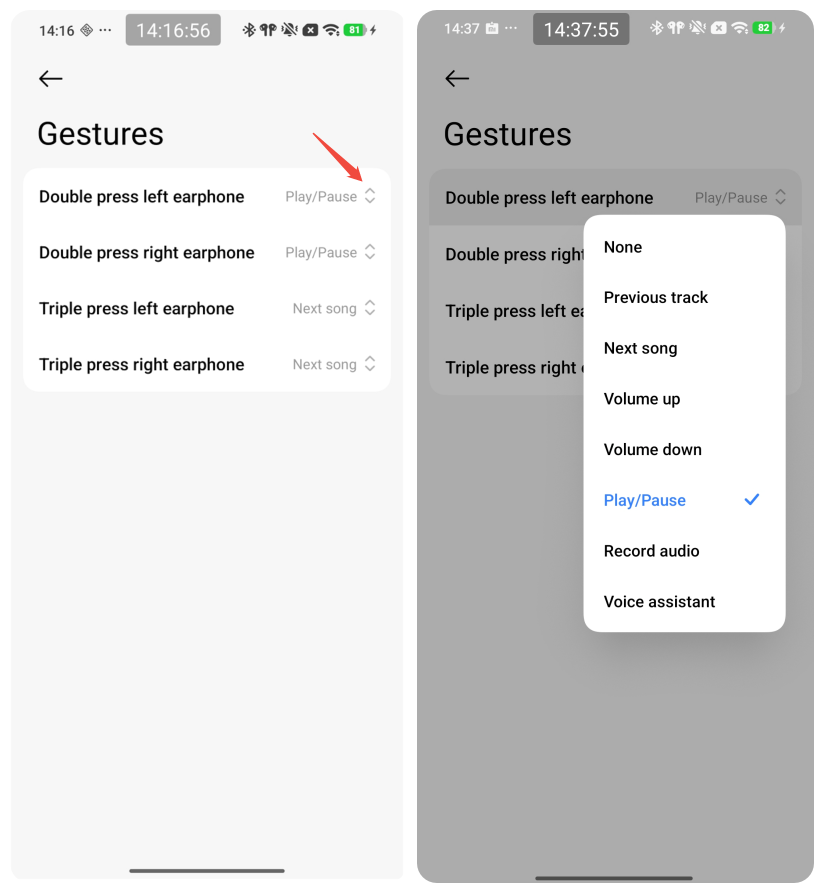
Q6: Does the Xiaomi Clip support gesture customization?
A: Yes, gesture customization is supported. Gesture functions such as previous track, volume adjustment, and waking the voice assistant can be customized through phone settings or in the Xiaomi Earbuds app.
1. After the Bluetooth connection is successful, tap the arrow on the right side.
2. On the device page, tap [Gestures].
3. On the [Gestures] page, tap the arrow on the right side.
4. Adjust the gesture settings.
Q7: What are the touch gestures for the Xiaomi Clip?
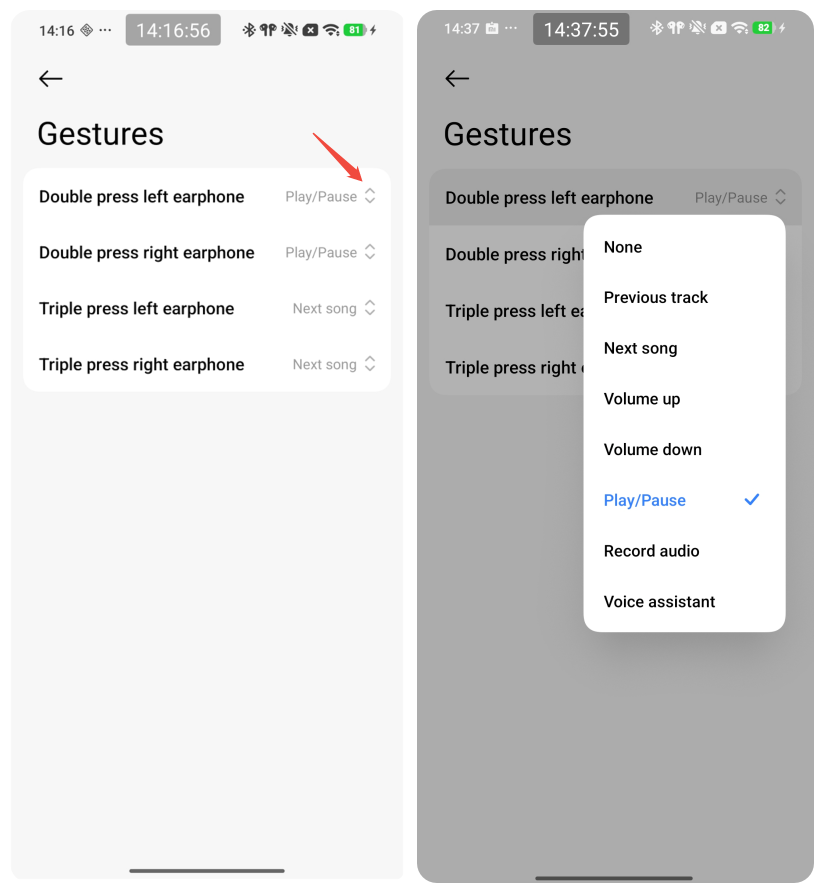
A: The default touch gestures on the Xiaomi Clip are double-tap to play and pause music, and triple-tap to play the next track. When receiving a call, double-tap the touch area to answer. During a call, double-tap the touch area to end the call. You can also customize touch gestures for your earbuds in the app.
Double press left/right earphone:
None, Previous track, Next song, Volume up, Volume down, Play/Pause, Record audio, Voice assistant
Triple press left/right earphone:
None, Previous track, Next song, Volume up, Volume down, Play/Pause, Record audio, Voice assistant
Q8: What to do if the button on my Xiaomi Clip charging case feels stuck when I press it?
A: Please check the button on the charging case for any foreign objects, or signs of water ingress or moisture. You can try pressing the button a few times to see if it regains its proper spring-back action.
If the button remains stuck or fails to spring back, or if you notice any abnormal indicator behavior, please contact our after-sales support team for assistance.
Q9: Why do touch controls on the Xiaomi Clip sometimes fail to respond?
A: The touch-sensitive area must be tapped correctly. If you tap outside the designated area, the interval between consecutive taps is too short, or the force applied is insufficient, the touch controls may not function. Additionally, please check the touch-sensitive area for any sweat, water droplets, or dirt. If present, please clean the surface and try again.
Q10: What scenarios are prone to accidental touch triggers on the Xiaomi Clip?
A: The Xiaomi Earbuds use a tap (double-tap/triple-tap) control method, which effectively reduces accidental touches. However, there is still a low probability of accidental triggers in the following dynamic scenarios.
1. Scenarios such as running, jumping, or cycling.
2. Walking up and down stairs.
3. When brushing hair or turning your head, particularly for people with long hair.
4. Accidental contact with the palm or arm.
5. Sweating can cause accidental triggers, as sweat changes capacitive sensing.
6. Touching the earbuds while washing the face, applying makeup, or doing skincare and hair care.
7. Sleeping or lying on one's side, which presses against the earbud touch control area.
8. Placing the earbuds in a pocket without putting them back in the charging case.
Wireless Connection
Q1: How to connect the Xiaomi Clip to a phone?
A: To connect the Xiaomi Clip to a phone, please refer to the following steps:
1. Open the charging case lid and keep the earbuds inside the case with the lid open, then press and hold the charging case button for 2 seconds until the indicator flashes to enter pairing mode (note that the earbuds will automatically enter Bluetooth pairing mode the first time the charging case lid is opened).
2. Turn on Bluetooth on the phone, search for the earbuds' name "Xiaomi Clip" in the Bluetooth menu, and tap to connect.
3. For daily use, simply open the charging case lid and the earbuds will automatically reconnect to the last paired Bluetooth device, provided that the device is within the earbuds' connection range.
Q2: How to connect the Xiaomi Clip to the Xiaomi Earbuds App?
A: 1. Download and install the Xiaomi Earbuds App from the app store (it supports Android 7.0 and above, as well as iOS 14.0 and above, so please ensure the phone's system version is upgraded to the latest).
2. Open the app, keep the earbuds connected to the phone via Bluetooth, and follow the app's prompts to complete the earbud binding.
Q3: Are there system version requirements for connecting and using the Xiaomi Clip?
A: The Xiaomi Clip supports connection with both Android and iOS systems. The Xiaomi Earbuds App requires Android 7.0 and above, or iOS 14.0 and above, and the app should be updated to the latest version. Some specific functions, such as the earbud finding feature, may have additional system version requirements, which are detailed in the corresponding function descriptions.
Q4: How to disconnect the Xiaomi Clip from a phone?
A: To disconnect the connection, turn off Bluetooth in the phone's Bluetooth settings, or put the earbuds into the charging case and close the lid, after which the earbuds and phone will automatically disconnect after 5 seconds.
To unpair the earbuds and clear the pairing record, either delete the earbuds' pairing record in the phone's Bluetooth settings, or put the earbuds into the charging case and keep the lid open, then press and hold the charging case button for 10 seconds to restore factory settings and clear the pairing record.
Q5: What to do if the Xiaomi Clip experiences connection drops?
A: If the Xiaomi Clip experiences connection drops, please refer to the following methods:
1. If the earbud battery level is insufficient, charge the earbuds immediately.
2. If the phone is too far from the earbuds, exceeding the effective transmission distance of 10 meters, or if there are obstacles blocking the signal, place the earbuds and the phone close together and try reconnecting.
3. If electromagnetic wave interference in the area is disrupting the Bluetooth connection, move away from objects with significant electromagnetic interference, such as microwaves or monitors.
4. If the issue persists after checking the above, try restoring the factory settings by placing both earbuds in the charging case, keeping the lid open, and pressing and holding the charging case button for 10 seconds.
Q6: Does the Xiaomi Clip support dual-device connection?
A: The Xiaomi Clip supports dual-device connection and this feature is enabled by default.
1. To connect, after the first Bluetooth device is connected, keep both earbuds in the charging case with the lid open and press and hold the charging case button for 2 seconds to enter pairing mode, then connect the second Bluetooth device. After pairing is complete, the earbuds will automatically connect to both the first and second devices simultaneously.
2. The audio switching rule is that calls (dialing, answering, or being on a call) always take priority over music and video media, and calls can be switched between the two devices. For media, the first connection takes priority (audio from the later device will be muted, so pause playback on the current device if you need to switch).
3. Note that if the connected device is a computer, or if third-party calling apps are used, the audio switching logic may change due to specific limitations of the device or app.
Q7: Does the Xiaomi Clip support connection with smart bands or watches?
A: The Xiaomi Clip can connect to smart TVs that feature Bluetooth functionality. For smart bands and watches, the earbuds support connection with devices that have Bluetooth audio playback functions, though actual compatibility depends on the specific device's supported features.
Q8: Why is a single Xiaomi Clip unable to connect?
A: If a single Xiaomi Clip fails to connect, you can troubleshoot the issue by checking the following steps:
1. Check for poor contact on one side, which leads to pairing with only one earbud. If this occurs, place the earbuds back into the charging case, confirm the charging case indicator lights up, and re-pair the Bluetooth.
2. If low battery on one side has caused it to power off, confirm good contact, charge the earbuds in the case for 10 minutes, and then re-pair the Bluetooth.
3. Check for dirt or debris blocking the earbud's sound outlet or speaker, and clean it if necessary.
4. If water or sweat has entered the earbud and caused a short circuit, try restoring the factory settings by placing both earbuds in the case, keeping the lid open, and pressing and holding the button for 10 seconds.
5. Check if the Bluetooth connection between the left and right earbuds is disconnected.
6. If the issue still cannot be resolved after the above steps, please contact an after-sales service center for assistance.
Q9: Why does the Xiaomi Clip stay connected when placed in the charging case?
A: If the charging case lid is not closed, the earbuds will not disconnect automatically and will maintain the connection. The earbuds and phone will disconnect automatically 5 seconds after the lid is closed.
If the connection persists even after the lid is closed, check for sweat or oil on the charging contacts that could cause poor contact between the case and the earbuds, and clean the contacts on both the earbuds and the case before trying again. If the earbuds are placed incorrectly and the contacts are not properly aligned, remove the earbuds and readjust their placement in the case.
Q10: Why does the Xiaomi Clip not reconnect after being taken out of the charging case?
A: If the Xiaomi Clip fails to reconnect after being taken out of the charging case, please refer to the following:
1. Check if the phone's Bluetooth is turned off. If so, turn it on.
2. If the earbuds are set to automatically reconnect to the last connected device, and that device is not this phone, re-pair them with the current phone.
3. If the phone is too far from the earbuds (over 10 meters) or there are obstacles blocking the signal, place the phone and earbuds close together and try reconnecting.
4. If electromagnetic interference in the area is disrupting the connection, move away from objects with strong electromagnetic interference, such as microwaves.
5. Check for dirt on the earbuds' bottom copper pillars. If dirty, clean them and re-pair.
6. If the issue persists after trying the above steps, try restoring the earbuds to factory settings.
Q11: Why can't the phone find the Xiaomi Clip?
A: If the phone cannot find the Xiaomi Clip, please refer to the following:
1. Confirm that the earbuds have entered pairing mode by opening the charging case lid, keeping the earbuds inside with the lid open, and pressing and holding the charging case button for 2 seconds until the indicator flashes.
2. Make sure the phone's Bluetooth is turned on and that the earbuds are within Bluetooth range, which is a minimum of 10 meters in an open, unobstructed space.
3. Check if the earbuds are currently connected to another device. If so, disconnect them from that device first.
4. Move away from environments with strong electromagnetic interference.
5. If the earbuds still cannot be found, try restoring the factory settings and pairing them again.
Q12: If the Xiaomi Clip is already connected to two devices, why does one of the devices not reconnect when the case is opened?
A: When dual-device connection is active, the earbuds will automatically reconnect to the last device used, while the other device must wait until the current device's activities have ended before it can reconnect.
Additionally, if the earbuds are out of range and disconnected for more than 10 minutes, they will no longer reconnect to the original device.
If the earbuds return to the connectable range within 10 minutes, they will reconnect automatically, provided that the original device is not currently occupied by activities such as music playback.
Q13: Does the Xiaomi Clip automatically turn off when left unconnected for a long time?
A: The Xiaomi Clip does not have an independent power button. When left unconnected for a long time, the earbuds enter a sleep power-saving state, and the indicator turns off.
To wake them up, place the earbuds into the charging case or open the charging case lid. When the case lid is reopened, the earbuds will automatically reconnect to the last paired Bluetooth device.
Q14: Why does the music play from the phone's speaker even though the Xiaomi Clip is properly connected?
A: This usually happens because the Bluetooth connection is active, but the [Media audio] option is not enabled for the earbuds.
1. After the earbuds are connected to the phone, go to [Settings] >> [Bluetooth] on the phone, find [Xiaomi Clip], tap the icon on the right, and turn on [Media audio].
2. Disconnect the Bluetooth on the phone's Bluetooth settings page and then reconnect it.
3. You can also try turning the phone's Bluetooth off and then back on, and wait for the earbuds to automatically reconnect successfully.
Q15: What to do if the Xiaomi Clip cannot find the Bluetooth signal?
A: If the phone cannot find the Bluetooth signal of the Xiaomi Clip, please refer to the following steps:
1. Confirm that the earbuds have entered pairing mode by opening the lid and pressing and holding the charging case button for 2 seconds until the indicator flashes.
2. Make sure the phone's Bluetooth is turned on and that the earbuds are within the effective transmission distance of 10 meters.
3. Check if there are old pairing records for the earbuds in the phone's Bluetooth list that might cause interference. Delete them and search again.
4. Move away from environments with strong electromagnetic interference, such as microwaves.
5. Try putting the earbuds back into the charging case and reopening the lid, or restore the factory settings and pair them again.
Q16: Under what circumstances will the Xiaomi Clip experience disconnection or delay?
A: The Xiaomi Clip may experience disconnection or delay under several specific conditions.
1. When exceeding the effective transmission distance, which is 10 meters in an open, unobstructed space, or when there are obstacles blocking the signal between the earbuds and the phone.
2. When there is strong electromagnetic interference in the area, such as from Wi-Fi, cell towers, transformers, or high-power electrical appliances.
3. When the network environment is poor, signal transmission may experience packet loss and delay.
4. There is an inherent delay during audio transmission, as audio is first sent from the phone to the main earbud, which then transmits it to the secondary earbud.
5. In gaming scenarios with high latency and processing requirements, a slight delay may be noticeable.
Q17: What to do if the phone can find the Xiaomi Clip but cannot connect?
A: If the phone can discover the Xiaomi Clip but fails to connect, please refer to the following steps:
1. Delete the earbuds' old pairing record in the phone's Bluetooth settings first, and then pair and connect again.
2. Confirm that the phone's system and Bluetooth plug-in have been updated to the latest version.
3. Confirm that the Xiaomi Earbuds App is the latest version.
4. With the charging case lid open and the earbuds inside, press and hold the button on the charging case for 10 seconds to reset the earbuds to their factory settings, and then reconnect.
Q18: What should be done if the Xiaomi Earbuds cannot reconnect after disconnecting from the phone?
A: If the Xiaomi Earbuds fail to reconnect after a disconnection, you can try the following steps to restore the connection.
1. Put the earbuds back into the charging case, close the lid for 5 seconds, and then reopen it. The earbuds will automatically reconnect to the phone.
2. If the earbuds have been disconnected for more than 10 minutes, they will enter pairing mode, and you will need to reconnect them manually in the phone's Bluetooth menu.
3. Check whether the phone's Bluetooth is turned on and whether the earbuds are the last connected device.
4. Move away from environments with strong electromagnetic interference, or clean any dirt from the copper pillars at the bottom of the earbuds.
5. If the issue still cannot be resolved, try restoring the factory settings and pairing again.
Q19: What to do if the Xiaomi Clip cannot connect to the phone's Bluetooth or the Xiaomi Earbuds App?
A: 1. Check whether the phone system and Bluetooth plug-in are updated to the latest version.
2. Check whether the Xiaomi Earbuds App is the latest version.
3. Reset the earbuds by pressing and holding the charging case button for 10 seconds with earbuds in the case and the lid open to restore factory settings, then reconnect.
Q20: When the Xiaomi Clip is connected to both a PC and a phone, and the phone is taken out of range, why do the earbuds not reconnect to the PC upon returning to its connection range?
A: If the earbuds are disconnected for more than 10 minutes, they will not automatically reconnect to the original device. If they return to the PC's connection range within 10 minutes, they can reconnect, provided the phone has no active tasks (such as music playback). If the phone has active tasks, they will not reconnect to the PC. To resolve this, end the phone call or music playback, or place the earbuds into the charging case and open the lid to reconnect.
Charging and Battery
Q1: What is the battery life of the Xiaomi Clip?
A: 1. In AAC mode, with the earbuds fully charged and the volume set to 50%, music playback lasts up to 9 hours; with the charging case fully charged, total playback time reaches approximately 38 hours.
2. In LHDC mode, with the earbuds fully charged and the volume set to 50%, music playback lasts up to 6 hours; with the charging case fully charged, total playback time reaches approximately 25 hours.
3. For calls, with the volume set to 50% in a non-noisy environment in AAC mode, talk time lasts up to 6 hours; with the charging case fully charged, total talk time reaches approximately 25 hours.
Note:
Actual usage time may vary depending on the phone model, usage conditions, charging status, codec sampling rate, and environmental factors.
Q2: What is the approximate charging time for the Xiaomi Clip?
A: The charging case supports wired charging and the earbuds are charged via contact points.
1. It takes 60 minutes or less to fully charge the earbuds using the charging case.
2. It takes 120 minutes or less to fully charge the earbuds when the charging case runs out of power.
Q3: Can the battery in the Xiaomi Clip be replaced?
A: The battery in the Xiaomi Clip cannot be replaced.
Q4: How to check the battery level of the Xiaomi Clip?
A: You can check the battery level of the Xiaomi Clip through the following methods:
1. On phones that support Google Play services (Android 6.0 and above), after logging in to a Google account, the phone's notification bar will display the battery level of both earbuds when connected via Google Fast Pair.
2. You can download and install the Xiaomi Earbuds App to view the earbud battery level.
3. On Xiaomi phones, you can check the earbud battery level in the Bluetooth settings page, though specific support depends on the device's actual configuration.
Q5: Q: Does the charging case of the Xiaomi Clip support reverse charging for mobile phones?
A: No, the charging case of the Xiaomi Clip doesn't support reverse charging for mobile phones.
Q6: Why is the actual battery life of the Xiaomi Clip shorter than the advertised time?
A: 1. If the earbud battery is low, it is recommended to fully charge the earbuds before use.
2. If the volume is high, it will consume more battery. Try lowering the volume to see if the usage time returns to normal.
3. If the earbuds are in an environment with strong electromagnetic interference, or if there are obstacles like walls between the earbuds and the phone, try to stay away from objects with strong electromagnetic interference (such as microwaves) and ensure there are no obstacles between the earbuds and the phone.
Q7: What to do if the Xiaomi Clip cannot be charged?
A: If the Xiaomi Clip cannot be charged, please refer to the following steps:
1. If the earbuds have not been used for a long time and have shut down due to power depletion, charge the charging case for at least 10 minutes to ensure the earbuds are activated.
2. If the charging case has no power (indicated by an orange light when the lid is open with low battery, or no light when completely dead), charge the case itself.
3. Check if the earbuds and charging case are making good contact. You can put the earbuds in and out of the case 3 times. If the contact is normal, the charging case indicator will turn on when the earbuds are placed inside.
4. Check if there is dirt at the contact points between the earbuds and the charging case. Use a cotton swab to clean the charging contact pillars at the bottom of the earbuds and the contact pillars in the charging case.
5. If an incompatible charging adapter is being used, replace it with a compatible one.
Q8: What to do if the charging case of the Xiaomi Clip cannot be charged?
A: If the Xiaomi Clip charging case cannot be charged, please refer to the following steps:
1. Confirm that a USB-C (Type-C) charging cable is being used to charge the case. During charging, the orange indicator should stay on, and it will turn to a steady green light when the battery level is above 95%.
2. Check whether the charging adapter and cable are compatible and whether they are supplying power normally.
3. If the charging case has not been used for a long time, charge it for more than 10 minutes to activate it.
4. Clean the charging port of the case and the earbud contacts, and then try charging again.
5. If it still cannot be charged, please contact after-sales service for assistance.
Q9: What to do if the Xiaomi Clip cannot be turned on?
A: The Xiaomi Clip does not have an independent power button. It automatically powers off and starts charging when placed in the charging case. If the earbuds cannot be used, please check the following:
1. Confirm that the earbuds have good contact with the charging case, which is indicated by the charging case indicator turning on when the earbuds are placed inside.
2. Charge the charging case for at least 10 minutes to activate the earbuds.
3. Clean the contact points between the earbuds and the charging case.
4. Try restoring the factory settings by placing both earbuds into the charging case, keeping the lid open, and pressing and holding the charging case button for 10 seconds.
Q10: Is it normal for the Xiaomi Clip to get hot while charging?
A: Yes, it is normal for the earbuds and the charging case to get slightly warm during the charging process (the product's working temperature range is 0 °C–45 °C). However, if they become abnormally hot, feel hot to the touch, or emit a smell, please stop charging and contact after-sales service.
Q11: Can the Xiaomi Clip be charged using a power bank?
A: Yes, the charging case can be charged using a power bank, as long as a Type-C charging cable is used (most power banks are compatible). However, the earbuds themselves do not support direct charging via a power bank and must be placed inside the charging case to charge.
Q12: Why is the battery life of the left and right Xiaomi Clip different?
A: It is normal for the left and right earbuds to have a small battery difference (within 10%) occasionally. By default, the earbud taken out of the charging case first acts as the main earbud, and the second one acts as the secondary earbud. The main earbud handles the same functions while also transmitting data to the secondary earbud and maintaining the connection to the phone, so it consumes more power and its usage time will be relatively shorter.
Q13: Why doesn't the notification bar show the battery level after the Xiaomi Clip is connected to the phone?
A: If the notification bar doesn't show the battery level of the Xiaomi Clip, please check that notification permissions for the [Google Play Services] App have been enabled.
In addition, the earbud battery level is refreshed with 1% accuracy and synchronized to the phone. Due to Bluetooth communication, usage status, and the system's refresh mechanism, the battery level displayed on the phone may briefly fluctuate or not display.
If you want a more stable and accurate reading, try the following:
1. Confirm that the earbuds and phone are properly connected.
2. Update the phone system and Bluetooth plug-in to the latest version.
3. Check the battery level when the earbuds are idle or fully charged.
Q14: Why is the battery life of the Xiaomi Clip so short?
A: If the Xiaomi Clip has a short battery life, please check the following:
1. If the earbud battery is low, charge it fully before use.
2. If the volume is high, it will consume battery faster. Try lowering the volume.
3. If the earbuds are in an environment with strong electromagnetic interference, or there are obstacles between the earbuds and the phone, try to stay away from objects with strong electromagnetic interference, such as microwaves.
Q15: Why does the charging case charge the Xiaomi Clip more slowly when its battery is low?
A: When the Xiaomi Clip charging case is at a low battery level, the charging speed for the earbuds may decrease to protect the battery and ensure charging safety. This is a normal phenomenon. It is recommended to charge the case itself for a certain amount of time before using it to charge the earbuds.
Q16: How to use the button functions and indicator effects of the Xiaomi Clip charging case?
A: For your reference, here is a description of the button functions on the Xiaomi Clip charging case:
1. Open the charging case with both earbuds inside and keep the lid open. Press and hold the case button for 2 seconds until the indicator flashes. The earbuds will enter pairing mode.
2. Place the earbuds in the charging case with the lid open, then press and hold the charging case button for 10 seconds. The indicator flashes slowly three times, then rapidly. The earbuds are reset and enter pairing mode, and the phone's pairing record will be cleared.
3. Place the earbuds in the charging case with the lid open or closed. Press the button on the case three times to record audio. Press the button three times again to end the recording (removing the earbuds from the case will also end the recording).
For your reference, here is an introduction to the indicator status on the Xiaomi Clip charging case:
Pairing:
1. In pairing mode, the indicator will flash white (blinking twice per second for one minute).
2. When the connection is successful, the indicator will stay a steady white for 5 seconds.
Charging:
1. When both earbuds are in the case: a steady green light means both the case and both earbuds have more than 95% battery. Otherwise, it shows a steady orange light.
2. When a single earbud is in the case: a steady green light means both the case and the single earbud have more than 95% battery. Otherwise, it shows a steady orange light.
3. When no earbuds are in the case: a steady green light means the case has more than 95% battery. Otherwise, it shows a steady orange light.
Battery level:
1. When both earbuds are in the case with the lid open: it displays the lowest battery level of the two earbuds. If both are above 60%, the light is green for 8 seconds. Otherwise, it is orange for 8 seconds.
2. When both earbuds are in the case with the lid closed: it displays the case battery level. If above 40%, the light is green for 5 seconds. Otherwise, it is orange for 5 seconds.
3. When a single earbud is in the case with the lid open: if the earbud battery is above 60%, the light is green for 8 seconds. Otherwise, it is orange for 8 seconds.
4. When a single earbud is in the case with the lid closed: if the case battery is above 40%, the light is green for 5 seconds. Otherwise, it is orange for 5 seconds.
5. When no earbuds are in the case with the lid open: if the case battery is above 40%, the light is green for 8 seconds. Otherwise, it is orange for 8 seconds.
6. When no earbuds are in the case with the lid closed: if the case battery is above 40%, the light is green for 5 seconds. Otherwise, it is orange for 5 seconds.
When earbuds are placed into the case, the indicator temporarily displays the earbud's battery level before switching back to the case's battery status.
1. If the charging case is empty and one earbud is placed inside, the indicator will show that earbud's battery status for 1 second, then switch to displaying the charging case's battery level.
2. If there is already one earbud in the charging case and the second earbud is placed inside, the indicator will show the newly placed earbud's battery status for 1 second, then switch to displaying the charging case's battery level.
3. If the earbud battery is above 60%, the light is green. Otherwise, it is orange.
4. When the two earbuds are not a matched pair, the orange indicator flashes (twice every second) and then turns off after 10 seconds (with a delay of approximately 2 seconds).
Function Usage
Q1: Does the Xiaomi Clip support in-ear detection?
A: The Xiaomi Clip supports in-ear detection. When in-ear detection is enabled, put on one or both earbuds before playing music; playback will pause automatically when you remove the earbuds, and resume automatically when you put them back on within 2 minutes. After 2 minutes, playback will not resume automatically. This feature is enabled by default and you can configure it via your phone's Bluetooth settings or the Xiaomi Earbuds App.
Note:
Enabling the "in-ear detection" feature via mobile Bluetooth settings is only effective on certain devices. The specific options available within the Bluetooth settings menu may vary from one device to another.
Q2: Does the Xiaomi Clip support earbud tip fit detection?
A: The Xiaomi Clip doesn't support earbud tip fit detection. The Xiaomi Clip features an open-ear clip-on design without an earbud tip structure, so earbud tip fit detection is not supported.
Q3: Does the Xiaomi Clip support voice control?
A: The Xiaomi Clip doesn't support voice control. The Xiaomi Clip can wake the system voice assistant (such as Google Assistant) through custom gestures.
Q4: Does the Xiaomi Clip support dimensional audio?
A: The Xiaomi Clip doesn't support dimensional audio.
Q5: Does the Xiaomi Clip support adaptive sound?
A: The Xiaomi Clip doesn't support adaptive sound.
Q6: Does the Xiaomi Clip support the "Find your earphones" feature?
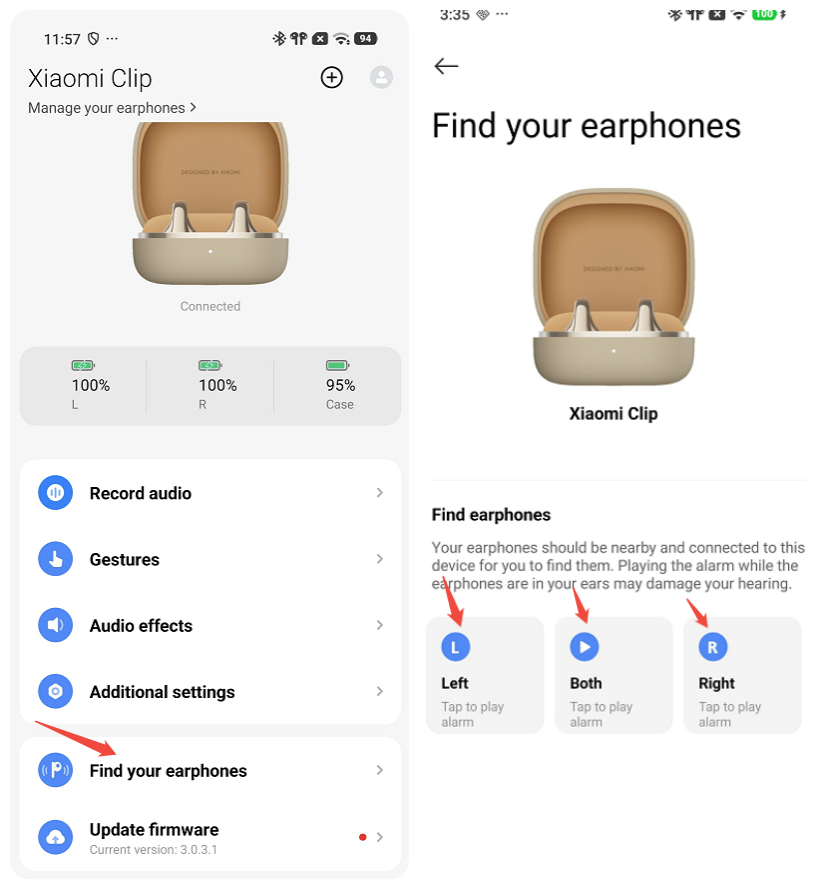
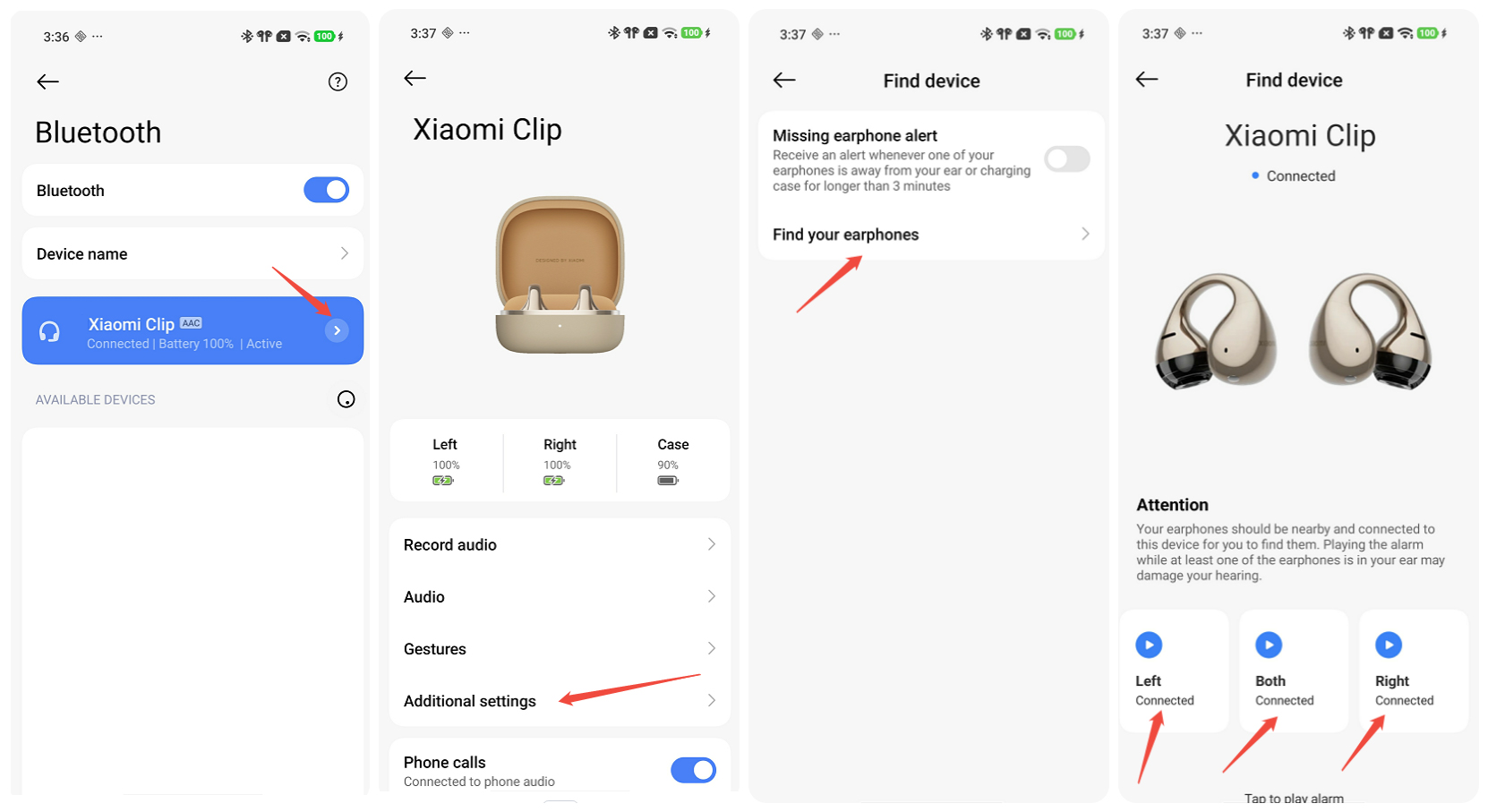
A: The Xiaomi Clip supports the "Find your earphones" feature. The method to use it varies depending on the phone brand.
There are two ways to use this feature:
1. Open the Xiaomi Earbuds App >> [Find your earphone] >> then tap [Left], [Both], or [Right] to make the earbuds emit a finding ringtone.
2. Go to the Bluetooth settings, navigate to [Additional settings] >> [Missing earphone alert] >> [Find your earphone] >> then tap [Left], [Both], or [Right] to make the earbuds emit a finding ringtone.
Note:
Enabling this feature via mobile Bluetooth settings is only effective on certain devices. The specific options available within the Bluetooth settings menu may vary from one device to another.
Q7: Does the Xiaomi Clip support waking the system voice assistant?
A: The Xiaomi Clip can wake the system voice assistant (such as Google Assistant) through custom gestures.
Q8: Does the Xiaomi Clip support battery display in the phone's notification bar?
A: Yes. After the earbuds are connected to the phone, the notification bar on the phone will display the battery level of both earbuds. The specific display method depends on the actual configuration of the phone's system.
Q9: Does the Xiaomi Clip support audio sharing? How is it enabled?
A: The Xiaomi Clip supports audio sharing. When the same phone is connected to the Xiaomi Clip and another pair of earbuds, the audio sharing switch can be turned on in the Bluetooth settings of the other earbuds.
Note:
Specific usage conditions may vary depending on the phone. A few phones do not support this feature.
Q10: Does the Xiaomi Clip support active noise cancellation (ANC)?
A: No, active noise cancellation is not supported. This product supports call noise reduction but does not have an active noise cancellation function.
Q11: How many levels of noise cancellation does the Xiaomi Clip have and how to adjust it?
A: The Xiaomi Clip does not have an active noise cancellation function, so there are no noise cancellation levels to adjust. Call noise reduction is automatically enabled during calls and does not require manual adjustment.
Q12: Does the Xiaomi Clip support call noise reduction? How to enable and use it?
A: Yes, call noise reduction is supported. It takes effect automatically during calls and does not require manual activation. The earbuds use a 3-mic and VPU call solution, which effectively improves call clarity. However, in extremely noisy environments, the noise reduction effect may be affected.
Q13: Does the Xiaomi Clip support the Xiaomi pop-up window?
A: No, the Xiaomi Clip doesn't support the Xiaomi pop-up window.
Q14: Does the Xiaomi Clip support Google Fast Pair?
A: The Xiaomi Clip supports Google Fast Pair. Please use a phone that supports Google Play services (Android 6.0 and above) and log in to a Google account. With both earbuds in the charging case, place the phone within 0.3 meters, and open the lid to enter pairing mode. The phone will then display the Google Fast Pair pop-up window.
Q15: How to update the firmware version of the Xiaomi Clip?
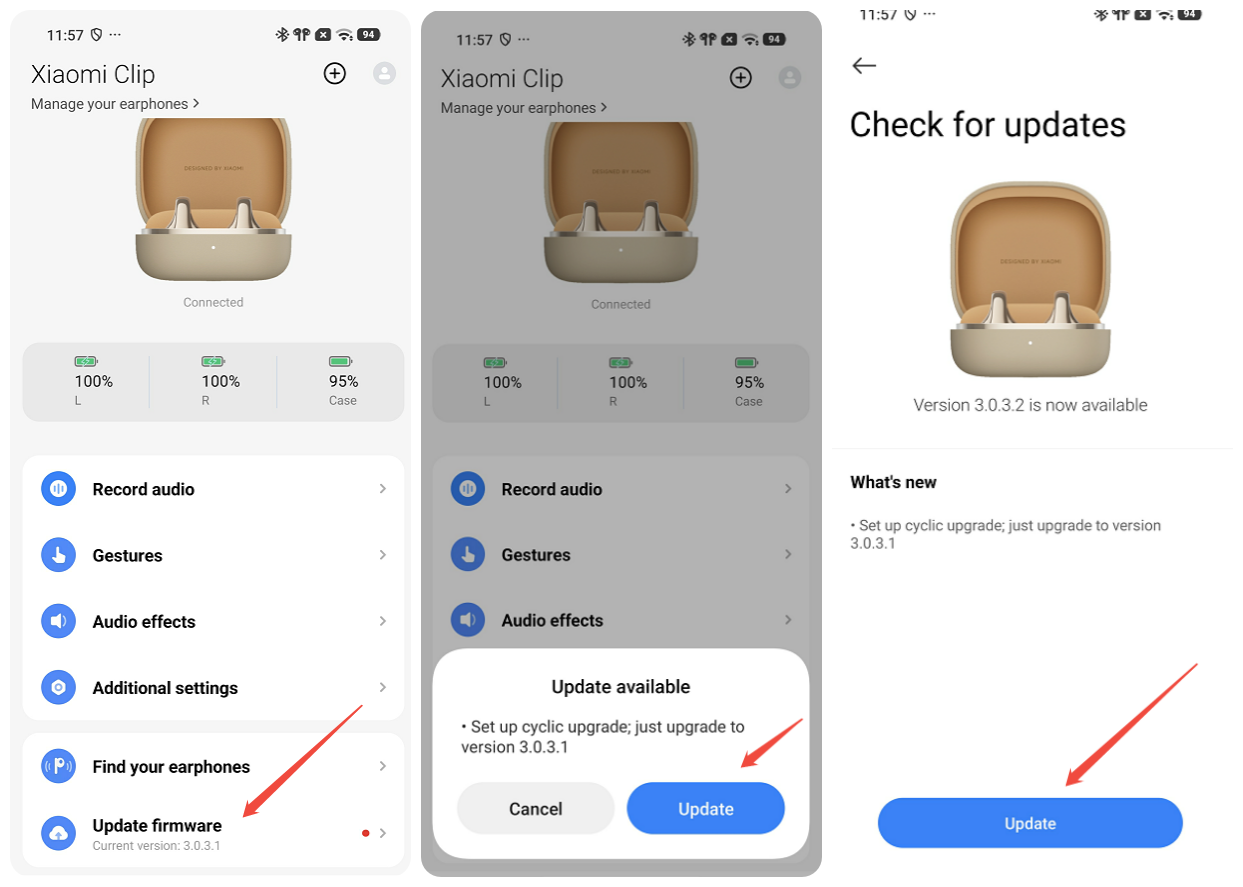
A: You can check and update the earbud firmware through the Xiaomi Earbuds App. Keep the Xiaomi Earbuds App updated to the latest version, connect the earbuds to the phone >> open the Xiaomi Earbuds App >> [Update firmware] >> follow the in-app prompts to complete the firmware update. During the update process, please keep the earbuds in the charging case and in a connected state.
Q16: Does the Xiaomi Clip support low latency mode? How is it enabled?
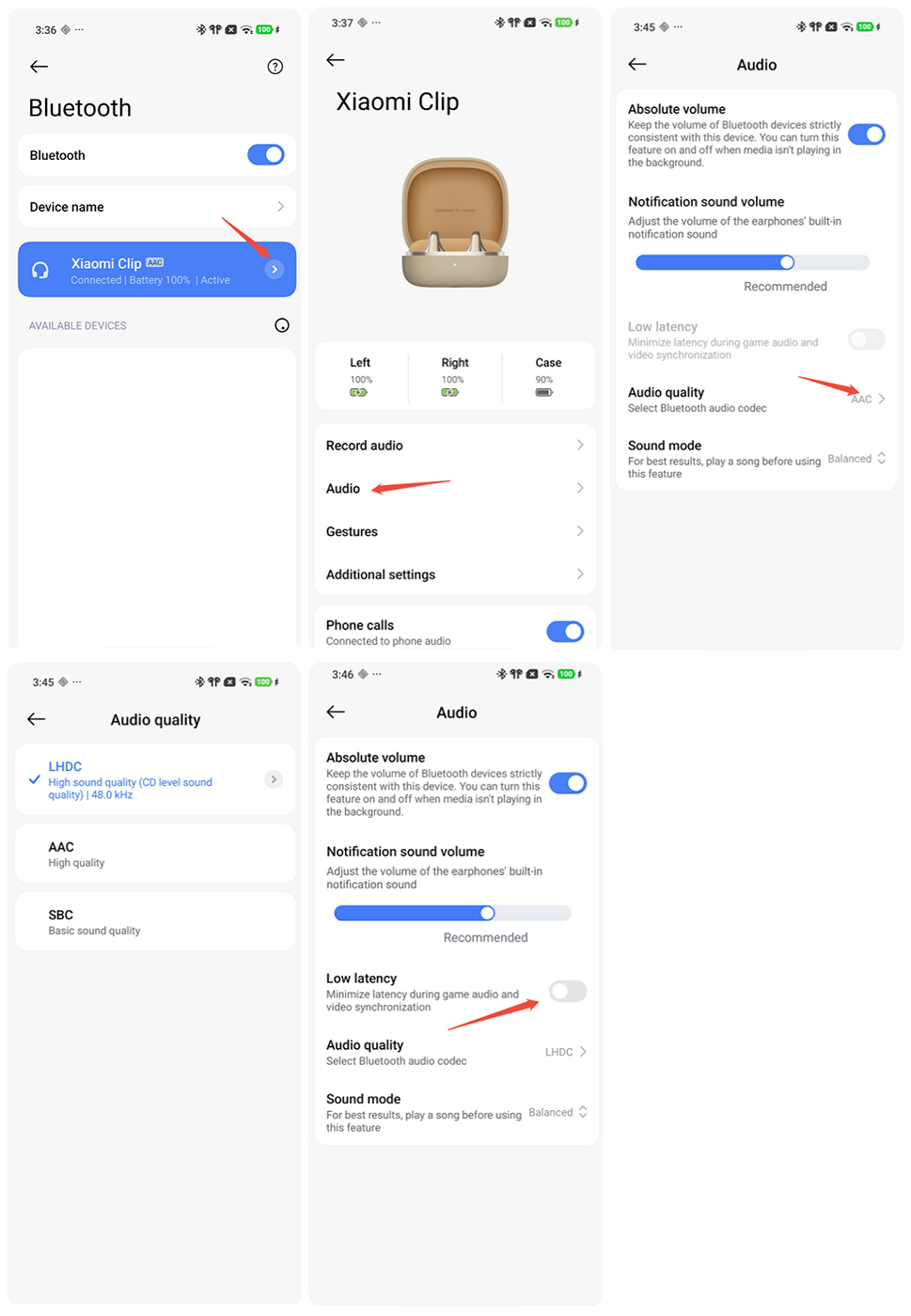
A: The Xiaomi Clip supports low latency mode. Please enter the Bluetooth settings menu on your phone >> [Audio] >> enable [Low latency].
Note:
Low latency can only be enabled when the Bluetooth codec type is LHDC. When the codec type is AAC or SBC, enabling low latency is not supported and it remains off by default. To adjust the codec type, please enter the Bluetooth settings menu on your phone >> [Audio] >> [Audio quality] >> [LHDC].
Q17: Does the Xiaomi Clip support Transparency mode? How is it enabled?
A: No, Transparency mode is not supported. This product features an open-ear clip-on design and does not have an active noise cancellation function, so there is no Transparency mode.
Q18: Does the Xiaomi Clip support actively announcing the names of contacts?
A: No, the Xiaomi Clip does not support notification announcements.
Q19: Does the Xiaomi Clip support low-power Bluetooth audio (LE Audio)?
A: No, the Xiaomi Clip doesn't support LE Audio.
Q20: Does the Xiaomi Clip consume mobile data?
A: No, the Xiaomi Clip does not consume mobile data.
Q21: Does the Xiaomi Clip support file transfer or have storage capabilities?
A: No, the Xiaomi Clip does not support file transfer, nor does it have a storage function. Therefore, it cannot download or play music independently.
Q22: Can the Xiaomi Clip be used to listen to audiobooks?
A: Yes, when connected via Bluetooth, the Xiaomi Clip can be used to listen to audiobook audio.
Q23: Does the Xiaomi Clip support heart rate monitoring?
A: No, the Xiaomi Clip does not support heart rate monitoring.
Q24: Is the radiation from the Xiaomi Clip harmful?
A: No, the Xiaomi Clip connects to the phone via Bluetooth, which emits very little radiation. It has passed strict safety and environmental certifications, so it is safe to use.
Q25: Can the Xiaomi Clip play voice prompts from navigation apps?
A: Yes, the Xiaomi Clip can play the voice prompts from navigation software.
Q26: Why does the battery level fluctuate in the Find My App after pairing the Xiaomi Clip with an iPhone?
A: When Apple's Find My App is first paired, the iPhone displays a default battery level that is not a full charge state. After pairing is complete, entering the details page and having the Find My App call back to the device will then read the actual battery level and update the UI.
Q27: How to connect the Xiaomi Clip to the Apple Find My App?
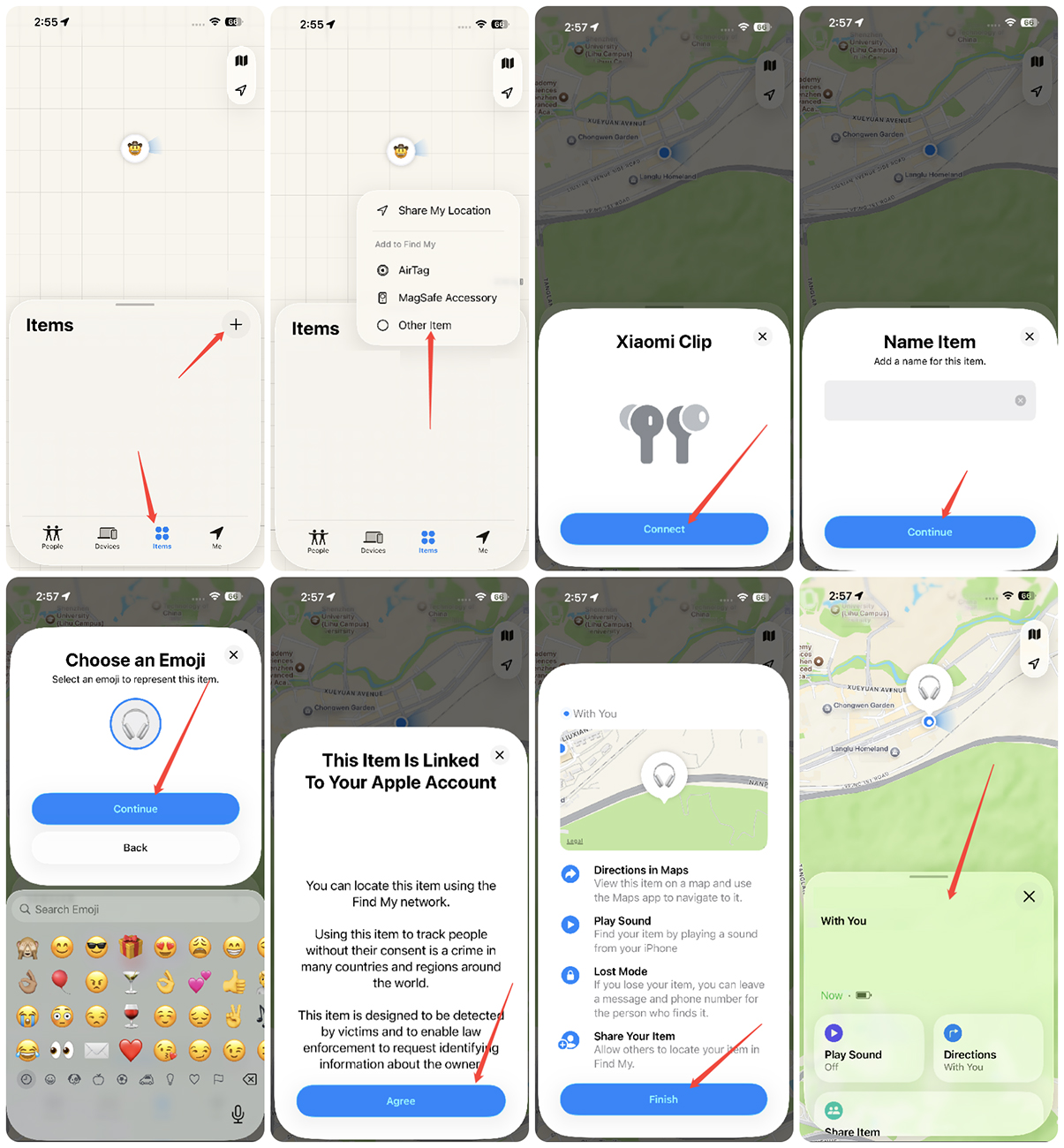
A: To connect the Xiaomi Clip to the Apple Find My App, please use an iPhone or iPad with iOS 18 or higher. Note that this feature only supports locating the charging case. It does not support precise finding or locating the earbuds themselves.
To connect the Xiaomi Clip to the Apple Find My App, please refer to the following steps:
1. Open the charging case lid with both earbuds inside and press and hold the case button for 2 seconds to enter pairing mode.
2. On the iOS device, open the [Find My] app, tap the [+] icon in the Items tab, and select [Other Item].
3. Once your phone finds the Xiaomi Clip, tap [Connect], enter a name, and follow the prompts to complete registration.
Usage Scenarios
Q1: Can the left and right earbuds of the Xiaomi Clip be recombined for use?
A: The earbuds cannot be paired and combined with earbuds of other models, but they do support re-pairing and combining with another earbud of the same model.
The earbuds can be worn on either side. The transparent sound-emitting sphere has L/R markings, but there is no need to distinguish left from right during actual wear. The earbuds feature a built-in three-axis gyroscope that automatically identifies the wearing direction, without affecting the effect of the left and right channels. The L/R markings are purely for decorative purposes.
Q2: Can the Xiaomi Clip be used during exercise?
A: Yes, the Xiaomi Clip can be used during exercise. However, please note the following:
1. Based on daily use, earbuds usually stay secure during jogging, brisk walking, or strength training. For high-intensity interval training or large jumping movements, it is recommended to try them on first to confirm the fit on your ears.
2. Pay attention to ear comfort. Clip-on earbuds rely on ear clamping, so people with thicker or sensitive ears may feel pressure during long workouts. If uncomfortable, adjust the position or shorten the wearing time.
3. Clean the earbuds after exercise. Sweat left on the earbuds may cause skin discomfort. It is recommended to wipe the earbuds dry after exercise before putting them back into the charging case to keep them clean and hygienic.
Q3: What are the precautions for the usage environment of the Xiaomi Clip?
A: Please note the following environmental precautions when using the Xiaomi Clip:
1. The working temperature is 0 °C-45 °C, the storage temperature is -20 °C to 45 °C, and the relative humidity is 5%-95% RH. Avoid leaving the earbuds in extremely cold (below 0 °C), extremely hot (above 45 °C), or environments with large temperature differences for a long time to prevent damage to battery performance.
2. Never expose the earbuds to liquids or damp places (although it supports IP57 protection, it is not resistant to hot water, so do not wear it while bathing).
3. Never expose the earbuds to open flames to avoid explosion hazards.
4. Avoid contact with sharp objects to prevent scratches or damage.
5. When wearing the earbuds for strenuous exercise, pay attention to wiping off sweat in time to prevent sweat infiltration from causing damage.
Q4: Does the Xiaomi Clip easily shake or fall off when worn?
A: No, they will not shake or fall off when worn correctly. Please refer to the instruction manual for the correct wearing method.
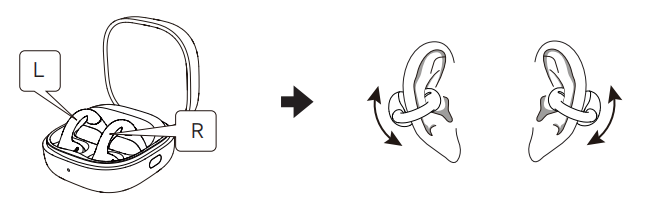
1. Take out the earbuds, gently open the connecting bridge. Clip the earbuds onto your ears, positioning the transparent spherical speaker units in front of your ears and the curved battery compartments naturally behind them.
2. After putting on the earbuds, slightly adjust their position or angle until they fit comfortably and securely for better sound quality.
Note:
During use, do not excessively stretch or twist the connecting bridge. If the earbuds feel uncomfortable, gently rotate the curved battery compartments and transparent spherical speaker units, then adjust the position and angle of the earbuds on the outer ears.
Q5: Will wearing the Xiaomi Clip cause an allergic reaction? What should be done if an adverse reaction occurs?
A: The parts of the earbuds that come into contact with the skin have all passed strict hazardous substance testing (the earbuds are certified through skin patch testing and are suitable for general skin use), and normal use will not cause adverse effects on the human body.
Possible causes of suspected allergic symptoms include:
1. Prolonged wearing (such as sleeping) without ventilation, leaving sweat residue on the earbuds.
2. Dirt on the earbuds not cleaned for a long time, leading to residue buildup causing suspected allergic symptoms.
Handling suggestions:
1. If allergic symptoms occur, please stop using them and clean the skin.
2. After exercising with the earbuds, check if there is sweat on them. If so, wipe them clean before putting them back into the case.
3. Regularly check the earbuds and charging case for dirt during daily use, and clean them promptly if found.
4. After prolonged continuous wearing, take off the earbuds to let your ears rest for about half an hour.
5. If there are residual water droplets inside the earbuds after bathing, clean them thoroughly before wearing them.
6. If the earbuds cause severe discomfort, inflammation, or allergic reactions, it is recommended to stop wearing them and consult a doctor promptly.
Q6: Does the Xiaomi Clip support connecting left and right earbuds to separate phones or other devices, using them as two single earbuds?
A: No, it doesn't support it.
Q7: Why does music continue to play when the earbuds of the Xiaomi Clip are in the charging case?
A: If music continues to play when the earbuds of the Xiaomi Clip are in the charging case, please check the following:
1. The earbud contacts or the charging case pins may be dirty, causing poor contact. If so, wipe the earbud contacts and the charging case pins, then re-pair.
2. The earbuds may be placed at an incorrect angle, preventing them from seating properly and causing poor contact with the pins. If so, place the earbuds into the case at the correct angle. The charging case indicator will light up green when properly seated.
3. If the issue persists, please contact after-sales service.
Q8: Can I go out without the charging case and just take the earbuds of the Xiaomi Clip?
A: If the phone and earbuds are already connected and the earbud battery is sufficient for your outing, you can leave the charging case behind. However, to prevent running out of power, having nowhere to store the earbuds, or losing them, it is recommended to carry the charging case when going out.
Q9: Does the Xiaomi Clip support connection to a TV?
A: Yes, the Xiaomi Clip supports connection to smart TVs that feature Bluetooth functionality.
Q10: Why does the audio play through the phone's speaker when double-tapping the touch area of the Xiaomi Clip during a WhatsApp or Teams voice call?
A: When using WhatsApp or Teams for voice calls, double-tapping the earbud touch area is recognized by the system as a call-switching command. This switches the call audio to the phone, causing the sound to play externally. If this occurs, end the current voice call and redial to resolve it.
Note:
For network calls like WhatsApp and Teams, behavior may vary across different versions of third-party apps.
Q11: Why is the Xiaomi Clip detected as being worn and playing music when it is not actually worn?
A: 1. Sweat, water stains, or dirt left on the earbud touch area may cause the earbuds to falsely detect them as being worn. Check the earbuds and charging case regularly for dirt and clean them promptly if found.
2. Holding the earbuds in your hand can easily cause accidental touches on the touch area. If music plays when the earbuds are laid flat on a desk, it can be paused and will return to normal, which is a normal phenomenon.
3. When the listening sphere and the touch area are pressed together (such as when gripping or squeezing the earbuds for storage), it can trigger the wear detection. The earbuds will resume the paused state once the two spheres are separated, which is a normal phenomenon.
4. If the earbuds are in the case and the charging case is completely out of power, the earbuds will not pause playback when placed inside. Once the case is charged, the normal function will be restored, which is a normal phenomenon.
Sound Effect
Q1: Why is the sound of the Xiaomi Clip intermittent?
A: Intermittent sound can be caused by the radio frequency performance of the earbuds or the phone, obstacles between the earbuds and the phone, or wireless interference from the environment. To resolve this, confirm the usage environment, move away from sources of wireless interference, ensure the earbud antenna is not blocked, and keep the phone and earbuds close together.
Q2: What to do if the left and right earbuds of the Xiaomi Clip are not synchronized in sound?
A: Audio is first transmitted from the phone to the main earbud, and the main earbud then transmits it to the secondary earbud. There is a certain delay during this transmission process, but it does not affect music or calls. This is a normal phenomenon for Bluetooth earbuds.
Q3: What to do if the volume of the Xiaomi Clip is too low during use?
A: If the volume of the Xiaomi Clip is too low during use, please refer to the following:
1. Check the phone's volume settings to confirm the volume is turned up and not muted.
2. Inspect the earbud sound outlet or speaker for any blockages, and clean them if necessary.
3. Ensure there are no obstacles between the earbuds and the phone, and that they are within the effective transmission range.
4. Increase the volume of the earbuds' built-in notification sound in the phone's Bluetooth menu or in the Xiaomi Earbuds App.
Q4: What to do if there is noise during the use of the Xiaomi Clip?
A: If there is noise during the use of the Xiaomi Clip, please check the following:
1. Obstacles or a long distance between the phone and the earbuds may cause low volume and noise. Please ensure there are no obstacles (e.g., moving the phone from a pants pocket to a jacket pocket).
2. Weak signals or an unstable network at the call location can affect call quality. Please move to an area with a good signal before making calls.
3. Keep away from nearby objects with strong electromagnetic interference (such as microwaves).
4. If the earbud microphone holes are blocked, the other party may hear low volume and noise. Please ensure the microphone holes are free of foreign objects or stickers.
5. Using the earbuds in extremely noisy environments may also affect the call quality.
Q5: Why does the volume of one earbud become lower after using the Xiaomi Clip for a period of time?
A: 1. Check if the earbud sound outlet or speaker is blocked by foreign objects. If so, clean the outlet and try again.
2. If the volume becomes lower or the sound quality becomes unclear after the earbuds get wet, it is recommended to dry the surface moisture, let them sit in a well-ventilated area for about 96 hours until completely dry, and the volume should return to normal.
Q6: Is the Xiaomi Clip a stereo earbud?
A: Yes. The Xiaomi Clip is a stereo earbud, with the left and right earbuds outputting left and right channels, respectively. The built-in three-axis gyroscope automatically recognizes the wearing direction, without affecting the stereo effect of the left and right channels.
Q7: How to adjust the volume of the Xiaomi Clip?
A: You can adjust the volume using the phone's volume buttons, or you can set the volume increase/decrease as a custom gesture through the phone's Bluetooth menu or the Xiaomi Earbuds App to adjust it.
Q8: Why does the volume sometimes adjust automatically when the Xiaomi Clip connects to a device?
A: When the Xiaomi Clip is connected to a phone, volume synchronization is performed. The Absolute volume function aligns the phone with the current volume level of the earbuds.
Note:
The name of this feature varies by device.
Q9: What to do if the noise cancellation effect of the Xiaomi Clip is poor?
A: The Xiaomi Clip does not have an active noise cancellation function. Call noise reduction is automatically enabled during calls.
Q10: What to do if the sound quality of the Xiaomi Clip is poor?
A: If you feel the sound quality of the Xiaomi Clip is poor, please check the following:
1. Check whether the earbud sound outlet is blocked by foreign objects, and clean it if necessary.
2. Confirm the current Bluetooth codec type. Using the LHDC 5.0 codec is recommended for better sound quality, as AAC/SBC sound quality is relatively limited.
3. Move away from electromagnetic interference environments and ensure there are no obstacles between the phone and the earbuds.
4. Check the audio source quality.
5. If the volume becomes lower or the sound quality becomes unclear after the earbuds get wet, please dry the surface moisture, let them sit in a well-ventilated area for about 96 hours until completely dry before use.
Q11: What to do if there is no sound when using the Xiaomi Clip to answer calls or listen to music?
A: If there is no sound when using the Xiaomi Clip to answer calls or listen to music, please check the following:
1. If electromagnetic wave interference in the area disrupts the Bluetooth connection and causes no sound, move away from objects with strong electromagnetic interference, such as microwaves.
2. The phone's volume may not be turned up or may be in silent mode. Turn up the volume on the phone.
3. A long distance (over 10 meters) or obstacles blocking the signal can cause the issue. Keep the phone and earbuds close together or reconnect them.
4. To resolve abnormal connections, disconnect the earbuds, put them back into the charging case, close the lid for 5 seconds, then open the lid and reconnect to the phone.
5. Try restoring the factory settings if the above methods do not work.
Q12: Why is there sound during calls but no sound when listening to music after the Xiaomi Clip is connected to the phone?
A: This issue occurs because Bluetooth is connected but the "Media audio" option is not checked.
1. Go to the phone's [Settings] >> [Bluetooth] >> find [Xiaomi Clip] and tap the icon on the right, then turn on [Media audio].
2. In the phone's Bluetooth settings, find the earbuds and tap [Disconnect]. Open the charging case with both earbuds inside and keep the lid open. Press and hold the case button for 2 seconds until the indicator flashes. The earbuds will enter pairing mode. Search for earbuds again on your phone and tap to reconnect.
3. If it still cannot be resolved, please try restoring the factory settings. Place the earbuds in the charging case with the lid open, then press and hold the charging case button for 10 seconds. The indicator flashes slowly three times, then rapidly. The earbuds are reset and enter pairing mode. Search for earbuds again on your phone and tap to reconnect.
Q13: What to do if one earbud of the Xiaomi Clip has no sound?
A: If one earbud of the Xiaomi Clip has no sound, you can troubleshoot the issue by checking the following:
1. Check for poor contact on one side, which could lead to pairing with only one earbud. Place the earbuds back into the case, confirm the charging case indicator lights up, and re-pair the Bluetooth.
2. If low battery on one side caused it to power off, confirm good contact, charge the earbuds in the case for 10 minutes, and then re-pair the Bluetooth.
3. Inspect for dirt or debris blocking the earbud's sound outlet or speaker, and clean it if necessary.
4. If water or sweat has entered the earbud and caused a short circuit, let it sit in a well-ventilated area for about 96 hours until completely dry before use.
5. If the Bluetooth connection between the left and right earbuds is disconnected, try restoring the factory settings by placing both earbuds in the case, keeping the lid open, and pressing and holding the button for 10 seconds.
6. If the issue still cannot be resolved after the above steps, please contact an after-sales service center for assistance.
Q14: Can the volume and sound quality return to normal after the Xiaomi Clip gets wet and becomes muffled?
A: The earbuds of the Xiaomi Clip support IP57 protection. If the volume becomes lower or the sound quality becomes unclear after the earbuds get wet, it is recommended to wipe the surface moisture, let them sit in a well-ventilated area to dry naturally, and wait for about 96 hours until they are completely dry. After that, the sound will usually return to normal.
Cleaning and Maintenance
Q1: How to clean the Xiaomi Clip?
A: Please regularly clean the charging contacts of the case, the earbud charging contacts, and the surface. Wipe the earbud contacts dry before putting the earbuds back, and use a cotton swab to gently clean the case contacts.
Note:
1. Never expose the earbuds to liquids or damp places.
2. Never use abrasive solvents to clean the earbuds.
3. Avoid leaving the earbuds in environments that are too cold (below 0 °C), too hot (above 45 °C), or have extreme temperature differences, as this can damage the battery.
4. Never expose the earbuds to open flames to avoid explosion hazards.
5. Never let the earbuds come into contact with sharp objects, which can cause scratches or damage.
6. Never insert any objects into the earbuds, as this will damage the internal components.
7. Never attempt to disassemble the earbuds.
8. If not used for a long time, store the earbuds in a dry place, and charge them on time if stored for more than a month to maintain battery performance.
9. Clean the earbud and case contacts after exercise or periodically.
To check if the spring pins are stuck, use a cotton swab or dropper to apply a little alcohol to the pin tip, press the pin 10 times with a pointed cotton swab, and observe if it rebounds normally. Repeat this process 2-3 times. If it still doesn't rebound, contact after-sales service.
Q2: What should be noted when cleaning the Xiaomi Clip?
A: When cleaning the Xiaomi Clip, please note the following precautions to avoid damaging the device:
1. Never expose the earbuds to liquids or damp places.
2. Never use abrasive solvents to clean the earbuds.
3. Never insert any objects into the earbuds to avoid damaging the internal components.
4. Never attempt to disassemble the earbuds.
5. Avoid letting the earbuds come into contact with sharp objects to prevent scratches or damage.
Q3: How should the Xiaomi Clip be stored if it is not used for a long time?
A: If the earbuds are not used for a long time, make sure to store them in a dry place. If they are stored for more than a month, they should be charged regularly to ensure the battery and earbuds work properly.
Additionally, avoid leaving the earbuds in environments that are too cold (below 0 °C), too hot (above 45 °C), or have extreme temperature differences, to prevent the battery activity from being damaged.
Recording Function
Q1: Does the Xiaomi Clip support a recording function?
A: The Xiaomi Clip supports the recording function. It supports recording the sound of the system audio and video from your phone, calling audio and ambient sounds. However, the recording transcription and translation functions are not supported.
Q2: How to use the Xiaomi Clip to start recording?
A: To use the recording function of the Xiaomi Clip, please refer to the following methods:
Method 1:
1. Open the [Xiaomi Earbuds] App.
2. Tap [Record audio].
3. Tap the recording icon to start or stop recording. The earbuds will provide voice prompts when recording begins and ends.
Method 2:
You can customize touch gestures for your earbuds via the Xiaomi Earbuds App. Once you’ve configured a gesture for recording, you can use it to start or stop a recording. The earbuds will provide voice prompts when recording begins and ends.
Method 3:
Place the earbuds in the charging case with the lid open or closed. Press the button on the case three times to record audio. Press the button three times again to end the recording (removing the earbuds from the case will also end the recording).
Note:
Please use the recording function responsibly. Do not infringe upon the legitimate rights and interests of others, including but not limited to privacy rights and intellectual property rights. Additionally, do not use the recording for illegal purposes. When you record a call, you will be notified at the start and end of the recording.
Q3: How to play the recording files of the Xiaomi Clip?
A: The recording files are stored locally on earbuds. They need to be manually imported to the phone via the Xiaomi Earbuds App before they can be played. Recording transcription and translation are not supported.
Q4: Where are the files recorded using the Xiaomi Clip saved?
A: The recording files are saved locally on earbuds. They need to be manually imported to the phone via the Xiaomi Earbuds App for storage.
Q5: Do the recording files of the Xiaomi Clip support export?
A: Yes. After the recording files are imported to the phone in the Xiaomi Earbuds App, they can be exported. However, recording transcription and translation are not supported.
Q6: What is the recording duration of the Xiaomi Clip?
A: The single-earbud recording duration for microphone or system audio is 60 minutes, and the single-earbud recording duration for calls is 120 minutes.
Q7: Why does the Xiaomi Clip recording automatically stop?
A: The recording may automatically stop due to storage limits, low battery, channel closure, audio preemption, or data transmission errors.
1. If the earbud recording storage is full (up to 60 minutes for on-site audio/video and up to 120 minutes for calls), the recording will end automatically once the storage limit is reached.
2. If the earbud battery runs out during recording, the recording will end automatically and the file will be saved.
3. If the audio/video recording channel is closed on the phone, or the earbuds are placed into the charging case, the recording will end automatically. For calls, ending the call on the phone or placing the earbuds into the case will also end the recording.
4. If a call comes in during on-site audio/video recording, it will preempt the audio channel, interrupt the current recording, and end it automatically.
5. If a data transmission error occurs during real-time recording (such as the App receiving duplicate packets, packet issues, or App response timeouts), the recording will be terminated.
Q8: Is there a prompt when the Xiaomi Clip starts and ends recording?
A: Yes. When starting or stopping recording through the Xiaomi Earbuds App or the recording gesture, the earbuds will provide voice prompts when recording begins and ends.
Note:
When recording during a call, the earbuds will provide voice prompts when recording begins and ends, but the other party will not hear them.
Does it help?
Yes
No