

Mijia Water Flosser 2 Portable FAQ
Basic Information
Q1: What are the selling points of the Mijia Water Flosser 2 Portable?
A: For your reference, here are the selling points of the Mijia Water Flosser 2 Portable:
1. The flosser uses gentle wide-angle jet technology to provide 7 times the cleaning coverage for a more comfortable flossing experience.
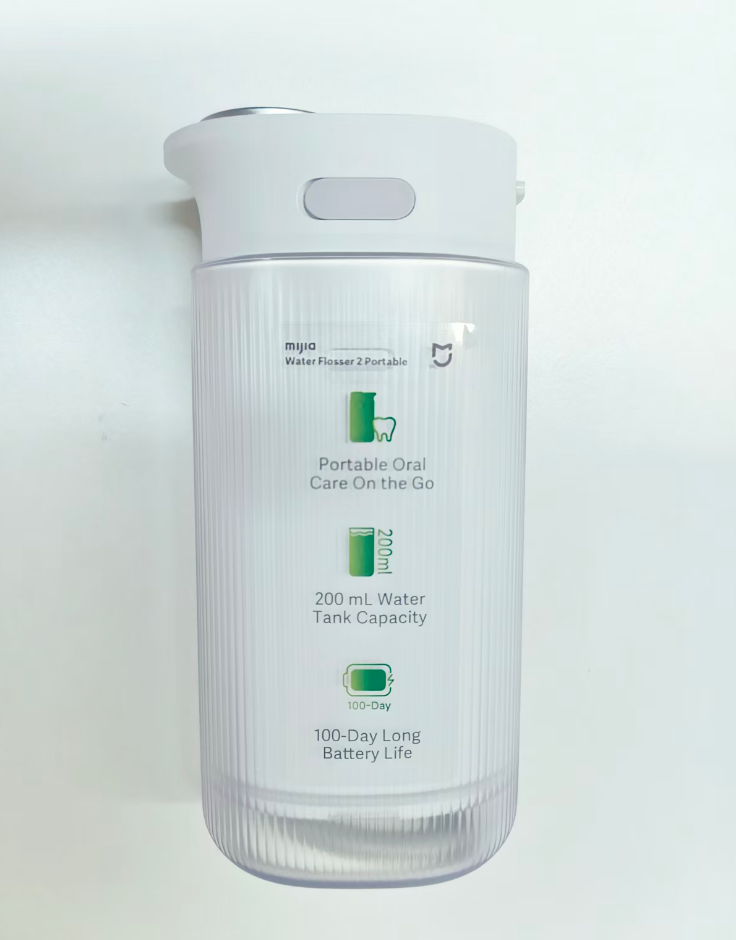
2. It features a 200 ml pull-out water tank with a compact and portable design for convenient, hassle-free use.
3. It offers four flossing modes to provide versatile options for effective teeth cleaning.
Q2: What color is the Mijia Water Flosser 2 Portable?
A: The Mijia Water Flosser 2 Portable is white.
Q3: What does the Mijia Water Flosser 2 Portable look like?
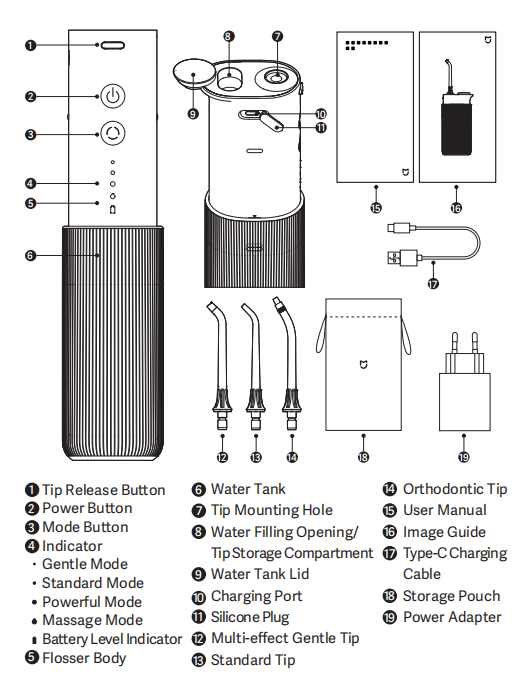
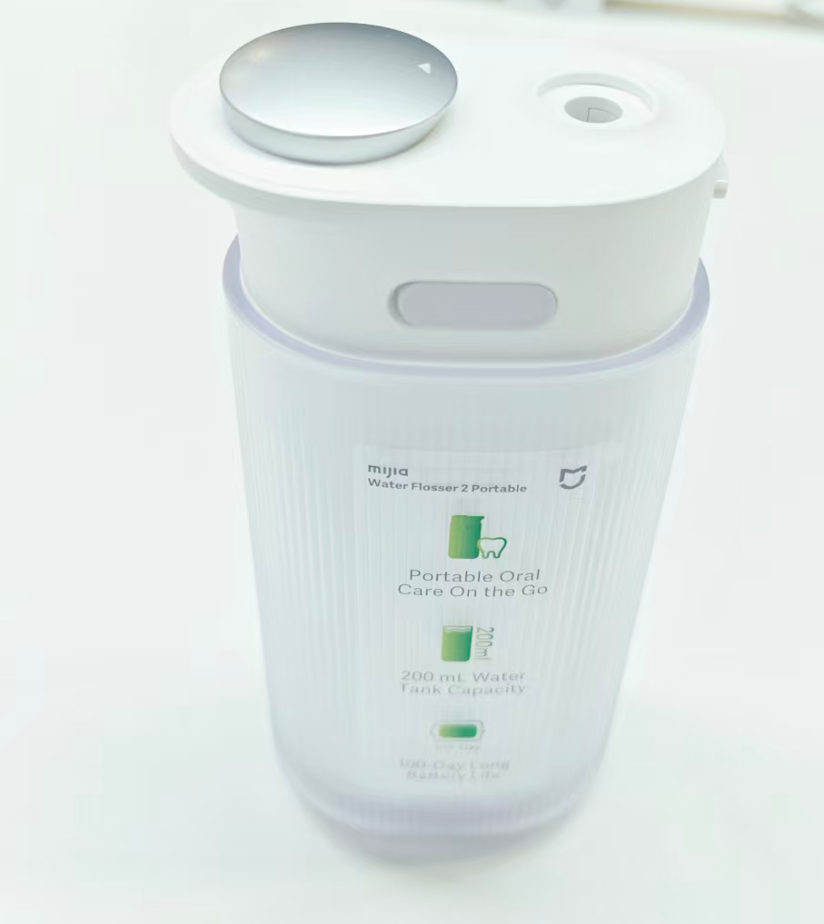
A: The appearance of the Mijia Water Flosser 2 Portable is shown below:
The flosser features a tip release button, power button, mode button, indicators, flosser body, water tank, tip mounting hole, water filling opening, tip storage compartment, water tank lid, charging port, and silicone plug.
Product dimensions: Approximately 50 mm × 69 mm × 143 mm.
Packaging dimensions: Approximately 192 mm × 190 mm × 56 mm.
Q4: What improvements does the Mijia Water Flosser 2 Portable offer compared with the previous-generation water flosser?
A: The Mijia Water Flosser 2 Portable is Xiaomi’s first portable water flosser launched in overseas markets. It delivers excellent performance and using experience, while its pull-out water tank makes it more portable.
Q5: Why does the Mijia Water Flosser 2 Portable have an odor when first unpacked?
A: A slight odor could be present when the Mijia Water Flosser 2 Portable is first unpacked. This is because the product has been sealed in its packaging for an extended period, preventing the odor from dissipating. The odor will gradually disappear after several uses and will not affect the human body. Please feel free to use the product.
Q6: Who is the Mijia Water Flosser 2 Portable suitable for?
A: The Mijia Water Flosser 2 Portable is suitable for adults. People with severe periodontal disease or those who have undergone oral surgery within the past six months should use it under the guidance of a dentist.
Appearance and Material
Q1: What is the body material of the Mijia Water Flosser 2 Portable?
A: The main body is made of ABS plastic.
Q2: What is the material of the tip of the Mijia Water Flosser 2 Portable?
A: The tip of the Mijia Water Flosser 2 Portable is made of ABS.
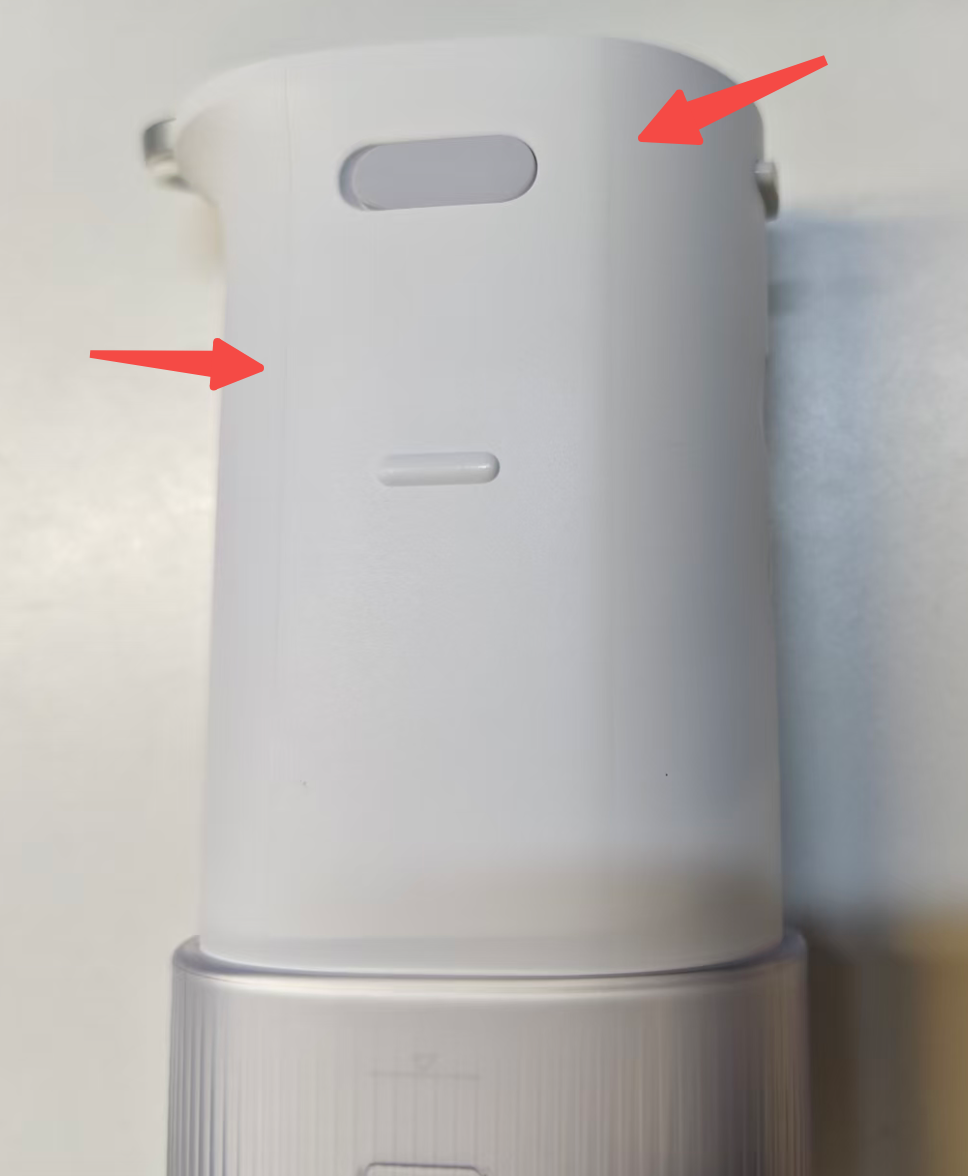
Q3: Are the two lines on the body of the Mijia Water Flosser 2 Portable after unpacking a quality issue?
A: This is normal and is not a product quality issue. During the injection molding process, mold parting lines can remain where the mold sections meet. This is a common characteristic of injection-molded products and does not affect the flosser’s functionality, water resistance, or service life. Please feel free to use the product.
Water Tank
Q1: What is the water tank capacity of the Mijia Water Flosser 2 Portable?
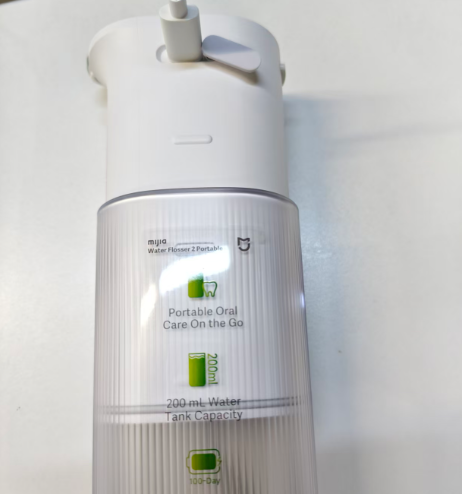
A: The water tank capacity of the Mijia Water Flosser 2 Portable is 200 ml.
Q2: Can the water tank of the Mijia Water Flosser 2 Portable be removed?
A: Yes. The water tank can be removed separately. Hold the flosser body with one hand and the water tank with the other, then pull them apart in opposite directions.
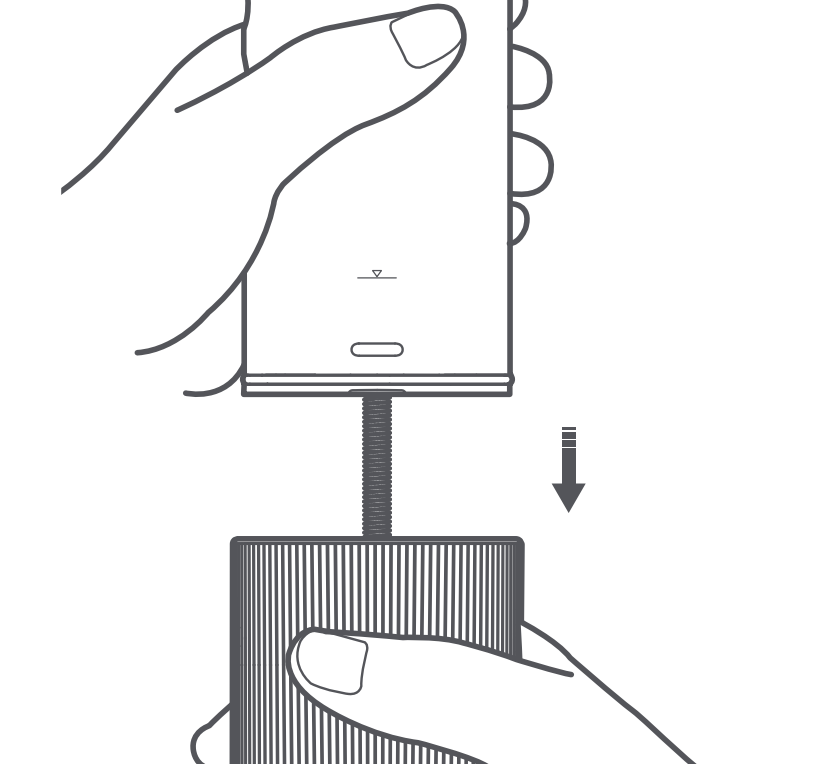
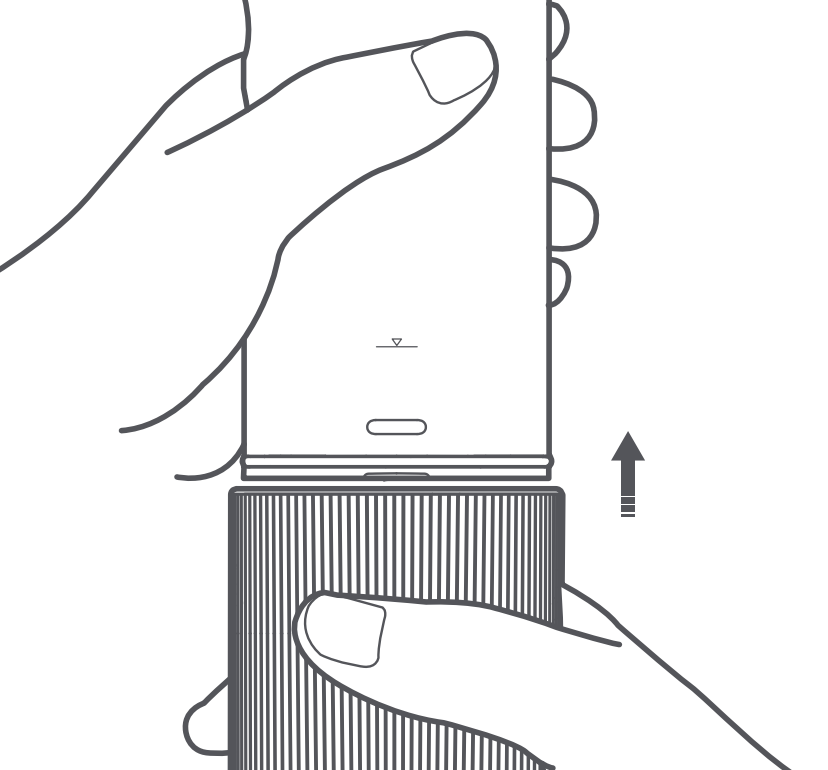
Q3: How to fill the water tank of the Mijia Water Flosser 2 Portable? Is there a maximum water level indicator?
A: To fill the water tank of the Mijia Water Flosser 2 Portable, please refer to the following steps:
1. Pull the water tank down to the limit mark on the flosser body.
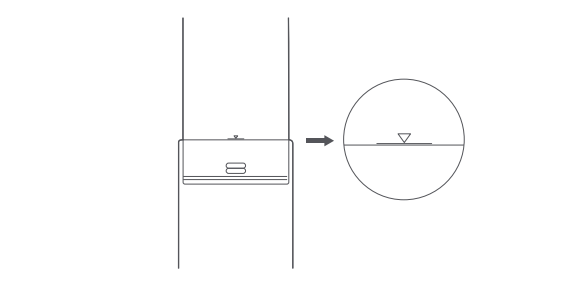
2. Open the top water tank lid and rotate it 180°. Hold the flosser vertically and fill the water tank with an appropriate amount of water. Then, press the lid down to close it securely.
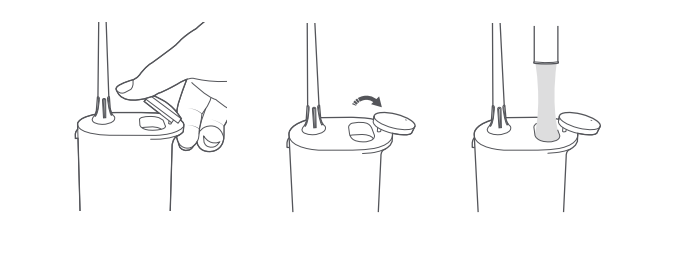
3. There is no maximum water level indicator. Fill the water tank until it is full, then stop adding water.
Note:
1. It is recommended to use warm water below 40 °C or running tap water.
2. Do not fill the flosser with toothpaste, salt, solid mouthwash tablets, mouthwash containing isopropyl myristate, or other chemicals that may clog or damage the flosser.
Q4: Why is the Mijia Water Flosser 2 Portable leaking water?
A: If the Mijia Water Flosser 2 Portable is leaking water, please refer to the following troubleshooting steps:
1. The tip could not be installed correctly. Reinstall the tip. A “click” indicates that it is properly installed.
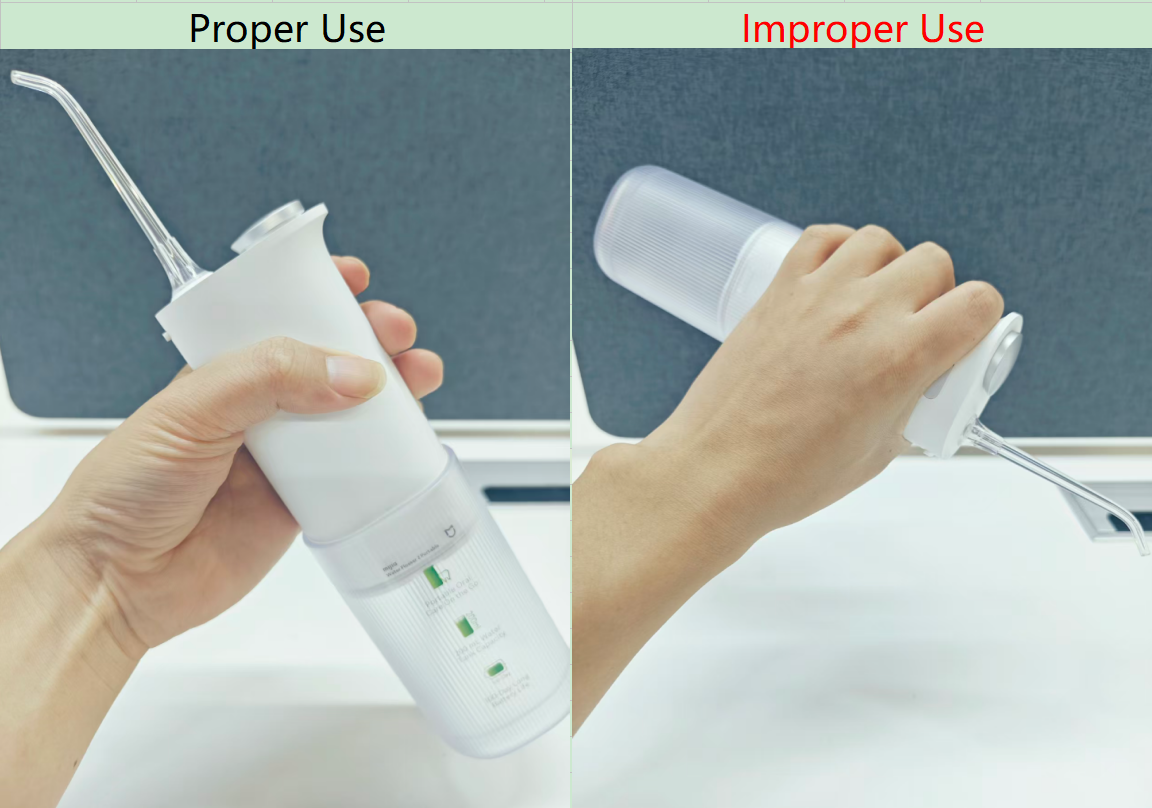
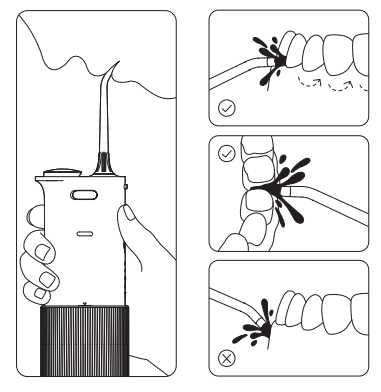
2. Incorrect usage, as shown in the figure. For example, if the flosser is held upside down while cleaning the teeth, hold the main unit upright. The water jet should be directed at a 90° angle to the gumline.
3. The tip could have deteriorated or worn out after long-term use. Replace it with a new tip.
4. The water tank could be cracked due to impact, or the sealing ring on the main unit could have deteriorated or come off. Replace the water tank or sealing ring as needed.
5. If all the above have been checked and the issue persists, the tip mounting hole on the main unit could be faulty. Please contact the after-sales service center for further assistance.
Q5: Why is the water stream from the Mijia Water Flosser 2 Portable so thick?
A: The “thick water stream” from the gentle multi-purpose tip is a result of its gentle wide-angle jet technology, which provides a larger cleaning area and is gentler on the gums. If you prefer a finer water jet, switch to the standard tip.
Q6: What water pressure modes are available on the Mijia Water Flosser 2 Portable?
A: There are four modes on the Mijia Water Flosser 2 Portable: Gentle, Standard, Powerful, and Massage.
Q7: What to do if the water pressure of the Mijia Water Flosser 2 Portable is too low?
A: Switch the Mijia Water Flosser 2 Portable to powerful mode and try again.
If you feel the water pressure is still low, follow these troubleshooting steps:
1. Remove the water tank and check whether the filter at the bottom of the water intake hose is clogged with dirt. If so, clean the filter.
2. Check whether the water intake hose is damaged. If it is damaged, replace it with a new one.
3. Check whether the tip is clogged with dirt or whether the tip outlet is damaged. If it is clogged or damaged, replace it with a new tip and try again.
4. If the water pressure remains low after completing all the above troubleshooting steps, please contact the after-sales service center for further assistance.
Q8: Why does water splash around when using the Mijia Water Flosser 2 Portable?
A: If water splashes around when using the Mijia Water Flosser 2 Portable, please refer to the following information:
1. Lean forward at a 40-degree angle, place the tip in the mouth, and close the lips naturally, leaving a small gap for the water to drain out. Then turn on the flosser. This helps prevent splashing.
2. Please refer to the following instructions for the correct way to use the flosser:
(1) Hold the flosser vertically and lean over the sink. Press the mode button to select your desired mode. Insert the tip into your mouth, aim it at interdental spaces or the gumline, and press the power button to start the flosser. Slightly close your lips to prevent splashing, while leaving a small gap to allow water to flow from your mouth into the sink.
(2) Keep the water jet at a 90° angle to your gumline. It is recommended to start cleaning from the back teeth, slowly move the tip along the gumline toward the front teeth, and pause briefly at each interdental space.
(3) After use, empty the water tank and let the flosser run idle for a few seconds to drain any residual water inside. Once the residual water is drained, open the top water tank lid and place the flosser in a well-ventilated area to air dry. When the inside of the water tank is completely dry, push it back up into place and close the water tank lid.
Note:
1. Be sure to place the tip in your mouth before pressing the power button.
2. Do not aim the water jet directly at the gums.
3. Do not press the tip forcefully against your teeth or gums, as this can trigger motor jam protection in powerful mode. When motor jam protection is activated, the flosser will automatically pause, and the 4 indicators on the flosser body will blink white for 10 seconds before going off. Press the power button to turn on the flosser again, which restores normal functionality.
Q9: Why does the Mijia Water Flosser 2 Portable not dispense water during initial use?
A: If the Mijia Water Flosser 2 Portable does not dispense water during initial use, please refer to the following steps to troubleshoot:
1. Make sure the product has sufficient battery power. Open the water tank cover and pull the water tank down to the limit mark on the flosser body.
2. Fill the water tank with water, point the tip at the gaps between the teeth or along the gumline, and press the power button to start the flosser.
3. If the flosser still does not dispense water properly, contact the after-sales service center for further assistance.
Q10: What to do if the water intake hose of the Mijia Water Flosser 2 Portable is removed?
A: If the water intake hose of the Mijia Water Flosser 2 Portable is removed, please refer to the following information:
1. Disassembling the water intake hose is not recommended.
2. Reinstall it as follows:
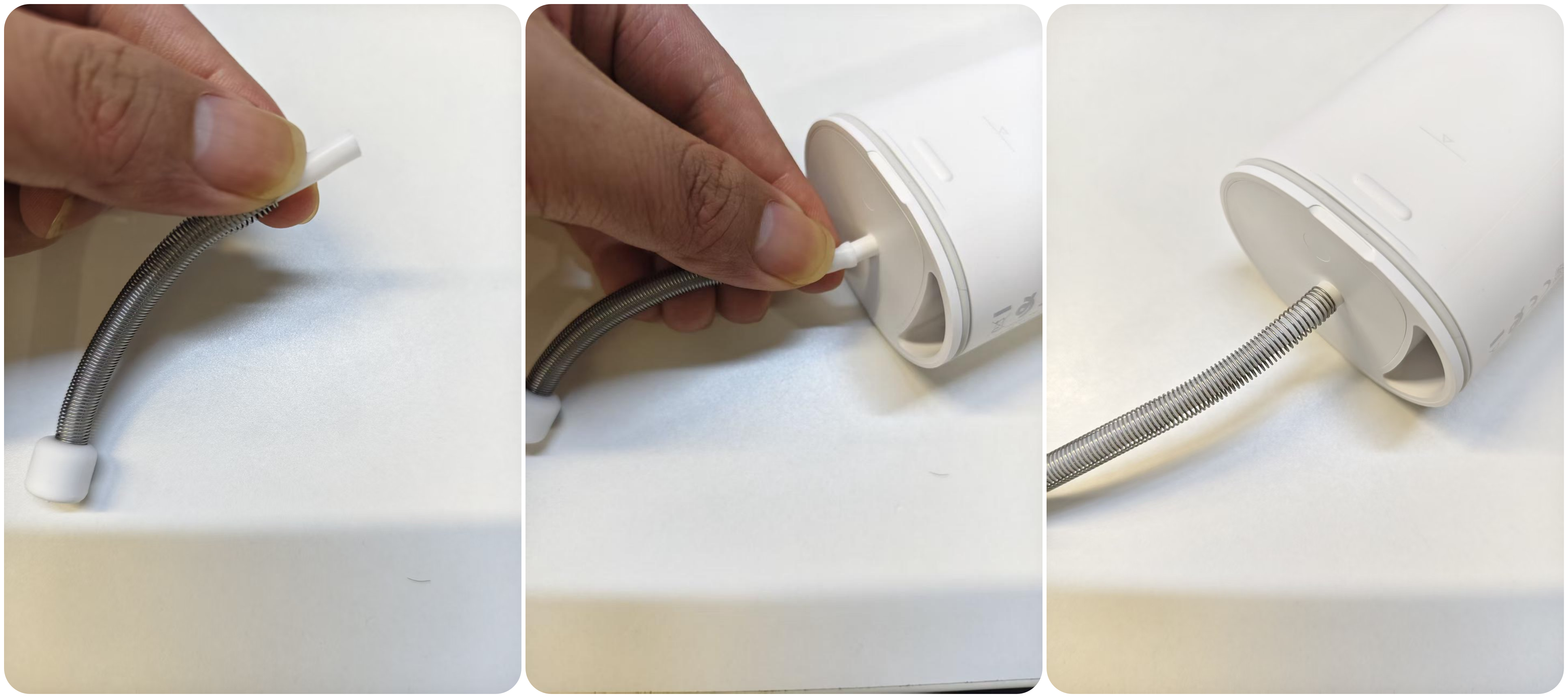
(1) Compress the spring on the water intake hose to expose the soft rubber section.
(2) Align the water intake hose with the connection post at the bottom of the main unit.
(3) Fit the water intake hose over the connection post until the hose completely covers the connection post.
Q11: What to do if the water intake hose of the Mijia Water Flosser 2 Portable becomes detached?
A: If the water intake hose of the Mijia Water Flosser 2 Portable is removed, please reinstall it as follows:
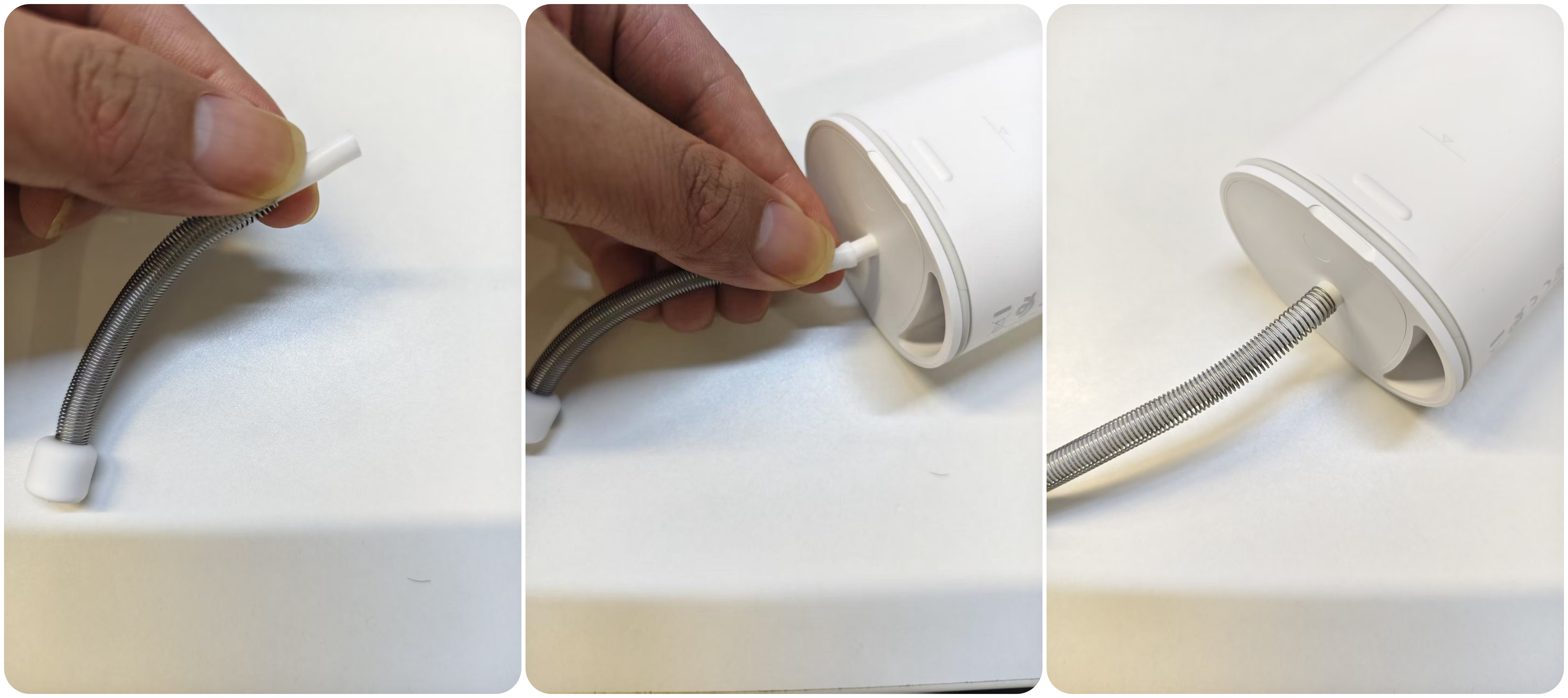
1. Compress the spring on the water intake hose to expose the soft rubber section.
2. Align the water intake hose with the connection post at the bottom of the main unit.
3. Fit the water intake hose over the connection post until the hose completely covers the connection post.
Tips
Q1: How many tips does the Mijia Water Flosser 2 Portable have, and what are the differences and uses of each tip?
A: The Mijia Water Flosser 2 Portable comes with 3 tips:
1. Multi-effect Gentle Tip: Sprays a dual-layer umbrella-shaped water stream that provides up to 7 times wider cleaning coverage. It gently cleans between teeth and along the gumline while effectively removing debris without irritating the gums. It is especially suitable for first-time use and sensitive gums.
2. Standard Tip: Effectively removes food debris from between teeth and in grooves. It is suitable for daily cleaning or deeper cleaning.
3. Orthodontic Tip: Designed to clean complex areas around braces, brackets, and other orthodontic appliances. It is suitable for orthodontic treatment.
Q2: Is the water pressure of the Mijia Water Flosser 2 Portable too strong? Can it damage the teeth?
A: The Mijia Water Flosser 2 Portable offers four pressure modes: Gentle, Standard, Powerful, and Massage.
For first-time use, it is recommended to use the Gentle mode with the Multi-effect Gentle Tip continuously for one week. After getting accustomed to the flosser, other modes and tips can be used.
If discomfort persists for more than two weeks, stop using the product and consult a dentist.
Q3: How to install and remove the tip of the Mijia Water Flosser 2 Portable?
A: To install and remove the tip of the Mijia Water Flosser 2 Portable, please refer to the following information:
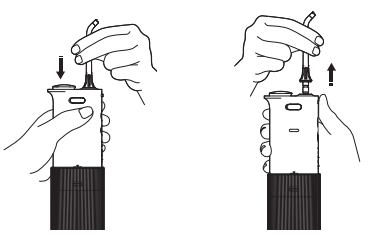
1. Insert the tip vertically into the tip mounting hole, and it is installed in place when you hear a "click" sound.
2. Press and hold the tip release button while pulling the tip upward to remove it.
Note:
Do not press the tip release button during use, as the tip may eject and cause accidental injury.
Q4: Can the tip of the Mijia Water Flosser 2 Portable be replaced? What is the compatible tip model?
A: Yes. The tips of the Mijia Water Flosser 2 Portable can be replaced with Xiaomi Water Flosser Replacement Tips. The replacement set includes Standard Tips and Orthodontic Tips, which are sold separately. The model is MWN505.
Q5: What is the service life of the tip of the Mijia Water Flosser 2 Portable? How often should it be replaced?
A: The tip has a service life of 3-6 months. It is recommended to replace it with a new one after 3-6 months of use.
Q6: Are the tips of the Mijia Water Flosser 2 Portable compatible with other tips?
A: Yes. They are compatible with tips from the Xiaomi Water Flosser 2.
Q7: Why is the tip of the Mijia Water Flosser 2 Portable loose after installation instead of being fixed in place?
A: The tip features a 360° rotatable design, allowing the angle to be adjusted manually for flexible positioning and easier cleaning of all tooth surfaces.
If the tip rotates automatically during use and cannot stay in a fixed direction, it could be loose because the tip is worn and cannot lock into place properly. It is recommended to replace it with a new tip. If the issue persists after replacement, please contact the after-sales service center for further assistance.
Q8: What to do if the tip of the Mijia Water Flosser 2 Portable falls off easily?
A: If the tip of the Mijia Water Flosser 2 Portable falls off easily, please follow these troubleshooting steps:
1. The tip can not be installed properly. Reinstall the tip. A “click” indicates that it is properly installed.
2. The tip could be worn or aged after prolonged use. Replace it with a new tip.
3. If the issue persists after the above checks, the tip mounting hole on the main unit can be faulty. Please contact the after-sales service center for further assistance.
Q9: Why does water leak from the connection between the tip and the main unit of the Mijia Water Flosser 2 Portable during use?
A: If water leaks from the connection between the tip and the main unit during use, please follow these troubleshooting steps:
1. The tip may not be installed properly. Reinstall the tip. A “click” indicates that it is properly installed.
2. The flosser could be held upside down during use. Hold the main unit upright and keep the water jet at a 90° angle to the gumline.
3. The tip could be worn or aged after prolonged use. Replace it with a new tip.
4. If the issue persists after the above checks, the tip mounting hole on the main unit could be faulty. Please contact the after-sales service center for further assistance.
Function Usage
Q1: How many modes does the Mijia Water Flosser 2 Portable have?
A: The Mijia Water Flosser 2 Portable has 4 modes: Gentle, Standard, Powerful, and Massage.
Q2: Does the Mijia Water Flosser 2 Portable have different modes? How to switch them?
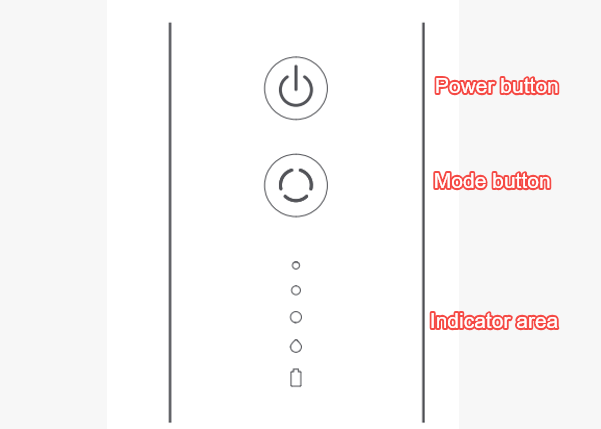
A: The Mijia Water Flosser 2 Portable has 4 modes. Press the mode button to switch between modes. The corresponding mode indicator will light up in white.
Q3: How to use the Mijia Water Flosser 2 Portable?
A: To use the Mijia Water Flosser 2 Portable, please refer to the following information:
Turning on/off:
Press the power button to turn the flosser on or off.
Note:
1. This product features a 2-minute timer. It automatically turns off after 2 minutes of continuous use. Press the power button again to continue using it.
2. The standard mode allows for 50 seconds of uninterrupted cleaning with a full tank of water, while the duration of usage may vary for different modes.
Switching modes:
Press the mode button to cycle through gentle mode, standard mode, powerful mode, and massage mode. When a mode is enabled, the corresponding indicator on the flosser body lights up.
Note:
1. The product features mode memory. By default, it restores the last mode used when turned on.
2. The powerful mode features a 3-second gradual ramp-up, where water pressure gradually increases over approximately 3 seconds after the mode is enabled.
How to use the flosser:
1. Hold the flosser vertically and lean over the sink. Press the mode button to select your desired mode. Insert the tip into your mouth, aim it at interdental spaces or the gumline, and press the power button to start the flosser. Slightly close your lips to prevent splashing, while leaving a small gap to allow water to flow from your mouth into the sink.
2. Keep the water jet at a 90° angle to your gumline. It is recommended to start cleaning from the back teeth, slowly move the tip along the gumline toward the front teeth, and pause briefly at each interdental space.
3. After use, empty the water tank and let the flosser run idle for a few seconds to drain any residual water inside. Once the residual water is drained, open the top water tank lid and place the flosser in a well-ventilated area to air dry. When the inside of the water tank is completely dry, push it back up into place and close the water tank lid.
Note:
1. Be sure to place the tip in your mouth before pressing the power button.
2. Do not aim the water jet directly at the gums.
3. Do not press the tip forcefully against your teeth or gums, as this can trigger the motor jam protection in powerful mode. When motor jam protection is activated, the flosser will automatically pause, and the 4 indicators on the flosser body will blink white for 10 seconds before going off. Press the power button to turn on the flosser again, which restores normal functionality.
Q4: How many times a day is it recommended to use the Mijia Water Flosser 2 Portable?
A: It is recommended to use the Mijia Water Flosser 2 Portable once after lunch. Additional use in the morning and evening can be based on individual oral health conditions.
Q5: Does the Mijia Water Flosser 2 Portable support mode memory?
A: Yes. The Mijia Water Flosser 2 Portable starts in the mode used before it was last turned off.
Q6: Is the Mijia Water Flosser 2 Portable noisy?
A: The sound power level is ≤75 dB(A), which is within the normal range.
The motor drives the water pump during operation, which produces a certain amount of operating noise. This is normal. All products undergo noise testing before leaving the factory and can be used with confidence.
Q7: What are the precautions when using the Mijia Water Flosser 2 Portable?
A: For your reference, here are the precautions when using the Mijia Water Flosser 2 Portable:
1. The plug should be removed from the socket-outlet before cleaning or maintaining the appliance.
2. This appliance can be used by children aged 8 years and above and persons with reduced physical, sensory or mental capabilities or lack of experience and knowledge if they have been given supervision or instruction concerning use of the appliance in a safe way and understand the hazards involved.
3. Children should be supervised to ensure that they do not play with the appliance.
4. This appliance contains a non-replaceable battery. When the battery is at the end of its life or leaking, the appliance and battery should be properly disposed of at an official recycling point.
5. Charge only with a Safety Extra Low Voltage DC power supply with an output of 5 V=1 A.
6. Use only with <A520-050100U-EU1> power supply unit.
7. The appliance is only to be used with the power supply unit provided with the appliance.
8. Do not use this product unless you understand the operating procedures and safety instructions to prevent injuries resulting from improper operation.
9. Periodontal conditions or oral surgery within the past 6 months require use of this product under the guidance of a dentist.
10. This product is not a toy. Keep out of reach of children.
11. Do not disassemble or modify this product, as it can result in fire or personal injury. For repairs, contact the after-sales service center.
12. Do not damage, modify, forcibly bend, pull, or twist the charging cable.
13. Do not place the product in a high-temperature or humid environment, and avoid direct sunlight.
14. This product contains a built-in rechargeable battery. Do not dispose of it by fire, expose it to heat, or charge, use, or place it in a high-temperature environment. Otherwise, this can lead to overheating, fire, or explosion.
15. Do not expose the appliance or battery to excessive temperatures.
16. Be aware of the risk of the terminals of the battery-operated appliance or battery being short-circuited by metal objects.
17. Cleaning and maintenance shall not be performed by children without supervision.
18. For the purposes of recharging the battery, only use the detachable supply unit provided with this appliance.
19. The battery should be removed from the appliance before it is scrapped.
20. The appliance should be disconnected from the mains supply when removing the battery.
21. The battery is to be disposed of safely.
22. The product should be charged at room temperature between 10 °C and 35 °C. Charging is not available when the temperature falls below 0 °C.
23. It should only be supplied with safety extra-low voltage corresponding to the marking on the appliance.
24. Make sure that the charging port and charging cable are dry before charging; Otherwise, it can cause an electric shock or short circuit.
Q8: What to do if discomfort occurs when using the Mijia Water Flosser 2 Portable?
A: If you experience discomfort when using the Mijia Water Flosser 2 Portable, please refer to the following information:
1. During initial use, you can experience tingling or bleeding in your gums; this is because your gums are not yet accustomed to this type of stimulation. This will subside within 1-2 weeks.
2. For first-time use, it is recommended to use the Gentle mode with the Multi-effect Gentle Tip continuously for one week. After getting accustomed to the flosser, other modes and tips can be used.
3. If the discomfort persists for more than 2 weeks, stop using the product and consult a dentist.
Q9: What to do if the buttons on the Mijia Water Flosser 2 Portable do not work?
A: If the buttons on the Mijia Water Flosser 2 Portable do not work, please follow the troubleshooting steps below:
1. Check whether dirt has accumulated around the buttons. If so, use a small brush to clean the dirt and try again.
2. Check whether the buttons are detached or damaged. If they are detached or damaged, please contact the after-sales service center for further assistance.
Q10: Why do the gums bleed after using the Mijia Water Flosser 2 Portable?
A: If the gums bleed after using the Mijia Water Flosser 2 Portable, please refer to the following information:
1. During initial use, you can experience tingling or bleeding in your gums; this is because your gums are not yet accustomed to this type of stimulation. This will subside within 1-2 weeks.
2. For first-time use, it is recommended to use the Gentle mode with the Multi-effect Gentle Tip continuously for one week. After getting accustomed to the flosser, other modes and tips can be used.
3. If the discomfort persists for more than 2 weeks, stop using the product and consult a dentist.
Q11: What to do if the Mijia Water Flosser 2 Portable cannot be turned on?
A: If the Mijia Water Flosser 2 Portable cannot be turned on, please follow the troubleshooting steps below:
1. The product has charging protection while charging and cannot be turned on during charging. This is normal.
2. The battery level could be too low. Charge the product. If it still cannot be turned on after being fully charged, please contact the after-sales service center for further assistance.
Q12: Why does the Mijia Water Flosser 2 Portable turn off automatically during use?
A: If the Mijia Water Flosser 2 Portable turns off automatically during use, please follow the troubleshooting steps below:
1. The product has a 2-minute automatic shut-off function and will turn off automatically after 2 minutes of continuous use. Press the power button to continue using it.
2. The power button may have been pressed accidentally, causing the flosser to pause. When holding the main unit, avoid the buttons as much as possible to prevent accidental presses.
3. If the above conditions are ruled out and the flosser turns off automatically before 2 minutes of continuous use, please contact the after-sales service center for further assistance.
Charging and Battery Endurance
Q1: What are the battery model and battery type of the Mijia Water Flosser 2 Portable?
A: The battery model of the Mijia Water Flosser 2 Portable is 18650, and it is a lithium-ion battery.
Q2: What is the battery capacity of the Mijia Water Flosser 2 Portable?
A: The battery capacity of the Mijia Water Flosser 2 Portable is 2200 mAh.
Q3: Is the battery of the Mijia Water Flosser 2 Portable removable?
A: No. The battery is not removable.
Q4: How long can the Mijia Water Flosser 2 Portable be used on a single charge?
A: The Mijia Water Flosser 2 Portable can last approximately 65 days on a full charge when used once a day for one minute in Standard mode.
It can last approximately 100 days on a full charge when used once a day for one minute in Gentle mode.
Q5: How to charge the Mijia Water Flosser 2 Portable?
A: The Mijia Water Flosser 2 Portable supports only wired charging. Open the silicone plug on the side of the device and use the included Type-C charging cable to connect to a power source. It takes approximately 4 hours to fully charge.
Note:
Before charging, check the charging port for any liquid; ensure the port is dry before proceeding with charging.
Q6: How long does it take to fully charge the Mijia Water Flosser 2 Portable?
A: It takes approximately 4 hours to charge fully.
Q7: What is the length of the power cable for the Mijia Water Flosser 2 Portable?
A: The power cable of the Mijia Water Flosser 2 Portable is 50 cm.
Q8: What is the standby time of the Mijia Water Flosser 2 Portable?
A: The battery endurance varies depending on the selected mode. The battery endurance is calculated based on one use per day, with each use lasting one minute.
Standard mode: It can last approximately 65 days.
Gentle mode: It can last approximately 100 days.
Q9: Does the Mijia Water Flosser 2 Portable support use while charging?
A: The Mijia Water Flosser 2 Portable does not support use while charging.
Q10: What are the voltage and current of the Mijia Water Flosser 2 Portable during use?
A: The current varies depending on the selected mode. The rated charging input is 5 V/1 A.
Q11: What to do if the Mijia Water Flosser 2 Portable cannot be charged?
A: If the Mijia Water Flosser 2 Portable cannot be charged, please refer to the following troubleshooting steps:
1. Check whether the ambient temperature is too low or too high. The product should be charged at temperatures between 0 °C and 35 °C.
2. Check whether the charging cable or the charging port on the side of the product is dirty or wet. Clean or dry them before trying to charge the product again.
3. Use the charging cable included with the product. Make sure to use a 5 V/1 A power adapter from a reputable manufacturer.
4. If the issue persists after the above checks, please contact the after-sales service center for further assistance.
Q12: Why does the Mijia Water Flosser 2 Portable not last as long as the advertised battery endurance when fully charged?
A: If the Mijia Water Flosser 2 Portable does not last as long as the advertised battery endurance when fully charged, please refer to the following troubleshooting steps:
1. Using the flosser in a low-temperature environment can reduce its battery endurance.
2. The advertised battery endurance is approximately 65 days in Standard mode, based on one use per day for one minute, equivalent to approximately 65 minutes of total usage. Actual battery endurance varies depending on the frequency and duration of use and should be evaluated accordingly.
3. If the actual battery endurance is significantly shorter than the advertised battery endurance, such as only 5-30 days when used once a day for one minute, please contact the after-sales service center for further assistance.
Q13: Why does the Mijia Water Flosser 2 Portable not include a power adapter?
A: Global version: The product includes a Type-C charging cable but does not include a power adapter as part of Xiaomi's sustainability efforts to reduce plastic waste.
EU version: An EU-standard power adapter is included in the package.
Smart Control
Q1: Can the Mijia Water Flosser 2 Portable connect to the Xiaomi Home App?
A: No, it can not connect to the Xiaomi Home App.
Q2: Does the Mijia Water Flosser 2 Portable support Bluetooth connectivity?
A: No. The Mijia Water Flosser 2 Portable does not support Bluetooth connectivity.
Q3: Does the Mijia Water Flosser 2 Portable support firmware updates?
A: The Mijia Water Flosser 2 Portable does not support firmware updates.
Indicators
Q1: How many indicators does the Mijia Water Flosser 2 Portable have, and what do they indicate?
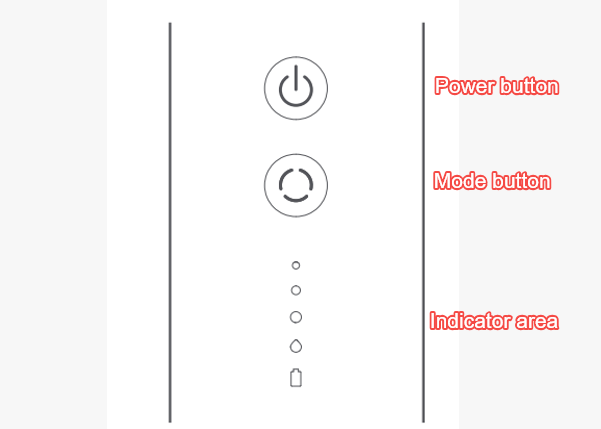
A: The Mijia Water Flosser 2 Portable has five indicators.
From top to bottom, they indicate Gentle, Standard, Powerful, Massage, and Battery Level.
These indicators clearly show the current operating mode and battery level.
Battery level indicator during operation:
40%-100%: Keeping white
20%-40%: Keeping orange
10%-20%: Blinking orange steadily
<10%: Blinking orange rapidly (flosser cannot be turned on)
Battery level indicator during charging:
0%-40%: Blinking orange
40%-100%: Blinking white
100%: Keeping white
Q2: What to do if the indicators of the Mijia Water Flosser 2 Portable do not light up?
A: If the indicators of the Mijia Water Flosser 2 Portable do not light up, please refer to the following troubleshooting steps:
1. The battery level could be too low. Connect the flosser to the charger and check whether the indicators turn on properly.
2. The indicators could be faulty. Please contact the after-sales service center for further assistance.
Q3: Does the Mijia Water Flosser 2 Portable have a display screen?
A: It does not have a display screen; It uses an LED indicator.
Additional Information
Q1: What is the water resistance rating of the Mijia Water Flosser 2 Portable?
A: The water resistance rating of the Mijia Water Flosser 2 Portable is IPX7.
Q2: Does the Mijia Water Flosser 2 Portable support the travel lock function?
A: The Mijia Water Flosser 2 Portable does not support the travel lock function.
Q3: Can the Mijia Water Flosser 2 Portable be taken on an airplane? Are there any restrictions regarding the battery?
A: The Mijia Water Flosser 2 Portable contains a built-in battery. It is recommended to keep it with you in your carry-on luggage. Please contact your airline to confirm whether it is permitted on board.
Q4: Is the Mijia Water Flosser 2 Portable convenient to carry on business trips?
A: The Mijia Water Flosser 2 Portable features a portable design, making it convenient for business travel.
Note:
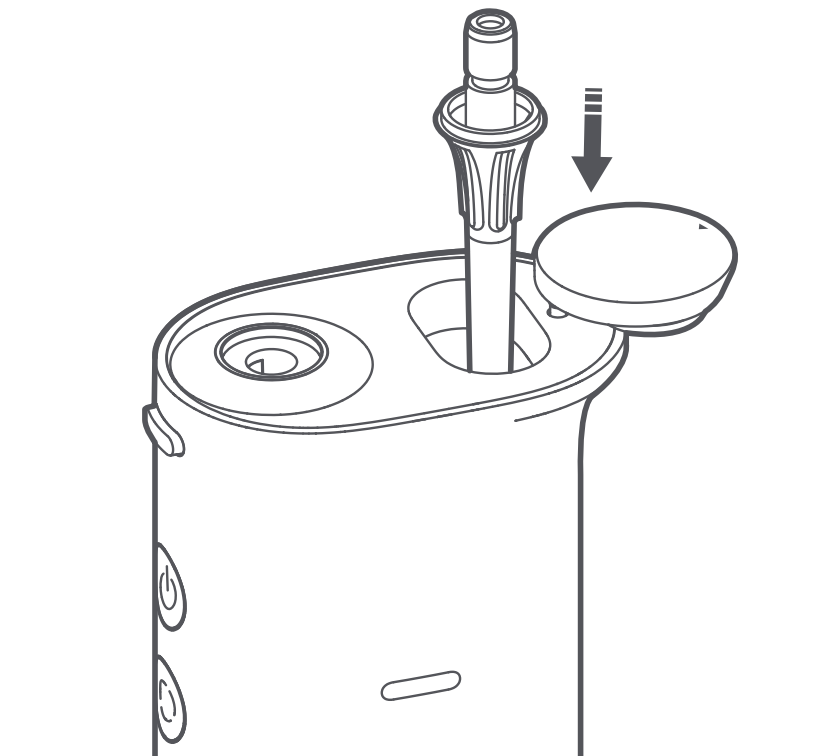
Please clean and dry the main unit and water tank; the tip can be stored inside the unit (as shown in the image), and the device can be packed in the included storage pouch for travel.
Q5: Where to check the serial number of the Mijia Water Flosser 2 Portable?
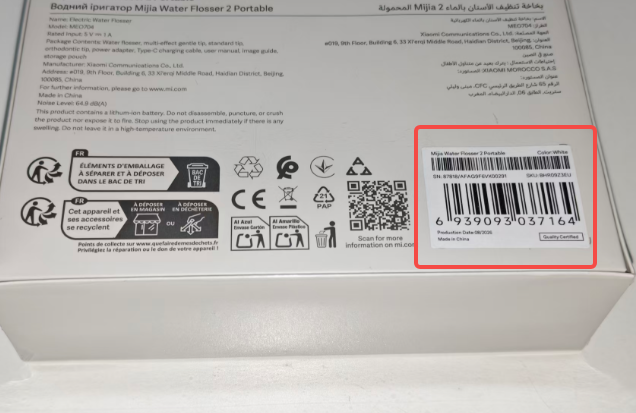
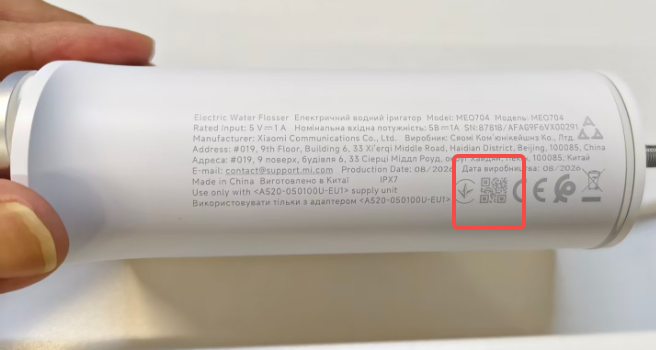
A: You can find the serial number of the Mijia Water Flosser 2 Portable on the back of the product's retail packaging or printed on the main unit. Scan the QR code to view the serial number.
Q6: What are the usage environment requirements for the Mijia Water Flosser 2 Portable?
A: The usage environment requirements for the Mijia Water Flosser 2 Portable are as follows:
1. Charging environment: Charge the product at temperatures between 0 °C and 35 °C. Do not charge it below 0 °C.
2. Storage environment: Avoid prolonged exposure to direct sunlight and store the product in a dry environment to help prevent bacterial growth.
3. Water temperature: Do not fill the water tank with water above 40 °C to avoid scalding during oral cleaning.
Cleaning and Maintenance
Q1: Can the Mijia Water Flosser 2 Portable be washed under running water?
A: Yes. Before rinsing, make sure the silicone plug on the charging port is securely closed.
Q2: How to clean the Mijia Water Flosser 2 Portable?
A: Daily cleaning:
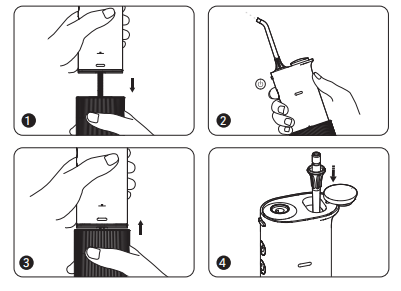
1. After each use, hold the flosser body with one hand and the water tank with the other. Pull the water tank downward firmly to detach it, and pour out any residual water inside.
2. Turn on the flosser and let it run idle until residual water is drained, then press the power button to turn it off.
3. Align the water tank with the flosser body and push it upward firmly until it clicks back into the flosser body.
4. Remove the tip, rinse and dry it, and then store it in the built-in tip storage compartment.
Note:
1. The water temperature for cleaning should not exceed 40 °C.
2. Do not use corrosive liquids, thinners, alcohol, or similar substances to clean this product.
3. The flosser body and water tank can be wiped clean with a damp cloth or rinsed with clean water, ensuring thorough drying afterward.
4. If scale builds up inside the water tank, clean it with a brush.
5. The product should be cleaned and stored after drying if it is not used for an extended period.
6. Ensure that both the interior of the water tank and the exterior of the flosser body are dry before reinstalling the water tank into the flosser body.
Regular maintenance:
Fill the water tank with warm water that does not exceed 40 °C and add a tablespoon of white vinegar. Turn on the flosser and let it run until the water tank is empty. After the water tank is empty, let the flosser continue to run for approximately 1 minute until it automatically turns off. At this point, refill the water tank with warm water that does not exceed 40 °C, press the power button to turn it on, and let it run until the water tank is empty again.
Note:
It is recommended to perform regular maintenance every 1-3 months to ensure optimal performance of the product.
Q3: How should the Mijia Water Flosser 2 Portable be stored if it won't be used for an extended period?
A: If the Mijia Water Flosser 2 Portable is not used for an extended period, please refer to the following information:
1. After use, empty the water tank and run the flosser without water for 10 seconds to drain any residual water inside. Place it in a well-ventilated area and allow it to dry completely before storage.
2. Storage environment: Avoid direct sunlight and high-temperature environments. Store the flosser in a dry environment to help prevent bacterial growth.
3. Fully charge the flosser before storage, and fully charge it once every 6 months thereafter.
Q4: Can the Mijia Water Flosser 2 Portable replace a toothbrush?
A: No. The Mijia Water Flosser 2 Portable cannot replace a toothbrush. It is an auxiliary oral cleaning tool mainly designed to remove food debris from between teeth and along the gumline. For good oral hygiene, use it together with regular toothbrushing.
Q5: Can the Mijia Water Flosser 2 Portable remove dental calculus?
A: No. It is designed to help clean food debris between teeth and reduce the risk of dental calculus buildup.
Q6: Can the Mijia Water Flosser 2 Portable remove dental plaque?
A: No. It is designed to help clean food debris between teeth and reduce plaque buildup.
Additional Questions
Q1: What to do if all four mode indicators on the Mijia Water Flosser 2 Portable flash simultaneously?
A: This can be caused by a blockage that triggers motor stall protection. Please follow the troubleshooting steps below:
1. Remove the water tank and check whether the filter at the bottom of the water intake hose is clogged with dirt. If so, clean it.
2. Check whether the tip is clogged or damaged. If it is clogged or damaged, replace it with a new tip.
3. If the issue persists after the above checks, contact the after-sales service center for further assistance.
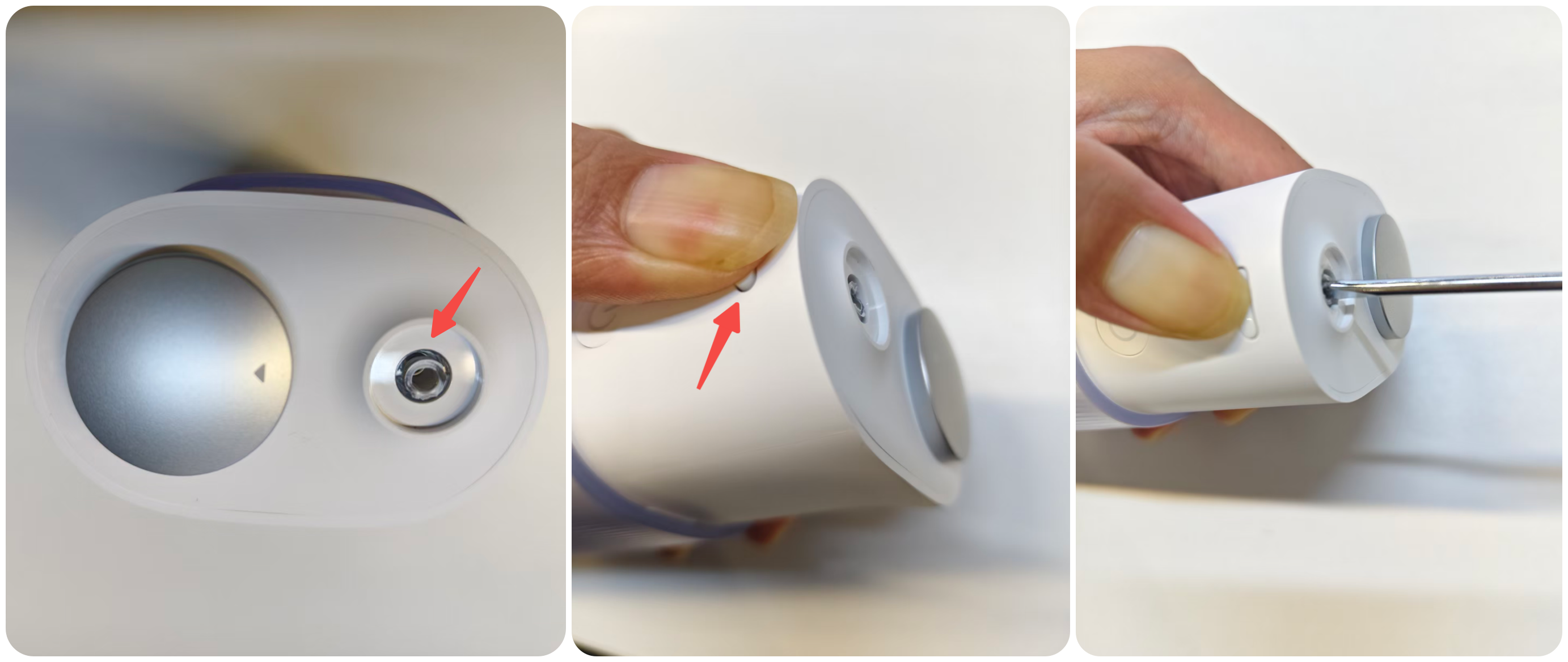
Q2: What to do if the tip breaks and gets stuck in the tip mounting hole of the Mijia Water Flosser 2 Portable?
A: The tip may break if the Mijia Water Flosser 2 Portable is dropped.
Solution: A flat-head screwdriver can be used to remove the broken tip as follows:
1. Press and hold the tip release button.
2. Insert a 3 mm flat-head screwdriver into the inner wall of the broken tip and slowly rotate it to remove the broken piece.
3. Install a new tip before using the flosser again.
4. If the broken piece cannot be removed, please contact the after-sales service center for further assistance.
Q3: What to do if the Mijia Water Flosser 2 Portable does not start?
A: If the Mijia Water Flosser 2 Portable does not start, please follow these troubleshooting steps:
1. The product may have insufficient battery power. Please charge it promptly.
2. If the issue persists, the internal components could be faulty. Please contact after-sales service for further assistance.
Does it help?
Yes
No