

Mijia Smart Multi-oscillation Electric Toothbrush Pro FAQ
Product Overview
Q1: Is the Mijia Smart Multi-oscillation Electric Toothbrush Pro a sonic toothbrush?
A: The Mijia Smart Multi-oscillation Electric Toothbrush Pro is not a sonic electric toothbrush. Rather, it is an oscillation electric toothbrush.
Electric toothbrushes rely on a built-in motor to drive the brush head in high-frequency oscillating, rotating, or sweeping-vibrating motions (the Mijia Smart Multi-oscillation Electric Toothbrush Pro utilizes a combined motion of oscillation and vibration) to automatically perform the cleaning action. Compared to manual toothbrushes, they make it easier to maintain consistent cleaning pressure and are more efficient at removing plaque.
Electric toothbrushes are primarily categorized into the following types:
1. Rotating: The small, round brush head rotates back and forth.
2. Sonic: The bristles vibrate rapidly from side to side.
3. Oscillation (Mijia Smart Multi-oscillation Electric Toothbrush Pro): A servo motor drives the brush head through a combined motion of oscillation and axial vibration.
Q2: What is a multi-oscillation electric toothbrush and how does the Mijia Smart Multi-oscillation Electric Toothbrush Pro work?
A: A multi-oscillation electric toothbrush is equipped with a multi-degree-of-freedom motor that allows the brush head to simultaneously perform horizontal micro-oscillation and vertical angular sweeping. The Mijia Smart Multi-oscillation Electric Toothbrush Pro replicates the Bass brushing technique through this dual-dimensional movement, solving the cleaning blind spot problem of traditional single-motor toothbrushes.
Q3: How does the Mijia Smart Multi-oscillation Electric Toothbrush Pro compare to a manual toothbrush?
A: A manual toothbrush operates at a maximum of 100 to 200 strokes per minute, and without proper technique, it may not effectively remove stubborn plaque and can easily harm the gums. The Mijia Smart Multi-oscillation Electric Toothbrush Pro combines up-and-down and side-to-side brushing at high frequency to achieve thorough plaque removal and deep interdental cleaning while protecting gums.
Q4: Who is the Mijia Smart Multi-oscillation Electric Toothbrush Pro suitable for?
A: The Mijia Smart Multi-oscillation Electric Toothbrush Pro is designed for adults, including the following groups:
1. People who value oral care and pursue a convenient lifestyle, such as those with busy schedules who want efficient cleaning or those who feel manual brushing is insufficient.
2. People with sensitive teeth or gum discomfort, as the product supports multiple intensity levels and allows setting a comfortable level via the app, reducing gum irritation from uneven manual brushing pressure.
3. Smokers and people who frequently drink strong tea or coffee, as the whitening brush head features a polishing zone that helps reduce surface stains over time.
Q5: What is copper-free bristle implantation technology used in the Mijia Smart Multi-oscillation Electric Toothbrush Pro?
A: Copper-free bristle implantation is a modern bristle-anchoring technique that does not use metal materials. Instead, it uses high-precision equipment to firmly secure bristles in the brush head. The advantages include better environmental friendliness, improved safety, and greater durability.
Q6: Why should brush heads of the Mijia Smart Multi-oscillation Electric Toothbrush Pro be replaced regularly?
A: Brush heads should be replaced regularly for the following reasons:
1. Fresh brush heads provide better cleaning performance.
2. Over time, bristles gradually wear down and accumulate plaque, reducing cleaning effectiveness.
3. After three months of use, bristles become deformed and can harbor large amounts of bacteria.
Q7: What is the recommended brushing method for the Mijia Smart Multi-oscillation Electric Toothbrush Pro?
A: The recommended brushing method is the Bass technique, which is widely endorsed by dental professionals worldwide. It focuses on cleaning plaque at the gum line and in gum grooves, where plaque is the main cause of gingivitis, tartar, and cavities. When using the Mijia Smart Multi-oscillation Electric Toothbrush Pro, follow these steps:
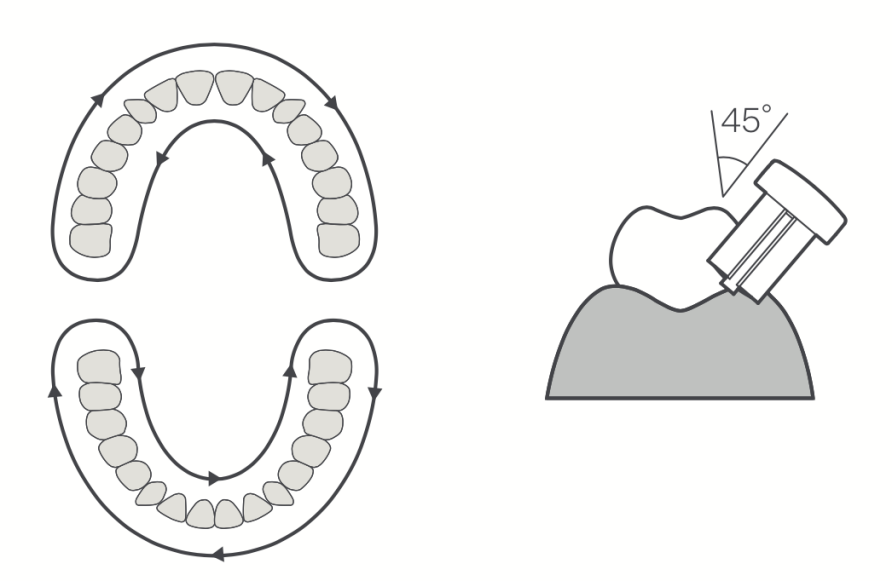
1. Hold the bristles at a 45-degree angle to the gum line, with bristles pointing toward the root and gently extending into the gum groove. Use light pressure, as pressing too hard weakens the vibration and may damage the gums.
2. Clean two to three teeth at a time, holding for two to three seconds per group before slowly moving to the next, with slight overlap to avoid missing areas.
3. Clean all tooth surfaces in order: outer and inner surfaces of back teeth at 45 degrees, inner surfaces of front teeth with the brush held vertically, chewing surfaces with the brush laid flat, and do not forget the back of the last molar, which is a common blind spot.
4. Complete a full two-minute session divided into four quadrants: upper right, upper left, lower right, and lower left, spending 30 seconds on each area.
Q8: What are the key selling points of the Mijia Smart Multi-oscillation Electric Toothbrush Pro?
A: The key selling points are as follows:
1. Smart color screen interaction: The built-in color screen displays brushing data in real time, including pressure, coverage, and duration, helping you improve your brushing habits.
2. Smart tooth surface recognition: Using a six-axis sensor, the toothbrush identifies six brushing zones, automatically adjusts power for each zone, and provides missed-area reminders.
3. App oral care manager: The Xiaomi Home App offers personalized cleaning plans based on your goals, including orthodontic care, pregnancy care, whitening, daily deep cleaning, sensitive teeth cleaning, and smart per-surface cleaning.
Product Appearance and Accessories
Q1: What is the product structure of the Mijia Smart Multi-oscillation Electric Toothbrush Pro?
A: The Mijia Smart Multi-oscillation Electric Toothbrush Pro consists of two parts:
1. Brush head: Made of PP+TPE with a built-in elastic soft gel. It comes in two replaceable types: a soft brush head and a cleaning brush head. Bristles are made of BBC tapered filament or DuPont round filament, with color-fading indicator bristles. The brush head is detachable and compatible with this model.
2. Brush handle: Made of metal aluminum alloy for high rigidity and a premium grip feel. It houses the internal transmission and vibration mechanism.
Q2: What are the weight and dimensions of the Mijia Smart Multi-oscillation Electric Toothbrush Pro?
A: The Mijia Smart Multi-oscillation Electric Toothbrush Pro weighs 168.3 grams with one brush head attached. With the brush head, the dimensions are 254.4 mm x 28.3 mm x 31 mm. Without the brush head, the dimensions are 171 mm x 28.3 mm x 31 mm.
Q3: What are the weight and dimensions of the package of the Mijia Smart Multi-oscillation Electric Toothbrush Pro?
A: The package measures 238 ± 2 mm in length, 149 ± 2 mm in width, and 77 ± 2 mm in height. The total package weight is 805 ± 10 g, including shrink wrap.
Q4: What material is the handle of the Mijia Smart Multi-oscillation Electric Toothbrush Pro made of?
A: The handle of the Mijia Smart Multi-oscillation Electric Toothbrush Pro is made of metal aluminum alloy, which provides high rigidity and a comfortable grip.
Q5: What are the brush head dimensions of the Mijia Smart Multi-oscillation Electric Toothbrush Pro?
A: The brush head measures 20 mm in width, 20 mm in depth, and 83.4 mm in height. The brush head weighs 5 grams.
Q6: Which brush head models are compatible with the Mijia Smart Multi-oscillation Electric Toothbrush Pro?
A: The brush head of the Mijia Smart Multi-oscillation Electric Toothbrush Pro is compatible with the Xiaomi Oscillation Electric Toothbrush and the Xiaomi Oscillation Electric Toothbrush Pro.
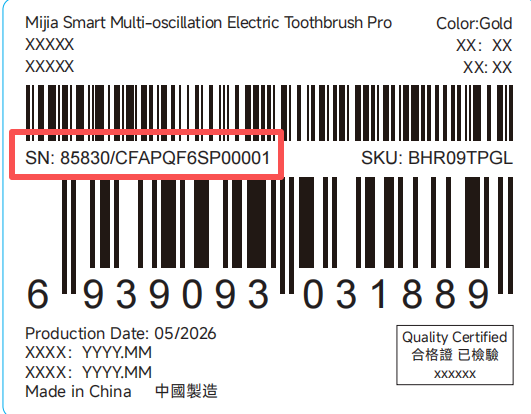
Q7: Where can I find the serial number of the Mijia Smart Multi-oscillation Electric Toothbrush Pro?
A: The serial number is located on the label in the bottom-right corner on the back of the product package.
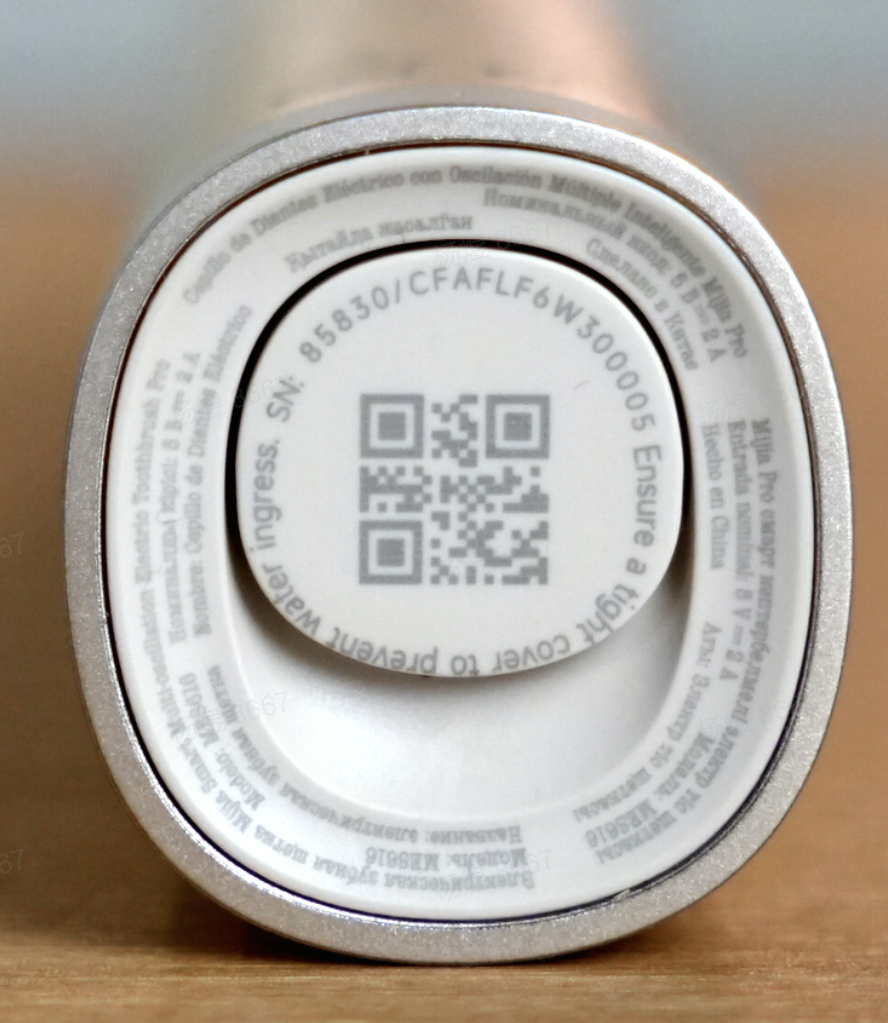
You can also check the serial number (SN) on the bottom of the electric toothbrush handle.
Function Usage
Q1: How to use the Mijia Smart Multi-oscillation Electric Toothbrush Pro?
A: To use the Mijia Smart Multi-oscillation Electric Toothbrush Pro, follow these steps:
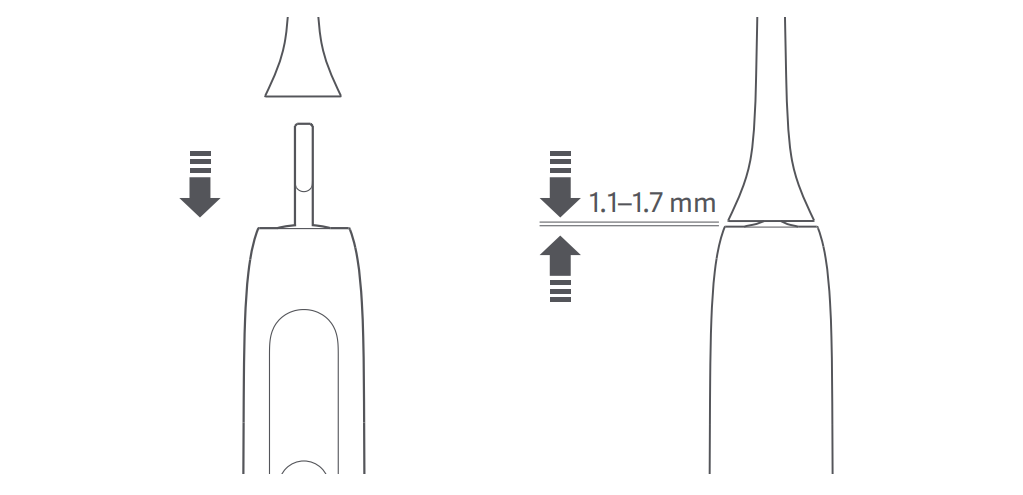
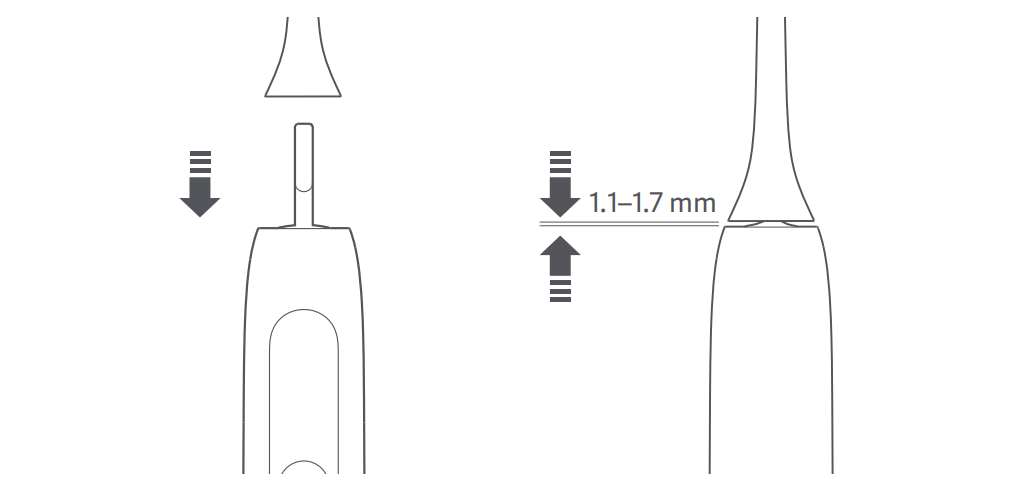
1. Attach the brush head to the brush handle, ensuring a gap of approximately 1.1 to 1.7 mm between them. This gap prevents the brush head from hitting the main body during high-frequency vibration and allows the motor to deliver maximum power.
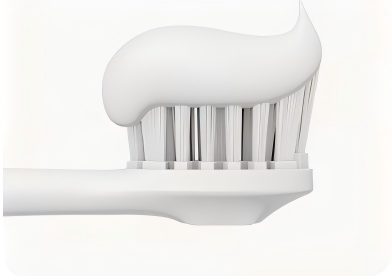
2. Apply an appropriate amount of toothpaste to the brush head and moisten it with water.
3. Select a suitable brushing mode.
4. Brush at a 45-degree angle to the gum line, moving the brush slowly. During brushing, you can press the power button to switch modes.
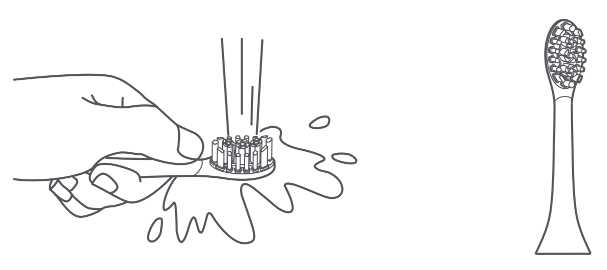
5. After brushing, rinse the brush head and store the toothbrush upright in a ventilated area.
Q2: How to maintain the Mijia Smart Multi-oscillation Electric Toothbrush Pro?
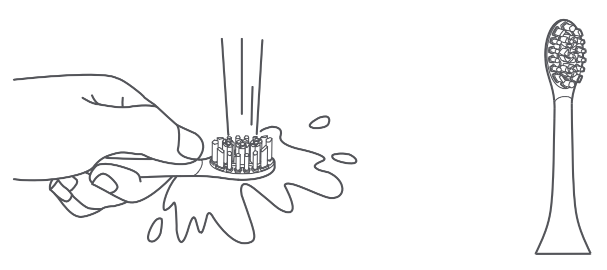
A: After each use, rinse the brush head under running water, shake off excess water, and place it in a ventilated area to air dry.
Q3: How to install or replace the brush head on the Mijia Smart Multi-oscillation Electric Toothbrush Pro?
A: Make sure that the bristle direction of the toothbrush head is aligned with the front side of the handle. Align downward and install the toothbrush head onto the handle, and make sure there is a 1.1–1.7 mm gap between the toothbrush head and the handle.
Note:
The gap is required to avoid collision of the toothbrush head with the handle during high-frequency oscillation, so that the motor can run more stably.
Q4: What brushing modes does the Mijia Smart Multi-oscillation Electric Toothbrush Pro offer?
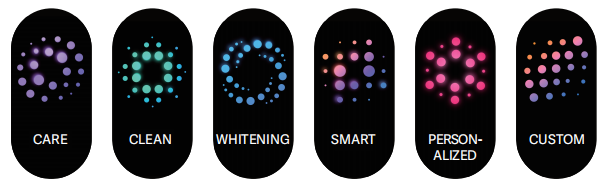
A: The Mijia Smart Multi-oscillation Electric Toothbrush Pro offers six modes: Care, Cleaning, Whitening, Smart, Custom, and Personalized. The Custom and Personalized modes need to be activated through the Xiaomi Home App before use.
Care mode: Gentle cleaning. This is suitable for beginners and people with sensitive teeth and gums.
Clean mode: Daily cleaning. Cleans the gingival sulcus with horizontal oscillation, while cleaning the tooth surface with vertical oscillation.
Whitening mode: Powerful cleaning. This is suitable for people who want whiter teeth.
Smart mode: Intelligent oscillation. This adapts its cleaning methods to different tooth surfaces.
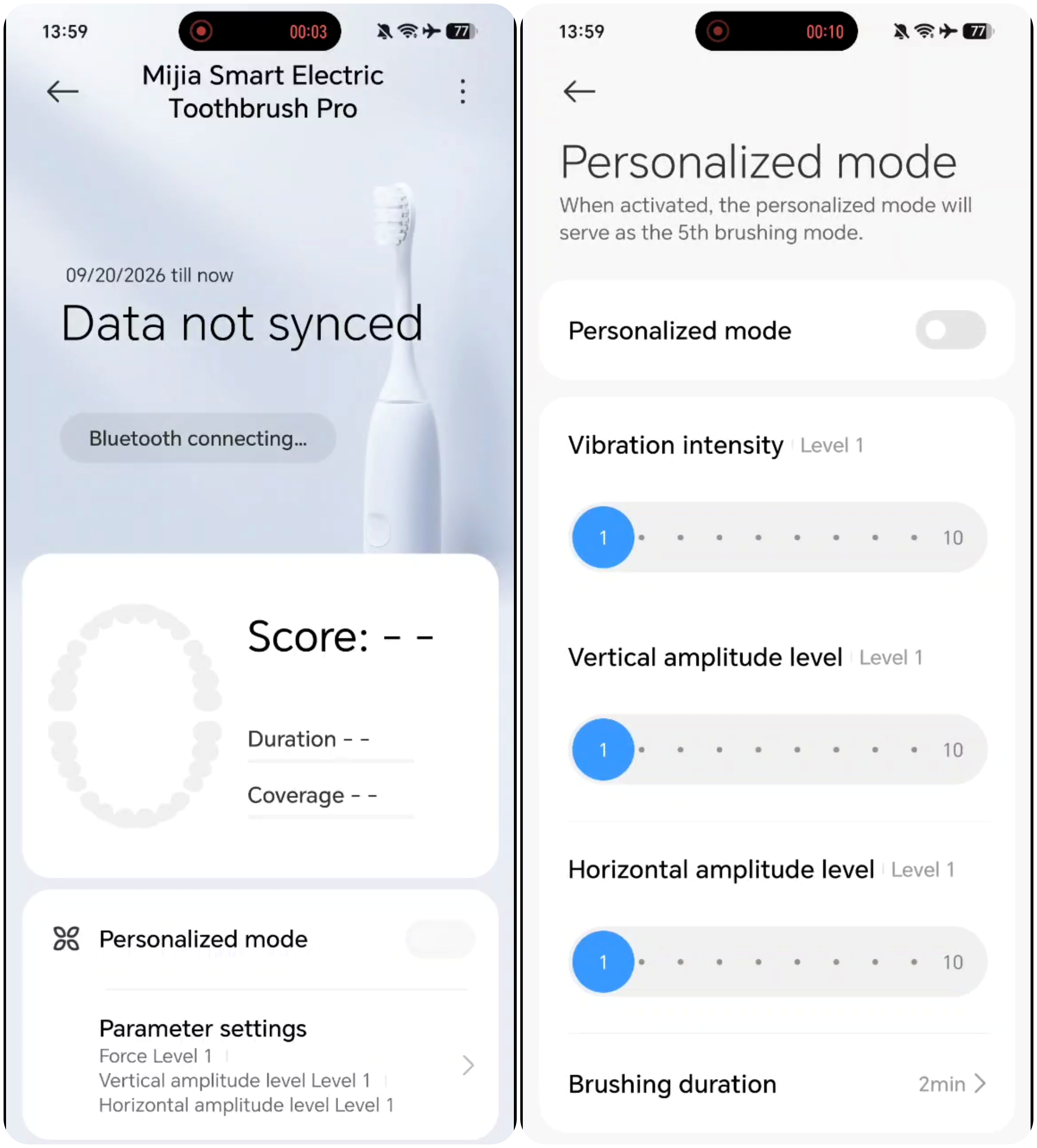
Personalized mode: You can adjust the oscillation intensity, the range of vertical and horizontal movements, and set brushing duration in the App.
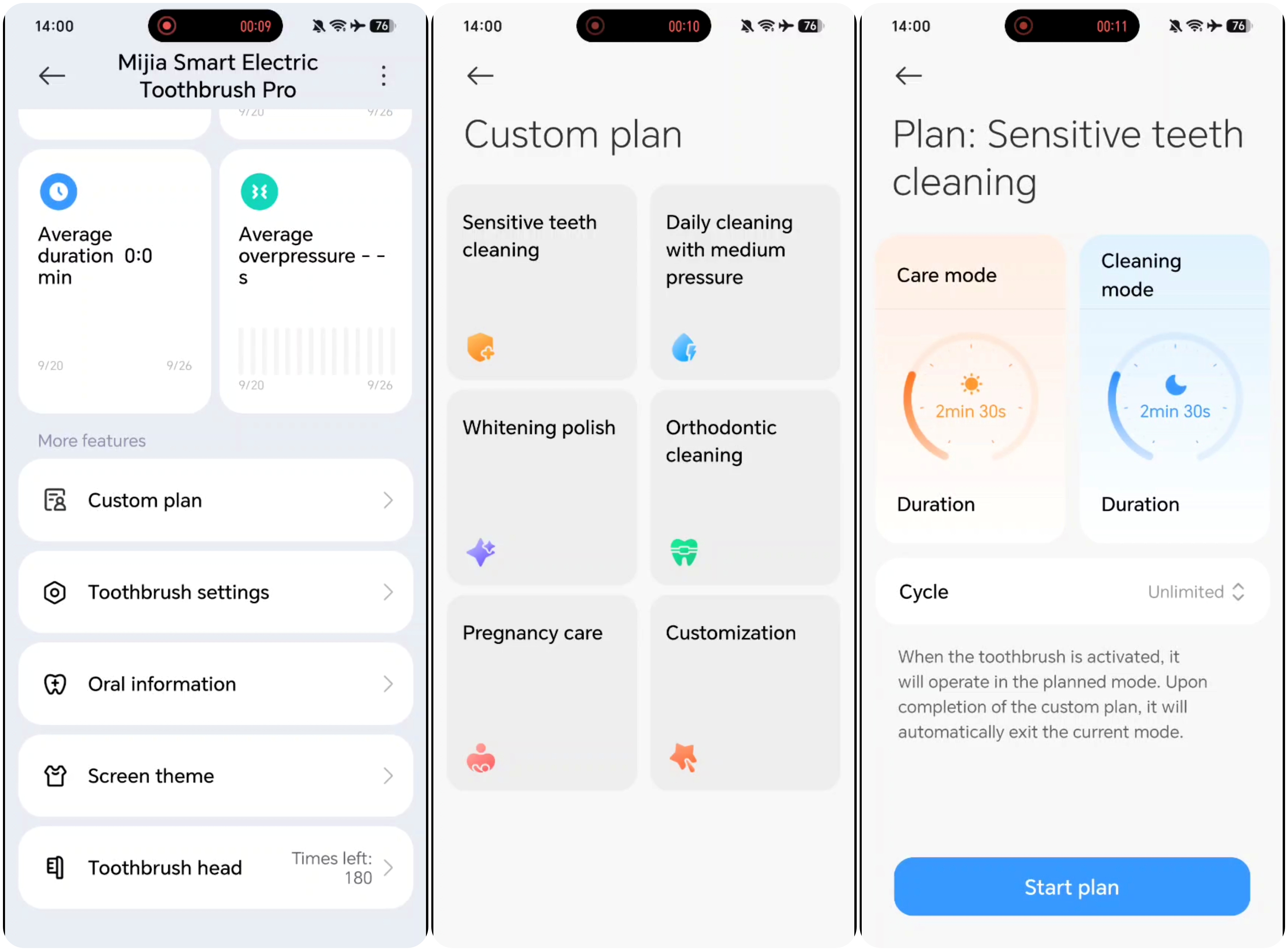
Custom plan: The App offers preset plans such as sensitivity care, powerful cleaning, and whitening polish. Each plan includes different seings for morning and evening (such as cleaning mode, duration). Select an oral care plan based on your needs.
Q5: How to switch brushing modes on the Mijia Smart Multi-oscillation Electric Toothbrush Pro?
A: Press the power button to cycle through modes in the following order: Care, Cleaning, Whitening, Smart, Custom, and Personalized. Personalized and Custom modes need to be set in the Xiaomi Home App. Once set and enabled, they will be included in the mode cycle.
Q6: How do the buttons on the Mijia Smart Multi-oscillation Electric Toothbrush Pro work?
A:
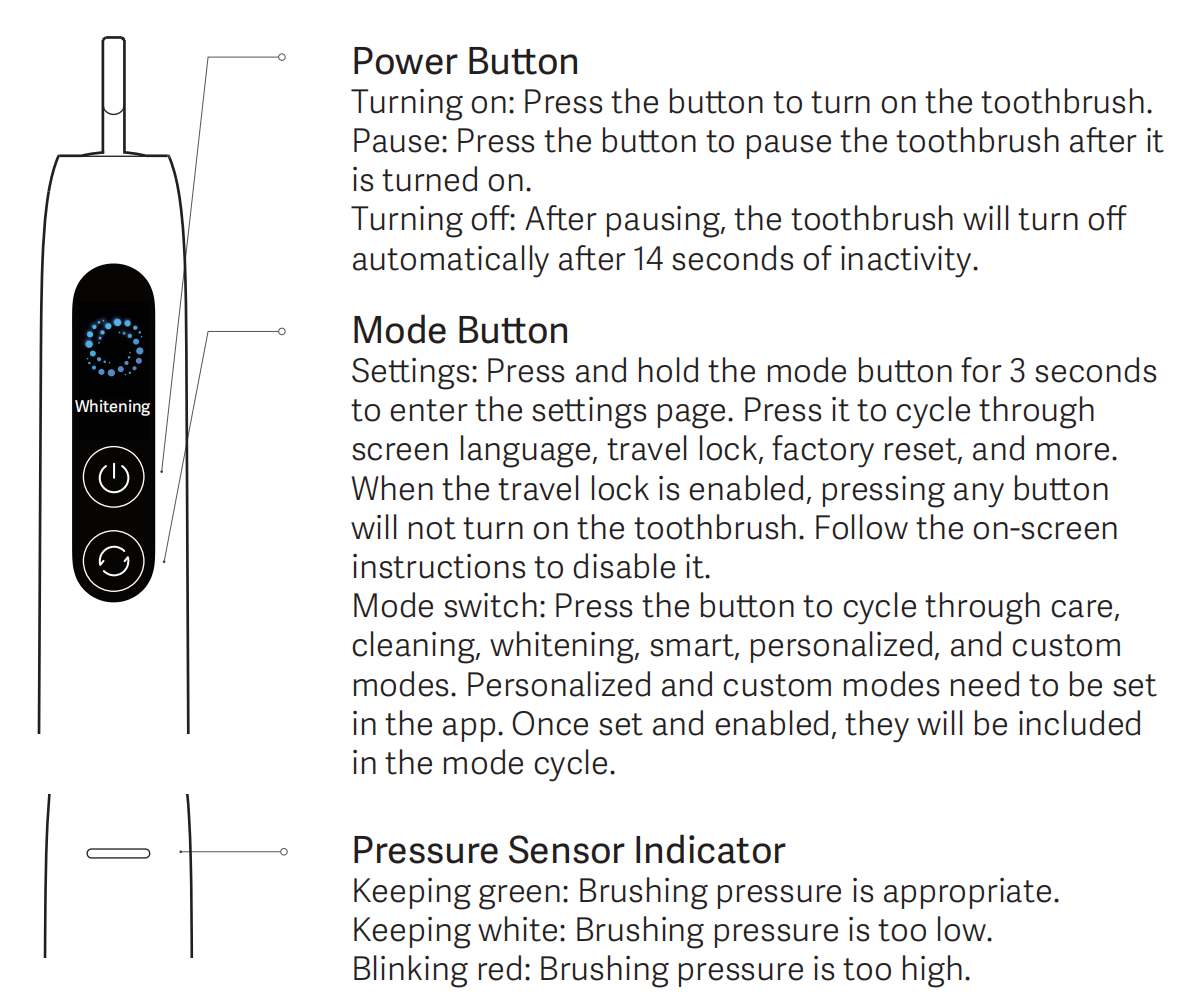
Power Button
1. Turning on: Press the button to turn on the toothbrush.
2. Pause: Press the button to pause the toothbrush after it is turned on.
3. Turning off: After pausing, the toothbrush will turn off automatically after 14 seconds of inactivity.
Mode Button
1. Settings: Press and hold the mode button for 3 seconds to enter the settings page. Press it to cycle through screen language, travel lock, factory reset, and more. When the travel lock is enabled, pressing any button will not turn on the toothbrush. Follow the on-screen instructions to disable it.
2. Mode switch: Press the button to cycle through care, clean, whitening, smart, personalized, and custom modes. Personalized and custom modes need to be set in the App. Once set and enabled, they will be included in the mode cycle.
Q7: Does the Mijia Smart Multi-oscillation Electric Toothbrush Pro remember the last used mode?
A: Yes, the Mijia Smart Multi-oscillation Electric Toothbrush Pro remembers the last used mode and power level.
Q8: What is the default brushing duration of the Mijia Smart Multi-oscillation Electric Toothbrush Pro?
A: The default brushing duration is 2 minutes.
Q9: How does the 30-second zone reminder work on the Mijia Smart Multi-oscillation Electric Toothbrush Pro?
A: The toothbrush briefly pauses every 30 seconds to prompt you to switch to the next brushing area.
Q10: Does the Mijia Smart Multi-oscillation Electric Toothbrush Pro have an anti-splash feature?
A: Yes, upon pressing the power button, the motor does not immediately jump to full-speed vibration; instead, it gradually ramps up from low to high intensity. This prevents the brush head—already loaded with toothpaste—from vibrating at high speed outside the mouth, which would otherwise cause toothpaste and foam to splatter onto the mirror or sink.
Q11: Does the Mijia Smart Multi-oscillation Electric Toothbrush Pro support lift-to-wake?
A: Yes, the built-in accelerometer detects when the toothbrush is lifted and automatically wakes the device.
Q12: Does the Mijia Smart Multi-oscillation Electric Toothbrush Pro support shake-to-wake?
A: Yes, shake-to-wake works the same way as lift-to-wake.
Q13: How to personalize settings on the Mijia Smart Multi-oscillation Electric Toothbrush Pro?
A: Open the Xiaomi Home App, navigate to toothbrush settings, select Personalized mode, and adjust the settings to your preference.
Q14: What are the Custom and Personalized modes of the Mijia Smart Multi-oscillation Electric Toothbrush Pro?
A: The Custom mode provides a cloud-based care plan tailored to your oral condition. The Personalized mode allows you to adjust frequency and intensity manually. Both modes need to be activated through the Xiaomi Home App.
Here is how to activate the custom plan:
1. Open the Xiaomi Home App, select the device card, and tap [Custom plan] to select and configure the plan's duration.
2. Once the customized plan is set up, the toothbrush's home screen in the App will display the plan's progress; additionally, when you press the power button to start brushing, the toothbrush will default to the customized plan mode.
3. The customized plan will automatically deactivate once the set duration expires.
Here is how to enable the Personalized mode:
Open the Xiaomi Home App >> select the device >> enable [Personalized mode]. You can tap [Parameter settings] to configure settings for the specific level, including brushing duration, vibration intensity, horizontal amplitude level, vertical amplitude level, and the mode toggle switch.
Q15: Does the Mijia Smart Multi-oscillation Electric Toothbrush Pro have a soft start feature?
A: Yes, the motor gradually ramps up to full speed to prevent toothpaste splashing.
Q16: How does the travel lock work on the Mijia Smart Multi-oscillation Electric Toothbrush Pro?
A: The travel lock prevents accidental activation during travel. To enable it, press and hold the mode button for 3 seconds to enter the settings page. Press it to cycle through screen language, travel lock, and more.
When the travel lock is enabled, pressing any button will not turn on the toothbrush. Follow the on-screen instructions to disable it.
Q17: How to access the settings menu on the Mijia Smart Multi-oscillation Electric Toothbrush Pro?
A: Press and hold the mode button for 3 seconds to enter the settings menu, then press to cycle through the available options.
Q18: How to change the language on the Mijia Smart Multi-oscillation Electric Toothbrush Pro?
A: Press and hold the mode button for 3 seconds to enter the settings menu, select Language, and press to switch between available languages. The Mijia Smart Multi-oscillation Electric Toothbrush Pro supports English, Traditional Chinese, and Russian.
Q19: How to prevent the Mijia Smart Multi-oscillation Electric Toothbrush Pro from slipping?
A: Keep your hands and the handle dry, avoid applying lubricants, and do not press too hard during use.
Q20: How to store the Mijia Smart Multi-oscillation Electric Toothbrush Pro?
A: Please refer to the following tips for storing your toothbrush when it is not in frequent use:
1. After each use, rinse the brush head under running water, shake off excess moisture, and place it upright in a dry, well-ventilated area to air dry; avoid storing it in a sealed container where water accumulation could breed bacteria.
2. Before long-term storage, clean the brush head and handle, wipe off any surface moisture, and store them separately.
3. If storing for an extended period, charge the battery to approximately 50% to prevent damage from deep discharge; recharge it every three months.
4. Do not store in high-temperature or humid environments (such as enclosed bathroom cabinets or areas exposed to direct sunlight) to prevent material aging and battery performance degradation.
5. Do not store in sealed bags or airtight containers when not in use, as enclosed environments can trap moisture and lead to mold growth.
6. Keep away from heavy objects that could crush the device, and avoid impacts that might damage the handle, sensors, or buttons.
7. When packing for travel, activate the travel lock to prevent accidental activation and battery drain.
Q21: Does the Mijia Smart Multi-oscillation Electric Toothbrush Pro have a color-fading bristle indicator?
A: Yes, both the soft and cleaning brush heads feature green color-fading indicator bristles that fade over time to signal when replacement is needed.
Q22: What does the indicator on the Mijia Smart Multi-oscillation Electric Toothbrush Pro mean?
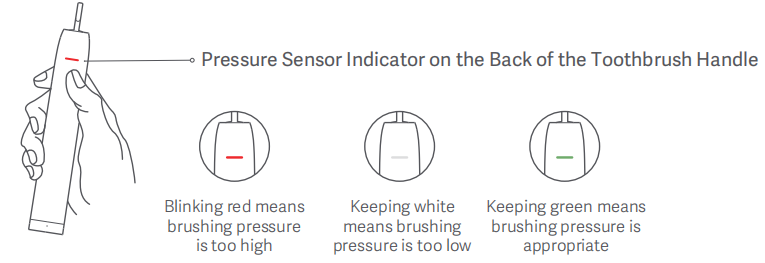
A: The Mijia Smart Multi-oscillation Electric Toothbrush Pro has a pressure reminder feature to protect gum health and ensure effective cleaning.
1. When brushing pressure is too low, the pressure sensor indicator will stay white, prompting you to brush harder.
2. When brushing pressure is appropriate, the pressure sensor indicator will stay green.
3. When brushing pressure is too high, the pressure sensor indicator will blink red, and the toothbrush will reduce its oscillation frequency to prevent tooth damage.
Q23: What screen does the Mijia Smart Multi-oscillation Electric Toothbrush Pro have?
A: The Mijia Smart Multi-oscillation Electric Toothbrush Pro has a 0.96-inch LCD color screen with a resolution of 80 by 160 pixels. It displays brushing duration, coverage rate, plaque risk, battery level, and missed area reminders.
Q24: What does the Mijia Smart Multi-oscillation Electric Toothbrush Pro display after brushing?
A: After brushing, the screen displays the brushing duration, coverage rate, and missed area reminders.
Q25: How does the Mijia Smart Multi-oscillation Electric Toothbrush Pro calculate plaque risk?
A: The toothbrush calculates the plaque formation rate since your last brushing session and presents it as a risk score.
Q26: How does the missed area reminder work on the Mijia Smart Multi-oscillation Electric Toothbrush Pro?
A: The six-axis sensor identifies six brushing zones, tracks which areas have been cleaned, and alerts you to any uncleaned areas.
Q27: Is the Mijia Smart Multi-oscillation Electric Toothbrush Pro waterproof?
A: Yes, the Mijia Smart Multi-oscillation Electric Toothbrush Pro has an IPX8 waterproof rating.
Q28: Can I use the Mijia Smart Multi-oscillation Electric Toothbrush Pro in the shower?
A: Yes, you can use the toothbrush with cold or warm water. However, do not use it with hot water or steam, as this may damage the device.
Q29: Is the charging port of the Mijia Smart Multi-oscillation Electric Toothbrush Pro waterproof?
A: The handle itself has an IPX8 waterproof rating. However, the charging port and charging dock must not be submerged in water.
Q30: How does over-pressure protection work on the Mijia Smart Multi-oscillation Electric Toothbrush Pro?
A: The toothbrush has three sensitivity levels for pressure detection. When pressure is too low, a white flash appears. When pressure is optimal, a green light appears. When pressure is too high, a red flash appears, and the motor automatically reduces speed.
Q31: Is gum bleeding normal when first using the Mijia Smart Multi-oscillation Electric Toothbrush Pro?
A: The Mijia Smart Multi-oscillation Electric Toothbrush Pro features a vibration frequency of up to 30,720 strokes per minute, delivering cleaning performance several times superior to that of a manual toothbrush. Upon first use, you may experience a tingling sensation or slight gum bleeding as your gums adjust to this high-efficiency cleaning. This typically resolves within one to two weeks. If the issue persists beyond two weeks, it may indicate an underlying gum problem; it is advised to discontinue use and consult a dentist.
Q32: Can I disassemble the Mijia Smart Multi-oscillation Electric Toothbrush Pro?
A: No, the Mijia Smart Multi-oscillation Electric Toothbrush Pro should not be disassembled.
Q33: What type of battery does the Mijia Smart Multi-oscillation Electric Toothbrush Pro have?
A: The Mijia Smart Multi-oscillation Electric Toothbrush Pro utilizes a lithium-ion polymer battery pack consisting of two pouch cells connected in series, with a capacity of 1140 mAh per cell.
Note:
It should be noted that the battery pack consists of two 1140 mAh cells connected in series; due to the characteristics of series connections, the total battery capacity (in mAh) is not the sum of the individual capacities — rather, only the voltage adds up.
Q34: How long does it take to fully charge the Mijia Smart Multi-oscillation Electric Toothbrush Pro?
A: It takes approximately 4 hours to fully charge the Mijia Smart Multi-oscillation Electric Toothbrush Pro.
Q35: How long does the battery of the Mijia Smart Multi-oscillation Electric Toothbrush Pro last?
A: The battery lasts up to 30 days based on Care mode usage, brushing twice a day for 2 minutes each session.
Q36: How does battery life vary across different modes on the Mijia Smart Multi-oscillation Electric Toothbrush Pro?
A: When fully charged and used twice daily for two minutes per session—using the Care mode and factory-default power settings—the toothbrush typically lasts about 30 days. Battery life may vary depending on the mode used and specific usage conditions; such variations are normal.
If you experience short standby times, consider the following potential causes:
1. Constant Bluetooth connectivity accelerates battery drain, so it is recommended to avoid keeping the Bluetooth connection active continuously.
2. Excessive usage frequency; rapid battery depletion is normal in such cases. To verify performance, fully charge the device and test it by using the Care mode and factory-default power settings twice a day for two minutes per session.
Q37: What is the recommended charging temperature for the Mijia Smart Multi-oscillation Electric Toothbrush Pro?
A: The recommended charging temperature range is 0 to 35 degrees Celsius.
Q38: What charging method does the Mijia Smart Multi-oscillation Electric Toothbrush Pro use?
A: The Mijia Smart Multi-oscillation Electric Toothbrush Pro uses USB Type-C for charging.
Q39: What type of charging port does the Mijia Smart Multi-oscillation Electric Toothbrush Pro have?
A: The Mijia Smart Multi-oscillation Electric Toothbrush Pro has a USB Type-C charging port.
Q40: How long is the charging cable of the Mijia Smart Multi-oscillation Electric Toothbrush Pro?
A: The charging cable is 0.5 meters long.
Q41: Does the Mijia Smart Multi-oscillation Electric Toothbrush Pro come with a power adapter?
A: No, a power adapter is not included in the package.
Q42: Can I use the Mijia Smart Multi-oscillation Electric Toothbrush Pro while it is charging?
A: No, the toothbrush cannot be used while charging.
Q43: How should I dispose of the Mijia Smart Multi-oscillation Electric Toothbrush Pro battery?
A: When the device reaches the end of its service life or if the battery leaks, please remove and dispose of the built-in battery in accordance with the regulations of the country or region where the product is used. If the battery cannot be removed, please dispose of the entire unit in strict compliance with local regulations for household waste sorting.
Q44: How loud is the Mijia Smart Multi-oscillation Electric Toothbrush Pro during operation?
A: The noise level is below 55 dB during operation.
Q45: How to connect the Mijia Smart Multi-oscillation Electric Toothbrush Pro to the Xiaomi Home App?
A: The Mijia Smart Multi-oscillation Electric Toothbrush Pro works with the Xiaomi Home App.
To connect your device to the Xiaomi Home App, please scan the QR code to download and install the App. You will be directed to the connection setup page if the App is already installed. Or search for "Xiaomi Home" in the app store to download and install it. Open the Xiaomi Home app, tap "+" on the upper right, and then follow the instructions to add your device.
Note:
1. When connecting with the Xiaomi Home App, it is recommended to keep your phone as close to the toothbrush as possible to ensure uninterrupted connection.
2. The version of the App might have been updated; please follow the instructions based on the current App version.
Q46: What operating systems does the Mijia Smart Multi-oscillation Electric Toothbrush Pro support when connected to the Xiaomi Home App?
A: The Xiaomi Home App supports Android 9.0 and above, and iOS 14.0 and above. A Bluetooth connection is required. Windows and macOS are not supported.
Q47: What features does the Xiaomi Home App offer for the Mijia Smart Multi-oscillation Electric Toothbrush Pro?
A: After pairing the Mijia Smart Multi-oscillation Electric Toothbrush Pro with the Xiaomi Home App, the following functions are available:
1. View brushing reports, brushing scores, battery level, and historical brushing data (including brushing time, duration, and cleaning status), as well as weekly report scores.
2. Customize smart oral care goals.
3. Configure personalized brushing modes.
4. Adjust pressure sensitivity.
5. View and reset the remaining lifespan of the brush head.
6. Perform firmware updates.
Q48: How to view brushing history for the Mijia Smart Multi-oscillation Electric Toothbrush Pro?
A: Open the Xiaomi Home App and select the Mijia Smart Multi-oscillation Electric Toothbrush Pro. In the brushing report section at the top, you can view data from your most recent brushing session, including your brushing score, coverage, brushing pressure, duration, and frequency. You can view these reports on a daily, weekly, or monthly basis.
Q49: How to update the firmware of the Mijia Smart Multi-oscillation Electric Toothbrush Pro?
A: Connect the toothbrush via Bluetooth, open the Xiaomi Home App, go to settings, and select [Firmware update] to download and install the latest firmware.
Q50: Does the Mijia Smart Multi-oscillation Electric Toothbrush Pro vibrate when connecting to the Xiaomi Home App?
A: No, the toothbrush does not vibrate when connecting to or disconnecting from the Xiaomi Home App. Vibration only occurs during mode activation.
Q51: How many brushing records can the Mijia Smart Multi-oscillation Electric Toothbrush Pro store?
A: The toothbrush can store up to 60 sets of brushing records. Please sync regularly, as records may be lost if the device stays offline for more than two months.
Q52: Can multiple accounts connect to the Mijia Smart Multi-oscillation Electric Toothbrush Pro at the same time?
A: No, only one account can connect to the toothbrush at a time.
Q53: Does the Mijia Smart Multi-oscillation Electric Toothbrush Pro support sending notifications through the Xiaomi Home App?
A: Yes, the Mijia Smart Multi-oscillation Electric Toothbrush Pro supports sending notifications through the Xiaomi Home App.
Q54: Does the Mijia Smart Multi-oscillation Electric Toothbrush Pro support smart scene automation?
A: Yes, the Mijia Smart Multi-oscillation Electric Toothbrush Pro supports smart scene automation with the following triggers: full charge, battery below 20 percent, and remaining consumable uses below 6.
Q55: Can I change the Mijia Smart Multi-oscillation Electric Toothbrush Pro settings in the Xiaomi Home App without a Bluetooth connection?
A: No, a Bluetooth connection is required to change settings in the Xiaomi Home App of the Mijia Smart Multi-oscillation Electric Toothbrush Pro.
Q56: Does the Mijia Smart Multi-oscillation Electric Toothbrush Pro support AI features?
A: No, the Mijia Smart Multi-oscillation Electric Toothbrush Pro does not support AI features.
Q57: Does the Mijia Smart Multi-oscillation Electric Toothbrush Pro support AI ring functionality?
A: No, AI ring functionality is not applicable to the Mijia Smart Multi-oscillation Electric Toothbrush Pro.
Q58: Can I bring the Mijia Smart Multi-oscillation Electric Toothbrush Pro on an airplane?
A: Yes, you can bring the Mijia Smart Multi-oscillation Electric Toothbrush Pro in your carry-on luggage, as it contains a small lithium-ion battery. Please contact the respective airline to confirm whether it is safe to bring on an airplane.
Q59: How to factory reset the Mijia Smart Multi-oscillation Electric Toothbrush Pro?
A: Press and hold both buttons simultaneously for 7 seconds to perform a factory reset. After resetting, please sync the toothbrush with the Xiaomi Home App again.
Q60: How to check the battery level of the Mijia Smart Multi-oscillation Electric Toothbrush Pro in the Xiaomi Home App?
A: Open the Xiaomi Home App, select your toothbrush, and the battery level will be displayed on the main screen.
Q61: How to view brushing history and scores for the Mijia Smart Multi-oscillation Electric Toothbrush Pro?
A: Open the Xiaomi Home App, select your toothbrush, and navigate to the Scores or History section.
Q62: How to check the remaining life of the Mijia Smart Multi-oscillation Electric Toothbrush Pro brush head?
A: Open the Xiaomi Home App, navigate to Brush head, and view the remaining days. You can also reset the brush head usage counter from the brush head page when you install a new one.
Troubleshooting
Q1: Why won't the Mijia Smart Multi-oscillation Electric Toothbrush Pro turn on?
A: If the toothbrush won't turn on, check the following:
1. The travel lock may be enabled. Press any button for 3 seconds to disable it.
2. The toothbrush may be connected to a charger. Disconnect it from the charger first.
3. A Bluetooth connection may be active. Disconnect it from the app first.
4. The battery may be depleted. Charge the toothbrush before use.
Q2: Why is there no response from the Mijia Smart Multi-oscillation Electric Toothbrush Pro when charging?
A: This is normal behavior. The toothbrush cannot be activated while it is connected to a charger.
Q3: Why is the battery life of the Mijia Smart Multi-oscillation Electric Toothbrush Pro shorter than expected?
A: When fully charged and used twice daily for two minutes per session—using the Care mode and factory-default power settings—the toothbrush typically lasts about 30 days. Battery life may vary depending on the mode used and specific usage conditions; such variations are normal.
If you experience short standby times, consider the following potential causes:
1. Constant Bluetooth connectivity accelerates battery drain, so it is recommended to avoid keeping the Bluetooth connection active continuously.
2. Excessive usage frequency: Rapid battery depletion is normal in such cases. To verify performance, fully charge the device and test it by using Care mode and factory-default power settings twice a day for two minutes per session.
Q4: What to do if the Mijia Smart Multi-oscillation Electric Toothbrush Pro shows a moisture warning?
A: This indicates that water ingress or a short circuit has been detected at the charging port; charging could be dangerous in this state, so this serves as a warning not to proceed.
If this occurs, please stop charging immediately. Use a hair dryer to dry the water inside the charging port and the charging cable connector before attempting to charge again (please control the temperature and duration to avoid heat damage to the product).
Securely close the dust cover after use, and check for the presence of water before each charge; If water is found, clean and dry the area according to the method described above.
Q5: What to do if the dust cover of the Mijia Smart Multi-oscillation Electric Toothbrush Pro fell off?
A: If the dust cover is intact, clean it and press it back into place; if the dust cover is damaged or lost, the device loses its water resistance—stop washing or submerging it and contact official after-sales support for a replacement part.
Q6: What to do if the charging port dust cover of the Mijia Smart Multi-oscillation Electric Toothbrush Pro doesn't close?
A: Clean any debris from the charging port area. If the dust cover has aged and lost its elasticity, please contact customer support.
Q7: Why is the standby time of the Mijia Smart Multi-oscillation Electric Toothbrush Pro short?
A: When fully charged and used twice daily for two minutes per session—using the Care mode and factory-default power settings—the toothbrush typically lasts about 30 days. Battery life may vary depending on the mode used and specific usage conditions; such variations are normal.
If you experience short standby times, consider the following potential causes:
1. Constant Bluetooth connectivity accelerates battery drain, so it is recommended to avoid keeping the Bluetooth connection active continuously.
2. Excessive usage frequency: Rapid battery depletion is normal in such cases. To verify performance, fully charge the device and test it by using Care mode and factory-default power settings twice a day for two minutes per session.
Q8: Why won't the brush head attach to the Mijia Smart Multi-oscillation Electric Toothbrush Pro?
A: If the brush head of the Mijia Smart Multi-oscillation Electric Toothbrush Pro cannot be inserted onto the drive shaft, please troubleshoot using the following steps:
1. Foreign object in the brush head pole: Use a tool to remove any foreign object from the pole.
2. Sticky residue or foreign matter on the drive shaft: Clean the drive shaft.
3. Verify if the brush head is a compatible model. Non-compatible brush heads can also cause this issue.
Q9: Why are the bristles on the new Mijia Smart Multi-oscillation Electric Toothbrush Pro brush head split?
A: The toothbrush features copper-free tufting, with the bristles undergoing a rounding process prior to being inserted. During the tufting process, the bristles are subjected to tension when being drawn into the brush head, which may result in slight deformation; however, this does not affect brushing performance. Additionally, please avoid applying excessive pressure during use, as this can also cause the bristles to deform.
Q10: Why is the Mijia Smart Multi-oscillation Electric Toothbrush Pro making abnormal vibrations or sounds?
A: 1. Check the brush head installation: Ensure the brush head is correctly attached, maintaining a gap of 1.1–1.7 mm between the brush head and the handle. Do not press it tightly against the handle. Improper installation can cause abnormal noise or vibration.
2. Check the gap between the brush head and the motor shaft; clear away any trapped debris, such as toothpaste residue or hair.
3. Ensure the brush head is not cracked or damaged. A damaged brush head can cause abnormal vibration; it is recommended to replace it with a genuine brush head and try again.
4. If the issues persist (abnormal noise, vibration, rattling, or knocking sounds) after checking the above, there may be an internal fault in the main unit. Stop using the device immediately, disconnect the power, and contact official after-sales support for inspection. Do not attempt to disassemble the unit yourself.
Note:
Variations in vibration intensity across different modes are normal.
Q11: Why is the vibration of the Mijia Smart Multi-oscillation Electric Toothbrush Pro weak?
A: 1. Check the toothbrush's remaining battery level. Vibration intensity automatically decreases when the battery is low. Please fully charge the toothbrush before testing.
2. If excessive pressure is applied while brushing, the pressure protection function automatically reduces vibration frequency to protect your gums; simply reduce the brushing pressure to restore normal vibration.
3. Check the brush head installation. Ensure there is a 1.1–1.7 mm gap between the brush head and the handle. Do not press the brush head flush against the handle. Clear away any toothpaste residue or hair stuck in the gap between the motor shaft and the brush head.
4. Try replacing the brush head with a compatible model. An old or deformed brush head can weaken vibration transmission.
5. If the vibration remains weak after performing the above checks, the main unit may be faulty. Please stop using the device and contact official after-sales support for inspection. Do not attempt to disassemble the unit yourself.
Note:
Vibration intensity varies by mode. The Care mode is designed to have a gentler vibration, which is normal.
Q12: Why does the Mijia Smart Multi-oscillation Electric Toothbrush Pro stop vibrating during use?
A: 1. Check the battery level. The toothbrush stops vibrating when the battery is depleted and requires charging via the charging cable.
2. Ensure the travel lock is not engaged: if the travel lock is on, the toothbrush will not start when the button is pressed; press and hold the mode button for 3 seconds to access settings and disable the travel lock.
3. Excessive brushing pressure triggered the pressure protection feature: sustained excessive pressure reduces vibration intensity and may cause the motor to stop briefly in extreme cases; operation resumes once brushing pressure is reduced.
4. Check the brush head installation: ensure the brush head is properly attached with a 1.1–1.7 mm gap between the brush head and the handle; clear any hair or toothpaste residue stuck in the gap around the motor shaft.
5. Briefly press the power button to restart the toothbrush; if it shuts down frequently for no apparent reason, try performing a factory reset by pressing and holding the mode button for 3 seconds.
6. If the toothbrush still fails to vibrate or start after performing the above troubleshooting steps, discontinue use and contact official after-sales support for inspection. Do not attempt to disassemble the device yourself.
Note:
A brief pause in vibration every 30 seconds serves as a zone-switching reminder; this is a normal design feature, not a malfunction.
Q13: Why is the Mijia Smart Multi-oscillation Electric Toothbrush Pro not cleaning thoroughly?
A: For optimal cleaning, hold the brush at a 45-degree angle to the gum line, brush for a full 2 minutes, follow the on-screen prompts, and replace the brush head every 3 months.
Q14: What to do if the bristles of the Mijia Smart Multi-oscillation Electric Toothbrush Pro feel too hard?
A: 1. This product comes with two types of brush heads: a cleaning head and a soft head. If the bristles feel too firm, we recommend switching to the soft head, which features softer bristles suitable for you with sensitive gums.
2. You can switch brushing modes; we recommend prioritizing the care mode, which offers softer vibration intensity to reduce gum irritation. Alternatively, you can connect to the Xiaomi Home App and use the personalized mode to lower the vibration intensity.
3. Do not press hard against your teeth or gums while brushing, as excessive pressure can make the bristles feel stiffer; simply keep the bristles lightly touching the tooth surface. Excessive pressure will trigger a pressure alert.
4. Bristles on new brush heads may feel slightly firm; soaking the brush head in warm water for 30–60 seconds can help soften them.
Note:
If you continue to experience stinging pain or gum bleeding after using the soft head and lowering the intensity, please stop using the product and consult a dentist.
Q15: What to do if the Mijia Smart Multi-oscillation Electric Toothbrush Pro vibration feels too strong?
A: The Mijia Smart Multi-oscillation Electric Toothbrush Pro features a specially engineered multi-directional motor capable of reaching vibration frequencies of up to 30,720 strokes per minute, delivering superior oral cleaning performance compared to manual toothbrushes. If you find the vibration intensity too strong or are unaccustomed to the sensation in your hand while using it, we recommend using the mode button to switch to a lower-intensity mode, such as the care mode. Alternatively, once the electric toothbrush is connected to the Xiaomi Home App, you can enable the [Personalized mode] and go to [Parameter settings] to adjust the brushing intensity.
Additionally, if you turn on the toothbrush handle without a brush head attached, you may feel significant vibration. Please attach the brush head before use.
Q16: Why does the Mijia Smart Multi-oscillation Electric Toothbrush Pro stop when I press too hard?
A: This is normal pressure protection behavior. The toothbrush automatically reduces speed or pauses to protect your gums when excessive pressure is detected.
Q17: Why does the brush head of the Mijia Smart Multi-oscillation Electric Toothbrush Pro rotate 360 degrees?
A: If the brush head rotates a full 360 degrees freely, this indicates abnormal behavior caused by motor damage. Please contact customer support for repair or replacement.
Q18: Why won't the Mijia Smart Multi-oscillation Electric Toothbrush Pro connect via Bluetooth?
A: Check that your phone's operating system meets the minimum requirements, that Bluetooth and location permissions are granted to the Xiaomi Home App, and that the toothbrush has sufficient battery. Try factory resetting the toothbrush and restarting your phone.
Please contact customer support if the issue persists.
Q19: Why won't the Mijia Smart Multi-oscillation Electric Toothbrush Pro connect to the Xiaomi Home App?
A: If you are experiencing issues connecting the Mijia Smart Multi-oscillation Electric Toothbrush Pro to the Xiaomi Home App, please follow these troubleshooting steps:
1. The toothbrush connects to your phone via Bluetooth; ensure the toothbrush is close to the phone, Bluetooth is enabled on the phone, and the Xiaomi Home App has permission to use Bluetooth.
2. If the toothbrush is currently vibrating, turn it off before attempting to connect.
3. If the toothbrush fails to connect after being paired, try re-pairing it by referring to the following steps:
(1). Remove the device from the Xiaomi Home App: press and hold the device card in the App and select [More] >> [Delete device].
(2). Reset the toothbrush: press and hold both the Power button and the Mode button simultaneously for 7 seconds until the screen indicates a successful reset. Once reset, press the Power button to activate the device, then search for it and connect to it again (refer to the pairing method below).
Pairing method:
Xiaomi Home App >> "+" in the top right corner >> the device name should appear in the search results >> follow the on-screen prompts >> wait for pairing to complete.
Note:
1. Do not operate the toothbrush while the pairing process is underway.
2. The Bluetooth gateway refers to other smart devices. It is normal for the main interface to display "Not connected to Bluetooth gateway" after the toothbrush connects to the Xiaomi Home App. This does not affect the Bluetooth connection between the toothbrush and the App.
Q20: Why does the Mijia Smart Multi-oscillation Electric Toothbrush Pro automatically disconnect from the Xiaomi Home App?
A: Automatic disconnection during brushing vibration is a normal power-saving feature; disconnections may also be caused by excessive distance, wireless interference, phone background power-saving restrictions, or low battery levels. Try updating the App or resetting the toothbrush to factory settings and re-pairing it; basic functions remain unaffected by Bluetooth disconnection, but please contact the local official after-sales service center if frequent, abnormal disconnections occur.
Q21: Why does the battery level of the Mijia Smart Multi-oscillation Electric Toothbrush Pro fluctuate?
A: Voltage fluctuations caused by toothbrush vibrations during use are normal. Keep the toothbrush close to your phone to ensure a stable Bluetooth connection. Enable background permissions for the Xiaomi Home App. Update the App, or reset the toothbrush to factory settings and re-pair it. Perform a full charge and discharge cycle. Rely on the toothbrush's own low-battery indicator; contact the local official after-sales service center if battery life is abnormal.
Q22: Why does the indicator on the Mijia Smart Multi-oscillation Electric Toothbrush Pro stay on?
A: The pressure sensor indicator should turn off when the device is powered off or in standby mode. If the light remains constantly on, you can force a restart by pressing and holding both the Power and Mode buttons simultaneously for 7 seconds. If this does not work, try restoring the factory settings. If the issue persists, please contact after-sales support.
Q23: Why is the pressure sensor on the Mijia Smart Multi-oscillation Electric Toothbrush Pro not working?
A: The Mijia Smart Multi-oscillation Electric Toothbrush Pro features a pressure-sensing alert system. During normal brushing, the pressure sensor indicator glows white.
If the brushing pressure is too high, the indicator flashes red.
If the brushing pressure is too low, the indicator stays white.
To verify that the pressure indicator is functioning correctly, you can press the brush head backward with slightly more force than used during normal brushing to observe the light's response.
Q24: Why does the pressure sensor on the Mijia Smart Multi-oscillation Electric Toothbrush Pro trigger too easily?
A: If your electric toothbrush displays a pressure sensor error (such as the following scenarios):
1. The pressure sensor indicator turns red immediately upon powering on and remains red.
2. The pressure sensor indicator flashes white and continues to flash white even when pressure is applied (no response to pressure).
3. The red light turns on under low pressure (it turns red without applying force).
Please follow these troubleshooting steps to resolve the issue:
1. Update the electric toothbrush to the latest firmware version and try again.
2. If it is already running the latest version, try resetting the toothbrush (press and hold both the Power button and the Mode button for 7 seconds).
3. If the issue persists, the device requires professional inspection/service.
Q25: Why is the missed area detection on the Mijia Smart Multi-oscillation Electric Toothbrush Pro inaccurate?
A: Missed-spot detection relies on gyroscope-based motion tracking; minor errors are normal, so use this feature only as a supplementary guide. Keep your head steady, position the bristles at a 45° angle against the gumline, and switch brushing zones when prompted every 30 seconds. You can go back and brush any missed orange-highlighted areas. Try restoring factory settings if issues persist; contact customer support if detection is completely inaccurate.
Q26: Why is the smart mode on the Mijia Smart Multi-oscillation Electric Toothbrush Pro not working correctly?
A: The smart mode relies on the gyroscope, which has a normal margin of error. Keep the toothbrush stable during brushing and follow the on-screen prompts for best results.
Q27: Why does the Mijia Smart Multi-oscillation Electric Toothbrush Pro switch modes unexpectedly?
A: It is normal for the toothbrush to pause for 30 seconds to signal a zone change, or to reduce vibration intensity or stop completely if excessive pressure is applied.
If the electric toothbrush switches modes unexpectedly or stops during use due to low battery, please fully charge it and try again.
If the issue of unexpected mode switching or sudden stopping persists, please reset the device to factory settings by pressing and holding both the power button and the mode button simultaneously for 7 seconds. If the problem remains, please contact after-sales support.
Q28: Why is the re-brushing time on the Mijia Smart Multi-oscillation Electric Toothbrush Pro so short?
A: The duration for the supplementary brushing session is calculated as "20 seconds × the number of missed zones identified"; the fewer missed zones identified, the shorter the duration, with a maximum of 120 seconds.
Q29: Why is the brushing count on the Mijia Smart Multi-oscillation Electric Toothbrush Pro incorrect?
A: 1. Brushing logs are primarily stored on the toothbrush itself and only sync to the Xiaomi Home App once a Bluetooth connection is successfully established. Unstable Bluetooth signals, excessive distance between devices, or phone power-saving policies restricting the App's background activity can lead to missed or duplicate syncs, resulting in display anomalies.
2. A temporary system freeze may cause the loss of local brushing logs. Force-restart the toothbrush by pressing and holding both the Power and Mode buttons simultaneously for 7 seconds to resolve temporary system issues.
3. Update the Xiaomi Home App to the latest version. Delete the device record within the App, then perform a factory reset on the toothbrush (press and hold the Mode button for 3 seconds to enter settings and select the reset option). Finally, re-pair the device to restore the log synchronization link.
4. Low battery levels can affect local log storage and Bluetooth data uploading; it is recommended to fully charge the toothbrush before monitoring the logging status.
Q30: Is the gap between the brush head and handle of the Mijia Smart Multi-oscillation Electric Toothbrush Pro normal?
A: Yes, a gap of 1.1 to 1.7 mm between the brush head and the handle is a normal design feature. This gap prevents the brush head from hitting the main body during high-frequency vibration and allows the motor to deliver maximum power.
Q31: Why is the display on the Mijia Smart Multi-oscillation Electric Toothbrush Pro not turning on?
A: 1. Confirm wake-up operation: The device supports "lift-to-wake"; the screen will only light up when you pick up the toothbrush or briefly press the power button. The screen automatically turns off after a period of inactivity; this is normal standby behavior, not a malfunction.
2. Check battery status: The screen will not light up if the battery is completely depleted; please use the original Type-C cable to charge. The screen may not light up immediately upon connecting the charger; please continue charging for a few minutes to see if the charging icon appears. A full charge takes approximately 4 hours. If a moisture warning appears for the charging port, disconnect the charger and wait until the port is completely dry before charging.
3. Resolve system freeze: Force a restart by pressing and holding both the power button and the mode button simultaneously for 7 seconds. After restarting, test the lift-to-wake and button-wake functions.
If the issue persists, please contact after-sales support.
Q32: Why does the Mijia Smart Multi-oscillation Electric Toothbrush Pro display show "Failed"?
A: The "Failed" message indicates that the current operation did not complete. This commonly occurs during Bluetooth pairing, factory reset, firmware update, or screen theme. Press and hold the power and mode buttons for 7 seconds to restart the toothbrush, then retry the operation.
Q33: Why does the Mijia Smart Multi-oscillation Electric Toothbrush Pro disconnect from Bluetooth when vibrating?
A: The Bluetooth connection should remain stable while the toothbrush is vibrating; a disconnection occurring immediately upon the start of vibration indicates an issue.
1. Motor vibration can cause Bluetooth RF interference. Please keep the toothbrush close to your phone.
2. Grant the Xiaomi Home App permissions for background activity, Bluetooth, and location, and disable battery optimization on your phone to prevent the App from being suspended or disconnected when the screen is locked.
3. Low battery levels can exacerbate Bluetooth instability during vibration. Please fully charge the toothbrush and try again.
4. Update the App, delete the device record, and re-pair the toothbrush after performing a factory reset; alternatively, force a restart to resolve temporary system issues by pressing and holding both the Power and Mode buttons for 7 seconds.
Note:
If the connection is stable in standby mode but consistently drops as soon as vibration begins, this indicates a hardware fault; please contact official after-sales support for inspection and do not attempt to disassemble the device yourself.
Q34: Why is the Mijia Smart Multi-oscillation Electric Toothbrush Pro not syncing data with the Xiaomi Home App?
A: 1. Prioritize firmware updates: Connect the toothbrush and check the firmware version in the Xiaomi Home App settings. If a new version is available, update the firmware and try syncing again.
2. App permissions: Grant the Xiaomi Home App permission to run in the background and access Bluetooth; disable battery optimization for the App to prevent the system from putting it to sleep and interrupting synchronization.
3. Basic troubleshooting: Ensure the toothbrush is sufficiently charged; force a restart by pressing and holding both the power button and the mode button for 7 seconds. If the issue persists, delete the device record from the App, reset the toothbrush to factory settings, and re-pair it.
Note:
Brushing records are stored locally on the toothbrush, so synchronization failures will not result in data loss. You can attempt to sync again once Bluetooth connectivity is restored. If synchronization still fails after multiple troubleshooting attempts, please contact official after-sales support.
Q35: Why can't I connect the Mijia Smart Multi-oscillation Electric Toothbrush Pro to the Xiaomi Home App after factory reset?
A: 1. Ensure the toothbrush is in pairing mode (indicated by a pairing prompt on the screen). If it does not enter pairing mode automatically, open the Xiaomi Home App, tap the "+" icon in the top-right corner, and follow the on-screen instructions to add the device.
Note:
Keep your phone close to the electric toothbrush during connection to ensure stability. App versions may be updated. Please follow the actual instructions provided within the App.
2. Phone-side operations: Turn Bluetooth off and then back on, and delete any existing device records for the toothbrush from the Xiaomi Home App. Do not attempt to pair the toothbrush directly via your phone's system Bluetooth settings.
3. Minimize wireless interference by keeping the toothbrush close to your phone and away from 2.4GHz routers or other Bluetooth devices. Additionally, grant the Xiaomi Home App permissions for Bluetooth, location, and background activity, and disable battery optimization for the App.
4. Check the toothbrush's battery level; low battery can cause pairing failures, so try again after charging. Restart the toothbrush by pressing and holding both the power button and the mode button for 7 seconds, then attempt to pair it again.
Note:
If pairing continues to fail, check the firmware version and, if necessary, contact official after-sales support to have the hardware inspected.
Does it help?
Yes
No