
Redmi Note 10 5G FAQ
1.Q: Quali sono le caratteristiche di Redmi Note 10 5G?
A: Redmi Note 10 5G adotta una grande batteria ricaricabile da 5000 mAh, l'uscita del caricabatterie cablato standard è di 18 W. L'hardware è dotato di MediaTek Dimensity 700 , 6. Schermo di protezione degli occhi da 5 pollici, offre un'esperienza visiva cinematografica.
Apparenza
1.Q: Quali sono le caratteristiche di Redmi Note 10 5G e quale materiale utilizza?
R:Redmi Note 10 5G utilizza uno schermo da 6,5 pollici. Il materiale del vetro dello schermo è il vetro Corning GG3.
R:Redmi Note 10 5G non ha un pulsante a sfioramento e utilizza uno schema di pulsanti virtuali.
Percorso di impostazione: Impostazioni aggiuntive >> Visualizzazione a schermo intero>>Pulsanti
A: Redmi Note 10 5G non ha una spia di carica a LED.
A: Redmi Note 10 5G supporta l'interfaccia da 3,5 mm, l'auricolare Type-C e l'adattatore Type-C.
A: Redmi Note 10 5G supportano lo sblocco facciale AI e il sensore di impronte digitali montato lateralmente. Lo sblocco facciale di Redmi Note 10 5G può ottenere uno sblocco facciale rapido e sicuro attraverso la corrispondenza intelligente ad alta precisione attraverso il rilevamento dei volti, la stima dell'atteggiamento, la valutazione della qualità, l'estrazione delle caratteristiche, il confronto dei volti, il rilevamento in vivo e altre tecnologie. Il sensore di impronte digitali montato lateralmente adotta l'impronta digitale nascosta, la posizione di riconoscimento delle impronte digitali è sul pulsante di accensione. La funzione di sblocco delle impronte digitali scure viene aggiunta al telefono cellulare. Quando la luce ambientale è scura, la luminosità dello spot può essere ridotta per evitare l'abbagliamento. L'interruttore è disattivato per impostazione predefinita. Dopo aver digitato l'impronta digitale, apri questa funzione in Impostazioni - Password e sicurezza - Sblocco impronta digitale. Quando si attiva lo sblocco scuro, il tempo di sblocco delle impronte digitali viene aumentato, quindi è disattivato per impostazione predefinita.
Suggerimento per il rischio: il riconoscimento facciale è meno sicuro delle password grafiche, digitali e ibride e il telefono potrebbe essere sbloccato da foto, persone con aspetto simile o oggetti con caratteristiche simili.
A: Redmi Note 10 5G supportaIP52 vivente impermeabile e antipolvere. I danni causati dall'invasione di liquidi o polvere non sono coperti dalla garanzia. Inoltre, la funzione di fuoriuscita di polvere a prova di vita sarà ridotta a causa dell'usura quotidiana, non efficace in modo permanente. Non caricare il telefono cellulare in condizioni di bagnato.
A: Si carica completamente in 2 ore in ambiente di test di laboratorio.
A: Redmi Note 10 5G | Adapter Cavo USB Type-C | SIM Eject Tool Custodia protettiva | Guida rapida | Scheda di garanzia
Hardware correlato
1.Q: Qual è l'effetto selfie della Redmi Note 10 5G fotocamera frontale?
A: Redmi Note 10 5G utilizza una fotocamera da 8 MP con modalità ritratto AI nella parte anteriore, esprime le emozioni attraverso l'obiettivo.
A: La fotocamera posteriore Redmi Note 10 5G adotta 48M (fotocamera principale) + 2M (fotocamera macro) + 2M (sensore di profondità), che può rilevare più scene per creare immagini migliori.
R: Non supporto.
R: Per una considerazione completa di potenza e prestazioni, non Redmi Note 10 5G renderizzerà l'effetto sfocatura nello stato di anteprima quando si scattano foto in modalità verticale. Dopo lo scatto, le foto scattate in modalità ritratto mostreranno l'effetto di sfocatura dello sfondo.
A: Redmi Note 10 5G utilizza unoschermo con risoluzione 1080 * 2400. Al momento, la maggior parte delle app sul mercato può riconoscere automaticamente le dimensioni e la risoluzione dello schermo del telefono. Un piccolo numero di software o riprodurre video potrebbe non essere a schermo intero, non il software a schermo intero può essere a schermo intero Le impostazioni possono forzare lo schermo intero, nessun bordo nero.
Nota: se l'app attualmente utilizzata di frequente di visualizzazione e proporzione dello schermo anomale è sbilanciata, invia feedback nella cartella degli strumenti di sistema del desktop >> >>Servizi e feedback e il modulo seleziona più >>applicazione di terze parti >>selezionare il nome dell'applicazione corrispondente e una descrizione dettagliata del problema del nome dell'app, Gli sviluppatori di app effettueranno aggiornamenti di adattamento.
A: Redmi Note 10 5G utilizzare uno schermo di protezione degli occhi da 6,5 pollici con una risoluzione di 1080 * 2400.Support per schermo solare, schermo luminoso, modalità di protezione degli occhi, regolazione della temperatura del colore senza palo.
A: Redmi Note 10 5G adotta nano-SIM + nano-SIM / microSD, supporta SD e può fino a 512G.
Nota 1: non è consigliabile tagliare la carta da sola, il che potrebbe causare danni al titolare della carta, non riconoscere che la carta o la scheda SIM non può essere estratta, ecc.
R: Redmi Note 10 5G supporta le reti 5G dual standby ma non supporta la scheda esim.
R: Redmi Note 10 5G supporta VoLTE (chiamate vocali e video HD). Utilizzare questa funzione per rendere la chiamata più veloce e migliore qualità della chiamata. Ha bisogno dell'operatore della scheda SIM per supportare e la regione ha una copertura del segnale di rete VoLTE.
R: Redmi Note 10 5G non supporta VoWiFi.
A: Redmi Note 10 5G capacità della batteria è 5000mAh grande capacità.
* La situazione effettiva può variare in base agli scenari di utilizzo e alle versioni del software.
A: Redmi Note 10 5G supporta il protocollo di ricarica rapida QC2.0.
R: Redmi Note 10 5G supporta NFC.
A: Redmi Note 10 5G supporta WiFi Direct / WiFi Display, 2.4G supporta b / g / n / ax, 5G supporta il protocollo a / n / ac / ax.
A: Redmi Note 10 5G utilizza Bluetooth 5.1 e HID, può connettersi a dispositivi esterni come mouse bluetooth e tastiera bluetooth.
A: Redmi Note 10 5G supporta AAC、LDAC.
A: Redmi Note 10 5G supporta la funzione FM per cuffie.
A: 5G: n1, n3, n7, n8, n20, n28, n38, n40, n41, n66, n77, n78
4G: FDD-LTE Band 1,2,3,4,5,7,8,12,17,20,28,32,66 TDD-LTE Band 38,40,41
3G: WCDMA Band 1,2,4,5,8
2G: GSM 850 900 1800 1900 MHz
Relativo al sistema
1.Q: Redmi Note 10 5G hanno l'assistente vocale?
R: Redmi Note 10 5G ha l'assistente vocale di Google.
R: Redmi Note 10 5G supporta la modalità ad alto volume. Dopo aver regolato il volume della chiamata su pieno, premere il pulsante volume + verso l'alto per abilitare la modalità volume elevato. Ottimizzando il software con l'hardware sottostante, il volume del ricevitore può essere nuovamente aumentato. Allo stesso tempo, Redmi Note 10 5G supporta il volume di amplificazione esterna, che migliora notevolmente il volume di riproduzione esterno e la qualità del suono del telefono.
A: Redmi Note 10 5G supports big MAC font, which makes reading large characters easier and more convenient for the elderly.
Open path: System Settings >> Display >> Text size >> select "big MAC".
4.Q: Does Redmi Note 10 5G support split screen mode?
A: Redmi Note 10 5G supports split screen mode.
5.Q: Does Redmi Note 10 5G support full-screen gestures?
A: Redmi Note 10 5G supports full-screen gestures, which you can select directly at the first boot or switch in the full-screen options set by the system after entering the system.
6.Q: Does Redmi Note 10 5G support one-handed mode?
A: Redmi Note 10 5G supports one hand mode, open method: Settings >> Additional settings >> One-handed mode, you can choose to use different sizes.
7.Q: Does Redmi Note 10 5G support double click to wake up?
A: Redmi Note 10 5G supports double click on the screen to wake up (the system is turned off by default), which needs to be turned on manually.
Open Double tap screen to wake setting path: system settings >> Lock screen >> Double tap screen to wake.
8.Q: How does Redmi Note 10 5G perform hardware detection?
A: There are two ways of hardware detection for Redmi Note 10 5G:
Method 1: enter "*#*#64663#*#*" in the dial interface, or enter "*#*#6484#*#*".
Mode 2: in the Setting>>About phone>>All specs, click "kernel version" four times.
9.Q: Does Redmi Note 10 5G have Bootloader lock?
A: In order to improve the security of user data, ensure the reliability of phone search function, and prevent scalpers from batch swiping third-party ROM, which may lead to user information leakage or other system problems, Redmi Note 10 5G has added Bootloader lock.
10. Q: Does Redmi Note 10 5G support the Recovery mode to empty data?
A: Redmi Note 10 5G supports the Recovery mode to clear all data.Enter the Recovery mode: in the shutdown state, hold down the volume + power button, and release the power button until entering the Recovery mode after Mi Logo appears on the screen.
Risk Issues
1.Q: Detailed Description:
Partial discoloration of battery cover
Analysis
Redmi Note 10 5G project features that the surface of the composite plate is dull, and the nano film molecular material is hidden in the matte molecular gap, which is not easy to clean
Suggested Script
I'm very sorry for the inconvenience. Redmi Note 10 5G is a life-class waterproof mobile phone. The whole body of the mobile phone is covered with nano coating. The coating will show different colors at a specific angle. This phenomenon doesn’t affect the mobile phone experience. The mobile phone will be strictly tested before leaving the factory, so you can rest assured. In addition, I would also like to remind you that it's better to use the self-contained protective cover. Thank you for your support for Xiaomi!
2.Q: Detailed Description:
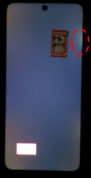
Partial light leakage of black screen in dark room
Analysis
After the screen and the casing are assembled to maintain pressure, the deformation of CG edge drives the local deformation of LCD screen, which leads to light leakage.
Suggested Script
I'm very sorry for the inconvenience. Redmi Note 10 5G is a 5G LCD mobile phone launched by Xiaomi. When the edge of the screen is stressed, the internal LCD will change and partial brightness will appear. This is the basic feature of the LCD screen. The mobile phone will undergo strict professional testing before leaving the factory. You can rest assured to use it. Warm reminder, to pay attention to protect your eyes, try not to look at the phone in the dark for a long time, thank you for your support!
3.Q: Detailed Description:
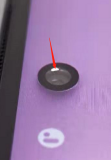
Leakage inside the front camera hole
Analysis
The front camera is LCD blind hole screen, and the peeling of backlight glue at this position will cause light leakage in the hole.
Suggested Script
I'm sorry for the inconvenience. There is bright light in the front camera hole at a specific angle, which is a common phenomenon of LCD blind hole screen. This light does not have any effect on the function of the front camera. The mobile phone will be strictly tested before leaving the factory, so you can rest assured.
4.Q: Detailed Description:
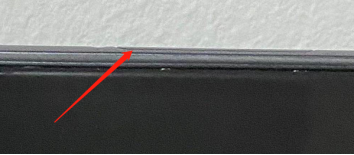
The whole machine card holder bulge
Analysis
The position of the rear shell tray has a length dimension at the extreme lower limit, and there is no gap between the card holder and the rear shell, which causes the card holder to interfere with the rear shell and the card holder floats.
Suggested Script
I'm very sorry for the inconvenience. It's normal that the card holder floats slightly after installation. It doesn't affect your normal use. It's recommended that to install the original protective cover. Thank you for your support to Xiaomi!
5.Q: Detailed Description:
The battery cover gap is large
Analysis
The width of the bottom of the PR surface of the rear shell is out of tolerance, which causes the sheet clearance to exceed
Suggested Script
Thank you very much for your feedback. The assembly gap of mobile phone battery cover is a normal assembly phenomenon, and the function and performance are not affected. Of course, we have been working hard to make perfect and flawless products. Thanks for your support for Xiaomi.
6.Q: Detailed Description:
System / camera start slow & Photo button
Analysis
1.Background open a lot of applications, crashes caused by the poor memory environment and CPU load.
2.After the app is started for the first time or the system version is upgraded, it is stuck for a short time, resulting in the code background optimization.
3.Open high quality game for a long time or charge to play games, which causes temperature rise, trigger thermal frequency reduction, and cause system to jam and frame falling Suggested Script
I'm very sorry for the inconvenience. First of all, please help to confirm whether there are many applications in the background of mobile phone, which leads to stuck? It is recommended that you clean up the background application in time to release more memory. It is recommended to restart it regularly (every three days, or every week). Some applications may be self starting and can't be cleaned up with one click, which takes up a lot of system resources and causes stuck. It is recommended that you go to mobile Security > Manage apps > Permissions > Autostart > turn off the Autostart apps, and then check whether they will get stuck after one key cleaning. It is also recommended that you upgrade your mobile phone to the latest software version. The latest version has a new memory optimization scheme. Try the latest software version to see if there are any such problems. If it is the first time to start the app or after upgrading the system version, it is because the system optimizes the app startup in the background in order to make the app use more smoothly in the future. At this time, it is normal to cause a temporary jam. If the temperature of the mobile phone is too high, it is because the high temperature frequency limit is triggered, which leads to the performance degradation. It is suggested that you restart the mobile phone, put it for a period of time, and observe whether there is such a stuck problem.
7.Q: Detailed Description:
5g speed is slow, the color ring back tone of the phone is flashing, the volte video call picture is stretched, and the probability of network drop and unable to stay in the weak network environment
Analysis
Poor network coverage of operators
Suggested Script
First of all, this problem is caused by the poor network coverage of the operators, and there is no problem with the mobile phone. It is recommended that you make more calls to complain to the operators, and the operators will arrange their staff to your nearest base station, adjust the antenna direction of the base station, and appropriately increase the transmission power, so as to solve your problem;
Secondly, before our mobile phone leaves the factory, it has passed the basic function test, full use case test, dynamic and static test. This kind of data flow, video call and network resident problems belong to the most basic use cases. We have tested a lot, and the real problems of the mobile phone have been modified, so there is no problem with your mobile phone, it is caused by the network problems of the operator.
8.Q: Detailed Description:
Redmi Note 10 5G non standard charger is slow or doesn’t support charging
Analysis
Users don't use the standard charger (QC2.0), which will cause the mobile phone can’t be charged with the maximum charging current
Suggested Script
Dear customers, I am very sorry for the inconvenience. In case of slow charging of mobile phone, we must first confirm whether the standard charger is currently used. If it is not a standard charger, the mobile phone will not be able to charge with the maximum charging current. Secondly, try to avoid charging under extreme conditions, such as high temperature / playing games and watching videos, which will affect the charging efficiency. Our Redmi Note 10 5G mobile phone charging, after many rounds of electrical performance verification, indicators are in line with the standard.
È stato utile?