

What to do if the Mi Electric Scooter 1S’s mileage deviation?
Mileage deviation refers to a situation where the displayed distance traveled on the scooter does not accurately match the actual distance covered.
If you’re experiencing mileage deviation on your Mi Electric Scooter Essential, please refer to the following troubleshooting steps:
1. Ensure that there is no interference affecting the GPS signal. The presence of clouds or rain, as well as being in buildings, tunnels, forests, canyons, and gorges can impact GPS accuracy;
2. Smartphone manufacturers choose chips for each device, and due to the great diversity that is available, the variation can change a lot depending on the smartphone model;
3. When the energy-saving feature is enabled on the smartphone, it will shut down GPS to save power;
4. Incorrect tire pressure can affect the accuracy of the speedometer. Make sure your scooter’s tires are inflated to the recommended pressure;
5. Test the scooter’s mileage accuracy in an open area with a known distance. Compare the scooter’s displayed mileage with the actual distance covered to gauge the deviation;
6. Please clear the Mi Home app’s cache;
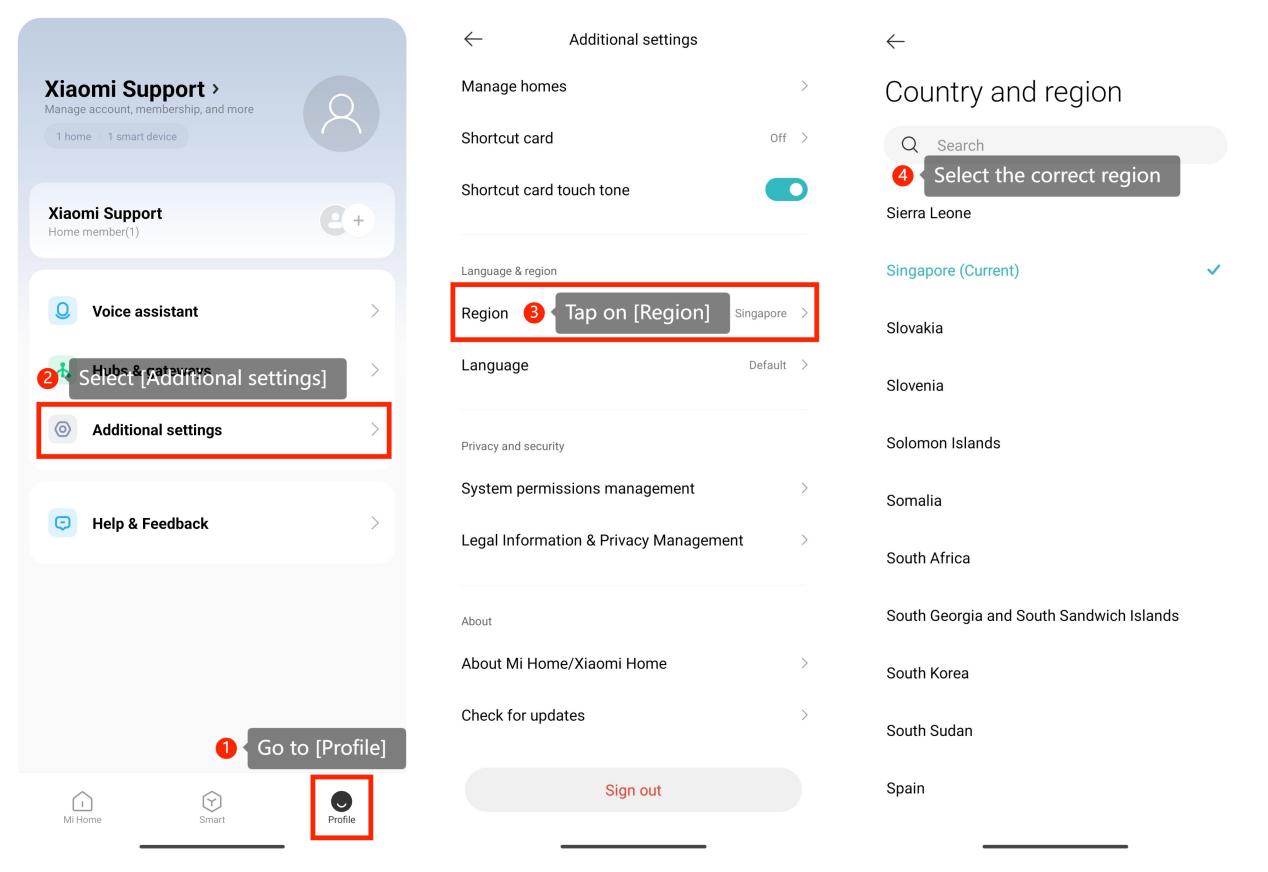
7. Please check if the correct region is selected by going to the Mi Home app >> [Profile] >> [Additional settings] >> [Region] >> select the correct region;
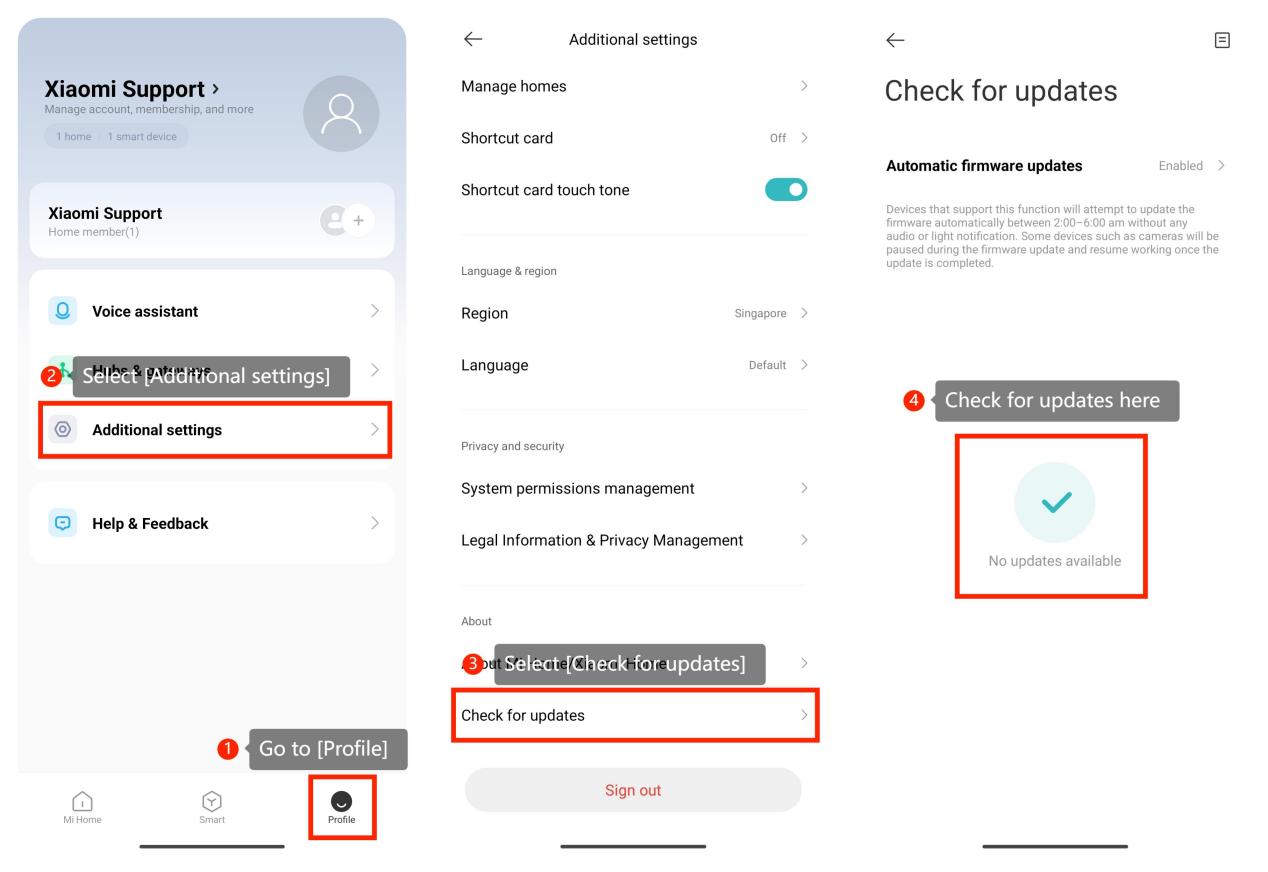
8. Ensure that you are using the latest version of the Mi Home app, you can check for updates by going to the Mi Home app >> [Profile] >> [Additional settings] >> [Check for updates];
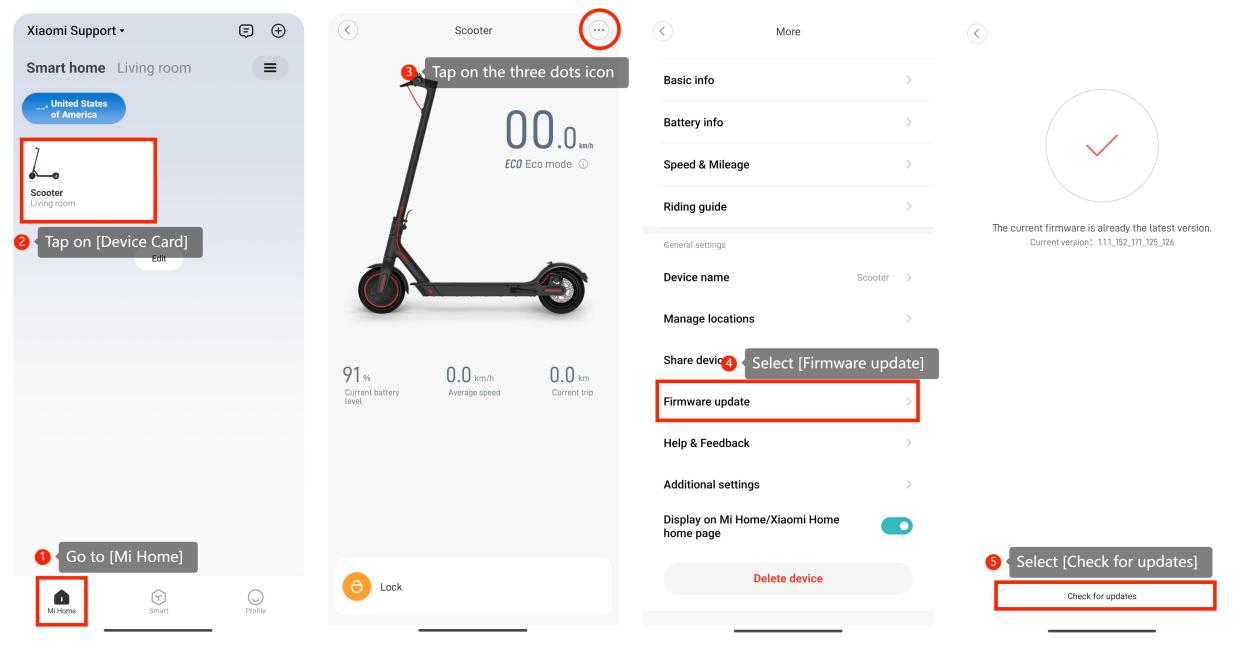
9. You can check for updates on the scooter by going to the Mi Home app >> [Mi Home] >> tap on [Device Card] >> tap on the three dots icon at the upper right corner >> [Firmware update] >> [Check for updates];
10. Please uninstall the Mi Home app and install it again via Apple App Store or Google App Store.
Friendly Tips:
1. When you need to record riding mileage, please turn on Bluetooth and Location on your smartphone and then connect the Mi Home app to the scooter via Bluetooth;
2. When you ride the scooter, please don’t shut down the app and let the app run in the background on the smartphone.
We hope the above information is helpful. If the issue still occurs, please reconnect the scooter, tap the 3-dot icon at the upper right corner, and go to [Help & Feedback] >> [Feedback]. After submitting your request, please have some patience and wait for future updates.
If you’re experiencing mileage deviation on your Mi Electric Scooter Essential, please refer to the following troubleshooting steps:
1. Ensure that there is no interference affecting the GPS signal. The presence of clouds or rain, as well as being in buildings, tunnels, forests, canyons, and gorges can impact GPS accuracy;
2. Smartphone manufacturers choose chips for each device, and due to the great diversity that is available, the variation can change a lot depending on the smartphone model;
3. When the energy-saving feature is enabled on the smartphone, it will shut down GPS to save power;
4. Incorrect tire pressure can affect the accuracy of the speedometer. Make sure your scooter’s tires are inflated to the recommended pressure;
5. Test the scooter’s mileage accuracy in an open area with a known distance. Compare the scooter’s displayed mileage with the actual distance covered to gauge the deviation;
6. Please clear the Mi Home app’s cache;
7. Please check if the correct region is selected by going to the Mi Home app >> [Profile] >> [Additional settings] >> [Region] >> select the correct region;
8. Ensure that you are using the latest version of the Mi Home app, you can check for updates by going to the Mi Home app >> [Profile] >> [Additional settings] >> [Check for updates];
9. You can check for updates on the scooter by going to the Mi Home app >> [Mi Home] >> tap on [Device Card] >> tap on the three dots icon at the upper right corner >> [Firmware update] >> [Check for updates];
10. Please uninstall the Mi Home app and install it again via Apple App Store or Google App Store.
Friendly Tips:
1. When you need to record riding mileage, please turn on Bluetooth and Location on your smartphone and then connect the Mi Home app to the scooter via Bluetooth;
2. When you ride the scooter, please don’t shut down the app and let the app run in the background on the smartphone.
We hope the above information is helpful. If the issue still occurs, please reconnect the scooter, tap the 3-dot icon at the upper right corner, and go to [Help & Feedback] >> [Feedback]. After submitting your request, please have some patience and wait for future updates.
Does it help?
Yes
No