

What to do if you fail to use Chromecast on the Xiaomi TV F2 32?
If the issue occurs when you are failing to use Chromecast on the Xiaomi TV F2 32, please refer to the following methods:
1. Try restarting your TV and Chromecast devices. Sometimes, a simple reboot can solve the connection problem;
2. Make sure Chromecast and your TV are connected to the same Wi-Fi network. You can ensure the stability of the network by restarting the router; if the other devices also can't work properly in the same network environment, it means it is the router's problem, and it is recommended to connect to another network to try;
3. Check if Chromecast has too much cache and data. To clear them, please go to [Settings] >> [Applications] >> [Manage Installed Applications] >> [Clear data] or [Clear cache];
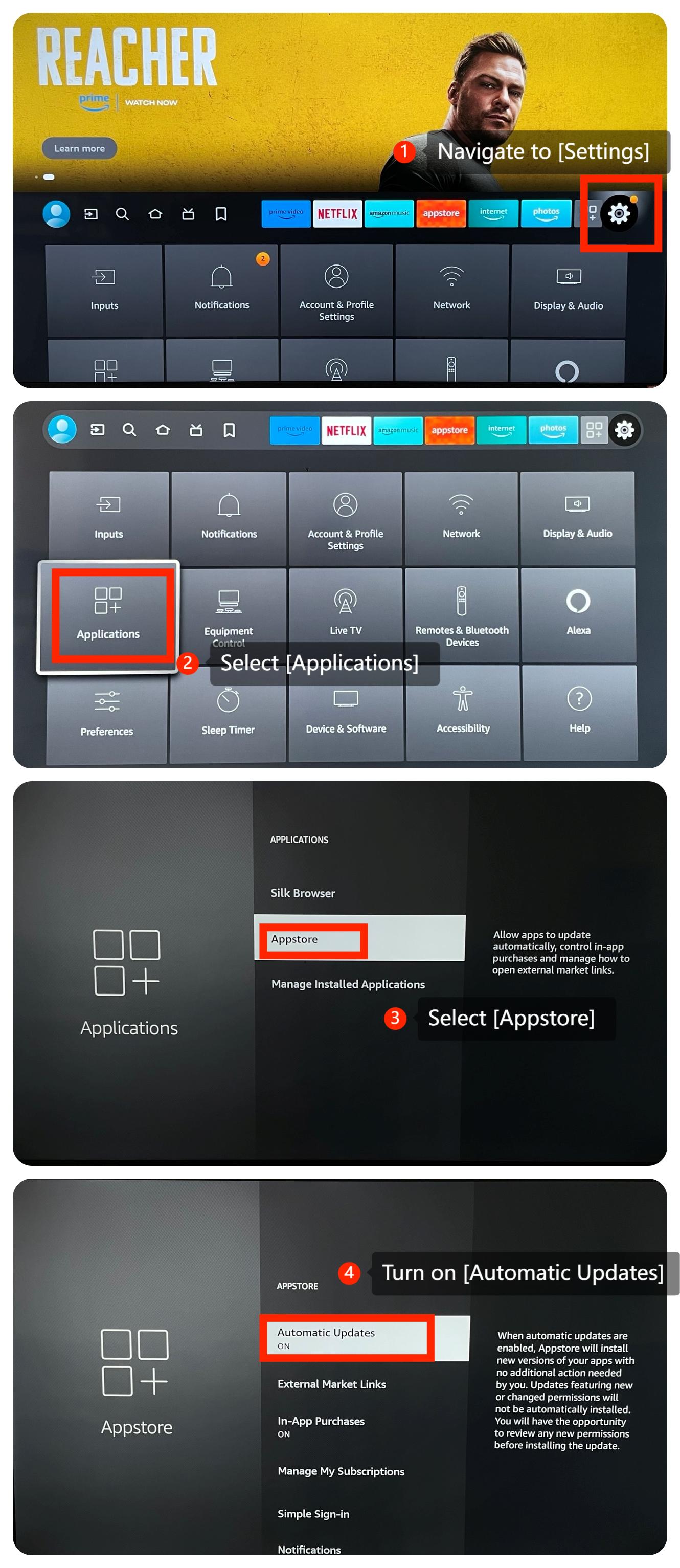
4. Check whether Xiaomi Fire TV has installed the latest firmware version. In addition, please update the Chromecast app on Xiaomi Fire TV to the latest version available. To update, please navigate to the [Settings] >> [Applications] >> [Appstore] >> [Automatic Updates];
5. You can try uninstalling and reinstalling Chromecast to confirm if the issue is on the app itself;
6. Please try to connect the Chromecast to other TVs, if it works, it may be a compatibility issue;
7. As a last resort, consider performing a factory reset on your TV by going to [Settings] >> [Device & Software] >> [Reset to Factory Defaults]. This will erase all the data on your TV, so make sure to back up important data before proceeding.
If the issue still persists, you could submit your feedback on your TV by going to [Settings] >> [Help] >> [Send feedback], follow the instructions on this interface.
1. Try restarting your TV and Chromecast devices. Sometimes, a simple reboot can solve the connection problem;
2. Make sure Chromecast and your TV are connected to the same Wi-Fi network. You can ensure the stability of the network by restarting the router; if the other devices also can't work properly in the same network environment, it means it is the router's problem, and it is recommended to connect to another network to try;
3. Check if Chromecast has too much cache and data. To clear them, please go to [Settings] >> [Applications] >> [Manage Installed Applications] >> [Clear data] or [Clear cache];
4. Check whether Xiaomi Fire TV has installed the latest firmware version. In addition, please update the Chromecast app on Xiaomi Fire TV to the latest version available. To update, please navigate to the [Settings] >> [Applications] >> [Appstore] >> [Automatic Updates];
5. You can try uninstalling and reinstalling Chromecast to confirm if the issue is on the app itself;
6. Please try to connect the Chromecast to other TVs, if it works, it may be a compatibility issue;
7. As a last resort, consider performing a factory reset on your TV by going to [Settings] >> [Device & Software] >> [Reset to Factory Defaults]. This will erase all the data on your TV, so make sure to back up important data before proceeding.
If the issue still persists, you could submit your feedback on your TV by going to [Settings] >> [Help] >> [Send feedback], follow the instructions on this interface.
Does it help?
Yes
No