

What to do if the Xiaomi TV A Pro 50 cannot connect to the cable network?
If your Xiaomi TV A Pro 50 cannot connect to the cable network, there are several methods you can take to troubleshoot the issue:
1. Ensure that the cable is securely connected to both your TV and the cable outlet. Check if there are loose or damaged cables. If you find any physical issues, please replace the cable;
2. Check if the input ports on your TV are in good condition. If possible, you can connect the cable to other ports to check whether the source of the issue is a port malfunction or damage;
3. Turn off your router and TV, then restart them. Check if your TV can connect to the network;
4. Ensure that your internet connection is working. Check if you have a stable and high-speed network. Network fluctuations can lead to failed connections. You can test this by trying to use other devices. If necessary, you can seek help from your network operator;
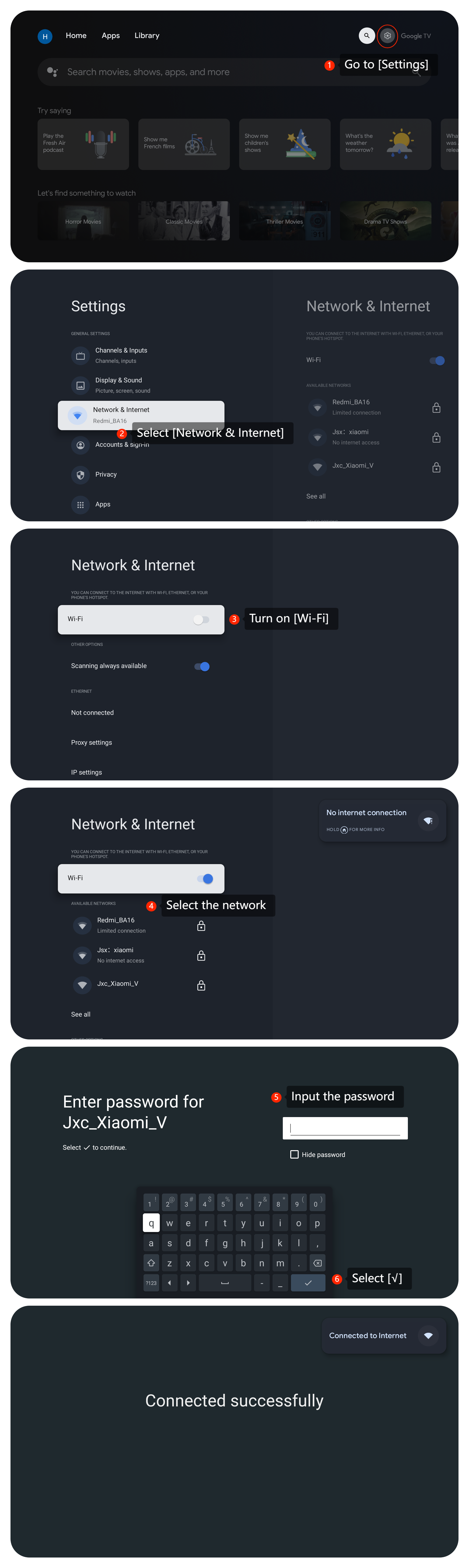
5. Reconnect your TV to the Wi-Fi network by going to [Settings] >> [Network & Internet] >> turn on [Wi-Fi] >> select your network >> input the password >> select [√];
6. Make sure your TV has the latest firmware or software updates installed. You can check for updates in the TV’s settings menu by navigating to [Settings] >> [System] >> [About] >> [System update];
7. Reset your TV to the factory defaults. Please navigate to [Settings] >> [System] >> [About] >> [Reset] >> [Factory reset]. Be aware to back up any important information and privacy data.
If the above troubleshooting methods can't resolve the issue, please contact our local official service center or your seller for further assistance. They will help you in this regard.
1. Ensure that the cable is securely connected to both your TV and the cable outlet. Check if there are loose or damaged cables. If you find any physical issues, please replace the cable;
2. Check if the input ports on your TV are in good condition. If possible, you can connect the cable to other ports to check whether the source of the issue is a port malfunction or damage;
3. Turn off your router and TV, then restart them. Check if your TV can connect to the network;
4. Ensure that your internet connection is working. Check if you have a stable and high-speed network. Network fluctuations can lead to failed connections. You can test this by trying to use other devices. If necessary, you can seek help from your network operator;
5. Reconnect your TV to the Wi-Fi network by going to [Settings] >> [Network & Internet] >> turn on [Wi-Fi] >> select your network >> input the password >> select [√];
6. Make sure your TV has the latest firmware or software updates installed. You can check for updates in the TV’s settings menu by navigating to [Settings] >> [System] >> [About] >> [System update];
7. Reset your TV to the factory defaults. Please navigate to [Settings] >> [System] >> [About] >> [Reset] >> [Factory reset]. Be aware to back up any important information and privacy data.
If the above troubleshooting methods can't resolve the issue, please contact our local official service center or your seller for further assistance. They will help you in this regard.
Does it help?
Yes
No