

What to do if the Xiaomi TV A Pro 32 fail to connect to the Bluetooth devices?
If the Xiaomi TV A Pro 32 fails to connect to the Bluetooth devices, please refer to the following troubleshooting steps:
1. Check if the Bluetooth device you’re trying to connect is compatible with your TV;
2. Ensure the TV and the Bluetooth device are within the effective Bluetooth connectivity range;
3. Ensure that the Bluetooth device’s Bluetooth feature is turned on;
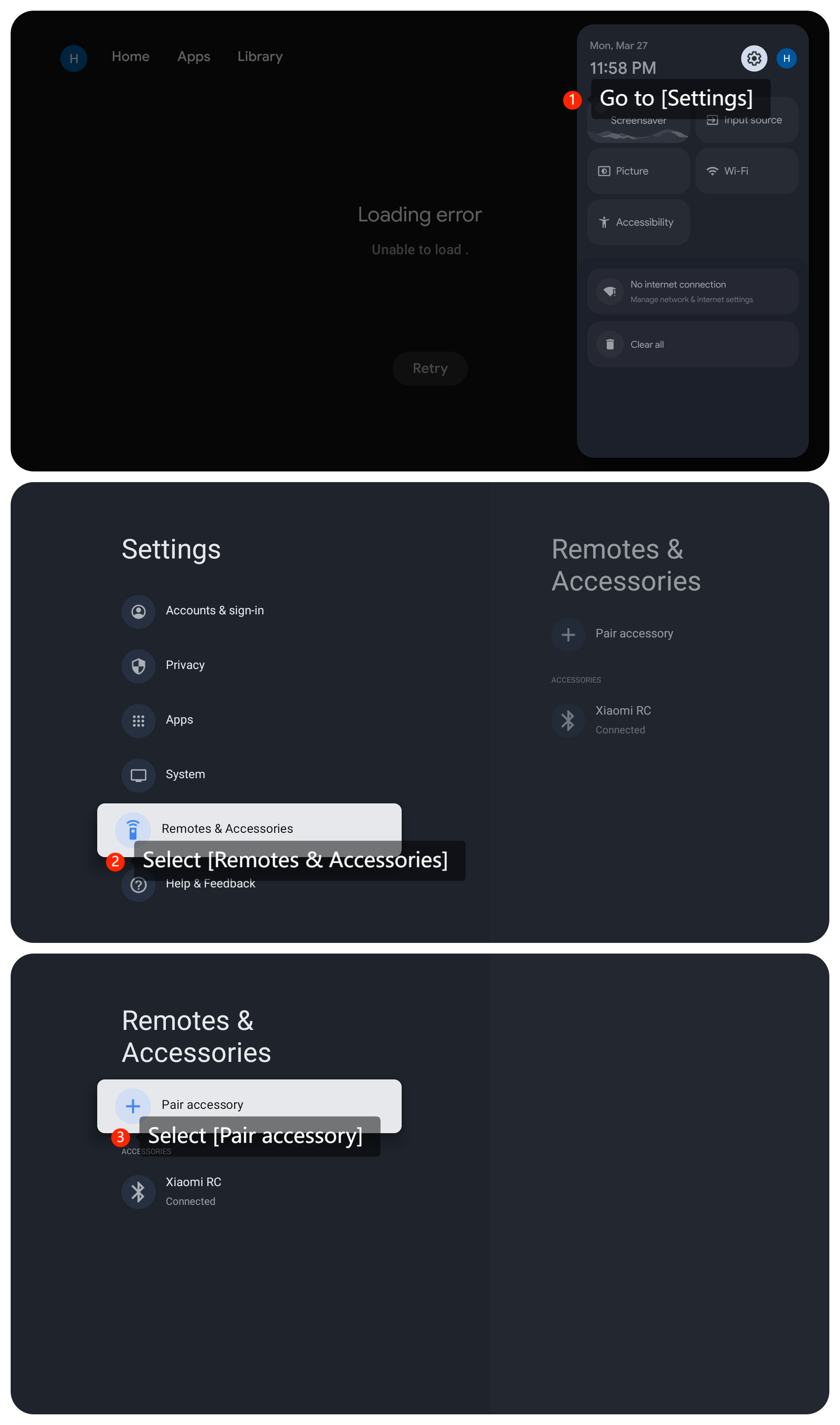
4. Reconnect your Bluetooth device to your TV by navigating to [Settings] >> [Remotes & Accessories] >> [Pair accessory] >> turn on the [Bluetooth] feature on your Bluetooth device and pair up with your TV;
5. Reboot both your TV and the Bluetooth device;
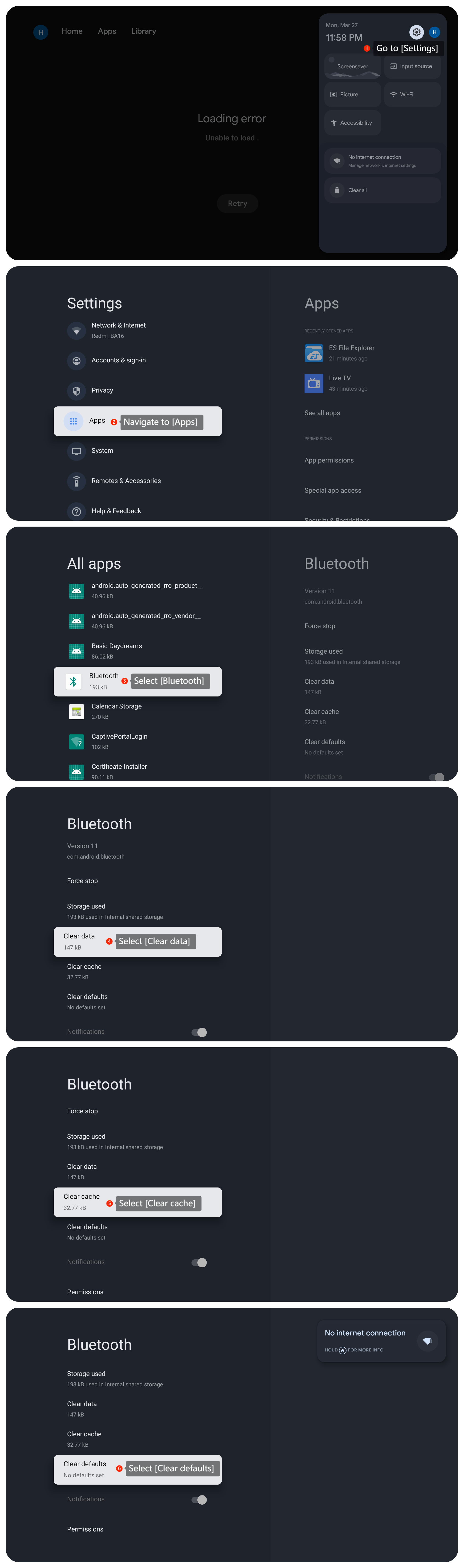
6. Sometimes, resetting the Bluetooth settings on your TV can help if there is a glitch in the Bluetooth configuration. Please go to [Settings] >> [Apps] >> [Bluetooth] >> [Clear data], [Clear cache],and [Clear defaults];
7. Ensure that your TV has the latest software updates installed by going to [Settings] >> [System] >> [About] >> [System update] and check for updates;
8. As a last resort, consider performing a factory reset on your TV by going to [Settings] >> [System] >> [About] >> [Reset] >> [Factory reset]. This will erase all the data on your TV, so make sure to back up important data before proceeding.
If the above troubleshooting methods can’t resolve the issue, please contact our local official service center or your seller for further assistance. They will help you in this regard.
1. Check if the Bluetooth device you’re trying to connect is compatible with your TV;
2. Ensure the TV and the Bluetooth device are within the effective Bluetooth connectivity range;
3. Ensure that the Bluetooth device’s Bluetooth feature is turned on;
4. Reconnect your Bluetooth device to your TV by navigating to [Settings] >> [Remotes & Accessories] >> [Pair accessory] >> turn on the [Bluetooth] feature on your Bluetooth device and pair up with your TV;
5. Reboot both your TV and the Bluetooth device;
6. Sometimes, resetting the Bluetooth settings on your TV can help if there is a glitch in the Bluetooth configuration. Please go to [Settings] >> [Apps] >> [Bluetooth] >> [Clear data], [Clear cache],and [Clear defaults];
7. Ensure that your TV has the latest software updates installed by going to [Settings] >> [System] >> [About] >> [System update] and check for updates;
8. As a last resort, consider performing a factory reset on your TV by going to [Settings] >> [System] >> [About] >> [Reset] >> [Factory reset]. This will erase all the data on your TV, so make sure to back up important data before proceeding.
If the above troubleshooting methods can’t resolve the issue, please contact our local official service center or your seller for further assistance. They will help you in this regard.
Does it help?
Yes
No