

How to fix the wireless network problem on the Xiaomi TV A Pro 55?
If you have trouble connecting your Xiaomi TV A Pro 55 to a wireless network, please refer to the following troubleshooting steps:
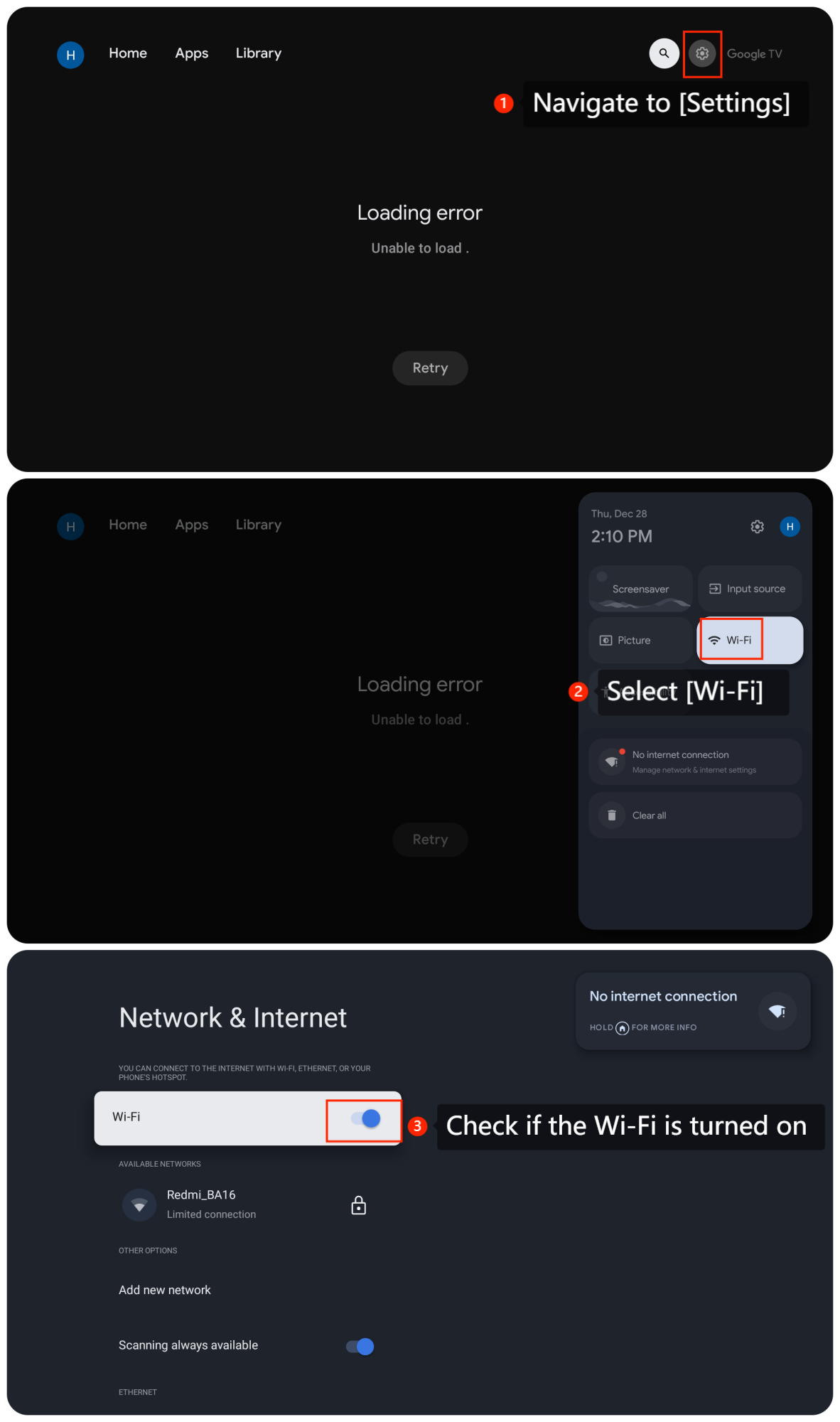
1. Navigate to [Settings] >> [Wi-Fi] >> check if the Wi-Fi is turned on and attempt to connect to your network;
2. Double-check that you're entering the correct Wi-Fi password. If there's any doubt, try entering the password again carefully, paying attention to uppercase/lowercase characters and any special symbols;
3. Verify your router is connected properly. Ensure that the cables are not physically damaged and they are securely plugged into the correct ports;
4. Turn off your TV, router and modem, and unplug them from the power source. Wait a few minutes, then plug them in and turn them on. Try connecting to the wireless network again;
5. Poor signal strength can cause connection issues. Try moving the TV closer to the router to see if it connects. This might help rule out any signal strength problems;
6. If the problem persists, you can perform a factory reset as the last resort by navigating to [Settings] >> [System] >> [About] >> [Reset] >> [Factory reset]. Be aware that this will erase all data and settings on your TV, so make sure to back up anything important before doing this.
If the above troubleshooting methods can't resolve the issue, please contact our local official service center or your seller for further assistance. They will help you in this regard.
1. Navigate to [Settings] >> [Wi-Fi] >> check if the Wi-Fi is turned on and attempt to connect to your network;
2. Double-check that you're entering the correct Wi-Fi password. If there's any doubt, try entering the password again carefully, paying attention to uppercase/lowercase characters and any special symbols;
3. Verify your router is connected properly. Ensure that the cables are not physically damaged and they are securely plugged into the correct ports;
4. Turn off your TV, router and modem, and unplug them from the power source. Wait a few minutes, then plug them in and turn them on. Try connecting to the wireless network again;
5. Poor signal strength can cause connection issues. Try moving the TV closer to the router to see if it connects. This might help rule out any signal strength problems;
6. If the problem persists, you can perform a factory reset as the last resort by navigating to [Settings] >> [System] >> [About] >> [Reset] >> [Factory reset]. Be aware that this will erase all data and settings on your TV, so make sure to back up anything important before doing this.
If the above troubleshooting methods can't resolve the issue, please contact our local official service center or your seller for further assistance. They will help you in this regard.
Does it help?
Yes
No