

What to do if the sound on the Xiaomi TV A2 FHD 43' changes dramatically?
If the sound on your Xiaomi TV A2 FHD 43' changes dramatically, please refer to the following scenarios and their troubleshooting methods:
Scenario 1:
If the issue occurs while you are using the built-in speaker of your TV, please refer to the following steps:
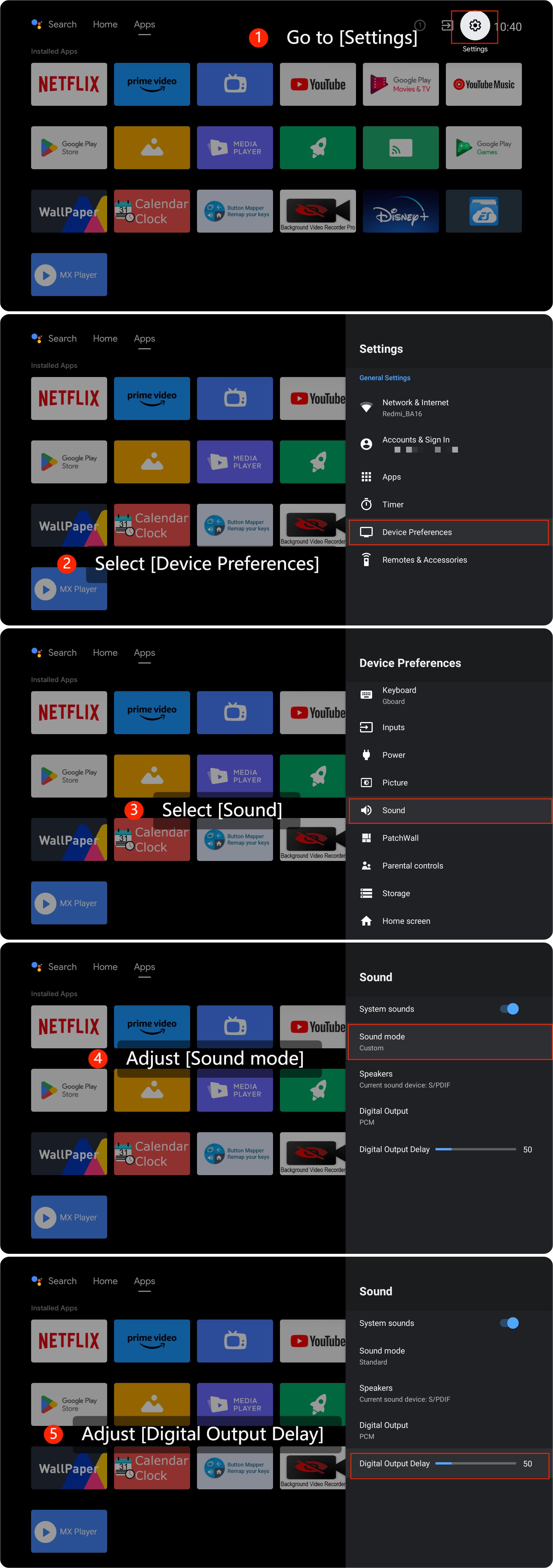
1. Check if audio settings are correctly configured by going to [Settings] >> [Device Preferences] >> [Sound] >> adjust [Sound mode] and [Digital Output Delay];
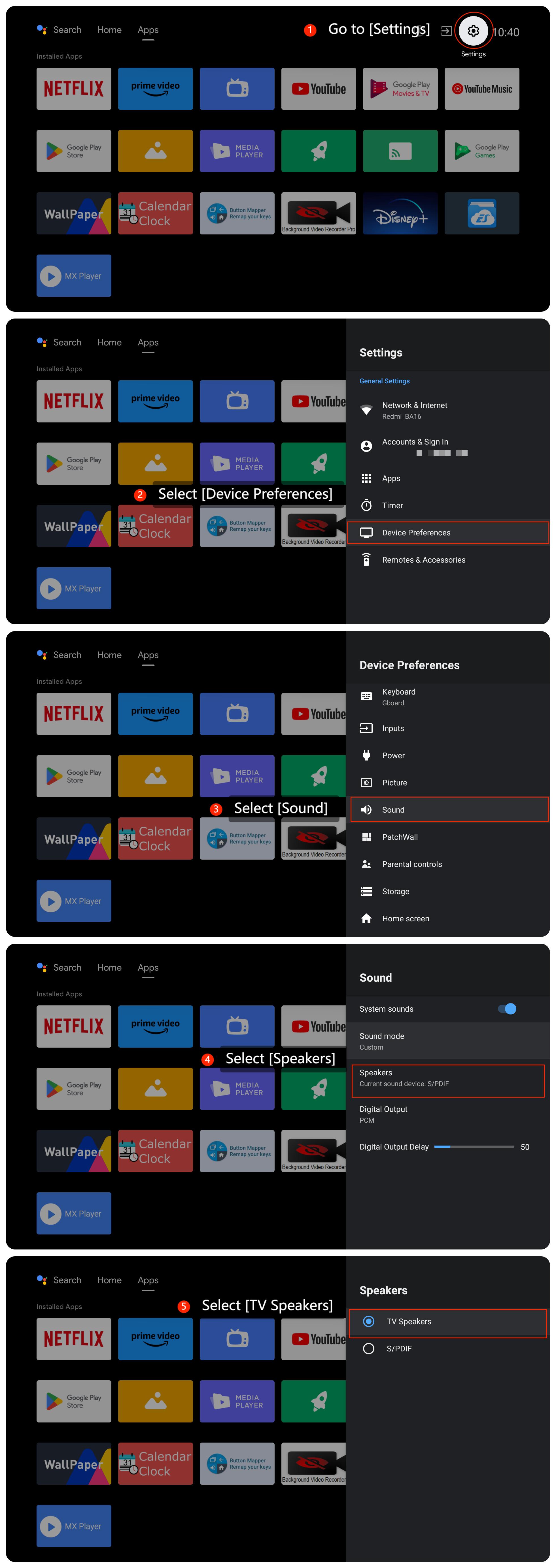
2. Check if the current speaker is correctly set by going to [Settings] >> [Device preferences] >> [Sound] >> [Speakers] >> [TV Speakers];
3. Ensure your TV is running on the latest system by navigating to [Settings] >> [Device Preferences] >> [About] >> [System update];
4. Try playing different types of content such as movies, TV shows, and music to see if the issue is consistent across all sources, which can help determine if the issue is content-specific;
5. As a last resort, you can try performing a factory reset on your TV. Be aware that this will erase all your settings and data, so make sure to back up any important data before proceeding. Go to [Settings] >> [Device Preferences] >> [Reset].
Scenario 2:
If the issue occurs while you are using external devices like a soundbar, please refer to the following steps:
1. Check external devices connected to your TV by unplugging the cable and plugging it back. Make sure all cables are securely plugged in as loose or damaged cables can lead to audio issues;
2. Restart your external device as sometimes a simple restart can resolve the issue.
If the above troubleshooting methods can’t resolve the issue, please contact our local official service center or your seller for further assistance. They will help you in this regard.
Scenario 1:
If the issue occurs while you are using the built-in speaker of your TV, please refer to the following steps:
1. Check if audio settings are correctly configured by going to [Settings] >> [Device Preferences] >> [Sound] >> adjust [Sound mode] and [Digital Output Delay];
2. Check if the current speaker is correctly set by going to [Settings] >> [Device preferences] >> [Sound] >> [Speakers] >> [TV Speakers];
3. Ensure your TV is running on the latest system by navigating to [Settings] >> [Device Preferences] >> [About] >> [System update];
4. Try playing different types of content such as movies, TV shows, and music to see if the issue is consistent across all sources, which can help determine if the issue is content-specific;
5. As a last resort, you can try performing a factory reset on your TV. Be aware that this will erase all your settings and data, so make sure to back up any important data before proceeding. Go to [Settings] >> [Device Preferences] >> [Reset].
Scenario 2:
If the issue occurs while you are using external devices like a soundbar, please refer to the following steps:
1. Check external devices connected to your TV by unplugging the cable and plugging it back. Make sure all cables are securely plugged in as loose or damaged cables can lead to audio issues;
2. Restart your external device as sometimes a simple restart can resolve the issue.
If the above troubleshooting methods can’t resolve the issue, please contact our local official service center or your seller for further assistance. They will help you in this regard.
Does it help?
Yes
No