

What to do if you fail to stream online videos smoothly on the Xiaomi TV A Pro 43?
If you fail to stream online videos smoothly on the Xiaomi TV A Pro 43, please refer to the following troubleshooting methods:
1. Please check the Internet connection. Ensure that the internet connection is stable and has sufficient bandwidth for streaming video. If not, please consider using a wired connection or moving closer to a Wi-Fi router;
2. You can update the firmware and apps. Make sure that both the TV firmware and the streaming apps are up to date as Xiaomi often releases new apps to improve glitches and bugs. Please go to [Settings] >> [System] >> [About] >> [System update];
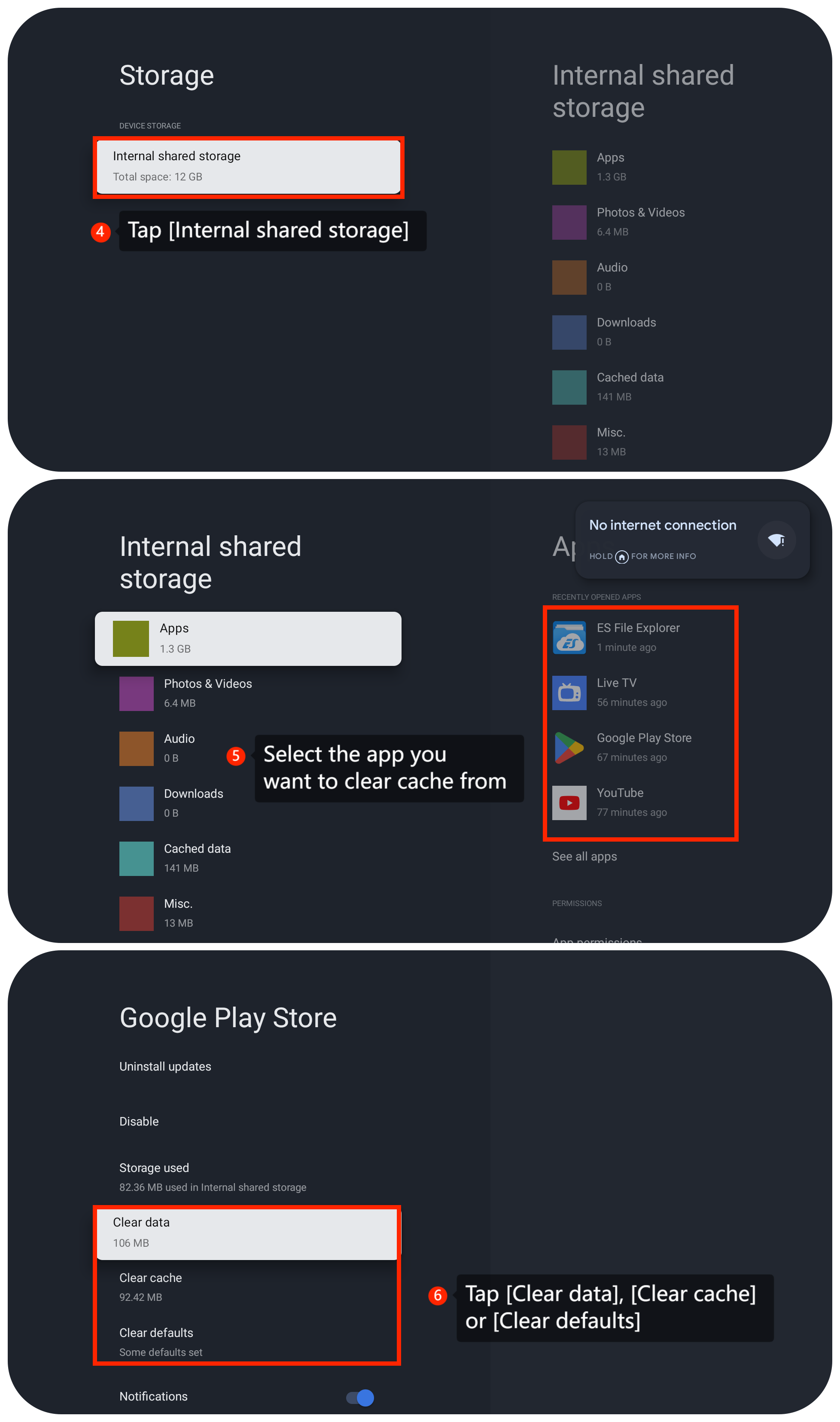
3. Clear the cache and data of the streaming app experiencing issues by going to [Settings] >> [System] >> [Storage] >> tap [Internal shared storage] >> select the app you want to clear cache from >> tap [Clear data], [Clear cache] or [Clear defaults];

1. Please check the Internet connection. Ensure that the internet connection is stable and has sufficient bandwidth for streaming video. If not, please consider using a wired connection or moving closer to a Wi-Fi router;
2. You can update the firmware and apps. Make sure that both the TV firmware and the streaming apps are up to date as Xiaomi often releases new apps to improve glitches and bugs. Please go to [Settings] >> [System] >> [About] >> [System update];
3. Clear the cache and data of the streaming app experiencing issues by going to [Settings] >> [System] >> [Storage] >> tap [Internal shared storage] >> select the app you want to clear cache from >> tap [Clear data], [Clear cache] or [Clear defaults];
4. Rebooting the TV to refresh the system often resolves temporary glitches or issues;
5. If the issue is specific to a particular app, try using a different app for streaming content. This can help determine if the problem is app-specific;
6. You can adjust the video quality settings. Adjust the video quality settings in the settings of the streaming app. Lowering the resolution may be helpful in cases where the internet connection is not strong enough for higher quality streaming;
7. Make sure there are no unnecessary background processes running on the TV. So please turn off any unused apps or processes that may be consuming resources;
8. If your router supports both the 2.4GHz and 5GHz bands, connect your TV to the 5GHz band. The 5GHz band generally offers higher speeds and is less crowded, resulting in a more stable connection;
9. As a last resort, you can try performing a factory reset on your TV. Go to [Settings] >> [System] >>[About] >> [Reset] >> [Factory reset]. Be aware that this will erase all your settings and data, so make sure to back up any important data before proceeding.
Friendly Tips:
The recommended bit rates of the video stream are shown as below:
1. The 4K UHD video stream requires 10Mbps;
2. The 2K video srteam requires 5Mbps;
3. The 720p video stream requires 2.5Mbps.
If the above troubleshooting methods can’t resolve the issue, please contact our local official service center or your seller for further assistance. They will help you in this regard.
5. If the issue is specific to a particular app, try using a different app for streaming content. This can help determine if the problem is app-specific;
6. You can adjust the video quality settings. Adjust the video quality settings in the settings of the streaming app. Lowering the resolution may be helpful in cases where the internet connection is not strong enough for higher quality streaming;
7. Make sure there are no unnecessary background processes running on the TV. So please turn off any unused apps or processes that may be consuming resources;
8. If your router supports both the 2.4GHz and 5GHz bands, connect your TV to the 5GHz band. The 5GHz band generally offers higher speeds and is less crowded, resulting in a more stable connection;
9. As a last resort, you can try performing a factory reset on your TV. Go to [Settings] >> [System] >>[About] >> [Reset] >> [Factory reset]. Be aware that this will erase all your settings and data, so make sure to back up any important data before proceeding.
Friendly Tips:
The recommended bit rates of the video stream are shown as below:
1. The 4K UHD video stream requires 10Mbps;
2. The 2K video srteam requires 5Mbps;
3. The 720p video stream requires 2.5Mbps.
If the above troubleshooting methods can’t resolve the issue, please contact our local official service center or your seller for further assistance. They will help you in this regard.
Does it help?
Yes
No