

How to fix sound sync issue on the Xiaomi TV P1E 65?
To troubleshoot the problem of sound sync on your Xiaomi TV P1E 65, please refer to the following scenarios and their troubleshooting methods:
Scenarios 1:
If the issue occurs when you are using apps on your TV, please refer to the following methods:
1. Some apps have their own audio settings. Check if the app you’re using has any specific settings for syncing sound;
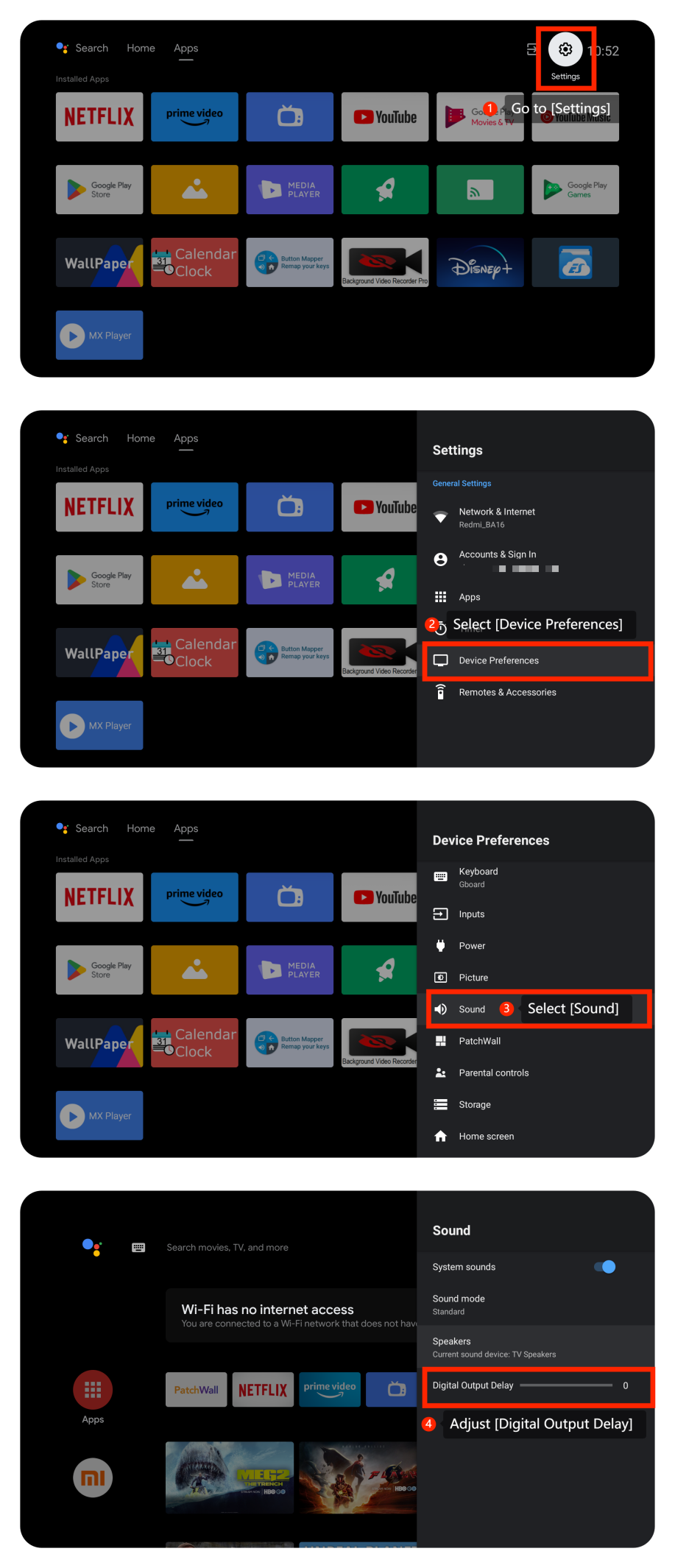
2. Check sound settings by going to [Settings] >> [Device Preferences] >> [Sound] >> adjust [Digital Output Delay];
3. Make sure your TV’s operating system is up-to-date. Please navigate to [Settings] >> [Device Preferences] >> [About] >> [System update] >> search for an available update and then select the download and install option to update the system;
4. If the issue persists, you can try factory resetting your TV. Please perform a factory reset by going to [Settings] >> [Device Preferences] >> scroll down and select [Reset]. After the reset, set up the TV again and check if the issue persists.
Scenario 2:
If the issue occurs when you are using external device like DVD player or game console, please refer to the following methods:
1. Ensure the cables connecting external devices to your TV are firmly and correctly plugged into the appropriate ports;
2. Ensure that your HDMI cable is in good condition. If possible, try using a different HDMI cable to see if the issue persists;
3. Check if the device you’re using has any specific settings for syncing sound.
Scenario 3:
If the issue occurs when you are using casting on your TV, please refer to the following methods:
1. Please ensure that both the casting device such as your computer or your smartphone and your TV are connected to the same Wi-Fi network with a strong signal;
2. Check the casting device settings (e.g., smartphone, tablet, or computer) for any display or casting settings. Make sure the casting device is set to the correct audio settings.
If the above troubleshooting methods can’t resolve the issue, please contact our local official service center or your seller for further assistance. They will help you in this regard.
Friendly Tips:
The recommended bit rates of the video stream are shown as below:
1. The 4K UHD video stream requires 10Mbps;
2. The 2K video stream requires 5Mbps;
3. The 720p video stream requires 2.5Mbps.
Scenarios 1:
If the issue occurs when you are using apps on your TV, please refer to the following methods:
1. Some apps have their own audio settings. Check if the app you’re using has any specific settings for syncing sound;
2. Check sound settings by going to [Settings] >> [Device Preferences] >> [Sound] >> adjust [Digital Output Delay];
3. Make sure your TV’s operating system is up-to-date. Please navigate to [Settings] >> [Device Preferences] >> [About] >> [System update] >> search for an available update and then select the download and install option to update the system;
4. If the issue persists, you can try factory resetting your TV. Please perform a factory reset by going to [Settings] >> [Device Preferences] >> scroll down and select [Reset]. After the reset, set up the TV again and check if the issue persists.
Scenario 2:
If the issue occurs when you are using external device like DVD player or game console, please refer to the following methods:
1. Ensure the cables connecting external devices to your TV are firmly and correctly plugged into the appropriate ports;
2. Ensure that your HDMI cable is in good condition. If possible, try using a different HDMI cable to see if the issue persists;
3. Check if the device you’re using has any specific settings for syncing sound.
Scenario 3:
If the issue occurs when you are using casting on your TV, please refer to the following methods:
1. Please ensure that both the casting device such as your computer or your smartphone and your TV are connected to the same Wi-Fi network with a strong signal;
2. Check the casting device settings (e.g., smartphone, tablet, or computer) for any display or casting settings. Make sure the casting device is set to the correct audio settings.
If the above troubleshooting methods can’t resolve the issue, please contact our local official service center or your seller for further assistance. They will help you in this regard.
Friendly Tips:
The recommended bit rates of the video stream are shown as below:
1. The 4K UHD video stream requires 10Mbps;
2. The 2K video stream requires 5Mbps;
3. The 720p video stream requires 2.5Mbps.
Does it help?
Yes
No