

What to do if apps can’t be logged in on the Xiaomi TV Max 86?
If you have trouble logging in apps on your Xiaomi TV Max 86, please refer to the following troubleshooting steps:
1. Ensure that your Xiaomi TV is properly connected to the internet. Weak or unstable internet connectivity can hinder login processes;
2. Turn off your Xiaomi TV, unplug it for a few minutes, and then plug it back in. Turn it on and check if the login works;
3. Ensure you're using the correct Google account credentials to log in. Verify that your account information is accurate;
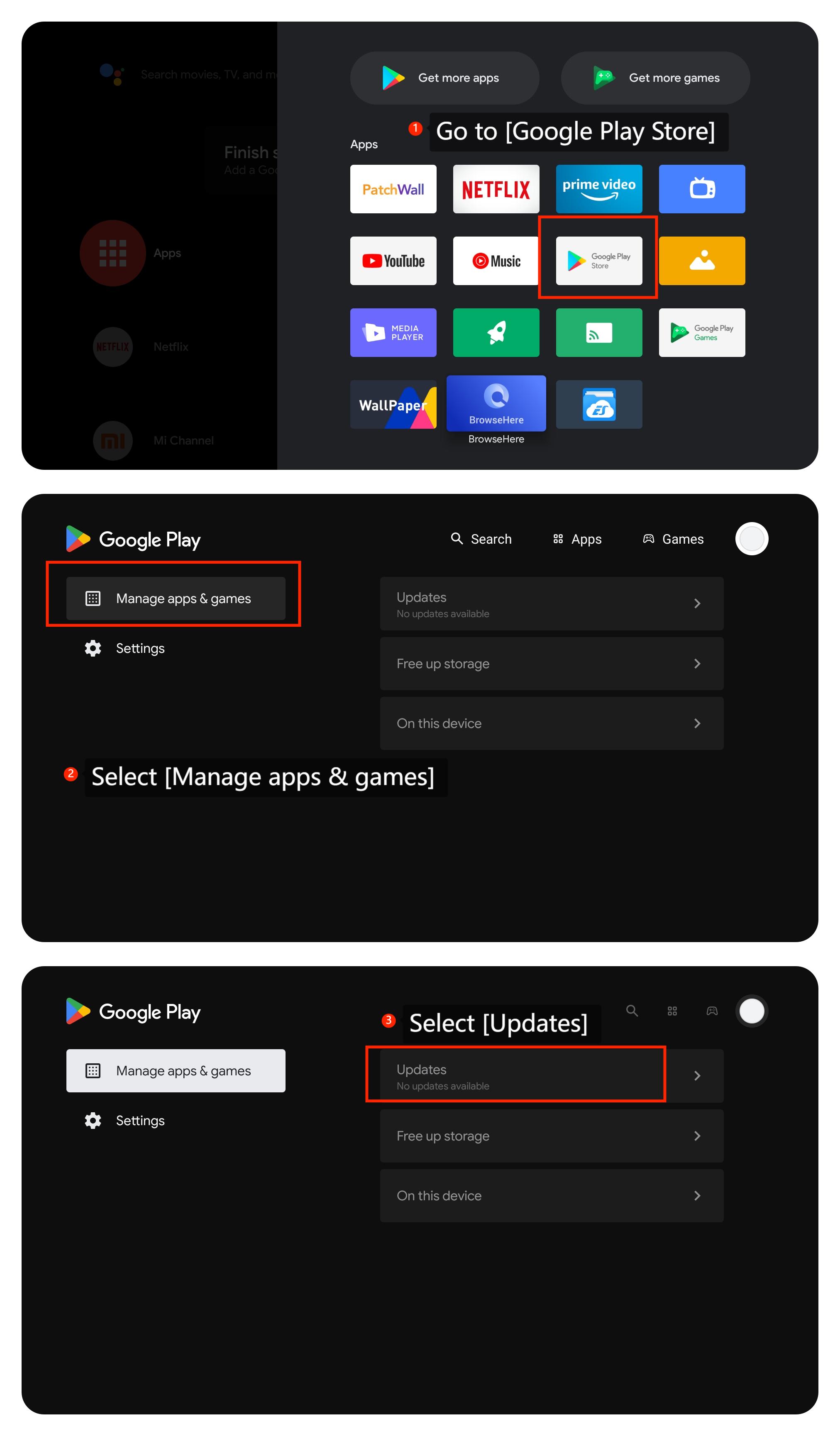
4. Ensure that the app is the latest version by going to [Apps] >> [Google Play Store] >> [Manage apps & games] >> [Updates];
1. Ensure that your Xiaomi TV is properly connected to the internet. Weak or unstable internet connectivity can hinder login processes;
2. Turn off your Xiaomi TV, unplug it for a few minutes, and then plug it back in. Turn it on and check if the login works;
3. Ensure you're using the correct Google account credentials to log in. Verify that your account information is accurate;
4. Ensure that the app is the latest version by going to [Apps] >> [Google Play Store] >> [Manage apps & games] >> [Updates];
5. Make sure that your TV's system is the latest version by going to [Settings] >> [About] >> [System Update]. If available, install the updates;
6. If the problem persists, you can perform a factory reset by navigating to [Settings] >> [Device Preferences] >> [Reset]. Be aware that this will erase all settings and data on your TV, so use it as a last resort.
We hope the above methods can resolve the issue. If the issue still persists, you could submit your feedback on your TV by going to [Settings] >> [Device Preferences] >> [Home screen] >> [Send feedback].
6. If the problem persists, you can perform a factory reset by navigating to [Settings] >> [Device Preferences] >> [Reset]. Be aware that this will erase all settings and data on your TV, so use it as a last resort.
We hope the above methods can resolve the issue. If the issue still persists, you could submit your feedback on your TV by going to [Settings] >> [Device Preferences] >> [Home screen] >> [Send feedback].
Does it help?
Yes
No