

Mijia Smart Air Purifier with Humidification Pro FAQ
Overview
Q1: What is a humidifier?
A: A humidifier is a household appliance designed to increase the humidity level in a room, alleviating issues caused by dry indoor air. It is commonly used during autumn and winter seasons or in air-conditioned rooms during summer.
Q2: Is a humidifier harmful to health?
A: The primary concern with a humidifier relates to the humidity level in the air after use. Excessively high humidity can have adverse effects on health. Indoor air can be humidified through methods such as sprinkling water or placing water basins, but using a humidifier is by far the most convenient option.
When using a humidifier, it is essential to clean it regularly. Otherwise, mold and other microorganisms inside the humidifier may enter the air with the mist and subsequently be inhaled into the respiratory tract, potentially leading to humidifier-related pneumonia. Additionally, higher humidity is not always better. In winter, a humidity level of around 50% is generally considered the most comfortable for the human body. If the air humidity is too high, one may experience chest tightness and difficulty breathing. Therefore, moderation in humidification is recommended.
Q3: What types of humidifiers are available?
A: Common humidifier types include ultrasonic, evaporative, and steam models as follows:
1. An ultrasonic humidifier uses a high-frequency oscillating plate to break water into fine mist for humidification.
2. An evaporative humidifier simulates natural evaporation by using a fan to blow air across water, releasing invisible water vapor into the air.
3. A steam humidifier heats water electrically to produce steam for humidification.
Q4: What is a mist-free or evaporative humidifier?
A: An evaporative humidifier increases indoor humidity by accelerating the natural evaporation of water. It is safe for use by elderly individuals, children, and sensitive groups. Compared to ultrasonic humidifiers, evaporative models distribute moisture more evenly and cover a larger humidification area. The filter further helps to filter out impurities, ensuring cleaner humidification.
Product Introduction and Usage
Q1: What are the selling points of the Mijia Smart Air Purifier with Humidification Pro?
A: The Mijia Smart Air Purifier with Humidification Pro is a new-generation intelligent evaporative humidifier and air purifier. Its key selling points are as follows:
1. It combines air purification and humidification in one device, featuring a Particle CADR of 422 m³/h (tested value), with a clean air delivery rate (CADR) of 6666 L/min.
2. It delivers an ultra-high humidification capacity of up to 2000 mL/h (1800 mL/h rated) and provides up to 16 hours of continuous humidification in Sleep mode (496 mL/h).
3. It is equipped with an 8 L extra-large removable water tank featuring a top-fill dome design, allowing convenient refilling without bending.
4. It features a comprehensive all-waterway sterilisation system, including UVC real-time waterway sterilisation, an anti-backflow water circuit, and automatic filter drying when the water level is low to reduce bacterial growth, contamination, and discoloration.
5. It provides real-time intelligent monitoring with five air-quality measurements (PM1, PM2.5, dust, temperature, and humidity), and features a smart light-adaptive LCD dome display with a hydrophobic surface that resists water stains.
6. It supports intelligent constant humidity control, smart linkage, and automatic waterway cleaning for a comfortable and hassle-free user experience.
7. It operates at as low as 14.6 dB(A) in Sleep mode, with a dimmed display for quiet, undisturbed operation.
8. It is equipped with 360° swivel caster wheels for easy movement between rooms.
9. It includes a child safety lock to help prevent accidental operation.
Q2: How does the Mijia Smart Air Purifier with Humidification Pro work for humidification?
A: The Mijia Smart Air Purifier with Humidification Pro delivers water to the humidifier filter. The built-in fan rotates to accelerate airflow, and the high-speed moving air disturbs the water on the humidifier filter. Water molecules then follow the airflow and disperse into the surrounding air, achieving uniform humidification throughout the room.
It also provides efficient air purification performance with different room sizes:
1. Children's room (8 m²): approx. 3.5 minutes. Based on a children's room with a floor area of 8 m² and a ceiling height of 3 m.
2. Bedroom (10 m²): approx. 4.3 minutes. Based on a bedroom with a floor area of 10 m² and a ceiling height of 3 m.
3. Living room (24 m²): approx. 10 minutes. Based on a living room with a floor area of 24 m² and a ceiling height of 3 m.
Q3: What sterilization methods does the Mijia Smart Air Purifier with Humidification Pro use?
A: The Mijia Smart Air Purifier with Humidification Pro adopts an all-waterway, all-weather sterilization system to provide comprehensive hygiene protection. It integrates multiple sterilization and antibacterial technologies, including a UV-C sterilization module for real-time waterway sterilization, an antibacterial and anti-mold humidifier filter, and non-submerged filter air-drying technology to help reduce bacterial growth. The overall sterilization rate of the entire unit reaches up to 99.9%.
Q4: How to disassemble and install the Mijia Smart Air Purifier with Humidification Pro?
A: After receiving the device, follow the steps below:
1. Open the compartment cover, pull out the air purification filter, and remove the humidifier filter. Use a vacuum cleaner to remove dust attached to the air inlet holes and compartment walls, or gently wipe with a soft cloth.
2. Remove the top unit, take out the water tank, pour out any remaining water in the tank, and gently wipe the inner walls of the water tank with a soft cloth.
3. Reinstall the water tank, humidifier filter, and air purification filter. Once cleaning is complete, close the compartment cover.
Note:
1. Do not use abrasive, corrosive, or flammable cleaning agents on any part of this product.
2. Do not squeeze or expose the filter to direct sunlight for drying.
3. Do not immerse the display screen or base of the humidifier in water. If water is present on the exterior surface, disconnect the power first and wipe it dry promptly to prevent device damage.
Q5: How to turn the Mijia Smart Air Purifier with Humidification Pro on and off?
A: 1. Power on: Connect the power supply, then press the Power button to turn on the device.
2. Standby: When the device is on, press the Power button once to enter standby mode.
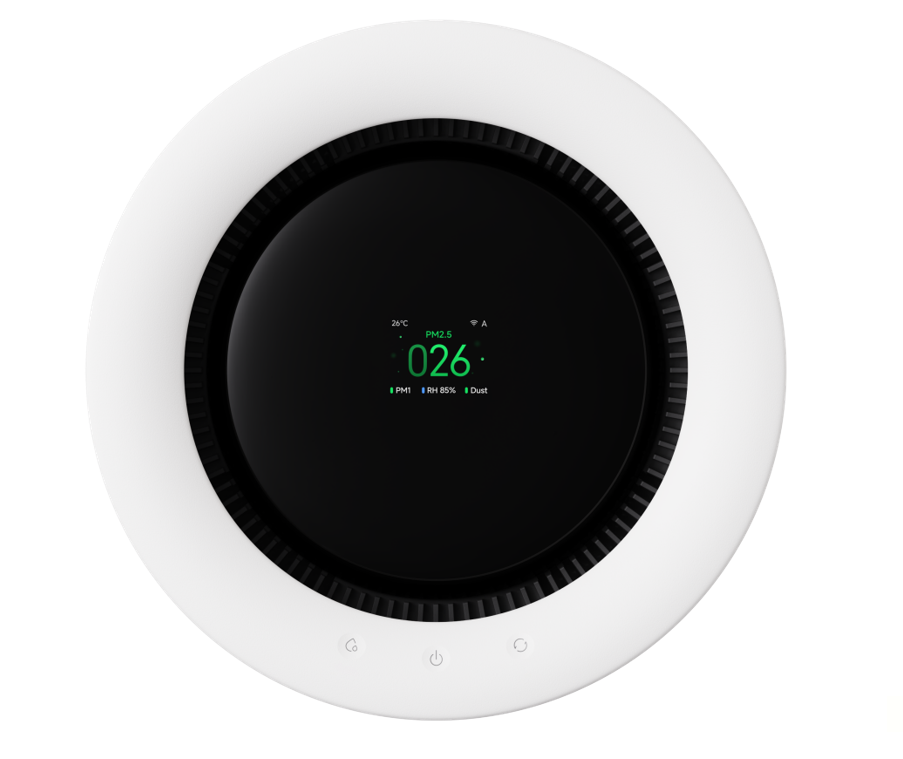
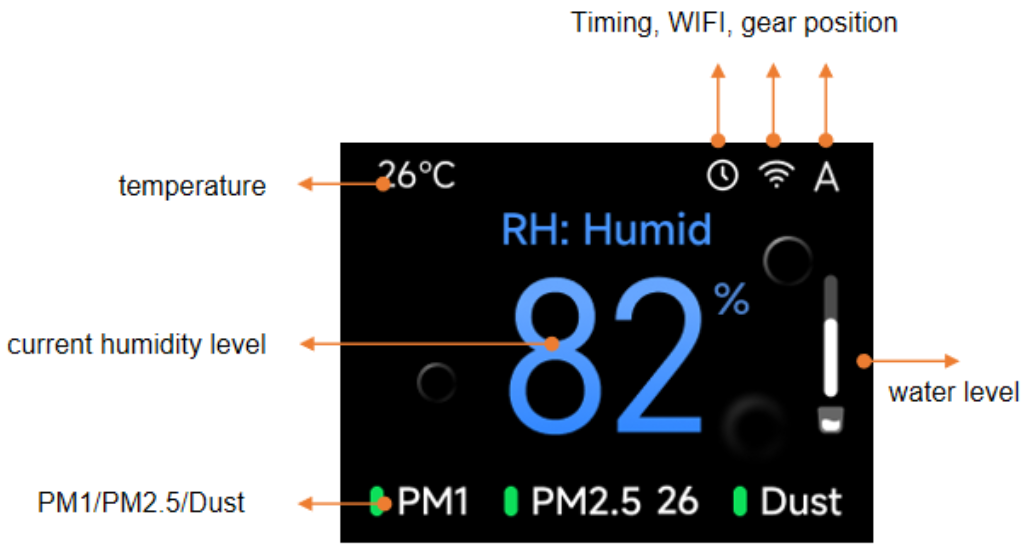
Q6: What does the display screen of the Mijia Smart Air Purifier with Humidification Pro show?
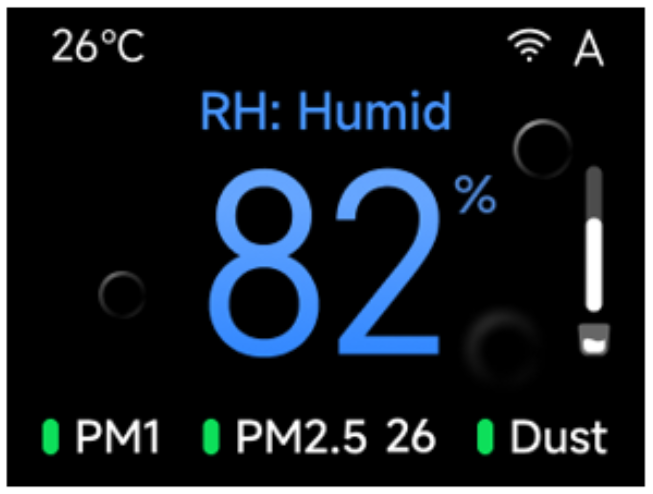
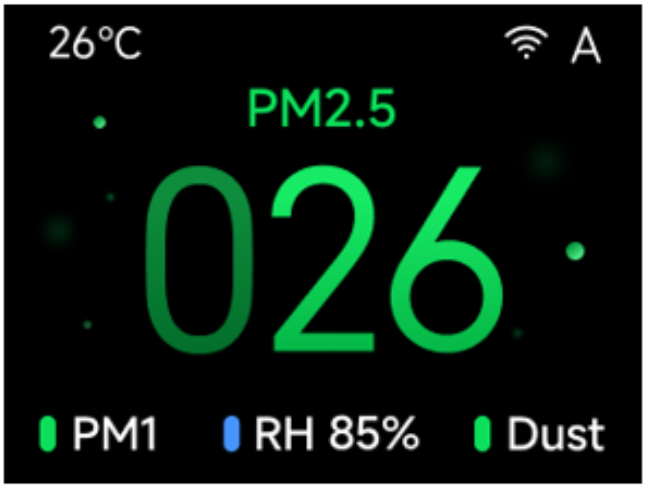
A: The display screen shows different status information depending on the current operating mode, as shown below:
Humidity screen:
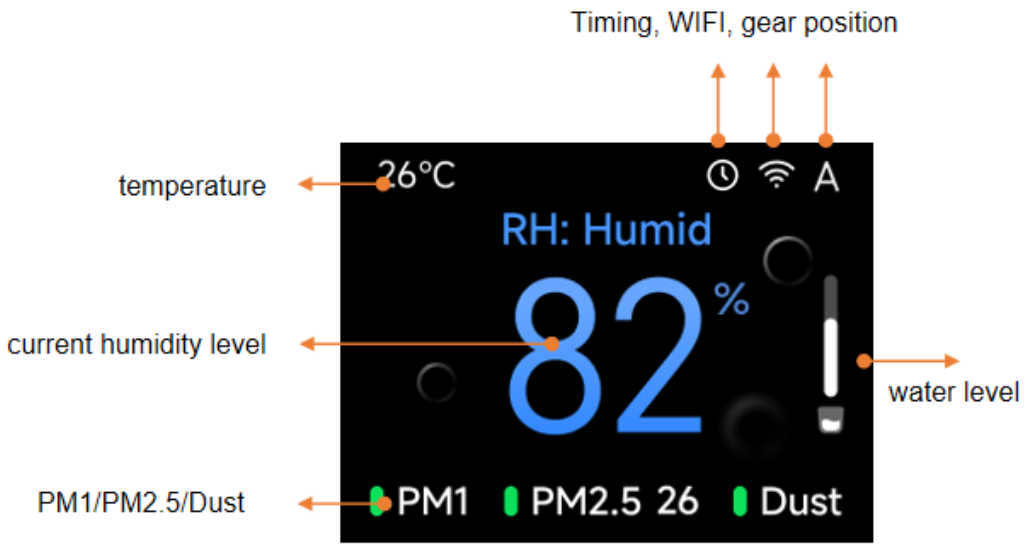
1. The current temperature in the upper left corner.
2. Wi-Fi connection status and mode indicator in the upper right corner.
3. The relative humidity (RH) and water tank level indicator on the right side.
Air quality indicators at the bottom: PM1, PM2.5, Dust.
Air quality screen:
1. The current temperature in the upper left corner.
2. Wi-Fi connection status and mode indicator in the upper right corner.
3. The PM2.5 concentration.
4. Air quality indicators at the bottom: PM1, Relative humidity (RH), Dust.
Q7: How to add water to the Mijia Smart Air Purifier with Humidification Pro?
A: To add water to the Mijia Smart Air Purifier with Humidification Pro, please refer to the following methods:
Method 1:
Pour an appropriate amount of water directly from the top of the device.
Method 2:
Remove the top unit, hold the water tank handle, and lift the tank upward to remove it. Fill with water without exceeding the maximum water level mark, then reinstall the water tank and other components.
Note:
1. If water overflows, pour out the excess water.
2. Disconnect the power supply before adding water.
Q8: How does the constant humidity mode of the Mijia Smart Air Purifier with Humidification Pro work?
A: In constant humidity mode, the Mijia Smart Air Purifier with Humidification Pro automatically adjusts its fan speed based on the difference between the current ambient humidity and the target humidity to maintain a stable indoor humidity level.
The target humidity can be customized through the Xiaomi Home App. By default, the target humidity is set to approximately 55%. When the ambient humidity is below 55%, the device operates at high speed to humidify quickly. Once the ambient humidity reaches 55%, the device switches to low speed. When the ambient humidity exceeds 60%, the device reduces to minimum speed. If the humidity drops below 60%, the device returns to low speed. When the humidity falls below 50%, the device resumes high-speed operation to bring the environment to the target humidity as quickly as possible, and the cycle continues.
Note:
The adjustable humidity range in the Xiaomi Home App is 40% to 70%. The humidity sensor is located inside the device, so there may be a slight difference compared to external humidity readings.
Q9: What are the functions of the buttons on the Mijia Smart Air Purifier with Humidification Pro?
A: 1. Mode button: Switches between Purify mode, Purify & humidify mode, or Air dry mode.
2. Level button: Switches between operating speed levels.
3. Power button: Turns the humidifier on or puts it into standby mode.
Q10: What are the fan speeds in different modes of the Mijia Smart Air Purifier with Humidification Pro?
A: In Purify mode:
1. Sleep level: approximately 400 RPM/min
2. Level 1: approximately 640 RPM/min
3. Level 2: approximately 880 RPM/min
4. Level 3: approximately 1120 RPM/min
In Purify & humidify mode:
1. Sleep level: approximately 400 RPM/min
2. Level 1: approximately 660 RPM/min
3. Level 2: approximately 920 RPM/min
4. Level 3: approximately 1180 RPM/min
Q11: What protection features does the Mijia Smart Air Purifier with Humidification Pro have?
A: The Mijia Smart Air Purifier with Humidification Pro is equipped with overfill water protection and over-humidification air protection.
Q12: How does the over-humidification protection of the Mijia Smart Air Purifier with Humidification Pro work?
A: When the ambient humidity reaches 80%, the device will shut off the fan after one hour while keeping the water pump running. Once the humidity drops to 70%, the fan resumes its previous speed level. This feature can be disabled through the Xiaomi Home App.
Q13: What is the air purification capability of the Mijia Smart Air Purifier with Humidification Pro?
A: The Mijia Smart Air Purifier with Humidification Pro achieves a Particle CADR of 400 m³/h (422 m³/h tested value), effectively removing airborne particles, bacteria, viruses, allergens, and other pollutants.
Its purification performance has been certified by an accredited authority and includes:
PM1: 99.99% removal rate after 1 hour.
PM2.5: 99.99% removal rate after 1 hour.
PM10: 99.99% removal rate after 1 hour.
Influenza A (H1N1): 99.99% removal rate after 1 hour.
Staphylococcus aureus: 99.9% removal rate after 1 hour.
Escherichia coli: 99.9% removal rate after 1 hour.
Pseudomonas aeruginosa: 99.9% removal rate after 1 hour.
Klebsiella pneumoniae: 99.9% removal rate after 1 hour.
Japanese cedar pollen allergen: 97.28% removal rate after 1 hour.
Cat dander allergen: 99.01% removal rate after 1 hour.
Dog dander allergen: 96.11% removal rate after 1 hour.
Dust mite allergen: 98.07% removal rate after 1 hour.
Q14: What safety precautions should be observed when using the Mijia Smart Air Purifier with Humidification Pro?
A: The following safety precautions must be observed:
1. Do not allow children to treat the product as a toy. Supervise children and pets to keep them at a safe distance during operation.
2. Do not plug or unplug the power adapter with wet hands to avoid the risk of electric shock.
3. Do not separate the water tank from the main unit during operation, and do not touch the air outlet.
4. Do not tilt or invert the device while it is connected to power or contains water, to prevent damage to internal electronic components.
5. Do not sit on, lean against, or tilt the device. When the main unit is tilted, the water level reading may be inaccurate, or water may overflow. Always place the device on a flat, stable surface during use.
6. When using the humidifier together with household gas-fueled appliances (such as gas stoves and gas water heaters), ensure adequate ventilation to prevent carbon monoxide poisoning.
7. The recommended water temperature for the water tank is 5 ℃ to 38 ℃. Do not add hot water, fragrances, essential oils, or disinfectants to the water tank, as these may damage the device.
Q15: What are the features of the humidifier filter for the Mijia Smart Air Purifier with Humidification Pro?
A: The humidifier filter is designed for efficient, hygienic, and long-lasting performance, with the following features:
1. It adopts a folded peak structure that provides a large evaporation surface area for efficient humidification.
2. It is made of wood pulp paper composed of high-density, water-absorbent fibres, ensuring excellent water absorption and evaporation performance.
3. It is washable and reusable, helping reduce maintenance costs.
4. It features a strong antibacterial coating with an Anti-mold Grade 1 rating and a 99.9% antibacterial rate, helping reduce bacterial growth and odor development.
5. It achieves an antibacterial rate of 99.99% against Staphylococcus aureus and Escherichia coli.
6. It is equipped with a scale collection box to help reduce water scale buildup and extend the filter's service life.
Q16: What are the Wi-Fi indicator statuses on the display panel of the Mijia Smart Air Purifier with Humidification Pro?
A: The specific status descriptions are as follows:
1. Waiting for connection / Reconnecting after disconnection: Blinking (on for 0.4 seconds, off for 0.2 seconds).
2. Connecting: The Wi-Fi icon lights up layer by layer.
3. Connected to the network: Steady on.
4. Not connected to the network within 30 minutes after powering on: Off.
Q17: How to reset the Wi-Fi on the Mijia Smart Air Purifier with Humidification Pro?
A: In standby or power-on state, press and hold the Mode button for 7 seconds. The screen will display a press-and-hold prompt simultaneously. After 7 seconds, the prompt will indicate to proceed with the App for connection.
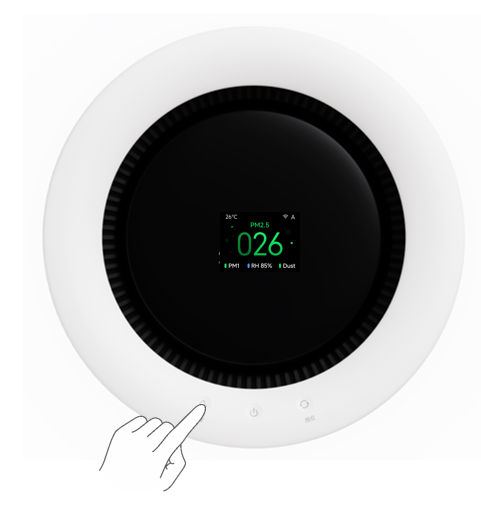
Note:
If the App is not connected, the device will return to the main screen after 30 minutes. Pressing any button other than the Power button can return to the main screen in advance.
Q18: How to enable or disable Wi-Fi on the Mijia Smart Air Purifier with Humidification Pro?
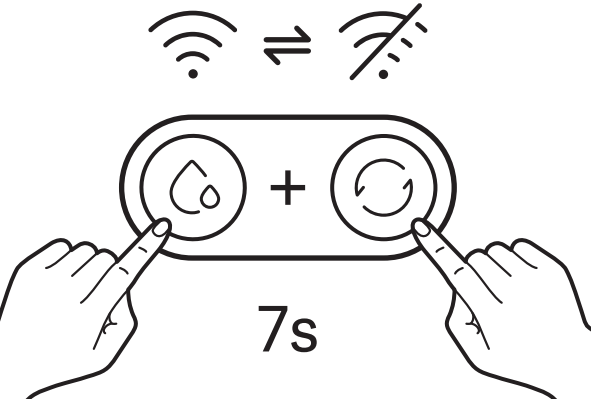
A: In the standby or power-on state, press and hold the Mode button and the Level button simultaneously for 7 seconds. The screen will display a press-and-hold prompt, and Wi-Fi will be enabled or disabled.
Q19: How often should the humidifier filter of the Mijia Smart Air Purifier with Humidification Pro be replaced?
A: Depending on usage frequency and water quality, it is recommended to replace the humidifier filter every 6 to 12 months. The remaining filter life can be checked in the Xiaomi Home App. After replacing the filter, press and hold the Mode button for 3 seconds to reset the filter, or reset it through the Xiaomi Home App.
Q20: Can essential oils be used in the Mijia Smart Air Purifier with Humidification Pro?
A: Essential oils must not be used in the Mijia Smart Air Purifier with Humidification Pro. Chemical substances such as essential oils can disperse into the air and pose a risk to respiratory health. The Mijia Smart Air Purifier with Humidification Pro is made of ABS plastic material, and since essential oils are corrosive chemicals, they can cause corrosion and damage to the device. Therefore, adding any type of essential oil during use is not recommended.
Q21: What is the difference between the Mijia Smart Air Purifier with Humidification Pro and a regular air purifier?
A: Compared to a regular air purifier, the Mijia Smart Air Purifier with Humidification Pro combines both air purification and humidification functions. It can filter airborne particulate pollutants such as dust and pollen, increase air humidity, relieve dry air, and provide antibacterial and antiviral protection, creating a more comfortable and healthier indoor environment.
Q22: Can substances other than essential oils (such as vinegar, herbal extracts, disinfectants, or floral water) be added to the Mijia Smart Air Purifier with Humidification Pro?
A: Since the humidifier disperses water molecules into the air through high-speed fan airflow, any additives in the water may be inhaled into the body along with the moisture, which could pose health risks. Therefore, adding any substances to the water during use is not recommended. It is advisable to use filtered water or purified water.
Q23: What does the humidification efficiency grade of the Mijia Smart Air Purifier with Humidification Pro mean?
A: The humidification efficiency grade of a humidifier refers to the ratio of the actual humidification capacity to the input power. It reflects how much humidification output can be produced per unit of power consumption and is an important indicator for evaluating humidifier performance.
The standard divides this indicator into four grades: A, B, C, and D. In general, humidifiers are not permitted to be rated below Grade D. The Mijia Smart Air Purifier with Humidification Pro achieves Grade A in humidification efficiency.
Q24: How often should the air purification filter of the Mijia Smart Air Purifier with Humidification Pro be replaced?
A: The air purification filter is a consumable component. Depending on the operating environment and daily usage duration, it is recommended to replace the filter every 6 to 12 months. The remaining filter life can be checked in the Xiaomi Home App. After replacing the air purification filter, press and hold the Level button for 3 seconds to reset the filter, or perform the reset through the Xiaomi Home App.
Q25: What type of water is recommended for the Mijia Smart Air Purifier with Humidification Pro?
A: Both tap water and purified water can be used. If the tap water has a high TDS (Total Dissolved Solids) value, it is recommended to clean the water tank, water pump, and humidifier filter regularly to prevent scale buildup that may affect humidification performance.
The device uses cold evaporative humidification technology, which produces no visible mist or dust and helps prevent water stains on furniture.
Q26: What does the screen display when the Purify mode of the Mijia Smart Air Purifier with Humidification Pro is active?
A: In Purify mode, the screen displays humidity, PM1, PM2.5, and dust (PM10) readings, with PM2.5 shown by default.
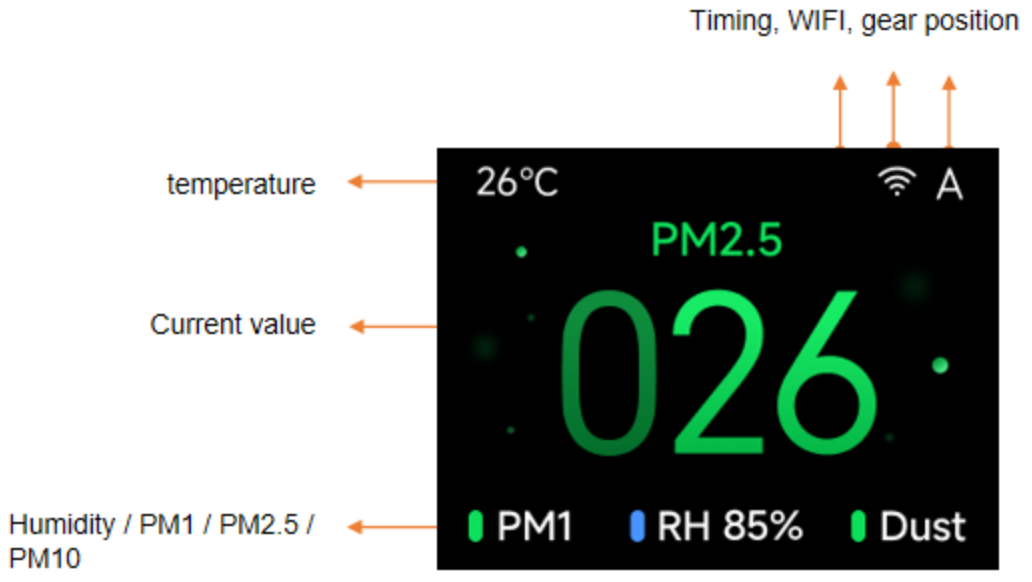
Q27: What does the screen display when the Purify & humidify mode of the Mijia Smart Air Purifier with Humidification Pro is active?
A: In Purify & humidify mode, the screen displays the current relative humidity.
Q28: How to restore the Mijia Smart Air Purifier with Humidification Pro to factory settings?
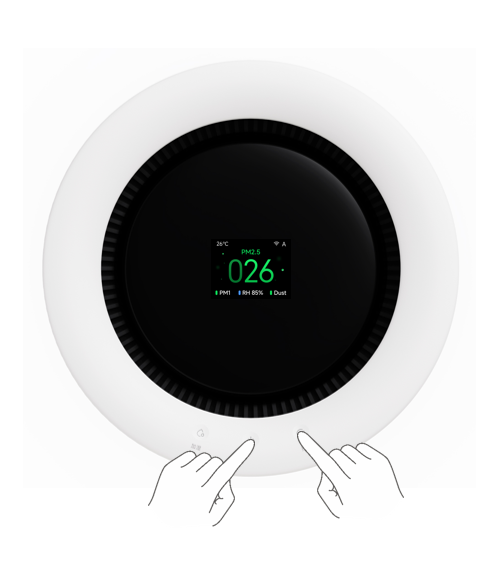
A: When the device is powered on, press and hold the Power button and the Level button simultaneously for 7 seconds. The screen will display a countdown prompt. After the countdown ends, the device will restart and the reset operation will be complete.
Q29: Can the display screen of the Mijia Smart Air Purifier with Humidification Pro show the remaining water level in the tank?
A: In Purify & humidify mode, a water level bar is displayed on the right side of the humidity value.
App Related
Q1: How to connect the Mijia Smart Air Purifier with Humidification Pro to the Xiaomi Home App?
A: The Mijia Smart Air Purifier with Humidification Pro is compatible with the Xiaomi Home App and can be controlled through it. Download and install the Xiaomi Home App by scanning the QR code in the product manual or by searching in the phone's built-in app store.
Follow the steps below to connect the Mijia Smart Air Purifier with Humidification Pro to the Xiaomi Home App:
1. Open the Xiaomi Home App and enable Bluetooth on the phone.
2. Turn on the humidifier, then press and hold the Mode button for 7 seconds. After hearing a beep, the Wi-Fi indicator will blink, indicating that the humidifier has entered the waiting-for-connection state.
3. Tap the "+" icon in the upper-right corner of the Xiaomi Home App interface to add a device and search automatically.
4. When the Mijia Smart Air Purifier with Humidification Pro is found, tap to select it. If the device cannot be found automatically, it can be added manually.
5. Follow the on-screen prompts to configure the network.
6. After the network configuration is successful, the phone will automatically connect to the device. Wait for the connection to complete.
Q2: What operations can be performed after connecting the Mijia Smart Air Purifier with Humidification Pro to the Xiaomi Home App?
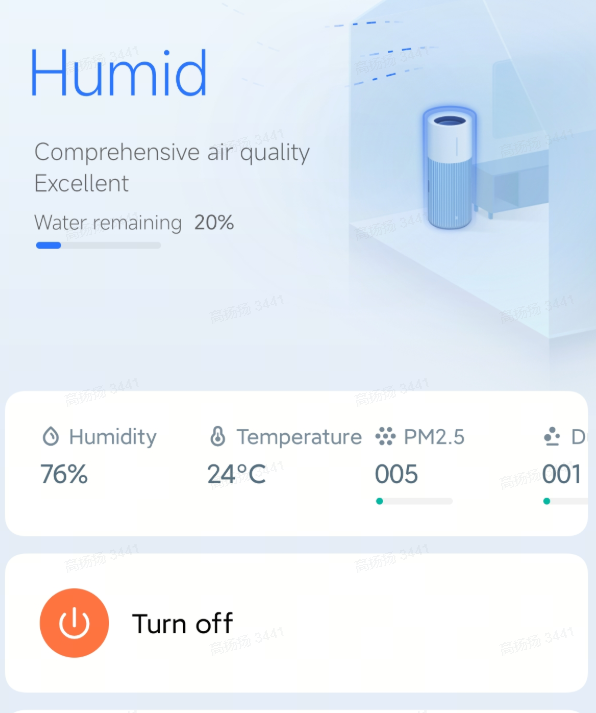
A: After connecting the Mijia Smart Air Purifier with Humidification Pro to the Xiaomi Home App, the following operations can be performed from the phone:
Viewing humidity, PM2.5, remaining water level, and controlling the humidifier for power on/off, mode and speed level selection, target humidity setting, and air drying, as shown below.

Q3: How to turn the Mijia Smart Air Purifier with Humidification Pro on or off through the Xiaomi Home App?
A: The Mijia Smart Air Purifier with Humidification Pro can be turned on or off through the Xiaomi Home App. The specific operation path is: Xiaomi Home App >> select the Mijia Smart Air Purifier with Humidification Pro >> tap [Turn on] or [Turn off] to turn the humidifier on or off.
Q4: How to adjust the speed level of the Mijia Smart Air Purifier with Humidification Pro through the Xiaomi Home App?
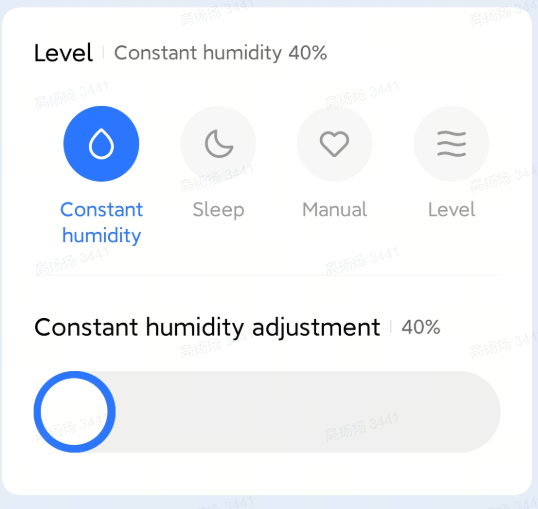
A: The Mijia Smart Air Purifier with Humidification Pro allows speed level adjustment through the Xiaomi Home App. The specific operation path is: Xiaomi Home App >> select the Mijia Smart Air Purifier with Humidification Pro >> select the desired speed level based on preference. Available modes include: Constant humidity, Sleep, and Manual. In Manual mode, the fan speed can be manually adjusted, as shown below.
Q5: How to set a timer for the Mijia Smart Air Purifier with Humidification Pro?
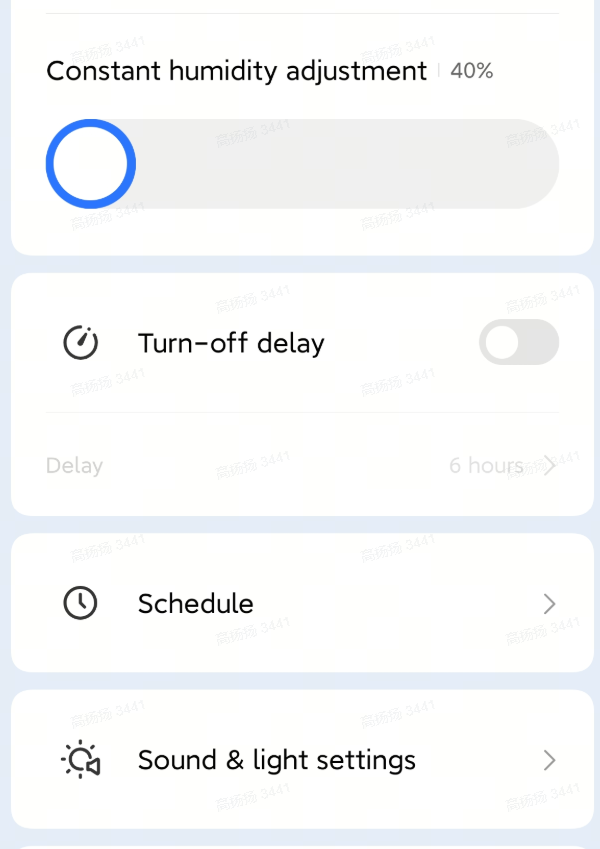
A: The Mijia Smart Air Purifier with Humidification Pro supports timer settings through the Xiaomi Home App. The specific operation path is: Xiaomi Home App >> select the Mijia Smart Air Purifier with Humidification Pro >> tap [Schedule] >> add a scheduled power on / scheduled power off / time period schedule, as shown below.
Q6: How to enable or disable the prompt sound of the Mijia Smart Air Purifier with Humidification Pro through the Xiaomi Home App?
A: The prompt sound of the Mijia Smart Air Purifier with Humidification Pro can be enabled or disabled through the Xiaomi Home App. The specific operation path is: Xiaomi Home App >> select the Mijia Smart Air Purifier with Humidification Pro >> select [Sound & light settings] >> [Notification sound].
Note:
After disabling the prompt sound, no audio alerts will be provided except for fault notifications.
Q7: How to update the firmware of the Mijia Smart Air Purifier with Humidification Pro?
A: The Mijia Smart Air Purifier with Humidification Pro is a smart device that supports firmware upgrades. The specific operation path is: Xiaomi Home App >> select the Mijia Smart Air Purifier with Humidification Pro >> tap the three dots in the upper-right corner >> tap [Firmware update]. If a new firmware version is available, tap [Update] to proceed.
Q8: Can the constant humidity target be adjusted in the Xiaomi Home App for the Mijia Smart Air Purifier with Humidification Pro?
A: Yes, the constant humidity target can be adjusted. In constant humidity mode, the device enters a constant humidity state with a default target of approximately 55% humidity. If the current humidity has not reached 55%, the device operates at high speed for humidification, and the constant humidity indicator remains steadily lit. When the ambient humidity reaches 55%, the device switches to low-speed humidification. When the ambient humidity exceeds 60%, the device reduces to minimum speed for humidification. If the humidity drops back below 60%, the device returns to low-speed humidification. When the humidity drops below 50%, the device resumes high-speed humidification to ensure the environment reaches the target humidity as quickly as possible, and the cycle continues.
Note:
The adjustable constant humidity range in the Xiaomi Home App is 40% to 70%. The humidity sensor is located inside the device, so readings may differ from external measurements.
Q9: How to adjust the screen brightness of the Mijia Smart Air Purifier with Humidification Pro?
A: The screen brightness can be adjusted in the Xiaomi Home App: select the Mijia Smart Air Purifier with Humidification Pro >> select [Sound & light settings] >> [Brightness] >> choose from options: [Auto adjustment], [On], [Medium], [Dim].
Q10: Can multiple people control the same Mijia Smart Air Purifier with Humidification Pro?
A: Yes, multiple people can control the same device, provided it is shared with designated accounts through the Xiaomi Home App. Tap the "..." icon in the upper-right corner of the plugin and select [Share device] to share with Xiaomi accounts. Shared accounts do not have access to firmware upgrade operations.
Common Issues and Troubleshooting
Q1: What to do if the Mijia Smart Air Purifier with Humidification Pro humidifies slowly and cannot reach the set humidity?
A: The initial room temperature, humidity, room size, and ventilation conditions all affect humidification performance. For the best humidification experience, keep doors and windows closed during use.
If the humidifier consistently humidifies slowly, perform the following checks:
1. After the humidifier has been running for some time, turn off the device and disconnect the power. Check whether the humidifier filter is wet. If the filter is not wet, reinstall the humidifier filter. After reinstallation, reconnect the power and restart humidification. If the filter remains dry after humidifying for some time, contact your local after-sales service center for further support.
2. Check whether the humidifier is producing airflow. If there is no airflow, please contact your local after-sales service center for further support.
Q2: What to do if the Mijia Smart Air Purifier with Humidification Pro does not automatically shut off after reaching the set humidity in constant humidity mode?
A: To maintain the target humidity, the device calculates the difference between the target humidity and the ambient humidity, then adjusts the fan speed accordingly. If the target humidity is within 5% above the ambient humidity, the device operates at minimum speed to maintain the current humidity level. If the target humidity exceeds the ambient humidity by more than 5%, the device stops rotating but does not shut off completely.
Q3: What to do if the water in the Mijia Smart Air Purifier with Humidification Pro turns yellow after extended use?
A: Water discoloration is related to airborne dust and water quality. Dust particles in the air can be drawn into the device through the air inlet and settle into the water tank after passing through the filter. Metal ions such as calcium, magnesium, and iron, as well as sediment particles in tap water, can also cause water discoloration after interacting with the filter. Discolored water does not affect normal operation. It is recommended to clean the water tank and filter once a week, or use purified water from a water purifier for humidification to effectively reduce discoloration.
Q4: Can the Mijia Smart Air Purifier with Humidification Pro heat water or be used with essential oils?
A: No. Water above 40 ℃ can damage the device structure and render it inoperable. Chemical substances such as essential oils can reduce the lifespan of the machine and compromise humidification safety.
Q5: What to do if the Mijia Smart Air Purifier with Humidification Pro overflows onto the floor?
A: Disconnect the power with dry hands and wipe up the spilled water. Remove the main unit and the filter, then pour out water from the tank until the level is below the maximum water mark.
Note:
The buttons on the main unit have a splash-resistant design, but the device has no waterproof rating.
Q6: What to do if the filter of the Mijia Smart Air Purifier with Humidification Pro has an odor when first used?
A: The air purification filter material is polyester fiber. A brand-new filter may have a slight odor, which does not affect health. The odor will dissipate on its own after a period of use.
Q7: What material is the humidifier filter of the Mijia Smart Air Purifier with Humidification Pro made of, and what is its function?
A: The humidifier filter is made of wood pulp paper composed of high-density, water-absorbent fibers. The folded filter design effectively prevents impurities in the water from evaporating into the air. During evaporative humidification, it helps to thoroughly block water impurities, preventing contaminated air from being released. Only fresh, clean, moist air is dispersed, helping to maintain a healthy indoor environment.
Q8: What to do if the Mijia Smart Air Purifier with Humidification Pro cannot be controlled after a firmware update, or if the update fails?
A: Ensure that the device is not currently in an upgrade state (i.e., the buttons can be operated normally). Then, reconnect the power and wait for the display indicator to flash once or for a sound to confirm.
Note:
Do not disconnect the power during this process. After the upgrade, the device restart requires approximately 1 to 2 minutes. Please wait patiently.
Q9: What to do if there are water droplets on the inner walls of the Mijia Smart Air Purifier with Humidification Pro?
A: When water vapor evaporates and comes into contact with the cooler inner walls, condensation occurs, producing a small amount of water droplets. This is a normal phenomenon.
Q10: What to do if the Mijia Smart Air Purifier with Humidification Pro does not respond when powered on and the indicator does not light up?
A: If the Mijia Smart Air Purifier with Humidification Pro does not respond when powered on and the indicator does not light up, perform the following steps:
1. Check whether the power outlet is properly connected and the power supply is on.
2. Poor contact with the power switch may cause the device to not respond when powered on.
3. The internal power cable inside the base may have become loose or disconnected during transportation.
If the issue persists, please contact your local after-sales service center for further assistance.
Q11: What to do if the Xiaomi Home App cannot discover the Mijia Smart Air Purifier with Humidification Pro?
A: If the phone cannot discover the device, go to the phone's Settings >> App permissions >> Xiaomi Home App and enable the related permissions. Also, allow your phone's location permission.
If the device still cannot be found, the current signal environment may have interference. Try adding the device manually.
The device may already be connected to another account. Press and hold the Mode button for 7 seconds until a beep is heard. After the device Wi-Fi is reset, try searching and connecting the device through the Xiaomi Home App again.
Q12: How often should the scale collection box of the Mijia Smart Air Purifier with Humidification Pro be replaced?
A: A scale collection box is included when purchasing the humidifier filter. Replace it together with the humidifier filter during each filter replacement.
Q13: What to do if the screen of the Mijia Smart Air Purifier with Humidification Pro does not light up?
A: If the screen does not light up during use of the Mijia Smart Air Purifier with Humidification Pro, follow these steps:
1. Check whether the Power button has been pressed. The screen only lights up when the Power button is pressed during use.
2. Manually adjust the brightness in the Xiaomi Home App. In the screen-off state, the display light will be turned off.
3. Disconnect and reconnect the power to restart the humidifier and check whether the screen returns to normal.
4. If the screen remains off but the device operates normally, contact your local after-sales service center for further support.
5. If the screen indicator does not light up or the display content is incomplete, there may be a screen malfunction. Contact your local after-sales service center for further support.
Q14: What to do if the Xiaomi Home App connection fails when connecting the Mijia Smart Air Purifier with Humidification Pro?
A: Please refer to the following troubleshooting steps:
1. Update the Xiaomi Home App to the latest version.
2. Verify that the Wi-Fi password entered during connection is correct. The Wi-Fi network name must not contain Chinese characters, and the password must not include special characters such as @ or %. If necessary, reset the network name and password to use English letters, numbers, and standard characters, then try again.
3. Check whether the router's internet connection is working properly by trying to open a webpage on the phone or on a computer connected to the same Wi-Fi network.
4. Confirm whether the distance between the router and the device is too far (beyond 5 meters or with walls in between). Try moving the router to within 1 to 2 meters of the device and attempt to reconnect.
5. Use the phone as a Wi-Fi hotspot and try connecting with another phone. If the connection is successful, follow the steps in item 3 to troubleshoot. If the hotspot connection also fails, contact your local after-sales service center for further support.
6. Check whether the router has too many connected devices, causing slow network speed or router unresponsiveness. Try restarting the router.
7. The Mijia Smart Air Purifier with Humidification Pro does not support enterprise EAP 802.1x authenticated networks, 5 GHz networks, or public Wi-Fi networks that require web authentication. Switch to a compatible network and try connecting again.
8. Connection failure may also be related to the phone. Try using another phone to connect, or re-download the Xiaomi Home App and update it to the latest version.
9. When reconnecting, reset the humidifier Wi-Fi first. Reset method: press and hold the Mode button for 7 seconds until a beep is heard. The Wi-Fi indicator will blink, indicating that the reset is successful and the device is in the waiting-for-connection state. Open the phone App to reconnect the Wi-Fi and bind the device.
Q15: Is it normal for the Mijia Smart Air Purifier with Humidification Pro to have water inside when first unboxed?
A: The small amount of water droplets found inside the Mijia Smart Air Purifier with Humidification Pro is a normal occurrence. All products undergo water pathway testing before leaving the factory. A small amount of residual water inside the device is normal and does not affect the hygiene or safety performance of the product. Products sold through official channels are all brand new and not second-hand. Please feel free to use the product with confidence.
Q16: What to do if the humidity displayed in the Xiaomi Home App does not match the hygrometer reading for the Mijia Smart Air Purifier with Humidification Pro?
A: The Mijia Smart Air Purifier with Humidification Pro is equipped with a humidity detection function. The sensor is located at the back of the device. Ensure that the back of the device is not obstructed and is free from heat source interference. If different devices show different humidity readings, consider the following:
1. The device uses an imported temperature and humidity sensor that has been compared against a professional humidity tester and found to be consistent. It is recommended to place the hygrometer on top of the device for a comparison test.
2. During the initial stages of humidification, airflow may cause the humidity near the device to be higher than in more distant areas. Place the hygrometer on top of the humidifier and wait 10 minutes for the reading to stabilize before comparing. Due to differences in sensors and measurement methods between products, a variation within plus or minus 5% is considered within the normal range.
Q17: Can the Mijia Smart Air Purifier with Humidification Pro detect when the filter life has expired?
A: Yes, the remaining filter life can be checked in the Xiaomi Home App.
Note:
Continuing to use the filter after it has expired will reduce humidification performance and air purification effectiveness. Regular replacement is recommended.
Q18: Can the filter of the Mijia Smart Air Purifier with Humidification Pro be used with other humidifiers?
A: No, the filter is not compatible with other humidifiers.
Q19: What to do if there are water droplets inside the packaging of the Mijia Smart Air Purifier with Humidification Pro?
A: To ensure proper device operation, water pathway testing is conducted before the product leaves the factory. A small amount of residual water may remain inside the water pump, and during transportation, this water may evaporate and form droplets on the packaging bag. This is a normal occurrence.
Q20: Will the filter of the Mijia Smart Air Purifier with Humidification Pro have an odor when first opened or during storage?
A: The filter should be kept dry before storage to prevent mold and moisture buildup. There will be no odor if stored without residual water. If the product has been sealed for an extended period, there may be a slight odor upon first opening. If the odor seems strong, rinse the filter with clean water.
Q21: How to store the filter of the Mijia Smart Air Purifier with Humidification Pro?
A: If the device will not be used for an extended period, the filter should be cleaned, air-dried, and stored properly to prevent mold growth and odor development.
Q22: What material is the filter of the Mijia Smart Air Purifier with Humidification Pro made of, and what is its function?
A: The humidifier filter is made of wood pulp paper composed of high-density, water-absorbent fibers. The folded water purification filter effectively prevents impurities in the water from evaporating. During evaporative humidification, it helps to thoroughly block water impurities, preventing contaminated air from being released. Only fresh, clean, moist air is dispersed, helping to maintain a healthy indoor environment.
Q23: Can the Mijia Smart Air Purifier with Humidification Pro be used without a filter?
A: No, the Mijia Smart Air Purifier with Humidification Pro cannot be used without a filter. The device must have the filters properly installed before use to prevent damage to the machine.
Q24: What to do if the Mijia Smart Air Purifier with Humidification Pro shows offline in the Xiaomi Home App or cannot connect to the network after being powered off?
A: Please refer to the following troubleshooting steps:
1. Check whether the Mijia Smart Air Purifier with Humidification Pro is powered on and operating normally.
2. Ensure the Wi-Fi network can access the internet normally. Move the humidifier closer to the router to ensure a stable signal.
3. Unplug the power cord and reconnect the power after 10 seconds (the power supply requires some time to discharge).
Q25: What to do if the buttons on the Mijia Smart Air Purifier with Humidification Pro are unresponsive?
A: If there are large water droplets on the buttons, they may interfere with button functionality. Wipe the buttons dry and try again. If the buttons remain unresponsive, contact your local after-sales service center for further support.
Q26: Does the Mijia Smart Air Purifier with Humidification Pro support top-fill water addition?
A: Yes, the Mijia Smart Air Purifier with Humidification Pro supports top-fill water addition. When adding water from the top, the water level must not exceed the maximum water level mark. If water is poured too quickly, a small amount may splash out. Add water slowly. If overflow occurs, remove the water tank, pour out the excess water, and wipe the main unit dry. The device can then be used normally.
Note:
Disconnect the power supply before adding water.
Q27: How to turn off the water tank indicator on the Mijia Smart Air Purifier with Humidification Pro?
A: Please refer to the following methods:
1. In Purify mode, the water tank indicator turns off automatically.
2. In Purify & humidify mode, the water tank indicator is on when the water pump is operating normally.
3. After activating the Air dry mode, the water tank indicator turns off when the water pump stops working.
4. In Sleep level, both the water tank indicator and the screen turn off.
Q28: What to do if noise is still audible in the sleep mode of the Mijia Smart Air Purifier with Humidification Pro?
A: The noise from an evaporative humidifier mainly comes from the water pump and the fan. The Mijia Smart Air Purifier with Humidification Pro uses a submersible water pump and a dynamically balanced fan design. The measured sound power level in sleep mode is 31 dB(A) (equivalent to a sound pressure level as low as 14.6 dB(A)). If the operating sound in sleep mode affects sleep, it is recommended to place the humidifier farther away.
If the device produces a dripping sound, it may be caused by scale buildup inside the water tank cap or the humidifier filter, preventing water from flowing back along the designed path and causing it to drip directly into the water tank. This can be resolved by cleaning or replacing the humidifier filter.
Note:
The measured sound pressure level in sleep mode was 14.6 dB(A). Data comes from the internal laboratory.
Q29: What to do if the air-drying time of the Mijia Smart Air Purifier with Humidification Pro is too long?
A: The Mijia Smart Air Purifier with Humidification Pro uses a non-submerged filter air-drying technology. The device automatically performs filter air drying before shutdown to reduce bacterial growth, mold, and odor issues. To ensure effective air drying, the device will continue air drying for 4 hours after shutdown. The Air dry mode can also be manually canceled to end the process.
Q30: What to do if the filter is still damp after the air-drying cycle of the Mijia Smart Air Purifier with Humidification Pro?
A: If the filter remains damp after the air-drying cycle, it may be because the humidity inside the humidifier is still high, resulting in incomplete drying. Press the Mode button once to re-enter the Air dry mode.
Q31: What alert notifications does the Mijia Smart Air Purifier with Humidification Pro have, and how should each be addressed?
A: Please refer to the alert notifications below:
1. Low water: Add a sufficient amount of clean water.
2. Water full: Indicates that the water tank is full. Stop adding water.
3. Compartment door not closed: Close the compartment door properly.
4. Air purification filter not detected: Install the air purification filter correctly.
5. Humidifier filter not detected: Install the humidifier filter correctly.
6. Water tank not detected: Install the water tank correctly (ensure the water level float is installed in the tank).
7. Maintenance required: When this prompt appears, press any button except the Power button to dismiss it. If the prompt appears again after the next power-on, open and close the compartment door or disconnect and reconnect the power, then try again.
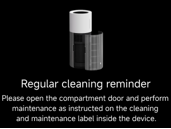
8. Motor fault: Contact your local after-sales service center for further assistance.
Q32: What to do if the Mijia Smart Air Purifier with Humidification Pro indicates low water even though there is still water in the tank?
A: The Mijia Smart Air Purifier with Humidification Pro is equipped with a low water protection feature. After the low water protection is triggered, unevaporated water on the filter will gradually flow down to the lower water tank, resulting in some remaining water. Generally, the higher the humidity, the more residual water there will be. Move the main unit to a bathroom or sink, remove the drain plug at the bottom of the water tank, drain the accumulated water, and gently wipe the bottom of the water tank with a soft cloth.
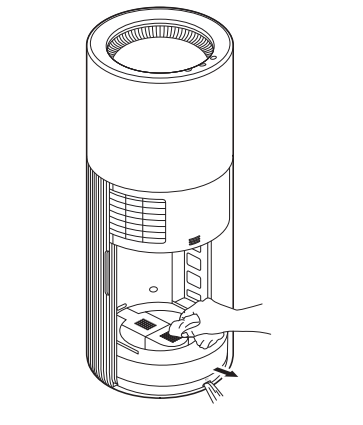
Q33: Does the Mijia Smart Air Purifier with Humidification Pro have a built-in battery?
A: No, the Mijia Smart Air Purifier with Humidification Pro does not have a built-in battery.
Q34: Can insects appear in the water of the Mijia Smart Air Purifier with Humidification Pro?
A: The Mijia Smart Air Purifier with Humidification Pro is an integrated humidifier and air purifier. The air is filtered through the air purification filter. If the water quality is satisfactory, insects will not breed in the water.
Q35: How long can the Mijia Smart Air Purifier with Humidification Pro operate at different speed levels?
A: In Level 3 mode, the humidification capacity is up to 2000 mL/h (1800 mL/h rated), providing approximately 6 hours of continuous humidification. In Sleep mode, the humidification capacity is 400 mL/h, providing approximately 16 hours of continuous humidification.
Q36: Can water be added to the Mijia Smart Air Purifier with Humidification Pro while it is operating?
A: Adding water while the device is operating is not recommended. Disconnect the power supply before adding water.
Q37: What to do if there is a lot of white powder on the humidifier filter of the Mijia Smart Air Purifier with Humidification Pro after extended use?
A: The white powder is caused by the accumulation of calcium and magnesium ions from the water on the filter surface over time. Rinse the filter with clean water, and once it is thoroughly cleaned, place it back into the device.
Q38: What to do if the Mijia Smart Air Purifier with Humidification Pro is accidentally triggered when adding water?
A: The Mijia Smart Air Purifier with Humidification Pro uses a capacitive touch sensing mechanism. When water or metal comes into contact with the buttons, the button function may be triggered. This is a normal occurrence. Disconnect the power supply before adding water.
Q39: What to do if the Mijia Smart Air Purifier with Humidification Pro makes a rustling sound during operation?
A: If water is accidentally poured into the air outlet during refilling, it may land on the fan blades. When the device is turned on, a rustling sound may be heard. The sound will disappear after 1 to 2 minutes of operation.
Q40: What to do if the Mijia Smart Air Purifier with Humidification Pro makes a water flow sound during operation?
A: When the humidifier is operating, the water pump draws water from the water tank to the humidifier filter. During this process, water flows through the system, producing a subtle water flow sound, which is normal.
Q41: What preparations are needed before shipping or transporting the Mijia Smart Air Purifier with Humidification Pro?
A: For a humidifier that has been used, empty the water from the water tank and remove the humidifier filter before packing and shipping.
Q42: How to remove odor from the Mijia Smart Air Purifier with Humidification Pro?
A: When the humidifier is not in use, empty the water tank and activate the Air dry mode to dry the humidifier filter, preventing odor and mold growth during extended periods of non-use.
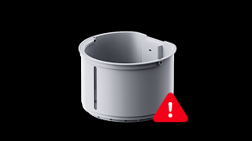
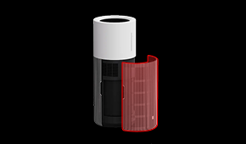
Q43: What to do if the Mijia Smart Air Purifier with Humidification Pro displays a compartment door not closed or water tank not detected message?
A: When the humidifier displays the corresponding icons on the screen after powering on:
1. Disconnect the humidifier from power for 1 minute.
2. Install the water tank properly and close the compartment door correctly.
3. Reconnect the power and turn on the device.
Note:
If the error persists after repeating the above steps, contact your local after-sales service center for further support and repair.
Q44: Will the Mijia Smart Air Purifier with Humidification Pro automatically shut off when water runs out during humidification?
A: When the humidifier runs out of water, it adjusts its operating mode automatically based on the settings in the App:
1. The device starts Air dry mode and automatically shuts off after air drying is complete.
2. If you switch to Purify & humidify mode manually, the device will still operate in Purify mode with low water.
Q45: What precautions should be taken when transporting or shipping the Mijia Smart Air Purifier with Humidification Pro?
A: To prevent water from entering and damaging the device during shipping, empty the water from the water tank and remove the humidifier filter. Follow the steps below:
1. Remove the water tank and pour out any remaining water.
2. Open the compartment door, remove the air purification filter, and remove the humidifier filter.
3. Move the main unit to a bathroom or sink, remove the drain plug at the bottom of the water tank, and drain all accumulated water.
4. Reinsert the drain plug, reinstall the water tank and air purification filter.
5. Close the compartment door.
6. Pack for shipping (do not ship the humidifier filter together with the device).
Q46: Can the humidifier filter of the Mijia Smart Air Purifier with Humidification Pro be washed?
A: The Mijia Smart Air Purifier with Humidification Pro uses a highly efficient antibacterial and anti-mold humidifier filter along with a scale collection box. The filter has a Grade 1 anti-mold rating and features a strong antibacterial coating with an antibacterial rate of 99.9%, reducing odor development. The filter can also be washed with water and reused multiple times.
Q47: What to do if the Mijia Smart Air Purifier with Humidification Pro indicates low water even though the water tank has water?
A: This may be caused by the water level float inside the water tank becoming detached, preventing the water level from being detected.
Reinstall the water level float by the following steps to resolve the issue:
1. Place the float into the float chamber.
2. Install the float chamber together with the float back into the water tank.
Does it help?
Yes
No