

Mijia Wireless Wet Dry Vacuum 5 Pro FAQ
Product Overview
Q1: What are the selling points of the Mijia Wireless Wet Dry Vacuum 5 Pro?
A: The selling points of the Mijia Wireless Wet Dry Vacuum 5 Pro are as follows:
1. It delivers leading cleaning performance: 160 °C high-temperature rapid steam for sterilization and removal of stubborn stains, 26 kPa cyclone strong suction, with an optional foam module.
2. It improves the maintenance-free experience: floating comb teeth anti-tangle design for more precise hair separation and removal.
3. It enhances the cleaning experience: dual-direction electric assist 2.0 with centralized intelligent drive for easier steering, low-noise silent drying for comfortable nighttime use.
Q2: What scenario is the Mijia Wireless Wet Dry Vacuum 5 Pro suitable for?
A: The Mijia Wireless Wet Dry Vacuum 5 Pro is suitable for use on hard floor surfaces such as wooden floors, tiles, and marble.
Q3: How to check the SN of the Mijia Wireless Wet Dry Vacuum 5 Pro?
A: The serial number (SN) for the Mijia Wireless Wet Dry Vacuum 5 Pro can be found in the following two locations:
1. The SN on the main unit is located on the label on the back of the body:
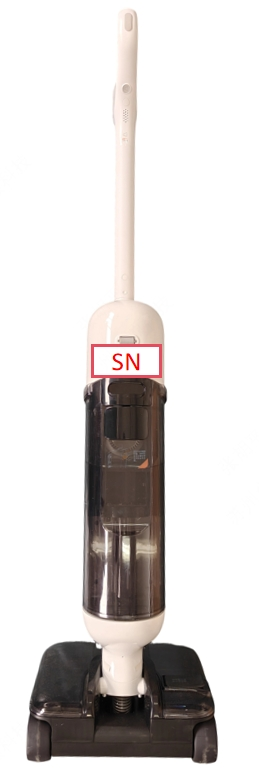
2. The SN for the outer box is located on the bottom of the packaging.
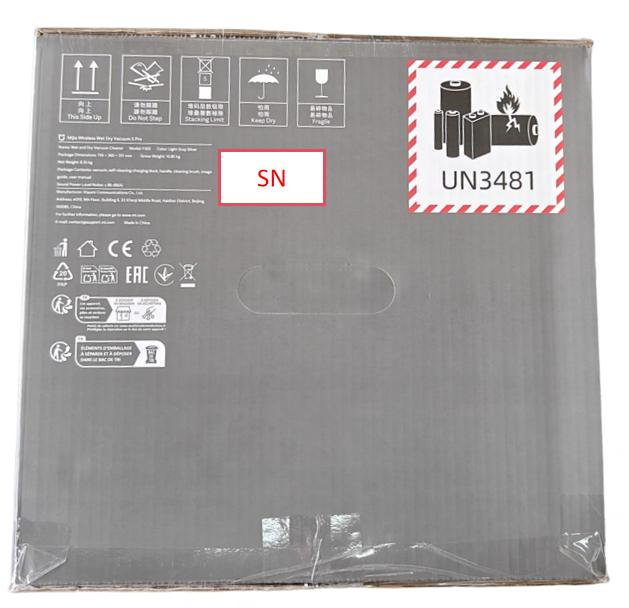
Q4: What are the differences between the Mijia Wireless Wet Dry Vacuum 5 Pro and the previous generation?
A: The differences between the Mijia Wireless Wet Dry Vacuum 5 Pro and the previous generation are as follows:
1. It adds steam floor cleaning.
2. It supports an optional foam cleaning module.
3. It upgrades suction power (from 21,000 Pa to 26,000 Pa).
4. It improves usability (from one-way traction to centralized electric assist).
5. It upgrades silent drying performance (noise reduced from 50 dBA to 45 dBA).
Appearance Introduction
Q1: What does the Mijia Wireless Wet Dry Vacuum 5 Pro look like?
A: The Mijia Wireless Wet Dry Vacuum 5 Pro consists of a vacuum, handle, and self-cleaning charging dock. The overall design is finished in a clean white color scheme.
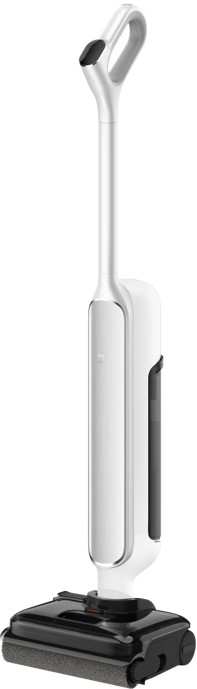
Q2: What are the dimensions and weight of the Mijia Wireless Wet Dry Vacuum 5 Pro?
A: For your reference, here are the dimensions and weight of the Mijia Wireless Wet Dry Vacuum 5 Pro:
The dimensions are 292 mm x 265 mm x 1140 mm (L x W x H).
The weight of the main unit is 6.1 kg.
Q3: What are the dimensions and weight of the self-cleaning charging dock on the Mijia Wireless Wet Dry Vacuum 5 Pro?
A: For your reference, here are the dimensions and weight of the self-cleaning charging dock on the Mijia Wireless Wet Dry Vacuum 5 Pro:
The dimensions are 386 mm × 399 mm × 93 mm (L x W x H).
The self-cleaning charging dock weighs 2.3 kg.
Q4: How many buttons does the Mijia Wireless Wet Dry Vacuum 5 Pro have, and how do you use them?
A: The Mijia Wireless Wet Dry Vacuum 5 Pro has four buttons: Power button, Mode button, Self-cleaning button, and Volume button.
To use the buttons on the vacuum, please refer to the following methods:
1. Power button: Press the button to turn on/off the vacuum.
2. Mode button: When turned on, press the button to switch modes.
3. Self-cleaning button: When the device is charging and the battery level is at least one bar:
(1). Press it to start self-cleaning and standard drying.
(2). Press and hold it for 3 seconds to start self-cleaning and quick drying.
Note:
After self-cleaning is completed, drying will start automatically, and the process will stop automatically once drying is finished.
(3). To stop manually, press this button.
4. Volume button: Press it to adjust volume: High volume (default), Low volume, and Off.
Q5: What are the indicator statuses of the Mijia Wireless Wet Dry Vacuum 5 Pro?
A: The Mijia Wireless Wet Dry Vacuum 5 Pro has a battery level indicator.
Here are the indicator statuses of the vacuum:
Breathing:
1. Run time ≤ 30s: Light up for 0.2s, off for 0.2s, repeat.
2. Run time 30s-40min: Light up for 0.8s, off for 0.8s, repeat.
3. Run time > 40min: Light up for 1s, off for 1.4s, off for 0.4s, repeat.
Flashing: Light up for 0.8s, off for 0.4s.
Charging indicator: The indicator light stays on for 0.65s and then goes off for 0.65s.
Screen off/shut down:
1. In abnormal condition: After the alert is shown, the screen turns off automatically if there is no operation for 20 seconds (shut down).
2. When placed on the base: After being fully charged, the screen turns off automatically if there is no operation for 20 seconds (shut down).
3. When turned on/paused: If no operation is performed, the screen turns off automatically after 200 seconds (shut down).
Q6: What information does the Mijia Wireless Wet Dry Vacuum 5 Pro display screen show?
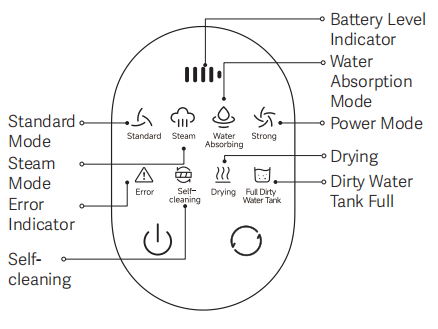
A: The display screen of the Mijia Wireless Wet Dry Vacuum 5 Pro shows the following information:
1. The battery level indicator is shown at the top of the screen.
2. The device indicates four modes, including Standard mode, Steam mode, Water Absorbing mode, and Power mode.
3. It also displays the drying status during operation.
4. An error indicator is shown when there is a malfunction.
5. When the dirty water tank is full, a “Dirty Water Tank Full” warning icon will appear.
6. The screen also shows a self-cleaning status icon when the self-cleaning function is activated.
7. A power button and a mode button are at the bottom.
Product Introduction
Q1: What type of battery does the Mijia Wireless Wet Dry Vacuum 5 Pro use, and what is its capacity?
A: The Mijia Wireless Wet Dry Vacuum 5 Pro comes with a 4000 mAh 6S1P pouch battery.
Q2: What are the power requirements of the Mijia Wireless Wet Dry Vacuum 5 Pro?
A: The power requirements of the Mijia Wireless Wet Dry Vacuum 5 Pro are 220–240 V, 50/60 Hz in the UK standard and EU standard: 220–240 V, 50/60 Hz, and it is 120V AC, 60 Hz in the US standard.
Q3: What is the length of the power cord of the Mijia Wireless Wet Dry Vacuum 5 Pro?
A: The power cord of the Mijia Wireless Wet Dry Vacuum 5 Pro is 1.47 m (exposed cable length).
Q4: What is the power plug of the Mijia Wireless Wet Dry Vacuum 5 Pro?
A: The power plug specifications of the Mijia Wireless Wet Dry Vacuum 5 Pro are XYP-202 for the EU standard, XMCT-01HK for the UK standard, and XMCT-02US for the US standard.
Q5: What is the water resistance rating of the Mijia Wireless Wet Dry Vacuum 5 Pro?
A: The Mijia Wireless Wet Dry Vacuum 5 Pro is not waterproof.
Q6: Does the Mijia Wireless Wet Dry Vacuum 5 Pro support high-temperature washing, and what is the temperature?
A: The Mijia Wireless Wet Dry Vacuum 5 Pro supports 160°C steam floor cleaning (boiler outlet temperature).
Q7: What are the capacities of the clean water tank and the dirty water tank of the Mijia Wireless Wet Dry Vacuum 5 Pro?
A: The clean water tank capacity of the Mijia Wireless Wet Dry Vacuum 5 Pro is 1000 ml, and the dirty water tank capacity is 700 ml ± 20 ml.
Q8: Does the Mijia Wireless Wet Dry Vacuum 5 Pro support water tank presence detection?
A: The Mijia Wireless Wet Dry Vacuum 5 Pro supports water tank presence detection.
Q9: Does the Mijia Wireless Wet Dry Vacuum 5 Pro support detection for low clean water levels and full dirty water levels?
A: The Mijia Wireless Wet Dry Vacuum 5 Pro supports dual detection capabilities: identifying low clean water levels and monitoring for a full dirty water tank.
Q10: Does the Mijia Wireless Wet Dry Vacuum 5 Pro support water-air separation?
A: The Mijia Wireless Wet Dry Vacuum 5 Pro supports water-air separation, enabling rapid separation to prevent dirty water from entering the fan motor, ensuring strong suction even when the unit is laid flat.
Product Usage
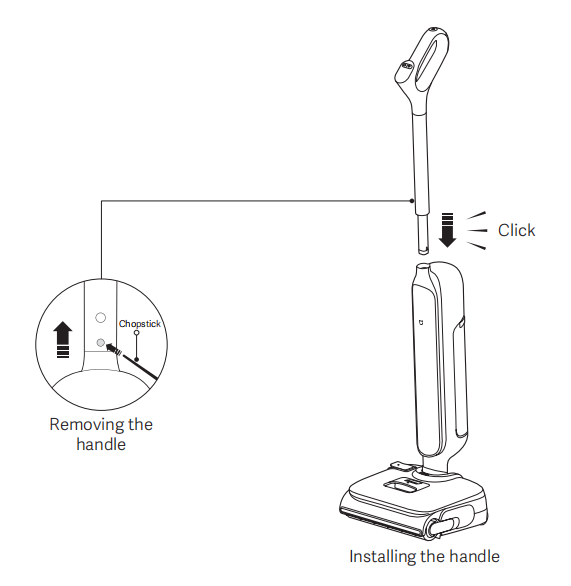
Q1: How to install and remove the handle of the Mijia Wireless Wet Dry Vacuum 5 Pro?
A: To install and remove the handle of the Mijia Wireless Wet Dry Vacuum 5 Pro, please refer to the following information:
1. Insert the handle vertically into the floor washer; a "click" sound indicates successful installation.
Note:
After installation, verify that the handle is secure and not loose.
2. Use a non-sharp tool (such as a chopstick) to press and hold the handle release button while pulling the handle straight up.
Q2: How to place the self-cleaning charging dock of the Mijia Wireless Wet Dry Vacuum 5 Pro?
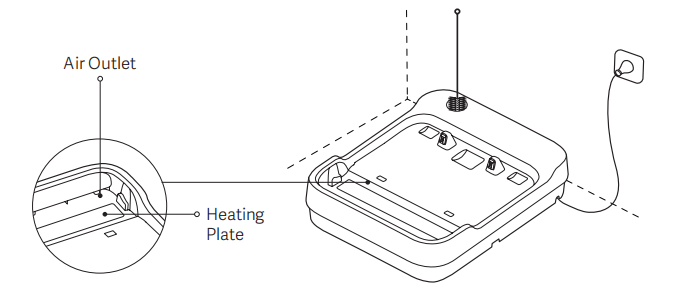
A: Place the self-cleaning charging dock of the Mijia Wireless Wet Dry Vacuum 5 Pro on a flat floor before connecting it to the power supply.
Note:
1. Do not place the self-cleaning charging dock near heat sources or in humid areas, such as by a radiator, in a kitchen, or in a bathroom.
2. The vacuum discharges hot air through the air outlet when drying the roller brush. Please keep the outlet clear and avoid any blockage.
3. Do not rinse the self-cleaning charging dock directly with water to prevent short circuits.
4. Do not touch the self-cleaning charging dock while it is powered on and operating, as it can cause burns.
Q3: How to charge the Mijia Wireless Wet Dry Vacuum 5 Pro?
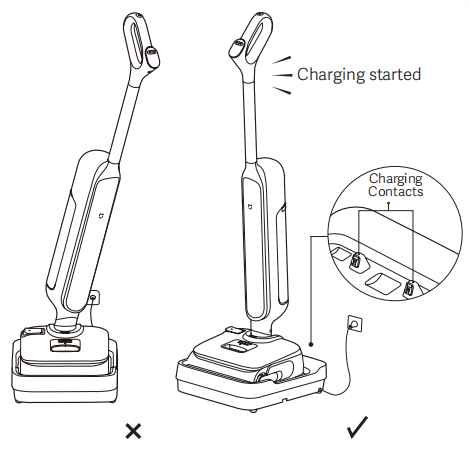
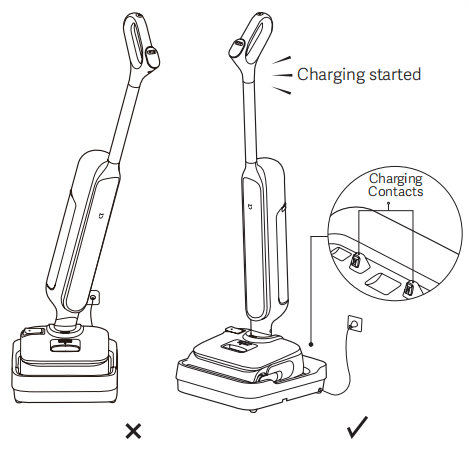
A: After powering on the self-cleaning charging dock, align the charging contacts on the bottom of the Mijia Wireless Wet Dry Vacuum 5 Pro brush head with the charging contacts on the self-cleaning charging dock, and ensure the vacuum is placed upright. When you hear the voice prompt indicating charging has started, the vacuum has entered charging mode.
Note:
1. Please fully charge the device before first use and after each use. Charging takes approximately 5 hours.
2. As shown in the illustration, charging will not work if the vacuum is tilted to the left or right on the self-cleaning charging dock. Please place it correctly.
Q4: How to add water to the Mijia Wireless Wet Dry Vacuum 5 Pro?
A: To add water to the Mijia Wireless Wet Dry Vacuum 5 Pro, please refer to the following steps:
1. Press the clean water tank release button and remove the clean water tank upward.
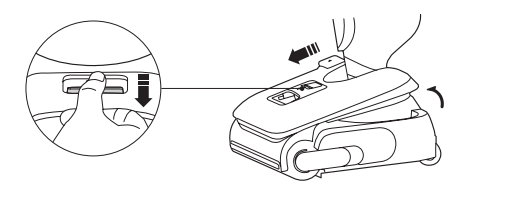
2. Open the clean water tank cover, slowly fill the water tank with clean water, and properly close the cover. Then, reinstall the clean water tank onto the vacuum. It is installed properly when a click is heard.
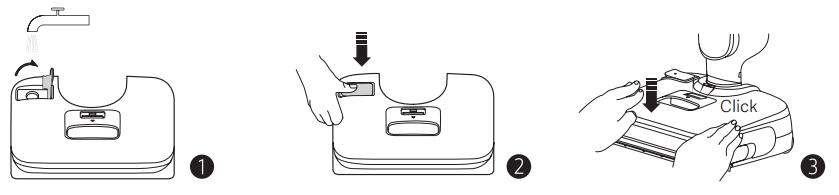
Note:
Do not add hot water. Otherwise, the water tank could become deformed.
Q5: How to turn on/off the Mijia Wireless Wet Dry Vacuum 5 Pro?
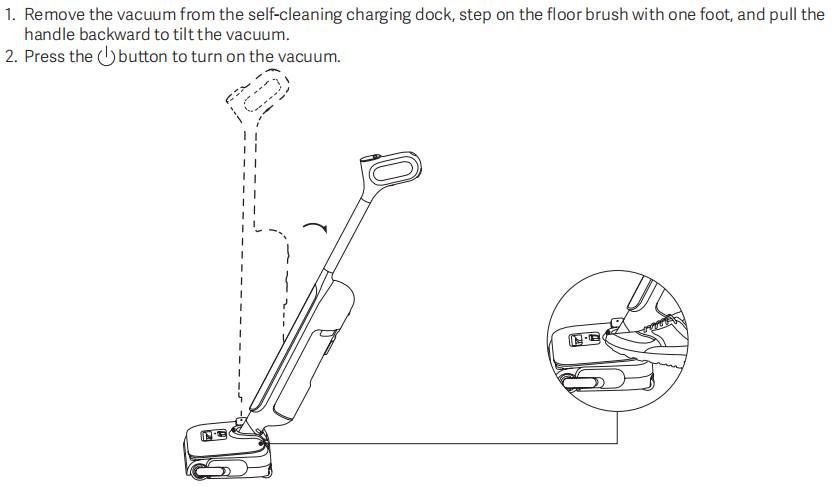
A: To turn on the Mijia Wireless Wet Dry Vacuum 5 Pro, please refer to the following steps:
1. Remove the vacuum from the self-cleaning charging dock, step on the floor brush with one foot, and pull the handle backward to tilt the vacuum.
2. Press the power button to turn on the vacuum.
To pause/turn off the Mijia Wireless Wet Dry Vacuum 5 Pro, please refer to the following steps:
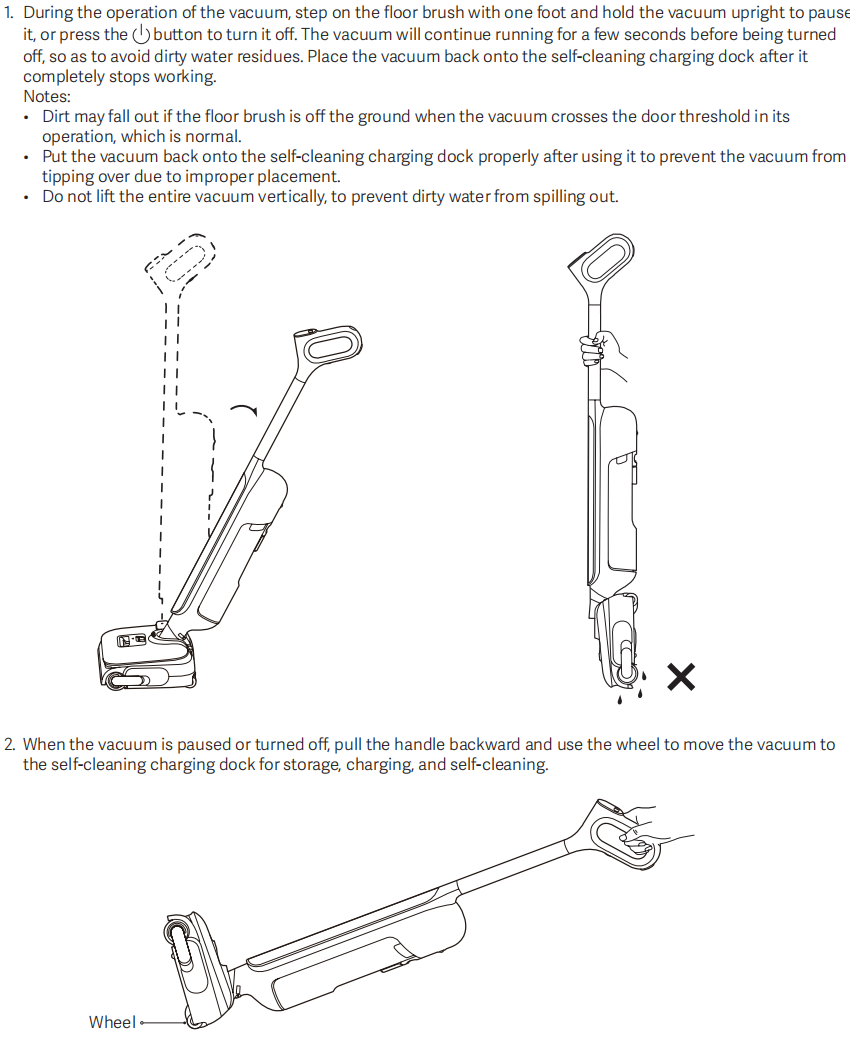
1. During the operation of the vacuum, step on the floor brush with one foot and hold the vacuum upright to pause it, or press the power button to turn it off. The vacuum will continue running for a few seconds before being turned off, so as to avoid dirty water residues. Place the vacuum back onto the self-cleaning charging dock after it completely stops working.
Note:
1. Dirt could fall out if the floor brush is off the ground when the vacuum crosses the door threshold in its operation, which is normal.
2. Put the vacuum back onto the self-cleaning charging dock properly after using it to prevent the vacuum from tipping over due to improper placement.
3. Do not lift the entire vacuum vertically to prevent dirty water from spilling out.
2. When the vacuum is paused or turned off, pull the handle backward and use the wheel to move the vacuum to the self-cleaning charging dock for storage, charging, and self-cleaning.
Q6: How many modes does the Mijia Wireless Wet Dry Vacuum 5 Pro have, and how to switch the modes?
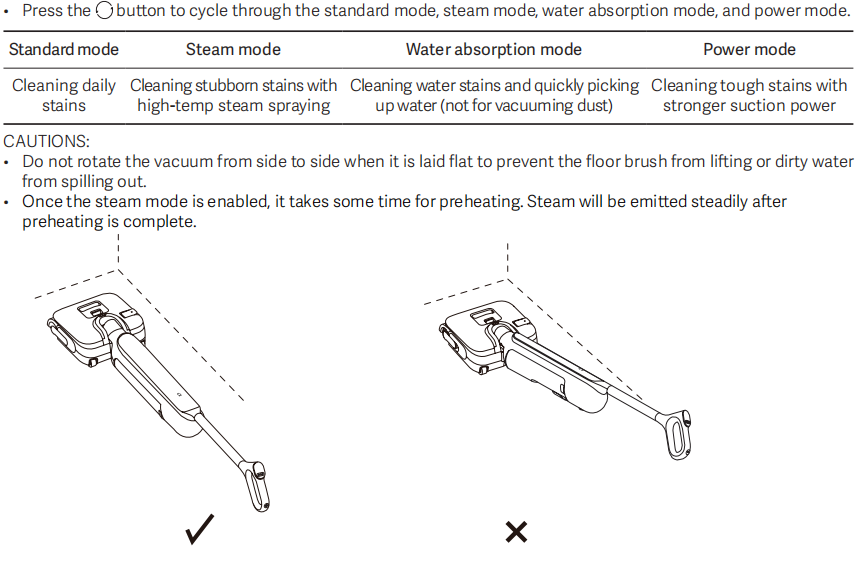
A: The Mijia Wireless Wet Dry Vacuum 5 Pro has 4 modes, including Standard mode, Steam mode, Water Absorption mode, and Power mode.
Standard mode: Cleaning daily stains.
Steam mode: Cleaning stubborn stains with high-temp steam spraying.
Water Absorption mode: Cleaning water stains and quickly picking up water (not for vacuuming dust).
Power mode: Cleaning tough stains with stronger suction power.
To switch modes, please press the Mode switch button to cycle through the Standard mode, Steam mode, Water Absorption mode, and Power mode.
Note:
1. Do not rotate the vacuum from side to side when it is laid flat to prevent the floor brush from lifting or dirty water from spilling out.
2. Once the steam mode is enabled, it takes some time for preheating. Steam will be emitted steadily after preheating is complete.
Q7: How to run the self-cleaning mode of the Mijia Wireless Wet Dry Vacuum 5 Pro?
A: To run the self-cleaning mode of the Mijia Wireless Wet Dry Vacuum 5 Pro, please refer to the following steps:
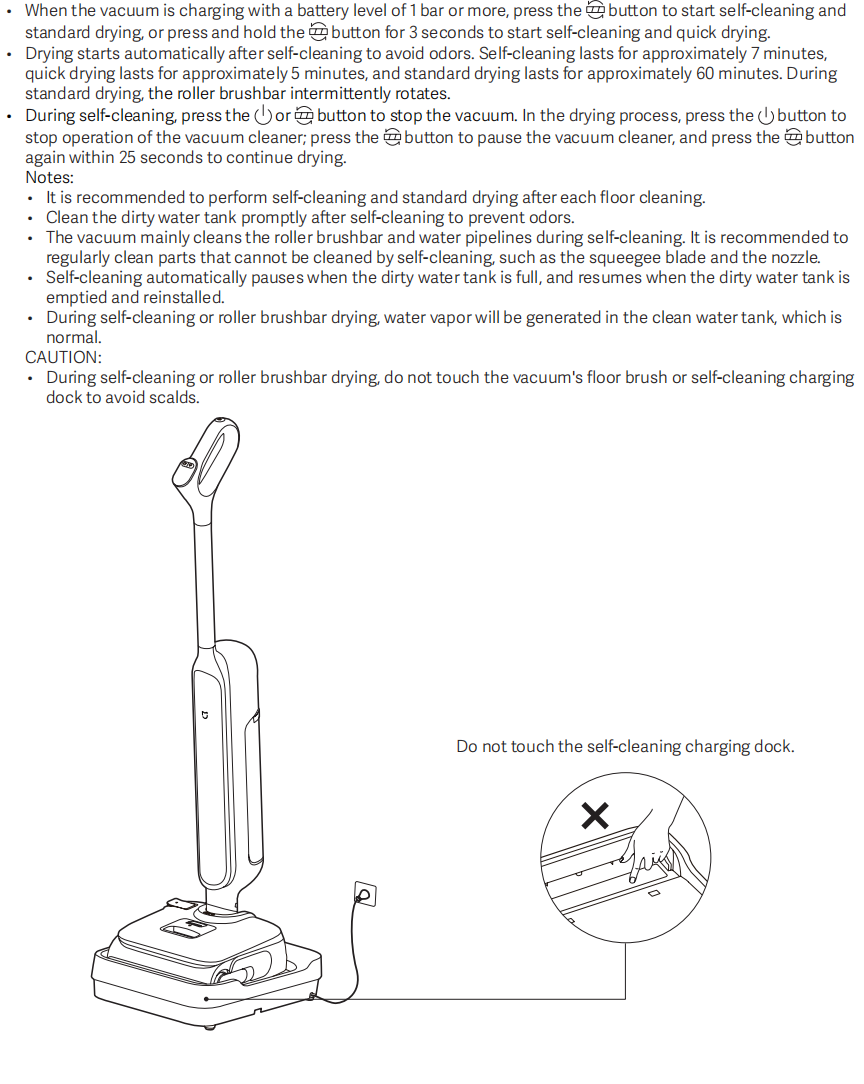
1. When the vacuum is charging with a battery level of 1 bar or more, press the Mode switch button to start self-cleaning and standard drying, or press and hold the Mode switch button for 3 seconds to start self-cleaning and quick drying.
2. Drying starts automatically after self-cleaning to avoid odors. Self-cleaning lasts for approximately 7 minutes, quick drying lasts for approximately 5 minutes, and standard drying lasts for approximately 60 minutes. During standard drying, the roller brushbar intermittently rotates.
3. During self-cleaning, press the Power button or Mode switch button to stop the vacuum. In the drying process, press the Power button to stop the operation of the vacuum. Press the Mode switch button to pause the vacuum, then press it again within 25 seconds to resume drying.
Note:
1. It is recommended to perform self-cleaning and standard drying after each floor cleaning.
2. Clean the dirty water tank promptly after self-cleaning to prevent odors.
3. The vacuum mainly cleans the roller brushbar and water pipelines during self-cleaning. It is recommended to regularly clean parts that cannot be cleaned by self-cleaning, such as the squeegee blade and the nozzle.
4. Self-cleaning automatically pauses when the dirty water tank is full, and resumes when the dirty water tank is emptied and reinstalled.
5. During self-cleaning or roller brushbar drying, water vapor will be generated in the clean water tank, which is normal.
CAUTION:
During self-cleaning or roller brushbar drying, do not touch the vacuum's floor brush or self-cleaning charging dock to avoid scalds.
Q8: Can detergent be added to the clean water tank of the Mijia Wireless Wet Dry Vacuum 5 Pro?
A: It is not recommended to add detergents, disinfectants, or other chemical liquids when cleaning the Mijia Wireless Wet Dry Vacuum 5 Pro. Some detergents may produce excessive foam or contain corrosive, oily, or sticky ingredients; long-term use could lead to clogs or damage to components such as the water tank. Additionally, detergent residue may interfere with the device's water dispensing and cleaning performance. It is recommended to use only clean water for daily mopping, in accordance with the product manual.
Note:
Do not add hot water, as it may deform the water tank.
Q9: How long do the self-cleaning and drying functions of the Mijia Wireless Wet Dry Vacuum 5 Pro take?
A: The self-cleaning time of the Mijia Wireless Wet Dry Vacuum 5 Pro is no more than 7 minutes, while quick drying takes approximately 5 minutes and standard drying takes approximately 60 minutes.
When the vacuum is charging, and the battery indicator shows at least one bar:
1. Press the self-cleaning button briefly to start self-cleaning and standard drying.
2. Press and hold the self-cleaning button for 3 seconds to start self-cleaning and quick drying.
Drying starts automatically after self-cleaning to help prevent odors.
Q10: What are the working methods for the self-cleaning and drying functions of the Mijia Wireless Wet Dry Vacuum 5 Pro?
A: The working methods for the self-cleaning and drying functions of the Mijia Wireless Wet Dry Vacuum 5 Pro are as follows:
1. Press the self-cleaning button briefly to start self-cleaning and standard drying. Press and hold the self-cleaning button for 3 seconds to start self-cleaning and quick drying.
2. During quick drying mode, the main motor and roller brush continue rotating to improve drying efficiency.
3. During standard drying mode, the roller brush rotates intermittently to reduce noise and improve acoustic comfort.
Q11: Why does the drying time of the Mijia Wireless Wet Dry Vacuum 5 Pro seem longer than the advertised time?
A: You likely combined the self-cleaning wash cycle and the subsequent drying process when testing, which results in a total duration of approximately 12 to 13 minutes (up to 7 minutes for the self-cleaning wash followed by approximately 5 minutes for quick drying). In fact, the drying time of the Mijia Wireless Wet Dry Vacuum 5 Pro is counted starting from the moment the voice prompt announces that drying has begun.
Quick drying refers to the self-cleaning charging dock continuously supplying hot airflow through the air outlet after the roller brush has been cleaned during the self-cleaning process. The quick drying mode takes approximately 5 minutes.
Q12: What are the precautions for using the self-cleaning and drying functions of the Mijia Wireless Wet Dry Vacuum 5 Pro?
A: For your reference, here are the precautions for using the self-cleaning and drying functions of the Mijia Wireless Wet Dry Vacuum 5 Pro:
1. It is recommended to perform self-cleaning and standard drying after each floor cleaning.
2. Please empty the dirty water tank promptly after self-cleaning to prevent odor.
3. Self-cleaning mainly focuses on cleaning the roller brush and water pathways. It is recommended to regularly clean areas that cannot be covered by self-cleaning, such as the scraper strip and suction inlet.
4. If the dirty water tank becomes full during self-cleaning, the process will automatically pause and resume after the tank is emptied and reinstalled.
5. During self-cleaning or roller brush drying, water vapor could appear in the clean water tank, which is normal.
6. Do not touch the floor brush or self-cleaning charging dock during self-cleaning or drying, as this may cause burns.
7. Do not add cleaning agents, as foam overflow during self-cleaning may damage the cleaning base.
8. After self-cleaning is completed, drying will start automatically to prevent odor.
9. During quick drying, the main motor and roller brush continue to operate to ensure efficiency.
10. During standard drying, the roller brush and edge brush rotate intermittently to reduce noise and improve user comfort.
Q13: What is the battery endurance of the Mijia Wireless Wet Dry Vacuum 5 Pro?
A: The battery endurance of the Mijia Wireless Wet Dry Vacuum 5 Pro is as follows:
Steam mode: ≥ 15 minutes.
Standard mode: ≥ 38 minutes.
Water absorption mode: ≥ 40 minutes.
Power mode: ≥ 32 minutes.
Q14: How long can the Mijia Wireless Wet Dry Vacuum 5 Pro be used when the water tank is full?
A: In standard mode, the runtime of the Mijia Wireless Wet Dry Vacuum 5 Pro is ≥ 38 minutes.
Q15: How to use the Mijia Wireless Wet Dry Vacuum 5 Pro for cleaning?
A: To use the Mijia Wireless Wet Dry Vacuum 5 Pro for cleaning, please refer to the following steps:
1. Open the clean water tank, fill it with clean water, and reinstall it onto the unit.
2. Press the power button to turn on the device, and gently tilt the body backward to start cleaning.
3. Move the machine in a slow, overlapping “S-shaped” pattern to thoroughly clean floor stains.
4. After cleaning, press the power button to turn it off; the unit will automatically perform strong suction for a few seconds to remove residual water from the internal pipeline.
5. Pull the vacuum slightly backward and stand it upright.
6. Place the entire unit steadily on the self-cleaning charging dock and keep it powered.
7. Press the self-cleaning button to start the roller brush self-cleaning process.
8. After self-cleaning is completed, remove the dirty water tank, empty it, and rinse the interior.
9. The device will automatically start the drying process to air-dry the roller brush.
Q16: Does the Mijia Wireless Wet Dry Vacuum 5 Pro support electrolyzed water sterilization?
A: The Mijia Wireless Wet Dry Vacuum 5 Pro can effectively sterilize in Steam mode. In Steam mode, it achieves a sterilization rate of over 99.9999% against Staphylococcus aureus, Candida albicans, Escherichia coli, Klebsiella pneumoniae, and Aspergillus niger.
Q17: Does the Mijia Wireless Wet Dry Vacuum 5 Pro support connecting to the Xiaomi Home App?
A: The Mijia Wireless Wet Dry Vacuum 5 Pro is not equipped with a Wi-Fi module, so it cannot be bound to or controlled via the Xiaomi Home App. All operations are performed directly using the physical buttons on the device.
Q18: Does the Mijia Wireless Wet Dry Vacuum 5 Pro support a child lock? How to enable it?
A: The Mijia Wireless Wet Dry Vacuum 5 Pro does not include a child lock function, so there is no activation method.
Q19: How to switch the voice broadcast language of the Mijia Wireless Wet Dry Vacuum 5 Pro?
A: To switch the voice language of the Mijia Wireless Wet Dry Vacuum 5 Pro, please refer to the information:
1. Press the Volume button to cycle through the volume levels: High volume (default), Low volume, Off.
2. Press and hold the Volume button for 3 seconds to cycle through available languages.
Language settings are saved automatically and will not reset after reboot.
Q20: How to adjust the voice broadcast volume of the Mijia Wireless Wet Dry Vacuum 5 Pro?
A: To adjust the voice broadcast volume of the Mijia Wireless Wet Dry Vacuum 5 Pro, please press the Volume button to cycle through the volume levels: High volume (default), Low volume, Off.
Q21: What voice prompts does the Mijia Wireless Wet Dry Vacuum 5 Pro provide, and how to handle them?
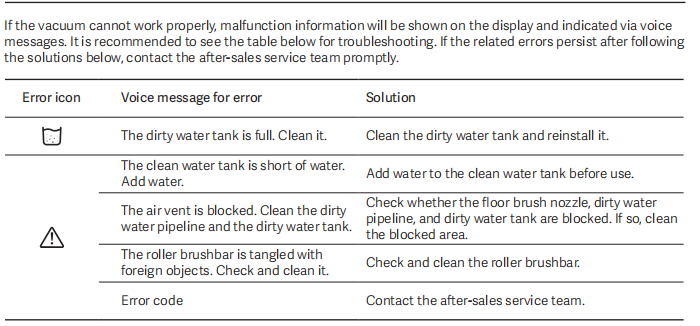
A: If the Mijia Wireless Wet Dry Vacuum 5 Pro does not work properly, error information will be displayed on the screen and indicated by voice messages. It is recommended to refer to the information below for troubleshooting. Contact the after-sales service if the relevant errors persist after following the solutions below.
1. If the Full Dirty Water Tank icon is shown on the display screen, it means the dirty water tank is full. Please clean the dirty water tank and reinstall it properly.
2. If the Error icon is shown on the display screen, it can indicate one of the following conditions:
(1). The clean water tank is short of water. Please add water to the clean water tank before use.
(2). The air duct is blocked. Clean the dirty water pipeline and the dirty water tank. Check whether the floor brush nozzle, dirty water pipeline, or dirty water tank is blocked. If so, clean the blocked area.
(3). The roller brushbar is tangled with foreign objects. Check and clean the roller brushbar.
(4). If an error code is displayed. Please contact the after-sales service center for further assistance.
Self-Cleaning Charging Dock Information
Q1: How to use the buttons on the self-cleaning charging dock of the Mijia Wireless Wet Dry Vacuum 5 Pro?
A: The self-cleaning charging dock of the Mijia Wireless Wet Dry Vacuum 5 Pro has no physical buttons. All operations are controlled via the buttons on the main unit itself.
Q2: What are the indicator statuses on the self-cleaning charging dock of the Mijia Wireless Wet Dry Vacuum 5 Pro?
A: The self-cleaning charging dock of the Mijia Wireless Wet Dry Vacuum 5 Pro is not equipped with status indicators, so the operating status cannot be checked via lighting.
Q3: Does the self-cleaning charging dock of the Mijia Wireless Wet Dry Vacuum 5 Pro have a display screen?
A: The self-cleaning charging dock of the Mijia Wireless Wet Dry Vacuum 5 Pro is not equipped with a display screen. Please refer to the main unit's display to check the device status.
Q4: How to charge the self-cleaning charging dock of the Mijia Wireless Wet Dry Vacuum 5 Pro?
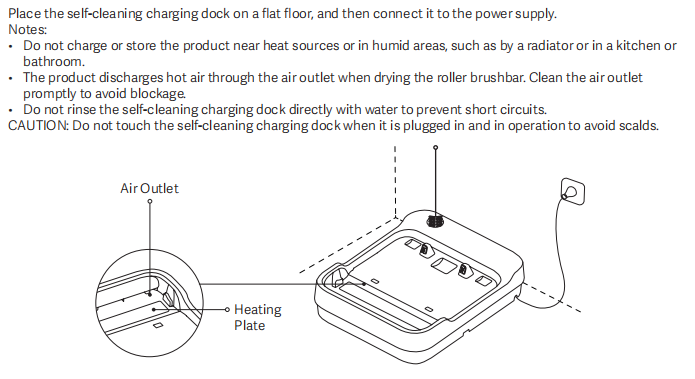
A: To charge the self-cleaning charging dock of the Mijia Wireless Wet Dry Vacuum 5 Pro, please place it on a flat floor, then connect it to the power supply.
Note:
1. Do not charge or store the product near heat sources or in damp areas, such as by a radiator or in the kitchen or bathroom.
2. The product releases hot air through the air outlet when the roller brush is dry. Clean the air outlet immediately to avoid blockage.
3. Do not rinse the self-cleaning charging dock directly with water to prevent a short circuit.
4. Do not touch the self-cleaning charging dock when it is plugged in and operating to avoid scalding.
Q5: How does the self-cleaning charging dock of the Mijia Wireless Wet Dry Vacuum 5 Pro dry the mop?
A: The Mijia Wireless Wet Dry Vacuum 5 Pro does not have a separate button for independent drying. The mop drying process runs automatically as part of the self-cleaning cycle.
Q6: Does the self-cleaning charging dock of the Mijia Wireless Wet Dry Vacuum 5 Pro have a water tank?
A: The self-cleaning charging dock of the Mijia Wireless Wet Dry Vacuum 5 Pro is not equipped with a water tank. Both the clean water supply and wastewater collection are handled by the main unit’s water tanks.
Q7: Does the self-cleaning charging dock of the Mijia Wireless Wet Dry Vacuum 5 Pro support self-cleaning?
A: The self-cleaning charging dock of the Mijia Wireless Wet Dry Vacuum 5 Pro does not support self-cleaning. Only the main unit can perform the self-cleaning function.
Maintenance and Care
Q1: How to clean and maintain the body of the Mijia Wireless Wet Dry Vacuum 5 Pro?
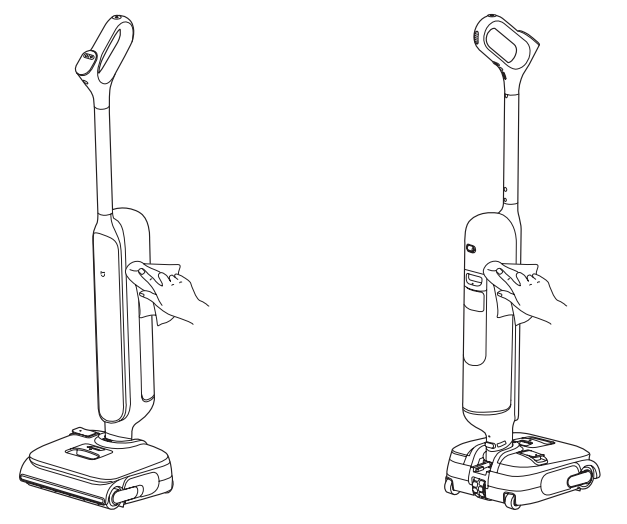
A: Clean the body of the Mijia Wireless Wet Dry Vacuum 5 Pro, place the floor washer in an upright position, and use a dry cloth or paper towel to clean off any adhering dust.
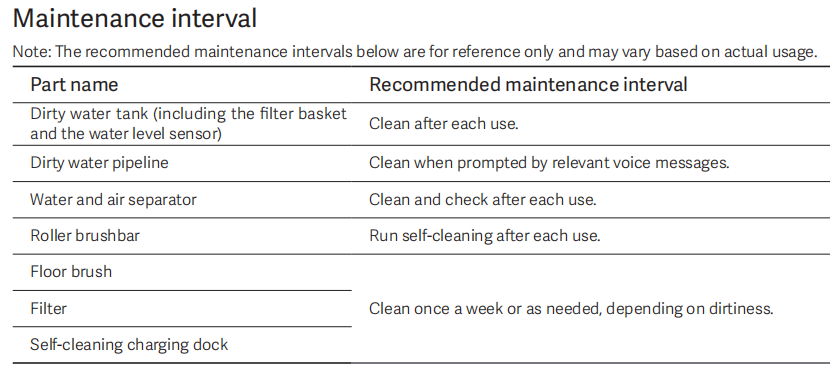
Q2: What are the maintenance intervals for the various components of the Mijia Wireless Wet Dry Vacuum 5 Pro?
A: Here are the maintenance intervals for the various components of the Mijia Wireless Wet Dry Vacuum 5 Pro for your reference:
1. For the Dirty water tank (including the filter basket and the water level sensor), please clean after each use.
2. For the Dirty water pipeline, clean it when prompted by relevant voice messages.
3. For the water and air separator, clean and check them after each use.
4. For the Roller brushbar, run self-cleaning after each use.
5. And for the Floor brush, filter, and the Self-cleaning charging dock, please clean once a week or as needed, depending on dirtiness.
Q3: How often should the consumable parts of the Mijia Wireless Wet Dry Vacuum 5 Pro be replaced?
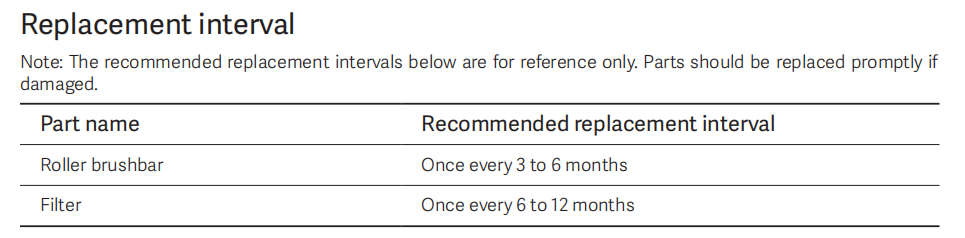
A: The recommended replacement intervals for the consumable parts of the Mijia Wireless Wet Dry Vacuum 5 Pro are as follows:
The Roller brush should be replaced once every 3 to 6 months, and the filter should be replaced once every 6 to 12 months.
Please note that these intervals are for reference only and may vary depending on actual usage conditions. If any part is visibly damaged, it should be replaced promptly.
Q4: How to clean the water tanks of the Mijia Wireless Wet Dry Vacuum 5 Pro?
A: A: To clean the water tanks of the Mijia Wireless Wet Dry Vacuum 5 Pro, follow these steps:
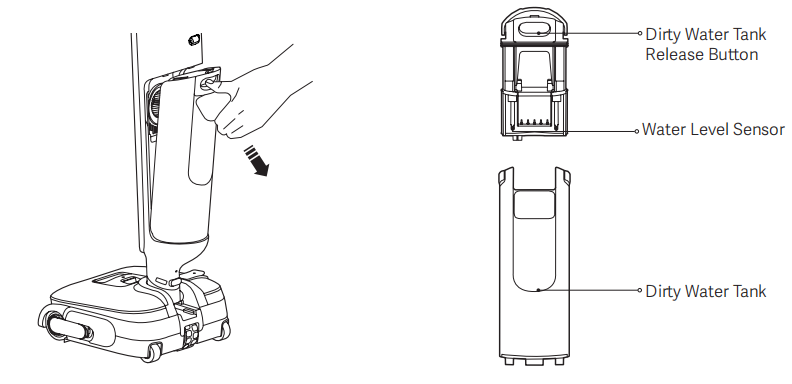
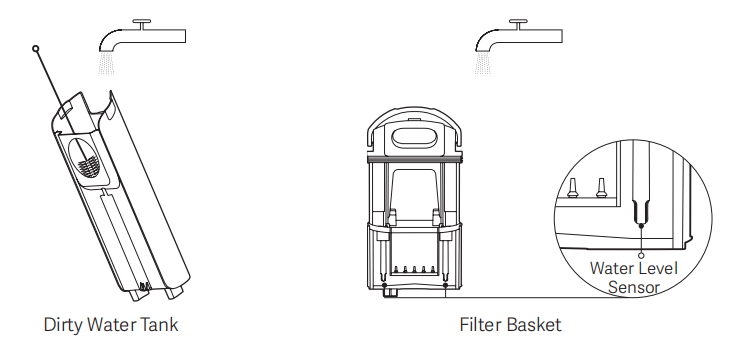
1. Press the Dirty Water Tank Release Button and pull the tank handle outward to remove the Dirty water tank.
2. Hold the filter basket handle and pull it upward to remove the basket, and pour out the dirty water and debris.
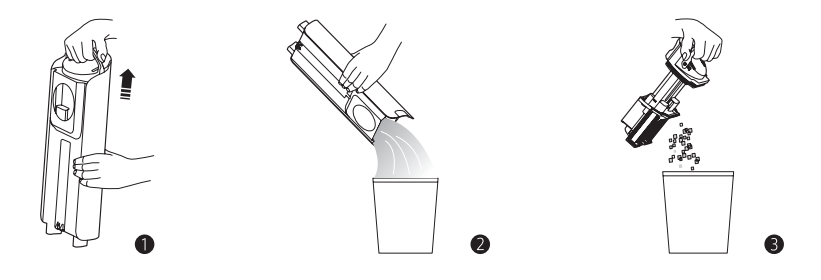
3. Rinse the dirty water tank, the filter basket, and the water level sensor until they are clean. Note:
(1) The cleaning brush can be used to assist in cleaning.
(2) Clean the water level sensor frequently to prevent dirt buildup from affecting detection accuracy.
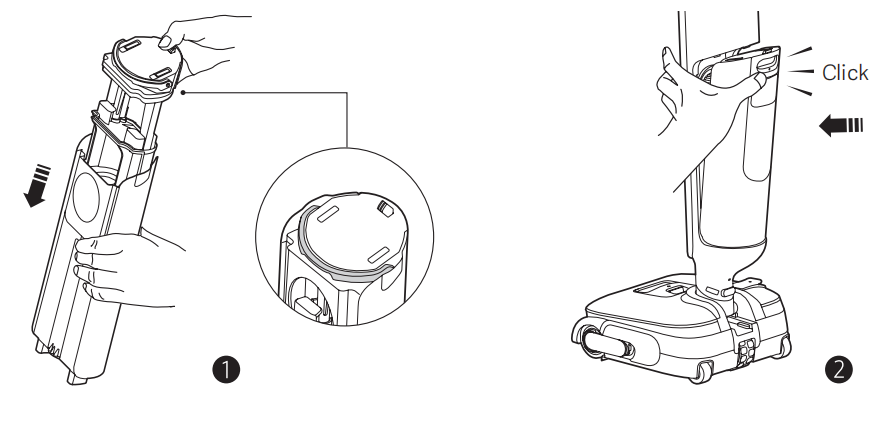
4. Reinstall the filter basket and make sure the filter basket handle is placed correctly. Then, reinstall the dirty water tank onto the vacuum properly until you hear a "click" sound.
Q5: How to clean the floor brush assembly of the Mijia Wireless Wet Dry Vacuum 5 Pro?
A: To clean the floor brush assembly of the Mijia Wireless Wet Dry Vacuum 5 Pro, follow these steps.
1. Press and hold the clean water tank release button and pull the clean water tank upward to remove it.
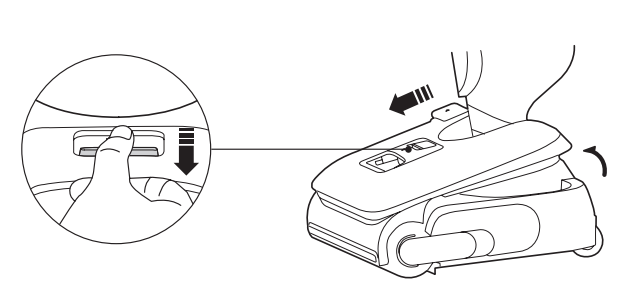
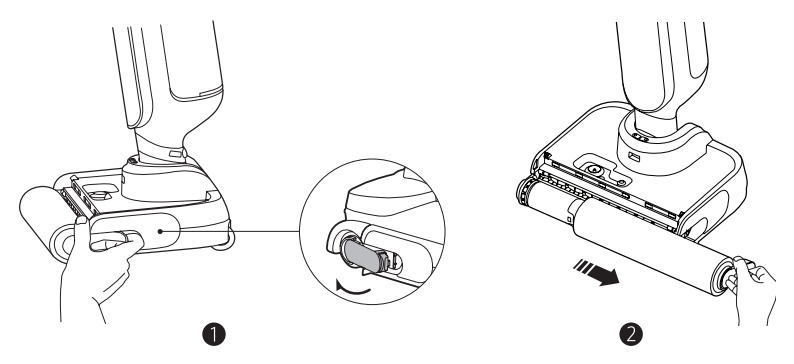
2. Press the roller brushbar latch and pull the roller brushbar outward to remove it.
Note:
(1) Do not remove the roller brushbar when the vacuum is on the self-cleaning charging dock.
(2) The roller brushbar handle is removable. If the handle falls off when the roller brushbar is being removed, reinstall the handle.
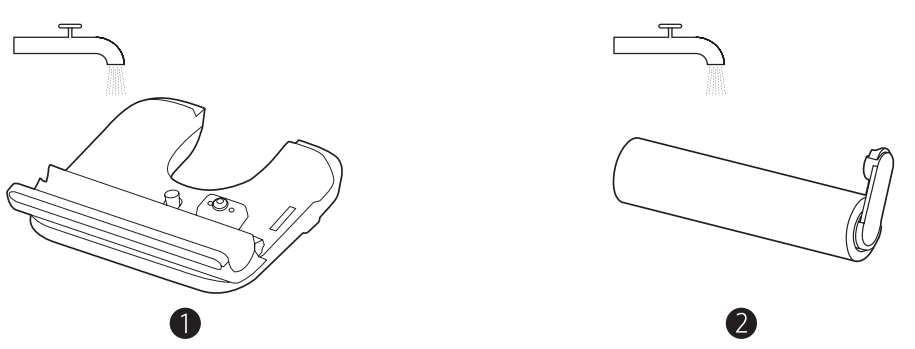
3. Rinse the back of the clean water tank and the roller brushbar with tap water until they are clean.
Note:
Do not expose the roller brushbar to direct sunlight.
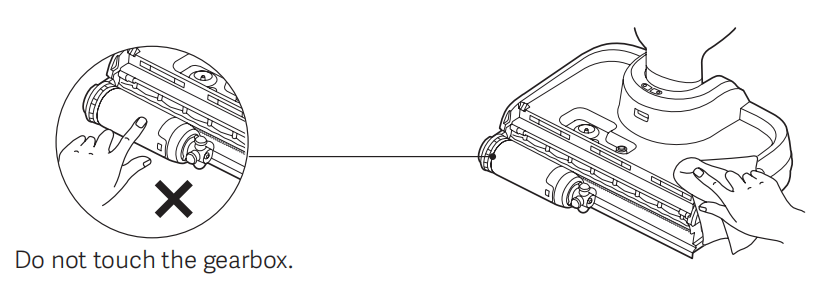
4. Clean the floor brush and foreign objects blocking the nozzle with a dry cloth or paper towel.
Note:
(1) Do not rinse the floor brush.
(2) Do not touch the gearbox right after using the vacuum to avoid scalds due to high temperature.
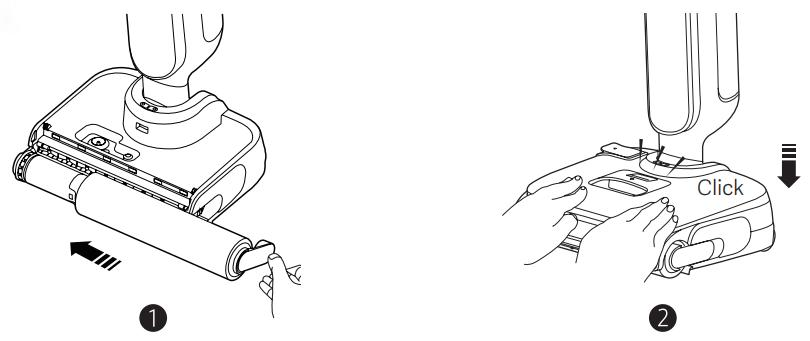
5. Reinstall the roller brushbar and the clean water tank in order. When reinstalling the clean water tank, align it with the slots until you hear a "click" sound.
6. After cleaning, place the vacuum back onto the self-cleaning charging dock and run self-cleaning and drying to avoid odors.
Q6: How to clean the filter of the Mijia Wireless Wet Dry Vacuum 5 Pro?
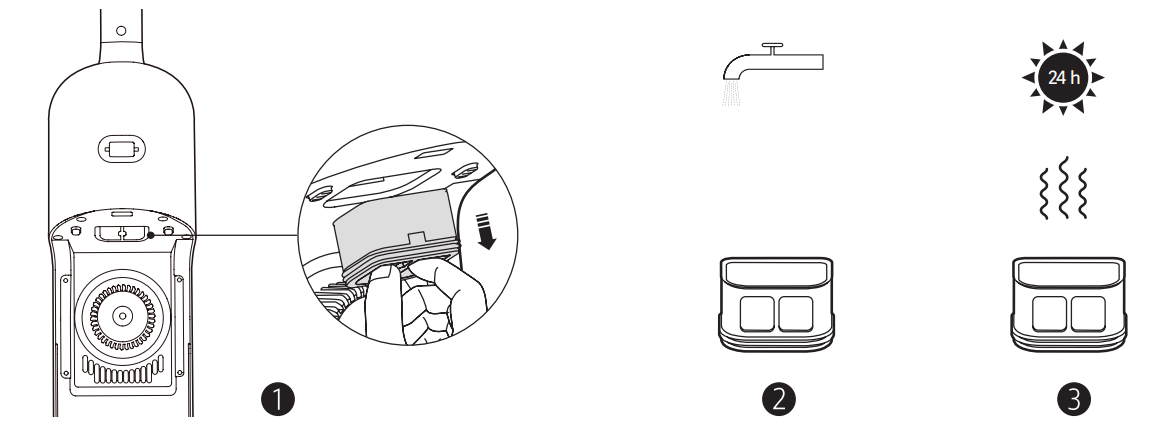
A: To clean the filter of the Mijia Wireless Wet Dry Vacuum 5 Pro, pull out the filter from the area above the installation slot on the dirty water tank, as illustrated. Rinse the filter with tap water until it is clean, air-dry it thoroughly, and reinstall it into the vacuum to prevent odors.
Q7: How to clean the water pipeline of the Mijia Wireless Wet Dry Vacuum 5 Pro?
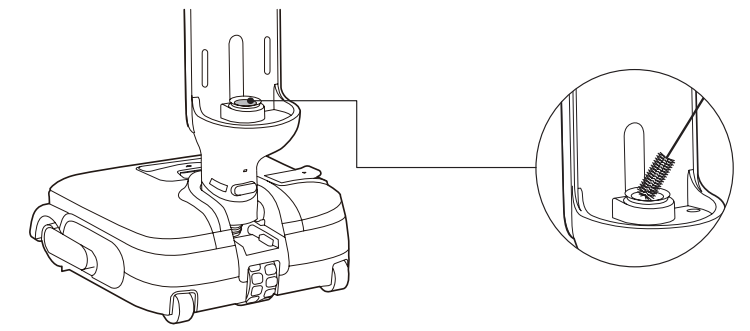
A: To clean the water pipeline of the Mijia Wireless Wet Dry Vacuum 5 Pro, remove the dirty water tank, and clean the dirty water pipeline with the cleaning brush as illustrated.
Q8: How to clean the Water and Air Separator of the Mijia Wireless Wet Dry Vacuum 5 Pro?
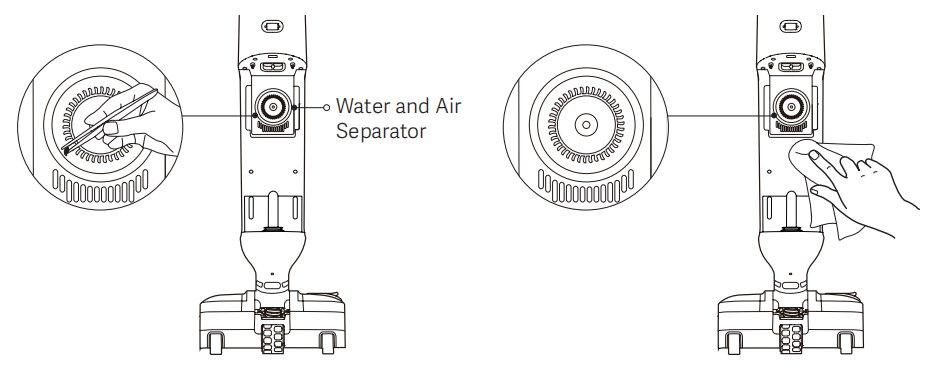
A: To clean the Water and Air Separator of the Mijia Wireless Wet Dry Vacuum 5 Pro, please refer to the following steps:
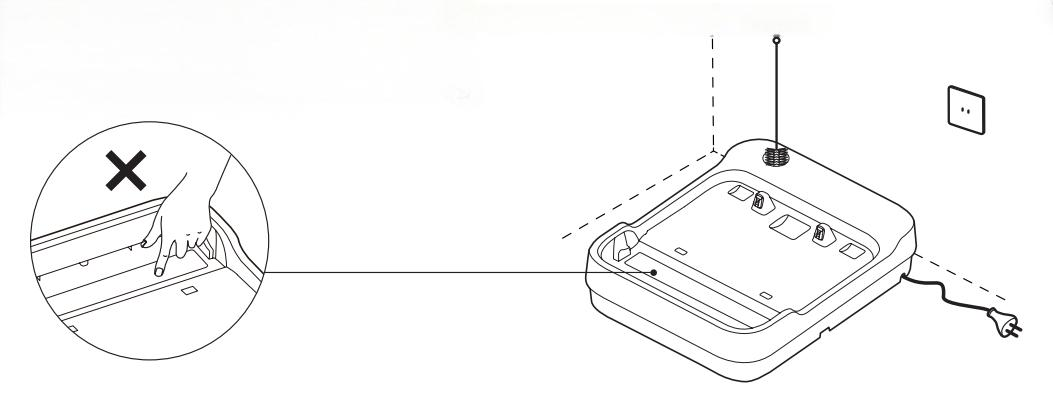
It is normal to find a small amount of dirty water on the self-cleaning charging dock after self-cleaning. Wipe the dirty water away.
CAUTION: Make sure the self-cleaning charging dock is cleaned after it is disconnected from power and cools off.
Note:
(1) The product discharges hot air through the air outlet when drying the roller brushbar. Clean the air outlet promptly to avoid blockage.
(2) Do not rinse the self-cleaning charging dock directly with water to prevent short circuits.
Q9: How to clean the water‑air separation unit of the Mijia Wireless Wet Dry Vacuum 5 Pro?
A: To clean the water‑air separation unit of the Mijia Wireless Wet Dry Vacuum 5 Pro, remove the dirty water tank and check the gaps around the water and air separator. If foreign objects are found in the gaps, use tweezers or other tools to remove them. It is normal to find a small amount of dirty water around the water and air separator. Wipe the dirty water away.
Usage Scenarios
Q1: Can the Mijia Wireless Wet Dry Vacuum 5 Pro be used on carpets?
A: The Mijia Wireless Wet Dry Vacuum 5 Pro is compatible with short-pile carpets only. After performing wet cleaning on such carpets, make sure to allow them sufficient time to dry completely. For long-pile carpets or thick plush rugs, we do not recommend using this vacuum, as the cleaning performance may be compromised and the carpets may not dry properly.
Q2: Can the Mijia Wireless Wet Dry Vacuum 5 Pro clean gaps between floorboards or tiles?
A: The roller brush bristle length of the Mijia Wireless Wet Dry Vacuum 5 Pro is approximately 7 mm, so it can effectively clean gaps in flat, hard surfaces such as tiled or wooden floors that are installed smoothly. For uneven or damaged floors, however, the cleaning performance may be reduced. If stubborn stains are trapped in those gaps, running the vacuum back and forth over the area several times can help remove them.
Q3: What is the minimum height of furniture that the Mijia Wireless Wet Dry Vacuum 5 Pro can reach underneath?
A: When the Mijia Wireless Wet Dry Vacuum 5 Pro is laid flat at 180°, its height is 137 mm. We recommend using it under furniture with a clearance of at least 140 mm to avoid any collision. If the foam cleaning module is attached, the height when laid flat increases to 147 mm, so a minimum clearance of 150 mm is recommended to prevent the vacuum from bumping against the furniture.
Q4: What to do if hair gets tangled around the roller brush of the Mijia Wireless Wet Dry Vacuum 5 Pro?
A: Please perform the self-cleaning function promptly after using the Mijia Wireless Wet Dry Vacuum 5 Pro. During the self-cleaning process, the roller brush rotates both forward and backward, allowing the comb teeth at the floor brush intake to dislodge hair and direct it into the dirty water tank.
In cases of severe tangling, remove the roller brush first, use a brush to clear away any hair caught on the comb teeth, clean the roller brush, and then reinstall it in the machine.
Q5: Why does the Mijia Wireless Wet Dry Vacuum 5 Pro leave a water mark after being left stationary?
A: If a water mark appears after the Mijia Wireless Wet Dry Vacuum 5 Pro has been left stationary, please check the following two points.
1. Inspect the sealing ring at the bottom of the clean water tank's water outlet valve to make sure it is properly seated. If the ring has been compressed out of shape, simply reposition it to restore its normal seal.
2. When filling the tank, residual moisture on the bottom of the tank may travel along the outer wall and drip from the bottom outlet. This is a normal occurrence and can be minimized by wiping the bottom of the tank after filling.
Q6: Why does the Mijia Wireless Wet Dry Vacuum 5 Pro feel heavy during use?
A: The Mijia Wireless Wet Dry Vacuum 5 Pro is indeed heavier than previous Xiaomi floor cleaner models. This weight increase comes from the upgraded 4000 mAh soft‑pack battery, which extends the runtime to up to 40 minutes in Water absorption mode. The 26 kPa strong suction also adds to the downward pressure, which enhances cleaning performance on the floor.
To compensate for the added weight, the vacuum is equipped with a central electric assist system that uses a central hub motor to provide flexible and effortless adjustment during operation, making the vacuum feel lighter and easier to maneuver than its actual weight might suggest.
Q7: Is there a risk of burns from the high‑temperature steam of the Mijia Wireless Wet Dry Vacuum 5 Pro?
A: The steam outlet of the Clean water tank is directed straight at the floor, so the steam first comes into contact with the floor surface and the roller brush. A yellow warning label is also placed on the product to remind you of the potential hazard.
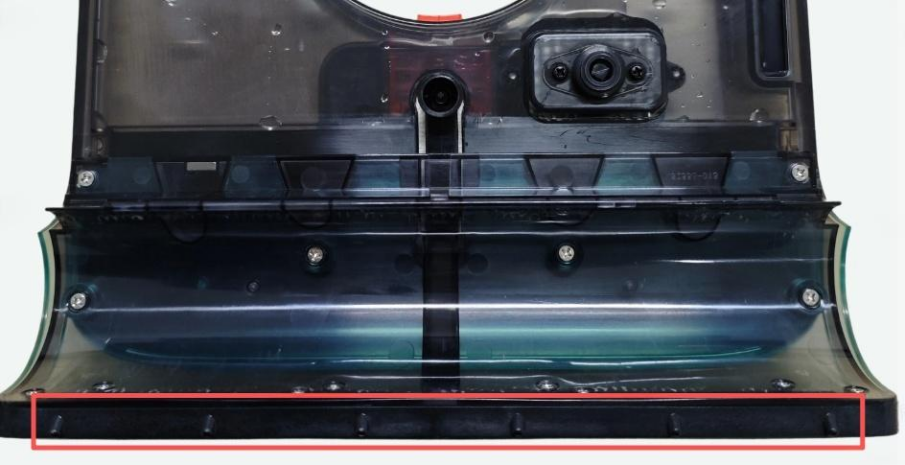
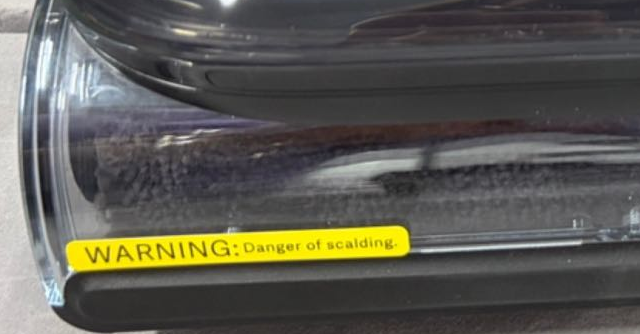
Additionally, the steam is not released immediately after you switch to Steam mode; it takes approximately 40 seconds to generate steam before it is released. This delay helps ensure that the steam is only emitted when the vacuum is ready and positioned correctly.
Q8: Why is there airflow from the rear side of the Mijia Wireless Wet Dry Vacuum 5 Pro during operation?
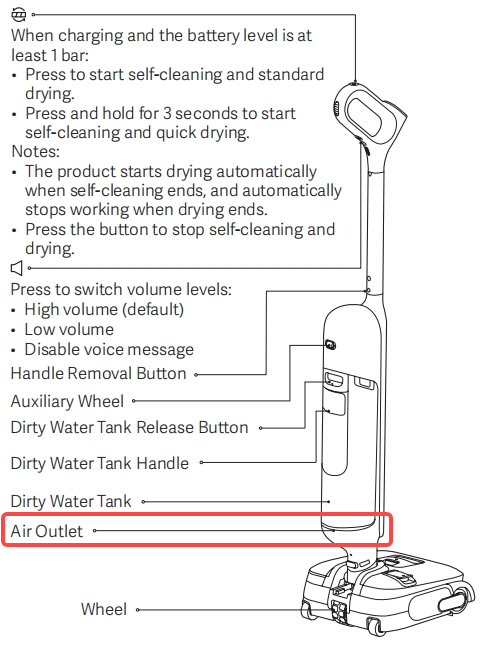
A: The gap below the Dirty water tank of the Mijia Wireless Wet Dry Vacuum 5 Pro serves as the air outlet. During high-speed operation, air circulation through this outlet is a normal phenomenon and does not affect normal use. As for hair and other lightweight debris, they may be blown away by the airflow and temporarily escape suction. In such cases, simply run the vacuum over the area a few more times – this does not affect normal operation.
Q9: What to do if the Mijia Wireless Wet Dry Vacuum 5 Pro is noisy during cleaning?
A: If your Mijia Wireless Wet Dry Vacuum 5 Pro makes noise during use, please check the following cases below to identify the cause:
Reference noise levels for normal operation
The Mijia Wireless Wet Dry Vacuum 5 Pro is equipped with a high-suction motor (26KPa) and integrates steam cleaning and power-assisted water circulation functions. Some operational noise is expected compared to manual cleaning tools. For reference, the maximum noise levels for each mode are as follows:
Standard mode, Water Absorption mode, and Steam mode are all limited to 74 dBA; Powerful mode is limited to 75 dBA; Quick drying mode is limited to 76 dBA; Standard drying mode is limited to 45 dBA; and Self-cleaning mode is limited to 78 dBA. It is worth noting that the quiet drying performance ranks among the industry's top tier.
Troubleshooting abnormal noises or rattling sounds
If you hear unusual sounds beyond the levels mentioned above, please perform the following checks:
1. Clean the floor brush by disassembling it, removing any tangled hair or debris from the roller, and ensuring that the roller rotates smoothly without obstruction.
2. Next, inspect the air duct and fan assembly. Disassemble these parts and check the fan impeller and volute housing for any blockages or trapped debris. If dirt or tangled materials are found, clean them thoroughly. After cleaning, verify that the impeller rotates freely without scraping and produces no abnormal noise during idle rotation. Finally, reassemble the unit and test it again.
If the issue persists after troubleshooting, please contact the local official after-sales service for further assistance.
Q10: Why does the Mijia Wireless Wet Dry Vacuum 5 Pro leave water stains on the floor during operation?
A: When the Mijia Wireless Wet Dry Vacuum 5 Pro is lifted off the ground while crossing a door threshold, its water‑suction‑and‑discharge cycle continues to operate. In this situation, water is discharged but cannot be sucked back up, resulting in noticeable water stains on the floor. This is a normal operating behavior of the machine and is not a malfunction.
The water‑suction‑and‑discharge cycle runs continuously as part of the regular cleaning process, and the vacuum does not have a suspension detection feature that would automatically stop the water flow. When the suction inlet is lifted off the ground, it cannot create negative pressure against the floor surface, so the suction function cannot take effect. As a result, only the water discharge function continues to run, which leaves water residue behind.
Troubleshooting
Q1: What are the error codes for the Mijia Wireless Wet Dry Vacuum 5 Pro?
A: If the Mijia Wireless Wet Dry Vacuum 5 Pro announces error code 3, please refer to the following:
1. Check the assembly of the dirty water tank for issues (e.g., incorrect installation of the filter assembly or obstruction of the separation fan).
2. If the separation fan impeller is not completely jammed but shows slight resistance, you can attempt to clear any obstructions from beneath the impeller yourself.
If the Mijia Wireless Wet Dry Vacuum 5 Pro displays other error codes, please contact the local official after-sales center for further assistance.
Q2: What to do if the steam output of the Mijia Wireless Wet Dry Vacuum 5 Pro is low and uneven?
A: If the steam output is low and uneven, check whether the clean water tank is properly installed and whether there are any foreign objects on the floor brush cover.
Q3: What to do if the Mijia Wireless Wet Dry Vacuum 5 Pro indicates an air duct blockage?
A: For air duct blockage on the Mijia Wireless Wet Dry Vacuum 5 Pro, it indicates an airflow obstruction within the suction system. Below are common causes and their corresponding solutions:
1. Foreign objects may be stuck in the suction inlet or internal piping, in which case you should use the cleaning brush to clear any debris from the scraper and pipe openings.
2. The dirty water tank may not have been emptied, or the filter basket may be overloaded, so you should empty the tank and remove any accumulated waste from the filter basket.
3. The filter cartridge could be clogged, so you will need to take it out, rinse it thoroughly with clean water, and allow it to dry completely before reinstalling it.
Q4: What to do if the wheels of the Mijia Wireless Wet Dry Vacuum 5 Pro make abnormal noises during operation?
A: If the wheels of the Mijia Wireless Wet Dry Vacuum 5 Pro make abnormal noises during operation, please check and resolve them as follows:
If the device makes a normal sound as the auxiliary wheels strike the ground while passing over thresholds, tile gaps, or changes in floor level, this noise is a normal structural occurrence caused by the uneven surface; slowing down when crossing these areas can reduce the noise, and no repair is required.
If the noise is not caused by surface irregularities, please check the bottom of the unit, the sides of the squeegee, and the rear auxiliary wheels for tangled hair or debris, as these can cause abnormal sounds. If the noise is due to trapped foreign objects, first remove the clean water tank and dirty water tank, then turn the unit over to thoroughly clear away any hair or debris tangled around the floor brush and auxiliary wheels; once cleaned, reassemble the unit and test it again.
Q5: What to do if the assistance power of the Mijia Wireless Wet Dry Vacuum 5 Pro weakens or disappears?
A: The forward assist of the Mijia Wireless Wet Dry Vacuum 5 Pro is driven by the roller brush, while the backward assist is provided by the assist wheels.
If the assist function of the Mijia Wireless Wet Dry Vacuum 5 Pro weakens, please refer to the following:
1. Loss of forward assist: This is usually caused by hair tangling, wear, or deformation/jamming of the roller brush; simply clear away debris or replace the roller brush to restore function.
2. Loss or weakening of backward assist:
(1) The assist wheels are slipping due to oil or water stains; simply clean the wheels.
(2) The floor surface (such as polished tiles or waxed wood flooring) is too slippery, causing the assist wheels to lose traction and slip, which reduces the perceived level of assistance.
Q6: Why does the Mijia Wireless Wet Dry Vacuum 5 Pro not work?
A: If the Mijia Wireless Wet Dry Vacuum 5 Pro does not power on or operate, please go through the following checks in order.
1. The handle may not be fully locked into place. When the handle is not securely engaged, the vacuum triggers a power‑off protection. Remove the handle and reinsert it firmly until you hear a click sound, which confirms that the handle is correctly installed.
2. The battery may be completely drained. If the battery charge is too low, the vacuum cannot start. Place the entire unit back onto the Self-cleaning Charging Dock and let it charge quietly for a while, then try turning it on again.
3. The clean water tank may not be properly seated. If the clean water tank is not installed correctly, remove it, align it with the mounting slot, and reinstall it securely. Make sure the tank fits flush against the main body with no looseness.
4. The dirty water tank may not be properly placed. If the dirty water tank is not correctly positioned, take it out, align it with the slot, and reinstall it. Ensure it sits firmly in place without any gaps or wobbling.
Q7: Why is the steam effect of the Mijia Wireless Wet Dry Vacuum 5 Pro poor?
A: To conserve energy, the steam output of the Mijia Wireless Wet Dry Vacuum 5 Pro gradually decreases with extended use. The Steam mode is specifically designed for spot‑treating stubborn stains on hard floors by softening them with high‑temperature steam, so it is not recommended to keep this mode running continuously throughout the entire cleaning session. For areas without tough stains, switching to the Smart Mode is sufficient to handle everyday cleaning needs.
Q8: Why is the dirty water recovery of the Mijia Wireless Wet Dry Vacuum 5 Pro abnormal?
A: If the Mijia Wireless Wet Dry Vacuum 5 Pro fails to collect dirty water properly, please follow these steps to identify and resolve the issue.
1. The suction pipeline may be blocked by debris. Disassemble the pipeline, clean out any foreign matter inside, and then reassemble and test the vacuum again.
2. The dirty water tank may have accumulated excessive dirt, or the filter screen may be clogged. Empty the dirty water tank and scrub the filter screen with a brush to remove any buildup.
3. The filter may be clogged with dirt that blocks its pores. Wash the filter thoroughly with clean water and allow it to air‑dry completely before reinstalling it into the vacuum for normal use.
Q9: Why does the Mijia Wireless Wet Dry Vacuum 5 Pro indicate that the dirty water tank is full even when it is not actually full?
A: If the Mijia Wireless Wet Dry Vacuum 5 Pro falsely reports that the dirty water tank is full, the following steps can help resolve the issue.
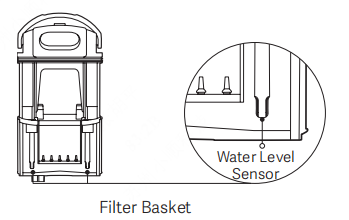
1. Clean the water level sensor to remove any dirt or residue that may be causing inaccurate readings.
2. When handling the dirty water tank, do not lift or move it by holding the filter basket handle, as this may cause the filter basket to detach and spill dirty water.
3. After cleaning, reinstall the filter basket and ensure that its handle is properly seated in place.
Q10: Why does the Mijia Wireless Wet Dry Vacuum 5 Pro indicate a low water level even when the clean water tank has water?
A: If the Mijia Wireless Wet Dry Vacuum 5 Pro prompts that the water level is low despite the clean water tank being filled, the issue may lie in one of the following areas.
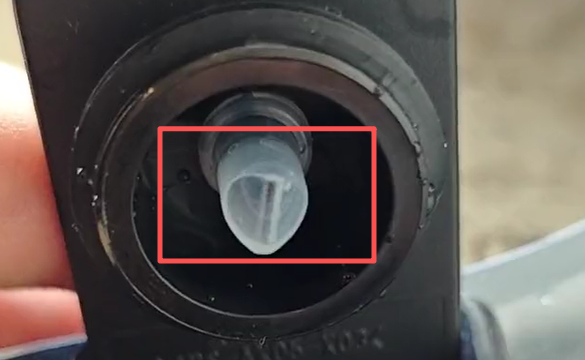
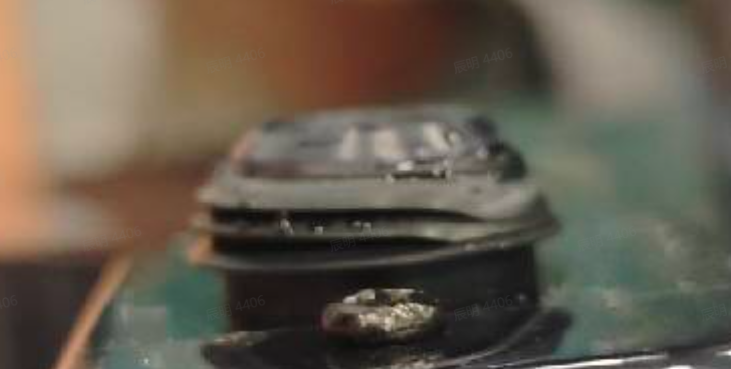
1. Check whether the duckbill valve at the water inlet of the clean water tank is stuck or adhered. This valve can become sticky after using cleaning agents, which may prevent proper air intake and cause false low‑water alerts.
2. Inspect the sealing ring around the water outlet at the bottom of the clean water tank for any adhesion or sticking. Similar to the duckbill valve, this sealing ring can also be affected by cleaning agents, leading to improper sealing and triggering the low‑water warning.
Q11: What to do if the Mijia Wireless Wet Dry Vacuum 5 Pro cannot be charged?
A: If the Mijia Wireless Wet Dry Vacuum 5 Pro cannot be charged, please follow these steps to resolve the issue.
1. First, confirm that the power socket is functioning normally. Try plugging the charger into a different outlet that is known to be working, and then attempting to charge the vacuum again.
2. Next, clean the metal charging contacts on both the vacuum body and the Self-cleaning Charging Dock. Wipe them with a dry cloth to remove any dirt, stains, or oxidation, and then try charging once more.
3. As shown in the illustration, if the vacuum is tilted to the left or right while placed on the charging dock, it will not charge properly. Ensure that the vacuum is positioned correctly and stands upright on the dock for proper charging.
Q12: Why is there no voice prompt on the Mijia Wireless Wet Dry Vacuum 5 Pro?
A: If the device does not provide voice announcements, please check if the feature has been disabled and re-enable the voice function by pressing the button.

Q13: What to do if the Mijia Wireless Wet Dry Vacuum 5 Pro cannot run the self‑cleaning cycle?
A: If the self‑cleaning cycle does not start on the Mijia Wireless Wet Dry Vacuum 5 Pro, please check the following two aspects:
1. The vacuum must be in the charging state to perform self‑cleaning. If it is not charging, first make sure the charging connection is properly established. Confirm that the power socket is functioning, clean the metal charging contacts on both the vacuum and the charging dock, and ensure the vacuum is placed upright on the dock without tilting. Only when the vacuum is correctly charging can the self‑cleaning function be activated.
2. The battery level may be too low for self‑cleaning. Allow the vacuum to charge quietly until the battery indicator shows more than one bar. Then, press the Self‑cleaning button briefly to start self‑cleaning and standard drying, or press and hold the button for 3 seconds to start self‑cleaning and quick drying.

Q14: Why does the roller brush of the Mijia Wireless Wet Dry Vacuum 5 Pro make abnormal noise during operation?
A: If the roller brush of the Mijia Wireless Wet Dry Vacuum 5 Pro produces unusual sounds while running, the following steps can help pinpoint the cause.
1. First, inspect the installation of the clean water tank and the roller brush. Improper assembly can often lead to noise, so ensure both components are correctly fitted and securely seated in place.
2. Check the edges and gaps on both sides of the roller brush, as well as the joints where the wiper blade meets the brush. If any hard foreign objects are tangled or stuck there, remove them promptly using the cleaning brush, then reinstall the roller brush properly.
3. If all the above checks are normal and a slight humming sound persists, this is not a fault. The Mijia Wireless Wet Dry Vacuum 5 Pro uses a floating wiper blade technology that maintains constant contact with the brush to scrape away dirt, and the motor rotation naturally creates minor vibration. These may produce a low‑level sound that falls well within the product's cleaning noise specification of ≤74 dBA (Standard mode and Water absorption mode).
Q15: What to do if there are large water stains on the floor after using the Mijia Wireless Wet Dry Vacuum 5 Pro?
A: If the Mijia Wireless Wet Dry Vacuum 5 Pro leaves noticeable water stains after cleaning, the issue usually stems from either roller brush wear or partial blockage in the air duct. The following checks and remedies can help resolve the problem.
1. Roller brush wear or aging
Over time, the brush bristles become shorter, and if the brush is not cleaned promptly after each use, dirt dries on it and makes it stiff, reducing its water absorption efficiency. To fix this, replace the roller brush when it shows signs of wear. Additionally, we recommend running the self‑cleaning cycle and drying the brush after every use, which helps extend its service life.
2. Partial air duct blockage
A blockage in the air duct can weaken suction power, leading to poor water pickup. Several factors may contribute to this: the wiper blade may be contaminated with foreign objects, reducing its ability to squeeze water; the suction inlet or the pipeline may be obstructed; the dirty water tank may not have been emptied, allowing the filter basket to become full; or the filter itself may be clogged. To address this, please empty the dirty water tank and remove any debris from the filter basket. Use the cleaning brush to clear the wiper blade and the suction pipe. Also, wash the filter thoroughly and allow it to air‑dry completely before reinstalling it.
By following these steps, you can restore the vacuum's water‑pickup performance and reduce water stain residue on the floor.
Q16: Why is the battery runtime of the Mijia Wireless Wet Dry Vacuum 5 Pro short?
A: The battery runtime of the Mijia Wireless Wet Dry Vacuum 5 Pro varies depending on the operating mode selected.
1. In Steam mode, the vacuum runs for at least 15 minutes on a full charge.
2. In Standard mode, it runs for at least 38 minutes.
3. In Water absorption mode, it runs for at least 40 minutes.
4. And in Power mode, it runs for at least 32 minutes.
If you find the runtime shorter than expected, please check which mode you are using, as higher‑power modes consume more energy and naturally have shorter operating times.
Does it help?
Yes
No