Product Specification
Q1: What are the selling points of the Mijia Front Load Washer 9kg?
A: The selling points of the Mijia Front Load Washer 9kg are as follows:
1. The washing machine features a large 525 mm drum diameter combined with Power Wash high-pressure water flow, delivering deeper, more thorough cleaning.
2. It is equipped with Steam Sterilization and Mite Removal Technology, helping protect your family's health with a higher standard of cleanliness.
3. It comes with a full-color display screen that offers a simple, intuitive, and user-friendly operating experience.
4. It supports the Xiaomi Home App and adding smart scenes, enabling a smarter lifestyle experience and supporting full-chain OTA (Over-the-Air) upgrades.
5. It features an ultra-slim built-in design that integrates seamlessly into cabinetry, creating a clean, flush appearance without protrusion.
Q2: What color is the cabinet of the Mijia Front Load Washer 9kg?
A: The cabinet of the Mijia Front Load Washer 9kg is white in the Southeast Asia, Kazakhstan, Russia, Belarus, and is silver gray in the Saudi Arabia.
Q3: What are the dimensions of the Mijia Front Load Washer 9kg body?
A: The dimensions of the Mijia Front Load Washer 9kg body are 598 mm × 535 mm × 850 mm (W × D × H).
Q4: What are the package dimensions of the Mijia Front Load Washer 9kg?
A: The package dimensions of the Mijia Front Load Washer 9kg are 650 mm × 570 mm × 890 mm (W × D × H).
Q5: What is the net weight of the Mijia Front Load Washer 9kg?
A: The net weight of the Mijia Front Load Washer 9kg is 55 kg.
Q6: What is the gross weight of the Mijia Front Load Washer 9kg?
A: The gross weight of the Mijia Front Load Washer 9kg is 59 kg.
Q7: What is the material of the Mijia Front Load Washer 9kg body?
A: The material of the Mijia Front Load Washer 9kg body is sheet metal.
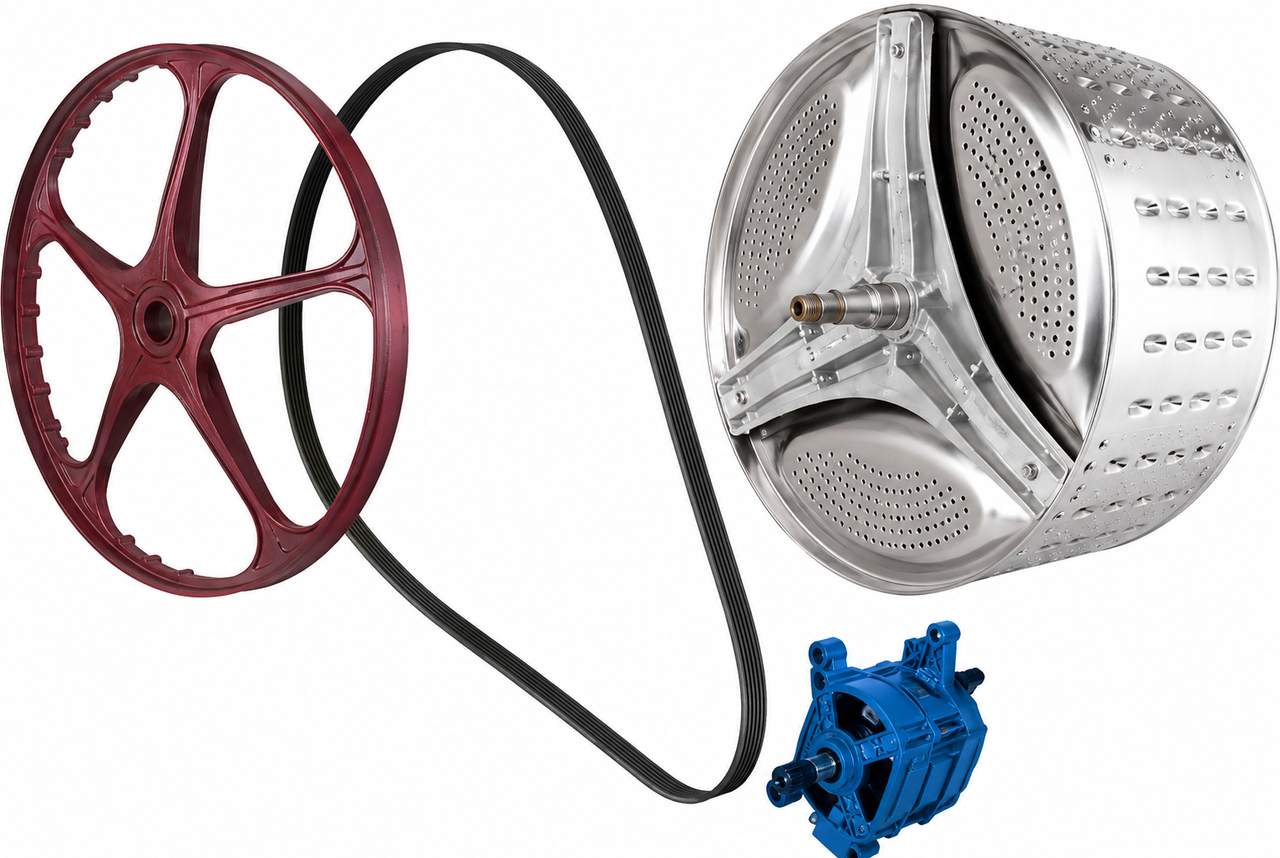
Q8: What is the material of the inner drum on the Mijia Front Load Washer 9kg?
A: The material of the inner drum on the Mijia Front Load Washer 9kg is stainless steel.
Q9: What is the material of the door on the Mijia Front Load Washer 9kg?
A: The area where the door contacts the door seal on the Mijia Front Load Washer 9kg is glass.
Q10: What are the environmental requirements for using the Mijia Front Load Washer 9kg?
A: The operating temperature range for the Mijia Front Load Washer 9kg is 0 °C to 40 °C, exceeding this range will adversely affect the machine's operation.
Q11: What is the IP rating of the Mijia Front Load Washer 9kg?
A: The IP rating of the Mijia Front Load Washer 9kg is IPX4.
Q12: What is the energy efficiency rating of the Mijia Front Load Washer 9kg?
A: The energy efficiency requirements for the Mijia Front Load Washer 9kg are as follows:
1. In Thailand and Vietnam, the energy efficiency rating is 5-star.
2. In Malaysia and Bangladesh, the water efficiency is 3-star, and the efficiency rating is 5-star.
3. In Singapore, the water efficiency is ≥ 4 Ticks.
4. In Indonesia, the energy efficiency is exempt.
Q13: What is the noise level of the Mijia Front Load Washer 9kg?
A: The noise level of the Mijia Front Load Washer 9kg during the spin cycle is less than 69 dB.
Q14: What is the water pressure of the Mijia Front Load Washer 9kg?
A: The water pressure of the Mijia Front Load Washer 9kg is 0.05 MPa-0.8 MPa.
Q15: Which App is used to connect to and manage the Mijia Front Load Washer 9kg?
A: The App used to connect to and manage the Mijia Front Load Washer 9kg is the Xiaomi Home App.
Q16: What is the rated voltage of the Mijia Front Load Washer 9kg?
A: The rated voltage of the Mijia Front Load Washer 9kg is 220-240 V. Exceeding the voltage range will affect the operation of the washing machine.
Q17: What is the heating and washing rated power of the Mijia Front Load Washer 9kg?
A: The heating and washing rated power of the Mijia Front Load Washer 9kg is 1500 W-1800 W.
Q18: What is the heating tube power of the Mijia Front Load Washer 9kg?
A: The rated heating tube power of the Mijia Front Load Washer 9kg is 230 V, 1600 W.
Q19: What is the power cord length of the Mijia Front Load Washer 9kg?
A: The power cord length of the Mijia Front Load Washer 9kg is 1.5 m.
Q20: What is the water inlet hose length of the Mijia Front Load Washer 9kg?
A: The water inlet hose length of the Mijia Front Load Washer 9kg is 1.2 m in Vietnam, Thailand, Malaysia, Bangladesh, Indonesia, Philippines, and Singapore.
The water inlet hose length is 1.5 m in Saudi Arabia, Kazakhstan, Russia, Belarus.
Q21: What are the water inlet hose specifications of the Mijia Front Load Washer 9kg?
A: The water inlet hose of the Mijia Front Load Washer 9kg is a Weibull quick connector and filter assembly, with a length of 1.2 m in Vietnam, Thailand, Malaysia, Bangladesh, Philippines, and Indonesia.
The water inlet hose is a Weibull quick connector and threaded 6-point connector, also with a length of 1.2 m in Singapore.
The water inlet hose is a Weibull quick connector and threaded 6-point connector, with a length of 1.5 m in Saudi Arabia, Kazakhstan, Russia, Belarus.
Q22: What is the length of the Mijia Front Load Washer 9kg drain hose?
A: The length of the Mijia Front Load Washer 9kg's drain hose is approximately 2.25 m, measured from the pump. It is approximately 1.5 m, measuring from the cabinet outlet, and it is approximately 1.0 m, measuring from the drain hose fixing clip.
Q23: What are the drain hose specifications of the Mijia Front Load Washer 9kg?
A: The drain hose specifications of the Mijia Front Load Washer 9kg are as follows:
1. Head outer diameter: 26 mm.
2. Head inner diameter: 20 mm.
3. Body diameter: 22.5 mm.
Q24: Does the Mijia Front Load Washer 9kg have a Night Wash?
A: The Mijia Front Load Washer 9kg supports Night Wash, but it can only be selected using the App after connecting to the Xiaomi Home App.
Q25: What is the drainage method of the Mijia Front Load Washer 9kg?
A: The Mijia Front Load Washer 9kg utilizes an upper drainage system.
Q26: Can the Mijia Front Load Washer 9kg be controlled remotely?
A: The Mijia Front Load Washer 9kg can be controlled remotely.
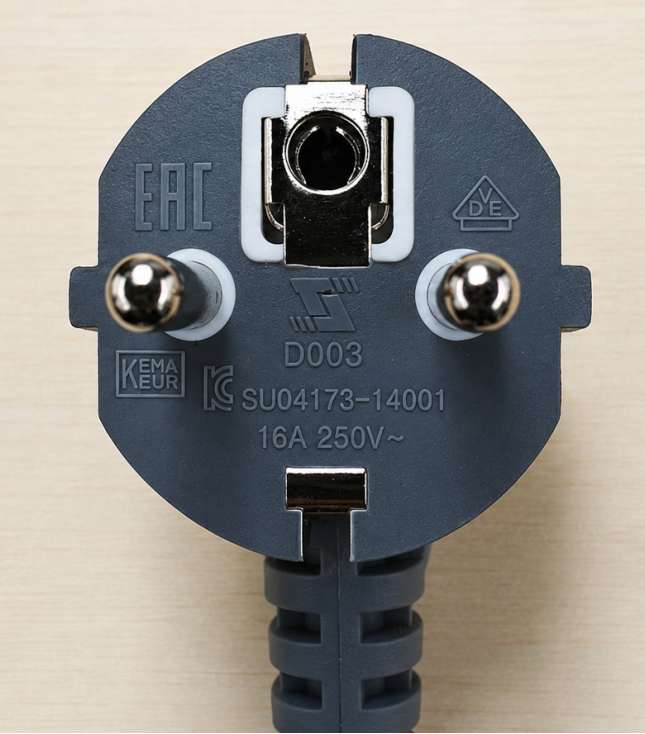
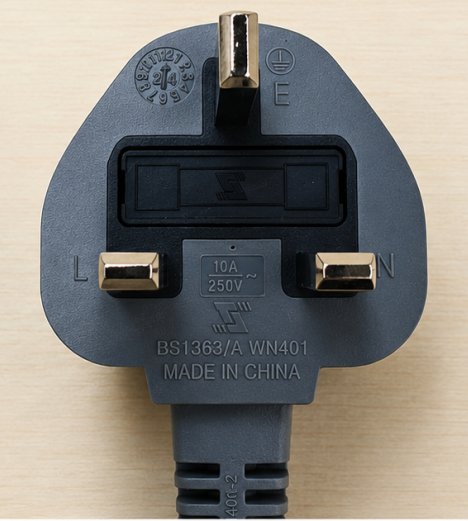
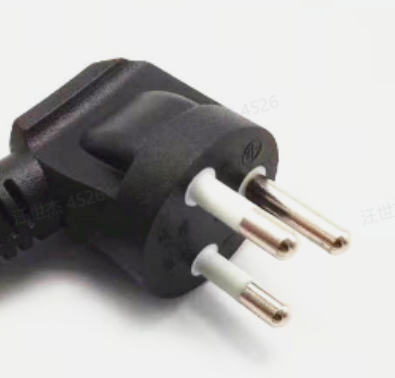
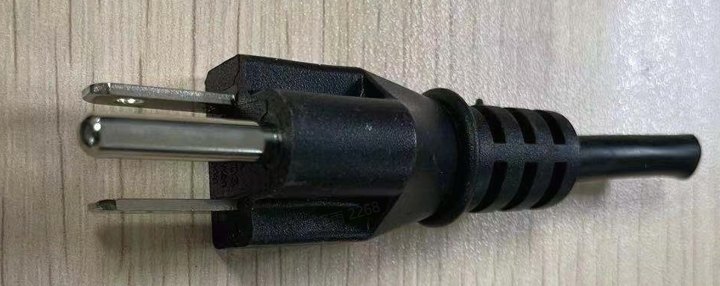
Q27: What are the power plug specifications for the Mijia Front Load Washer 9kg?
A: The Mijia Front Load Washer 9kg utilizes a Type F plug in Vietnam, Indonesia, Kazakhstan, Russia, Belarus.
It uses the Type G plug in Malaysia, Bangladesh, Singapore, Saudi Arabia.
It uses the Type O plug in Thailand.
It uses the Type B plug in the Philippines.
Q28: What is the door lock structure of the Mijia Front Load Washer 9kg?
A: The Mijia Front Load Washer 9kg utilizes an electromagnetic door lock.
Q29: Is the door seal of the Mijia Front Load Washer 9kg antibacterial?
A: The Mijia Front Load Washer 9kg uses an antibacterial door seal.
Q30: What is the BLDC motor of the Mijia Front Load Washer 9kg and what are its advantages?
A: BLDC (Brushless DC) motor of the Mijia Front Load Washer 9kg utilizes electronic commutation to replace carbon brushes, resulting in greater energy efficiency, quieter operation, a longer service life, and more precise speed control.
Q31: In which countries or regions is the Mijia Front Load Washer 9kg sold?
A: The Mijia Front Load Washer 9kg is sold in Vietnam, Thailand, Malaysia, Singapore, Indonesia, Saudi Arabia, Kazakhstan, Russia, Belarus.
Functions
Q1: What are the precautions when using the Mijia Front Load Washer 9kg?
A: The precautions when using the Mijia Front Load Washer 9kg are as follows:
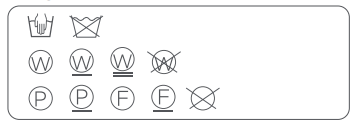
1. Do not wash clothes with any of the following symbols in the washing machine; otherwise, clothes can be damaged.
2. Do not wash clothes stained with flammable substances such as gasoline, petroleum, benzene, and alcohol.
3. Do not wash clothes contaminated with chemicals.
4. Do not wash heavy and highly absorbent items such as carpets, as this can cause imbalance and excessive vibration in the machine.
5. Do not wash clothes prone to staining or cracking, such as those with prints and multicolored seams.
6. Do not wash clothes with lace, silk, or other materials that can easily snag or unravel.
7. Do not wash suits, woolen coats, fur coats, leather garments, cheongsams, formal dresses, etc.
8. Do not wash bras with metal underwires.
9. Do not wash clothes with irremovable metal or plastic ornaments.
10. Do not wash fabrics containing metal wires.
11. Do not wash raincoats, car covers, or other waterproof items that are not machine washable.
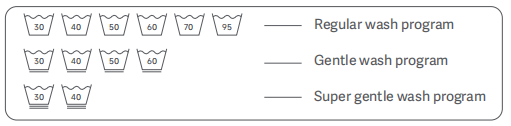
12. Check the care label on the clothes before washing, and select an appropriate washing method:
13. Wash colored items separately to avoid staining.
14. When washing large items, add two or three smaller items to avoid spin error during the spin cycle due to weight imbalance.
15. Check all pockets before washing to prevent items such as hairpins, coins, and keys from damaging the
clothing.
16. For heavily stained laundry, apply a small amount of detergent directly to the heavy stains and rub gently before putting it in the washing machine.
17. Before starting a wash cycle, make sure that no item is trapped in the door seal of the washing machine to prevent damage to the laundry and the seal.
18. Before loading laundry into the washing machine, tie up the straps, fasten the buttons, and zip up the zippers. Remove metal ornaments. Use a brush to remove debris like sand from clothes and the hems. Turn clothes prone to pilling inside out.
19. Before washing curtains, remove accessories such as curtain hooks and rings.
20. Place small items (such as handkerchiefs, gloves, socks, and bras) and easily tangled or worn items in a laundry bag before washing.
21. Do not exceed the Max. washing capacity when washing clothes (Max. washing capacity varies based on the cycle); otherwise, the washing performance will be affected.
22. The appliance automatically redistributes the load throughout the cycle to ensure a balanced load before spinning. Therefore, there could be a difference of up to 30 minutes between the actual wash duration and the displayed time.
Q2: How to add laundry detergent to the Mijia Front Load Washer 9kg?
A: To add laundry detergent to the Mijia Front Load Washer 9kg, please refer to the following steps:
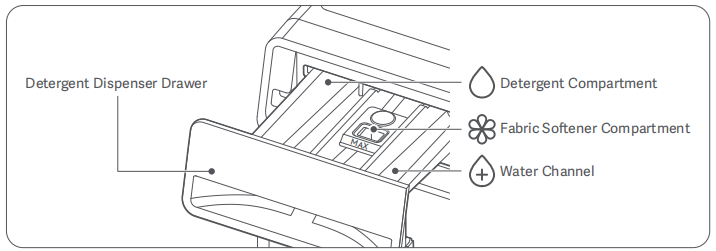
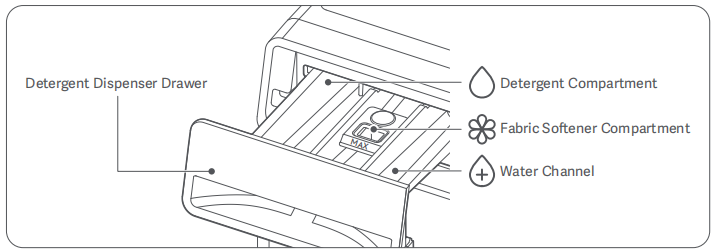
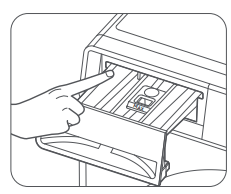
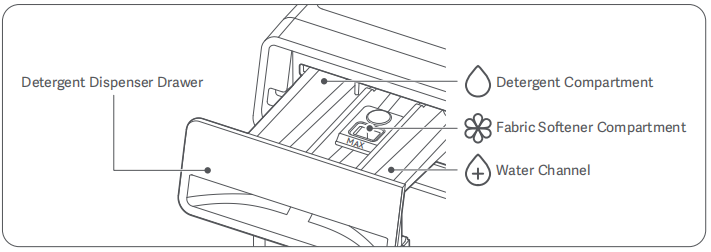
1. Pull open the Detergent Dispenser Drawer.
2. Add the detergent into the Detergent Compartment. Refer to the instructions for use of the detergent and add it as appropriate.
3. Close the Detergent Dispenser Drawer.
4. If laundry detergent is spilled, wipe it up with a rag as soon as possible.
Note:
Do not use too much detergent, as this can cause excessive suds, which can prevent thorough rinsing.
Q3: How to add fabric softener to the Mijia Front Load Washer 9kg?
A: To add fabric softener to the Mijia Front Load Washer 9kg, please refer to the following steps:
1. Pull open the Detergent Dispenser Drawer.
2. Add the fabric softener into the Fabric Softener Compartment.
3. It is recommended to dilute the fabric softener with water before pouring it into the compartment to prevent the softener from sticking in the compartment and being unable to be flushed out.
4. Close the Detergent Dispenser Drawer.
5. If softener is spilled, wipe it up with a rag as soon as possible.
Note:
1. Do not exceed the Max. line.
2. Do not add laundry detergent (powder or liquid) to the fabric softener compartment.
Q4: How to add the disinfectant to the Mijia Front Load Washer 9kg?
A: The Mijia Front Load Washer 9kg does not have a dedicated dispenser for disinfectant.
Q5: How to use laundry pods in the Mijia Front Load Washer 9kg?
A: If you need to use laundry pods, you can put them in the drum of the Mijia Front Load Washer 9kg together with the clothes.
Q6: Can disinfectant be added to the Mijia Front Load Washer 9kg dispenser?
A: The Mijia Front Load Washer 9kg does not feature a dedicated dispenser for disinfectants; disinfectants cannot be added to the detergent drawer.
Q7: How to use the washing only on the Mijia Front Load Washer 9kg?
A: The Mijia Front Load Washer 9kg does not support washing only.
Q8: How to use the rinse only on the Mijia Front Load Washer 9kg?
A: To use the rinse only on the Mijia Front Load Washer 9kg, please press and hold the Power button to turn it on. Put the clothes in the drum and close the door. Open the Xiaomi Home App >> choose the washing machine >> select [More], choose the [Rinse only] program, and then press the Start/Pause button to run the program.
Q9: How to use the Spin Only on the Mijia Front Load Washer 9kg?
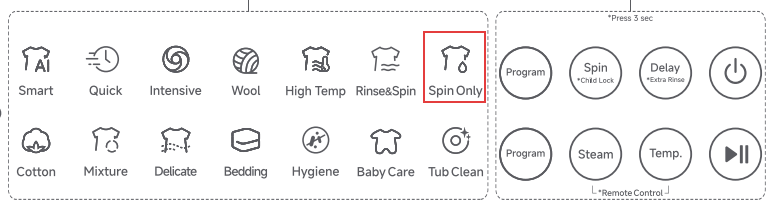
A: To use Spin Only on the Mijia Front Load Washer 9kg, please press and hold the Power button to turn on the device. Place the laundry inside the drum and securely close the door. Repeat pressing the [Program] button located on the upper side of the control panel to select the [Spin Only] program. Finally, tap the Start/Pause button to run the Spin Only program.
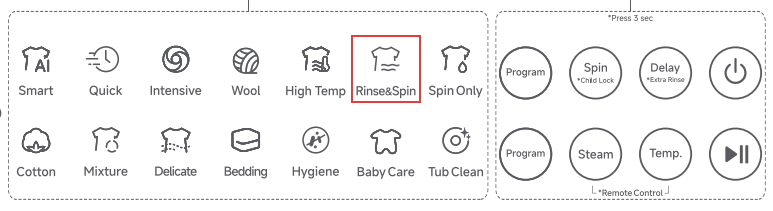
Q10: How to use the Rinse & Spin program on the Mijia Front Load Washer 9kg?
A: To use the Rinse & Spin program on the Mijia Front Load Washer 9kg, please refer to the following methods:
Method 1:
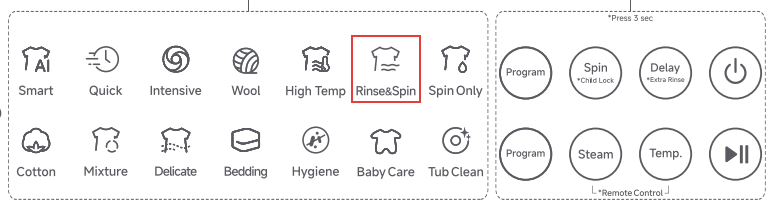
To use Rinse & Spin on the Mijia Front Load Washer 9kg, please press and hold the Power button to turn on the device. Place the laundry inside the drum and securely close the door. Repeat pressing the [Program] button located on the upper side of the control panel to select the [Rinse & Spin] program. Finally, press the Start/Pause button to initiate the spin cycle.
Method 2:
To use Rinse & Spin on the Mijia Front Load Washer 9kg, please press and hold the Power button to turn on the device. Place the laundry inside the drum and securely close the door. Open the Xiaomi Home App >> choose the washing machine >> tap [More] >> select [Rinse & Spin], and then tap the [Start] icon to run the Rinse & Spin program.
Q11: Can the Mijia Front Load Washer 9kg be filled with water manually?
A: The Mijia Front Load Washer 9kg is a drum-type design, and water cannot be added manually.
Q12: Can down jackets be washed in the Mijia Front Load Washer 9kg?
A: The Mijia Front Load Washer 9kg is designed with a Down program, which can wash down jackets.
Please press and hold the Power button to turn on the device. Place the laundry inside the drum and securely close the door. Open the Xiaomi Home App >> choose the washing machine >> tap [More] >> select [Down], and then tap the [Start] icon to run the Down program.
Q13: Can the Mijia Front Load Washer 9kg have a custom ringtone?
A: The Mijia Front Load Washer 9kg doesn’t support a custom ringtone.
Q14: How to set the washing time of the Mijia Front Load Washer 9kg?
A: You can set the washing time of the Mijia Front Load Washer 9kg by selecting the My Time program in the Xiaomi Home App. Other programs, whether on the panel or in the Xiaomi Home App, do not support setting the washing time.
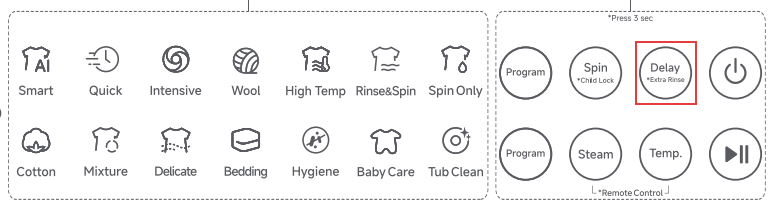
Q15: How to set the number of Rinse cycles on the Mijia Front Load Washer 9kg?
A: To set the number of Rinse cycles on the Mijia Front Load Washer 9kg, please refer to the following methods:
Method 1:
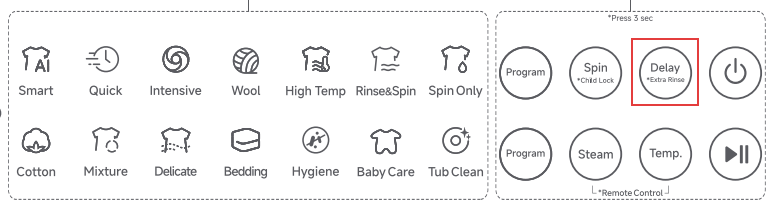
Press and hold the Delay button on the device’s panel to increase the number of rinse cycles.
Method 2:
1. Press and hold the [Steam] and [Temp.] buttons on the panel at the same time to enable remote control.
2. Open the Xiaomi Home App.
3. Tap [Mijia Front Load Washer 9kg].
4. Select the desired program.
5. Press [Rinse] to select the number of rinses from the options.
Q16: How to set the Spin Speed of the Mijia Front Load Washer 9kg?
A: To set the Spin Speed of the Mijia Front Load Washer 9kg, please refer to the following steps:
1. Press and hold the Power button to turn it on.
2. Put the clothes in the drum and close the door.
3. Press and hold the [Steam] and [Temp.] buttons on the panel at the same time to enable remote control.
4. Open the Xiaomi Home App.
5. Tap [Mijia Front Load Washer 9kg].
6. Select the desired program.
7. Tap [Spin Speed].
Q17: How to use the Smart program of the Mijia Front Load Washer 9kg?
A: To use the Smart program on the Mijia Front Load Washer 9kg, please refer to the following methods:
Method 1:
1. Press and hold the Power button to turn it on.
2. Put the clothes into the drum and close the door.
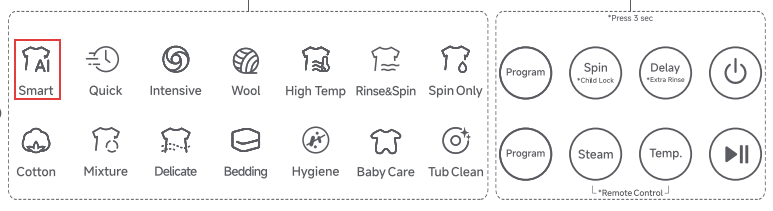
3. Repeatedly press the Program button on the upper side of the device’s panel.
4. Select the Smart program.
5. Press the Start/Pause button to run the Smart program.
Method 2:
1. Press and hold the [Steam] and [Temp.] buttons on the panel at the same time to enable remote control.
2. Open the Xiaomi Home App.
3. Tap [Mijia Front Load Washer 9kg].
4. Select [Smart].
6. Tap the Start icon to run the Smart program.
Note:
The Smart program is suitable for washing mixed loads of cotton, linen, and synthetic fabrics for daily wear.
Q18: What is the maximum washing capacity of the Smart program of the Mijia Front Load Washer 9kg?
A: The maximum washing capacity of the Smart program of the Mijia Front Load Washer 9kg is 6 kg.
Q19: How to use the Quick program of the Mijia Front Load Washer 9kg?
A: To use the Quick program of the Mijia Front Load Washer 9kg, please refer to the following methods:
Method 1:
1. Please press and hold the Power button to turn it on.
2. Put the clothes into the drum and close the door.
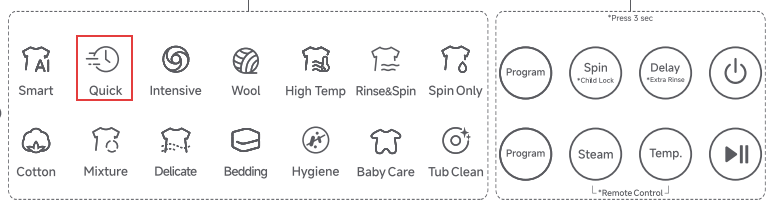
3. Repeatedly press the [Program] button located on the upper side of the control panel to select the [Quick] program.
4. Press the Start/Pause button to run the Quick program.
Method 2:
1. Press and hold the [Steam] and [Temp.] buttons on the panel at the same time to enable remote control.
2. Open the Xiaomi Home App.
3. Tap [Mijia Front Load Washer 9kg].
4. Select [Quick].
6. Tap the Start icon to run the Quick program.
Note:
The Quick program is suitable for washing thin, lightly soiled fabrics.
Q20: What is the maximum washing capacity of the Quick program of the Mijia Front Load Washer 9kg?
A: The maximum washing capacity of the Quick program of the Mijia Front Load Washer 9kg is 2 kg.
Q21: How to use the Intensive program of the Mijia Front Load Washer 9kg?
A: To use the Intensive program on the Mijia Front Load Washer 9kg, please refer to the following methods:
Method 1:
1. Please press and hold the Power button to turn on.
2. Put the clothes into the drum and close the door.
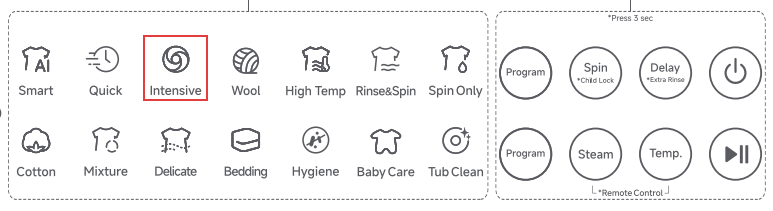
3. Repeatedly press the Program button on the upper side of the device’s panel.
4. Select the Intensive program.
5. Press the Start button to run the Intensive program.
Method 2:
1. Press and hold the [Steam] and [Temp.] buttons on the panel at the same time to enable remote control.
2. Open the Xiaomi Home App.
3. Tap [Mijia Front Load Washer 9kg].
4. Select [Intensive].
6. Tap the Start icon to run the Intensive program.
Note:
The Intensive program is suitable for washing moderately or heavily soiled fabrics. It is recommended to pre-treat stubborn stains with laundry detergent before machine washing.
Q22: What is the maximum washing capacity of the Intensive program of the Mijia Front Load Washer 9kg?
A: The maximum washing capacity of the Intensive program of the Mijia Front Load Washer 9kg is 9 kg.
Q23: How to use the Delicate program of the Mijia Front Load Washer 9kg?
A: To use the Delicate program on the Mijia Front Load Washer 9kg, please refer to the following methods:
Method 1:
1. Please press and hold the Power button to turn on.
2. Put the clothes into the drum and close the door.
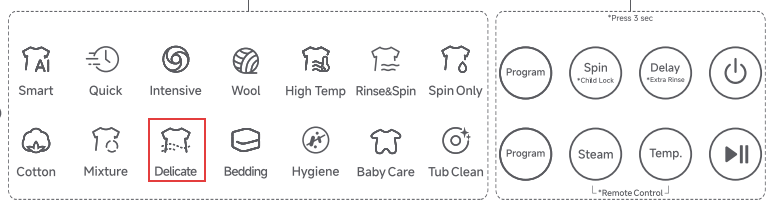
3. Repeatedly press the Program button on the lower side of the device’s panel.
4. Select the Delicate program.
5. Press the Start/Pause button to run the Delicate program.
Method 2:
1. Press and hold the [Steam] and [Temp.] buttons on the panel at the same time to enable remote control.
2. Open the Xiaomi Home App.
3. Tap [Mijia Front Load Washer 9kg].
4. Select [Delicate].
6. Tap the Start icon to run the Delicate program.
Note:
The Delicate program is suitable for washing sweaters, dresses, and other clothes that are easy to deform.
Q24: What is the maximum washing capacity of the Delicate program of the Mijia Front Load Washer 9kg?
A: The maximum washing capacity of the Delicate program of the Mijia Front Load Washer 9kg is 4 kg.
Q25: How to use the Heavy Wash program of the Mijia Front Load Washer 9kg?
A: To use the Heavy Wash program on the Mijia Front Load Washer 9kg, please refer to the following steps:
1. Please press and hold the Power button to turn on.
2. Put the clothes into the drum and close the door.
3. Press and hold the [Steam] and [Temp.] buttons on the panel at the same time to enable remote control.
4. Open the Xiaomi Home App.
5. Tap [Mijia Front Load Washer 9kg].
6. Tap [More].
7. Select the [Heavy Wash] program.
8. Tap [Start] to run the Heavy Wash program.
Note:
The Heavy Wash program is suitable for washing bed linens such as bed covers, sheets, and quilt covers.
Q26: What is the maximum washing capacity of the Heavy Wash program of the Mijia Front Load Washer 9kg?
A: The maximum washing capacity of the Heavy Wash program of the Mijia Front Load Washer 9kg is 6 kg.
Q27: How to use the Down program in the Mijia Front Load Washer 9kg?
A: To use the Down program on the Mijia Front Load Washer 9kg, please refer to the following steps:
1. Please press and hold the Power button to turn on.
2. Put the clothes into the drum and close the door.
3. Press and hold [Steam] and [Temp.] on the panel at the same time to enable remote control.
4. Open the Xiaomi Home App.
5. Tap [Mijia Front Load Washer 9kg].
6. Tap [More].
7. Select the [Down] program.
8. Tap [Start] to run the Down program.
Note:
The Down program is suitable for washing down-filled clothes (unsuitable for pillows or bedding).
Q28: What is the maximum washing capacity of the Down program of the Mijia Front Load Washer 9kg?
A: The maximum washing capacity of the Down program of the Mijia Front Load Washer 9kg is 2 kg.
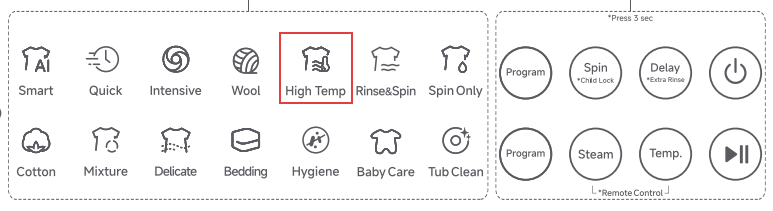
Q29: How to use the High Temp program of the Mijia Front Load Washer 9kg?
A: To use the High Temp program on the Mijia Front Load Washer 9kg, please refer to the following methods:
Method 1:
1. Press and hold the Power button to turn it on.
2. Put the clothes into the drum and close the door.
3. Repeatedly press the Program button on the upper side of the device’s panel.
4. Select the High Temp program.
5. Press the Start/Pause button to run the High Temp program.
Method 2:
1. Please press and hold the Power button to turn on.
2. Put the clothes into the drum and close the door.
3. Press and hold [Steam] and [Temp.] on the panel at the same time to enable remote control.
4. Open the Xiaomi Home App.
5. Tap [Mijia Front Load Washer 9kg].
6. Tap [More].
7. Select the [High Temp] program.
8. Tap [Start] to run the High Temp program.
Note:
The High Temp program is suitable for washing fabrics that can withstand high temperatures.
Q30: What is the maximum washing capacity of the High Temp program of the Mijia Front Load Washer 9kg?
A: The maximum washing capacity of the High Temp program of the Mijia Front Load Washer 9kg is 6 kg.
Q31: How to use the Favourite program of the Mijia Front Load Washer 9kg?
A: To use the Favourite program on the Mijia Front Load Washer 9kg, please refer to the following steps:
1. Please press and hold the Power button to turn on.
2. Put the clothes into the drum and close the door.
3. Press and hold [Steam] and [Temp.] on the panel at the same time to enable remote control.
4. Open the Xiaomi Home App.
5. Tap [Mijia Front Load Washer 9kg].
6. Tap [More].
7. Select the desired program.
8. Tap the heart icon on the upper right to set the program as your Favourite program.
9. Tap the [Favourite] program.
10. Tap [Start] to run the Favourite program.
Q32: What is the maximum washing capacity of the Favorite program of the Mijia Front Load Washer 9kg?
A: Because the Mijia Front Load Washer 9kg Favorite program is related to the selected function, the maximum washing capacity needs to be based on the actual display of the Xiaomi Home App.
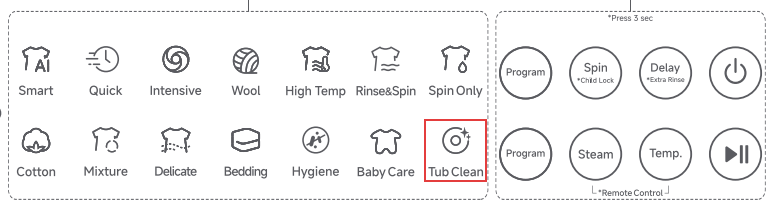
Q33: How to use the Tub Clean program on the Mijia Front Load Washer 9kg?
A: To use the Tub Clean program on the Mijia Front Load Washer 9kg, please refer to the following methods:
Method 1:
1. Please press and hold the Power button to turn on.
2. Repeatedly press the Program button on the lower side of the device’s panel.
3. Select the Tub Clean program.
4. Press the Start button to run the Tub Clean program.
Method 2:
1. Please press and hold the Power button to turn on.
2. Put the clothes into the drum and close the door.
3. Press and hold [Steam] and [Temp.] on the panel at the same time to enable remote control.
4. Open the Xiaomi Home App.
5. Tap [Mijia Front Load Washer 9kg].
6. Tap [More].
7. Select the [Tub Clean] program.
8. Tap [Start] to run the Tub Clean program.
Q34: Does detergent need to be added when using the Tub Clean program of the Mijia Front Load Washer 9kg?
A: When the Mijia Front Load Washer 9kg uses the Tub Clean program, detergent and softener cannot be added. If the Tub Clean program is performed once every three months, it is recommended to add a dedicated drum cleaner for the washing machine.
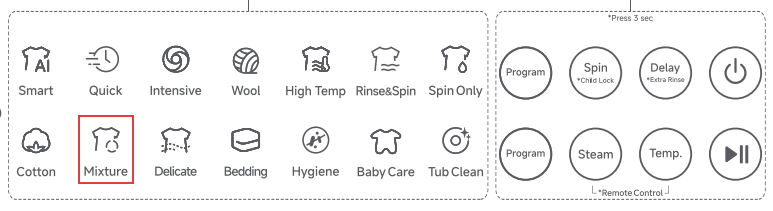
Q35: How to use the Mixture program of the Mijia Front Load Washer 9kg?
A: To use the Mixture program on the Mijia Front Load Washer 9kg, please refer to the following methods:
Method 1:
1. Please press and hold the Power button to turn on.
2. Put the clothes into the drum and close the door.
3. Repeatedly press the Program button on the lower side of the device’s panel.
4. Select the Mixture program.
5. Press the Start button to run the Mixture program.
Method 2:
1. Please press and hold the Power button to turn on.
2. Put the clothes into the drum and close the door.
3. Press and hold [Steam] and [Temp.] on the panel at the same time to enable remote control.
4. Open the Xiaomi Home App.
5. Tap [Mijia Front Load Washer 9kg].
6. Tap [More].
7. Select the [Mixture] program.
8. Tap [Start] to run the Mixture program.
Note:
The Mixture program is suitable for washing most clothes that do not need to be sorted.
Q36: What is the maximum washing capacity of the Mixture program of the Mijia Front Load Washer 9kg?
A: The maximum washing capacity of the Mixture program of the Mijia Front Load Washer 9kg is 9 kg.
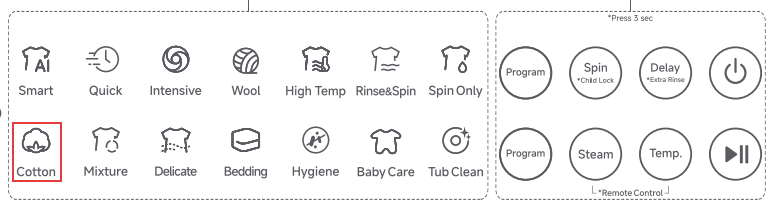
Q37: How to use the Cotton program of the Mijia Front Load Washer 9kg?
A: To use the Cotton program on the Mijia Front Load Washer 9kg, please refer to the following methods:
Method 1:
1. Please press and hold the Power button to turn on.
2. Put the clothes into the drum and close the door.
3. Repeatedly press the Program button on the lower side of the device’s panel.
4. Select the Cotton program.
5. Press the Start button to run the Cotton program.
Method 2:
1. Please press and hold the Power button to turn on.
2. Put the clothes into the drum and close the door.
3. Press and hold [Steam] and [Temp.] on the panel at the same time to enable remote control.
4. Open the Xiaomi Home App.
5. Tap [Mijia Front Load Washer 9kg].
6. Tap [More].
7. Select the [Cotton] program.
8. Tap [Start] to run the Cotton program.
Note:
The Cotton program is suitable for washing cotton and linen fabrics.
Q38: What is the maximum washing capacity of the Cotton program of the Mijia Front Load Washer 9kg?
A: The maximum washing capacity of the Cotton program of the Mijia Front Load Washer 9kg is 9 kg.
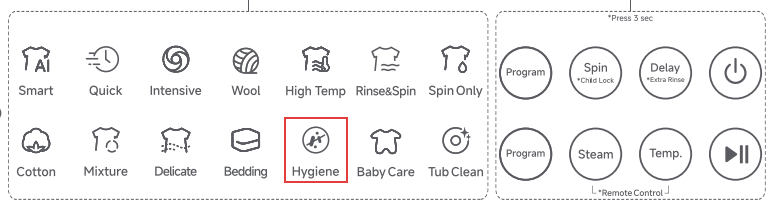
Q39: How to use the Hygiene program of the Mijia Front Load Washer 9kg?
A: To use the Hygiene program on the Mijia Front Load Washer 9kg, please refer to the following methods:
Method 1:
1. Please press and hold the Power button to turn on.
2. Put the clothes into the drum and close the door.
3. Repeatedly press the Program button on the lower side of the device’s panel.
4. Select the Hygiene program.
5. Press the Start button to run the Hygiene program.
Method 2:
1. Please press and hold the Power button to turn on.
2. Put the clothes into the drum and close the door.
3. Press and hold [Steam] and [Temp.] on the panel at the same time to enable remote control.
4. Open the Xiaomi Home App.
5. Tap [Mijia Front Load Washer 9kg].
6. Tap [More].
7. Select the [Hygiene] program.
8. Tap [Start] to run the Hygiene program.
Note:
The Hygiene program is suitable for washing cotton items, such as clothing and bedding, that can withstand high temperatures and require high sterilization.
Q40: What is the maximum washing capacity of the Hygiene program of the Mijia Front Load Washer 9kg?
A: The maximum washing capacity of the Hygiene program of the Mijia Front Load Washer 9kg is 3 kg.
Q41: How to use the Silk program in the Mijia Front Load Washer 9kg?
A: To use the Silk program on the Mijia Front Load Washer 9kg, please refer to the following steps:
1. Please press and hold the Power button to turn on.
2. Put the clothes into the drum and close the door.
3. Press and hold [Steam] and [Temp.] on the panel at the same time to enable remote control.
4. Open the Xiaomi Home App.
5. Tap [Mijia Front Load Washer 9kg].
6. Tap [More].
7. Select the [Silk] program.
8. Tap [Start] to run the Silk program.
Note:
The Silk program is suitable for washing silk fabrics.
Q42: What is the maximum washing capacity of the Silk program of the Mijia Front Load Washer 9kg?
A: The maximum washing capacity of the Silk program of the Mijia Front Load Washer 9kg is 2 kg.
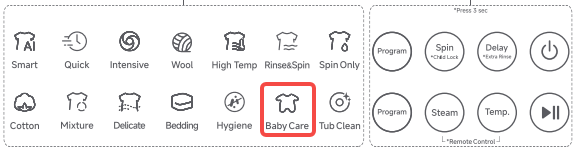
Q43: How to use the Baby Care program of the Mijia Front Load Washer 9kg?
A: To use the Baby Care program on the Mijia Front Load Washer 9kg, please refer to the following methods:
Method 1:
1. Press and hold the Power button to turn it on.
2. Put the clothes into the drum and close the door.
3. Repeatedly press the Program button on the lower side of the device’s panel.
4. Select the Baby Care program.
5. Press the Start/Pause button to run the Baby Care program.
Method 2:
1. Please press and hold the Power button to turn on.
2. Put the clothes into the drum and close the door.
3. Press and hold [Steam] and [Temp.] on the panel at the same time to enable remote control.
4. Open the Xiaomi Home App.
5. Tap [Mijia Front Load Washer 9kg].
6. Tap [More].
7. Select the [Baby Care] program.
8. Tap [Start] to run the Baby Care program.
Note:
The Baby Care program is suitable for washing baby clothes that are safe for high-temperature washing.
Q44: What is the maximum washing capacity of the Baby Care program of the Mijia Front Load Washer 9kg?
A: The maximum washing capacity of the Baby Care program of the Mijia Front Load Washer 9kg is 6 kg.
Q45: How to use the Waterproof program of the Mijia Front Load Washer 9kg?
A: To use the Waterproof program on the Mijia Front Load Washer 9kg, please refer to the following steps:
1. Please press and hold the Power button to turn on.
2. Put the clothes into the drum and close the door.
3. Press and hold [Steam] and [Temp.] on the panel at the same time to enable remote control.
4. Open the Xiaomi Home App.
5. Tap [Mijia Front Load Washer 9kg].
6. Tap [More].
7. Select the [Waterproof] program.
8. Tap [Start] to run the Waterproof program.
Note:
The Waterproof program is suitable for washing machine-washable jackets.
Q46: What is the maximum washing capacity of the Waterproof program of the Mijia Front Load Washer 9kg?
A: The maximum washing capacity of the Waterproof program of the Mijia Front Load Washer 9kg is 4 kg.
Q47: How to use the Jeans program in the Mijia Front Load Washer 9kg?
A: To use the Jeans program on the Mijia Front Load Washer 9kg, please refer to the following steps:
1. Please press and hold the Power button to turn on.
2. Put the clothes into the drum and close the door.
3. Press and hold [Steam] and [Temp.] on the panel at the same time to enable remote control.
4. Open the Xiaomi Home App.
5. Tap [Mijia Front Load Washer 9kg].
6. Tap [More].
7. Select the [Jeans] program.
8. Tap [Start] to run the Jeans program.
Note:
The Jeans program is suitable for washing denim clothing.
Q48: What is the maximum washing capacity of the Jeans program of the Mijia Front Load Washer 9kg?
A: The maximum washing capacity of the Jeans program of the Mijia Front Load Washer 9kg is 4 kg.
Q49: How to use the Rinse & Spin program on the Mijia Front Load Washer 9kg?
A: To use the Rinse & Spin program on the Mijia Front Load Washer 9kg, please refer to the following steps:
Method 1:
1. Press and hold the Power button to turn it on.
2. Put the clothes into the drum and close the door.
3. Repeatedly press the Program button on the upper side of the device’s panel.
4. Select the Rinse & Spin program.
5. Press the Start/Pause button to run the Rinse & Spin program.
Method 2:
1. Please press and hold the Power button to turn on.
2. Put the clothes into the drum and close the door.
3. Press and hold [Steam] and [Temp.] on the panel at the same time to enable remote control.
4. Open the Xiaomi Home App.
5. Tap [Mijia Front Load Washer 9kg].
6. Tap [More].
7. Select the [Rinse & Spin] program.
8. Tap [Start] to run the Rinse & Spin program.
Note:
The Rinse & Spin program is suitable for clothes that only need rinsing or that require an extra rinse cycle fabric softeners.
Q50: What is the maximum washing capacity of the Rinse & Spin program on the Mijia Front Load Washer 9kg?
A: The maximum washing capacity of the Rinse & Spin program on the Mijia Front Load Washer 9kg is 9 kg.
Q51: How to use the My Time program of the Mijia Front Load Washer 9kg?
A: To use the My Time program on the Mijia Front Load Washer 9kg, please refer to the following steps:
1. Please press and hold the Power button to turn on.
2. Put the clothes into the drum and close the door.
3. Press and hold [Steam] and [Temp.] on the panel at the same time to enable remote control.
4. Open the Xiaomi Home App.
5. Tap [Mijia Front Load Washer 9kg].
6. Tap [More].
7. Select the [My Time] program.
8. Tap [Start] to run the My Time program.
Note:
The My Time program allows you to set the washing time as you like. It is suitable for washing underwear made of cotton, synthetic fibers, or blends.
Q52: What is the maximum washing capacity of the My Time program of the Mijia Front Load Washer 9kg?
A: The maximum washing capacity of the My Time program of the Mijia Front Load Washer 9kg is 6 kg.
Q53: How to use the New Clothes program of the Mijia Front Load Washer 9kg?
A: To use the New Clothes program on the Mijia Front Load Washer 9kg, please refer to the following steps:
1. Please press and hold the Power button to turn on.
2. Put the clothes into the drum and close the door.
3. Press and hold [Steam] and [Temp.] on the panel at the same time to enable remote control.
4. Open the Xiaomi Home App.
5. Tap [Mijia Front Load Washer 9kg].
6. Tap [More].
7. Select the [New Clothes] program.
8. Tap [Start] to run the New Clothes program.
Note:
The New Clothes program is suitable for the first washing of new clothes, quickly removing lint, excess dye, chemical residues, etc.
Q54: What is the maximum washing capacity of the New Clothes program of the Mijia Front Load Washer 9kg?
A: The maximum washing capacity of the New Clothes program of the Mijia Front Load Washer 9kg is 2 kg.
Q55: How to use the Sports program on the Mijia Front Load Washer 9kg?
A: To use the Sports program on the Mijia Front Load Washer 9kg, please refer to the following steps:
1. Please press and hold the Power button to turn on.
2. Put the clothes into the drum and close the door.
3. Press and hold [Steam] and [Temp.] on the panel at the same time to enable remote control.
4. Open the Xiaomi Home App.
5. Tap [Mijia Front Load Washer 9kg].
6. Tap [More].
7. Select the [Sports] program.
8. Tap [Start] to run the Sports program.
Note:
The Sports program is suitable for washing sportswear, such as quick-dry clothes and yoga wear.
Q56: What is the maximum washing capacity of the Sports program of the Mijia Front Load Washer 9kg?
A: The maximum washing capacity of the Sports program of the Mijia Front Load Washer 9kg is 4 kg.
Q57: How to use the Synthetic program of the Mijia Front Load Washer 9kg?
A: To use the Synthetic program on the Mijia Front Load Washer 9kg, please refer to the following steps:
1. Please press and hold the Power button to turn on.
2. Put the clothes into the drum and close the door.
3. Press and hold [Steam] and [Temp.] on the panel at the same time to enable remote control.
4. Open the Xiaomi Home App.
5. Tap [Mijia Front Load Washer 9kg].
6. Tap [More].
7. Select the [Synthetic] program.
8. Tap [Start] to run the Synthetic program.
Note:
The Synthetic program is suitable for washing synthetic fabrics.
Q58: What is the maximum washing capacity of the Synthetic program of the Mijia Front Load Washer 9kg?
A: The maximum washing capacity of the Synthetic program of the Mijia Front Load Washer 9kg is 4 kg.
Q59: How to use the Underwear program of the Mijia Front Load Washer 9kg?
A: To use the Underwear program on the Mijia Front Load Washer 9kg, please refer to the following steps:
1. Please press and hold the Power button to turn on.
2. Put the clothes into the drum and close the door.
3. Press and hold [Steam] and [Temp.] on the panel at the same time to enable remote control.
4. Open the Xiaomi Home App.
5. Tap [Mijia Front Load Washer 9kg].
6. Tap [More].
7. Select the [Underwear] program.
8. Tap [Start] to run the Underwear program.
Note:
The Underwear program is suitable for washing underwear.
Q60: What is the maximum washing capacity of the Underwear program of the Mijia Front Load Washer 9kg?
A: The maximum washing capacity of the Underwear program of the Mijia Front Load Washer 9kg is 4 kg.
Q61: How to add clothes while the Mijia Front Load Washer 9kg is washing?
A: To add clothes while the Mijia Front Load Washer 9kg is washing, please refer to the following requirements:
1. The washing machine has reached a safe water level.
2. The temperature inside the washing machine has reached a safe temperature.
Here are the steps to add clothes when the Mijia Front Load Washer 9kg is washing for your reference:
1. Press the Start/Pause button to stop the washing machine.
2. Open the door and put in the clothes you need to add.
If the door cannot be opened, please follow the steps below:
(1). Select the Spin Only program, and drain the water inside the washing machine.
(2). Press the Start/Pause button again and open the door.
(3). If the internal temperature is high, wait until the temperature drops before opening the door.
3. Finally, close the door and restart.
Note:
Make sure the remote control is off when adding clothes.
Q62: How to use the Delay program of the Mijia Front Load Washer 9kg?
A: To use the Delay program on the Mijia Front Load Washer 9kg, please refer to the following steps:
1. Please press and hold the Power button to turn on.
2. Put the clothes into the drum and close the door.
3. Select the desired program, then repeatedly press the [Delay] button on the washing machine's control panel to set the desired delay time.
4. Press the Start/Pause button to run the Delay program.
Note:
Each extension lasts one hour, up to a maximum of 24 hours.
Q63: Does the water tap need to be turned on when running the Hygiene program of the Mijia Front Load Washer 9kg?
A: When the Mijia Front Load Washer 9kg uses the Hygiene program, the water tap needs to be turned on throughout the process.
Q64: What is the theory of the Hygiene program of the Mijia Front Load Washer 9kg?
A: The Hygiene program of the Mijia Front Load Washer 9kg achieves sterilization by heating the inside of the drum.
Q65: What is the mite removal rate of the Hygiene program of the Mijia Front Load Washer 9kg?
A: The mite removal rate of the Hygiene program of the Mijia Front Load Washer 9kg is 99.99%.
Q66: How to use the Spray function of the Mijia Front Load Washer 9kg?
A: Some programs of the Mijia Front Load Washer 9kg have a built-in spray function, which cannot be selected separately.
Q67: How to use the Drum light function of the Mijia Front Load Washer 9kg?
A: The Drum light will automatically turn on when the Mijia Front Load Washer 9kg is running.
Q68: Is there a time limit for the Drum light of the Mijia Front Load Washer 9kg?
A: The Drum light of the Mijia Front Load Washer 9kg will automatically turn off after a period of time during operation.
Q69: How to use the Child Lock function of the Mijia Front Load Washer 9kg?
A: You can enable or disable the child lock on the Mijia Front Load Washer 9kg by pressing and holding the Spin button. When the child lock is enabled, the washing machine's buttons will be disabled.
Q70: Can the water intake volume be adjusted on the Mijia Front Load Washer 9kg?
A: To use the high water level program on the Mijia Front Load Washer 9kg, please press and hold the Power button to turn on the device; place your laundry inside the drum and securely close the door. Open the Xiaomi Home App, select a wash program, and choose the [High water level] option from the wash cycle menu. Finally, press the Start icon to run the program.
Q71: Does the Mijia Front Load Washer 9kg have an anti-wrinkle function? How to achieve it?
A: The Mijia Front Load Washer 9kg does not have an anti-wrinkle function.
Q72: How much detergent should be put in the Mijia Front Load Washer 9kg when manually loading it?
A: When putting detergent into the Mijia Front Load Washer 9kg, please use low-foaming detergent and follow the instructions of the detergent. When putting softener in, please dilute the softener with water first and do not exceed the MAX (maximum) baseline.
Q73: Can the Notification sound of the Mijia Front Load Washer 9kg be turned off?
A: You can turn off the notification sound of the Mijia Front Load Washer 9kg. Enter the Xiaomi Home App, select the device, and tap the three-dots icon in the upper right corner, then turn off [Notification sound].
Q74: Can a laundry bag be used in the Mijia Front Load Washer 9kg?
A: When washing small items using the Mijia Front Load Washer 9kg, you can use a laundry bag.
Q75: How to choose the Mijia Front Load Washer 9kg detergent?
A: When choosing detergent for the Mijia Front Load Washer 9kg, please choose a low-foaming detergent and use it according to the instructions on the detergent.
Q76: Does the capacity of the Mijia Front Load Washer 9kg refer to dry clothes or wet clothes?
A: The capacity of the Mijia Front Load Washer 9kg refers to the dry clothes capacity.
Q77: Can other items be placed on the Mijia Front Load Washer 9kg?
A: It is not recommended to place other items on the Mijia Front Load Washer 9kg, especially electrical appliances, as the magnetic field will cause the device to malfunction, and the vibration of the device has a risk of causing items to fall off.
Q78: How to open the door of the Mijia Front Load Washer 9kg during washing?
A: To open the door when the Mijia Front Load Washer 9kg is running, the following conditions are required:
1. The washing machine has reached a safe water level.
2. The temperature inside the washing machine has reached a safe temperature.
Here are the steps to open the door when the Mijia Front Load Washer 9kg is running for your reference:
1. Press the Start/Pause button to stop the washing machine.
2. Open the door.
If the door cannot be opened, please follow the steps below:
(1). Select the Spin Only program, and drain the water inside the washing machine.
(2). Press the Start/Pause button again and open the door.
(3). If the internal temperature is high, wait until the temperature drops before opening the door.
(4). Check if the remote control is turned off. The door cannot be opened when the remote control is turned on.
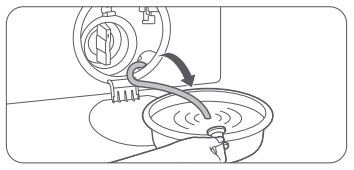
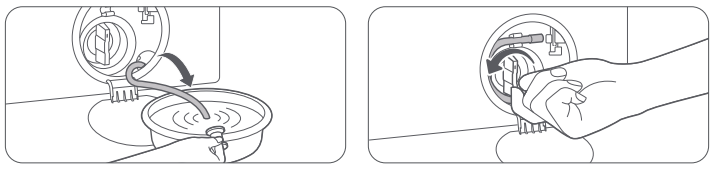
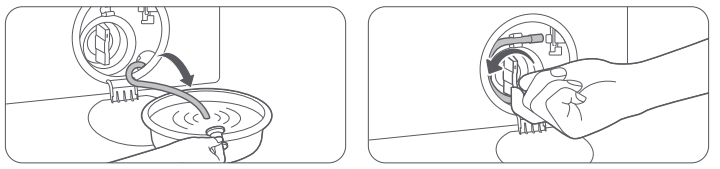
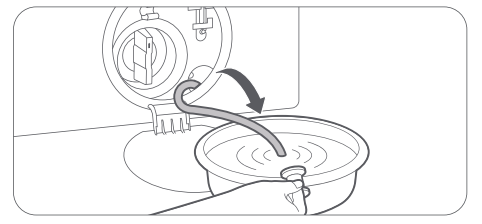
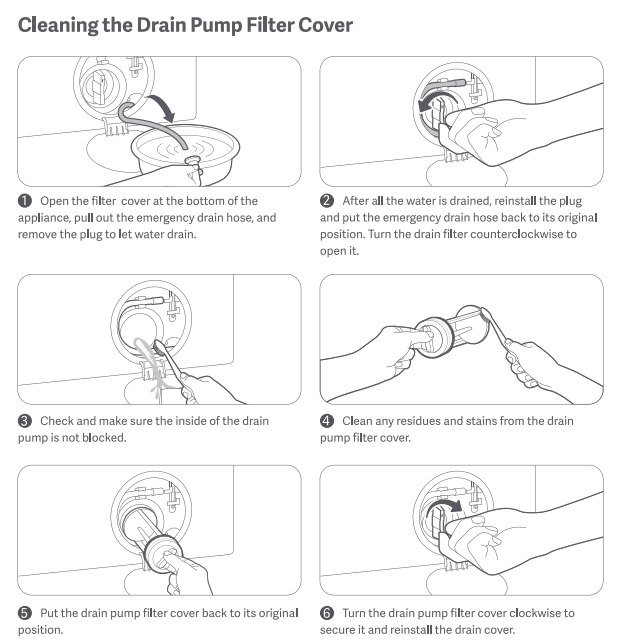
(5). If you cannot wait long enough, open the drain filter cover and unplug the emergency drain pipe to drain the water.
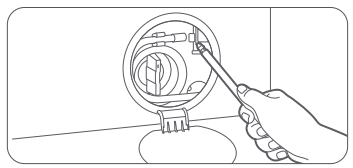
(6). In case of emergency, you can open the door by pulling down the emergency release cord with a tool.
Note:
The emergency pull ring is for use in emergencies. Please do not use it in non-emergency situations.
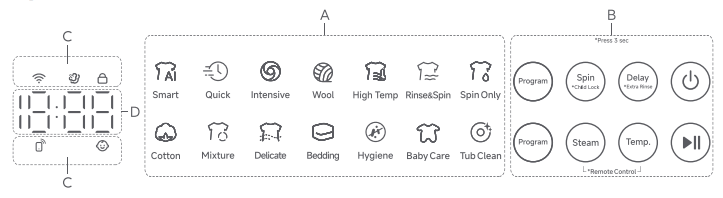
Q79: What do the icons on the Mijia Front Load Washer 9kg panel mean?
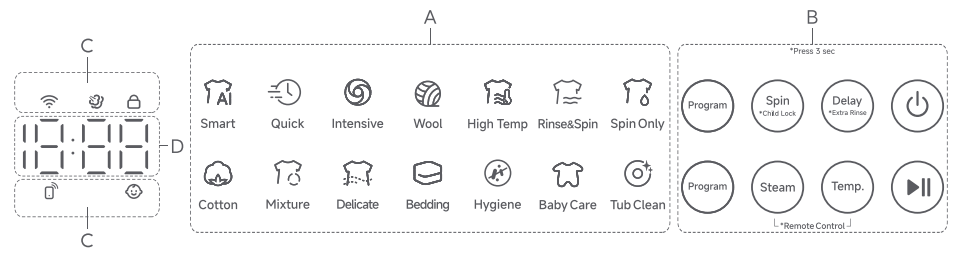
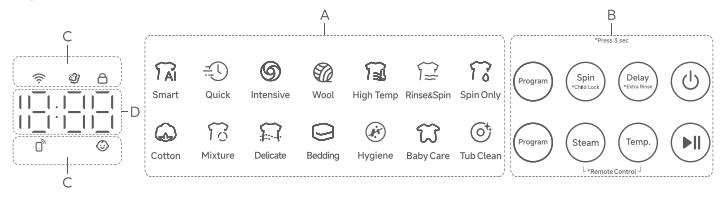
A: The meanings of the program icons in the middle of the panel on the Mijia Front Load Washer 9kg are as follows:
Program display area:
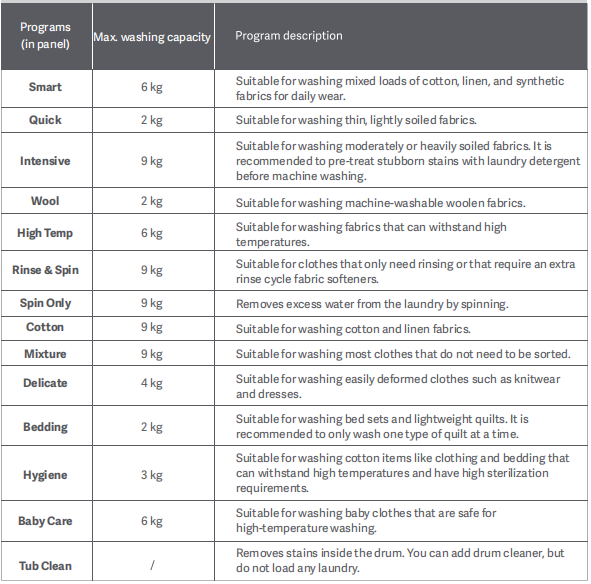
1. Smart: The Max. washing capacity is 6 kg, and it is suitable for washing mixed loads of cotton, linen, and synthetic fabrics for daily wear.
2. Quick: The Max. washing capacity is 2 kg, and it is suitable for washing thin, lightly soiled fabrics.
3. Intensive: The Max. washing capacity is 9 kg, and it is suitable for washing moderately or heavily soiled fabrics. It is recommended to pre-treat stubborn stains with laundry detergent before machine washing.
4. Wool: The Max. washing capacity is 2 kg, and it is suitable for washing machine-washable woolen fabrics.
5. High Temp: The Max. washing capacity is 6 kg, and it is suitable for washing fabrics that can withstand high temperatures.
6. Rinse & Spin: The Max. washing capacity is 9 kg, and it is suitable for clothes that only need rinsing or that require an extra rinse cycle, fabric softeners.
7. Spin Only: The Max. washing capacity is 9 kg, and it removes excess water from the laundry by spinning.
8. Cotton: The Max. washing capacity is 9 kg, and it is suitable for washing cotton and linen fabrics.
9. Mixture: The Max. washing capacity is 9 kg, and it is suitable for washing most clothes that do not need to be sorted.
10. Delicate: The Max. washing capacity is 4 kg, and it is suitable for washing easily deformed clothes such as knitwear and dresses.
11. Bedding: The Max. washing capacity is 2 kg, and it is suitable for washing bed sets and lightweight quilts. It is recommended to only wash one type of quilt at a time.
12. Hygiene: The Max. washing capacity is 3 kg, and it is suitable for washing cotton items like clothing and bedding that can withstand high temperatures and have high sterilization requirements.
13. Baby Care: The Max. washing capacity is 6 kg, and it is suitable for washing baby clothes that are safe for high-temperature washing.
14. Tub Clean: It removes stains inside the drum. You can add drum cleaner, but do not load any laundry.
Button group:
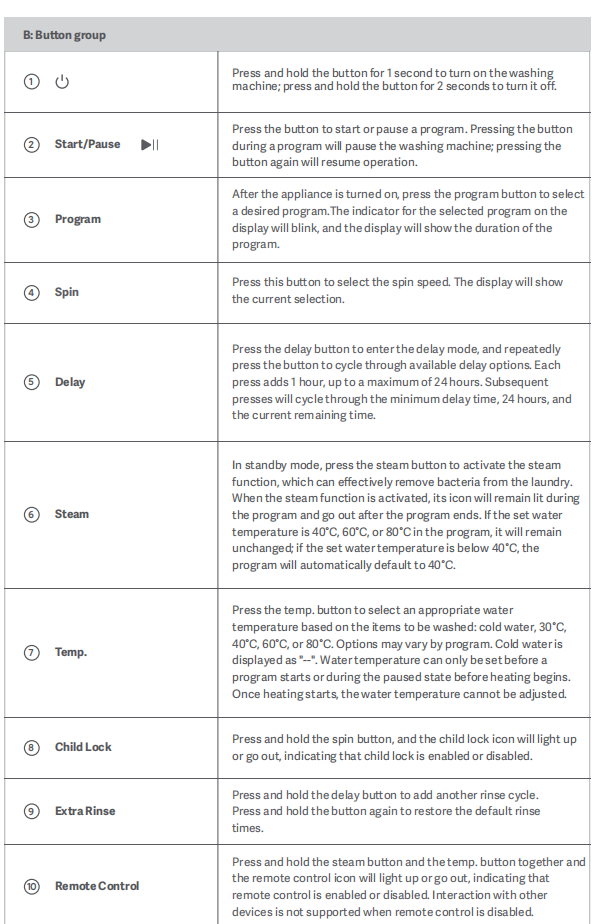
1. Power button:
Press and hold the button for 1 second to turn on the washing machine; press and hold the button for 2 seconds to turn it off.
2. Start/Pause:
Press the button to start or pause a program. Pressing the button during a program will pause the washing machine; pressing the button again will resume operation.
3. Program:
After the appliance is turned on, press the program button to select the desired program. The indicator for the selected program on the display will blink, and the display will show the duration of the program.
4. Spin:
Press this button to select the spin speed. The display will show the current selection.
5. Delay:
Press the delay button to enter the delay mode, and repeatedly press the button to cycle through available delay options. Each press adds 1 hour, up to a maximum of 24 hours. Subsequent presses will cycle through the minimum delay time, 24 hours, and the current remaining time.
6. Steam:
In standby mode, press the steam button to activate the steam function, which can effectively remove bacteria from the laundry. When the steam function is activated, its icon will remain lit during the program and go out after the program ends. If the set water temperature is 40 °C, 60 °C, or 80 °C in the program, it will remain unchanged; if the set water temperature is below 40 °C, the program will automatically default to 40 °C.
7. Temp.
Press the temp. button to select an appropriate water temperature based on the items to be washed: cold water, 30 °C, 40 °C, 60 °C, or 80 °C. Options can vary by program. Cold water is displayed as "--". Water temperature can only be set before a program starts or during the paused state before heating begins. Once heating starts, the water temperature cannot be adjusted.
8. Child Lock:
Press and hold the spin button, and the child lock icon will light up or go out, indicating that the child lock is enabled or disabled.
9. Extra Rinse:
Press and hold the delay button to add another rinse cycle. Press and hold the button again to restore the default rinse times.
10. Remote Control:
Press and hold the steam button and the temp. button together, and the remote control icon will light up or go out, indicating that the remote control is enabled or disabled. Interaction with other devices is not supported when remote control is disabled.
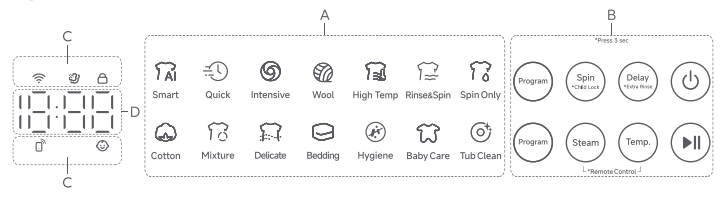
Function icons:
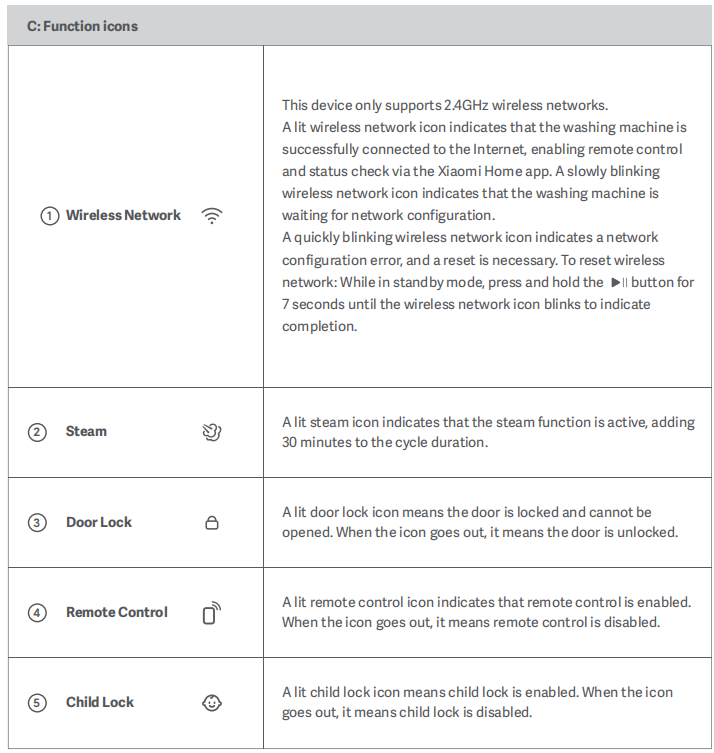
1. Wireless Network:
This device only supports 2.4GHz wireless networks.
A lit wireless network icon indicates that the washing machine is successfully connected to the Internet, enabling remote control and status check via the Xiaomi Home app. A slowly blinking wireless network icon indicates that the washing machine is waiting for network configuration.
A quickly blinking wireless network icon indicates a network configuration error, and a reset is necessary. To reset the wireless network: While in standby mode, press and hold the Start/Pause button for 7 seconds until the wireless network icon blinks to indicate completion.
2. Steam:
A lit steam icon indicates that the steam function is active, adding 30 minutes to the cycle duration.
3. Door Lock:
A lit door lock icon means the door is locked and cannot be opened. When the icon goes out, it means the door is unlocked.
4. Remote Control:
A lit remote control icon indicates that the remote control is enabled. When the icon goes out, it means the remote control is disabled.
5. Child Lock:
A lit child lock icon means the child lock is enabled. When the icon goes out, it means the child lock is disabled.
Digital display:
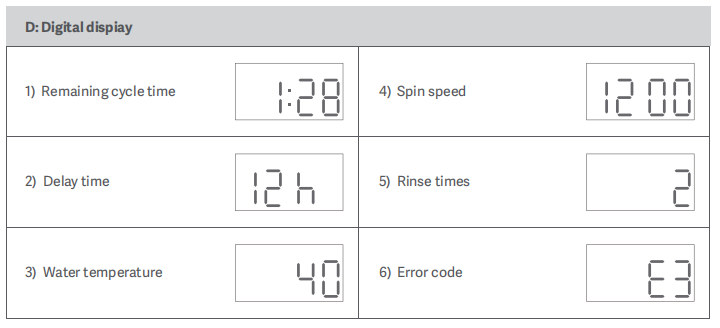
1. Remaining cycle time.
2. Delay time.
3. Water temperature.
4. Spin speed.
5. Rinse times.
6. Error code.
Q80: Where is the water inlet of the Mijia Front Load Washer 9kg?
A: The water inlet of the Mijia Front Load Washer 9kg is located on the upper rear side of the washing machine when facing the machine.
Q81: How to connect the Mijia Front Load Washer 9kg with the Xiaomi Home App?
A: To connect the Mijia Front Load Washer 9kg with the Xiaomi Home App, please refer to the following steps:
1. Scan the QR code on the instruction manual to download and install the Xiaomi Home App.
2. If the app is already installed, you will be directed to the connection settings page. Alternatively, search for "Xiaomi Home" in the App Store to download and install it.
3. Open the Xiaomi Home App, tap [+] in the upper right corner, and follow the instructions to add your device.
Q82: How to modify the device name of the Mijia Front Load Washer 9kg?
A: To modify the device name of the Mijia Front Load Washer 9kg, please refer to the following steps:
1. Open the Xiaomi Home App.
2. Tap [Mijia Front Load Washer 9kg].
3. Tap the three-dots icon in the upper right corner.
4. Tap [More device info].
5. Tap [Custom name].
6. Fill in the name and tap [OK] to change the device name.
Q83: How to manage the location of the Mijia Front Load Washer 9kg on the Xiaomi Home App?
A: To manage the location of the Mijia Front Load Washer 9kg on the Xiaomi Home App, please refer to the following steps:
1. Open the Xiaomi Home App.
2. Tap [Mijia Front Load Washer 9kg].
3. Tap the three-dots icon in the upper right corner.
4. Tap [More device info].
5. Tap [Room].
6. Select a room you want to set up.
7. Tap the [√] icon to confirm.
Q84: How to share the Mijia Front Load Washer 9kg with others?
A: After binding the Mijia Front Load Washer 9kg with the Xiaomi Home App, you can share the device with others by referring to the following methods:
Method 1:
1. Open the Xiaomi Home App and select [Profile].
2. Tap the plus icon under the profile.
3. Choose [Member] and tap [Next].
4. Set a family nickname.
5. Select an invitation method: you can choose to invite via QR code scan or by manually entering the Xiaomi Account.
6. Wait for the invitee to accept the sharing request via the bell notification icon in the Xiaomi Home App to complete the device sharing process.
Method 2:
1. Open the Xiaomi Home App.
2. Tap [Mijia Front Load Washer 9kg].
3. Tap the three-dots icon in the upper right corner.
4. Tap [Share device].
5. You can select a previously shared Xiaomi account or enter the Xiaomi account manually.
3. Wait for the invitee to accept the sharing and complete the device sharing.
Note:
Sharing the main account device too many times can affect the function. It is recommended to set the sharing permissions reasonably according to the actual usage scenario.
Q85: How to update the firmware version of the Mijia Front Load Washer 9kg?
A: To update the firmware version of the Mijia Front Load Washer 9kg, please refer to the following steps:
1. Open the Xiaomi Home App.
2. Tap [Mijia Front Load Washer 9kg].
3. Tap the three-dots icon in the upper right corner.
4. Tap [Firmware update].
5. Tap [Update].
Q86: Can the Mijia Front Load Washer 9kg be controlled through the Xiaomi Home App when Child Lock is enabled?
A: When the Child Lock is turned on, the Xiaomi Home App cannot be used to control the Mijia Front Load Washer 9kg to ensure safety.
Q87: How to view the electronic manual of the Mijia Front Load Washer 9kg?
A: To view the electronic manual of the Mijia Front Load Washer 9kg, please refer to the following steps:
1. Open the Xiaomi official website mi.com in your country/region.
2. Select [Support].
3. Select [User Guide].
4. Choose your country/region.
5. Select [Ecosystem].
6. Choose the Mijia Front Load Washer 9kg.
Q88: How to check the SN of the Mijia Front Load Washer 9kg?
A: The SN of the Mijia Front Load Washer 9kg is on the back of the door (the door needs to be opened), or you can check it on the back of the washing machine.
Q89: How to check the running status of the Mijia Front Load Washer 9kg?
A: You can check it on the panel of the Mijia Front Load Washer 9kg, or you can also check it on the Xiaomi Home App.
To check the washing status via the Xiaomi Home App, please refer to the following steps:
1. Please press and hold the Power button to turn on.
2. Put the clothes into the drum and close the door.
3. Press and hold [Steam] and [Temp.] on the panel at the same time to enable remote control.
4. Open the Xiaomi Home App.
5. Tap [Mijia Front Load Washer 9kg].
6. Tap [More].
7. Select a program and tap [Start] to run the program.
8. Then you can check the washing status.
Q90: How should clothes be treated before using the Mijia Front Load Washer 9kg?
A: Before using the Mijia Front Load Washer 9kg, please do the following to the clothes:
1. For clothes of different colors, please wash them separately to avoid staining.
2. When washing large items, put two or three small items in the washing machine.
3. Avoid abnormal dehydration caused by weight imbalance.
4. Please check all pockets before washing to avoid damage to clothes by hairpins, coins, keys, etc.
5. When there are many stains, first use a small amount of detergent to scrub the areas with more stains, and then put them in the washing machine for washing.
6. Before starting the washing process, make sure that the sealing ring of the door is not caught by the clothes to prevent damage to the clothes and the sealing ring of the door.
7. Before putting clothes in for washing, please fasten the belts, buttons, and zip up the clothes.
8. Remove metal decorations from clothing. Use a brush to remove sand on clothing and inside the hems.
9. Clothes that are prone to pilling should be washed inside out.
10. When cleaning curtains, you need to remove curtain hooks, rings, and other accessories.
11. Small items (such as handkerchiefs, gloves, socks, bras, etc.) and clothes that are easily tangled or worn should be placed in a laundry bag for washing.
12. Do not exceed the maximum washing capacity when washing clothes (the maximum washing capacity of each program is different). Otherwise, it will affect the washing effect.
Q91: How to change the program while the Mijia Front Load Washer 9kg is running?
A: If you need to change the program while the Mijia Front Load Washer 9kg is running, please press the Start/Pause button or the Power button to change the program.
Q92: Can the Mijia Front Load Washer 9kg remember the last program set?
A: After the Mijia Front Load Washer 9kg has finished running, it will default to the Smart program when it is turned on again. If the device loses power during operation, it will default to the program when the power is turned on again.
Q93: How to restore the Mijia Front Load Washer 9kg to factory settings?
A: The Mijia Front Load Washer 9kg cannot be restored to factory settings. However, you can reset Wi-Fi: please press and hold the Start/Pause button for 7 seconds after powering on. The reset is complete once you hear a "beep".
Q94: Can the Mijia Front Load Washer 9kg be connected to the hot water hose?
A: The Mijia Front Load Washer 9kg cannot be connected to the hot water hose.
Q95: Will the Mijia Front Load Washer 9kg automatically shut off after completing the program?
A: After the Mijia Front Load Washer 9kg program is completed, the display will prompt "End" and then turn off.
Q96: How to reset the Wi-Fi of the Mijia Front Load Washer 9kg?
A: To reset the Wi-Fi of the Mijia Front Load Washer 9kg, turn on the device and press and hold the Start/Pause button for 7 seconds. The reset is complete once you hear a beep. Then you can turn the Wi-Fi back on.
Installation
Q1: What are the installation requirements for the Mijia Front Load Washer 9kg?
A: The installation requirements for the Mijia Front Load Washer 9kg are as follows:
1. All electrical wiring and grounding need to comply with local and national electrical standards. Please protect the power cord and do not place it randomly, as it can be stepped on, compressed, or pinched by other objects. Pay special attention to the power plug, socket, and all connection points of the power cord. Additionally, please do not cut off the washing machine's plug to connect it directly to the outlet.
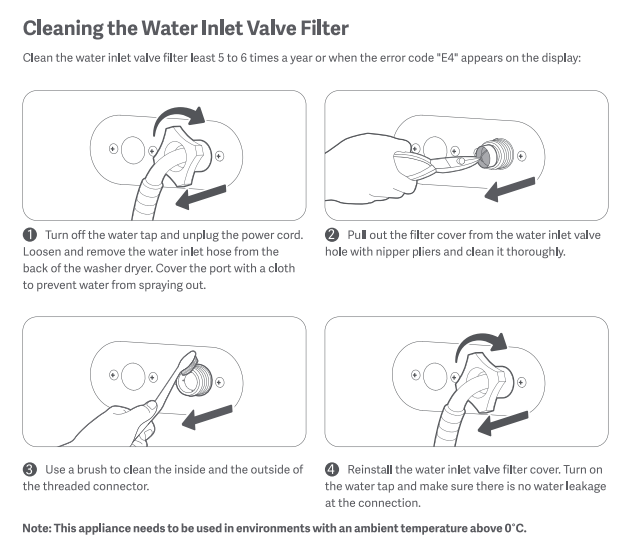
2. The operating water pressure of the washing machine is 0.05 MPa–0.8 MPa. If the water pressure is lower than 0.05 MPa, the inlet valve can not function properly, or the water intake time can exceed the program setting, and the display can show an “E4” warning. The washing machine should be installed as close to the water tap as possible. Before use, please check all connections of the inlet valve and water tap to prevent leakage.
3. A dedicated drainage area is required, and the floor drain should not be higher than 10 cm above the base of the washing machine.
4. The installation surface needs to be a solid, flat, clean, and level floor free from water and grease. Avoid direct sunlight, ensure good ventilation, and keep the washing machine away from heat sources such as coal fires or gas stoves. The operating ambient temperature is 0 °C-40 °C. Do not place the washing machine in environments below 0 °C, as residual water in the valves, drain pump, and hoses can freeze and affect normal operation.
5. If installed in a recess or cabinet, the minimum clearance requirements are: 15 mm on the sides, 30 mm at the rear, 20 mm at the top, and 550 mm at the front.
Q2: How to adjust the balance of the Mijia Front Load Washer 9kg?
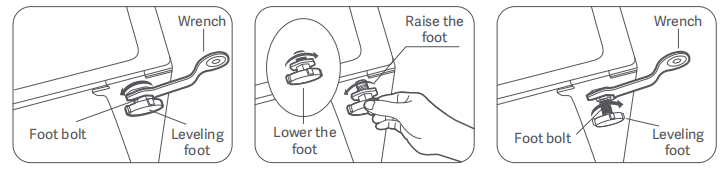
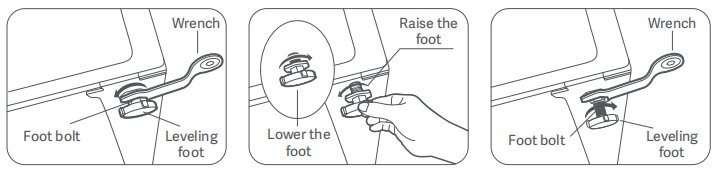
A: Once the Mijia Front Load Washer 9kg is in place, check whether it is stable. Press the two ends of a diagonal line on the top of the washing machine with both hands respectively to see whether it wobbles. Check the two ends on the other diagonal line using the same method. If the washing machine wobbles, adjust the leveling feet to make sure it remains stable.
To adjust the balance of the Mijia Front Load Washer 9kg, please refer to the following steps:
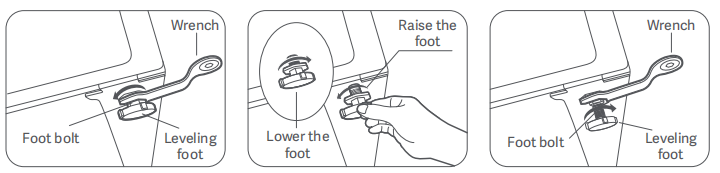
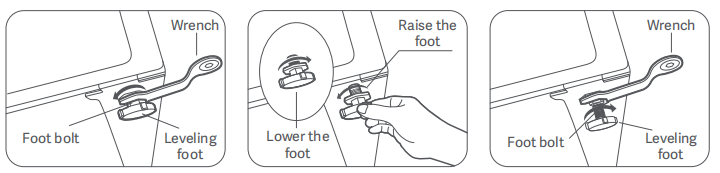
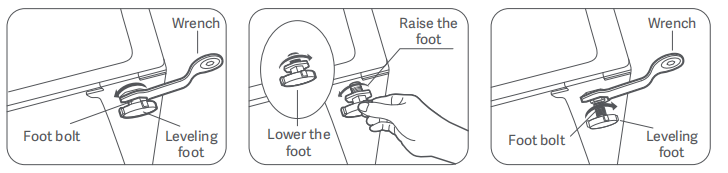
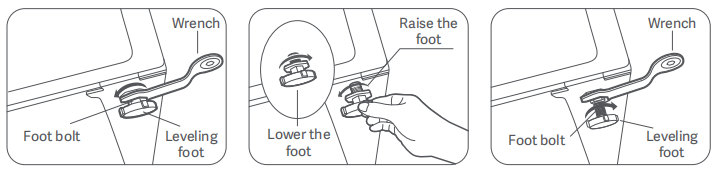
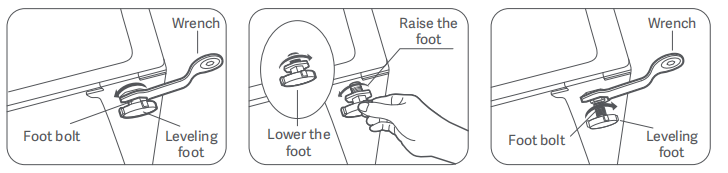
1. Use the Feet Adjusting Wrench to turn a foot bolt counterclockwise to loosen it.
2. Turn the leveling foot and adjust it to the desired height. Turn counterclockwise to raise the feet, and turn clockwise to lower the feet.
3. Use the wrench to tighten the foot bolt. Adjust the other leveling feet by the same method to ensure the washing machine is level and stable.
4. After adjustment, press the two ends of a diagonal line on the top of the washing machine with both hands respectively to see whether it wobbles. Check the two ends on the other diagonal line using the same method.
Note:
Do not place wooden pieces or any other items under the feet, as this can cause excessive vibration or noise during operation.
Q3: How to determine whether the Mijia Front Load Washer 9kg is properly balanced?
A: After placing the Mijia Front Load Washer 9kg in position, press the two ends of a diagonal line on the top of the washing machine with both hands respectively to see whether it wobbles. Check the two ends on the other diagonal line using the same method. If the washing machine wobbles, adjust the leveling feet to make sure it remains stable.
Q4: Does the Mijia Front Load Washer 9kg support embedded installation?
A: The Mijia Front Load Washer 9kg supports embedded installation. If the washing machine is placed in an alcove or closet, the minimum required clearances are 15 mm on each side, 30 mm at the rear, 20 mm at the top, and 550 mm at the front.
Q5: How to install the water inlet hose of the Mijia Front Load Washer 9kg?
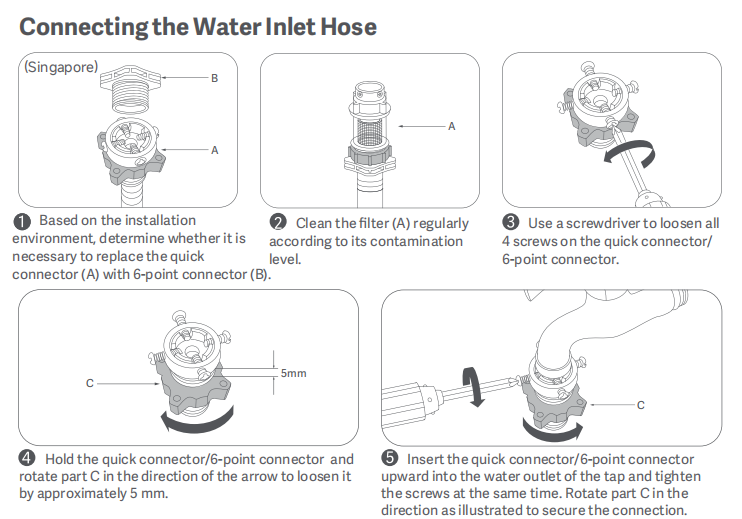
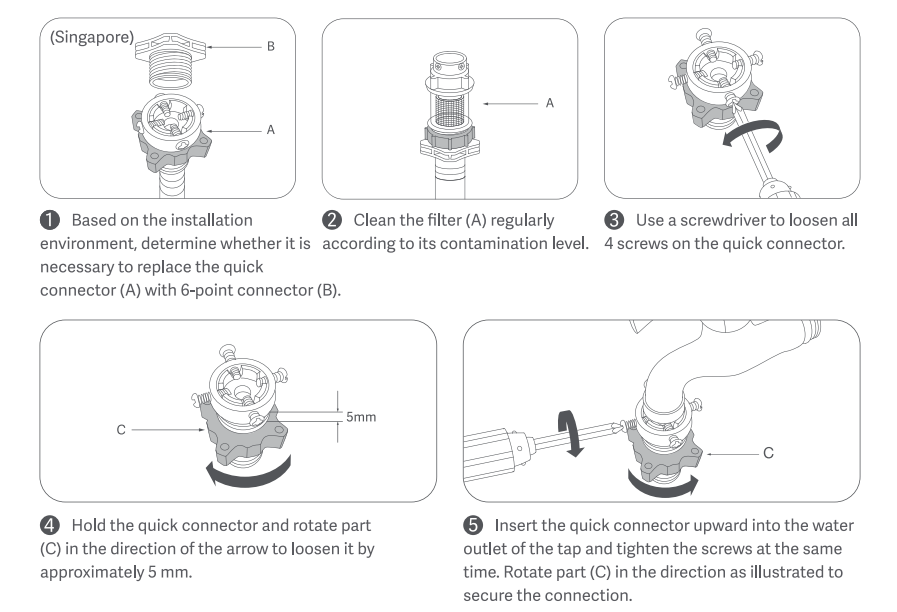
A: The Mijia Front Load Washer 9kg uses a quick-connect inlet hose. Please follow the steps below for installation:
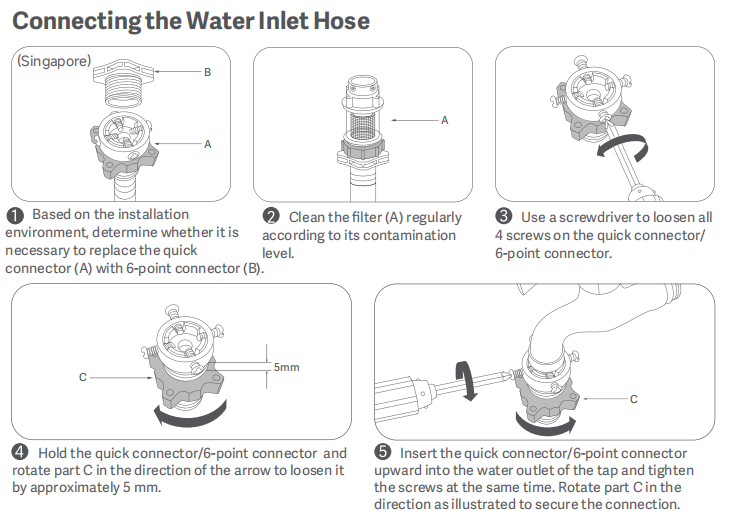
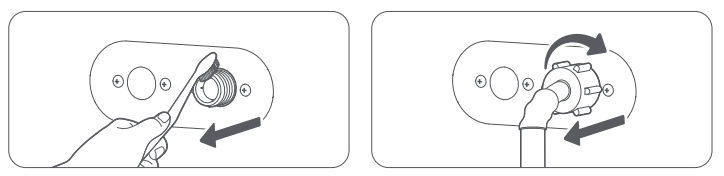
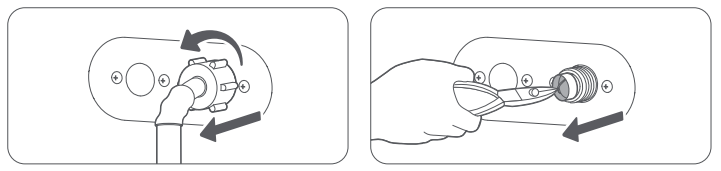
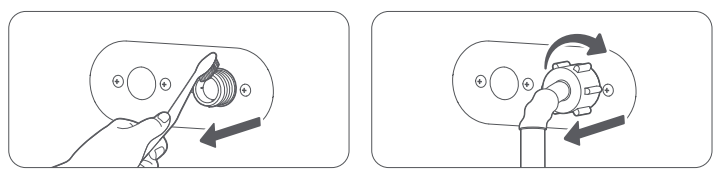
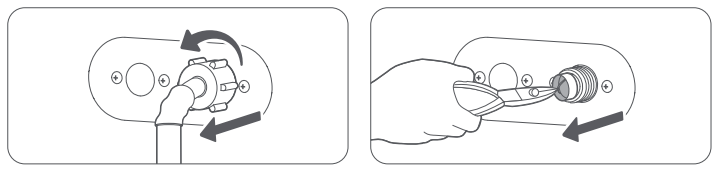
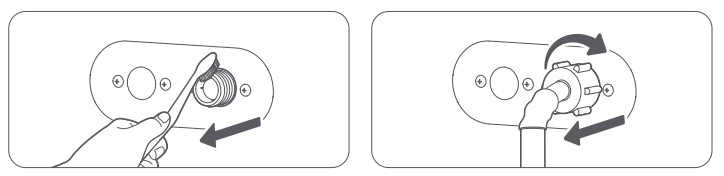
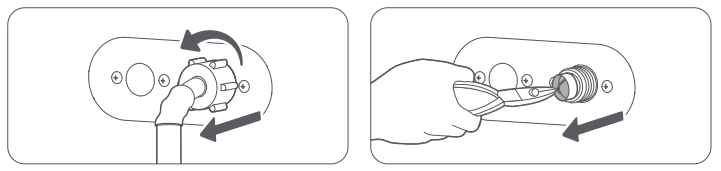
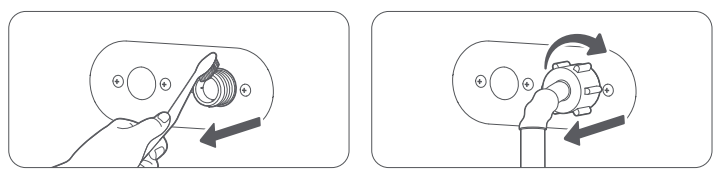
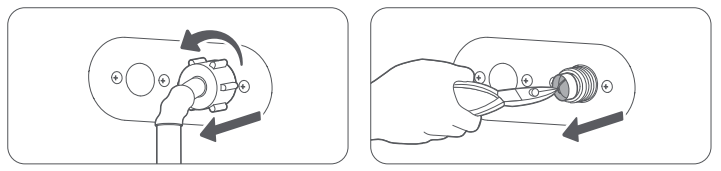
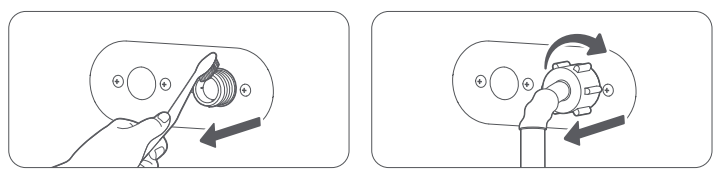
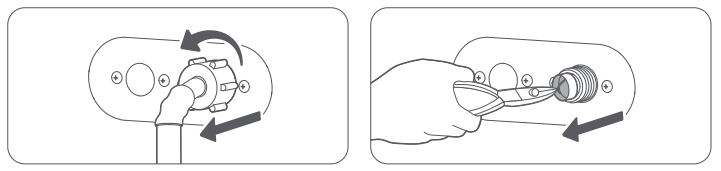
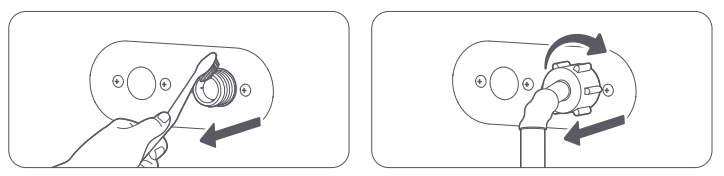
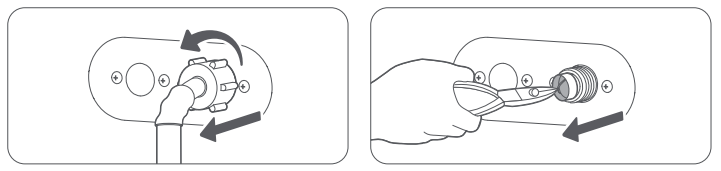
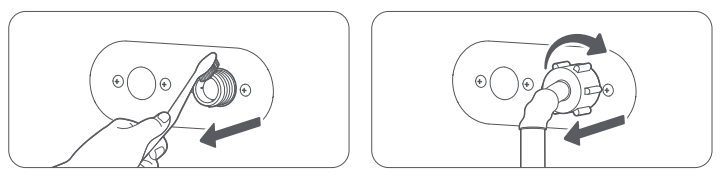
1. Based on the installation environment, determine whether it is necessary to replace the quick connector (A) with 6-point connector (B).
2. Clean the filter (A) regularly according to its contamination level.
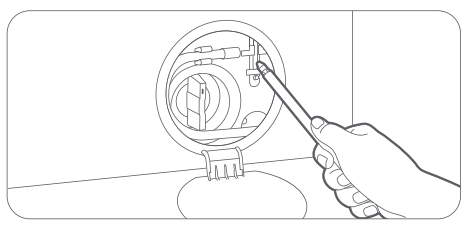
3. Use a screwdriver to loosen 4 screws on the quick connector/6-point connector.
3. Hold the quick connector/6-point connector and rotate part (C) in the direction of the arrow to loosen it by approximately 5 mm.
4. Insert the quick connector/6-point connector upward into the water outlet of the tap and tighten the screws at the same time. Rotate part (C) in the direction as illustrated to secure the connection.
Note:
1. Connect the quick connector of the inlet hose (found in the accessory bag) to the water supply faucet, ensuring a secure and watertight seal.
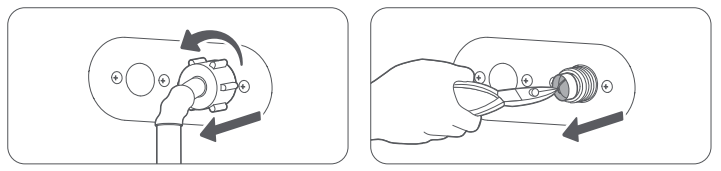
2. Connect the other end of the inlet hose to the water inlet valve located on the back of the washing machine; tighten the hose by turning it in a clockwise direction.
3. Turn on the water faucet and check all connection points for leaks. If a leak is detected, refer to the steps above to tighten the specific connection point where the leak is occurring. If the faucet itself is leaking, replace the faucet immediately.
4. Keep the inlet hose in a natural position; do not bend, kink, or pull it taut.
Q6: How to position the drain hose of the Mijia Front Load Washer 9kg?
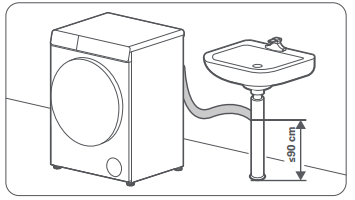
A: The Mijia Front Load Washer 9kg uses an upper drainage method. When installing the Drain Hose, the clamp that fixes the Drain Hose cannot be removed, and the Drain Hose cannot be laid flat on the ground. Please make sure that the Drain Hose is firmly fixed to ensure that it will not move or fall off during drainage to avoid property loss due to leakage.
There are two ways to connect the drain hose:
Inserting the Drain Hose directly into the floor drain:
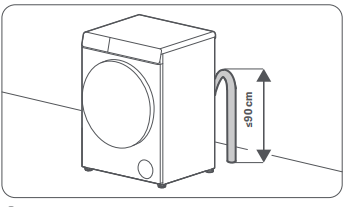
1. To prevent siphoning (water flowing back inside the machine), make sure the height of the vertical hose above the floor drain is not greater than 90 cm, and it is recommended to use a 65 cm vertical hose.
2. When installing, make sure the Drain Hose is obliquely connected to the vertical hose, with the end of the Drain Hose above the water level in the drain.
Connecting to a branch of the downpipe:
Connect the end of the Drain Hose to a branch of the sink downpipe, ensuring the height from the connection point to the ground does not exceed 90 cm.
Q7: Can the Mijia Front Load Washer 9kg water inlet hose be extended?
A: The Mijia Front Load Washer 9kg comes with a 1.2 m water inlet hose in Thailand, Vietnam, Malaysia, Bangladesh, Singapore, Philippines, and Indonesia. If a longer hose is required, you can request one from the installation technician.
Q8: What is the maximum for the extended water inlet hose of the Mijia Front Load Washer 9kg?
A: There is no specific limit for the length of the water inlet hose of the Mijia Front Load Washer 9kg, as long as the water pressure remains within the required range of 0.05 MPa-0.8 MPa.
Q9: Can the Mijia Front Load Washer 9kg drain hose be extended?
A: The Mijia Front Load Washer 9kg drain hose can be extended. If a longer hose is required, you can request one from the installation technician.
Q10: How to replace the drain hose of the Mijia Front Load Washer 9kg?
A: The drain hose of the Mijia Front Load Washer 9kg cannot be replaced by yourself. If replacement is required, please contact the local official after-sales service center for assistance.
Q11: Can the Mijia Front Load Washer 9kg be installed on a base?
A: Installing the Mijia Front Load Washer 9kg on a base is not recommended, as it can cause excessive vibration or noise during operation.
Q12: How many Transit Bolts are in the Mijia Front Load Washer 9kg? How to remove them?
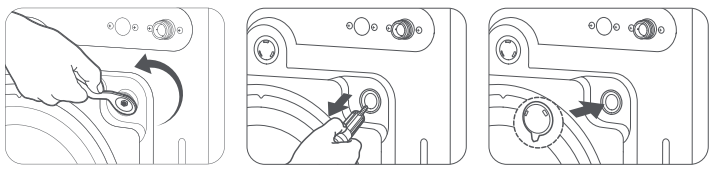
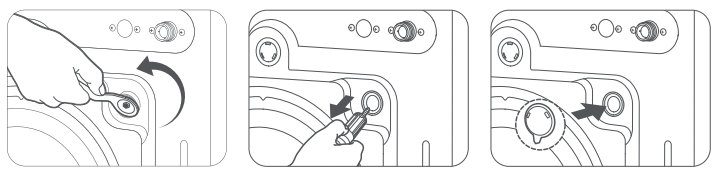
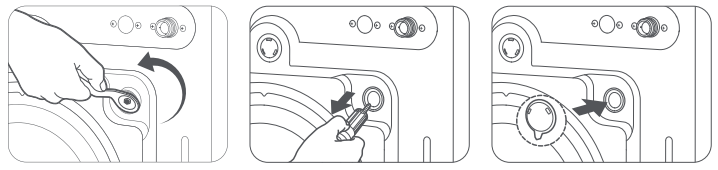
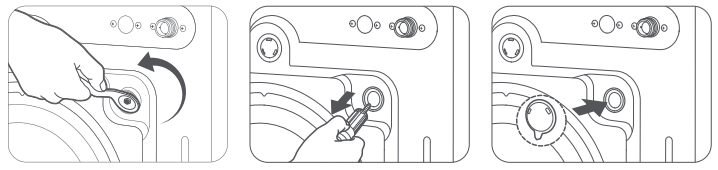
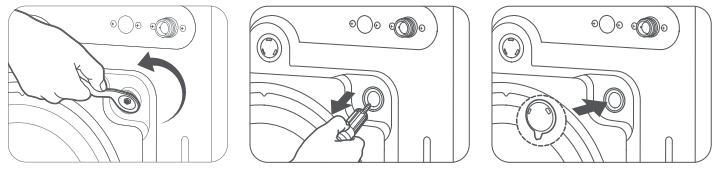
A: There are 4 Transit Bolts in the Mijia Front Load Washer 9kg.
To remove the Transit Bolts in the washing machine, please refer to the following steps:
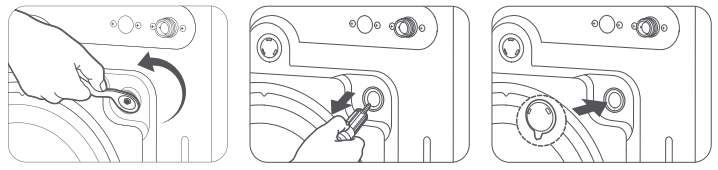
1. Use the wrench to unscrew all the Transit Bolts on the back of the washing machine.
2. Hold the bolt caps and pull the bolts out of the bolt holes. Keep the Transit Bolts in a safe place for future use when needed.
3. Seal the 4 bolt holes with the Transit Bolt hole covers provided in the accessory bag to prevent dust from entering.
Q13: Do the Transit Bolts of the Mijia Front Load Washer 9kg need to be removed?
A: The Transit Bolts of the Mijia Front Load Washer 9kg must be removed before it can be used properly.
Q14: What will happen if the Transit Bolts of the Mijia Front Load Washer 9kg are not removed?
A: If the Mijia Front Load Washer 9kg is used without removing the Transit Bolts, it will cause the washing machine to vibrate violently, shift, and experience other problems that will prevent it from working properly.
Q15: Is there any impact if the Transit Bolt Hole Covers of the Mijia Front Load Washer 9kg are not installed?
A: The Transit Bolt Hole Covers of the Mijia Front Load Washer 9kg are used to prevent dust from entering. Not installing them will not affect the use, but it will cause dust to enter.
Q16: How to adjust the feet of the Mijia Front Load Washer 9kg?
A: Here are the steps to adjust the feet of the Mijia Front Load Washer 9kg for your reference:
1. Use the Feet Adjusting Wrench to turn a foot bolt counterclockwise to loosen it.
2. Turn the leveling foot and adjust it to the desired height. Turn counterclockwise to raise the feet, and turn clockwise to lower the feet.
3. Use the wrench to tighten the foot bolt. Adjust the other leveling feet by the same method to ensure the washing machine is level and stable.
4. After adjustment, press the two ends of a diagonal line on the top of the washing machine with both hands respectively to see whether it wobbles. Check the two ends on the other diagonal line using the same method.
Note:
Do not place wooden pieces or any other items under the feet, as this can cause excessive vibration or noise during operation.
Q17: What precautions should be taken when transporting the Mijia Front Load Washer 9kg?
A: Please refer to the following precautions when transporting the Mijia Front Load Washer 9kg:
New device:
Just move it. After moving it to the designated location, you need to remove the Transit Bolts and adjust the balance.
Old device:
1. Short-distance transport (moving within the room):
Just move it directly. After moving it to the designated location, readjust the balance of the washing machine.
2. Long distance transport:
(1). Clean the detergent or softener in the Detergent Dispenser Drawer to make sure there is no residue left;
(2). Open the drain filter or use the emergency Drain Hose to drain the remaining water inside.
(3). Re-bolt the Transit Bolts of the washing machine to the back to ensure they are secure and prevent damage from jolting.
(4). After transporting to the designated location, it is necessary to remove the Transit Bolts and adjust the balance.
Q18: Do the Transit Bolts need to be reinstalled when transporting the Mijia Front Load Washer 9kg?
A: If the Mijia Front Load Washer 9kg needs to be transported long distances, the Transit Bolts need to be reinstalled on the back of the washing machine and ensure they are secure.
Q19: How to install the Mijia Front Load Washer 9kg?
A: To install the Mijia Front Load Washer 9kg, please refer to the following steps:
1. Use the wrench to unscrew all the Transit Bolts on the back of the washing machine.
2. Hold the bolt caps and pull the bolts out of the bolt holes. Keep the Transit Bolts in a safe place for future use when needed.
3. Seal the 4 bolt holes with the Transit Bolt hole covers provided in the accessory bag to prevent dust from entering.
Once the washing machine is in place, check whether it is stable:
Press the two ends of a diagonal line on the top of the washing machine with both hands respectively to see whether it wobbles. Check the two ends on the other diagonal line using the same method. If the washing machine wobbles, adjust the leveling feet to make sure it remains stable.
Note:
Do not place wooden pieces or any other items under the feet, as this can cause excessive vibration or noise during operation.
Adjust the leveling foot:
1. Use the Feet Adjusting Wrench to turn a foot bolt counterclockwise to loosen it.
2. Turn the leveling foot and adjust it to the desired height. Turn counterclockwise to raise the feet, and turn clockwise to lower the feet.
3. Use the wrench to tighten the foot bolt. Adjust the other leveling feet by the same method to ensure the washing machine is level and stable.
4. After adjustment, press the two ends of a diagonal line on the top of the washing machine with both hands respectively to see whether it wobbles. Check the two ends on the other diagonal line using the same method.
Connect the Water Inlet Hose:
1. Based on the installation environment, determine whether it is necessary to replace the quick connector (A) with 6-point connector (B).
2. Clean the filter (A) regularly according to its contamination level.
3. Use a screwdriver to loosen 4 screws on the quick connector/6-point connector.
3. Hold the quick connector/6-point connector and rotate part (C) in the direction of the arrow to loosen it by approximately 5 mm.
4. Insert the quick connector/6-point connector upward into the water outlet of the tap and tighten the screws at the same time. Rotate part (C) in the direction as illustrated to secure the connection.
Note:
1. Connect the quick connector of the inlet hose (found in the accessory bag) to the water supply faucet, ensuring a secure and watertight seal.
2. Connect the other end of the inlet hose to the water inlet valve located on the back of the washing machine; tighten the hose by turning it in a clockwise direction.
3. Turn on the water faucet and check all connection points for leaks. If a leak is detected, refer to the steps above to tighten the specific connection point where the leak is occurring. If the faucet itself is leaking, replace the faucet immediately.
4. Keep the inlet hose in a natural position; do not bend, kink, or pull it taut.
Three methods to connect the Drain Hose for your reference:
1. Fixed at the edge of the sink: The Drain Hose should be placed at a height of 60 cm to 90 cm from the ground. Use a thin rope to fix it at the edge of the sink for drainage without affecting the water flow.
2. Connecting to a branch of the downpipe: To prevent siphoning, please ensure that the vertical pipe situated above the floor drain measures between 60 and 90 centimeters in height. A vertical pipe height of 65 centimeters is recommended. Ensure that the drain pipe connects to the vertical pipe at an incline.
3. Connecting to a branch of the downpipe: Connect the end of the Drain Hose to a branch of the sink downpipe, ensuring the height from the connection point to the ground does not exceed 90 cm.
After you have completed installing your washing machine, run the Quick program to ensure it is installed correctly.
After completing the installation, it is recommended to download the Xiaomi Home App to connect the washing machine so that you can fully use all the functions.
Q20: Does the power supply of the Mijia Front Load Washer 9kg need to be connected to a ground wire?
A: The power supply of the Mijia Front Load Washer 9kg needs to be connected to a ground wire to help prevent electrical leakage or induced current.
Q21: How to install the base plate on the Mijia Front Load Washer 9kg?
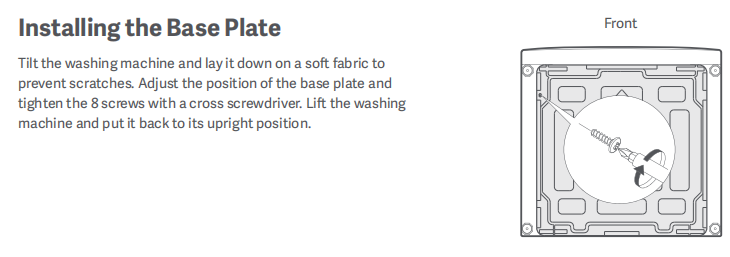
A: To install the Base Plate on the Mijia Front Load Washer 9kg, please refer to the following steps:
1. Tilt the washing machine and lay it down on a soft fabric to prevent scratches.
2. Adjust the position of the bottom plate and tighten the 8 screws with a cross screwdriver.
3. Lift the washing machine and put it back to its upright position.
Note:
1. Check whether the Base Plate is intact and whether the accessory screws are missing.
2. Lay the back of the washing machine down before removing the transport bolts. Lay the machine flat, expose the bottom of the washing machine, and remove the foam base. The ground must be protected by packaging cartons or foam.
3. Install the Base Plate in the direction of the arrow on the Base Plate, install the buckle/screw to the bottom of the washing machine, and check whether the Base Plate is firmly installed.
Q22: Can the door seal of the Mijia Front Load Washer 9kg be replaced?
A: The door seal of the Mijia Front Load Washer 9kg cannot be replaced by yourself. If the door seal is damaged, please contact the after-sales service center.
Trouleshooting
Q1: What to do if the Mijia Front Load Washer 9kg does not work?
A: If the Mijia Front Load Washer 9kg does not work, please refer to the following steps to troubleshoot:
1. Check whether there is power in the power supply. Use other electrical appliances to plug into the washing machine power supply and confirm whether they can be used. If it cannot be used, please check the power supply at home.
2. Make sure that the operating procedure is correct:
(1). Turn on the water tap and ensure that there is water flowing.
(2). Ensure that the door is securely closed.
(3). After selecting a program, press the Start/Pause button to start the washing machine.
3. Check to ensure that the child lock function is disabled.
4. It is normal for the machine to emit a series of clicking sounds and perform a quick drain cycle just before filling with water; this serves to verify that the door is securely locked.
5. Verify that no clothing items are caught in the door, preventing it from closing properly.
6. If the above methods still cannot solve the problem, please contact the after-sales service center.
Q2: What to do if the Mijia Front Load Washer 9kg is offline while using the remote control function?
A: If the Mijia Front Load Washer 9kg is offline while using the remote control function. This can be due to an accidental button press while operating the remote control, which inadvertently triggered a reset of the Wi-Fi function.
Please refer to the following methods to troubleshoot:
1. Power on the device and allow it to enter standby mode. Then, press and hold the [Start/SPause] button for 7 seconds until you hear a "beep" sound. Next, press and hold the [Steam] button for 3 seconds. The Wi-Fi icon will begin to flash. At this point, you can proceed to search for the device and complete the network configuration process.
2. Ensure that you upgrade the software to the latest version. The OTA update is expected to take approximately 10 minutes. Please do not disconnect from the network or interrupt the power supply during this process.
Q3: What to do if the Mijia Front Load Washer 9kg stops during operation?
A: If the Mijia Front Load Washer 9kg stops during operation, please refer to the following steps to troubleshoot:
1. Check whether there is power in the power supply. Use other electrical appliances to plug into the washing machine power supply and confirm whether they can be used. If it cannot be used, please check the power supply at home.
2. There will be pauses or soaking periods during a cycle. Wait a moment, and the washing machine will resume automatically.
3. Make sure the water inlet valve filter is not clogged. Clean the water inlet valve filter at least 5 to 6 times a year or when the error code "E4" appears on the display.
(1). Turn off the water tap and unplug the power cord. Loosen and remove the water inlet hose from the back of the washing machine. Cover the port with a cloth to prevent water from spraying out.
(2). Pull out the filter cover from the water inlet valve hole with nipper pliers and clean it thoroughly.
(3). Use a brush to clean the inside and the outside of the threaded connector.
(4). Reinstall the water inlet valve filter cover. Turn on the water tap and make sure there is no water leakage at the connection.
Note:
This appliance needs to be used in environments with an ambient temperature above 0 °C.
4. Check whether the Drain Pump Filter Cover is clogged. If the Drain Pump Filter Cover is clogged, it will cause poor drainage. Please clean the drainage filter.
(1). Open the filter cover at the bottom of the appliance, pull out the emergency drain hose, and remove the plug to let water drain.
(2). After all the water is drained, reinstall the plug and put the emergency drain hose back to its original position. Turn the drain filter counterclockwise to open it.
(3). Check and make sure the inside of the drain pump is not blocked.
(4). Clean any residues and stains from the drain pump filter cover.
(5). Put the drain pump filter cover back to its original position.
(6). Turn the drain pump filter cover clockwise to secure it and reinstall the drain cover.
5. If the above methods still cannot solve the problem, please contact the after-sales service center.
Q4: What to do if there is no water supply when using the Mijia Front Load Washer 9kg?
A: If there is no water supply when using the Mijia Front Load Washer 9kg, please refer to the following steps to troubleshoot:
1. Turn on the water tap and confirm that the water flow is normal.
2. Ensure the water pressure is at 0.05-0.8 MPa. If the water pressure is too low, it will cause water failure. Or use it during off-peak hours to avoid concentrated water use.
3. Make sure the water inlet valve filter is not clogged. Clean the water inlet valve filter at least 5 to 6 times a year or when the error code "E4" appears on the display.
(1). Turn off the water tap and unplug the power cord. Loosen and remove the water inlet hose from the back of the washing machine. Cover the port with a cloth to prevent water from spraying out.
(2). Pull out the filter cover from the water inlet valve hole with nipper pliers and clean it thoroughly.
(3). Use a brush to clean the inside and the outside of the threaded connector.
(4). Reinstall the water inlet valve filter cover. Turn on the water tap and make sure there is no water leakage at the connection.
Note:
This appliance needs to be used in environments with an ambient temperature above 0 °C.
4. Ensure not open the Delay program.
5. Press the Start/Pause button to start.
6. If the above methods still cannot solve the problem, please contact the after-sales service center.
Q5: What to do if there is slow water supply when using the Mijia Front Load Washer 9kg?
A: If there is slow water supply when using the Mijia Front Load Washer 9kg, please refer to the following steps to troubleshoot:
1. Check if the water inlet filter is clogged; a clogged filter will result in restricted water flow. Clean the water inlet valve filter at least 5 to 6 times a year or when the error code "E4" appears on the display.
(1). Turn off the water tap and unplug the power cord. Loosen and remove the water inlet hose from the back of the washing machine. Cover the port with a cloth to prevent water from spraying out.
(2). Pull out the filter cover from the water inlet valve hole with nipper pliers and clean it thoroughly.
(3). Use a brush to clean the inside and the outside of the threaded connector.
(4). Reinstall the water inlet valve filter cover. Turn on the water tap and make sure there is no water leakage at the connection.
Note:
This appliance needs to be used in environments with an ambient temperature above 0 °C.
2. Ensure the water pressure is at 0.05-0.8 MPa. If the water pressure is too low, it will cause water failure. Or use it during off-peak hours to avoid concentrated water use.
Note:
If the above methods still cannot solve the problem, it is recommended to purchase a booster pump, but the water pressure should not exceed 0.8 MPa.
Q6: What to do if there is insufficient water supply when using the Mijia Front Load Washer 9kg?
A: The Mijia Front Load Washer 9kg is designed to save water. It is normal to have less water intake. The water intake will not exceed the bottom edge of the door.
If there is insufficient water supply when using the Mijia Front Load Washer 9kg, please refer to the following steps to troubleshoot:
1. Check if the water inlet filter is clogged; a clogged filter will result in restricted water flow. Clean the water inlet valve filter at least 5 to 6 times a year or when the error code "E4" appears on the display.
(1). Turn off the water tap and unplug the power cord. Loosen and remove the water inlet hose from the back of the washing machine. Cover the port with a cloth to prevent water from spraying out.
(2). Pull out the filter cover from the water inlet valve hole with nipper pliers and clean it thoroughly.
(3). Use a brush to clean the inside and the outside of the threaded connector.
(4). Reinstall the water inlet valve filter cover. Turn on the water tap and make sure there is no water leakage at the connection.
Note:
This appliance needs to be used in environments with an ambient temperature above 0 °C.
2. Ensure the water pressure is at 0.05 MPa -0.8 MPa. If the water pressure is too low, it will cause water failure. Or use it during off-peak hours to avoid concentrated water use.
Note:
If the above methods still cannot solve the problem, it is recommended to purchase a booster pump, but the water pressure should not exceed 0.8 MPa.
Q7: What to do if the Mijia Front Load Washer 9kg doesn’t stop filling water?
A: If the Mijia Front Load Washer 9kg doesn’t stop filling water, please refer to the following steps to troubleshoot:
1. Check whether the water intake of the washing machine has exceeded the door. If it has, please apply for after-sales inspection.
2. If the water intake does not reach the water level, the washing machine will continue to fill with water. Please wait until the water level is reached.
If the washing machine does not reach the water level for a long time, please refer to the following steps:
1. Check if the water inlet filter is clogged; a clogged filter will result in restricted water flow. Clean the water inlet valve filter at least 5 to 6 times a year or when the error code "E4" appears on the display.
(1). Turn off the water tap and unplug the power cord. Loosen and remove the water inlet hose from the back of the washing machine. Cover the port with a cloth to prevent water from spraying out.
(2). Pull out the filter cover from the water inlet valve hole with nipper pliers and clean it thoroughly.
(3). Use a brush to clean the inside and the outside of the threaded connector.
(4). Reinstall the water inlet valve filter cover. Turn on the water tap and make sure there is no water leakage at the connection.
Note:
This appliance needs to be used in environments with an ambient temperature above 0 °C.
2. Ensure the water pressure is at 0.05 MPa -0.8 MPa. If the water pressure is too low, it will cause water failure. Or use it during off-peak hours to avoid concentrated water use.
Note:
If the above methods still cannot solve the problem, it is recommended to purchase a booster pump, but the water pressure should not exceed 0.8 MPa.
3. Please check whether the Drain Hose of the washing machine is draining water at the same time as the water is entering. If this happens, it means that the Drain Hose of the washing machine is too low. Because the washing machine is designed for upper drainage, please lift the Drain Hose to the bracket on the back of the washing machine.
Q8: What to do if the water level in the Mijia Front Load Washer 9kg is too high?
A: If the water level of the Mijia Front Load Washer 9kg is too high, please check whether the water inflow exceeds the door. If it exceeds the door, please apply for after-sales inspection.
Q9: What to do if the Mijia Front Load Washer 9kg is filled with water and draining out at the same time?
A: If the Mijia Front Load Washer 9kg is filling with water and draining out at the same time, it means that the Drain Hose of the washing machine is too low. Because the washing machine is designed for upper drainage, please lift the Drain Hose to the bracket on the back of the washing machine.
Q10: What to do if the Mijia Front Load Washer 9kg does not drain?
A: If the Mijia Front Load Washer 9kg does not drain, please refer to the following steps to troubleshoot:
1. Make sure the pipe between the Drain Hose and the drainage outlet is not bent.
2. Check whether the Drain Pump Filter is clogged. If the Drain Pump Filter is clogged, it will cause poor drainage. Please clean the drainage filter.
(1). Open the filter cover at the bottom of the appliance, pull out the emergency drain hose, and remove the plug to let water drain.
(2). After all the water is drained, reinstall the plug and put the emergency drain hose back to its original position. Turn the drain filter counterclockwise to open it.
(3). Check and make sure the inside of the drain pump is not blocked.
(4). Clean any residues and stains from the drain pump filter cover.
(5). Put the drain pump filter cover back to its original position.
(6). Turn the drain pump filter cover clockwise to secure it and reinstall the drain cover.
3. Check whether the Drain Hose is inserted too deep into the sewer. If the Drain Hose is inserted too deep into the sewer, the washing machine will not drain. In severe cases, it will cause siphoning. Please remove the Drain Hose from the sewer and place it next to the sewer.
4. If you are using the Spin Only program, please make sure the washing machine door is completely closed and press and hold the Start button to start the washing machine.
5. If the above methods still cannot solve the problem, please contact the after-sales service center.
Q11: What to do if there is drainage residue in the Mijia Front Load Washer 9kg?
A: If there is drainage residue in the Mijia Front Load Washer 9kg, please refer to the following steps to troubleshoot:
1. For the washing machine, which is designed for upper drainage, it is normal for a small amount of water to remain in the drum after each use. Please feel free to use it.
2. Check whether the Drain Pump Filter Cover is clogged. If the Drain Pump Filter Cover is clogged, it will cause poor drainage. Please clean the drainage filter.
(1). Open the filter cover at the bottom of the appliance, pull out the emergency drain hose, and remove the plug to let water drain.
(2). After all the water is drained, reinstall the plug and put the emergency drain hose back to its original position. Turn the drain filter counterclockwise to open it.
(3). Check and make sure the inside of the drain pump is not blocked.
(4). Clean any residues and stains from the drain pump filter cover.
(5). Put the drain pump filter cover back to its original position.
(6). Turn the drain pump filter cover clockwise to secure it and reinstall the drain cover.
3. Check whether the Drain Hose is inserted too deep into the sewer. If the Drain Hose is inserted too deep into the sewer, the washing machine will not drain. In severe cases, it will cause siphoning. Please remove the Drain Hose from the sewer and place it next to the sewer.
4. If the above methods still cannot solve the problem, please contact the after-sales service center.
Q12: What to do if there is water in the new Mijia Front Load Washer 9kg?
A: During the production process of the Mijia Front Load Washer 9kg, water is added for inspection. It is normal for a new machine to have a small amount of water inside when it is shaken. Please feel free to use it.
Q13: What to do if the Mijia Front Load Washer 9kg does not spin?
A: If the Mijia Front Load Washer 9kg does not spin, please refer to the following steps to troubleshoot:
1. Make sure the door is closed when running the Spin Only program and press and hold the Start/Pause button. For safety reasons, the washing machine will not tumble or spin until the door is closed.
2. Make sure the hose between the Drain Hose and the drainage outlet is not bent.
3. Check whether the Drain Pump Filter Cover is clogged. If the Drain Pump Filter Cover is clogged, it will cause poor drainage. Please clean the drainage filter.
(1). Open the filter cover at the bottom of the appliance, pull out the emergency drain hose, and remove the plug to let water drain.
(2). After all the water is drained, reinstall the plug and put the emergency drain hose back to its original position. Turn the drain filter counterclockwise to open it.
(3). Check and make sure the inside of the drain pump is not blocked.
(4). Clean any residues and stains from the drain pump filter cover.
(5). Put the drain pump filter cover back to its original position.
(6). Turn the drain pump filter cover clockwise to secure it and reinstall the drain cover.
4. Check whether the Drain Hose is inserted too deep into the sewer. If the Drain Hose is inserted too deep into the sewer, the washing machine will not drain. In severe cases, it will cause siphoning. Please remove the Drain Hose from the sewer and place it next to the sewer.
5. If the above methods still cannot solve the problem, please contact the after-sales service center.
Q14: What to do if the Mijia Front Load Washer 9kg spins insufficiently?
A: If the Mijia Front Load Washer 9kg spins insufficiently, please refer to the following steps to troubleshoot:
1. Check the type of detergent used. For drum washing machines, it is recommended to use low-foaming detergent. If you use high-foaming detergent, please reduce the amount.
2. Check the spin speed. If the clothes are not completely dry, please select a higher speed to spin again.
3. Check whether the Drain Pump Filter Cover is clogged. If the Drain Pump Filter Cover is clogged, it will cause poor drainage. Please clean the drainage filter.
(1). Open the filter cover at the bottom of the appliance, pull out the emergency drain hose, and remove the plug to let water drain.
(2). After all the water is drained, reinstall the plug and put the emergency drain hose back to its original position. Turn the drain filter counterclockwise to open it.
(3). Check and make sure the inside of the drain pump is not blocked.
(4). Clean any residues and stains from the drain pump filter cover.
(5). Put the drain pump filter cover back to its original position.
(6). Turn the drain pump filter cover clockwise to secure it and reinstall the drain cover.
4. Check the placement of the drain hose to ensure that there are no bends in the hose from the drain hose to the drain outlet.
5. The load is too small. Small loads (one or two items) will lead to imbalance and poorer spinning performance. It is recommended to wash multiple items together.
To correctly place clothes, please refer to the following steps:
(1). Put clothes of different sizes together, do not put small items to spin alone.
(2). Check whether the clothes are placed in a scattered manner. If the clothes are placed in a disorderly manner, they can become tangled and cause imbalance.
If the above methods still cannot solve the problem, please contact the after-sales service center.
Q15: What to do if the timer does not run while the Mijia Front Load Washer 9kg is running?
A: If the timer does not run while the Mijia Front Load Washer 9kg is running, please refer to the following steps to troubleshoot:
1. When you select a high-temperature program such as Hygiene or High Temp program, and the water temperature exceeds 60 °C, the water will enter the drainage cooling process when draining. At this time, the displayed time will not run, and it will continue to run after the cooling process is completed.
2. When there is too much foam inside, to prevent the foam from overflowing, the washing machine will perform a defoaming process. At this time, the timer will stop and will continue to run after the defoaming process is completed.
3. During the Spin program of the washing machine, the clothes inside turn over. When the clothes inside are unbalanced, the washing machine will enter the process of automatic balancing. At this time, the time will not run and it cannot rotate at high speed. When the clothes are balanced and then enter high-speed operation, the time will continue to decrease. If it is not balanced for a long time, you can try to pause the washing machine, take out the clothes and shake them loose, and then put them into the drum to continue dehydrating.
To reduce the occurrence of unbalanced clothes, please place the clothes according to the following steps:
1. Put clothes of different sizes together, and do not put small items to spin alone.
2. Do not place the clothes in a scattered manner. If the clothes are placed in a disorderly manner, the clothes can become tangled and cause imbalance.
If the above methods still cannot solve the problem, please contact the after-sales service center.
Q16: What to do if the Mijia Front Load Washer 9kg displays a different time than the actual time?
A: The running time of the Mijia Front Load Washer 9kg is from the time the washing machine is turned on to the end of the program, but the overall time will deviate due to some special reasons.
Here are the reasons why the washing machine displays a different time than the actual time:
1. If the water pressure is insufficient, the time will be exceeded due to slow water inflow. It is recommended that the water pressure be between 0.05 MPa and 0.8 MPa.
2. Unbalanced clothes will cause the automatic adjustment mode to exceed the time limit. It is recommended to wash multiple pieces of clothes at the same time, and do not wash a single piece of heavy and absorbent clothing separately.
Q17: What to do if the Mijia Front Load Washer 9kg keeps running for a long time and cannot be stopped?
A: If the Mijia Front Load Washer 9kg continues operating for an extended period and does not stop, it is due to one of the following reasons:
1. If excessive foam accumulates inside the washing machine, it will initiate a de-foaming cycle to prevent overflow. The washing machine will resume its normal operation once this de-foaming process is complete.
2. During the Spin program of the washing machine, the clothes inside turn over. When the clothes inside are unbalanced, the washing machine will enter the process of automatic balancing. At this time, the time will not run, and it cannot rotate at high speed. When the clothes are balanced and then enter high-speed operation, the time will continue to decrease. If it is not balanced for a long time, you can try to pause the washing machine, take out the clothes and shake them loose, and then put them into the drum to continue dehydrating.
To reduce the occurrence of unbalanced clothes, please place the clothes according to the following steps:
1. Put clothes of different sizes together, and do not put small items to spin alone.
2. Do not place the clothes in a scattered manner. If the clothes are placed in a disorderly manner, the clothes can become tangled and cause imbalance.
If the above methods still cannot solve the problem, please contact the after-sales service center.
Q18: What to do if the door of the Mijia Front Load Washer 9kg cannot be opened?
A: To open the door of the Mijia Front Load Washer 9kg, two conditions are required as follows:
1. The washing machine reaches a safe water level.
2. The temperature inside the washing machine reaches a safe temperature.
When the Mijia Front Load Washer 9kg completes the program, if the internal temperature is too high, please wait for the temperature to drop before opening the door.
If the door still cannot be opened, please follow the steps below:
(1). Select the Spin Only program, drain the water inside the washing machine, press the Start/Pause button again, and open the door.
(2). If the internal temperature is high, please wait for the temperature to drop before opening the door.
(3). If you cannot wait long enough, open the Drain Pump Filter Cover and unplug the emergency Drain Hose to drain the water.
(4). In case of emergency, you can open the door by pulling down the emergency release cord with a tool.
Note:
The emergency release cord is for use in emergencies. Please do not use it in non-emergency situations.
(5). If the above methods still cannot solve the problem, please contact the after-sales service center.
Q19: What to do if the door of the Mijia Front Load Washer 9kg cannot be closed?
A: If the door of the Mijia Front Load Washer 9kg cannot be closed, please refer to the following steps to troubleshoot:
1. Check if there is any clothing caught in the door. Clothes caught in the door will prevent it from closing.
2. Check whether the Start/Pause button is pressed. The door can be opened at any time when the washing machine has not started.
3. Check whether the door is completely closed. You can use a little more force when closing the door.
4. If the above methods still cannot solve the problem, please contact the after-sales service center.
Q20: What to do if there are water stains, white marks, and oil stains in the new Mijia Front Load Washer 9kg?
A: If there are water stains, white marks, and oil stains in the new Mijia Front Load Washer 9kg, please use a towel to clean it and run the Tub Clean program before using it normally. The Mijia Front Load Washer 9kg has been tested by adding water during production, so some water stains are normal.
Q21: What to do if the detergent in the Detergent Dispenser Drawer of the Mijia Front Load Washer 9kg cannot be rinsed into the machine?
A: If the detergent in the Detergent Dispenser Drawer of the Mijia Front Load Washer 9kg cannot be rinsed into the machine, please refer to the following steps to troubleshoot:
1. Check whether the water pressure is normal. It is recommended to use the water pressure between 0.05 MPa and 0.8 MPa. If the water pressure is too low, the water will flow slowly, and the detergent will not be able to be flushed in.
2. Check whether the water inlet filter is clogged. If the water inlet filter is clogged, it will slow down the water intake, preventing the detergent from being flushed into the machine. Clean the water inlet valve filter at least 5 to 6 times a year or when the error code "E4" appears on the display.
(1). Turn off the water tap and unplug the power cord. Loosen and remove the water inlet hose from the back of the washing machine. Cover the port with a cloth to prevent water from spraying out.
(2). Pull out the filter cover from the water inlet valve hole with nipper pliers and clean it thoroughly.
(3). Use a brush to clean the inside and the outside of the threaded connector.
(4). Reinstall the water inlet valve filter cover. Turn on the water tap and make sure there is no water leakage at the connection.
Note:
This appliance needs to be used in environments with an ambient temperature above 0 °C.
3. If the above methods still cannot solve the problem, please contact the after-sales service center.
Q22: What to do if there is always detergent residue in the Mijia Front Load Washer 9kg?
A: If there is always detergent residue in the Mijia Front Load Washer 9kg, please refer to the following steps to troubleshoot:
1. Check whether the water pressure is normal. It is recommended to use the water pressure between 0.05 MPa and 0.8 MPa. If the water pressure is too low, the water will flow slowly and the detergent will not be able to be flushed in.
2. Check whether the water inlet filter is clogged. If the water inlet filter is clogged, the water will flow slowly and the detergent will not be able to flow in. Please clean the water inlet filter.
(1). Turn off the water tap and unplug the power cord. Loosen and remove the water inlet hose from the back of the washing machine. Cover the port with a cloth to prevent water from spraying out.
(2). Pull out the filter cover from the water inlet valve hole with nipper pliers and clean it thoroughly.
(3). Use a brush to clean the inside and the outside of the threaded connector.
(4). Reinstall the water inlet valve filter cover. Turn on the water tap and make sure there is no water leakage at the connection.
Note:
This appliance needs to be used in environments with an ambient temperature above 0 °C.
If the above methods still cannot solve the problem, please contact the after-sales service center.
Q23: What to do if the softener in the Detergent Dispenser Drawer of the Mijia Front Load Washer 9kg cannot be rinsed into the machine?
A: If the softener in the Detergent Dispenser Drawer of the Mijia Front Load Washer 9kg cannot be rinsed into the machine, please refer to the following steps to troubleshoot:
1. Check whether the softener adding position is correct.
2. Make sure the softener is diluted with water. The softener is a concentrated liquid. Please dilute it with clean water before putting it in. If it is not diluted, it will easily cause the softener to stick to the Detergent Dispenser Drawer and cannot be flushed in.
3. If the above methods still cannot solve the problem, please contact the after-sales service center.
Q24: What to do if the Mijia Front Load Washer 9kg does not clean properly?
A: If the Mijia Front Load Washer 9kg does not clean properly, please refer to the following steps to troubleshoot:
1. Add detergent and fabric softener to the correct compartments of the detergent dispenser drawer. Do not add them directly to the drum.
2. For dirty laundry, please select a longer program.
3. It is recommended to pre-wash or soak your clothes to deal with stubborn stains on collars, cuffs, and other areas before putting them into the drum for washing.
Q25: What to do if clothes are stained after washing in the Mijia Front Load Washer 9kg?
A: It is recommended to wash clothes of different colors separately when placing them in the Mijia Front Load Washer 9kg. Washing dark and light-colored clothes at the same time is prone to staining.
Q26: What to do if the Mijia Front Load Washer 9kg does not clean parts thoroughly?
A: If the Mijia Front Load Washer 9kg does not clean parts thoroughly, please refer to the following steps to troubleshoot:
1. For dirty laundry, please select a longer program.
2. It is recommended to pre-wash or soak your clothes to deal with stubborn stains on collars, cuffs, and other areas before putting them into the drum for washing.
Q27: What to do if the clothes are damaged by the Mijia Front Load Washer 9kg?
A: If the clothes are damaged by the Mijia Front Load Washer 9kg, please check whether there are other sharp objects inside the inner drum or whether it is caused by zipper-like objects. If not, please contact the after-sales service center.
Q28: What to do if the Mijia Front Load Washer 9kg does not rinse thoroughly?
A: If the Mijia Front Load Washer 9kg does not rinse thoroughly, please refer to the following steps to troubleshoot:
1. Check the type of detergent. Please choose low-foam detergent.
2. Check the amount of detergent. Please add detergent according to the instructions. Adding too much detergent will cause the rinse to not be clean.
3. When setting the program, you can increase the number of rinses to ensure that it can be rinsed cleanly.
4. It is normal to have a little foam on the door after washing, just wipe it dry.
Q29: What to do if there is loud noise when the Mijia Front Load Washer 9kg is washing?
A: If there is loud noise when the Mijia Front Load Washer 9kg is washing, please refer to the following steps to troubleshoot:
1. For new machines that have not been installed, please check whether the Transit Bolts have been removed:
(1). Use the wrench to unscrew all the transit bolts on the back of the appliance.
(2). Hold the bolt caps and pull the bolts out of the bolt holes. Keep the transit bolts in a safe place for future use when needed.
(3). Seal the 4 bolt holes with the transit bolt hole covers provided in the accessory bag to prevent dust from entering.
2. The washing machine needs to be installed on a hard, flat, clean, and level ground free from water and oil.
3. Once the washing machine is in place, check whether it is stable. If the washing machine wobbles, adjust the leveling feet to make sure it remains stable.
Here are the steps to adjust the balance of the washing machine for your reference:
(1). Press the two ends of a diagonal line on the top of the washing machine with both hands respectively, to see whether it wobbles and whether it needs to be adjusted.
(2). Use the wrench to turn a foot bolt counterclockwise to loosen it.
(3). Turn the leveling foot and adjust it to the desired height. Turn counterclockwise to raise the feet, and turn clockwise to lower the feet.
(4). After adjustment, press the two ends of a diagonal line on the top of the washing machine with both hands respectively to see whether it wobbles. Check the two ends on the other diagonal line using the same method.
(5). Use the wrench to tighten the foot bolt. Adjust the other leveling feet by the same method to ensure the washing machine is level and stable.
Note:
Do not place wooden pieces or any other items under the feet, as this can cause excessive vibration or noise during operation.
4. Check if there are too many clothes in the washing machine. Too many clothes will cause the washing machine to make too much noise. Please put in the clothes according to the maximum capacity of different programs and do not exceed the limit.
5. Check if there are any foreign objects on the clothes, such as zipper buttons, etc. These objects will rub against the drum when the washing machine is running, causing noise.
6. If the above methods still cannot solve the problem, please contact the after-sales service center.
Q30: What to do if there is loud noise when the Mijia Front Load Washer 9kg is spinning?
A: To solve the loud noise of the Mijia Front Load Washer 9kg, please refer to the following steps:
1. For new machines that have not been installed, please check whether the Transit Bolts have been removed:
(1). Use the wrench to unscrew all the transit bolts on the back of the appliance.
(2). Hold the bolt caps and pull the bolts out of the bolt holes. Keep the transit bolts in a safe place for future use when needed.
(3). Seal the 4 bolt holes with the transit bolt hole covers provided in the accessory bag to prevent dust from entering.
2. The washing machine needs to be installed on a hard, flat, clean, and level ground free from water and oil.
3. Once the washing machine is in place, check whether it is stable. If the washing machine wobbles, adjust the leveling feet to make sure it remains stable.
Here are the steps to adjust the balance of the washing machine for your reference:
(1). Press the two ends of a diagonal line on the top of the washing machine with both hands respectively, to see whether it wobbles and whether it needs to be adjusted.
(2). Use the wrench to turn a foot bolt counterclockwise to loosen it.
(3). Turn the leveling foot and adjust it to the desired height. Turn counterclockwise to raise the feet, and turn clockwise to lower the feet.
(4). After adjustment, press the two ends of a diagonal line on the top of the washing machine with both hands respectively to see whether it wobbles. Check the two ends on the other diagonal line using the same method.
(5). Use the wrench to tighten the foot bolt. Adjust the other leveling feet by the same method to ensure the washing machine is level and stable.
Note:
Do not place wooden pieces or any other items under the feet, as this can cause excessive vibration or noise during operation.
4. Check if there are too many clothes in the washing machine. Too many clothes will cause the washing machine to make too much noise. Please put in the clothes according to the maximum capacity of different programs and do not exceed the limit.
5. Check if there are any foreign objects on the clothes, such as zippers, buttons, etc. These objects will rub against the drum when the washing machine is running, causing noise.
If the above methods still cannot solve the problem, please contact the after-sales service center.
Q31: What to do if there is loud noise when the Mijia Front Load Washer 9kg is draining?
A: When the Mijia Front Load Washer 9kg is draining, the drain pump will work and there will be some noise, which is normal.
If the noise is too loud, please clean the Drain Pump Filter Cover as follows:
1. Open the filter cover at the bottom of the washing machine, pull out the emergency drain hose, and remove the plug to let water drain.
2. After all the water is drained, reinstall the plug and put the emergency drain hose back to its original position. Turn the drain filter counterclockwise to open it.
3. Check and make sure the inside of the drain pump is not blocked.
4. Clean any residues and stains from the drain pump filter cover.
5. Put the drain pump filter cover back to its original position.
6. Turn the drain pump filter cover clockwise to secure it and reinstall the drain cover.
If the above methods still cannot solve the problem, please contact the after-sales service center.
Q32: What to do if there is loud noise when the Mijia Front Load Washer 9kg is filling with water?
A: When the Mijia Front Load Washer 9kg is filling with water, the water inlet valve works, and there will be a certain sound, which is a normal phenomenon.
If the noise is too loud, please refer to the following steps to troubleshoot:
1. It is recommended that the water pressure is 0.05 MPa -0.8 MPa. If the water pressure is too low, the sound of water inflow will be too loud. Please avoid peak hours or add more pumps.
2. Please check whether the Water Inlet Valve Filter is blocked. A blocked Water Inlet Valve Filter will cause a loud sound from the water inlet.
To clean the Water Inlet Valve Filter, please refer to the following steps:
(1). Turn off the water tap and unplug the power cord. Loosen and remove the water inlet hose from the back of the washing machine. Cover the port with a cloth to prevent water from spraying out.
(2). Pull out the filter cover from the water inlet valve hole with nipper pliers and clean it thoroughly.
(3). Use a brush to clean the inside and the outside of the threaded connector.
(4). Reinstall the Water Inlet Valve Filter cover. Turn on the water tap and make sure there is no water leakage at the connection.
Note:
This washing machine needs to be used in environments with an ambient temperature above 0 °C.
If the above methods still cannot solve the problem, please contact the after-sales service center.
Q33: What to do if the Mijia Front Load Washer 9kg vibrates?
A: To solve the vibration of the Mijia Front Load Washer 9kg, please refer to the following steps:
1. For new machines that have not been installed, please check whether the Transit Bolt have been removed.
(1). Use the wrench to unscrew all the transit bolts on the back of the appliance.
(2). Hold the bolt caps and pull the bolts out of the bolt holes. Keep the transit bolts in a safe place for future use when needed.
(3). Seal the 4 bolt holes with the transit bolt hole covers provided in the accessory bag to prevent dust from entering.
2. The washing machine needs to be installed on a hard, flat, clean, and level ground free from water and oil.
3. Once the washing machine is in place, check whether it is stable. If the washing machine wobbles, adjust the leveling feet to make sure it remains stable.
Here are the steps to adjust the balance of the washing machine for your reference:
(1). Press the two ends of a diagonal line on the top of the washing machine with both hands respectively, to see whether it wobbles and whether it needs to be adjusted.
(2). Use the wrench to turn a foot bolt counterclockwise to loosen it.
(3). Turn the leveling foot and adjust it to the desired height. Turn counterclockwise to raise the feet, and turn clockwise to lower the feet.
(4). After adjustment, press the two ends of a diagonal line on the top of the washing machine with both hands respectively to see whether it wobbles. Check the two ends on the other diagonal line using the same method.
(5). Use the wrench to tighten the foot bolt. Adjust the other leveling feet by the same method to ensure the washing machine is level and stable.
Note:
Do not place wooden pieces or any other items under the feet, as this can cause excessive vibration or noise during operation.
4. Check if there are too many clothes in the washing machine. Too many clothes will cause the washing machine to make too much noise. Please put in the clothes according to the maximum capacity of different programs and do not exceed the limit.
5. Please check if the clothes inside are seriously entangled. Please take out the clothes after pausing, and put them back in after they are all untangled, and continue the previous procedure.
If the above methods still cannot solve the problem, please contact the after-sales service center.
Q34: What to do if the Mijia Front Load Washer 9kg shifts during operation?
A: To solve the shifting of the Mijia Front Load Washer 9kg during operation, please refer to the following steps:
1. For new machines that have not been installed, please check whether the Transit Bolt have been removed.
(1). Use the wrench to unscrew all the transit bolts on the back of the appliance.
(2). Hold the bolt caps and pull the bolts out of the bolt holes. Keep the transit bolts in a safe place for future use when needed.
(3). Seal the 4 bolt holes with the transit bolt hole covers provided in the accessory bag to prevent dust from entering.
2. The washing machine needs to be installed on a hard, flat, clean, and level ground free from water and oil.
3. Once the washing machine is in place, check whether it is stable. If the washing machine wobbles, adjust the leveling feet to make sure it remains stable.
Here are the steps to adjust the balance of the washing machine for your reference:
(1). Press the two ends of a diagonal line on the top of the washing machine with both hands respectively, to see whether it wobbles and whether it needs to be adjusted.
(2). Use the wrench to turn a foot bolt counterclockwise to loosen it.
(3). Turn the leveling foot and adjust it to the desired height. Turn counterclockwise to raise the feet, and turn clockwise to lower the feet.
(4). After adjustment, press the two ends of a diagonal line on the top of the washing machine with both hands respectively to see whether it wobbles. Check the two ends on the other diagonal line using the same method.
(5). Use the wrench to tighten the foot bolt. Adjust the other leveling feet by the same method to ensure the washing machine is level and stable.
Note:
Do not place wooden pieces or any other items under the feet, as this can cause excessive vibration or noise during operation.
4. Check if there are too many clothes in the washing machine. Too many clothes will cause the washing machine to make too much noise. Please put in the clothes according to the maximum capacity of different programs and do not exceed the limit.
5. Please check if the clothes inside are seriously entangled. Please take out the clothes after pausing, and put them back in after they are all untangled, and continue the previous procedure.
If the above methods still cannot solve the problem, please contact the after-sales service center.
Q35: What to do if the Mijia Front Load Washer 9kg does not heat up during operation?
A: If the Mijia Front Load Washer 9kg does not heat up during operation, please refer to the following steps to troubleshoot:
1. Check whether the selected program has heating function. If not, please switch to a program with heating.
2. The washing machine will only heat up during the washing process, and there is no heating during the rinsing process. Therefore, it is normal for the water in the rinsing drainage to be cold.
If the problem is still not solved, please contact the after-sales service center.
Q36: What to do if there is foam on the door of the Mijia Front Load Washer 9kg after finishing washing?
A: If there is foam on the door of the Mijia Front Load Washer 9kg after finishing washing, please refer to the following steps to troubleshoot:
1. Confirm the amount of detergent to be added. Please follow the instructions of the washing machine and put it in proportion to the clothes to be washed.
2. It is normal to have slight foam on the door after the program is completed. Please increase the number of rinses when selecting the program to ensure a more thorough rinse.
If the problem is still not solved, please contact the after-sales service center.
Q37: What to do if the door seal of the Mijia Front Load Washer 9kg is dirty?
A: Every time the Mijia Front Load Washer 9kg is used, there will be some impurities in the door seal. If it is not cleaned for a long time, it will cause mold or odor. Therefore, it is recommended to clean the door seal regularly with a towel.
Q38: What to do if there's an odor in the Mijia Front Load Washer 9kg?
A: If the Mijia Front Load Washer 9kg has an odor, please refer to the following steps to troubleshoot:
New machine:
1. If there is a smell of baked plastic, it is due to the smell of the door seal rubber under high temperature. This is normal and will not affect your health. As the number of high-temperature washes increases, this phenomenon will decrease. Please feel free to use it.
2. The washing machine will be inspected by adding water during production. Due to transportation and other reasons, there will be some odor, which is normal. When using a new machine, please run a program with an empty drum first.
Old machine:
1. Please do not insert the Drain Hose of the washing machine too deep into the sewer. Inserting it too deep will cause siphoning, backflow or odor. Please place the drain pipe next to the sewer.
2. Check whether the door seal is moldy. Every time the washing machine is used, there will be some impurities in the door seal. If it is not cleaned for a long time, it will cause mold or odor. Therefore, it is recommended to clean the door seal regularly with a towel.
3. There will be some impurities inside the drum. If it is not cleaned for a long time, it will produce odor. It is recommended to use the Tub Clean function to clean the drum once every three months. If the washing machine is used frequently, the use cycle of the drum cleaning function can be shortened.
If the problem is still not solved, please contact the after-sales service center.
Q39: What to do if there's a burning smell in the Mijia Front Load Washer 9kg?
A: If a newly purchased Mijia Front Load Washer 9kg has a burnt smell (similar to the smell of roasted plastic), it is due to the rubber of the door seal under high temperature. This is normal and will not affect your health. As the number of high-temperature washes increases, this phenomenon will also decrease. Please feel free to use it.
If a burning smell appears after using it for a period of time, please immediately turn off the power, stop using it, and contact the after-sales service center.
Q40: What to do if there's water leakage of Water Inlet Hose of the Mijia Front Load Washer 9kg?
A: To solve the water leakage of the Water Inlet Hose of the Mijia Front Load Washer 9kg, please refer to the following steps to troubleshoot:
1. Check whether the position where the faucet is connected to the Water Inlet Hose is loose. Please reconnect it and use a reliable faucet.
To connect the Water Inlet Hose, please refer to the following steps:
(1). Based on the installation environment, determine whether it is necessary to replace the quick connector (A) with the 6-point connector (B).
(2). Clean the filter (A) regularly according to its contamination level.
(3). Use a screwdriver to loosen 4 screws on the quick connector.
(4). Hold the quick connector and rotate part (C) in the direction of the arrow to loosen it by approximately 5 mm.
(5). Insert the quick connector upward into the water outlet of the tap and tighten the screws at the same time. Rotate part (C) in the direction illustrated to secure the connection.
2. If the Water Inlet Hose joint is leaking, please contact the after-sales service to provide a new Water Inlet Hose.
Q41: What to do if there's a water leakage of the Drain Hose of the Mijia Front Load Washer 9kg?
A: When the Drain Hose of the Mijia Front Load Washer 9kg leaks water, please check the placement of the Drain Hose. It needs to be connected to the sewer or drainage pool. Do not insert the floor drain too deep into the sewer, which will cause backflow.
If the Drain Hose is broken, please contact the after-sales service center.
Q42: What to do if there's water leakage from the bottom of the Mijia Front Load Washer 9kg?
A: If the Mijia Front Load Washer 9kg is leaking water from the bottom, please refer to the following steps to troubleshoot:
1. Check whether the Drain Hose of the washing machine is broken. If so, please contact the after-sales service center.
2. Check if the drain filter is loose or misaligned. Unscrew the drain filter cover and tighten it again.
3. Check if there is any clothing or foreign objects stuck in the door. Please remove the clothing and clean the door seal (especially if something like hair is stuck, it will cause water leakage).
If the problem is still not solved, please contact the after-sales service center.
Q43: What to do if there's water leakage from the door of the Mijia Front Load Washer 9kg?
A: If the door of the Mijia Front Load Washer 9kg is leaking, please check if there are clothes or foreign objects stuck in the door. Please remove the clothes and clean the door seal (especially if something like hair is stuck, it will cause water leakage).
If the problem cannot be solved, please contact the after-sales service center.
Q44: What to do if there's water leakage from the Detergent Dispenser Drawer of the Mijia Front Load Washer 9kg?
A: If the Detergent Dispenser Drawer of the Mijia Front Load Washer 9kg is leaking, please refer to the following steps to troubleshoot:
1. Check if too much detergent is added. Use low-foam detergent and add it in proportion to the clothes according to the detergent instructions.
2. Check if the Detergent Dispenser Drawer is not installed properly, take it out, and reinstall it.
Q45: What to do if there's water leakage from the Drain Pump Filter of the Mijia Front Load Washer 9kg?
A: The water leakage of the Drain Pump Filter of the Mijia Front Load Washer 9kg is caused by the filter cover not being installed properly. Please remove the Drain Pump Filter, reinstall it, and tighten it. If it still does not solve the problem, please contact the after-sales service center.
Q46: What to do if the Mijia Front Load Washer 9kg has poor sterilization effect?
A: If the Mijia Front Load Washer 9kg has poor sterilization effect, please make sure you have selected the correct program. You can also increase the temperature to enhance the sterilization effect.
Q47: What to do if there's freezing of Mijia Front Load Washer 9kg?
A: It is not recommended to use the Mijia Front Load Washer 9kg below 0 °C. If it freezes, please cut off the water and electricity, stop using it, and wait until the ice melts before using it again.
Q48: What to do if the Mijia Front Load Washer 9kg is spinning idle without water input?
A: The Mijia Front Load Washer 9kg will run idle to measure the weight of the clothes before operation to determine the amount of water intake. This is normal, so please feel free to use it.
Q49: What to do if the panel of the Mijia Front Load Washer 9kg does not display?
A: If the panel of the Mijia Front Load Washer 9kg does not display, please check whether the power supply at home is normal. Use other household appliances to plug into the socket of the washing machine to confirm whether it can be used normally. If it still cannot be used, please check the circuit at home. If other household appliances can be used, please contact the after-sales service center.
Q50: What to do if the panel of the Mijia Front Load Washer 9kg does not show complete information?
A: If the panel of the Mijia Front Load Washer 9kg does not show complete information, please turn off the washing machine and restart it. If the problem is still not solved, please contact the after-sales service center.
Q51: What to do if the Mijia Front Load Washer 9kg has no power?
A: When the Mijia Front Load Washer 9kg has no power, please check whether the power supply at home is normal. Use other household appliances to plug into the socket of the washing machine to confirm whether it can be used normally. If it still cannot be used, please check the circuit at home. If other household appliances can be used, please contact the after-sales service center.
Q52: What to do if the circuit breaker trips when the Mijia Front Load Washer 9kg is powered on?
A: If the circuit breaker trips when the Mijia Front Load Washer 9kg is powered on, please check whether there are other high-power devices on the washing machine circuit. It is recommended that the washing machine be connected to a separate circuit and confirm whether there is a ground wire on the power supply. If there is no ground wire, please contact an electrician to add a ground wire. If the above is still not resolved, please contact the after-sales service center.
Q53: What to do if there's an electricity leakage in the Mijia Front Load Washer 9kg?
A: If the Mijia Front Load Washer 9kg has an electricity leakage, please check whether there is a ground wire in your home. If not, please contact an electrician to add a ground wire. If the ground wire is normal, please contact the after-sales service center.
Q54: What to do if the buttons of the Mijia Front Load Washer 9kg fail to work?
A: If the buttons of the Mijia Front Load Washer 9kg fail to work, please refer to the following steps to troubleshoot:
1. Check if there is any water on your hands or buttons, wipe them dry, and try again.
2. Check whether the Child Lock is turned on. If the Child Lock is turned on, the buttons cannot be operated. Please remove the Child Lock before operating. Press and hold the Spin button to turn Child Lock on or off.
3. The program icons display only and cannot be operated. Please press the Program button to select a function.
4. Check if there are any high-power appliances (such as microwave ovens or steam ovens) near the washing machine. If there are, please turn them off and then try operating the washing machine again.
If the problem is still not solved, please contact the after-sales service center.
Q55: What to do if the Wi-Fi indicator on the Mijia Front Load Washer 9kg is abnormal/off?
A: If the Wi-Fi indicator on the Mijia Front Load Washer 9kg is off, please confirm whether the remote control function is turned on. Please press the Steam button and Temp. button for 3 seconds to turn on the remote control function.
Here are four states of the Wi-Fi indicator for your reference:
1. The Wi-Fi indicator is off, which means Wi-Fi is disabled.
2. The Wi-Fi indicator is always on, indicating a successful connection.
3. The Wi-Fi indicator flashes slowly to indicate it is waiting for a connection.
4. The Wi-Fi indicator flashes quickly, indicating that the network configuration is wrong and the Wi-Fi needs to be reset. Press and hold the Start/Pause button for 7 seconds to reset the Wi-Fi.
Q56: What to do if the Mijia Front Load Washer 9kg cannot connect to the Xiaomi Home App?
A: If the Mijia Front Load Washer 9kg cannot connect to the Xiaomi Home App, please refer to the following steps to troubleshoot:
1. Check whether the Wi-Fi is 2.4 GHz. The washing machine can only connect to the Xiaomi Home App on 2.4 GHz Wi-Fi instead of 5 GHz Wi-Fi.
2. Check whether the router is working properly to ensure smooth network operation.
3. Check whether the Wi-Fi name or password has been changed. You can try resetting the device to reset Wi-Fi.
4. Check whether the [Hubs & gateways] in the Xiaomi Home App is enabled. (Xiaomi Home App >> [Profile] >> [Hubs & gateways]. This option needs to be turned off).
5. Check if there are too many devices connected to the router and if the Mijia Front Load Washer 9kg has a weak signal.
6. Press and hold the Start/Pause button for 7 seconds to reset the Wi-Fi of the washing machine and reconnect.
If the problem is still not solved, please contact the after-sales service center.
Q57: What to do if the Mijia Front Load Washer 9kg cannot upgrade firmware?
A: If the Mijia Front Load Washer 9kg cannot upgrade firmware, please check whether the network is normal and whether the router can work normally to ensure that the network is unobstructed.
Q58: What to do if the Mijia Front Load Washer 9kg cannot switch modes in the Xiaomi Home App?
A: If the Mijia Front Load Washer 9kg cannot switch modes in the Xiaomi Home App, please turn off the washing machine, switch the mode, and restart it.
Q59: What to do if the Mijia Front Load Washer 9kg does not automatically shut down after the program is completed?
A: The Mijia Front Load Washer 9kg will automatically shut down after the program is completed. If it does not automatically shut down, please observe whether there is a fault code on the display screen. Please follow the fault code prompts in the manual. If there is no fault code and the power does not automatically shut down for a long time, please unplug the washing machine and contact the after-sales service center.
Q60: What are the meanings of the sounds of the Mijia Front Load Washer 9kg?
A: Here are the meanings of the sounds of the Mijia Front Load Washer 9kg when it is running:
1. When water is filling: When the washing machine is filling with water, the water inlet valve works and makes a "buzzing" sound, which is normal.
2. During operation: The motor of the washing machine will make a "buzzing" sound during operation, which is normal.
3. When draining: When the washing machine is draining, the drain pump works and makes a "gulp gulp" sound.
4. When starting: When the washing machine starts, the door lock closes and makes a "click" sound.
Q61: What to do if the Mijia Front Load Washer 9kg backflows water?
A: Backflowing water from the Mijia Front Load Washer 9kg is caused by the siphon phenomenon caused by the Drain Hose being inserted too deep into the sewer. Please remove the Drain Hose from the sewer.
Q62: What to do if the Mijia Front Load Washer 9kg cannot be turned on or off?
A: If the Mijia Front Load Washer 9kg cannot be turned on or off, please check the power supply first. Use other household appliances to plug into the socket of the washing machine to confirm whether the power supply is working. If other household appliances cannot be used, please check the power supply. If the power supply is normal, please make sure that there is no water on your hands during operation and that they are in a dry state. If the problem is still not solved, please contact the after-sales service center.
Q63: What to do if there is residual water in the Detergent Dispenser Drawer of the Mijia Front Load Washer 9kg?
A: If there is residual water in the Detergent Dispenser Drawer of the Mijia Front Load Washer 9kg, please check whether too much detergent is placed. Too much detergent will cause water inlet blockage. Please clean the Detergent Dispenser Drawer and the water inlet before using.
Q64: What to do if there's appearance damage to the Mijia Front Load Washer 9kg?
A: To solve the appearance damage of the Mijia Front Load Washer 9kg, please refer to the following steps:
1. If the exterior is dirty, please wipe it with a damp cloth.
2. If there are scratches on the surface, please check whether it is the scratch on the protective film. Please tear off the protective film and observe it again.
If the problem is still not solved or the appearance is deformed, please contact the after-sales service center.
Q65: What to do if there's panel damage on the Mijia Front Load Washer 9kg?
A: If the panel of the Mijia Front Load Washer 9kg is damaged, please contact the after-sales service center.
Q66: What to do if there's damage to the door of the Mijia Front Load Washer 9kg?
A: If the door of the Mijia Front Load Washer 9kg is damaged, please contact the after-sales service center.
Q67: What to do if there's damage to the drum of the Mijia Front Load Washer 9kg?
A: If the drum of the Mijia Front Load Washer 9kg is damaged, please unplug the power plug and do not use it to avoid danger. Contact the after-sales service center for on-site inspection and treatment.
Q68: What to do if there's damage to the accessories of the Mijia Front Load Washer 9kg?
A: If the accessories of the Mijia Front Load Washer 9kg are damaged, please contact the after-sales service center.
Q69: What to do if there's the Drain Hose damage of the Mijia Front Load Washer 9kg?
A: If the Drain Hose of the Mijia Front Load Washer 9kg is damaged, please contact the after-sales service center.
Q70: What to do if there's damage to the Water Inlet Hose of the Mijia Front Load Washer 9kg?
A: If the Water Inlet Hose of the Mijia Front Load Washer 9kg is damaged, please contact the after-sales service center.
Q71: What to do if there's damage to the feet of the Mijia Front Load Washer 9kg?
A: If the feet of the Mijia Front Load Washer 9kg are damaged, please contact the after-sales service center.
Q72: What to do if the label of the Mijia Front Load Washer 9kg is warped?
A: The warped label of the Mijia Front Load Washer 9kg does not affect normal operation. Please feel free to use it.
Q73: What to do if there is water inside the new Mijia Front Load Washer 9kg?
A: To ensure quality, the Mijia Front Load Washer 9kg undergoes a water inspection before leaving the factory. Therefore, a small amount of water inside is normal. Please run a Tub Clean program before the first use to ensure internal cleanliness.
Q74: What to do if the Mijia Front Load Washer 9kg door seal has an odor?
A: Odor in the new Mijia Front Load Washer 9kg: A rubber smell from the door seal of a newly purchased washing machine is normal. You can run a Tub Clean program before first use and leave the door open to ventilate. The smell will gradually fade over time.
Odor in the old washing machine: There is a drainage groove around the door seal that can accumulate dirt over time. If not cleaned regularly, it will have mold and odor. Please use a cloth to clean the drainage groove thoroughly.
Q75: What to do if the Mijia Front Load Washer 9kg door seal turns white?
A: The whitening of the door seal is caused by the high-temperature and high-humidity environment during transportation. This is normal and does not affect the Mijia Front Load Washer 9kg’s performance. To address this, apply petroleum jelly (or another oil-based cleaner) to the surface of the door seal to dissolve the white substance, then wipe the door seal clean with a damp cloth.
Q76: What to do if the surface of the new Mijia Front Load Washer 9kg’s door seal has oil?
A: The oily substance on the door seal is to prevent it from sticking and is a normal phenomenon. It will not affect the Mijia Front Load Washer 9kg’s performance. You can wipe the door seal with a towel and then run a Tub Clean program.
Q77: What to do if the Mijia Front Load Washer 9kg’s region shows as Singapore when connected to the Xiaomi Home App?
A: This is because the Xiaomi Home App server is located in Singapore. Therefore, it is normal for the region to show as Singapore. You can change the region to the location where the Mijia Front Load Washer 9kg is used via the Xiaomi Home App >> [Profile] >> [Additional settings] >> [Region].
Cleaning and Maintenance
Q1: How to clean the cabinet of the Mijia Front Load Washer 9kg?
A: To clean the cabinet of the Mijia Front Load Washer 9kg, please refer to the following steps:
1. Before cleaning the washing machine, unplug the power cord.
2. Use a soft cloth and household detergent that does not contain abrasive or corrosive ingredients to wipe the cabinet and control panel.
Note:
Do not rinse the washing machine cabinet directly with water, as this can damage the machine.
Q2: How to clean the inner drum of the Mijia Front Load Washer 9kg?
A: To clean the inner drum of the Mijia Front Load Washer 9kg, please use a soft cloth or soft brush to remove dirt and residue, then run the complete Tub Clean program.
Q3: How to clean the Water Inlet Valve Filter of the Mijia Front Load Washer 9kg?
A: To clean the Water Inlet Valve Filter of the Mijia Front Load Washer 9kg, please refer to the following steps:
1. Turn off the water tap and unplug the power cord. Loosen and remove the water inlet hose from the back of the washing machine. Cover the port with a cloth to prevent water from spraying out.
2. Pull out the filter cover from the water inlet valve hole with nipper pliers and clean it thoroughly.
3. Use a brush to clean the inside and the outside of the threaded connector.
4. Reinstall the Water Inlet Valve Filter cover. Turn on the water tap and make sure there is no water leakage at the connection.
Note:
This washing machine needs to be used in environments with an ambient temperature above 0 °C.
Q4: How to clean the Drain Pump Filter Cover of the Mijia Front Load Washer 9kg?
A: To clean the Drain Pump Filter Cover of the Mijia Front Load Washer 9kg, please refer to the following steps:
1. Open the filter cover at the bottom of the washing machine, pull out the emergency drain hose, and remove the plug to let water drain.
2. After all the water is drained, reinstall the plug and put the emergency drain hose back to its original position. Turn the drain filter counterclockwise to open it.
3. Check and make sure the inside of the drain pump is not blocked.
4. Clean any residue and stains from the drain pump filter cover.
5. Put the drain pump filter cover back to its original position.
6. Turn the drain pump filter cover clockwise to secure it and reinstall the drain cover.
Q5: How to maintain the Mijia Front Load Washer 9kg?
A: Regular maintenance is recommended after long-term use. Keeping the Mijia Front Load Washer 9kg clean can improve performance and help avoid unnecessary repairs.
To clean the cabinet of the Mijia Front Load Washer 9kg, please refer to the following steps:
1. Before cleaning the washing machine, unplug the power cord.
2. Use a soft cloth and household detergent that does not contain abrasive or corrosive ingredients to wipe the cabinet and control panel.
To clean the Water Inlet Valve Filter of the Mijia Front Load Washer 9kg, please refer to the following steps:
1. Turn off the water tap and unplug the power cord. Loosen and remove the water inlet hose from the back of the washing machine. Cover the port with a cloth to prevent water from spraying out.
2. Pull out the filter cover from the water inlet valve hole with nipper pliers and clean it thoroughly.
3. Use a brush to clean the inside and the outside of the threaded connector.
4. Reinstall the Water Inlet Valve Filter cover. Turn on the water tap and make sure there is no water leakage at the connection.
Note:
This washing machine needs to be used in environments with an ambient temperature above 0 °C.
To clean the Drain Pump Filter Cover of the washing machine, please refer to the following steps:
1. Open the filter cover at the bottom of the washing machine, pull out the emergency drain hose, and remove the plug to let water drain.
2. After all the water is drained, reinstall the plug and put the emergency drain hose back to its original position. Turn the drain filter counterclockwise to open it.
3. Check and make sure the inside of the drain pump is not blocked.
4. Clean any residues and stains from the drain pump filter cover.
5. Put the drain pump filter cover back to its original position.
6. Turn the drain pump filter cover clockwise to secure it and reinstall the drain cover.
To clean the drum of the washing machine, please refer to the following steps:
1. Please use a soft cloth or brush to clean the drum of the washing machine.
2. Clean the drum by the Tub Clean program every 3 months.
Q6: How to clean the Detergent Dispenser Drawer of the Mijia Front Load Washer 9kg?
A: When cleaning the Detergent Dispenser Drawer of the Mijia Front Load Washer 9kg, pull the compartment out to the outermost end, press the left side with your fingers, and then pull out the box. When taking it out, pay attention to whether there is liquid such as detergent/softener in the compartment to prevent the liquid from spilling. Use a soft cloth or brush to clean.
Q7: How to clean the door seal of the Mijia Front Load Washer 9kg?
A: Please use a soft cloth or brush to clean the white lint that is attached to the inside of the Mijia Front Load Washer 9kg door. Do not remove the door seal when cleaning. Please clean the door seal regularly. After washing, please open the door for ventilation to prevent odors.
Q8: What to do if the Mijia Front Load Washer 9kg is not used for a long time?
A: If the Mijia Front Load Washer 9kg is not used for a long time, please refer to the following details:
1. Run a Spin Only program to drain any residual water from the appliance.
2. Turn off the tap and disconnect the water inlet hose.
3. Unplug the appliance and leave its door open to allow for air circulation and prevent mildew.
Q9: Can detergent be used when cleaning the inner drum of the Mijia Front Load Washer 9kg?
A: You can use a drum cleaner when opening the Tub Clean program to clean the Mijia Front Load Washer 9kg. The drum cleaner needs to be placed directly into the drum.
Q10: How often should the Tub Clean program of the Mijia Front Load Washer 9kg be used?
A: It is recommended to use the Tub Clean program of the Mijia Front Load Washer 9kg once every three months, or adjust the frequency according to actual usage conditions.