

Mijia Brushless Cordless Drill 2 FAQ
Overview
Q1: What are the basic parameters of the Mijia Brushless Cordless Drill 2?
A: The basic parameters of the Mijia Brushless Cordless Drill 2 are as follows:
1. Product name: Mijia Brushless Cordless Drill 2
2. Product model: MJWSDZ002QW
3. Product dimensions: Approx. 166 x 55 x 205 mm
4. Maximum torque: 50 N·m
5. No-load speed: High speed 0-1700 rpm, Low speed 0-400 rpm
6. Charging parameters: 5 V/2 A, 9 V/2 A, 12 V/2 A
7. Rated voltage: 14.4 V
8. Charging interface: Type-C
9. Rated capacity: 1900 mAh
10. Battery type: Lithium-ion battery pack
11. Product net weight: Approx. 990 g (Including an 8 mm multi-purpose drill bit)
12. Operating temperature: -10 °C~45 °C
13. Charging temperature: 5 °C~40 °C
14. Storage temperature: -10 °C~45 °C
15. Maximum chuck diameter: Φ10 mm
Q2: What are the features of the Mijia Brushless Cordless Drill 2?
A: The features of the Mijia Brushless Cordless Drill 2 are as follows:
1. The drill is equipped with a powerful and reliable brushless motor.
2. It has an intelligent screen display for an upgraded interactive experience.
3. The drill allows one-click switching between two gears to suit various operating scenarios.
4. It is compatible with multiple materials, easily adapting to diverse tasks.
5. The drill offers 32 levels of torque adjustment for precise control.
6. It provides dual modes (Drilling and screwdriving) with free function switching.
7. The drill features a minimalist screwless design, subverting traditional tool appearance.
8. It has exquisite surface craftsmanship for a comfortable grip.
9. The drill is wireless and portable, with a large-capacity, long-lasting battery.
10. It uses a universal Type-C charging interface for fast charging.
11. The drill comes with abundant accessories to meet most work needs.
12. It includes a water-resistant storage bag with a sleek and neat design.
Q3: What drive bits/drill bits are included with the Mijia Brushless Cordless Drill 2?
A: The Mijia Brushless Cordless Drill 2 comes with the following drive bits and drill bits:
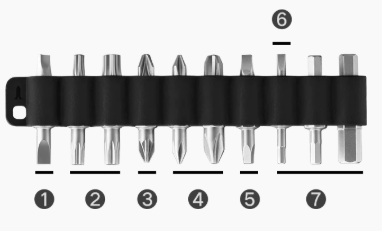
Screwdriver bits:
1. Flat: SL4, SL5
2. Torx: T15, T20, T25, T30
3. Pozidriv: PZ1, PZ2
4. Phillips: PH0, PH1, PH2, PH3
5. Square: S1, S2
6. Triangle: 2.3
7. Hex: H2, H3, H4, H5, H6
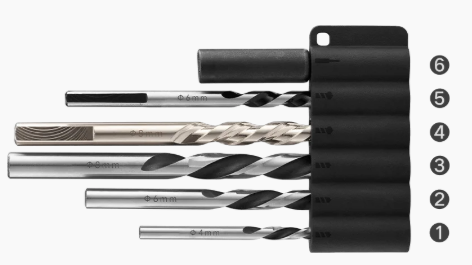
Drill bits:
1/2/3. Wood drill bits: 4 mm, 6 mm, 8 mm
4. Multi-purpose drill bit: 8 mm
5. Multi-functional ceramic tile drill bit: 6 mm
6. Extension rod: (Dimensions: 60 mm × 10 mm)
Q4: Which materials are the drill bits of the Mijia Brushless Cordless Drill 2 suitable for drilling?
A: An 8 mm alloy multi-purpose drill bit of the Mijia Brushless Cordless Drill 2 is suitable for wood, plastics, thin metal, and light concrete (Water should be used during operation). A 6 mm multi-functional ceramic drill bit is suitable for ceramic tiles, red brick, and plastics (Water should be used during operation), and 4/6/8 mm wood drill bits are metallic in color and are only suitable for drilling holes in plastic and wood materials.
Q5: What items is the Mijia Brushless Cordless Drill 2 suitable for disassembling and assembling?
A: The Mijia Brushless Cordless Drill 2 is designed for disassembling and assembling various lamps, furniture, and electrical appliances, including tables, chairs, wardrobes, bookshelves, bedside cabinets, and other furniture that requires screwing, as well as household appliances and lightweight transportation tools such as TVs, air conditioners, microwave ovens, and bicycles. It is suitable for drilling on plastic, metal, wood, and brick walls.
Q6: Can the Mijia Brushless Cordless Drill 2 use non-standard drill bits?
A: The Mijia Brushless Cordless Drill 2 is equipped with standard C6.3 bits and can be adapted to drill bits with a diameter of less than 10 mm.
Q7: What material is the body of the Mijia Brushless Cordless Drill 2 made of?
A: The body of the Mijia Brushless Cordless Drill 2 is made of high-quality engineering plastic with a soft rubber handle, offering excellent heat and impact resistance, a comfortable grip, and minimal deformation.
Q8: Does the Mijia Brushless Cordless Drill 2 have a lighting function?
A: Yes, the Mijia Brushless Cordless Drill 2 is equipped with an LED light for illumination.
Q9: What are the dimensions of the storage case for the Mijia Brushless Cordless Drill 2?
A: The dimensions of the storage case for the Mijia Brushless Cordless Drill 2 measure approximately 325 mm × 325 mm × 72.5 mm.
Frequently Asked Questions
Q1: What is the appearance of the Mijia Brushless Cordless Drill 2?
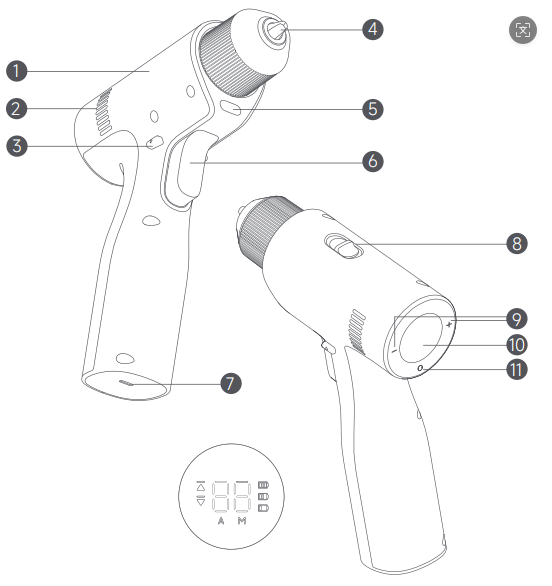
A: The appearance of the Mijia Brushless Cordless Drill 2 is as follows:
1. Brushless Cordless Drill
2. Ventilation Holes
3. Forward/Lock/Reverse Button
4. Chuck
5. Light
6. On/Off Button
7. Charging Port
8. Speed Mode Button (High/Low Speed)
9. Gear Adjustment Buttons
10. Display
11. Gear Switch Mode Button (Manual/Automatic)
Note:
Illustrations of the product and accessories in the user manual are for reference purposes only. Actual product and functions can vary due to product enhancements.
Q2: How to install the drill bits/drive bits of the Mijia Brushless Cordless Drill 2?
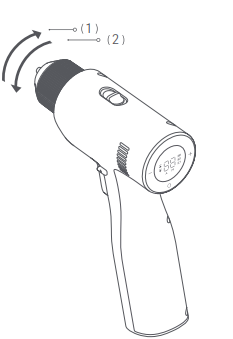
A: Turn the chuck of the Mijia Brushless Cordless Drill 2 in the direction shown by arrow (1) to loosen it until the accessory can be inserted. Then, turn the chuck in the direction shown by arrow (2) to tighten it until the accessory is securely in place.
Note:
The chuck features a locking mechanism. A click sound and tactile feedback will confirm proper locking to prevent the accessory from loosening during use.
Q3: How to charge the Mijia Brushless Cordless Drill 2?
A: When the Mijia Brushless Cordless Drill 2 is low on power, the battery icon on the display lights up red, and it needs to be charged in time. Charge it through the USB Type-C interface at the bottom of the handle.
During charging, the battery icon on the display will light up and show the charging status:
1. 0% < Battery ≤ 33%: Battery icon blinks in red.
2. 33% < Battery ≤ 67%: Battery icon blinks in white.
3. 67% < Battery ≤ 100%: Battery icon blinks in white.
When fully charged, the battery icon will turn off.
It takes about 120 minutes to fully charge with a 12 V/2 A charger, and 8 hours with a 5 V/1 A charger. This time refers to the duration from when the main unit is too low on power to operate to full charge. Charging time can vary due to temperature and other environmental factors.
Note:
1. To protect the battery and motor, the motor does not work, and the drill cannot be used during charging. After charging, it is recommended to unplug the charging cable first, then press the on/off button to check the battery level before storage.
2. It is recommended to fully charge the battery every 3 months during long-term storage.
Q4: Can the Mijia Brushless Cordless Drill 2 be used while charging?
A: No. To protect the battery and motor, the Mijia Brushless Cordless Drill 2 cannot be used while it is charging.
Q5: How to check if the battery of the Mijia Brushless Cordless Drill 2 is fully charged?
A: When the battery level of the Mijia Brushless Cordless Drill 2 drops below 33%, a red battery icon will light up on the display. Please recharge the drill promptly.
Q6: Does the Mijia Brushless Cordless Drill 2 need regular charging?
A: Yes. Even when fully charged, it is recommended to recharge the Mijia Brushless Cordless Drill 2 every three months if it remains unused, to maintain battery health and ensure optimal performance.
Q7: How to select modes for the Mijia Brushless Cordless Drill 2?
A: In manual mode of the Mijia Brushless Cordless Drill 2, it is recommended to start at a lower torque/speed setting (1–5 gears). If more power is needed, increase the setting step by step. This mode is suitable for drilling.
In automatic mode, there is no need to adjust the gear levels manually. The drill will stop automatically when it encounters certain resistance (e.g., when a screw is fully tightened). This mode is ideal for screwdriving. When using this mode for drilling, the drill can stop unexpectedly. This is not a malfunction and can be resolved by restarting the drill or switching to manual mode.
Q8: What are the usage tips for the Mijia Brushless Cordless Drill 2?
A: When pre-drilling, it is recommended to use 1-5 gears in low-speed mode to avoid misalignment.
Due to the high torque of the Mijia Brushless Cordless Drill 2, strong counter-torsion can occur when driving screws. Please grip the drill firmly or use both hands during operation. When using gear levels between 16 and 32, the drill delivers higher output torque. Hold the tool with both hands to prevent excessive reaction force from twisting your wrist and ensure safe operation.
Q9: Why is there a motor smell from the ventilation holes when starting the Mijia Brushless Cordless Drill 2?
A: For a new Mijia Brushless Cordless Drill 2, the motor is coated with harmless protective substances such as wire enamel and lubricating oil to ensure optimal performance. These can emit a slight odor during initial use, which is normal and does not indicate any malfunction. You can use the drill with confidence.
Q10: Why does the Mijia Brushless Cordless Drill 2 seem weak and drill slowly?
A: When drilling, push the direction switch to the far left and push the Mijia Brushless Cordless Drill 2 forward while operating to improve drilling efficiency.
Q11: Can the Mijia Brushless Cordless Drill 2 use chucks from other manufacturers?
A: The chuck in the Mijia Brushless Cordless Drill 2 is installed using specialized equipment. Replacing the chuck yourself can easily damage the device, so we do not recommend that you disassemble the device and replace the chuck yourself. Disassembling the device will void the warranty.
Q12: Why can't the Mijia Brushless Cordless Drill 2 drill through walls?
A: The Mijia Brushless Cordless Drill 2 cannot be used for drilling into reinforced concrete walls. It is suitable only for drilling into ordinary brick walls. If you need to drill into brick walls, use it with the multi-purpose drill bit.
Q13: Why does the Mijia Brushless Cordless Drill 2 make more noise when running idle as a new device?
A: This is a normal phenomenon. The gearbox of a new Mijia Brushless Cordless Drill 2 has not been used, and the grease has not been fully applied to the gears. The noise will disappear after the device is used for a period of time.
Q14: How to switch the speed of the Mijia Brushless Cordless Drill 2?
A: High-speed mode: Push the speed mode button to the high-speed position, press the on/off button, and the Mijia Brushless Cordless Drill 2 will run at high speed. This mode is suitable for high-speed tasks, such as drilling operations.
Low-speed mode: Push the speed mode button to the low-speed position, press the on/off button, and the drill will run at low speed. This mode is suitable for low-speed tasks, such as tightening or loosening screws.
Q15: How to use the forward/lock/reverse button of the Mijia Brushless Cordless Drill 2?
A: Use the forward/lock/reverse button to change the Mijia Brushless Cordless Drill 2's direction of rotation or lock the on/off button.
The detailed usage is as follows:
1. Forward: For drilling or screwing, push the button fully to the far left. The upward arrow icon will light up on the display.
2. Reverse: For loosening or removing screws, push the button fully to the far right. The downward icon will light up on the display.
3. Locking on/off button: Push the button to the middle to lock the on/off button. The display will show neither upward arrow nor downward arrow.
Q16: What is the maximum torque of the Mijia Brushless Cordless Drill 2?
A: The maximum torque of the Mijia Brushless Cordless Drill 2 is 50 N·m.
Q17: What type of battery does the Mijia Brushless Cordless Drill 2 use?
A: The Mijia Brushless Cordless Drill 2 uses a lithium-ion battery.
Q18: What is the net weight of the Mijia Brushless Cordless Drill 2?
A: The net weight of the Mijia Brushless Cordless Drill 2 is approximately 990 g (With an 8 mm multi-purpose drill bit).
Q19: What are the speeds of the high-speed and low-speed modes on the Mijia Brushless Cordless Drill 2?
A: In high-speed mode, the speed of the Mijia Brushless Cordless Drill 2 is 0-1700 rpm, and in low-speed mode, it is 0-400 rpm.
Q20: Will the speed increase as the on/off button of the Mijia Brushless Cordless Drill 2 is pressed deeper?
A: The on/off button of the Mijia Brushless Cordless Drill 2 is a variable-speed switch. The rotational speed increases with the depth of the press.
Q21: What is the maximum drill bit size supported by the Mijia Brushless Cordless Drill 2?
A: The Mijia Brushless Cordless Drill 2 supports drill bits up to 10 mm in diameter.
Q22: What does the number "5" in the circle on the product logo of the Mijia Brushless Cordless Drill 2 mean?
A: The Mijia Brushless Cordless Drill 2 contains certain hazardous substances, and its Environmental Protection Use Period (EPUP) is 5 years. During the EPUP, starting from the date of manufacture, the toxic or hazardous substances or elements contained in the product will not leak or undergo sudden changes under normal use conditions. Therefore, the product will not cause serious environmental pollution or harm to your personal safety or property, and it can be used with confidence.
After the Environmental Protection Use Period has expired, the product should enter the recycling system.
The Environmental Protection Use Period is not the same as the safe use period and is particularly different from usage limits based on electrical safety, electromagnetic safety, or other factors. It is also not the product’s quality guarantee or warranty period.
Q23: What is the service life of the Mijia Brushless Cordless Drill 2?
A: The service life of the Mijia Brushless Cordless Drill 2 depends on your usage scenarios and intensity. The main unit, bits, and other components are made of high-quality materials, and normal use will not cause device damage. Store it in a dry and well-ventilated environment to avoid moisture, which can significantly extend the service life of the main unit and bits. It is recommended to charge the battery at least every 3 to 6 months when the drill is idle to effectively prolong battery life.
Q24: What to do if the Mijia Brushless Cordless Drill 2 cannot be charged?
A: If the Mijia Brushless Cordless Drill 2 cannot be charged, please refer to the following steps to troubleshoot:
1. Check if the power strip or power outlet is supplying power properly.
2. Check if the charger and charging cable are functional and properly connected. Confirm if the ambient temperature is too low. The activity of lithium-ion batteries decreases in low temperatures.
3. If the temperature is too low, move the drill to a warmer environment and wait for a while before charging.
4. If the drill has not been used for a long time and the battery is fully depleted, it will take some time to respond after charging starts. The battery icon will appear on the display once charging starts properly.
Q25: Why does the Mijia Brushless Cordless Drill 2 stop automatically while driving a screw?
A: The Mijia Brushless Cordless Drill 2 is equipped with an electronic torque adjustment function. When the torque required to drive the screw exceeds the set gear torque, the device enters protection mode and pauses. You can use automatic mode or manual mode to increase the torque and restart.
Q26: Why is there wear on the surface of the drive bits/drill bits of the Mijia Brushless Cordless Drill 2 after use?
A: The drive bits/drill bits equipped with the Mijia Brushless Cordless Drill 2 are consumable accessories. Wear after use is normal if the bit does not fully match the screw slot. Contact the after-sales service center to purchase replacements if needed.
Q27: How to quickly increase or decrease gears for the Mijia Brushless Cordless Drill 2 in manual mode?
A: In manual mode, press and hold the [+] and [-] buttons to quickly increase or decrease gears.
Q28: Why do the drive bits of the Mijia Brushless Cordless Drill 2 have no magnetic attraction?
A: The drive bits equipped with the Mijia Brushless Cordless Drill 2 are not magnetic. When using the bits, do not insert them directly into the chuck. Instead, use them together with the extension rod, which provides a magnetic holding function and allows the screw to be securely held during operation.
Q29: Why can't the Mijia Brushless Cordless Drill 2 drill through ceramic tiles?
A: The ceramic tile drill bit included with the Mijia Brushless Cordless Drill 2 can drill through ceramic tiles. For better results, add water to the drill bit while drilling to prevent damage from frictional heat and extend the drill bit's service life.
Q30: Does the Mijia Brushless Cordless Drill 2 come with a charger or charging cable?
A: No, the Mijia Brushless Cordless Drill 2 does not include a charger or charging cable as standard. Use a compliant charger to charge the product. A charger with a power output of 30 W or higher is recommended.
Q31: Does the Mijia Brushless Cordless Drill 2 support Type-C charging?
A: The Mijia Brushless Cordless Drill 2 is equipped with a universal USB-C interface and supports Type-C charging.
Q32: Does the Mijia Brushless Cordless Drill 2 support fast charging?
A: Yes, the Mijia Brushless Cordless Drill 2 supports fast charging at 9 V/2 A and 12 V/2 A. It can be fully charged in as fast as 2 hours when used with a 12 V/2 A charger.
Q33: Can a broken drill bit of the Mijia Brushless Cordless Drill 2 be replaced or covered by warranty?
A: Drill bits of the Mijia Brushless Cordless Drill 2 are consumable accessories and are not covered by the warranty.
Q34: Can broken or rusted driver bits of the Mijia Brushless Cordless Drill 2 be replaced or covered by warranty?
A: The driver bits of the Mijia Brushless Cordless Drill 2 are consumable accessories and have no warranty period.
Q35: Why does the Mijia Brushless Cordless Drill 2 sound different in forward and reverse rotation
A: The noise levels of the Mijia Brushless Cordless Drill 2 are controlled to be within 85 dB (Measured at a distance of 1 meter) in both forward and reverse rotation. Since the drill operates based on a mechanical gear transmission mechanism, there could be slight differences in sound between forward and reverse rotation. This is a normal phenomenon. Please use the product with confidence.
Q36: Why is the button of the Mijia Brushless Cordless Drill 2 unresponsive or insensitive when pressed?
A: To prevent accidental operation caused by extrusion, the button of the Mijia Brushless Cordless Drill 2 is designed to require firm pressing for adjustment. This is not a product quality defect. It is safe to use.
Q37: Why is there a "click" sound when starting the Mijia Brushless Cordless Drill 2 for the first time?
A: The chuck of the Mijia Brushless Cordless Drill 2 is in an unclamped state when leaving the factory. When starting, there is a rotation delay between the chuck jaws and the main body. Tightening the chuck will eliminate this sound.
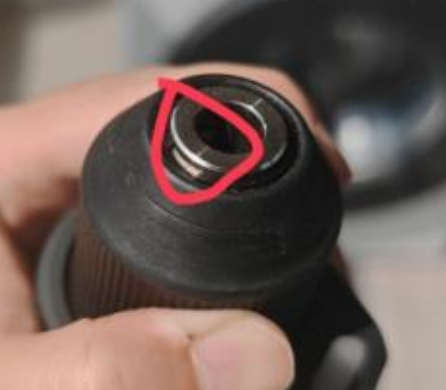
Q38: Is it normal for the spindle of the Mijia Brushless Cordless Drill 2 to have a gap?
A: The locking part of the Mijia Brushless Cordless Drill 2 is fixed with a circlip, which has a normal gap. This is not a product design flaw or quality defect, and cannot be resolved by replacement.
Q39: Is it normal that there are grinding marks on the surface of the drill bit of the Mijia Brushless Cordless Drill 2?
A: The drill bits of the Mijia Brushless Cordless Drill 2 are processed by mechanical grinding, so friction marks on the surface are normal. This is not a product appearance defect and cannot be resolved by replacement.
Q40: Is it normal for the display of the Mijia Brushless Cordless Drill 2 to show scratches after being wiped with a tissue?
A: The display of the Mijia Brushless Cordless Drill 2 is not scratch-resistant and is made of plastic. Wiping with paper towels can leave scratches. For dust removal, it is recommended to wipe the screen with a cotton cloth.
Troubleshooting
Q1: What to do if the Mijia Brushless Cordless Drill 2 stops rotating and displays error codes E3 or E9 during operation?
A: If the Mijia Brushless Cordless Drill 2 stops rotating and shows error codes E3 or E9, it could be because the product has not been used for a long time, or the battery temperature is too high or too low. Try placing the device at room temperature to stand still for a while, and then use it.
Q2: What to do if the Mijia Brushless Cordless Drill 2 stops rotating and the battery icon blinks in red during operation?
A: If the battery icon blinks in red while operating the Mijia Brushless Cordless Drill 2, it can indicate that the lithium battery is depleted. Please recharge the drill before further use.
Q3: What to do if the drill bit cannot be installed on the Mijia Brushless Cordless Drill 2?
A: If the drill bit cannot be installed on the Mijia Brushless Cordless Drill 2, it could be due to a mismatch between the drill bit size and the chuck. Try using the drill bits provided in the accessory package or those with a diameter ≤10 mm.
Q4: Why does the Mijia Brushless Cordless Drill 2 not rotate when the on/off button is pressed?
A: If the Mijia Brushless Cordless Drill 2 does not rotate when the on/off button is pressed, the trigger can be locked in the middle position. Try moving the forward/lock/reverse button (Viewed from the tail of the device toward the chuck) to the left or right to release it.
Does it help?
Yes
No