

Mijia Smart Air Purifier Max FAQ
Overview
Q1: What are the product introductions and selling points of the Mijia Smart Air Purifier Max?
A: The Mijia Smart Air Purifier Max adopts the design of a single motor and double fans. Its nominal parameters are an ultra-high PCADR (particulate matter) of 900 m³/h and an FCADR (formaldehyde) of 200 m³/h. The cumulative purification capacity (CCM) reaches 18,000 mg for particulate matter (PCCM, cumulative particulate matter purification capacity) and 2,000 mg for formaldehyde (single-component loading), suitable for an area of 63-108 m². It is equipped with a six-layer composite purification matrix for professional antibacterial, anti-allergy, dust removal, and allergen removal.
The device can display air quality indicators such as PM1 (particulate matter less than or equal to 1 micron), PM2.5 (particulate matter less than or equal to 2.5 microns), dust (PM10, particulate matter less than or equal to 10 microns), formaldehyde concentration, temperature, and relative humidity. It can also display working status such as UV, operating gear, and current operating mode.
Product Introduction and Usage
Q1: What functions do the buttons of the Mijia Smart Air Purifier Max have?
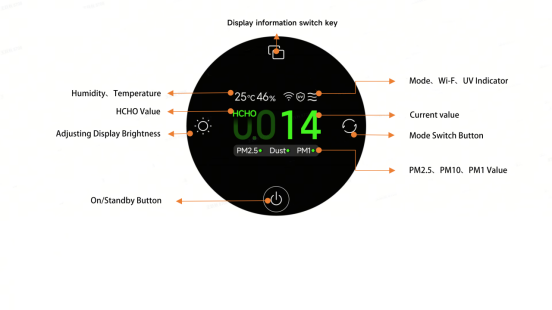
A: The buttons and functions of the Mijia Smart Air Purifier Max are shown below:
1. The Mijia Smart Air Purifier Max is equipped with an On/Standby button. Tap the on/standby button to turn on the air purifier or set it to standby.
2. The Mijia Smart Air Purifier Max is equipped with a Mode button. Tap the Mode button to cycle through modes: Speed 1, Speed 2, Speed 3, Auto, Sleep, and Manual.
3. The Mijia Smart Air Purifier Max is equipped with a Brightness button. Tap the Brightness button to cycle through display brightness: On, Medium, Dim, and Off.
4. The Mijia Smart Air Purifier Max is equipped with a Display button. Tap the Display button to cycle through display content: Formaldehyde value, PM2.5 value, PM1 value, and dust index.
Q2: What type of motor does the Mijia Smart Air Purifier Max use, and what is the noise level?
A: The Mijia Smart Air Purifier Max uses a DC brushless motor, which supports stepless speed control, resulting in low noise and a long lifespan. The maximum noise level of the entire unit is ≤68 dB(A), and a sleep mode is available for use during sleep, with noise levels as low as 33dB(A).
Q3: What is the device on the back of the Mijia Smart Air Purifier Max?
A: The device on the back of the Mijia Smart Air Purifier Max is a laser particle sensor, primarily used to monitor the concentration of particulate matter in the ambient air. The other is a formaldehyde sensor.
Q4: Which settings will be lost after resetting the Wi-Fi on the Mijia Smart Air Purifier Max?
A: After resetting the Wi-Fi on the Mijia Smart Air Purifier Max, your app settings and scheduled on/off times will be lost.
Q5: Can multiple people control one Mijia Smart Air Purifier Max simultaneously?
A: Yes, multiple people can control one Mijia Smart Air Purifier Max simultaneously by sharing it with designated Xiaomi accounts via the Xiaomi Home App.
Q6: After sharing the Mijia Smart Air Purifier Max with others, can the shared person upgrade the firmware?
A: Currently, a shared person cannot upgrade the firmware.
Q7: What is the Manual mode for the Mijia Smart Air Purifier Max?
A: The Manual mode allows you to set the fan speed of the air purifier according to your needs via the Xiaomi Home App. The speed can be adjusted steplessly to achieve the optimal purification effect for your specific area.
Q8: Will a humidifier affect the PM2.5 reading of the Mijia Smart Air Purifier Max?
A: Yes. Ultrasonic humidifiers atomize water into tiny water droplets at a high concentration. The highly sensitive sensor in the Mijia Smart Air Purifier Max will detect these tiny water droplets, resulting in a higher-than-normal reading, or even a reading that exceeds the maximum limit. The reading will gradually return to normal after the humidifier is turned off. This is a normal phenomenon.
Q9: Will an electric heater affect the PM2.5 reading of the Mijia Smart Air Purifier Max?
A: Yes. Because electric heaters promote air convection in the room and make the air relatively dry, it becomes easier for tiny particles to float in the air and spread. This causes the air purifier's particle sensor to register a higher reading.
Q10: How to turn on/off the display screen of the Mijia Smart Air Purifier Max, and how to adjust the screen brightness?
A: The Mijia Smart Air Purifier Max has a Brightness button. Each press of the button cycles the screen between bright, dim, and off. If connected to the Xiaomi Home App, find and tap the device, then find the [Display] to turn the screen on or off. If you want to adjust the screen brightness, you can open the [Display] >> tap [Screen brightness] >> choose your desired screen brightness >> tap [Confirm].
Note:
After the screen is turned off, the display buttons will not completely turn off, making it convenient to control the device in dark environments.
Q11: What kind of filter does the Mijia Smart Air Purifier Max come with?
A: The Mijia Smart Air Purifier Max comes standard with a high-quality antibacterial and antiviral filter and a modified activated carbon filter combination, which is an integrated high-quality filter.
Q12: How to replace the filter in the Mijia Smart Air Purifier Max?
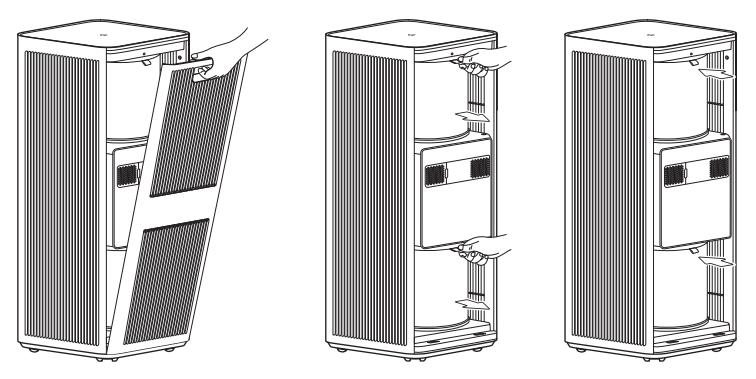
A: Before replacing the filter, set the air purifier on standby and unplug it before performing the following operations. Unwrap the packaging of the filter before installing it. Open the filter compartment cover and grip the pull-tab to remove the old filter. Then, install the new filter. Make sure the pull-tab is facing outward and upward. Finally, close the filter compartment cover.
Note:
1. To ensure optimal performance, please replace the two filters at the same time.
2. After replacing the filter, you need to manually reset the filter life.
Q13: How is the filter lifespan calculated for the Mijia Smart Air Purifier Max, and how often should it be replaced?
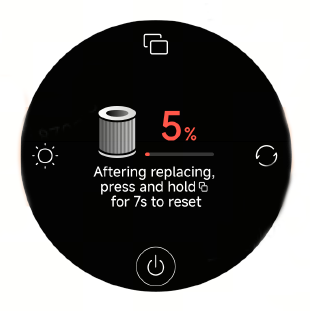
A: The Mijia Smart Air Purifier Max automatically calculates the filter lifespan based on the air quality of the usage environment, the purifier's operating mode, speed, and running time. If the air quality is poor, the filter lifespan will be consumed faster; if the air quality is good, the filter lifespan will be consumed more slowly. Generally, the filter lifespan is approximately 6-12 months. When the purifier detects that the filter lifespan is ≤5%, it will remind you to replace the filter via the display screen and the app. It is recommended to clean the outermost pre-filter of the filter every month.
Note:
The above replacement time suggestions are based on tests conducted in a laboratory environment. The actual replacement time can vary depending on the actual usage environment and system reminders.
Q14: Does the Mijia Smart Air Purifier Max require resetting the filter lifespan after replacing the filter?
A: The Mijia Smart Air Purifier Max does not have an RFID tag module. After replacing the filter, you need to manually reset the filter lifespan. On the filter-related page, press and hold the Display button for 7 seconds to reset the filter. After the reset is complete, the screen will display the filter lifespan.
Q15: Why are the PM2.5 readings high on the Mijia Smart Air Purifier Max, and why are the indoor readings higher than the outdoor readings?
A: The water vapor and oil fumes generated indoors from using humidifiers, smoking, and cooking can affect the air purifier's assessment of pollution levels. Additionally, the outdoor readings displayed in the app can differ from the actual values in your specific location.
Q16: Why does the PM2.5 reading change even when the Mijia Smart Air Purifier Max is running without a filter?
A: Without a filter, the PM2.5 level can decrease or increase. This depends on the environment. Without a filter, the device acts like a fan, circulating indoor air. This mixes areas with high and low PM2.5 concentrations. During this time, the PM2.5 detected by the sensor is random. After a longer period, the PM2.5 concentration in the air will become more uniform, and the sensor reading will stabilize.
Q17: Will the filter life decrease if the Mijia Smart Air Purifier Max is used without a filter?
A: The device cannot start and operate normally without a filter installed.
Q18: Can the upper and lower filters of the Mijia Smart Air Purifier Max be reset separately?
A: No, they cannot be reset separately. The upper and lower filters are sold as a set and need to be replaced together to ensure the purification effect is not affected.
Q19: Will the room humidity decrease if the Mijia Smart Air Purifier Max is turned on for a long time?
A: Yes, because the air purifier filters out particulate matter in the air, it also filters out water vapor, which will reduce the humidity of the ambient air. This is normal. Water molecules will attach to the filter and activated carbon, causing a decrease in humidity and also interfering with the performance of the air purifier, and causing deviations in the displayed particulate matter values.
Q20: Can the Mijia Smart Air Purifier Max remove odors such as cooking fumes?
A: Yes, but depending on the environment, it takes a longer time to achieve the desired effect. The amount of activated carbon in the filter and the length of time the filter has been used will also affect the effectiveness of odor removal.
Q21: Does the Mijia Smart Air Purifier Max have an ion function?
A: The Mijia Smart Air Purifier Max does not have an ion function.
Q22: Can the Mijia Smart Air Purifier Max be modified for use?
A: No. Any modifications can affect the device's performance, stability, and safety. Therefore, altering the purifier's original operating mode is prohibited.
Q23: Does the Mijia Smart Air Purifier Max have a UV sterilization function?
A: Yes, the UV sterilization lamp function is enabled by default. You can enable or disable the UV sterilization function through the Xiaomi Home App. The UV LED comprehensively eliminates bacteria and viruses on the filter and in the ventilation area.
Q24: What wavelength does the UV sterilization lamp of the Mijia Smart Air Purifier Max use?
A: The UV sterilization lamp of the Mijia Smart Air Purifier Max uses the UV-C wavelength.
Q25: Can the UV sterilization lamp of the Mijia Smart Air Purifier Max be observed with the naked eye to see if it is on?
A: The UV sterilization lamp of the Mijia Smart Air Purifier Max is installed in the middle of the top of the lower filter compartment. The UV sterilization function will only start after the device is working normally. It cannot be observed during normal use, so the working status of the sterilization lamp cannot be directly observed. However, you can determine whether the sterilization lamp is working normally by checking if the UV indicator on the screen is on (ultraviolet light has a sterilizing effect, and staring at it for a long time can cause irreversible damage to the eyes).
Q26: How does the Mijia Smart Air Purifier Max disinfect and sterilize?
A: Particles containing germs in the air move with the airflow through inertial motion, irregular Brownian motion, or under the influence of certain field forces. The high-efficiency filter uses interception effect, inertial effect, diffusion effect, and electrostatic effect to make the particles containing germs adhere to the fiber surface. At the same time, the antibacterial coating of the filter element destroys the cell wall of the germs, inactivating them. Combined with ultraviolet light sterilization, this achieves the effect of disinfection and purification.
Q27: How to clean and store the Mijia Smart Air Purifier Max?
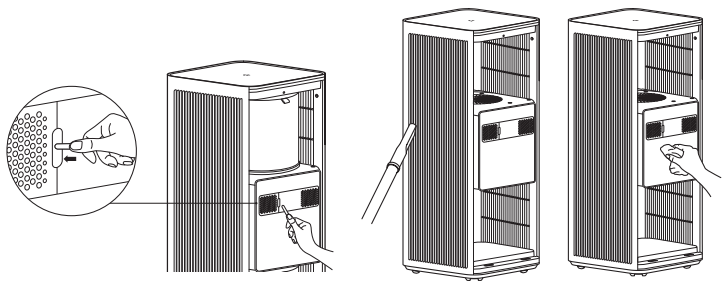
A: When the device needs cleaning, please unplug the power cord before cleaning. For surface dirt, gently wipe the device surface with a damp soft cloth. After prolonged use, you can open the filter compartment, remove the filter, and gently wipe the inner surface of the device with a damp soft cloth. Dry the filter in a well-ventilated area. The laser particle sensor compartment door can be removed and rinsed with water. After everything is dehydrated, reassemble the parts and use the device. If the air purifier is not used for an extended period, it is recommended to clean the air purifier every 3 months.
Q28: Why does the air feel a bit dry after the Mijia Smart Air Purifier Max is turned on?
A: The basic working principle of an air purifier is to circulate air through the filter to achieve filtration. While filtering pollutants in the air, it also filters out moisture in the air, causing a decrease in air humidity, which makes people feel that the air is a bit dry.
Q29: What is the principle of formaldehyde removal in the Mijia Smart Air Purifier Max?
A: The main method of formaldehyde removal in the Mijia Smart Air Purifier Max is that when air passes through the activated carbon layer of the composite filter, formaldehyde and other substances are adsorbed by the activated carbon and decomposed by the amino acids in the activated carbon, thus achieving the effect of formaldehyde removal.
Q30: Why does the packaging of the Mijia Smart Air Purifier Max have an odor?
A: The shock-absorbing protective foam in the packaging has a slight inherent material odor. Because the device is in contact with the foam for a long time, it will also absorb some of the foam's odor. The odor will naturally dissipate after the packaging is opened for a while and is harmless to the human body.
Q31: Can pregnant women and young children use the Mijia Smart Air Purifier Max?
A: This device has been certified by relevant EU authorities, so it is safe for pregnant women and young children to use.
Q32: Does the Mijia Smart Air Purifier Max release ozone, and is it harmful to the human body?
A: This device has been certified by relevant EU authorities, and its ozone release is far below EU standards. Please use it with confidence.
App-related information
Q1: How to connect the Mijia Smart Air Purifier Max to the Xiaomi Home App?
A: Scan the QR code on the instruction manual or install the Xiaomi Home App from the Google Play Store and Apple App Store, and bind your Xiaomi account. Ensure your home Wi-Fi is working properly, and your phone is connected to the Wi-Fi. Turn on the air purifier, open the Xiaomi Home App, and the app will automatically search for nearby Xiaomi Home smart devices and provide prompts. Alternatively, you can manually add the device by tapping the plus sign in the upper-right corner. After adding the Mijia Smart Air Purifier Max according to the prompts, you can control the air purifier's power on/off, switch operating modes, and view current indoor air quality, temperature, and humidity through the app.
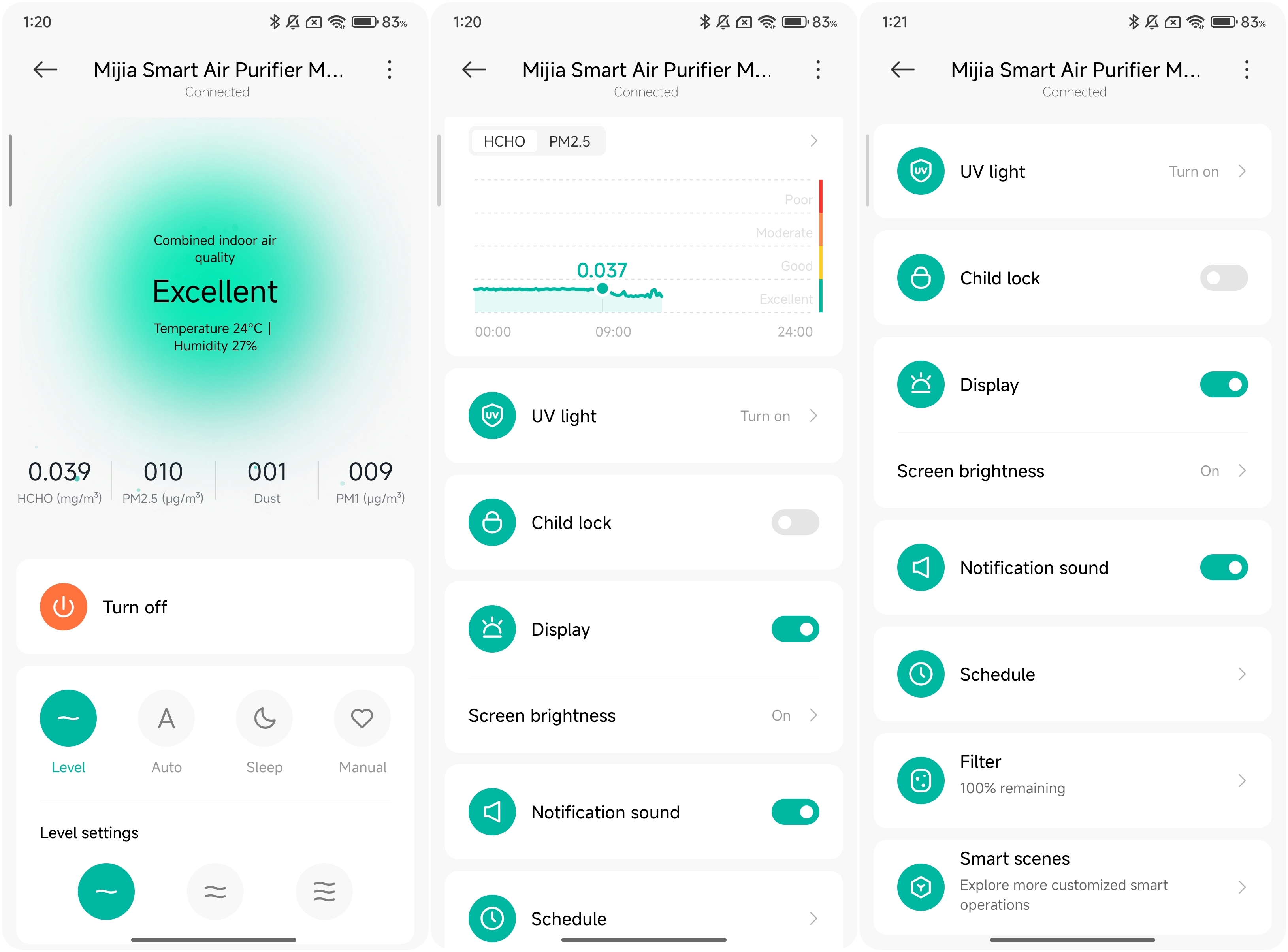
Q2: What are the features of the Mijia Smart Air Purifier Max App interface?
A: You can remotely control the air purifier's operating modes, view indoor air quality changes, check the remaining filter life, and set up linkages with other smart products through the Xiaomi Home App.
Q3: What are the network connection requirements for the Mijia Smart Air Purifier Max?
A: The Mijia Smart Air Purifier Max supports network control and is compatible with most personal routers on the market.
Please note the following requirements for your router's wireless network:
1. The Mijia Smart Air Purifier Max can only connect to 2.4 GHz Wi-Fi networks; 5GHz Wi-Fi is not currently supported.
2. The Wi-Fi encryption method must be WPA or WPA2; WEP is not supported.
3. The router must have DHCP enabled; static IP addresses are not currently supported, nor are web authentication or enterprise-level 802.1X.
Note:
To control the Mijia Smart Air Purifier Max, you need to download the Xiaomi Home App.
Q4: Does the Mijia Smart Air Purifier Max support HomeKit?
A: No, the Mijia Smart Air Purifier Max does not support HomeKit.
Q5: Can the Mijia Smart Air Purifier Max be used as a fan?
A: Yes, you can use the side air outlet facing your body to use it as a fan.
Q6: Is it okay to smoke near the Mijia Smart Air Purifier Max?
A: It is not recommended to smoke near the air intake of the air purifier, as the filter and other materials inside the device are easily flammable. Sparks being drawn into the device could cause a fire.
FAQ
Q1: How to solve the problem of the Mijia Smart Air Purifier Max frequently shutting down/stopping automatically?
A: If the Mijia Smart Air Purifier Max is frequently shutting down/stopping automatically, please follow the steps below to troubleshoot:
1. Check if any smart scenes are set up in the Xiaomi Home App for automatic on/off control. If the conditions for these scenes are met, the device will automatically turn on or off.
2. If the issue persists, please contact the after-sales service center for assistance.
Q2: How to fix the Mijia Smart Air Purifier Max if it doesn't turn on?
A: If the Mijia Smart Air Purifier Max doesn't turn on, please follow the steps below to troubleshoot:
1. Confirm that the power outlet is working and that the power cord is properly connected.
2. Check if the filter is installed correctly and evenly, and ensure the main unit and filter compartment door are properly installed without any gaps.
3. If the above are normal, the device will emit a beeping sound after being plugged in, and the screen will display the Xiaomi Home logo before turning off. Pressing the On/Standby button should then turn the device on normally.
4. If the device beeps and the screen displays door not closed, it means the device is powered on correctly, but the filter compartment door needs to be reinstalled.
5. If the device does not respond at all when the On/Standby button is pressed, please contact the after-sales service center.
Q3: What to do if there are vertical lines on the display screen of the Mijia Smart Air Purifier Max?
A: If the problem persists after unplugging the device for more than 10 seconds and then plugging it back in, the display screen has a performance fault and requires service. Please contact the after-sales service center.
Q4: How to deal with unusual noises from the Mijia Smart Air Purifier Max?
A: If the Mijia Smart Air Purifier Max is making unusual noises, please follow the steps below to troubleshoot:
1. Check if the filter is installed correctly and if the filter's packaging bag has been removed.
2. Check if any foreign objects have entered the air purifier. If so, open the filter compartment and remove the foreign object.
3. Check if any foreign objects have entered the laser particle sensor.
4. If the issue persists, please contact the after-sales service center.
Q5: What to do if the screen displays filter compartment not closed on the Mijia Smart Air Purifier Max?
A: Check if the filter compartment door on the main unit is closed tightly and reassemble it. Turn off the power for 10 seconds and then turn it back on. If the problem persists, please contact the after-sales service center for inspection.
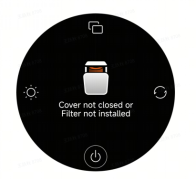
Q6: What to do if the screen displays motor malfunction on the Mijia Smart Air Purifier Max?
A: If the screen displays motor malfunction on the Mijia Smart Air Purifier Max, please follow the steps below to troubleshoot:
1. Check if the filter is installed correctly.
2. Check if there are any foreign objects in the fan area causing the motor to stall or malfunction, and then unplug the unit for 10 seconds and restart it.
3. If the above steps are ineffective, please contact the after-sales service center for inspection.
Q7: Why does the Mijia Smart Air Purifier Max have an unpleasant odor?
A: The Mijia Smart Air Purifier Max can have some harmless odors when new. Due to the use of a composite filter, there can be some residual odors from the main materials and auxiliary materials used in the manufacturing process when the new unit is first used. This odor will gradually decrease after a period of use. This new unit odor is normal and will not have any negative impact on your health. To accelerate the removal of the initial odor, it is recommended to run the unit at the highest setting in a well-ventilated area for a period of time. Please use it with confidence.
If you still notice an odor after more than a month of use, this is because the filter absorbs pollutants during use, which can produce a slight odor. Also, prolonged use and relatively humid environments can contribute to this odor. People sensitive to odors can notice this smell. Running the device at the highest setting for a period of time will reduce the odor. This odor will not harm your health.
To avoid the risk of the filter becoming damp and producing a sour smell, it is recommended that in areas with high humidity, the air purifier be kept running continuously for 24 hours, and the lowest-level pre-filter be cleaned every two weeks or so.
Q8: Does the filter for the Mijia Smart Air Purifier Max come with packaging?
A: The filter for the Mijia Smart Air Purifier Max comes with sealed plastic packaging from the factory. This is to prevent secondary contamination of the filter during storage and transportation. The filter can have a slight odor when first opened, but this will diminish after a period of use and is not an abnormal phenomenon. It will not have any negative impact on your health.
Q9: Why is the purification effect of the Mijia Smart Air Purifier Max poor?
A: Please check if the area of the room matches the device's recommended coverage area and setting. The airtightness and height of the room will also affect the purification effect.
Q10: What to do if the Mijia Smart Air Purifier Max's PM2.5 reading is abnormal or inaccurate?
A: If the Mijia Smart Air Purifier Max's PM2.5 reading is abnormal or inaccurate, please follow the steps below to troubleshoot:
1. If you encounter inaccurate or abnormal PM2.5 readings, check if the laser particle sensor compartment door on the back of the unit is dirty or blocked. If it is dirty or blocked, you can use a non-sharp tool to open the laser particle sensor compartment door and clean the filter and sensor with an air gun or hairdryer (do not use hot air). Gently brush the filter of the laser particle sensor compartment door with a used toothbrush dipped in water, clean it thoroughly, and let it dry before reassembling and testing.
2. Different readings in the same environment for multiple air purifiers, and different environmental factors such as altitude, can also cause different readings. You can test them all in sleep mode and with different levels of smoke. If the error value increases linearly, it indicates a malfunction of the laser particle sensor. If the error value is within a certain range, it is considered normal.
3. If the issue persists, please contact the after-sales service center.
Q11: What could be causing the current sound when the Mijia Smart Air Purifier Max is turned off?
A: This sound originates from the inductor in the DC-DC circuit. Because the circuit board and various functional modules require different operating voltages, the circuit needs to convert a constant voltage into different voltage values for the load circuit. During voltage transformation, the inductor needs to be switched at a high frequency. The inductor continuously converts electrical energy into magnetic field energy, and then converts magnetic field energy back into electrical energy. This energy conversion will cause the inductor to produce a slight current sound, which is a normal phenomenon.
Q12: Why does the laser particle sensor fan on the Mijia Smart Air Purifier Max sometimes stop rotating?
A: When the device is powered on, the screen displays normally, and the sensor works continuously, displaying real-time values. When the screen is off, to reduce sensor usage time and increase its lifespan, the sensor activates every 2 minutes and operates for 12-15 seconds. The sensor also works continuously when the app is open. After closing the app and turning off the screen for 5 minutes, the sensor will also operate intermittently.
Q13: Why are the buttons on the Mijia Smart Air Purifier Max unresponsive?
A: The Mijia Smart Air Purifier Max has a child lock function. If the child lock is enabled, the buttons on the air purifier will be unresponsive. You need to disable the child lock function to operate the buttons on the air purifier. You can enable or disable the child lock by pressing and holding the Mode button for 7 seconds or through the Xiaomi Home App.
Q14: What to do if the Mijia Smart Air Purifier Max is always showing offline or is unable to connect to Wi-Fi?
A: If the Mijia Smart Air Purifier Max is always showing offline or unable to connect to Wi-Fi, please follow the steps below to troubleshoot:
1. Confirm that the Mijia Smart Air Purifier Max is powered on and operating normally.
2. Confirm that the Wi-Fi is working properly.
3. Please unplug the power cord, wait 10 seconds, and then plug it back in (the power supply needs some time to discharge). Try resetting the Wi-Fi of the Mijia Smart Air Purifier Max and reconnecting to Wi-Fi.
4. If the issue persists, please contact the after-sales service center.
Q15: What do the different colors of the air quality indicator on the Mijia Smart Air Purifier Max display mean? Why does it sometimes change colors abruptly?
A: The air quality status indicator on the Mijia Smart Air Purifier Max is a visual representation of PM2.5, PM1, dust, and formaldehyde concentration, and its color changes according to changes in air quality data. When the value fluctuates around a critical point, the indicator color will also change accordingly.
The indicator color changes in response to changes in air quality data, as shown below:
1. When the PM2.5 concentration is 1-20 µg/m³, the indicator is green, indicating excellent air quality. When the PM2.5 concentration is 21-35 µg/m³, the indicator is yellow, indicating good air quality. When the PM2.5 concentration is 36-55 µg/m³, the indicator is orange, indicating moderate air quality. When the PM2.5 concentration is greater than or equal to 56 µg/m³, the indicator is red, indicating poor air quality.
2. When the PM1 concentration is 1-15 µg/m³, the indicator is green, indicating excellent air quality. When the PM1 concentration is 16-26 µg/m³, the indicator is yellow, indicating good air quality. When the PM1 concentration is 27-55 µg/m³, the indicator is orange, indicating moderate air quality. When the PM1 concentration is greater than or equal to 56 µg/m³, the indicator is red, indicating poor air quality.
3. When the dust index is 1-8, the indicator is green, indicating excellent air quality. When the dust index is 9-16, the indicator is yellow, indicating good air quality. When the dust index is 17-24, the indicator is orange, indicating moderate air quality. When the dust index is 25 or greater, the indicator is red, indicating poor air quality.
4. When the formaldehyde concentration is 0.001-0.050 mg/m³, the indicator is green, indicating excellent air quality. When the formaldehyde concentration is 0.051-0.080 mg/m³, the indicator is yellow, indicating good air quality. When the formaldehyde concentration is 0.081-0.150 mg/m³, the indicator is orange, indicating moderate air quality. When the formaldehyde concentration is greater than or equal to 0.151 mg/m³, the indicator is red, indicating poor air quality.
Q16: How to solve the problem of high noise in the sleep mode of the Mijia Smart Air Purifier Max?
A: Sleep mode is designed to ensure purification effectiveness while reducing noise to 33dB(A), with a purification rate of 30m³/h. Please use it with confidence.
Q17: Why are there black powder particles falling out of the newly unpacked filter of the Mijia Smart Air Purifier Max, and is it harmful to the human body?
A: During transportation, the filter can experience slight powder shedding due to vibration and friction. This is normal. If you find black powder on the filter after opening the device or the new filter packaging, it could be activated carbon powder. Please wipe it clean with a damp soft cloth before re-installing. After the device is running, there will be no further continuous powder shedding. Please use it with confidence.
Q18: What is the fan speed adjustment logic in the Auto mode of the Mijia Smart Air Purifier Max?
A: When the air purifier is set to Auto mode, it will automatically adjust the fan speed based on the air quality status detected by the sensor.
The air quality indicator corresponds to the Auto mode fan speed as follows:
1. Green corresponds to sleep mode engine speed.
2. Yellow corresponds to the engine speed in Speed 1.
3. Orange corresponds to the engine speed between Speed 1 and Speed 2.
4. Red corresponds to the engine speed between Speed 2 and the Manual mode.
Q19: What does the dust index on the Mijia Smart Air Purifier Max represent?
A: The dust index, also known as PM10, represents the concentration of particulate matter with a diameter less than or equal to 10 micrometers detected by the device. The dust number displayed on the air purifier represents a level, not a numerical value, with levels ranging from 1 to 100, from low to high concentration.
Q20: How to turn off Wi-Fi on the Mijia Smart Air Purifier Max?
A: Wi-Fi is enabled by default. When the air purifier is on, simultaneously press and hold the Brightness button and Mode button for 7 seconds to enable or disable Wi-Fi. Wi-Fi indicator lights up when Wi-Fi is enabled, and goes off when Wi-Fi is disabled.
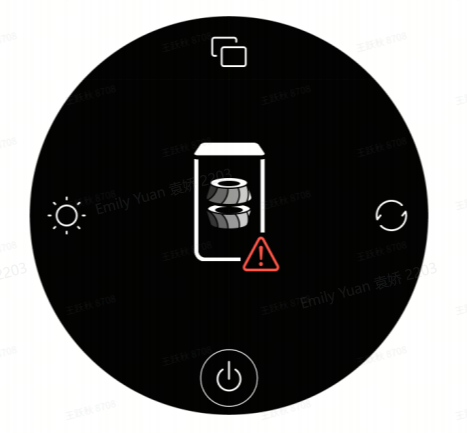
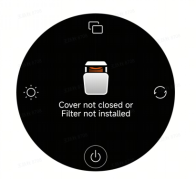
Q21: What to do if the Mijia Smart Air Purifier Max display shows that the cover is not closed or the filter is not installed?
A: If the Mijia Smart Air Purifier Max display shows that the cover is not closed or the filter is not installed, please follow the steps below to troubleshoot:
1. Properly install both the upper and lower filters, then close the compartment door.
2. If the filters are already installed and the compartment door is closed, but the display still shows that they are not properly installed, please unplug the power cord for 10 seconds and then plug it back in.
3. If the above steps are ineffective, please contact the after-sales service center for inspection.
Q22: What to do if the Mijia Smart Air Purifier Max's display shows that the filter life is less than 5%?
A: This indicates that the filter life is almost depleted. Please replace the filter promptly. After replacement, press and hold the Display button for 7 seconds to reset the filter life.
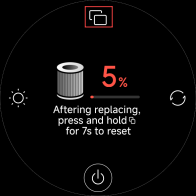
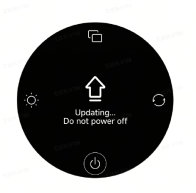
Q23: What to do if the display screen of the Mijia Smart Air Purifier Max shows "updating..."?
A: This indicates that the device is currently undergoing a firmware upgrade process. Please wait patiently for the update to complete. The device will be ready for normal use after the update is finished and the device restarts.
Note:
Do not power off the device during the update process.
Formaldehyde-Related Questions
Q1: How can the formaldehyde sensor on the Mijia Smart Air Purifier Max provide more accurate readings?
A: Before testing for formaldehyde, it's necessary to close all doors and windows for at least 12 hours, and also open cabinets and drawers. The temperature should ideally be maintained at around 23 °C. During this sealed period, the air purifier should be plugged in but not running. After 12 hours, check the current formaldehyde level through the Xiaomi Home App without turning on the air purifier for a more accurate reading.
Q2: Why doesn't the Mijia Smart Air Purifier Max display formaldehyde levels immediately after turning it on?
A: When the device is powered on, the formaldehyde sensor needs approximately 3 minutes to initialize. During the initialization process, the screen will display loading and will not show any values. After initialization is complete, you can switch to displaying the formaldehyde value by pressing the Display button at the top of the screen. You can also view the formaldehyde level in the device's environment through the Xiaomi Home App.
Q3: Do similar formaldehyde sensors have measurement errors? What is the range of errors?
A: Formaldehyde sensors have a certain degree of error, and the displayed values can vary by ±0.05 mg/m³. For example, if the actual value is 0.100 mg/m³, the screen display will be between 0.050 and 0.150 mg/m³.
Q4: Why do formaldehyde levels increase at night on the Mijia Smart Air Purifier Max?
A: Normally, indoor furniture and building materials contain formaldehyde, and formaldehyde is continuously and slowly released. During sleep, due to the possible activation of sleep mode or turning off the device, the rate of air purification decreases or stops, while formaldehyde continues to be released and accumulates. Therefore, it is possible for the formaldehyde reading to increase during sleep, especially in a closed room with poor air circulation, where the formaldehyde release rate is relatively faster.
Q5: How to explain the increase or decrease in formaldehyde levels when the Mijia Smart Air Purifier Max is turned on?
A: When the air purifier is turned on, the device displays the current formaldehyde level in real time. As the air is blown out from the purifier's outlet, it disturbs the air in the environment, causing the formaldehyde concentration to become uneven. Therefore, the displayed value will fluctuate. After running for a period of time, the value will stabilize and gradually decrease.
Q6: Why does the formaldehyde reading on the Mijia Smart Air Purifier Max suddenly increase when using a heater or air conditioner with hot air?
A: If there are sudden changes in temperature and humidity in the environment, the formaldehyde reading of the air purifier can suddenly increase or decrease. This effect is determined by the detection principle of the sensor, and this phenomenon is normal. When the ambient air temperature and humidity stabilize, the sensor reading will also return to normal. Factors that can affect formaldehyde levels include: cooling and reduced humidity from air conditioning, heating from air conditioning, electric heaters or fan heaters, increased humidity from humidifiers, and water vapor released after cooking or showering – all factors that cause changes in air conditions.
Q7: Why is the formaldehyde reading on the Mijia Smart Air Purifier Max different from the readings of other testing instruments?
A: The air purifier uses a Swiss-imported sensor that can resist interference from other aldehydes, benzenes, and other pollutants, effectively reducing errors. Therefore, the displayed value can be lower compared to other testing instruments. Some third-party testing instruments are easily interfered with by VOCs and other substances, ultimately leading to differences in the numerical results.
Q8: Why is the formaldehyde reading on the Mijia Smart Air Purifier Max consistently low in a newly renovated room?
A: Most materials used in renovation, such as paint, glue, and wood panels, contain pollutants like formaldehyde, benzene, and VOCs. However, if the materials used meet national standards, the formaldehyde levels in the room will generally not be very high and will also meet national standards. Furthermore, formaldehyde has a relatively long release cycle, between 3 and 15 years, with summer being the peak season for formaldehyde release. When the ambient temperature exceeds 23 degrees Celsius, the formaldehyde release rate increases significantly. Opening windows for ventilation or when the ambient temperature is below 19 degrees Celsius will dilute or reduce the release of formaldehyde.
Q9: Why do the formaldehyde readings on the Mijia Smart Air Purifier Max fluctuate when opening windows, doors, or using air conditioning or a humidifier?
A: Fluctuations in readings after opening doors or windows are due to fresh outdoor air entering the room, which has a different formaldehyde level than the indoor air, thus causing fluctuations in the readings. Opening a humidifier or air conditioner also causes sudden changes in humidity and temperature, leading to fluctuations in the readings. This is a normal phenomenon; please take readings after the environment has stabilized.
Q10: Why does the formaldehyde reading increase when covering the Mijia Smart Air Purifier Max's formaldehyde sensor with your hand?
A: Water molecules are an intermediate product in the operation of the formaldehyde sensor. When you cover the formaldehyde sensor window with your hand, the sweat on your hand interferes with the sensor, causing humidity fluctuations, which in turn affect the instantaneous reading of the formaldehyde sensor. This effect is determined by the detection principle of the formaldehyde sensor. Therefore, during normal use, avoid covering the formaldehyde sensor window with your hand.
Q11: Why does the formaldehyde level curve on the Mijia Smart Air Purifier Max show an abnormal increase?
A: The air quality curve represents the trend of air quality changes over the past 12 hours. The small dot on the far right of the curve displays the real-time value, while any point on the curve to the left of the dot shows the average value for the previous hour. If the air quality suddenly increases for a short period at a certain point in time, for example, someone walks past the device, and their perfume scent is detected by the VOC sensor, the VOC value will suddenly increase, and the air quality indicator light will turn red. After the person leaves the device and the air is purified and stabilized, the value will return to normal. This process will cause the air quality indicator light to suddenly turn red and then return to its previous state after a short time. Because the curve uses an average value, a momentary air anomaly will not cause the overall value to be too high, so the brief air anomaly will not be visible on the curve.
Q12: Why do multiple Mijia Smart Air Purifier Max show different PM2.5 levels and different air quality indicator colors when used in the same environment?
A: Firstly, in a real-world environment, dust moves with the airflow, making it difficult to guarantee that the dust levels are the same in any two locations, even in the same small room. The Mijia Smart Air Purifier Max has a very sensitive sensor, which can detect these differences. A PM2.5 difference between two Mijia Smart Air Purifier Max (calculated as: (average value - reading) / average value) within 10% is considered normal. Secondly, all electronic components have tolerances, and these tolerances can lead to different voltages in the sensors, resulting in different sensor output values. If the PM2.5 readings of two air purifiers differ significantly, it can be due to dust accumulation in the sensor compartment; you can remove the sensor compartment cover and clean the dust. The different air quality indicator colors in the same environment are due to the PM2.5 differences mentioned above. If the values detected by the two sensors are near the critical threshold, one can be above the threshold and the other below, leading to different air quality indicator colors.
Sensor error values:
1. PM1/PM2.5 (μg/m³): ±10 μg/m³ within 100 μg/m³, ±10% for 100 μg/m³ and above
2. PM10 (index): ±20%
3. Formaldehyde sensor (mg/m³): ±0.05 mg/m³
Q13: How to deal with poor formaldehyde removal results on the Mijia Smart Air Purifier Max?
A: Formaldehyde removal is a continuous process. Formaldehyde is a slow-releasing gaseous pollutant; it's not released all at once, but gradually, even over several years. When the indoor temperature is above 19 degrees Celsius, formaldehyde volatilizes faster, and the rate of volatilization increases with rising temperature. Safe formaldehyde filtration requires time. If you use an air purifier in a sealed space, and the formaldehyde concentration is 0.045 before filtration and 0.05 after running the air purifier overnight, the concentration in the sealed space can be too high. Without the air purifier running overnight, the formaldehyde concentration could be much higher than 0.05. Also, the instrument used to detect formaldehyde concentration needs to be considered. As for a more intuitive demonstration of the filtration effect, the air purifier currently doesn't provide this.
If accurate testing reveals that the air purifier's formaldehyde removal effect is unsatisfactory, there is likely a continuous source of formaldehyde pollution in the sealed space. It is recommended to use long-term ventilation by opening windows.
Q14: What type of sensor is used in the Mijia Smart Air Purifier Max's formaldehyde sensor?
A: The formaldehyde sensor is a high-end, fully imported sensor designed and manufactured by Sensirion of Switzerland. It is a solid-state sensor using electrochemical technology. It boasts excellent long-term stability and strong anti-interference capabilities, with minimal interference from other indoor VOCs such as alcohol and orange scent.
Q15: What to do if the Mijia Smart Air Purifier Max's formaldehyde sensor doesn't show any change?
A: If the formaldehyde reading remains unchanged or shows little change after keeping the room sealed for a period and then ventilating, it's possible that the formaldehyde sensor is obstructed, causing poor ventilation, or that the formaldehyde level is already very low and within the sensor's acceptable error range. You can take a piece of transparent tape, crumple it into a ball, and stick it near the formaldehyde sensor opening. Observe if the formaldehyde reading increases. If it increases, and then decreases after removing the tape ball, and returns to the previous value after a while, it indicates that the formaldehyde sensor is working correctly. If there is no change, try unplugging the device for 10 seconds and then turning it back on. If there is still no change, the sensor can be faulty, and you should contact the after-sales service center for assistance.
Note:
The formaldehyde sensor has an error margin of ±0.05 mg/m³.
Q16: Why does the Mijia Smart Air Purifier Max show high or inaccurate formaldehyde levels after unboxing or when used in a new environment?
A: It's normal for the concentration reading to be higher when the unit is used immediately after unboxing. When a new device is used for the first time, or after a long period of disuse, or when moved to a new environment, the device needs to run for at least 24 hours in the new environment to adapt to the temperature and humidity and perform self-calibration before the formaldehyde concentration readings become accurate.
Does it help?
Yes
No