

How to change the size of the Xiaomi Smart Camera C300 Dual’s device card in the Xiaomi Home App?
The Xiaomi Home App allows you to change the dashboard card layout of the Xiaomi Smart Camera C300 Dual. Selecting a larger card layout makes it more convenient to view the live feed and access important device details directly from the homepage.
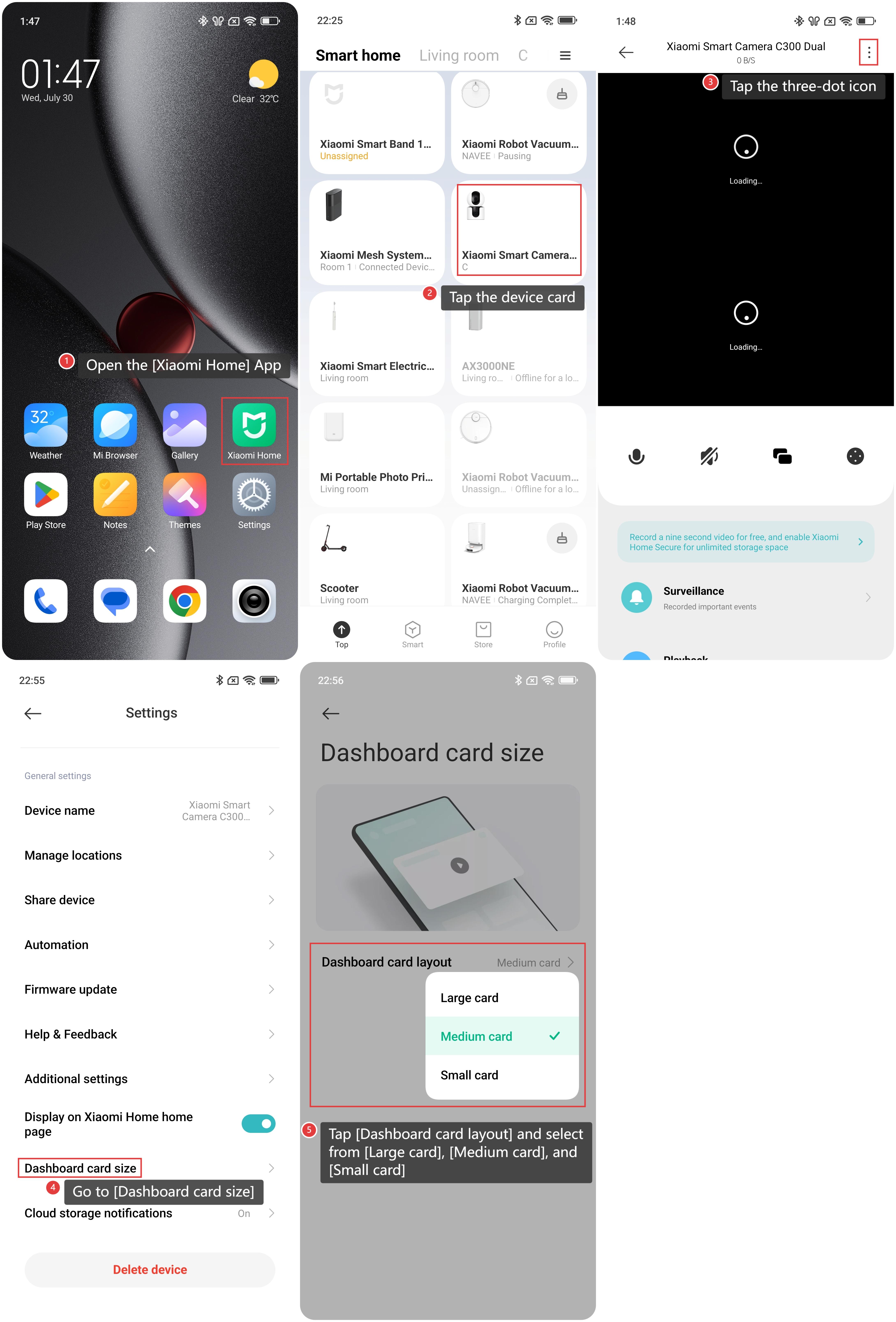
To change the size of the camera’s device card in the Xiaomi Home App, please refer to the following steps:
1. Open the [Xiaomi Home] App on the phone.
2. Tap the [Xiaomi Smart Camera C300 Dual] device card.
3. Tap the three-dot icon in the upper right corner to enter the settings.
4. Scroll down and go to [Dashboard card size].
5. Tap [Dashboard card layout] and select from [Large card], [Medium card], and [Small card].
Does it help?
Yes
No