

Xiaomi Sound Party FAQ
Product Information
Q1: What are the selling points of the Xiaomi Sound Party?
A: The selling points of the Xiaomi Sound Party are as follows:
- The Xiaomi Sound Party boasts a power output of 50 W.
- Supports Harman AudioEFX.
- Supports TWS mode.
- Support up to 26 hours of playtime.
- Xiaomi family design language.
- Time tunnel ambient lighting.
- Supports PD fast charging and reverse charging.
Q2: Does the Xiaomi Sound Party support NFC?
A: The Xiaomi Sound Party supports NFC. The NFC function is only compatible with phones running Android 8.1 and above and does not support iOS systems.
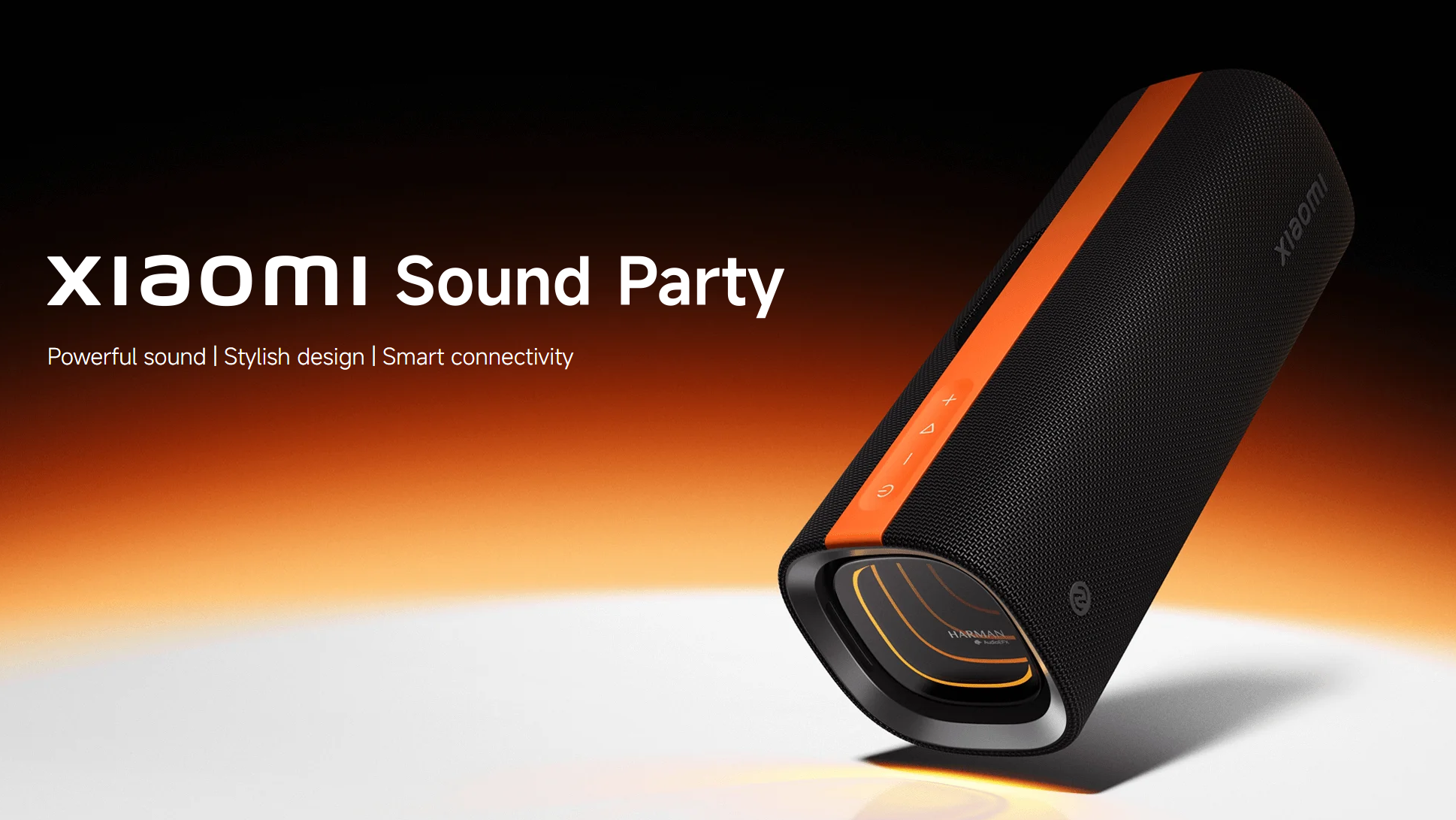
Q3: What does the Xiaomi Sound Party look like?
A:
- The Xiaomi Sound Party comes in black.
- The dimensions of the Xiaomi Sound Party are 255 mm × 92 mm × 92 mm. Net weight approximately 1200 grams.
Q4: How to turn on and off the Xiaomi Sound Party?
A: Press and hold the power button for 2 seconds to turn on and off the Xiaomi Sound Party.
Q5: Does the Xiaomi Sound Party support networking?
A: The Xiaomi Sound Party does not support networking.
Q6: Can the Xiaomi Sound Party be controlled via the App?
A: The Xiaomi Sound Party cannot be controlled via the App.
Q7: In what environments can the Xiaomi Sound Party be used?
A: The Xiaomi Sound Party's operating temperature range is 0 ℃ to 40 ℃. Using this device in an environment outside of this temperature range may damage the device.
Q8: How to charge the Xiaomi Sound Party?
A: The Xiaomi Sound Party uses a Type-C charging port. You can charge it by plugging in a power adapter.
Q9: How long does it take to fully charge the Xiaomi Sound Party?
A: The Xiaomi Sound Party can be fully charged in about 4 hours.
Q10: How to check the battery level of the Xiaomi Sound Party?
A: The real-time battery level of the Xiaomi Sound Party can only be viewed in the Bluetooth settings of your phone.
Q11: Does the Xiaomi Sound Party have a low battery reminder?
A: The Xiaomi Sound Party speaker only has a low-battery reminder function.
For your reference, here is the low battery reminder function information:
- When the battery level of the Xiaomi Sound Party is below 10%, it will enter low-battery mode. The power button will flash white quickly, and a low-battery tone will be played.
- A shutdown tone will sound when the low battery shutdown voltage is reached.
Q12: How to restore the Xiaomi Sound Party to factory settings?
A: When the Xiaomi Sound Party is turned on, press and hold the pause / play button and the volume up button at the same time for 2 seconds to restore to factory settings.
Q13: How to connect the Xiaomi Sound Party to mobile phones and other devices?
A: When the Xiaomi Sound Party is turned on, press the Bluetooth button to connect to your phone or other devices.
Q14: What buttons does the Xiaomi Sound Party have?
A: There are 7 buttons on the Xiaomi Sound Party.
For your reference, the buttons and their functions are as follows:
- Power button: Turn on/off/control lighting effects.
- Volume - button: Decrease the volume.
- Play/Pause button: Pause, switch songs, and answer calls.
- Volume + button: Increase the volume.
- Bass Boost button: Bass enhancement.
- Bluetooth button: Bluetooth pairing.
- Connect button: multiple devices pair, broadcast mode.
Q15: What are the interfaces on the Xiaomi Sound Party?
A: The interface on the Xiaomi Sound Party is a Type-C charging port.
Q16: Is there an indicator on the Xiaomi Sound Party?
A: There are indicators on the Xiaomi Sound Party.
Q17: What is the status of the indicator of the Xiaomi Sound Party?
A: The indicator of the Xiaomi Sound Party has three states: always on, flashing quickly, and off.
For your reference, here are the indicator lights on each button:
- The indicator on the power button is a solid white light when the device is powered on. When the battery is low, the white light flashes rapidly (on for 200 ms, off for 200 ms).
- The indicator on the Bluetooth button will flash white rapidly (on for 200 ms, off for 200 ms) during initial booting or pairing status. It will remain solid white after successful pairing. The indicator will be off in reconnecting mode.
- The indicator on the Bass Boost button is solid white in bass boost mode.
- The indicator on the Connect button will flash white rapidly (on for 200 ms, off for 200 ms) during pairing. It will turn solid white after a successful pair formation.
- The 3D colorful lighting status is on and off.
Q18: Does the Xiaomi Sound Party have a lanyard hole?
A: The Xiaomi Sound Party does not have a lanyard hole.
Q19: Does the Xiaomi Sound Party support connecting two devices at the same time?
A: The Xiaomi Sound Party supports connecting two devices at the same time.
Q20: Can the Xiaomi Sound Party be connected to a mobile phone to be used as a speaker and microphone?
A: The Xiaomi Sound Party can be connected to a mobile phone to be used as a speaker and microphone.
Q21: When adjusting the volume on the Xiaomi Sound Party, will the volume of the phone change as well?
A: When you adjust the volume on the Xiaomi Sound Party, the volume on your phone will also change.
Q22: How long does the Xiaomi Sound Party last when fully charged?
A: The Xiaomi Sound Party has a battery life of more than 26 hours at 50% volume.
Q23: Does the Xiaomi Sound Party support voice calls?
A: The Xiaomi Sound Party supports voice calls.
Q24: Does the Xiaomi Sound Party support Google Assistant or Amazon Alexa voice control?
A: The Xiaomi Sound Party does not support Google Assistant or Amazon Alexa voice control.
Q25: Can the Xiaomi Sound Party be connected to a car Bluetooth?
A: The Xiaomi Sound Party cannot be connected to a car Bluetooth.
Q26: What is the waterproof and dustproof level of the Xiaomi Sound Party?
A: The Xiaomi Sound Party's waterproof and dustproof rating is IP67.
Q27: Does Xiaomi Sound Party have a notification sound? Can it be turned off?
A: The Xiaomi Sound Party has a reminder sound, which cannot be turned off.
FAQ
Q1: Can the Xiaomi Sound Party be used as a Bluetooth gateway?
A: The Xiaomi Sound Party does not support use as a Bluetooth gateway.
Q2: Does the Xiaomi Sound Party support the SBC Bluetooth protocol?
A: The Xiaomi Sound Party supports the SBC Bluetooth protocol.
Q3: Does the Xiaomi Sound Party support the AAC Bluetooth protocol?
A: The Xiaomi Sound Party does not support the AAC Bluetooth protocol.
Q4: Does the Xiaomi Sound Party support the aptX Bluetooth protocol?
A: The Xiaomi Sound Party does not support the aptX Bluetooth protocol.
Q5: Does the Xiaomi Sound Party support the LDAC Bluetooth protocol?
A: The Xiaomi Sound Party does not support the LDAC Bluetooth protocol.
Q6: Does the Xiaomi Sound Party support the LHDC Bluetooth protocol?
A: The Xiaomi Sound Party does not support the LHDC Bluetooth protocol.
Q7: Does the Xiaomi Sound Party support the LC3 Bluetooth protocol?
A: The Xiaomi Sound Party does not support the LC3 Bluetooth protocol.
Q8: Does the Xiaomi Sound Party support the ASHA Bluetooth protocol?
A: The Xiaomi Sound Party does not support the ASHA Bluetooth protocol.
Q9: What is the Bluetooth version of the Xiaomi Sound Party?
A: The Bluetooth version of the Xiaomi Sound Party is 5.4.
Q10: What is the delay of the Xiaomi Sound Party?
A: The delay of the Xiaomi Sound Party is less than 250 ms.
Q11: How to use the Bluetooth function of the Xiaomi Sound Party?
A: Press the Bluetooth button on the Xiaomi Sound Party, and the speaker will automatically disconnect. Press and hold the Bluetooth button for 2 seconds to re-enter pairing mode.
Q12: Does the Xiaomi Sound Party support a Bluetooth Mesh gateway?
A: The Xiaomi Sound Party does not support Bluetooth Mesh gateways.
Q13: How many devices can Xiaomi Sound Party connect for multi-device playback?
A: The Xiaomi Sound Party supports multi-device combined playback, up to 100 devices.
Q14: How does the Xiaomi Sound Party form a stereo combination?
A: The Xiaomi Sound Party supports up to 2.0 channels. After turning on the speakers, press the Connect button on each speaker to connect them.
Q15: How to use the Xiaomi Sound Party stereo combination after it is created?
A: After the Xiaomi Sound Party stereo combination is created, the host device is the left channel, and the slave device is the right channel.
For your reference, here is the information on how to use it:
- After the Xiaomi Sound Party successfully forms a pair, it enters TWS mode. The white light on the host Bluetooth button is always on, and the white light on the slave Bluetooth button is off. If Bluetooth is not connected, the white light on the host will flash quickly or go out, and the white light on the slave Bluetooth button will be off. If the pair is successfully formed, the white light on the Connect button on both the host and secondary devices will always be on.
- The host and secondary devices have synchronized playback status and volume. Playback, pause, skip, and volume up buttons operate synchronously, and lighting effects are synchronized.
- Turning off one speaker does not affect the status of the other speaker.
- The pair formation state lasts for 15 minutes. If the pair formation is not successful after 15 minutes, the system will automatically shut down.
- The pairing time between two devices is less than 10 seconds.
- After the speaker is turned on and off again, exit TWS mode and enter Bluetooth mode (the Bluetooth white light will go out when reconnecting, and will stay on when successfully reconnected).
- The one who initiates the Bluetooth connection is the host.
- After forming a pair, the status before forming a pair is inherited (when in pair status, the host is the primary when the Bluetooth connection is reconnected).
- In call mode, only the host outputs the call audio.
Q16: How to exit the stereo pair of the Xiaomi Sound Party?
A: You can exit the stereo pair of the Xiaomi Sound Party by pressing the Connect button, or by pressing or pressing and holding the Bluetooth button.
Q17: Does the Xiaomi Sound Party support firmware upgrades?
A: The Xiaomi Sound Party supports firmware upgrades, but you need to contact the official after-sales service center to perform the upgrade.
Troubleshooting
Q1: What should to do if the Xiaomi Sound Party cannot be turned on?
A: If the Xiaomi Sound Party cannot be turned on, the device may have been shut down due to low battery. Connect the charger and charge it for a while, then press and hold the power button again to see if it can be turned on.
Q2: What to do if the Xiaomi Sound Party cannot be shut down?
A: Press and hold the Xiaomi Sound Party power button for more than 8 seconds to shut down.
Q3: What should you do if the phone cannot search for the Xiaomi Sound Party's Bluetooth signal?
A: For your reference, please follow the steps below to troubleshoot:
- Check that the Xiaomi Sound Party indicator is on to ensure your device is powered on. If it is not, press and hold the power button for two seconds to power it on, and then try searching for devices.
- If your phone cannot search for the Xiaomi Sound Party's Bluetooth signal when it is turned on, it may be connected to another phone. Press and hold the Bluetooth button for 2 seconds to disconnect all connections and enter pairing mode. Then use your phone to search for the speaker's Bluetooth signal again.
Q4: What should to do if the phone can search for the Xiaomi Sound Party but cannot connect to it?
A: For your reference, please follow the steps below to troubleshoot:
- Restart your phone's Bluetooth and the Xiaomi Sound Party, and try searching and connecting.
- Move your phone and the Xiaomi Sound Party away from interference sources such as microwave ovens and routers, and try connecting.
- Delete the pairing record of your phone with the Xiaomi Sound Party and try searching again.
Q5: What should to do if the Xiaomi Sound Party connection is unstable?
A: Move your phone and the Xiaomi Sound Party to an open space away from routers and other electronic devices. If you experience a stable connection just now, it means you are in an environment with interference before. Try not to use it near microwave ovens, routers, etc.
Q6: What should to do if the Xiaomi Sound Party cannot reconnect automatically?
A: For your reference, please follow the steps below to troubleshoot:
- Restart your phone's Bluetooth and the Xiaomi Sound Party to see if the sound can be restored.
- Press and hold the Xiaomi Sound Party's play button and volume up button at the same time for 2 seconds. Reconnect after restoring to factory settings.
Q7: What should to do if the Xiaomi Sound Party cannot be charged?
A: For your reference, please follow the steps below to troubleshoot:
- Use the charger to charge other products, such as mobile phones, and ensure that there is no abnormality in the charger itself.
- When the Xiaomi Sound Party is turned on, press and hold the play button and volume up button at the same time for 2 seconds. Restore the factory settings, and then charge and observe again.
Q8: What should to do if the buttons of the Xiaomi Sound Party fail to work?
A: Try to press and hold the Xiaomi Sound Party power button for 8 seconds to force shut down the device and then restart it to see how it performs.
Q9: What should to do if the Xiaomi Sound Party has no sound or the sound is very low?
A: For your reference, please follow the steps below to troubleshoot:
- Try increasing the volume by pressing the volume up button on the Xiaomi Sound Party and your phone to see if the sound increases.
- Some phones don't have a default absolute volume setting. To do this, go to [Settings] >> [Bluetooth] >> [Xiaomi Sound Party] on your phone and enable "Sync Bluetooth device volume with phone" (the name varies depending on the phone brand). Adjusting the volume on your phone or Bluetooth speaker will synchronize the volume.
Q10: What should to do if there is noise or intermittent sound in the Xiaomi Sound Party?
A: If the Xiaomi Sound Party has noise or intermittent sound, there is interference nearby. Move your phone and the Xiaomi Sound Party to an open space away from routers and other electronic devices. If the noise and intermittent sound disappear, it indicates that you were in an interference environment before. Try to avoid microwave ovens, routers, and other devices when using the Xiaomi Sound Party.
Q11: What should to do if the Xiaomi Sound Party suddenly shuts down while playing?
A: The Xiaomi Sound Party has reached the state of automatic shutdown due to low battery. Connect the charger to charge for a while, and use it again to check if it automatically shuts down again.
Q12: What should to do if the Xiaomi Sound Party's Bluetooth connection is stuck?
A: If the Xiaomi Sound Party Bluetooth connection is lagging, there may be interference nearby. Move your phone and the Xiaomi Sound Party to an open space away from routers and other electronic devices. If the noise and intermittent sound disappear, it indicates that interference was present before. Try to avoid microwave ovens, routers, and other devices when using the device.
Q13: Why does the Bluetooth of the Xiaomi Sound Party turn off automatically?
A: To extend the use time of the Xiaomi Sound Party and save energy, the Xiaomi Sound Party will automatically shut down after 15 minutes when it is not connected or connected but not playing. To use it again, press and hold the power button for 2 seconds to turn it on.
Q14: Why does the Xiaomi Sound Party suddenly play music?
A: When the Xiaomi Sound Party is playing music and receives an incoming call or an App voice call, the music playback will be temporarily paused, and the music will play automatically after the call ends.
Q15: What should to do if a PIN code is required when connecting to the Xiaomi Sound Party?
A: The Xiaomi Sound Party does not require manual entry of a PIN code.
Q16: What should to do if the Xiaomi Sound Party firmware upgrade fails?
A: The Xiaomi Sound Party does not have an OTA update function, so you cannot upgrade the firmware by yourself. For firmware upgrades, please contact the official after-sales service center.
Q17: What should to do if the indicator of the Xiaomi Sound Party is not on?
A: For your reference, please follow the steps below to troubleshoot:
- To troubleshoot the Xiaomi Sound Party shutdown issue, try turning it on by pressing and holding the power button for 2 seconds and checking if the light turns on.
- Connect the Xiaomi Sound Party to the charger and check whether the charging indicator lights up.
Does it help?
Yes
No