

Mijia Smart Water Purifier N800G FAQ
Overview
Q1: What are the selling points of the Mijia Smart Water Purifier N800G?
A: The selling points of the Mijia Smart Water Purifier N800G are as follows:
- The water purifier features a high flow rate design, producing 2 L/min of purified water, and filling a 150 mL cup in just about 4.6 seconds;
- The RO filter offers a service life of up to 3 years, providing stable performance and saving both filter replacements and costs;
- The App allows you to remotely monitor water consumption, filter status, and water quality;
- Compact size ensures under-sink installation without space limitations;
- 2:1 pure-to-waste water ratio, producing 2 cups of purified water for every 1 cup of waste water;
- Equipped with a five-chamber low-noise pump, ensuring quiet operation with minimal disturbance;
- The purified water tap indicator clearly shows filter status.
Q2: What water purification technology does the Mijia Smart Water Purifier N800G use?
A: The Mijia Smart Water Purifier N800G uses reverse osmosis (RO) technology to provide safe drinking water.
Currently, household water purifiers on the market are mainly classified by filtration precision into microfiltration, ultrafiltration, and reverse osmosis:
- Microfiltration (MF): Filtration precision is typically 0.1–1 micron. It performs basic coarse filtration, removing large particles such as sand, rust, and sediment. However, it generally cannot remove bacteria, viruses, or other harmful substances. The filter cartridges are usually disposable and non-washable, requiring frequent replacement. Common water filter pitchers belong to this category;
- Ultrafiltration (UF): Filtration precision ranges from 0.01–0.1 micron. UF filters can remove rust, sand, suspended solids, colloids, and some bacteria, but they cannot remove heavy metals or scale;
- Reverse Osmosis (RO): Theoretical filtration precision reaches 0.0001 micron, which is much higher than UF and MF. RO technology can remove rust, sand, suspended solids, colloids, bacteria, viruses, heavy metals, scale, organic compounds, and more. It is commonly used for producing purified water, industrial ultrapure water, and pharmaceutical ultrapure water
Q3: RO technology in the Mijia Smart Water Purifier N800G is so powerful, why are additional filters still needed?
A: The Mijia Smart Water Purifier N800G uses an economical reverse osmosis (RO) filtration system. The PPC filter in the purification system serves as a pre-treatment stage for the incoming water. It can intercept large particles, colloids, and other impurities, as well as adsorb odors and unwanted substances in the water. Although RO membranes could theoretically produce purified water on their own, large particles would accumulate on the membrane surface, quickly clogging it and increasing the frequency of RO membrane replacements. By protecting the RO membrane, the PPC filter reduces the number of filter changes and saves maintenance costs.
Q4: What is concentrated water, and why does the Mijia Smart Water Purifier N800G produce it?
A: Concentrated water refers to the portion of tap water that has undergone pre-treatment through the purifier’s folded PP cotton, pre-activated carbon stick and non-woven fabric, removing residual chlorine, suspended solids, rust, colloids and most organic substances. A part of this water then passes through the RO membrane and a post-activated carbon filter to produce purified water for drinking. The remaining water, which has only gone through the pre-treatment stages but not the RO and post-carbon stages, becomes concentrated water. Although its salt concentration is higher than tap water, most other parameters such as turbidity, color, residual chlorine, organic matter, suspended solids, colloids, COD (chemical oxygen demand), TOC (total organic carbon) and SDI (silt density index) are lower than those of tap water.
The Mijia Smart Water Purifier N800G uses RO technology for deep purification. The theoretical filtration precision of the RO membrane reaches 0.0001 micron, far higher than ultrafiltration (UF) or microfiltration (MF). While MF and UF do not produce wastewater, they cannot remove heavy metals, scale, or organic contaminants. During RO filtration, harmful substances such as bacteria, viruses, and heavy metals are discharged along with the concentrated water, which prevents concentration polarization and early clogging of the RO membrane. Therefore, it is normal for a reverse osmosis water purifier to discharge both purified water and concentrated water simultaneously.
Q5: What is the recovery rate (pure-to-waste water ratio) of the Mijia Smart Water Purifier N800G, and what factors affect it?
A: The recovery rate refers to the proportion of purified water produced by the water purifier relative to the tap water used during operation. The wastewater ratio is the ratio of purified water to wastewater. The Mijia Smart Water Purifier N800G is designed with a maximum pure-to-waste water ratio of 2:1 under standard test conditions (water temperature 25±1 °C, inlet water pressure 0.24±0.02 MPa).
The pure-to-waste water ratio is affected by several factors:
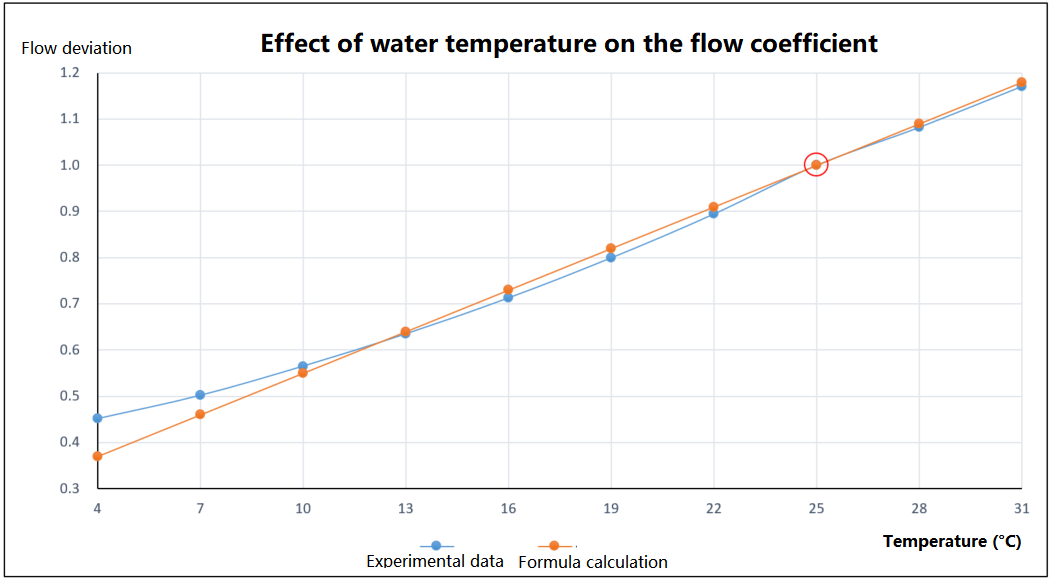
- Water temperature: When the water temperature is below 25 °C, the lower the temperature, the lower the recovery rate, which can result in more concentrated water than purified water. When the water temperature is above 25 °C, the higher the temperature, the higher the recovery rate, which can result in more purified water than concentrated water. Based on practical measurements, using 25 °C as a reference, the water output decreases by approximately 3% for every 1 °C drop and increases by approximately 3% for every 1 °C rise. The detailed relationship between temperature and flow coefficient is shown in the diagram. Please ensure that the water temperature stays within the RO membrane's safe range of 5 to 38 °C;
- Water pressure: When the inlet water pressure is lower than the standard 0.24±0.02 MPa, the recovery rate decreases, producing more concentrated water than purified water. When the water pressure is higher, the recovery rate increases, producing more purified water than concentrated water. The RO membrane's pressure limit must also be considered;
- Poor inlet water quality: High levels of contaminants can clog the filters, resulting in a lower recovery rate;
- Filter lifespan expiration: When filters become clogged with impurities over time, the recovery rate will decrease.
Q6: What is TDS, and what does the TDS value indicate?
A: TDS is only one indicator of water quality and cannot fully determine whether water is good or bad.
TDS stands for Total Dissolved Solids. It indicates how many milligrams of dissolved solids are present in one liter of water, expressed in mg/L or ppm. TDS includes non-volatile soluble salts, organic matter, and insoluble particles that can pass through filters. Generally, the lower the TDS value, the fewer dissolved solids in the water, and the purer the water.
After passing through a reverse osmosis (RO) water purifier, the TDS of tap water is significantly reduced. The difference in TDS between tap water and purified water reflects the effectiveness of the water purifier.
Note:
Soluble salts of calcium and magnesium are the main components that cause scale formation. TDS is not a measure of water quality, because beverages like cola or juice have TDS values above 400 mg/L, and mineral water can have TDS above 100 mg/L. The Mijia Smart Water Purifier effectively removes inorganic salts, heavy metal ions, organic matter, colloids, bacteria, viruses, and other impurities. However, TDS only measures the total dissolved solids and cannot detect bacteria, viruses, or other harmful substances. Therefore, a high or low TDS value alone cannot directly indicate the quality of purified water.
Under normal conditions, if the purifier is unused for a long time, the TDS of purified water can slightly increase due to osmosis. This is normal and can be reduced by running water from the faucet for about 15 seconds.
Q7: Will drinking purified water for a long time cause a lack of minerals?
A: Purified water refers to water that meets drinking water hygiene standards and is processed using methods such as electrodialysis, ion exchange, or reverse osmosis. It contains no additives and is safe for direct consumption. The main function of water in the human body is to support metabolism, not to provide nutrition. Mineral intake primarily comes from food.
For example, a glass of milk contains as much calcium as 1,200 glasses of mineral water, 500 grams of beef contains as much iron as 8,200 glasses of mineral water, and a glass of orange juice contains 500 times more beneficial minerals than untreated drinking water. These examples show that true nutritional intake relies on food, not drinking water. On the other hand, purified water is safe and hygienic. Drinking it long-term will not cause a mineral deficiency, and it helps prevent health risks associated with water contamination.
Q8: What is a point-of-use (POU) water dispenser, and can the Mijia Smart Water Purifier N800G be connected to one?
A: A point-of-use (POU) water dispenser, also called a pipeline water dispenser or wall-mounted pipeline dispenser, comes in wall-mounted and freestanding types. It is commonly used in homes, offices, and similar settings. POU water dispensers require a water source of purified water or filtered water.
The Mijia Smart Water Purifier N800G can be connected to a POU water dispenser, but the dispenser must have a water level control switch. Installation should be carried out by a professional installer, self-installation is not recommended.
- To connect, a T-type connector (not included) is required. The purified water line is split into two: one end connects to the purifier faucet, and the other end connects to the POU water dispenser;
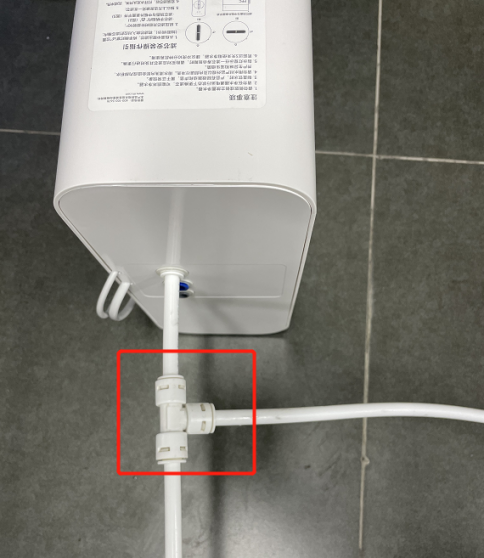
- After installation, go to the Xiaomi Home App's water purifier settings interface and enable the POU water dispenser mode. (If the water purifier is not connected to a POU dispenser, keep this feature turned off, otherwise the purifier can malfunction.)
Product Introduction and Usage
Q1: Can the purified water produced by the Mijia Smart Water Purifier N800G be consumed directly?
A: The purified water produced by the Mijia Smart Water Purifier N800G can be consumed directly.
Q2: How many filters does the Mijia Smart Water Purifier N800G have, and how many filtration stages?
A: The Mijia Smart Water Purifier N800G uses a PPC composite filter and an RO membrane filter. The filtration levels include folded PP, pre-activated carbon stick, non-woven fabric, RO membrane, post-activated carbon stick, and non-woven fabric, achieving six stages of filtration. The PPC composite filter effectively intercepts sand and rust, removes residual chlorine, color, and odor, and improves water taste. The RO membrane effectively removes scale, bacteria, viruses, heavy metals, and other harmful substances, ensuring safe drinking water.
Q3: What is the lifespan of the filters in the Mijia Smart Water Purifier N800G?
A: The lifespan of Mijia Smart Water Purifier N800G filters is calculated based on an integrated algorithm that considers factors such as water volume processed, usage time, water flow, and the quality of tap water and purified water. Filter life begins counting as soon as the filter is installed and powered on.
The PPC composite filter has a lifespan of up to 12 months, while the RO filter has a lifespan of up to 36 months.
Filter name | Key feature | Effectively removed substances | Replacement cycle |
Mijia Smart Water Purifier N800G Composite Filter PPC1 | Filters out relatively large impurities and particles; adsorbs discoloration, odors, residual chlorine, and some organic matter in water. | Rust, sediment, fibers, and other visible matter; discoloration, odors, residual chlorine, and organic compounds like trichloromethane and carbon tetrachloride. | No longer than 12 months
|
Mijia Smart Water Purifier N800G Filter RO1 | The theoretical filtration precision can reach 0.0001 microns. It can effectively intercept bacteria, heavy metals, organic matter, and other substances in water. | Heavy metals, bacteria, limescale, organic matter, etc.
| No longer than 36 months |
Note:
- Unopened filters are recommended to be stored for no more than two years. Storage conditions should avoid direct sunlight, high temperatures, and humidity;
- Filter life begins counting as soon as the filter is installed and powered on. It is recommended to install the filter when ready to use the water purifier. If the purifier is installed but not used immediately, turn off the water supply and disconnect the power;
- The actual filter replacement cycle varies depending on region, water quality, season, and usage;
- Please replace the filters regularly according to the reminders.
Q4: How to install the filters in the Mijia Smart Water Purifier N800G?
A: To install the filters in the Mijia Smart Water Purifier N800G, please refer to the following steps:
- Open the packaging and take out the filter. Remove the outer plastic film and foam from the filter;
- Align the filter gently with the filter compartment, then rotate it clockwise until it clicks into place;
- After installing the filter, reset the corresponding filter in the system. Once reset is complete, follow the instructions in the user manual to flush the filter.
Q5: Can the Mijia Smart Water Purifier N800G be self-installed?
A: The Mijia Smart Water Purifier N800G can be self-installed. Please refer to the user manual and installation video. If installation or operation cannot be completed independently, be sure to contact Xiaomi customer service or schedule a professional installer at an authorized Xiaomi service center. Any accidents or damages caused by self-installation must be borne by yourself.
Q6: What is the power consumption of the Mijia Smart Water Purifier N800G, and is it necessary to unplug when not in use?
A: The Mijia Smart Water Purifier N800G has a rated power of 75 W and a standby power of about 2 W. It is not necessary to unplug repeatedly when not in use.
Q7: How to install and replace the filters in the Mijia Smart Water Purifier N800G?
A: To install and replace the filters in the Mijia Smart Water Purifier N800G, please refer to the following steps:
- Close the three-way ball valve, turn on the tap, and wait until no water flows. At this point, turn off the
water purifier, disconnect it from power, and remove the old filter;
Note:
Do not forcefully pull the water hoses or the signal cables for the purified water tap to avoid power connection failure or water leakage.
- Rotate the filter 90° counterclockwise, and remove the filter from the filter compartment;
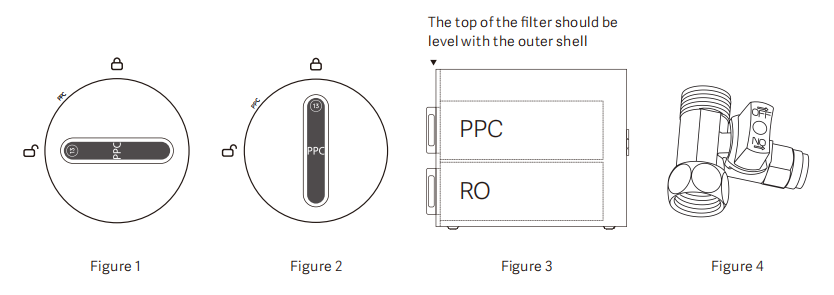
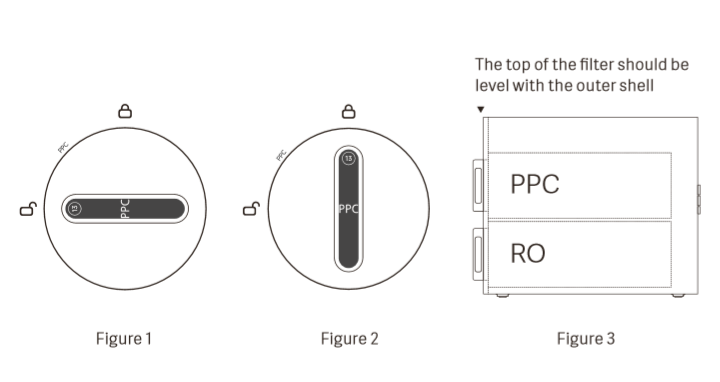
- Make the handle point to the "open lock" location, and gently insert the filter into the corresponding filter compartment (Figure 1);
- Install the filter by lightly pressing on it and rotating it 90° clockwise. The filter is put in place when the following conditions are met;(1). The filter handle points to "Lock closed" (Figure 2);(2). The top of the filter is level with the outer surface of the middle bezel (Figure 3).
- After connecting the water purifier to power and turning it on, open the three-way ball valve and press the select button to select a new filter. Then, the corresponding indicator blinks. Press and hold the reset button for 3 seconds. Once you hear a notification sound, the indicator goes off, indicating that the filter has been reset successfully.
Q8: What are the three PE hoses at the back of the Mijia Smart Water Purifier N800G, and what are their lengths?
A: Among the three hoses, the blue 3/8-inch hose is the inlet tap water hose, the white 3/8-inch hose is the purified water hose, and the gray 2/8-inch hose is the concentrated water hose. All hoses are 2 meters long.
Q9: What are the water quality, temperature, and pressure requirements for the Mijia Smart Water Purifier N800G?
A: To ensure proper operation of the Mijia Smart Water Purifier N800G, the following water conditions should be met:
- The water purifier is suitable for household use with tap water as the water source;
- The applicable water temperature is 5–38 °C. Lower water temperatures can result in a lower recovery rate, while higher temperatures can increase the recovery rate;
- The applicable water pressure is 0.1–0.4 MPa.
Note:
If the inlet water pressure is below 0.1 MPa, a booster pump must be installed at your expense. If the inlet water pressure is above 0.4 MPa, a pressure reducing valve must be installed at your expense.
Q10: Does the Mijia Smart Water Purifier N800G provide reminders when filter replacement is needed?
A: There are three types of reminders for the Mijia Smart Water Purifier N800G:
- Through the purified water tap indicator:
When either the PPC or RO filter is approaching the end of its life, the purified water tap indicator blinks in orange. When a filter has reached the end of its life, the purified water tap indicator keeps in orange. (Due to product updates, the display status varies slightly. Please refer to the latest software.) - Through the corresponding filter indicator on the water purifier:
When the filter indicator is off, the filter life is normal. When the filter is nearing the end of its life, the indicator blinks in orange. When the filter life has ended, the indicator keeps in orange. - Through the Xiaomi Home App:
The App displays the remaining filter life.
Q11: What are the status indicators of the purified water tap on the Mijia Smart Water Purifier N800G?
A: The status indicators of the purified water tap on the Mijia Smart Water Purifier N800G are as follows:
- When the indicator is off, the purifier keeps in standby mode;
- When the indicator keeps in blue, the purifier is producing water;
- When the indicator blinks in orange, a filter is nearing the end of its lifespan;
- When the indicator keeps in orange, a filter has reached the end of its lifespan.
Q12: How many water output modes does the water tap of the Mijia Smart Water Purifier N800G have?
A: The Mijia Smart Water Purifier N800G has one mode, producing purified water.
Q13: Can the Mijia Smart Water Purifier N800G be laid flat?
A: No. The Mijia Smart Water Purifier N800G must be installed in an upright position due to its special internal waterway system.
Q14: Can the Mijia Smart Water Purifier N800G be wall-mounted or used outdoors?
A: The Mijia Smart Water Purifier N800G does not support wall mounting or tabletop installation from under-counter units. Its operating water temperature is 5–38 °C and ambient temperature range is 4–40 °C. Outdoor environments can exceed these limits, so installation outdoors or near radiators is not recommended.
Do not store or expose the device to environments at 4 °C or below, as freezing can damage internal components. If the purifier has frozen, ensure it is fully thawed and check for water leakage before use.
Do not store or expose the device to environments at 4 °C or below, as freezing can damage internal components. If the purifier has frozen, ensure it is fully thawed and check for water leakage before use.
Q15: Does the Mijia Smart Water Purifier N800G have a heating function?
A: No. The Mijia Smart Water Purifier N800G does not support heating.
Q16: Can the water quality be monitored on the Mijia Smart Water Purifier N800G?
A: The Mijia Smart Water Purifier N800G allows monitoring of the filtered water quality through the Xiaomi Home App. The TDS of the purified water is comparable to that of bottled purified water and is safe for drinking.
Note:
Note:
Due to the characteristics of the RO membrane, if the purifier is unused for a period, the TDS of the output water gradually decreases from high to low, which is normal.
Q17: Does the discharge of concentrated water from the Mijia Smart Water Purifier N800G cause significant water waste?
A: The Mijia Smart Water Purifier N800G is mainly designed to provide drinking water for households. The water recovery rate reaches 65%, corresponding to a pure-to-waste water ratio of 2:1.
Q18: Can the Mijia Smart Water Purifier N800G be installed if there is no tap water drainage under the cabinet?
A: The Mijia Smart Water Purifier N800G uses RO technology, which produces a separate concentrated water output. If there is no drainage under the cabinet, the concentrated water can be collected in other containers for use, such as watering plants or mopping the floor. Installation details can be discussed with the installer. The concentrated water hose can be placed directly over the sink for collection.
Note:
Note:
- If the concentrated water is not discharged into the drain, take care to avoid water overflow;
- The waste water line must not be blocked, it must remain unobstructed to ensure water quality and filter lifespan.
Q19: What does the 800G in the Mijia Smart Water Purifier N800G represent?
A: The 800G in the Mijia Smart Water Purifier N800G indicates that the purifier can produce 800 gallons of purified water during continuous operation over 24 hours.
Note:
Note:
A gallon is a unit of volume.
Q20: What size hole is required to install the purified water tap of the Mijia Smart Water Purifier N800G?
A: The purified water tap installation of the Mijia Smart Water Purifier N800G requires a hole with a diameter of 25–35 mm.
Note:
Note:
The hole can use the sink soap dispenser hole, or be drilled in a stainless steel sink or acrylic countertop. For other countertop materials (e.g., marble or ceramic), a 25–35 mm hole must be pre-drilled with a flat area within a 25 mm radius around the hole.
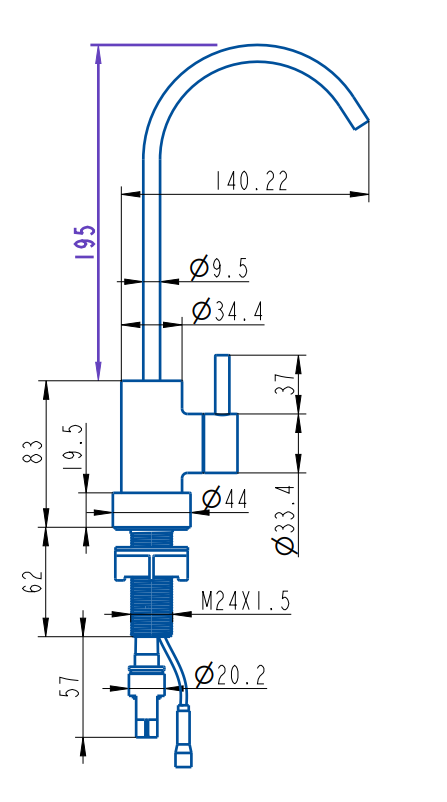
Q21: What are the dimensions of the purified water tap of the Mijia Smart Water Purifier N800G?
A: Please refer to the diagram below for the dimensions of the purified water tap of the Mijia Smart Water Purifier N800G:
Q22: What is the rated flow rate of the Mijia Smart Water Purifier N800G?
A: The rated flow rate of the Mijia Smart Water Purifier N800G is 2 L/min.
Q23: What is the rated voltage of the Mijia Smart Water Purifier N800G?
A: The rated voltage of the Mijia Smart Water Purifier N800G is 110 V AC.
Q24: What is the rated power of the Mijia Smart Water Purifier N800G?
A: The rated power of the Mijia Smart Water Purifier N800G is 75 W.
Q25: What is the total rated purified water capacity of the Mijia Smart Water Purifier N800G?
A: The total rated purified water capacity of the Mijia Smart Water Purifier N800G is 4000 L.
Q26: What are the product dimensions of the Mijia Smart Water Purifier N800G?
A: The product dimensions of the Mijia Smart Water Purifier N800G are 420 mm × 127 mm × 310 mm (L × W × H).
Q27: Can the Mijia Smart Water Purifier N800G be installed using groundwater?
A: No. The Mijia Smart Water Purifier N800G requires tap water as the water source.
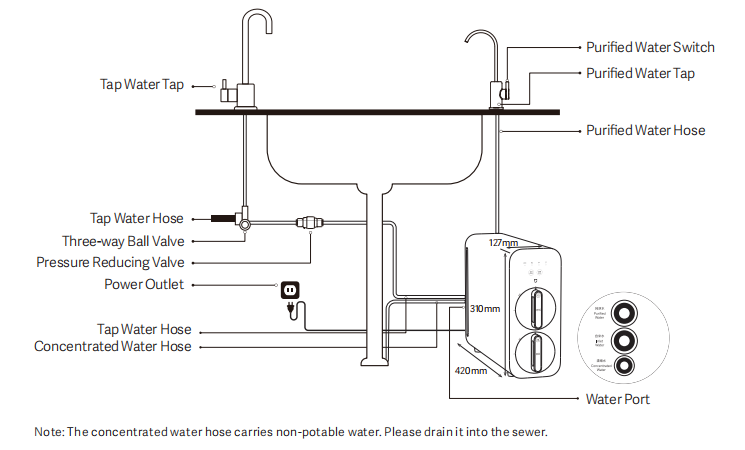
Q28: What installation requirements are needed for the Mijia Smart Water Purifier N800G?
A: The Mijia Smart Water Purifier N800G needs to meet the following installation requirements:
- The operating water pressure must be 0.1–0.4 MPa. If the water pressure exceeds 0.4 MPa, install a pressure-reducing valve. If the water pressure is below 0.1 MPa, purchase and install a booster pump;
- Sufficient space under the cabinet must be reserved for installation. The product dimensions are 420 mm (L) × 127 mm (W) × 310 mm (H). The purifier comes with an inlet elbow clamp, making the total installation length 470 mm;
- A power outlet or power strip (110 V AC, 2-pin socket) must be available within 1.5 meters of the installation location;
- The installation requires the use of the sink soap dispenser hole. If no hole is available, drill a hole with a diameter of Ø25–35 mm in advance;
- Kitchen tap water hoses and the water tap connection must be free of rust and allow smooth installation of the three-way ball valve;
- The angle valve of the tap water hose must have a standard ½-inch interface. If the interface is non-standard, purchase a suitable three-way ball valve separately;
- The kitchen must have access to open drainage, such as a drain hose or floor drain, and the drainage system must not be blocked.
Q29: Does the Mijia Smart Water Purifier N800G need rinsing after filter replacement, and how should it be rinsed?
A: The Mijia Smart Water Purifier N800G needs rinsing after filter replacement.
Rinsing the PPC filter:
Turn on the tap to start rinsing. This operation is expected to be completed in about 30 minutes. Turn off
the tap to complete rinse.
Rinsing the RO filter:
Dispense as much water as possible on the first day of installation for a better drinking experience. The
produced water on the first day is not recommended for drinking, but it can be used for kitchen
cleaning, as the special reverse osmosis membrane contains moisturizing ingredients (mainly
food-grade glycerin). If the above operation is not applicable, it is recommended to turn on the purified
water tap and run the water purifier for 20 minutes every two hours for a total of at least 12 times after
the installation until all the water has drained out to ensure the taste of the filtered water.
Note:
Apply the RO filter rinsing method to a new water purifier or when two filters are replaced simultaneously.
Q30: Can the concentrated water of the Mijia Smart Water Purifier N800G be consumed? Is it harmful?
A: The concentrated water of the Mijia Smart Water Purifier N800G is not recommended for drinking. Most impurities in the source water, such as color, odor, and heavy metals, are filtered by the Reverse Osmosis (RO) membrane. The discharged concentrated water contains a higher concentration of impurities than tap water, so it should not be consumed.
Q31: Can the purified water hose of the Mijia Smart Water Purifier N800G be split to supply two taps?
A: Splitting the purified water hose can damage the Mijia Smart Water Purifier N800G.
Q32: How long can the purified water produced by the Mijia Smart Water Purifier N800G be stored?
A: The purified water produced by the Mijia Smart Water Purifier N800G should be consumed promptly. Similar to bottled purified water, it is recommended to drink it as soon as possible and use on demand.
Q33: What accessories are included with the Mijia Smart Water Purifier N800G?
A: The Mijia Smart Water Purifier N800G includes the following accessories:
Mijia Smart Water Purifier N800G × 1;
Filter × 2;
Purified Water Tap × 1;
Bayonet Pin × 6;
User Manual × 1;
PE Hose × 3;
Three-way Ball Valve × 1;
Three-way Ball Valve Adapter × 1;
Thread Seal Tape × 1;
Hose Bending Clamp × 2;
Pressure Reducing Valve × 1;
Warranty Card × 1.
Network Related
Q1: How to add the Mijia Smart Water Purifier N800G to the Xiaomi Home App?
A: To add the Mijia Smart Water Purifier N800G to the Xiaomi Home App, please refer to the following steps:
- Power on the device. If it is not the first time connecting to the network, press and hold the select button for 7 seconds to reset the Wi-Fi;
- Open the Xiaomi Home App, tap the [+] icon in the top right corner to enter the device-adding interface, then select the Mijia Smart Water Purifier N800G from the discovered devices or choose it manually;
- Select the Wi-Fi network you want to connect to, enter the password, and tap [Next]. During the connection, if a pop-up asks whether to allow the Xiaomi Home App to access certain permissions, select [Allow once]. Wait until the device is successfully added.
Q2: Can the Xiaomi Home App display the inlet water temperature of the Mijia Smart Water Purifier N800G?
A: Yes, the Xiaomi Home App can display the inlet water temperature of the Mijia Smart Water Purifier N800G.
Q3: Can the filter life of the Mijia Smart Water Purifier N800G be checked in the Xiaomi Home App?
A: Yes, the Xiaomi Home App can display the remaining filter life of the Mijia Smart Water Purifier N800G in percentage. By tapping on the filter, you can enter the filter status interface. At the bottom, the [Reset filter] option allows you to reset the filter life after replacing the filter.
Q4: Can the TDS value be checked in the Xiaomi Home App for the Mijia Smart Water Purifier N800G?
A: Yes, the Xiaomi Home App can display the purified water TDS value of the Mijia Smart Water Purifier N800G.
Q5: What is the filter rinsing mode of the Mijia Smart Water Purifier N800G?
A: To ensure the lifespan of the RO filter and maintain water quality, when the inlet water temperature is ≥20 °C, the Mijia Smart Water Purifier N800G will automatically rinse if unused for more than 24 hours, with a rinsing time of about 240 seconds. When the inlet water temperature is <20 °C, the device will rinse automatically after 72 hours of inactivity, also for about 240 seconds. During rinsing, wastewater will be discharged, which is normal.
Note:
Note:
The device adopts a reverse osmosis (RO) membrane with a theoretical filtration precision of up to 0.0001 μm, which can effectively remove contaminants in water. Inevitably, colloids, microorganisms, particles, and insoluble salts can accumulate on the membrane surface, leading to scaling and reduced flow if not treated. The automatic rinsing function helps extend the RO filter's lifespan and maintain water output. By default, rinsing mode is enabled. You can disable it in the Xiaomi Home App if needed.
Q6: Can the button sound of the Mijia Smart Water Purifier N800G be turned off?
A: Yes. Connect the Mijia Smart Water Purifier N800G to the Xiaomi Home App, tap the top-right corner to access the settings, select Do Not Disturb mode, then adjust the device prompt sound. You can either disable it all day or set a custom time period.
Q7: Can the Xiaomi Home App display water usage details of the Mijia Smart Water Purifier N800G?
A: Yes, by entering the purifier interface in the Xiaomi Home App, you can view the water usage details of the Mijia Smart Water Purifier N800G.
Q8: How can the firmware of the Mijia Smart Water Purifier N800G be updated?
A: When a new firmware version is available, the firmware update option in the settings interface of the Mijia Smart Water Purifier N800G will be marked with a red dot. Open the Xiaomi Home App >> go to the purifier plugin >> tap the three-dot icon in the top right corner >> select [Firmware update] >> tap [Update now] and wait until the update is complete.
Note:
Do not power off the device during the upgrade. Use the device only after the upgrade has been completed.
Q9: Why does the water usage history in the Xiaomi Home App show "0" for the Mijia Smart Water Purifier N800G?
A: This can occur if the Mijia Smart Water Purifier N800G was not connected to the network during water usage or if the connection was unstable, causing the usage record to fail to upload.
Q10: Is the TDS value displayed on the home interface of the Xiaomi Home App for the Mijia Smart Water Purifier N800G an average value or an instant value?
A: The TDS value shown on the home interface of the Xiaomi Home App is the instant value measured by the Mijia Smart Water Purifier N800G.
Common Questions and Troubleshooting
Q1: Why does the Mijia Smart Water Purifier N800G produce a small amount of bubbles and black water during first use?
A: If the Mijia Smart Water Purifier N800G produces a small amount of bubbles and black water during first use, please refer to the following information:
- When using the purifier for the first time, the air inside the machine (filters and pipelines) must be fully expelled before normal water output occurs. Therefore, the first batch of purified water can contain a small amount of bubbles. This phenomenon will disappear with regular use. In addition, the granular activated carbon filter can release a tiny amount of carbon powder during transportation, which can appear as a small amount of black water during the first use along with purified and concentrate water.
- For first use, simply rinse the system to eliminate these issues. Power on the purifier, open the three-way valve, and open the purified water tap to rinse. Due to the characteristics of the RO membrane, it contains moisturizing components (mainly food-grade glycerin). To ensure optimal taste of the first batch of water after installation, it is recommended to use the machine as much as possible on the first day. The water produced during this period is not recommended for drinking and can be used for kitchen cleaning. If this cannot be done, it is recommended to open the purified water tap every 2 hours to produce water for 20 minutes and discharge it, repeating the process at least 12 times to ensure taste. Finally, close the purified water tap to complete the rinse.
Q2: What to do if the Mijia Smart Water Purifier N800G cannot upgrade firmware via the App, or the upgrade process freezes?
A: If the Mijia Smart Water Purifier N800G cannot upgrade firmware via the App, or the upgrade process freezes, please refer to the following steps:
- Check if the network environment is stable and ensure it is not a public network;
- Reset the purifier's Wi-Fi and try reconnecting;
- Try using your phone as a Wi-Fi hotspot and attempt the upgrade again;
- If the problem persists, report the issue via the Feedback interface in the App or contact after-sales service.
Q3: Why does the water from the Mijia Smart Water Purifier N800G appear milky white?
A: If the water from the Mijia Smart Water Purifier N800G appears milky white, please refer to the following information:
- The milky white appearance is caused by dissolved air bubbles;
- When tap water is transported under pressure through the water network, the solubility of gases present in the network and in the atmosphere increases under pressure, causing a significant amount of gas to dissolve into the water;
- As the water passes through the reverse osmosis (RO) membrane, it is further pressurized by the pump to maintain flow. This additional pressure increases the solubility of the dissolved gases even more. When the water passes through the RO membrane, these gases are broken into even smaller bubbles;
- Because the system is continuously pressurized, the gases cannot escape. When the water exits the system, the sudden drop in pressure causes the dissolved gases to expand into visible bubbles. When many bubbles are present, the water appears milky white. These bubbles will gradually disappear if the water is left standing;
- This phenomenon can occur in both purified water and concentrate water. It is a normal physical occurrence and does not affect the safety or drinkability of the water.
Q4: Why does the Mijia Smart Water Purifier N800G show water usage from yesterday even though it was installed today?
A: The Mijia Smart Water Purifier N800G uses a strategy to track total water usage. Before the device is connected to the network, its internal clock cannot synchronize with the server time. Since the purifier undergoes water testing before leaving the factory, any usage recorded before network connection is uniformly categorized as the previous day's usage. This is why the App shows water usage for yesterday even if the device was installed today.
Q5: Why doesn't the App show water usage after drawing water from the Mijia Smart Water Purifier N800G?
A: Please check whether the Mijia Smart Water Purifier N800G is connected to the App and whether the network is functioning properly. When the device is online, water usage data is transmitted to the platform after the water tap is used. If there is a network interruption during transmission, the usage data can be lost and will not appear in the App.
Q6: Why is there a deviation between the TDS value measured by the TDS pen and the TDS value displayed on the Mijia Smart Water Purifier N800G?
A: The TDS probe in the Mijia Smart Water Purifier N800G and the TDS pen are calibrated using the same water quality analyzer, so in theory, they should give similar readings for the same water.
If a deviation occurs, it is related to the measurement method:
- If air bubbles adhere to the probe of the TDS pen during measurement, the result can deviate from the actual value;
- The TDS pen measures static water, whereas the purifier measures flowing water, which can cause slight differences;
- If the purifier has not been used for an extended period, the initial TDS of the output water can fluctuate, causing discrepancies between the TDS pen and the real-time reading on the device;
- A deviation within 10% is generally considered normal.
Therefore, when measuring water TDS with a TDS pen, follow the instructions carefully to minimize errors.
Q7: How is the taste of water filtered by the Mijia Smart Water Purifier N800G?
A: The Mijia Smart Water Purifier N800G uses a six-stage reverse osmosis (RO) filtration system, including a post-activated carbon stick to improve taste. The purified water is ready for direct drinking and tastes similar to commercially available bottled purified water.
Q8: How many status indicators does the Mijia Smart Water Purifier N800G have and what do they indicate?
A: The Mijia Smart Water Purifier N800G has four status indicators on the device:
Error indicator:
- When the indicator is off, the water pump and the system work normally;
- When the indicator blinks, the continuous water production time has exceeded 60 minutes or there is a water shortage;
- When the indicator is always on, there is a temperature sensor error, a motherboard communication error, or low temperature.
PPC filter status indicator:
- When the indicator is off, the filter is working normally;
- When the indicator blinks, the filter is nearing the end of its lifespan;
- When the indicator is always on, the filter has reached the end of its lifespan, please replace it.
RO filter status indicator:
- When the indicator is off, the filter is working normally;
- When the indicator blinks, the filter is nearing the end of its lifespan;
- When the indicator is always on, the filter has reached the end of its lifespan, please replace it.
Wi-Fi indicator:
- When the indicator is off, the Wi-Fi is not connected;
- When the indicator blinks in orange, the purifier is awaiting Wi-Fi connection;
- When the indicator blinks in blue, the purifier is connecting to Wi-Fi;
- When the indicator keeps in blue, the Wi-Fi is connected successfully.
Purified water tap indicator:
- When the indicator is off, the purifier keeps in standby mode;
- When the indicator keeps in blue, the purifier is producing water;
- When the indicator blinks in orange, a filter is nearing the end of its lifespan;
- When the indicator keeps in orange, a filter has reached the end of its lifespan.
Q9: Why is the initial water output of the Mijia Smart Water Purifier N800G low and then gradually increases?
A: The booster pump of the Mijia Smart Water Purifier N800G requires a few seconds to stabilize when starting up, so the water output is relatively low during the first few seconds.
Q10: What to do if the TDS value displayed in the App for the Mijia Smart Water Purifier N800G is high?
A: The Mijia Smart Water Purifier N800G needs to be rinsed before normal use. If the machine has been idle for a long time, rinsing is also required. Otherwise, there is odor or a high TDS reading.
Q11: What to do if the Mijia Smart Water Purifier N800G cannot connect to Wi-Fi?
A: If the Mijia Smart Water Purifier N800G cannot connect to Wi-Fi, please check the following:
- Ensure the phone is connected to Wi-Fi and has internet access;
- If the purifier has been offline for over an hour, press and hold on the Select button on the device for 7 seconds. When the Wi-Fi indicator starts blinking in orange, try reconnecting;
- For Android phones, make sure location permissions are enabled in App management;
- Verify that the correct Wi-Fi password is entered;
- If the router has many connected devices causing slow or unresponsive network, restart the router and try again;
- Use English characters for the Wi-Fi name, and the password should contain only letters and numbers (no %, -, _, etc.);
- Re-download the Xiaomi Home App from the Play Store or App Mall and try connecting again;
- If the purifier is far from the router or obstructed, try using another phone as a hotspot;
- Check that the router firewall settings do not block the connection.
Note:
Before each reconnection, press and hold the Select button on the device for 7 seconds to reset the device until the Wi-Fi indicator blinks in orange, then attempt to reconnect.
Q12: Does the Mijia Smart Water Purifier N800G have anti-freeze protection?
A: No, but the Mijia Smart Water Purifier N800G does have a low-temperature warning function. The purifier is suitable for water temperatures between 5–38 °C. In extreme cold, do not place the device in environments below 0 °C, as internal freezing can occur. Using the purifier without thawing could cause the filters or other components to crack and leak. If the device has frozen, fully thaw it and check for leaks before use.
Q13: Why does the Mijia Smart Water Purifier N800G sometimes not dispense water even though the machine and booster pump are operating normally?
A: If the pump works but the purified water tap of the Mijia Smart Water Purifier N800G does not dispense water, it is because the internal pressure has not fully released after a rinse.
Try the following troubleshooting steps:
- Close the purified water tap and let the device rest for about 5 minutes, then open the tap again;
- Open and close the purified water tap 3–5 times to see if water flow resumes;
- Loosen the filter of the device to release pressure, then reinstall it;
- If the problem persists, a service engineer is required.
Q14: Is it normal for concentrated water to come out first during the initial use of the Mijia Smart Water Purifier N800G before purified water?
A: Yes. During first use, the new filters of the Mijia Smart Water Purifier N800G (in a dry state) need to be filled before purified water can be produced. The concentrated water is discharged before this process, so initially more concentrated water than purified water will come out. This is normal. After some operation, the water output ratio will stabilize.
Q15: Why does the Xiaomi Home App show the TDS value of the Mijia Smart Water Purifier N800G rising first and then falling?
A: This is a normal phenomenon. The RO membrane in the Mijia Smart Water Purifier N800G works based on reverse osmosis. During operation, the booster pump pressurizes the water to separate salts from water. When water production stops, the pump stops pressurizing, and the RO membrane pressure disappears. Normal osmosis occurs, and solutes in front of the RO membrane move to the back, causing a temporary increase in TDS in the purified water.
Q16: Why is there water coming out of the Mijia Smart Water Purifier N800G right after unboxing?
A: Each Mijia Smart Water Purifier N800G is fully tested for water flow, sterilized, and vacuum-packed before leaving the factory. A small amount of residual water at the outlet of the main unit is normal and does not affect use.
Q17: Why does the Mijia Smart Water Purifier N800G discharge a small amount of concentrated water after being turned off?
A: The Mijia Smart Water Purifier N800G has an automatic rinse function that periodically flushes residual colloids, microorganisms, particulate impurities, and insoluble salts from the RO membrane through the concentrate water tube to ensure membrane longevity.
Q18: Why does the water usage record of the Mijia Smart Water Purifier N800G show 0 s or 0 L?
A: The Xiaomi Home App displays flow with a default precision of 0.1 L and rounds to one decimal place, the time precision is 1 second. The purifier's minimum measurement unit is milliliters. When converted to liters and rounded, very short usage (e.g., quickly turning the purified water tap on and off) can result in a recorded usage of 0.0 L.
Q19: What to do if the Mijia Smart Water Purifier N800G makes noise during use?
A: The Mijia Smart Water Purifier N800G is a reverse osmosis purifier, and its booster pump can produce some noise during operation. If installed inside a cabinet, this noise does not affect daily life.
If the noise is excessive, please check the following:
- Ensure there is no resonance with other items, remove nearby items and try again;
- Check if there are objects on top of the purifier, remove them and test again;
- If the purifier is not installed inside a cabinet or the cabinet has no door, slight noise is normal;
- Noise can occur when the water tap is closed because the purifier is performing an automatic rinse;
- If the noise remains excessive, contact after-sales service for inspection.
Q20: Is it normal for the Mijia Smart Water Purifier N800G to have a delay of a few seconds when opening the water tap?
A: The Mijia Smart Water Purifier N800G uses an automatic water pressure control system. Air and residual water in the purified water hose are first expelled when the tap is opened, causing a 1–2 second delay before normal water flow begins. This is a normal phenomenon.
Q21: Why does the TDS value remain unchanged for the first 30 seconds on the Xiaomi Home App for the Mijia Smart Water Purifier N800G?
A: The Mijia Smart Water Purifier N800G uses RO reverse osmosis technology. After the purifier stops, TDS in the stored water can slightly increase. During the first 30 seconds of water flow, the App displays the TDS value from the previous use. After 30 seconds, it shows the real-time TDS value. TDS measures only dissolved solids in water and does not indicate bacteria, viruses, or other harmful substances. Therefore, the initial 30-second TDS display does not affect water safety or usability.
Q22: How to reset the Wi-Fi of the Mijia Smart Water Purifier N800G?
A: After changing the router or Wi-Fi password, the Wi-Fi of the Mijia Smart Water Purifier N800G needs to be reset. Press and hold the Select button for 7 seconds until the Wi-Fi indicator blinks in orange. When the prompt sound is heard, the Wi-Fi reset is successful.
Q23: Why does the error indicator turn on and the App show a low-temperature alarm on the Mijia Smart Water Purifier N800G?
A: The Mijia Smart Water Purifier N800G operates with a water temperature range of 5 ℃–38 ℃. When the inlet water temperature drops below 5 ℃, the purifier will trigger a low-temperature (anti-freeze) alarm. Once the inlet water temperature rises above 5 ℃, restart the purifier to resume normal use.
Note:
When a low-temperature alarm occurs, turn off the water supply and unplug the purifier to avoid potential leakage hazards.
Q24: Why does the purified water tap indicator not turn on when opening the purified water tap on the Mijia Smart Water Purifier N800G?
A: If the purified water tap indicator does not turn on when opening the purified water tap on the Mijia Smart Water Purifier N800G, please refer to the following steps:
- Check if there is a power outage at home;
- Check whether the error indicator is on. If it is, check the device error reported in the App and follow the instructions;
- Check if the Wi-Fi indicator on the purifier is on. If not, press the Select button to see if the corresponding filter indicator lights up. If nothing lights up, check whether the power plug is properly connected;
- Test with a different socket to determine if the issue is caused by the socket. If the problem persists, contact after-sales service.
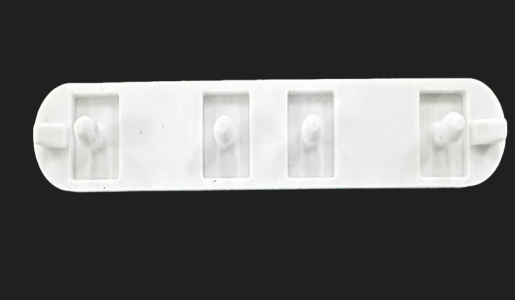
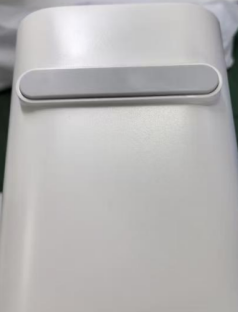
Q25: What is the silicone pad that falls off during the installation of a new Mijia Smart Water Purifier N800G?
A: The fallen silicone pad is an anti-slip pad located at the bottom of the Mijia Smart Water Purifier N800G's casing. Reattach it to the bottom of the casing, it does not affect the purifier's normal operation.
Does it help?
Yes
No