

What to do if the REDMI Buds 6 can't connect to the phone via Bluetooth?
The REDMI Buds 6 will not connect if Bluetooth is off, the devices aren’t paired, the firmware has issues, the battery is low, the pairing records conflict, the distance is too far, or there is a hardware fault.
If the REDMI Buds 6 can't connect to the phone via Bluetooth, please refer to the following troubleshooting steps:
- If your phone can't detect your Bluetooth earbuds, please check if there's a protective film on the contact area between the earbuds and the case. If present, remove it and attempt to reconnect the device.
- Make sure Bluetooth is turned on and your phone is discoverable.
- Ensure both earbuds and the charging case are charged with a full battery.
- Keep the earbuds and phone within 10 meters, without major obstacles.
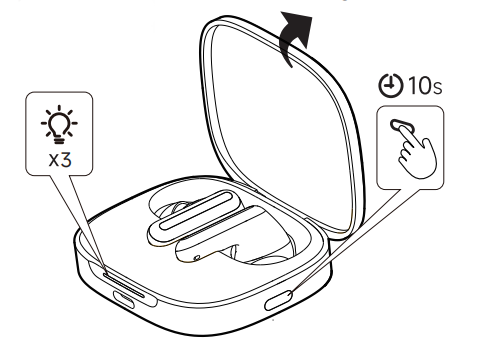
- Try to reset the earbuds. Place both earbuds in the charging case. Keep the case lid open. Press and hold the button on the bottom of the charging case for 10 seconds until the white indicator on the charging case enters a fast flashing state, meaning the reset is successful. After resetting, the earbuds should enter pairing mode automatically, then reconnect to the phone.
- Try pairing with another device (like another phone or laptop) to check if the issue is with the earbuds or the phone.
- Try rebooting your phone, and perform the Bluetooth connection again.
- Make sure your phone’s system is up to date.
- Clean the charging contacts and earbuds to ensure proper contact.
If the issue persists, it can be a Bluetooth hardware problem. Please contact the local after-sales service center for further inspection.
Does it help?
Yes
No