

Xiaomi OpenWear Stereo Pro FAQ
Overview
1. Q: What is the Bluetooth version of the Xiaomi OpenWear Stereo Pro?
A: The Xiaomi OpenWear Stereo Pro uses the latest Bluetooth 5.4 technology.
As more smartphones adopt this standard, using Bluetooth 5.4-compatible earphones maximizes speed, power efficiency, and connection stability.
2. Q: What is the battery life of the Xiaomi OpenWear Stereo Pro?
A: The Xiaomi OpenWear Stereo Pro earphones provide up to 8.5 hours of battery life on a single charge (AAC playback at 50% volume, default settings). With the charging case, total battery life can reach 45 hours under the same conditions.
3. Q: Is the battery of the Xiaomi OpenWear Stereo Pro replaceable?
A: The battery of the Xiaomi OpenWear Stereo Pro is non-replaceable.
FAQs
Appearance
1. Q: How to prevent the Xiaomi OpenWear Stereo Pro from being scratched?
A: Avoid storing the Xiaomi OpenWear Stereo Pro with hard objects to reduce friction and surface scratches.
2. Q: Why does the charging case of the Xiaomi OpenWear Stereo Pro shake so much?
A: The lower shell of the Xiaomi OpenWear Stereo Pro charging case does not have a protrusion. The large amount of shaking is normal and meets the factory inspection standards. Please feel free to use it.
3. Q: Is the Xiaomi OpenWear Stereo Pro waterproof?
A: The Xiaomi OpenWear Stereo Pro earphones support IP54 dust and water resistance, meeting CNAS and CMA requirements. The Xiaomi OpenWear Stereo Pro charging case is not waterproof.
4. Q: Why is there a surface crack inside the Xiaomi OpenWear Stereo Pro charging case after it was dropped?
A: To enhance the quality of the charging case, the inner tray of the Xiaomi OpenWear Stereo Pro charging case is treated with a special surface treatment. If the charging case is subjected to strong stress impact or falls from a height, the surface layer of the inner tray has a chance to turn white or have slight surface cracks. This does not mean that the charging case shell is cracked. Please feel free to use it.
5. Q: Why does the glossy surface of the Xiaomi OpenWear Stereo Pro get dirty easily and easily pick up fingerprints?
A: The decorative parts of the Xiaomi OpenWear Stereo Pro are made using the anodizing process, and the charging case uses the NCVM electroplating process. They are prone to fingerprints, which is normal. You can just wipe them normally before use.
6. Q: Why does the Xiaomi OpenWear Stereo Pro make unusual noises when shaken in the charging case?
A: It is normal for the Xiaomi OpenWear Stereo Pro to make unusual noises when it is shaken vigorously in the charging case after closing the lid.
7. Q: Why is the top cover of the Xiaomi OpenWear Stereo Pro charging case offset so much?
A: When the Xiaomi OpenWear Stereo Pro is closed, the upper cover of the charging case is greatly offset by external force, which is a normal phenomenon.
Wear
1. Q: How to wear the Xiaomi OpenWear Stereo Pro?
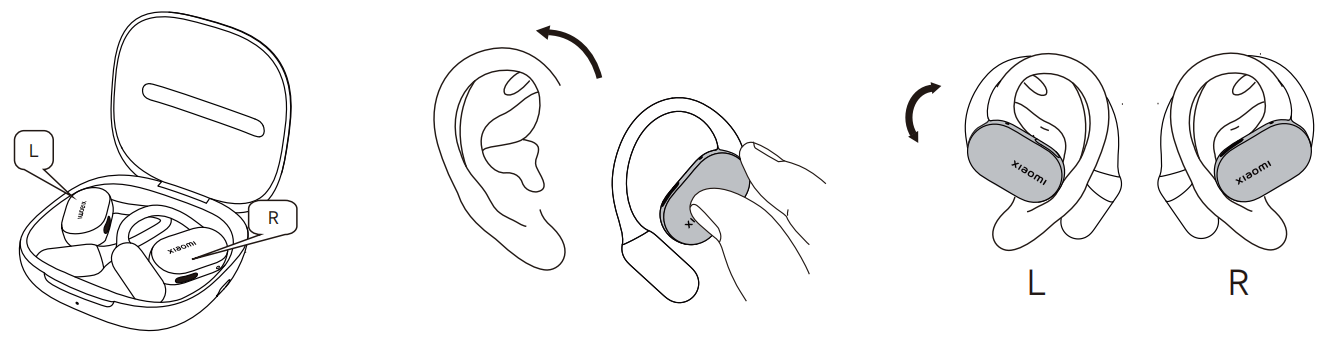
A: Open the Xiaomi OpenWear Stereo Pro charging case, hold the lower shell of the earphones on both sides, and hang them towards your ears on the outside of your auricle as shown below.
Note:
The earphones have separate left and right channels, marked "L" and "R" for the left and right channels, respectively. Please wear them correctly. Gently press the earphones inward with your fingers to ensure a secure fit. Avoid bending the ear hooks. This is for wear only and does not support in-ear detection.
2. Q: Will the Xiaomi OpenWear Stereo Pro shake or fall off when worn?
A: The Xiaomi OpenWear Stereo Pro is designed in accordance with ergonomics and can be worn firmly on the ear. It will not shake during normal use, but shake or fall off during strenuous exercise such as playing basketball.
3. Q: Why doesn’t the sound pause after taking off the Xiaomi OpenWear Stereo Pro?
A: The Xiaomi OpenWear Stereo Pro is an open earphone. Considering that shaking in certain scenarios, such as strenuous exercise, wearing detection will cause the sound to be intermittent, so the wearing detection function is not supported.
4. Q: Will wearing the Xiaomi OpenWear Stereo Pro cause adverse reactions such as allergies or inflammation?
A: The parts of the Xiaomi OpenWear Stereo Pro that come into contact with the skin have undergone rigorous testing for harmful substances and are harmless to the human body. When using these earphones, please avoid wearing them for extended periods (such as while sleeping) and keep your ears clean to prevent sweat and dirt buildup that may cause discomfort, irritation, or suspected allergies.
Possible causes of suspected allergic symptoms:
- Prolonged wear (such as while sleeping), poor ventilation, and sweat residue on the earphones.
- Dirt buildup on the earphones, which have not been cleaned for an extended period, can lead to possible allergic reactions.
- If severe ear discomfort or inflammation or allergic reactions occur after wearing the earphones, it is recommended that you stop wearing them and consult a physician promptly.
If only mild itching occurs, the following guidelines are recommended:
- After exercising with the earphones, check for sweat on the earphones. If so, wipe them clean before returning them to their case.
- During daily use, regularly check the earphones and charging case for dirt and clean them promptly.
- After prolonged continuous wear, remove the earphones and let your ears rest for about half an hour to relieve ear fatigue.
- After showering, if there are any water droplets in your ears, clean them before wearing the earphones.
5. Q: Is there a chance that the Xiaomi OpenWear Stereo Pro will fall off when running or experiencing severe shaking?
A: The Xiaomi OpenWear Stereo Pro comes with a lightweight design. To provide a more comfortable wearing experience, the earphones are constructed with 0.6 mm memory titanium wire and 40A liquid silicone to ensure a strong, skin-friendly fit.
However, if the earphones are subjected to intense vibrations, different ear sizes cause varying degrees of vibration or loss. If you've experienced earphones falling during such conditions, we recommend avoiding use to prevent them from falling or being lost.
Connect
1. Q: How to connect the Xiaomi OpenWear Stereo Pro to a phone or other device for the first time?
A: There is no pairing record when the Xiaomi OpenWear Stereo Pro is used for the first time.
The connection steps for first-time use are as follows:
- Connect a new device:
(1). Place the earphones in the charging case and close the lid. Open the lid and the white indicator on the charging case will flash for 1 minute while the earphones wait for connection;
(2). Turn on the Bluetooth of your device, search for and connect to "Xiaomi OpenWear Stereo Pro". If a connection password is required, enter "0000".
- Use devices that support Google GFPS for quick connection:
Place the earphones in the charging case, close the lid, and place it near an unlocked international version phone with Bluetooth enabled. Open the charging case lid and follow the instructions on the phone to connect the earphones.
Note:
To use Google Fast Pair, you must update your phone to the latest stable version. Most international phones currently support this feature, which is enabled by default. If the earphone pop-up window doesn't appear, please contact your phone manufacturer.
2. Q: What to do if the Xiaomi OpenWear Stereo Pro cannot be searched?
A: If the Xiaomi OpenWear Stereo Pro cannot be found, please refer to the following steps:
- When searching for Bluetooth earphones on your phone, make sure they are paired. Ensure the earphones are fully charged (the indicator in the charging case is on), open the charging case lid, and press and hold the function button for 2 seconds. The indicator will flash continuously, indicating the earphones are paired. Try pairing them on your phone.
- After the earphone pairing timeout, Bluetooth becomes undiscoverable. Please return the earphones to the charging case, close the case, wait at least 5 seconds, then reopen the case. Press and hold the function button on the charging case for 2 seconds to enter pairing mode.
- If the earphones have been paired with another device and the device fails to pair successfully, please disconnect the other device first and then try pairing again.
- If none of the above methods work, try restoring the earphones to factory settings. Place the earphones back into the charging case, open the lid, and press and hold the function button on the right side of the charging case for 10 seconds until the white indicator on the case flashes rapidly. This will restore the earphones to factory settings and re-enter pairing mode.
- After restoring the factory settings, try pairing again according to the above steps.
Note:
Due to the characteristics of Bluetooth earphones, the electromagnetic waves in your area can interfere with the Bluetooth connection and affect the phone's search for the earphones.
3. Q: Does the Xiaomi OpenWear Stereo Pro support connecting to Bluetooth smart bands and watches?
A: The Xiaomi OpenWear Stereo Pro and Bluetooth smart band are both receiving devices, so they cannot be connected. The watch connection scenario is limited and is not currently supported.
4. Q: Does the Xiaomi OpenWear Stereo Pro support dual device connection?
A: The Xiaomi OpenWear Stereo Pro supports dual device connection, and the dual device connection function is turned on by default.
Note:
- The mobile phone system version must be the latest.
- Dual connection means the earphones are connected to two devices. When device A and device B are in the same playback state, device A takes priority. When a call comes in from either device, the incoming device takes priority.
- When the earphones are in dual-connection mode, they can only be connected to the Xiaomi Earbuds App on one device.
- When two devices are connected, if device A is idle and device B is playing music, and a single earbud (left or right) moves out of the connection distance with device B, the earphone will not reconnect after returning. This function will be restored after closing and opening the lid of both earphones are in the charging case.
5. Q: Why does an issue occur when opening and reconnecting the Xiaomi OpenWear Stereo Pro?
A: The Xiaomi OpenWear Stereo Pro has been dual-connected to two devices, A and B. When the cover is opened to reconnect, one of the two devices does not reconnect or reconnects very slowly.
To solve the connection back issue, please refer to the following steps:
- If there is no audio streaming from either device (such as calls, audio, video, or notification sounds), the earphones will reconnect normally. If one device is slightly slower, it is because the earphones need to query the address of the paired device to reconnect. Please wait patiently for about 20 seconds.
- There's an audio stream (such as a call, audio or video, or notification sounds) while connected to device A; the earphones will pause their connection to device B for a better experience. This can cause device B to reconnect more slowly or time out, resulting in a connection failure. If the connection to device B is still unsuccessful after 5 minutes, you can manually reconnect by pressing on the device B record.
6. Q: How to pair the Xiaomi OpenWear Stereo Pro with a new phone?
A: You can put the Xiaomi OpenWear Stereo Pro into the charging case and press and hold the charging case button for 10 seconds until the orange light on the charging case flashes 3 times, and then release it.
The charging case will turn to a white light that flashes slowly, and the earphones will enter the connection-ready state. You can then use the new device to connect.
7. Q: Will the Xiaomi OpenWear Stereo Pro automatically shut down if it is not connected for a long time?
A: The Xiaomi OpenWear Stereo Pro will automatically shut down when not connected.
The specific automatic shutdown time is divided into the following situations:
- When the earphones are outside the charging case:
(1). When no device is connected, the Xiaomi OpenWear Stereo Pro will automatically shut down after 1 minute.
(2). When the Bluetooth of the connected device is turned off, the Xiaomi OpenWear Stereo Pro will automatically shut down after 1 minute if there is no other device connected.
(3). When the Xiaomi OpenWear Stereo Pro is out of range, it will enter the waiting state. If it is not connected to any device after 10 minutes, it will automatically shut down.
- When the earphones are in the charging case:
(1). When the earphones are placed in the charging case, they will automatically charge. When the earphones are fully charged with the lid closed, they will turn off.
(2). When the power level of the charging case is less than 5%, the earphones will shut down immediately after the cover of the charging case is closed.
8. Q: Why does the Xiaomi OpenWear Stereo Pro experience audio lag in certain environments?
A: When using the Xiaomi OpenWear Stereo Pro in strong interference environments, such as train stations, subway stations, and substations, the earphones’ RF performance can be affected, causing music to lag.
This is a common issue with Bluetooth products and is normal. In less interference-free environments, such as offices, cafes, and homes, the earphones will not experience lag.
9. Q: What to do if the Xiaomi OpenWear Stereo Pro Bluetooth connection is disconnected?
A: If the Xiaomi OpenWear Stereo Pro Bluetooth connection is disconnected, you can re-pair and reconnect it.
For specific details, please refer to the following information:
- Due to the special characteristics of Bluetooth earphones, electromagnetic waves in your area (such as in train stations and airports with interference from large base stations) interfere with the Bluetooth connection, causing disconnection. You can re-pair the earphones to reconnect to Bluetooth.
- If the phone is far away from the earphones, exceeding the effective transmission distance (10 m), or there is an obstacle between the earphones and the phone, you can put the earphones back into the charging case and press and hold the charging case button for 2 seconds to manually pair with Bluetooth.
10. Q: What to do if the Xiaomi OpenWear Stereo Pro Bluetooth signal cannot be searched?
A: If the Xiaomi OpenWear Stereo Pro Bluetooth signal cannot be searched, please refer to the following:
- Please check if the Xiaomi OpenWear Stereo Pro is in pairing mode.
- Check if the charging case or earphones are low on power. If the earphones are charged normally, the charging case indicator should light up green for 8 seconds after opening the case.
- Check whether the charging case or the earphones contacts are dirty. Please wipe the contact points of the earphones and charging case carefully to ensure good contact.
- If the earphones still cannot be found despite sufficient power, reset the earphones and pair them again. To reset the earphones, place the earphones in the charging case, press and hold the charging case button for 10 seconds until the orange light flashes three times, then release the button. The charging case will then turn to a slowly flashing white light. After the reset operation, the earphones will enter pairing mode.
- Try restarting your phone, changing your phone, or changing your usage environment before searching.
Note:
If the above methods do not work, the problem may be caused by a hardware failure. Please visit our local official after-sales center for further assistance.
11. Q: When will the Xiaomi OpenWear Stereo Pro experience disconnection or delay?
A: The Bluetooth connection technology used by the Xiaomi OpenWear Stereo Pro is affected by the usage environment, network, and mobile phone encoding and decoding speed, which can cause varying degrees of delay when the mobile phone audio data is transmitted to the earphones.
The earphones use true wireless Bluetooth technology. There will be a certain delay when the audio is transmitted from the mobile phone to the main and slave earphones, but it will not affect the quality of music and calls. Whether it is the sound details during calls or the rich frequency bands in music, it can be presented realistically.
If there are multiple routers or Bluetooth devices in use around the Bluetooth earphones at the same time, there will be varying degrees of interference, which can cause lag, intermittence, and disconnection.
The unobstructed effective connection distance of the mobile phone is 10 meters. If it exceeds the range of 10 meters, the connection will be disconnected.
Some Xiaomi phones support Low latency mode. After connecting a Xiaomi phone, go to [Settings] >> [Bluetooth] >> [Xiaomi OpenWear Stereo Pro] >> [Audio] >> [Audio quality] >> [SBC]. Then back to [Audio quality] >> enable [Low latency].
12. Q: What is the effective operating range of the Xiaomi OpenWear Stereo Pro?
A: The effective connection distance between the Xiaomi OpenWear Stereo Pro and the phone is about 10 meters in an unobstructed environment. In areas with low interference, such as those with many obstructions, multiple routers, or base stations, the distance will be shorter.
If you are in the office or at home, the effective usage distance will be reduced due to walls or other obstacles, so there is a chance that the phone will be stuck or the Bluetooth connection will be disconnected when you wear earphones from the living room to the bedroom.
13. Q: Why can the Xiaomi OpenWear Stereo Pro be searched but not connected?
A: If the device can search for the Xiaomi OpenWear Stereo Pro but cannot connect, the Bluetooth data of the mobile phone is abnormal. Try to delete the previous connection record on the device.
Press and hold the charging case button for 10 seconds to reset the device (place both earphones in a fully charged charging case, close the lid for 60 seconds and then open the lid, then press and hold the charging case button for 10 seconds until the charging case light flashes orange 3 times, then release it, and the charging case light will turn white and flash slowly), and then try to pair and connect.
Delete Bluetooth records on your phone: go to [Settings] >> [Bluetooth] >> [Xiaomi OpenWear Stereo Pro] >> [Upair].
14. Q: What should to do if the Xiaomi OpenWear Stereo Pro loses connection with my phone and cannot reconnect?
A: When the Xiaomi OpenWear Stereo Pro charging case lid is opened, the earphones are expected to reconnect to the previously paired device automatically. It is abnormal when it cannot reconnect automatically.
To solve the automatically reconnect issue, please refer to the following steps:
- Please check whether the Bluetooth on your phone is turned on or is not working properly. Restart Bluetooth from the Bluetooth device interface on your phone, then tap the “Xiaomi OpenWear Stereo Pro” in the list to see if the connection is successful.
- If your phone is far away from the earphones, exceeding the effective transmission distance (10 meters), or there are obstacles between the earphones and phone, please shorten the distance and try to reconnect.
- The earphones will automatically reconnect to the last connected device by default. Please confirm whether your earphones were last connected to this phone.
- Due to the characteristics of Bluetooth earphones, electromagnetic waves in your area can interfere with the Bluetooth connection, causing the earphones to fail to automatically reconnect. Please try changing the area and reconnecting.
- If you still cannot connect using the above methods, you can reset the earphones. To reset the earphones: Place the earphones in the charging case and press and hold the charging case button for 10 seconds until the orange light on the charging case flashes three times. Release the button, and the charging case light will turn white and flash slowly. You can now use your device to search and connect to the earphones again.
15. Q: What to do if the Xiaomi OpenWear Stereo Pro loses connection after placing it in the charging case and closing the lid?
A: Check whether there is any foreign matter (dirt) between the copper pillar of the Xiaomi OpenWear Stereo Pro and the charging pin of the charging case, which affects the signal transmission between the earphones and the copper pillar, causing the earphones to be disconnected when the lid is closed. Please use a cotton swab to wipe the copper pillar of the earphones.
16. Q: What to do if the Xiaomi OpenWear Stereo Pro pairing password is incorrect?
A: If the Xiaomi OpenWear Stereo Pro always displays a PIN or pairing password error, you can try entering "0000".
If the error persists, it is due to abnormal Bluetooth data on the device. Try deleting the previous connection records on the device. Place both earphones in a fully charged charging case. Press and hold the button on the charging case for 10 seconds until the orange light on the charging case flashes three times.
Release the button, and the white light on the charging case will flash slowly. Use the device to search for the earphones for pairing and connection.
17. Q: Why can't the Xiaomi OpenWear Stereo Pro connect back to the PC?
A: If the Xiaomi OpenWear Stereo Pro is disconnected for more than 5 minutes, it will not reconnect to the original device. If it returns to the PC's connection range within 5 minutes, it can reconnect to the PC even if there is no audio streaming on the phone.
Closing the phone call or music playback or putting the earphones in the case, you can reopen the charging case and connect it to the PC.
18. Q: Why does the Xiaomi OpenWear Stereo Pro disconnect even though the PC shows them as connected?
A: The PC still shows that the Xiaomi OpenWear Stereo Pro is connected after being disconnected. This is a PC compatibility display issue. We have reported the issue to Microsoft.
The recovery method is as follows:
- Delete the device from the PC Bluetooth and re-pair the earphones.
- After putting the earphones into the charging case and opening the lid to reconnect, the earphones will display "Connected for voice, music" in the Bluetooth of the PC, and you can use the earphones normally.
19. Q: Why can't the Xiaomi OpenWear Stereo Pro reconnect after opening the charging case?
A: This is because the Xiaomi OpenWear Stereo Pro charging case is out of power, or the connecting device is out of range.
Please refer to the following method to restore the connection:
- Make sure the charging case is fully charged, and the corresponding light will appear when the charging case is opened.
- Make sure the charging pins on the earphones are in full contact with the charging case.
- If all of the above are confirmed to be correct, try closing the lid again for 1 minute and then opening it again to check if the earphones can reconnect to the device.
Note:
If you still can't reconnect to your device after troubleshooting the above, perform a factory reset on the earphones and then reconnect.
Touch
1. Q: How to control the Xiaomi OpenWear Stereo Pro?
A: The touch area of the Xiaomi OpenWear Stereo Pro is in the silk-screen area of the "Xiaomi" logo on the earphone cover, as shown in the figure below. The earphones can be controlled by touch.

Note:
- To prevent possible hearing damage, do not use this product at high volume for a long time.
- The touch function of answering, rejecting, or hanging up a call is only supported on the Phone App. Other Apps can’t be controlled by touch.
- When the weather is cold outdoors and your hands become dry, there is a chance that the earphones will malfunction if you touch them.
- If you wear it incorrectly, the touch function will fail. You need to wear it correctly according to the instructions and then try the touch function.
- Some Apps do not respond to the touch buttons of the earphones due to their own problems. This is an App problem, not an earphone problem.
- Connect to the Xiaomi Earbuds App to discover more personalized features.
2. Q: Why is the touch of the Xiaomi OpenWear Stereo Pro unresponsive?
A: There are several reasons why the Xiaomi OpenWear Stereo Pro touch becomes unresponsive:
- The touch area is located at the "Xiaomi" logo. Touching it off-center also causes unresponsiveness. In cold weather, if your hands become dry, the earphones can not function properly.
- To avoid accidental touches when the earphones are not being worn, pressing the earphone pressing prompt area will not take effect.
- If it is not worn correctly or does not fit well, it is recommended to adjust the wearing direction according to the instructions in the manual.
- When wearing the earphones, the prompt area is not touched correctly, resulting in no response.
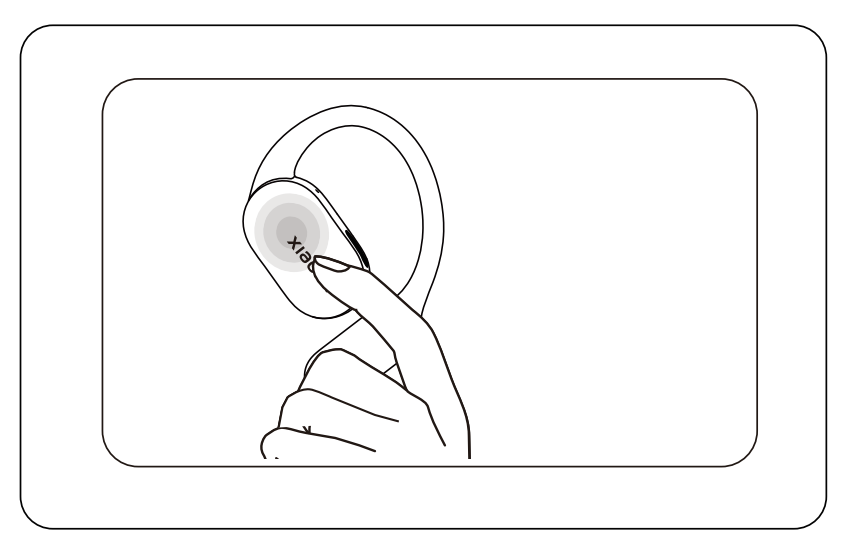
- The speed of continuous pressing is too slow. Please make sure to press 2 times in quick succession.
- If the finger is dirty or has too much liquid on it, it can cause the pressure indicator area to become insensitive. Please keep both your finger surface and the earphone pressure indicator area clean before pressing.
3. Q: Why is it easy to accidentally trigger the single-touch function on the Xiaomi OpenWear Stereo Pro?
A: Due to the large touch area of the Xiaomi OpenWear Stereo Pro, accidental single taps are difficult to avoid. To avoid a negative experience, we recommend that you set the single-tap gesture to "None".
To set the single tap gesture to "None", please refer to the following methods:
- Connect Xiaomi OpenWear Stereo Pro to the Xiaomi Earbuds App, go to[Gestures] >>[Press left earphone once] >> [None], and then go to [Gestures] >>[Press right earphone once] >> [None];
- Go to [Settings] >> [Bluetooth] >> [Xiaomi OpenWear Stereo Pro] >> [Gestures] >>[Press left earphone once] >> [None], and then go to [Settings] >> [Bluetooth] >> [Xiaomi OpenWear Stereo Pro] >> [Gestures] >>[Press right earphone once] >> [None].
4. Q: Why does double-tap on the Xiaomi OpenWear Stereo Pro pause playback but not resume it?
A: The following are the main reasons why the Xiaomi OpenWear Stereo Pro cannot resume playback after double-tap:
- The App only supports double-tap to pause and cannot be played by double-tap.
- The current App has been used for a while, and the corresponding App process has been cleared in the background of the phone. You can try keeping the App in the foreground and repeatedly pausing and playing by double-tap it during playback to confirm whether the double-tap pause and play function is working properly.
- It's also possible that a background App is occupying the audio control channel, preventing other music Apps from functioning properly. This can be caused by an App that forcibly takes audio focus, interfering with normal playback controls. Try closing any background Apps that might be using audio resources, then reopen your preferred music App to resume normal use.
Charging and battery life
1. Q: How to check the charging status and battery level of the Xiaomi OpenWear Stereo Pro?
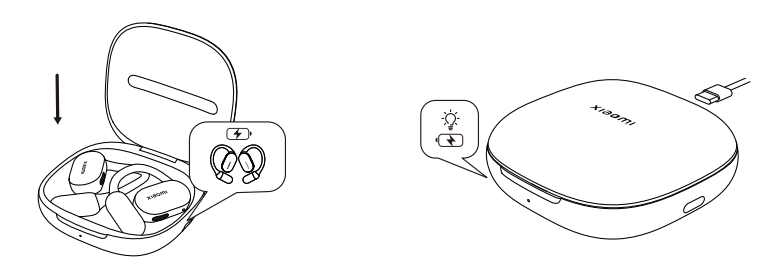
A: The charging case of the Xiaomi OpenWear Stereo Pro has only one LED light, located on the front of the charging case.
The orange indicator is always on when charging. It turns green when both the earphones and the charging case are charged to more than 95%.
The will indicator goes out after charging is completed. The earphones will automatically charge after being placed in the charging case.
How to check the battery level:
- Check the earphones' battery level
After the earphones are connected to the phone, you can check the earphones’ battery level in the phone’s status bar.
Note:
The phone status bar only displays the battery level of the lower-charged earphone. Some phones do not support checking the earphones' battery levels.
- Check the earphones and the charging case battery level
If the earphones are paired with a device and the earphones are in the charging case with the lid closed, please open the lid to check the earphones' battery level (The earphones' battery level will be displayed during opening the lid, and the charging case's battery level will be displayed during closing the lid. When the earphones are not in the charging case, the charging case battery level is displayed, whether the lid is open or closed.
(1). Open the charging case cover to check the battery level of the earphones. If the green indicator on the charging case stays on for 8 seconds, it means the battery level of the earphones in the charging case is greater than 60%. Close the charging case cover to check the battery level of the charging case. If the green indicator on the charging case stays on for 5 seconds, it means the battery level of the charging case is greater than 40%.
(2). Open the charging case to check the battery level of the earphones. If the orange indicator on the charging case stays on for 8 seconds, it means that the battery level of one or both earphones in the charging case is less than or equal to 60%. Close the charging case to check the battery level of the charging case. If the orange indicator on the charging case stays on for 5 seconds, it means that the battery level of the charging case is less than or equal to 40%.
(3). When the charging case is completely out of power, there is no light on the switch cover, and it needs to be charged in time.
- Use the Xiaomi Earbuds App to view
Download and log in to the Xiaomi Earbuds App in the Play Store. After the device is successfully connected to the phone, open the Xiaomi Earbuds App and add the earphones. You can then check the battery levels of the left and right earphones and the charging case (the case battery level display requires the earphones to be in the charging case).
Note:
- When checking the Bluetooth connection on your phone, the phone's status bar only displays the battery level of the lower-charged earphone. Some phones do not support checking the earphone battery level.
- The earphones automatically power on when you open the charging case. When you return the earphones to the charging case and close the lid, they automatically disconnect and enter sleep mode.
2. Q: Why does the Xiaomi OpenWear Stereo Pro have a short battery life?
A: The Xiaomi OpenWear Stereo Pro has a shorter usage time for the following reasons:
- The earphones’ battery is low and not 100% charged.
- Turning up the volume on your phone will consume the battery faster.
- The earphones are in an environment with strong electromagnetic interference, or there are obstacles such as walls between the earphones and the phone.
- While using the earphones, all function settings are turned on (such as audio format, dual device connection, etc.).
- The battery life of the earphones varies depending on the bit rate and audio protocol (LDAC format has a shorter battery life than AAC and SBC formats).
The corresponding solutions are as follows:
- It is recommended that you fully charge the earphones before use.
- It is recommended that you turn down the volume to see if the usage time is normal.
- When using, please keep away from objects with strong electromagnetic interference, such as microwave ovens, and ensure that there are no obstacles between the earphones and the phone.
- It is recommended to turn off the function setting switch on the mobile phone based on your own experience needs.
- For a longer battery life, we recommend that you change the audio format to AAC or SBC.
3. Q: How to charge the Xiaomi OpenWear Stereo Pro?
A: The Xiaomi OpenWear Stereo Pro only supports wired charging, not wireless charging.
The charging methods are as follows:
- Charge the earphones: Place the earphones in the charging case and they will automatically start charging.
- Charge the charging case: Use the included Type-C charging cable to charge the charging case. The indicator will turn solid orange while charging. When both the earphones and the case are charged to 95% or above, the light will turn solid green. The indicator will turn off when charging is complete.
4. Q: What to do if the Xiaomi OpenWear Stereo Pro can’t charge?
A: If the Xiaomi OpenWear Stereo Pro can’t be charged, please refer to the following reasons:
- The earphones have not been used for a long time.
- The charging case is out of power (the indicator on the charging case is off after opening the cover).
- There is dirt on the charging contacts of the earphones or charging case.
- When charging the earphones in extremely low or high temperatures, the charging function will be suspended for safety reasons.
The corresponding solutions are as follows:
- It is recommended that you charge the earphones for at least 30 minutes to ensure activation.
- Fully charge the charging case and try again.
- Use a cotton swab to clean the charging posts of the earphones and the charging contacts of the charging case.
- Choose a suitable charging environment for the earphones at 15-35 ℃.
5. Q: Why does the Xiaomi OpenWear Stereo Pro get hot while charging?
A: Since the Xiaomi OpenWear Stereo Pro uses a more efficient charging method, the temperature of the earphones will rise during fast charging. This is normal. We have also designed corresponding protection for the core components. Please feel free to use it.
Note:
The heat generated during charging has been tested by laboratories and professional institutions and is in compliance with safety regulations. Please rest assured that it will not cause harm to the human body.
At the same time, we recommend that you stay away from flammable and explosive dangerous goods with low ignition points, such as white phosphorus, as much as possible during the charging process.
6. Q: Can a power bank charge the Xiaomi OpenWear Stereo Pro?
A: It is not recommended to use a power bank to charge the Xiaomi OpenWear Stereo Pro charging case. Most power banks currently have a current protection function. When the power bank detects that the output current is too low, it will disconnect the charging.
Since the battery capacity of the Xiaomi OpenWear Stereo Pro is small, the current during charging is also small, which is generally lower than the current protection trigger value of the mobile power bank. Therefore, the current protection function of the mobile power bank will be triggered, and the battery can not be fully charged.
If the power bank supports low current mode, you can use the low current mode to charge the charging case.
7. Q: Why are the battery levels and battery life of the Xiaomi OpenWear Stereo Pro earphones inconsistent?
A: When using the two earphones of the Xiaomi OpenWear Stereo Pro, they play the master and slave roles. The power consumption of the master and slave ears is different in different working states. The power consumption of the master ear is greater than that of the slave ear. Long-term use will cause differences in the power display (the power of the left and right ears is inconsistent in the App). It is normal for the battery life to be different.
Note:
If you're used to wearing one earphone while the other is charging in the case, using both can easily cause the battery levels to diverge. It's recommended that you wear both earphones the same way to determine the battery level difference.
8. Q: What to do if the Xiaomi OpenWear Stereo Pro won’t charge or turn on?
A: If the Xiaomi OpenWear Stereo Pro cannot be charged and turned on, please follow the steps below to troubleshoot:
- Check whether the charging case has power. If the charging case has no power, charge the charging case first and then charge the earphones. After the earphones are charged, try to turn them on again. If the earphones have not been used for a long time and the power is low, it will take some time to charge before the indicator light comes on.
- Check whether the charging contacts of the earphones/the charging pins in the charging case are dirty, collapsed, or damaged. Clean the dirt and ensure that the charging contacts and the charging pins are in good contact.
- Try to reset the earphones. To reset, place the earphones in the charging case and press and hold the button on the charging case for 10 seconds until the orange light on the box flashes three times for the second time, and then release it. The charging case will then turn to a white light that flashes slowly. After the reset operation, the earphones will enter pairing mode;
- If the above troubleshooting does not work, the problem may be caused by a hardware failure. We would request you to go to our local official after-sales center for further assistance.
9. Q: What to do if the Xiaomi OpenWear Stereo Pro charging case cannot charge?
A: If the charging case of the Xiaomi OpenWear Stereo Pro fails to charge, please follow the steps below to troubleshoot:
- Replace the charging cable and charger to see if it can be charged. If it can be charged after replacement, it may be that the charging cable or charger is faulty.
- Use the charging cable and charger to charge other devices and verify whether the charging cable and charger are normal. If they charge other devices normally, please charge the charging case for half an hour and then observe again.
- If the above troubleshooting does not work, the problem may be caused by a hardware failure. We would request you to go to our local official after-sales center for further assistance.
Note:
To ensure a good product experience, please charge the earphones in time when the power of the charging case is less than 10% to ensure the battery life of the earphones.
10. Q: Why doesn't the status bar show the battery level when the Xiaomi OpenWear Stereo Pro is connected to a phone?
A: After the Xiaomi OpenWear Stereo Pro is connected to a mobile phone, the battery level display function in the status bar is not supported by all mobile phones. If the mobile phone does not support this function, the battery level cannot be displayed.
11. Q: Why is the actual battery life of the Xiaomi OpenWear Stereo Pro shorter than the time stated on the official website?
A: The battery life of the Xiaomi OpenWear Stereo Pro is strongly correlated with usage habits. The battery life data in the promotion all correspond to specific scenarios (such as music format, volume level, and whether other functions such as adaptive volume and spatial audio are enabled).
The test data was obtained in Xiaomi laboratories. Due to signal interference and electromagnetic interference in actual environments, some differences may occur, which is normal.
Audio
1. Q: Is the Xiaomi OpenWear Stereo Pro a dual-channel earphone?
A: The Xiaomi OpenWear Stereo Pro is a dual-channel earphone.
2. Q: How to adjust the volume of the Xiaomi OpenWear Stereo Pro?
A: Please refer to the following to adjust the volume of the Xiaomi OpenWear Stereo Pro:
- You can adjust the volume on your phone.
- You can select the gesture customization setting as the volume adjustment option in the Bluetooth settings page or the Xiaomi Earbuds App;
- Go to [Settings] >> [Bluetooth] >> [Xiaomi OpenWear Stereo Pro] >> [Audio] >> enable [Adaptive volume], to intelligently adjust the media and call volume based on the ambient volume.
Note:
During a call, volume adjustment via touch controls is not supported.
3. Q: Why does the volume of the Xiaomi OpenWear Stereo Pro automatically adjust when connected to a device?
A: The volume of the Xiaomi OpenWear Stereo Pro will automatically adjust when connected to a device in specific scenarios. This is normal, and please feel free to use it.
The scenarios for automatic volume adjustment are as follows:
- When the earphones are connected to a MIUI or a HyperOS device for the first time, the MIUI or the HyperOS volume protection mechanism causes the volume to be automatically adjusted.
- When the earphones are connected to an iOS device for the first time, iOS will automatically synchronize the volume.
- After adjusting the volume on a connected device, the volume will be synchronized with the last set volume when you connect again.
- When the adaptive volume function is turned on, the volume will increase when there is noise around you when playing music, watching videos, or making calls, and will decrease when the environment returns to quiet.
- The adaptive volume function is turned on in MIUI or HyperOS. When this function is turned on, when playing music, watching videos, or making calls, the volume will increase when there is noise around, and will decrease when the quiet environment is restored ( supported by most Xiaomi or REDMI phones with Android 15 and above ).
4. Q: Does the Xiaomi OpenWear Stereo Pro support noise cancellation?
A: The Xiaomi OpenWear Stereo Pro does not support ANC (Active Noise Cancellation).
5. Q: How to enable spatial audio on the Xiaomi OpenWear Stereo Pro?
A: The Xiaomi OpenWear Stereo Pro can enable spatial audio as follows:
- The Xiaomi Earbuds App: After connecting to the App, go to the Xiaomi OpenWear Stereo Pro page, tap [Dimensional Audio] >> enable [Immersive sound];
- For Xiaomi and REDMI series phones with supported settings, go to [Settings] >> [Bluetooth] >> [Xiaomi OpenWear Stereo Pro] >> [Dimensional Audio] >> enable [Immersive sound];
- If the spatial audio feature is not available in the Settings of your Xiaomi or REDMI phone, we recommend downloading the App and enabling it.
Note:
Not all Xiaomi phones support the spatial audio feature, and even some models can not support it even after updating to the latest system version.
Support will increase over time as the phone system is updated, so actual support will depend on the specific phone model. We would advise you to download the Xiaomi Earbuds App.
6. Q: How to enable Harman sound effects on the Xiaomi OpenWear Stereo Pro?
A: The Xiaomi OpenWear Stereo Pro can enable Harman sound effects as follows:
- The Xiaomi Earbuds App: After connecting to the App, go to the Xiaomi OpenWear Stereo Pro page, tap [Audio effects] >> tap [Audio balance] >> select [Harman AudioEFX] or [Harman Master];
- For Xiaomi series phones that support more settings: go to [Settings] >> [Bluetooth] >> [Xiaomi OpenWear Stereo Pro] >> [Audio] >> [Sound mode] >> select [Harman AudioEFX] or [Harman Master](supported by most Xiaomi and REDMI series phones running Android 15 and above);
- If the Audio effects feature is not available in the Settings of your Xiaomi or REDMI series phone, we recommend downloading the Xiaomi Earbuds App and enabling it.
Note:
Not all Xiaomi phones support the Harman sound effect feature, and even some models can not support it even after updating to the latest system version.
Support will increase over time as phone systems are updated, so actual support will depend on the specific phone model. We would advise you to download the Xiaomi Earbuds App.
7. Q: How does the Xiaomi OpenWear Stereo Pro share audio?
A: After connecting your phone to the Xiaomi OpenWear Stereo Pro, connect it to another the Xiaomi OpenWear Stereo Pro. Go to [Settings] >> [Bluetooth] >> [Xiaomi OpenWear Stereo Pro] >> enable [Share audio].
8. Q: Can the button on the Xiaomi OpenWear Stereo Pro charging case end a recording initiated on the mobile App?
A: The button on the Xiaomi OpenWear Stereo Pro charging case cannot end the recording initiated by the mobile App. It can only be ended through the App.
The software logic design is that the button starts the recording, and the App can close it. The recording initiated by the App cannot be closed by the button.
9. Q: Why does the Xiaomi OpenWear Stereo Pro automatically pause the recording when you start real-time audio-to-text or translation?
A: At this time, because the phone is currently recording audio and video (e.g., receiving a text message notification, pausing music, or wearing headphones), the recording type is set to audio and video. When the audio stream disappears, the Xiaomi OpenWear Stereo Pro recording automatically ends.
10. Q: Why are call recordings on the Xiaomi OpenWear Stereo Pro shorter than live and audio/video recordings?
A: To ensure the quality of live and audio/video recordings, more storage space is required. The specific local recording time for the Xiaomi OpenWear Stereo Pro is: call recording up to 120 minutes (per earpiece), and live and audio/video recording is 60 minutes (per earpiece).
11. Q: Why don't the recorded files have data recording when the Xiaomi OpenWear Stereo Pro is in the charging case and the lid is closed?
A: The Xiaomi OpenWear Stereo Pro has been in the off state for a long time when it was in the case. After turning on recording through the charging case, the earphones turned on. Since the time was not synchronized with the App at this time, no time point was displayed. This is a normal phenomenon.
12. Q: What to do if the sound is intermittent or there is noise when using the Xiaomi OpenWear Stereo Pro?
A: When using the Xiaomi OpenWear Stereo Pro daily, the sound from the earphones is intermittent, or there is noise.
To resolve abnormal sound issues, please follow the steps below:
- If the battery of your phone or earphones is low, please fully charge it before observing.
- If the distance between the phone and earphones, or between the two earphones, is too far, or there is an object blocking the signal (such as a wall), the sound can become intermittent or noisy. Move the phone and earphones closer together, or move the two earphones closer together, to avoid signal obstruction.
- If there is signal interference in your usage environment, you can try to compare it in other usage environments to see if this phenomenon occurs.
- Reset the earphones, delete the phone's connection history, restart the phone, and then pair again. If intermittent sound or noise persists, try another phone.
- If the above troubleshooting is ineffective, the issue may be caused by a hardware failure. We would request you to go to our local official after-sales center for further assistance.
13. Q: Why is the sound quality and noise cancellation effect of the Xiaomi OpenWear Stereo Pro poor?
A: The Xiaomi OpenWear Stereo Pro doesn't support noise cancellation. Regarding sound quality, open-ear headphones aren't as good as in-ear and semi-in-ear headphones. You can customize your listening experience by accessing the App and setting different sound effects (Harman Audio EFX, Harman Master, Enhance treble, Enhance voice, and Standard).
14. Q: What to do if the sound is too low when using the Xiaomi OpenWear Stereo Pro?
A: If the sound level is low when using the Xiaomi OpenWear Stereo Pro, please check that the absolute volume or adaptive volume function is enabled on your phone, as these functions can affect the audio volume. To set this function, go to [Settings] >> [Bluetooth] >> [Xiaomi OpenWear Stereo Pro] >> [Audio] >> enable [Absolute volume] or [Adaptive volume] (using Xiaomi phones as an example).
If the sound is still low after setting, please try another audio source.
15. Q: What to do if the Xiaomi OpenWear Stereo Pro is silent when making calls or listening to music?
A: When using the Xiaomi OpenWear Stereo Pro daily, there is no sound when making calls or listening to music.
To resolve the abnormal phenomenon of no sound, please follow the steps below:
- Check if the volume on your phone is turned down too low. If the volume is normal, go to [Settings] >> [Bluetooth] >> [Xiaomi OpenWear Stereo Pro] >> enable [Call audio] and [Media audio]. If they are, disconnect and reconnect.
- Place the earphones into the charging case, press and hold the charging case button for 10 seconds until the orange light on the charging case flashes 3 times, then release it. The charging case will turn white and flash slowly. Reset the device, restart the phone, and then connect it to try to see if there is any sound. If there is still no sound, connect it to another phone and test it again.
- If the above troubleshooting is ineffective, the issue may be caused by a hardware failure. We would request you to go to our local official after-sales center for further assistance.
16. Q: Why does the Xiaomi OpenWear Stereo Pro suddenly go silent while listening to music?
A: When using the Xiaomi OpenWear Stereo Pro earphones, you need to keep the audio in both ears synchronized. When there is a lot of surrounding interference, the earphones can experience audio link synchronization failure, resulting in silence.
If there is a sound failure, try putting the earphones back into the charging case, closing the case, waiting for 60 seconds, then opening the case and connecting to your phone. After Bluetooth is reconnected, check whether music playback resumes.
17. Q: Why can you make calls with the Xiaomi OpenWear Stereo Pro but not hear any music?
A: If you can make calls normally with the Xiaomi OpenWear Stereo Pro, but there is no sound when listening to music, it is a problem with the phone settings: go to [Settings] >> [Bluetooth] >> [Xiaomi OpenWear Stereo Pro] >> enable [Media audio]. If this option is turned off, there will be no sound when listening to music or watching videos. In this case, you need to manually turn on this option.
18. Q: What to do if one of the Xiaomi OpenWear Stereo Pro earphones has no sound or cannot connect?
A: When using the Xiaomi OpenWear Stereo Pro daily, one of the earphones has no sound or cannot be connected at all.
To resolve the issue with a single earphone, please follow the steps below:
- Place the earphones in the charging case and press and hold the charging case button for 10 seconds until the orange light on the charging case flashes three times for the second time. Release the button, and the charging case will turn white and flash slowly. Reset the device, restart the phone, and then connect it to try to see if there is sound.
- If there is still no sound, try connecting another phone and testing again;
- If the above troubleshooting fails, the issue may be caused by a hardware failure. We would request you to go to our local official after-sales center for further assistance.
19. Q: When using the Xiaomi OpenWear Stereo Pro to connect a PC and a phone, there is no sound on the PC?
A: When using the Xiaomi OpenWear Stereo Pro with a dual-connected PC and phone, if the phone is using audio services, audio services played on the Windows PC (the default input channel is the microphone array) will not preempt the phone's services. After turning off the phone's services, playing PC audio services again will allow the headphones to play PC audio normally.
Audio services played on the Mac (the default input channel is the headphones) will preempt the phone's services.
20. Q: Why is the volume low when the Xiaomi OpenWear Stereo Pro is connected to a Huawei phone?
A: When a Huawei phone is connected to the Xiaomi OpenWear Stereo Pro, the switch for synchronizing the Bluetooth device volume with the phone volume is turned off by default. You can turn it on.
Usage scenarios
1. Q: Does the Xiaomi OpenWear Stereo Pro support smart scenes?
A: The Xiaomi OpenWear Stereo Pro does not support smart scenes.
2. Q: Does the Xiaomi OpenWear Stereo Pro support the voice hotword feature?
A: The Xiaomi OpenWear Stereo Pro does not support the voice hotword function.
3. Q: Can the charging cable that comes with the Xiaomi OpenWear Stereo Pro transfer data?
A: The standard charging cable of the Xiaomi OpenWear Stereo Pro does not support data transmission and only guarantees a 5 V charging function.
4. Q: Does the Xiaomi OpenWear Stereo Pro support connecting the left and right earphones to two devices separately?
A: The Xiaomi OpenWear Stereo Pro does not support connecting the left and right earphones to two mobile phones, and does not support being used as two single-ear earphones.
5. Q: How to delete pairing records and reset the Xiaomi OpenWear Stereo Pro?
A: To delete pairing records of the Xiaomi OpenWear Stereo Pro:
Go to [Settings] >> [Bluetooth] >> [Xiaomi OpenWear Stereo Pro] >> [Upair].
To reset the Xiaomi OpenWear Stereo Pro, please refer to the following information:
Keep the lid of the case open and make sure the case is powered. Press and hold the button for about 10 seconds and then release it. The light on the case will flash orange 3 times and then turn white. The earphones have been reset successfully and entered the pairing state.
The reset process will clear the connection record between the earphones and the device. After the reset is complete, the earphones will re-enter pairing mode.
Note:
Due to the connection characteristics of Bluetooth signals, intermittent disconnection or silence can occur in places with strong electromagnetic signal interference, such as places with a lot of Wi-Fi, airports, train stations, microwave ovens, subways, traffic lights, etc.
6. Q: Does the Xiaomi OpenWear Stereo Pro support announcing the caller's name?
A: When the Xiaomi OpenWear Stereo Pro is connected to a mobile phone and a call comes in, it will only ring and will not announce the name and phone number of the incoming caller.
7. Q: Does the Xiaomi OpenWear Stereo Pro support voice calls and voice input via third-party software?
A: Whether the Xiaomi OpenWear Stereo Pro supports voice calls and voice input via third-party software depends on the system.
Both iOS and Android systems support voice calls and voice input.
Windows system devices that support Bluetooth can make voice calls after connecting and setting up correctly; voice input requires third-party software support.
8. Q: Does the Xiaomi OpenWear Stereo Pro support Xiaomi pop-up functions?
A: The Xiaomi OpenWear Stereo Pro supports Xiaomi pop-up features and Google's GFPS pop-up feature. Place the earphones close to an international phone that supports GFPS pop-up, place the earphones in the box, and open the lid, and a pop-up will appear on the phone.
Note:
Not all mobile phones support the pop-up function. Most international mainstream mobile phones support Google GFPS service and Google Fast Pair. Whether it is supported is subject to actual conditions.
9. Q: What to do if the Xiaomi OpenWear Stereo Pro does not have the Google GFPS pop-up function?
A: If the Google GFPS pop-up window doesn't appear after connecting the Xiaomi OpenWear Stereo Pro to your phone, please confirm that your phone is an international version (generally, it must support Google services, such as being logged into a Google account and having Google-related services installed). If the pop-up window still doesn't appear after checking everything, we recommend contacting the corresponding device's customer service for further confirmation.
10. Q: Why do the pop-up images on the Xiaomi OpenWear Stereo Pro not match?
A: When the Xiaomi OpenWear Stereo Pro is connected to a mobile phone, the first pop-up window is a simple picture, which is the initial setting. After the picture is recognized, it will be automatically downloaded from the cloud under a good network environment.
11. Q: Does the Xiaomi OpenWear Stereo Pro support scenes with a lot of metal powder?
A: Try not to use the Xiaomi OpenWear Stereo Pro in environments with a lot of metal dust, as this can damage the earphones(involving metal-related laboratories, metal parts processing, etc.).
12. Q: What versions of LDAC does the Xiaomi OpenWear Stereo Pro earphones support?
A: The Xiaomi OpenWear Stereo Pro headphones support LDAC decoding versions V4.0 and V5.0.
13. Q: How to maintain the Xiaomi OpenWear Stereo Pro?
A: The daily maintenance information of the Xiaomi OpenWear Stereo Pro is as follows:
- Do not expose the earphones to liquid, rain, or moisture. If exposed to moisture, please wipe them dry immediately.
- Never use unknown chemical solvents to clean the earphones.
- Please avoid exposing the earphones to low temperatures (below 0 °C), high temperatures (above 43 °C), or environments with large temperature fluctuations for extended periods of time. Prolonged exposure to these conditions can easily damage the battery.
- Do not place the earphones near open flames to avoid the risk of explosion.
- Do not expose the earphones to sharp objects, as this can cause scratches or damage.
- Never insert any objects into the earphones, as this can damage them.
- Never attempt to disassemble the earphones.
- If the earphones are not used for a long time, please place them in a dry place. If it is stored for more than one month, the earphones need to be charged to prevent battery damage.
14. Q: Why does the orange light on the Xiaomi OpenWear Stereo Pro charging case keep flashing?
A: If the recording is turned on abnormally, the orange light of the Xiaomi OpenWear Stereo Pro charging case will keep flashing.
To resolve the issue where the orange light keeps flashing, please refer to the following methods:
- Take the earphones out of the case to restore.
- You can resume recording by ending it in the Xiaomi Earbuds App.
Note:
If the earphones are not a pair, the abnormal light will flash when recording is started in the case. The orange light will flash for 10 seconds and then go out.
Make sure the charging case is charged. Place both earphones in the case and press and hold the charging button for 10 seconds. Wait for the second orange light to flash slowly three times and then turn to white light to pair with the device.
15. Q: Why can the Xiaomi OpenWear Stereo Pro charging case not be used normally after opening?
A: The Xiaomi OpenWear Stereo Pro charging case doesn't light up when opened, and the earphones won't connect. This indicates a dead battery.
Place both earphones in the case, close the lid, and charge the case for 30 minutes using the charging cable. Ensure the case is fully charged before opening the lid.
If charging doesn't resolve the issue, the problem may be caused by a hardware fault. We would request you to go to our local official after-sales center for further assistance..
16. Q: What are the requirements for using the Xiaomi Smart Hub with the Xiaomi OpenWear Stereo Pro?
A: The requirements for using Xiaomi Smart Hub for the Xiaomi OpenWear Stereo Pro are as follows:
- The device is a Xiaomi or REDMI phone, and the plug-in has been successfully updated (the Bluetooth page has Additional settings for the earphones).
- The phone operating system must be Xiaomi HyperOS 2.0 or above.
- The interconnectivity service has been updated to the latest version.
Does it help?
Yes
No