

How to set a timer for turning the Mijia Air Conditioner Pro Eco Inverter 1.5 HP on or off?
The Mijia Air Conditioner Pro Eco Inverter 1.5 HP supports timer functions for scheduled power-on and power-off. You can set the timer using either the remote control or the Xiaomi Home App based on your preference.
To set a timer for turning the Mijia Air Conditioner Pro Eco Inverter 1.5 HP on or off with the remote control, please refer to the following information:
1. While the Mijia Air Conditioner Pro Eco Inverter 1.5 HP is in standby or running mode, press the [Timer] button and use the [+] or [-] buttons to select your desired time. The setting will automatically confirm and take effect after 2 seconds;
2. When the air conditioner is turned on, you can set an auto-off timer, and when it is off, you can set an auto turn-on timer.
To set a timer for turning the Mijia Air Conditioner Pro Eco Inverter 1.5 HP on or off via the Xiaomi Home App, please refer to the following information:
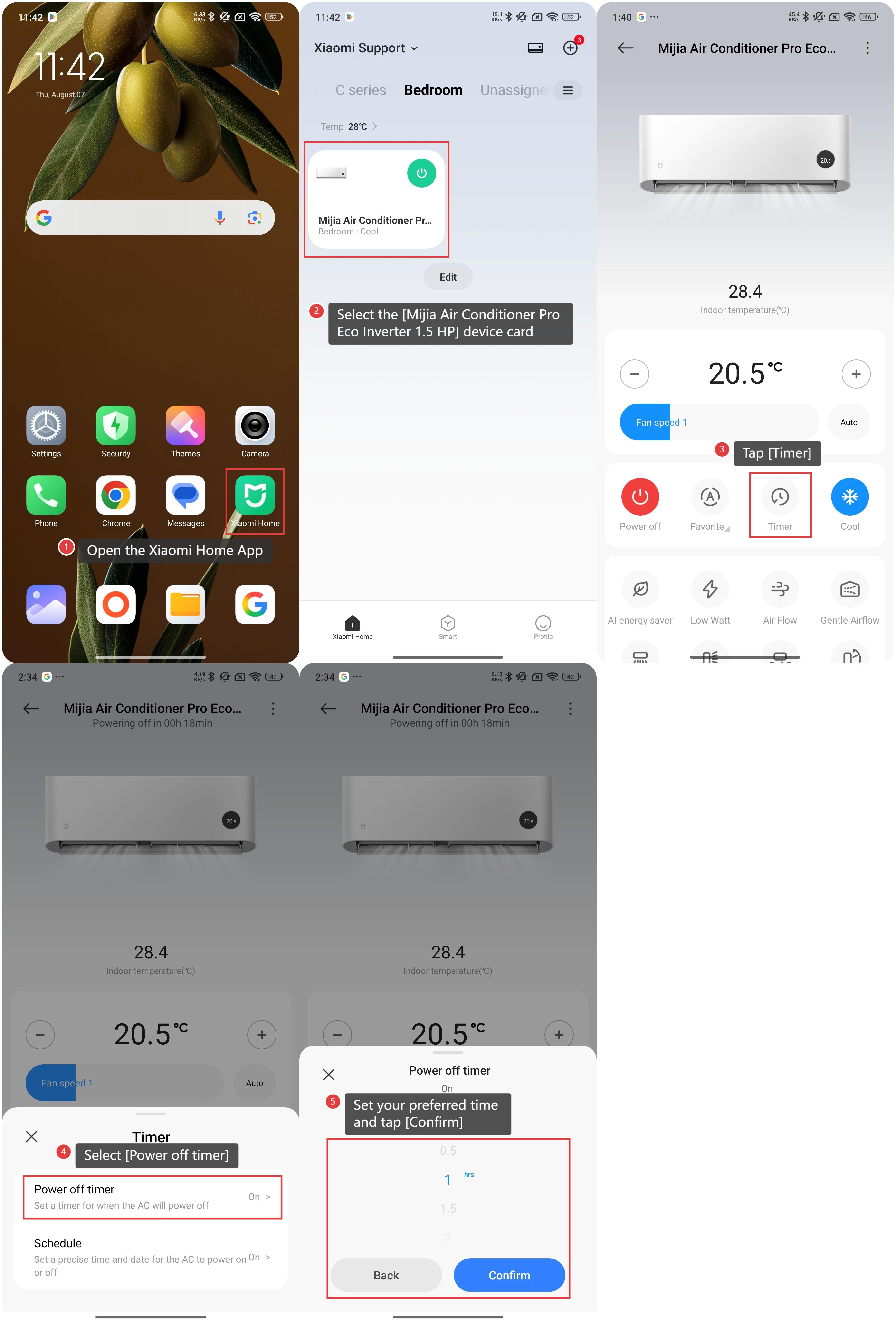
1. Open the Xiaomi Home App on your device;
2. Select the [Mijia Air Conditioner Pro Eco Inverter 1.5 HP] device card;
3. Tap [Timer];
4. Select [Power off timer] or [Power on timer];
5. Set your preferred time and tap [Confirm].
You can also create a schedule for the air conditioner to automatically power on or off at your desired time and date.
Please refer to the following steps to set the schedule of the Mijia Air Conditioner Pro Eco Inverter 1.5 HP:
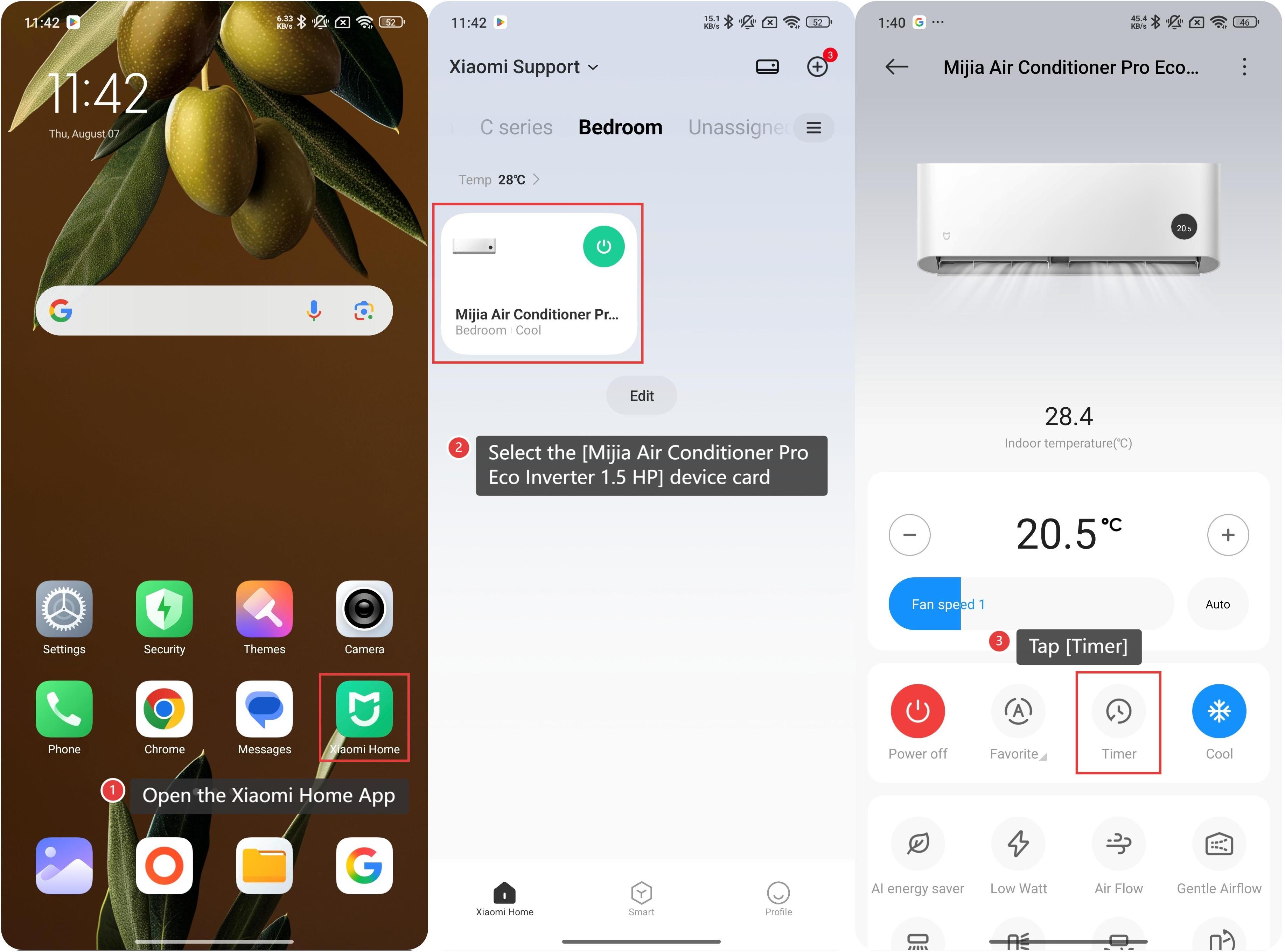
1. Open the Xiaomi Home App on your device;
2. Select the [Mijia Air Conditioner Pro Eco Inverter 1.5 HP] device card;
3. Tap [Timer];
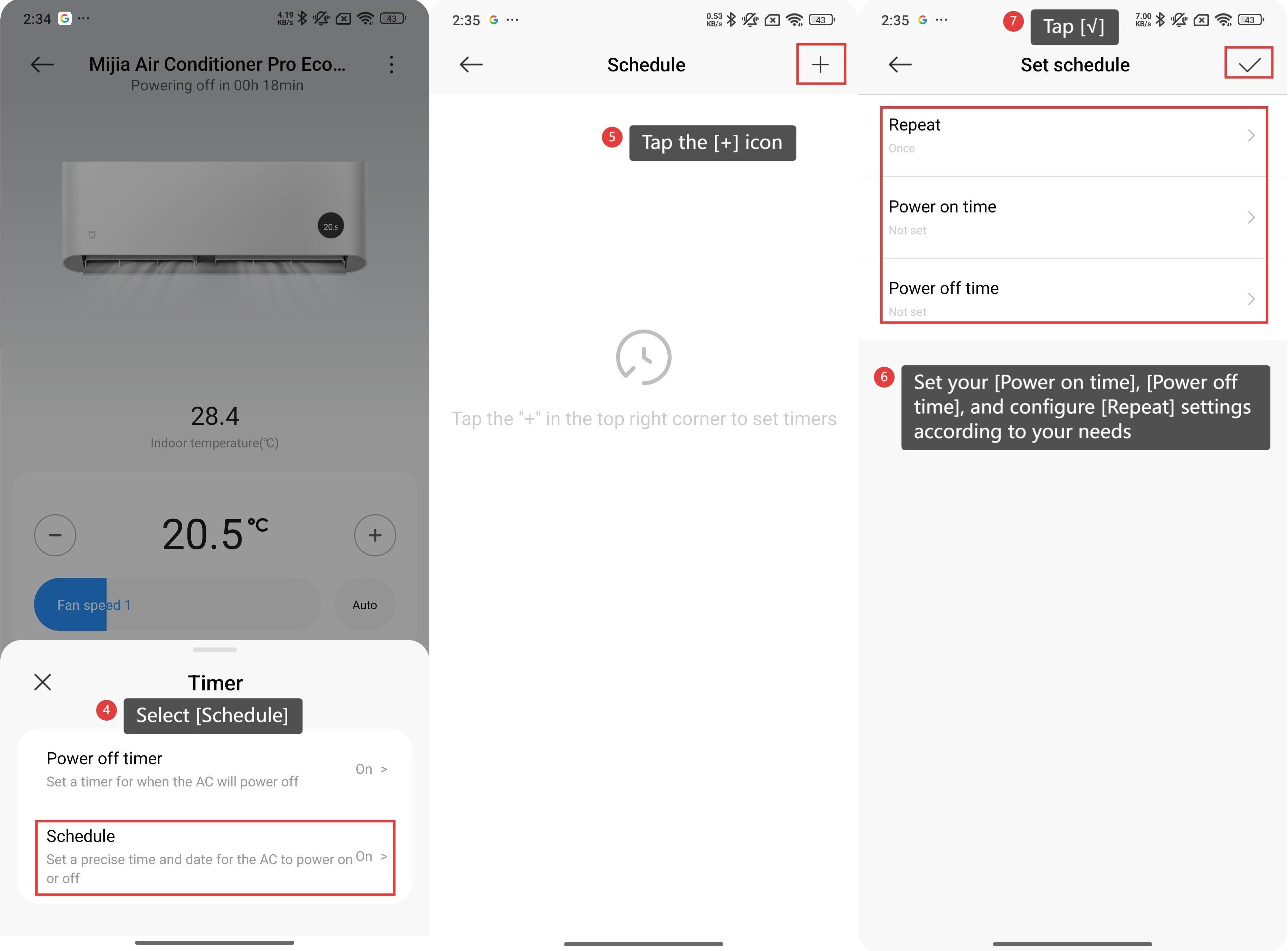
4. Select [Schedule];
5. Tap the [+] icon at the upper right corner;
6. Set your [Power on time], [Power off time], and configure [Repeat] settings according to your needs;
7. Tap the [√] icon to save your schedule.
To set a timer for turning the Mijia Air Conditioner Pro Eco Inverter 1.5 HP on or off with the remote control, please refer to the following information:
1. While the Mijia Air Conditioner Pro Eco Inverter 1.5 HP is in standby or running mode, press the [Timer] button and use the [+] or [-] buttons to select your desired time. The setting will automatically confirm and take effect after 2 seconds;
2. When the air conditioner is turned on, you can set an auto-off timer, and when it is off, you can set an auto turn-on timer.
To set a timer for turning the Mijia Air Conditioner Pro Eco Inverter 1.5 HP on or off via the Xiaomi Home App, please refer to the following information:
1. Open the Xiaomi Home App on your device;
2. Select the [Mijia Air Conditioner Pro Eco Inverter 1.5 HP] device card;
3. Tap [Timer];
4. Select [Power off timer] or [Power on timer];
5. Set your preferred time and tap [Confirm].
You can also create a schedule for the air conditioner to automatically power on or off at your desired time and date.
Please refer to the following steps to set the schedule of the Mijia Air Conditioner Pro Eco Inverter 1.5 HP:
1. Open the Xiaomi Home App on your device;
2. Select the [Mijia Air Conditioner Pro Eco Inverter 1.5 HP] device card;
3. Tap [Timer];
4. Select [Schedule];
5. Tap the [+] icon at the upper right corner;
6. Set your [Power on time], [Power off time], and configure [Repeat] settings according to your needs;
7. Tap the [√] icon to save your schedule.
Does it help?
Yes
No