

How to use the gentle airflow function on the Mijia Air Conditioner Pro Eco Inverter 1.0 HP?
The Mijia Air Conditioner Pro Eco Inverter 1.0 HP is equipped with soft air guide blade. When Gentle airflow mode is activated, the left and right airflow guide blades adjust their angles perpendicular to the airflow direction. The perforations on these guide blades help disperse the airflow, creating a softer and more comfortable breeze. Additionally, the direction of the airflow can be adjusted by changing the angle of the air guide blade.
To use the gentle airflow function on the Mijia Air Conditioner Pro Eco Inverter 1.0 HP, please refer to the following methods:
Method 1:
In cooling mode, press the [Air Flow] button on the remote control to cycle through gentle airflow, upward airflow, downward airflow, circulating airflow, and off. When the setting remains on [Gentle Airflow], the gentle airflow function is activated.
Method 2:
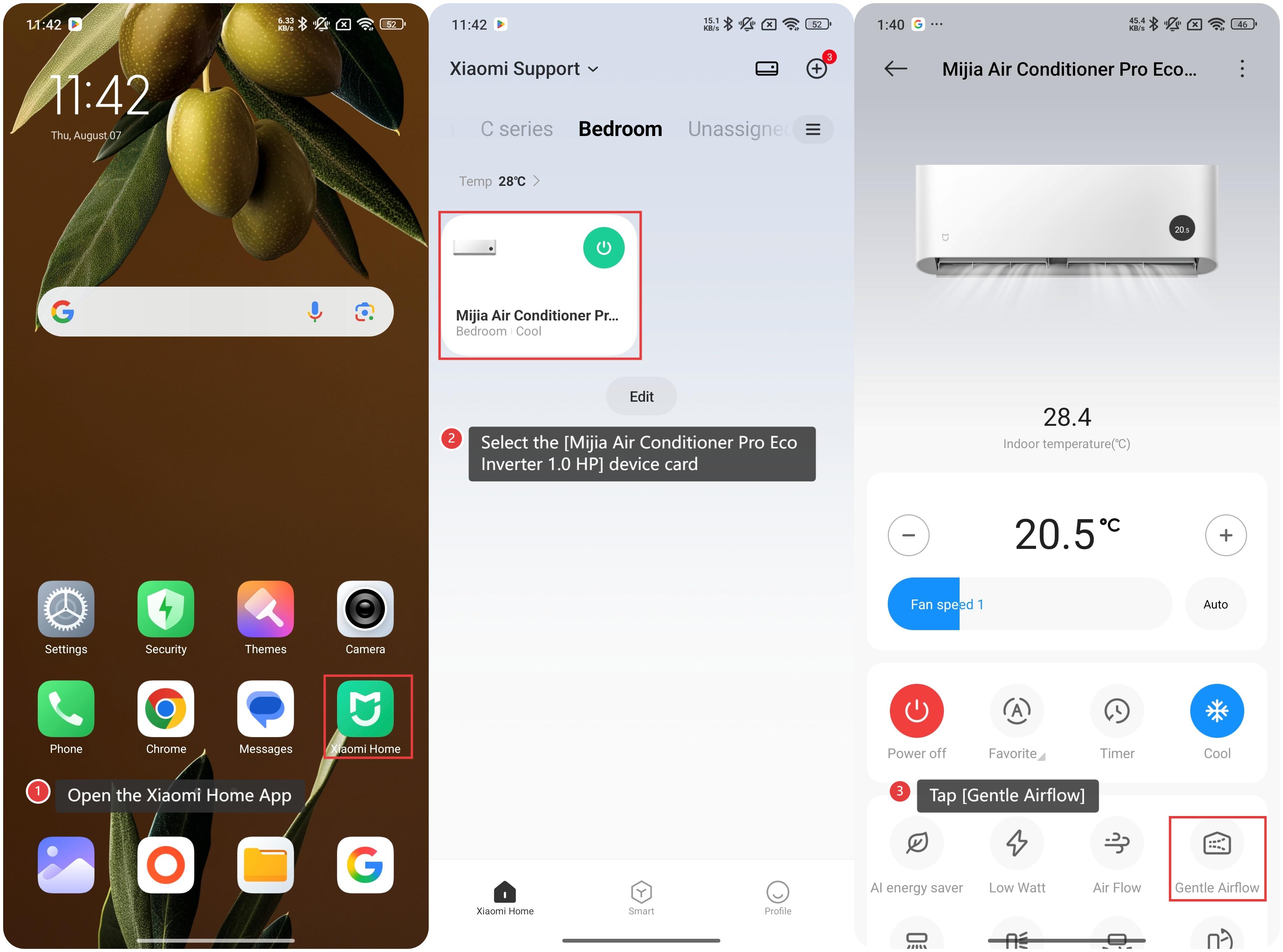
1. Open the Xiaomi Home App on your device;
2. Select the [Mijia Air Conditioner Pro Eco Inverter 1.0 HP] device card;
3. Tap [Gentle Airflow] to use this feature.
To use the gentle airflow function on the Mijia Air Conditioner Pro Eco Inverter 1.0 HP, please refer to the following methods:
Method 1:
In cooling mode, press the [Air Flow] button on the remote control to cycle through gentle airflow, upward airflow, downward airflow, circulating airflow, and off. When the setting remains on [Gentle Airflow], the gentle airflow function is activated.
Method 2:
1. Open the Xiaomi Home App on your device;
2. Select the [Mijia Air Conditioner Pro Eco Inverter 1.0 HP] device card;
3. Tap [Gentle Airflow] to use this feature.
Does it help?
Yes
No