

How to connect the Mijia Air Conditioner Pro Eco Inverter 1.0 HP to the Xiaomi Home App?
Install the Xiaomi Home App and log in to your account.
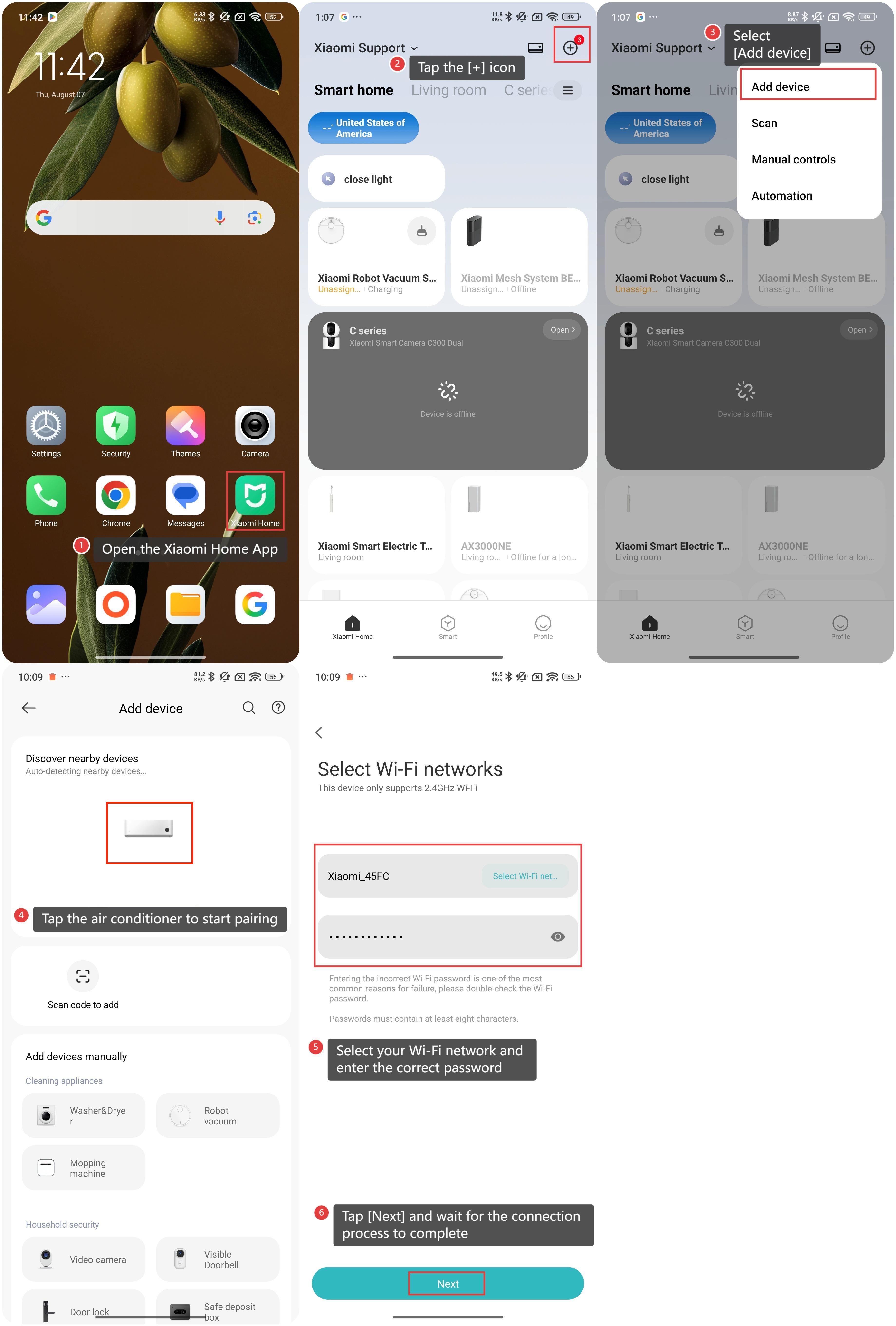
Please refer to the following steps to connect the Mijia Air Conditioner Pro Eco Inverter 1.0 HP:
1. Open the Xiaomi Home App on your device;
2. Tap the [+] icon at the upper right corner;
3. Select [Add device];
4. Tap the air conditioner to start pairing;
5. Select your Wi-Fi network and enter the correct password;
6. Tap [Next] and wait for the connection process to complete. Make sure Bluetooth is enabled and bring your phone closer to the device to finish pairing.
Note:
1. For Android phones, you can add the air conditioner via nearby devices or manual addition. For iPhones, after installing the Xiaomi Home App, tap the [+] icon on the homepage to manually select the device or select the scanned new device to add;
2. This Mijia Air Conditioner Pro Eco Inverter 1.0 HP does not support pairing with a smart band.
Please refer to the following steps to connect the Mijia Air Conditioner Pro Eco Inverter 1.0 HP:
1. Open the Xiaomi Home App on your device;
2. Tap the [+] icon at the upper right corner;
3. Select [Add device];
4. Tap the air conditioner to start pairing;
5. Select your Wi-Fi network and enter the correct password;
6. Tap [Next] and wait for the connection process to complete. Make sure Bluetooth is enabled and bring your phone closer to the device to finish pairing.
Note:
1. For Android phones, you can add the air conditioner via nearby devices or manual addition. For iPhones, after installing the Xiaomi Home App, tap the [+] icon on the homepage to manually select the device or select the scanned new device to add;
2. This Mijia Air Conditioner Pro Eco Inverter 1.0 HP does not support pairing with a smart band.
Does it help?
Yes
No