

Xiaomi Outdoor Camera CW100 Dual FAQ
Function Introduction
1. Q: What’s the appearance of the Xiaomi Outdoor Camera CW100 Dual?
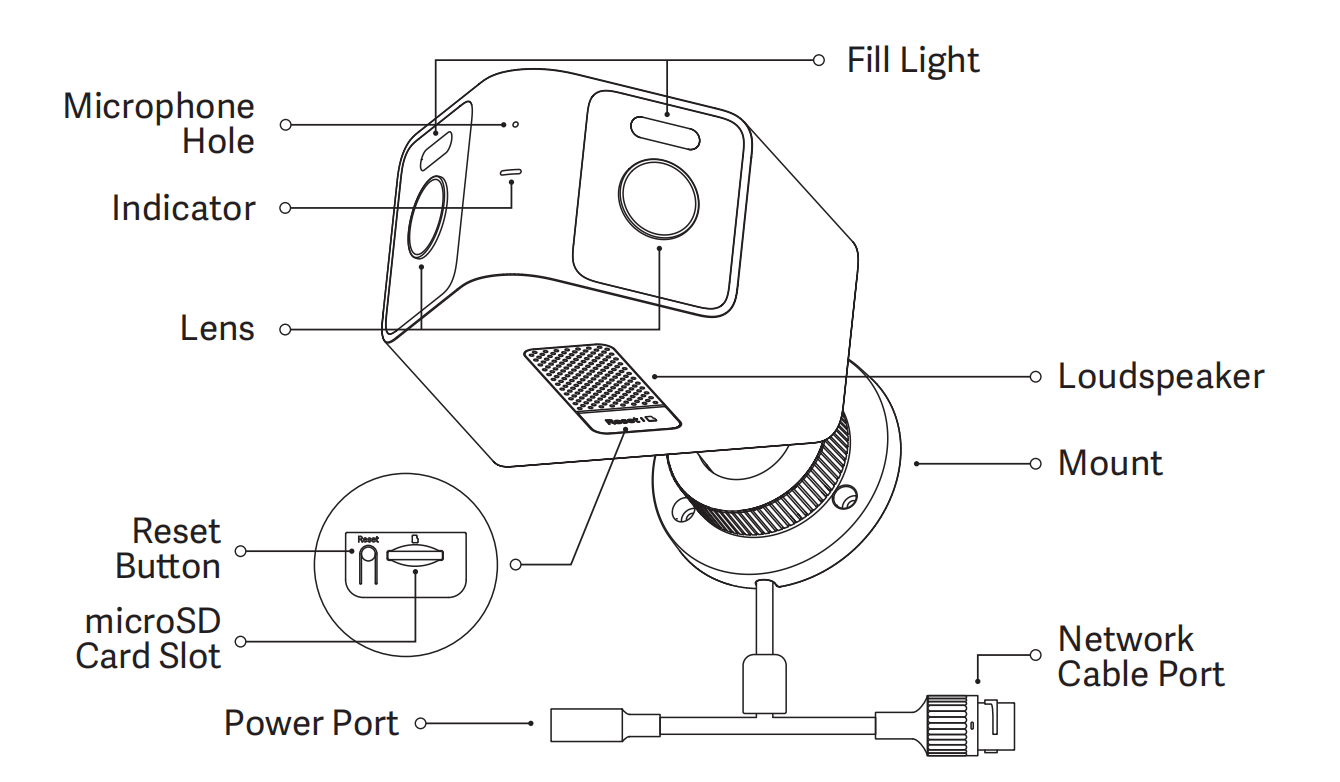
A: The appearance of the Xiaomi Outdoor Camera CW100 Dual is as follows:
The camera features several key components, including a fill light, microphone hole, indicator, lens, loudspeaker, and mount. It is also equipped with a network cable port, power port, reset button, and a microSD card slot for local storage.
2. Q: What is the power supply method for the Xiaomi Outdoor Camera CW100 Dual?
A: The Xiaomi Outdoor Camera CW100 Dual is powered by a 12V 1A adapter. To ensure proper functionality, be sure to use the original adapter.
3. Q: What are the installation methods for the Xiaomi Outdoor Camera CW100 Dual?
A: The Xiaomi Outdoor Camera CW100 Dual can be installed on a wall or ceiling.
4. Q: What are the steps for wall mounting the Xiaomi Outdoor Camera CW100 Dual?
A: To wall-mount the Xiaomi Outdoor Camera CW100 Dual, please refer to the following steps:
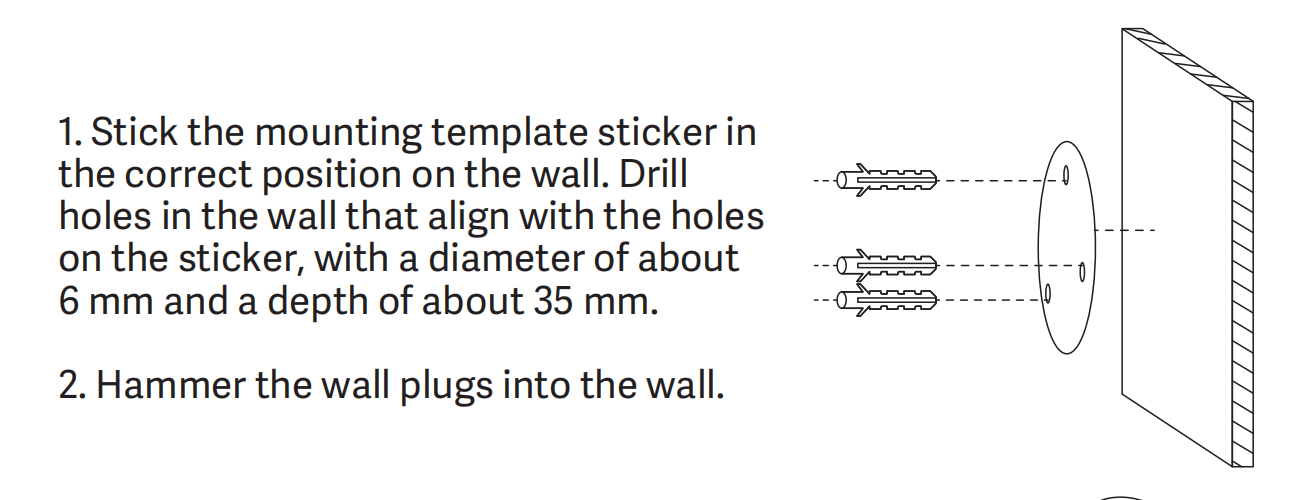
1. Stick the mounting template sticker in the correct position on the wall. Drill holes in the wall that align with the holes on the sticker, with a diameter of about 6 mm and a depth of about 35mm;
2. Hammer the wall plugs into the wall;
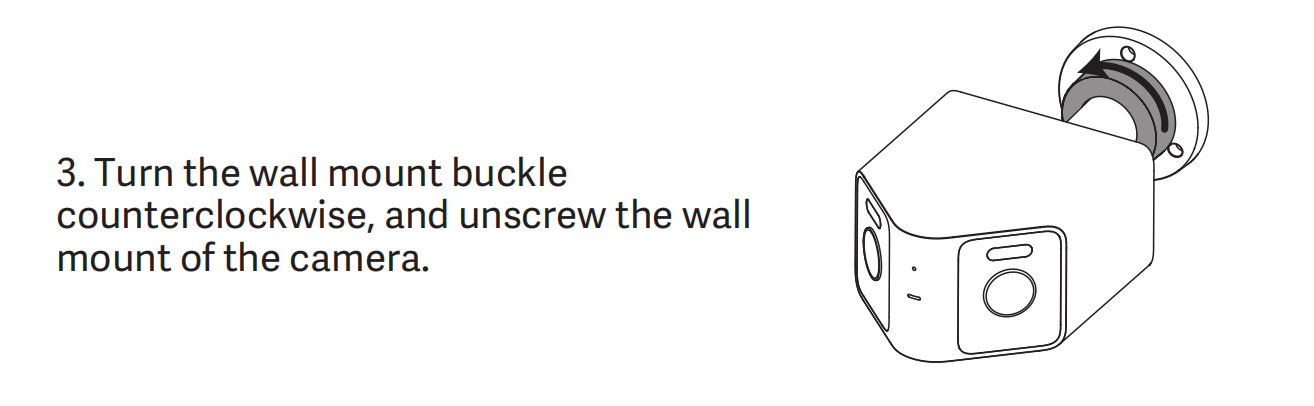
3. Turn the wall mount buckle counterclockwise, and unscrew the wall mount of the camera;
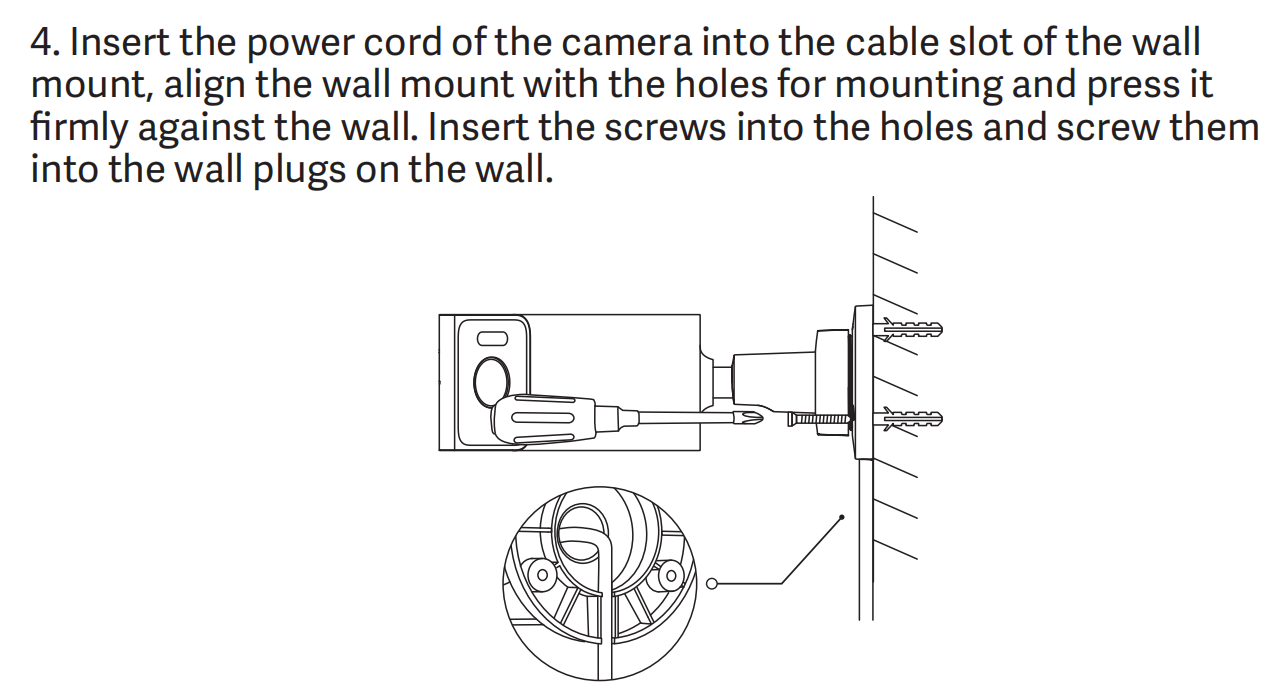
4. Insert the power cord of the camera into the cable slot of the wall mount, align the wall mount with the holes for mounting and press it firmly against the wall. Insert the screws into the holes and screw them into the wall plugs on the wall;
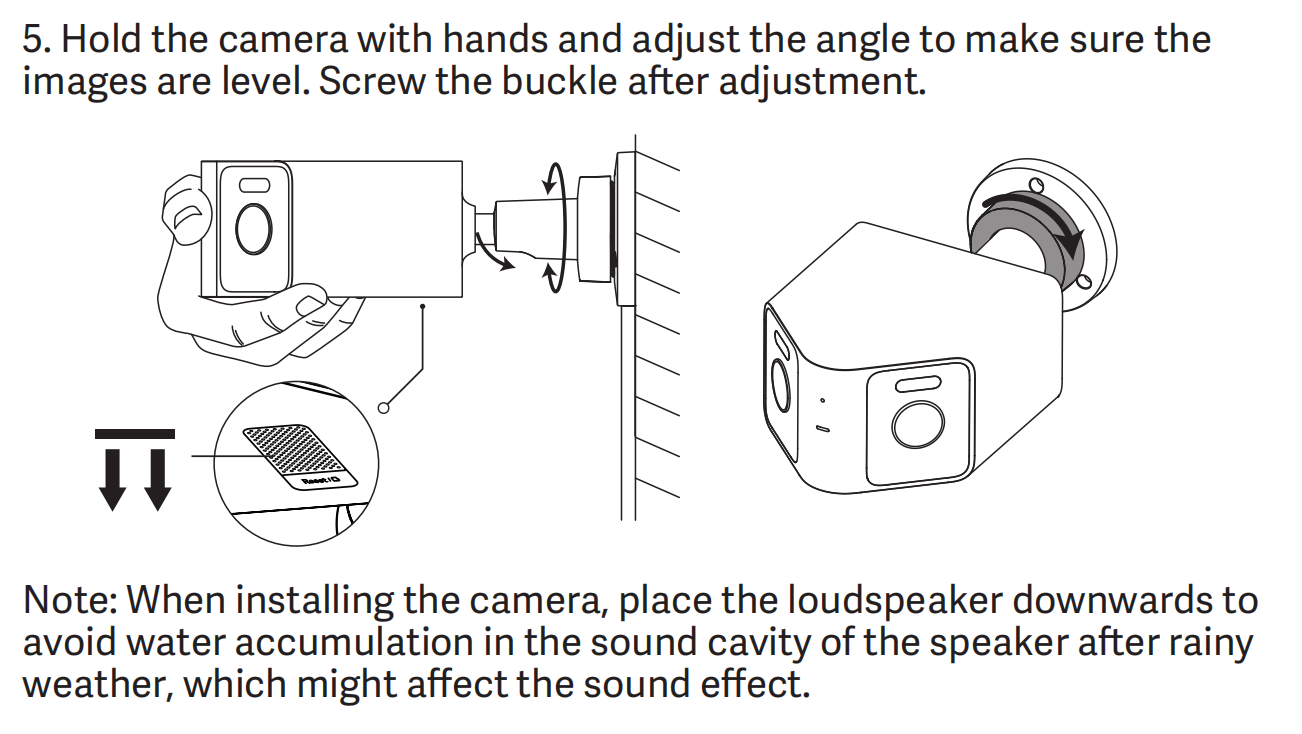
5. Hold the camera with hands and adjust the angle to make sure the images are level. Screw the buckle after adjustment;
Note:
When installing the camera, place the loudspeaker downwards to avoid water accumulation in the sound cavity of the speaker after rainy weather, which affects the sound effect.
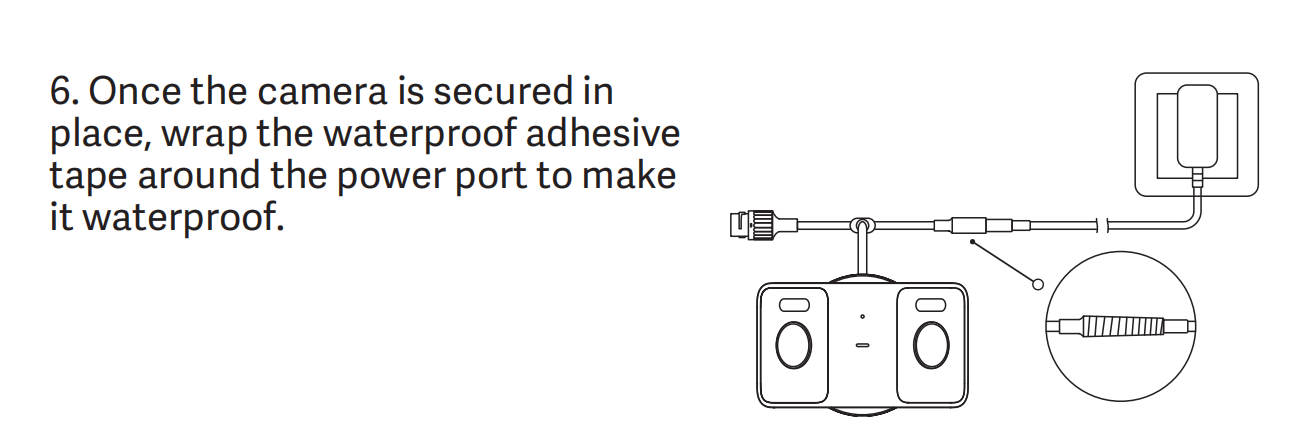
6. Once the camera is secured in place, wrap the waterproof adhesive tape around the power port to make it waterproof.
5. Q: How to power on the Xiaomi Outdoor Camera CW100 Dual?
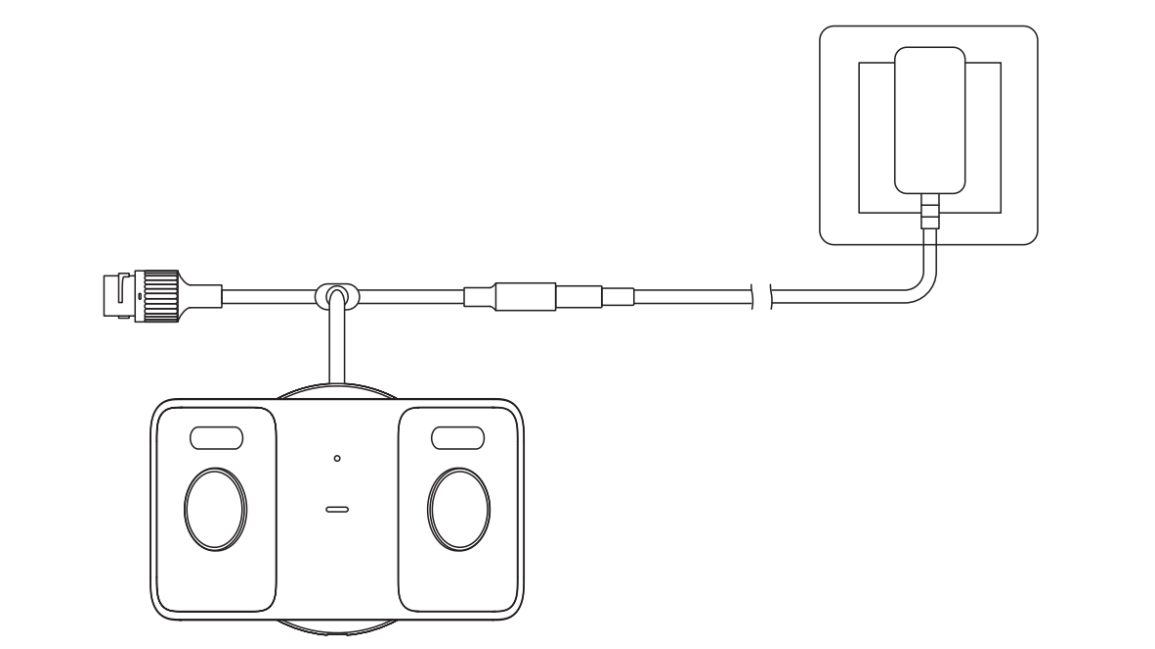
A: To power on the Xiaomi Outdoor Camera CW100 Dual, insert the power adapter cable into the camera’s power port. The indicator will keep in orange and the camera will automatically power on. A voice notification will confirm successful startup. Be sure to use the original adapter and power cable to avoid potential malfunctions.
6. Q: How to install a microSD card in the Xiaomi Outdoor Camera CW100 Dual?
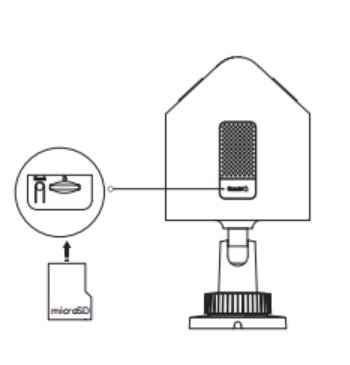
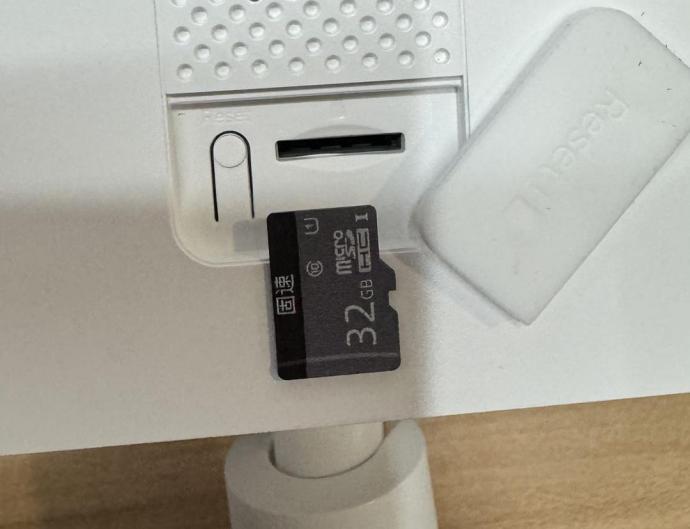
A: Make sure the Xiaomi Outdoor Camera CW100 Dual is powered off. Open the waterproof cover above the microSD card slot to expose the slot. Insert the microSD card with the contact side facing the correct direction as shown in the illustration.
Note:
Always power off the camera before inserting or removing the microSD card. Please use a microSD card from a reputable manufacturer (supported capacity: 16GB to 256GB). The card need to be formatted in the Mi Home/Xiaomi Home APP via the camera plugin ([Settings] >> [Manage storage]) before use. A microSD card with a read/write speed of at least U1/Class 10 is recommended.
7. Q: What network connection methods are supported by the Xiaomi Outdoor Camera CW100 Dual?
A: The Xiaomi Outdoor Camera CW100 Dual supports 2.4GHz single-band Wi-Fi and also features a 100Mbps Ethernet port for wired network connection.
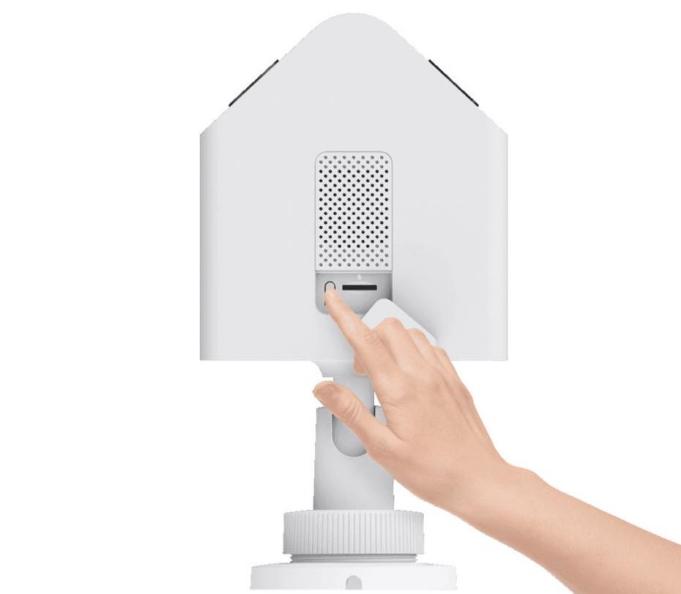
8 Q: How to restore the Xiaomi Outdoor Camera CW100 Dual to factory settings?
A: If you need to change the network the Xiaomi Outdoor Camera CW100 Dual is connected to, press the reset button. A voice prompt will confirm a successful reset.
Note:
Resetting the camera will not delete the contents of the microSD card.
9. Q: Does the Xiaomi Outdoor Camera CW100 Dual support NAS storage?
A: Yes, the Xiaomi Outdoor Camera CW100 Dual supports NAS storage. In the Mi Home/Xiaomi Home APP, go to the camera's live video interface, tap the top-right […] >> [Manage storage] >> [NAS network storage], and follow the instructions to add a storage device.
Note:
The router or NAS device must support this feature, and a microSD card must be installed in the camera and functioning properly for recording.
10. Q: Where is the SN of the Xiaomi Outdoor Camera CW100 Dual?
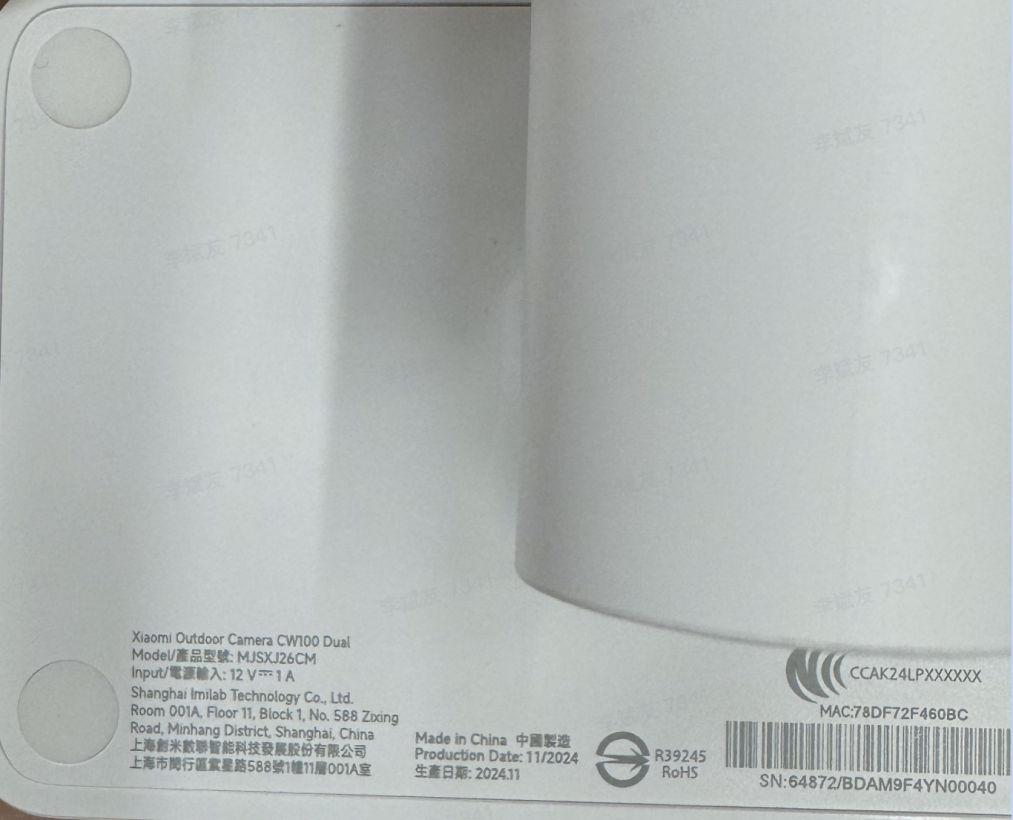
A: The SN of the Xiaomi Outdoor Camera CW100 Dual can be found in the following locations:
1. The SN can be found on the body of the camera;
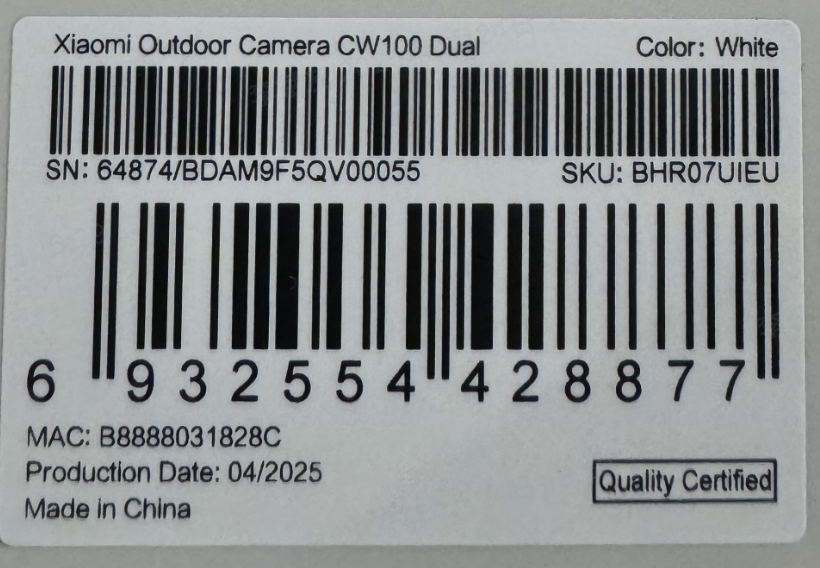
2. You can also find the SN barcode on the back of the product packaging.
1. Q: What’s the appearance of the Xiaomi Outdoor Camera CW100 Dual?
A: The appearance of the Xiaomi Outdoor Camera CW100 Dual is as follows:
The camera features several key components, including a fill light, microphone hole, indicator, lens, loudspeaker, and mount. It is also equipped with a network cable port, power port, reset button, and a microSD card slot for local storage.
2. Q: What is the power supply method for the Xiaomi Outdoor Camera CW100 Dual?
A: The Xiaomi Outdoor Camera CW100 Dual is powered by a 12V 1A adapter. To ensure proper functionality, be sure to use the original adapter.
3. Q: What are the installation methods for the Xiaomi Outdoor Camera CW100 Dual?
A: The Xiaomi Outdoor Camera CW100 Dual can be installed on a wall or ceiling.
4. Q: What are the steps for wall mounting the Xiaomi Outdoor Camera CW100 Dual?
A: To wall-mount the Xiaomi Outdoor Camera CW100 Dual, please refer to the following steps:
1. Stick the mounting template sticker in the correct position on the wall. Drill holes in the wall that align with the holes on the sticker, with a diameter of about 6 mm and a depth of about 35mm;
2. Hammer the wall plugs into the wall;
3. Turn the wall mount buckle counterclockwise, and unscrew the wall mount of the camera;
4. Insert the power cord of the camera into the cable slot of the wall mount, align the wall mount with the holes for mounting and press it firmly against the wall. Insert the screws into the holes and screw them into the wall plugs on the wall;
5. Hold the camera with hands and adjust the angle to make sure the images are level. Screw the buckle after adjustment;
Note:
When installing the camera, place the loudspeaker downwards to avoid water accumulation in the sound cavity of the speaker after rainy weather, which affects the sound effect.
6. Once the camera is secured in place, wrap the waterproof adhesive tape around the power port to make it waterproof.
5. Q: How to power on the Xiaomi Outdoor Camera CW100 Dual?
A: To power on the Xiaomi Outdoor Camera CW100 Dual, insert the power adapter cable into the camera’s power port. The indicator will keep in orange and the camera will automatically power on. A voice notification will confirm successful startup. Be sure to use the original adapter and power cable to avoid potential malfunctions.
6. Q: How to install a microSD card in the Xiaomi Outdoor Camera CW100 Dual?
A: Make sure the Xiaomi Outdoor Camera CW100 Dual is powered off. Open the waterproof cover above the microSD card slot to expose the slot. Insert the microSD card with the contact side facing the correct direction as shown in the illustration.
Note:
Always power off the camera before inserting or removing the microSD card. Please use a microSD card from a reputable manufacturer (supported capacity: 16GB to 256GB). The card need to be formatted in the Mi Home/Xiaomi Home APP via the camera plugin ([Settings] >> [Manage storage]) before use. A microSD card with a read/write speed of at least U1/Class 10 is recommended.
7. Q: What network connection methods are supported by the Xiaomi Outdoor Camera CW100 Dual?
A: The Xiaomi Outdoor Camera CW100 Dual supports 2.4GHz single-band Wi-Fi and also features a 100Mbps Ethernet port for wired network connection.
8 Q: How to restore the Xiaomi Outdoor Camera CW100 Dual to factory settings?
A: If you need to change the network the Xiaomi Outdoor Camera CW100 Dual is connected to, press the reset button. A voice prompt will confirm a successful reset.
Note:
Resetting the camera will not delete the contents of the microSD card.
9. Q: Does the Xiaomi Outdoor Camera CW100 Dual support NAS storage?
A: Yes, the Xiaomi Outdoor Camera CW100 Dual supports NAS storage. In the Mi Home/Xiaomi Home APP, go to the camera's live video interface, tap the top-right […] >> [Manage storage] >> [NAS network storage], and follow the instructions to add a storage device.
Note:
The router or NAS device must support this feature, and a microSD card must be installed in the camera and functioning properly for recording.
10. Q: Where is the SN of the Xiaomi Outdoor Camera CW100 Dual?
A: The SN of the Xiaomi Outdoor Camera CW100 Dual can be found in the following locations:
1. The SN can be found on the body of the camera;
2. You can also find the SN barcode on the back of the product packaging.
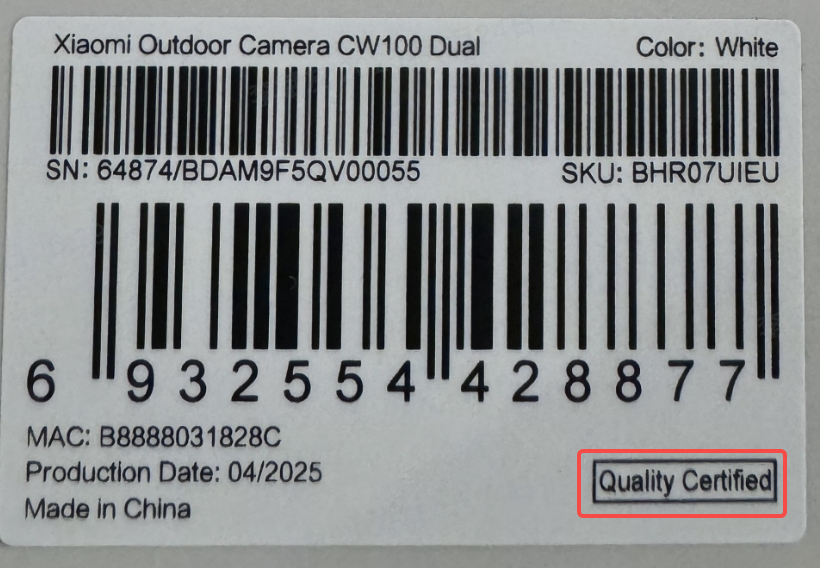
11. Q: Where is the quality certification label of the Xiaomi Outdoor Camera CW100 Dual?
A: The quality certification label for the Xiaomi Outdoor Camera CW100 Dual can be found on the sticker located at the bottom-right corner on the back of the product packaging.
12. Q: Does the Xiaomi Outdoor Camera CW100 Dual require a power connection, or is it battery-powered?
A: The Xiaomi Outdoor Camera CW100 Dual requires a power connection to operate. It does not contain a built-in battery and must be plugged into the power supply. Please make sure to use the original 12V 1A power adapter.
13. Q: Does the Xiaomi Outdoor Camera CW100 Dual support two-way audio communication?
A: Yes, the Xiaomi Outdoor Camera CW100 Dual is equipped with a built-in microphone and speaker, allowing you to engage in two-way audio communication via the Mi Home/Xiaomi Home APP on your smartphone.
To use the two-way audio communication, please refer to the following steps:
Open the [Mi Home/Xiaomi Home APP] >> enter the camera >> tap the call icon to start a voice conversation. Tap the icon again to hang up.
14. Q: What are the precautions of when using the Xiaomi Outdoor Camera CW100 Dual?
A: Please note the following precautions when using the Xiaomi Outdoor Camera CW100 Dual:
1. The camera is designed to operate in temperatures ranging from -30℃ to 60℃. Do not use the product in environments with temperatures beyond this range;
2. This product is a precision electronic device with an IP66 rating. Do not use it in overly humid environments or places where it can be exposed to water, as this could affect normal operation;
3. The included power adapter is not waterproof and is intended for indoor use only. Do not use it in excessively damp environments or where it can come into contact with water;
4. The power adapter operates in a temperature range of -30℃ to 45℃. Avoid using it in temperatures beyond this range;
5. To ensure optimal image quality, avoid placing the lens too close to reflective surfaces such as glass or white walls, which can cause the image to appear too bright in the foreground and too dark in the background;
6. If connecting via Wi-Fi, make sure the installation location is within the Wi-Fi coverage area. Install the camera where the Wi-Fi signal is strong;
7. When switching night vision on or off, the camera will activate the infrared filter, which can produce a slight clicking sound, which is normal;
8. If the power cable is damaged, please contact the after-sales service center to request replacement by a professional to avoid any hazards;
9. For safety, it is recommended to install the camera no higher than 2 meters;
10. To protect the video feed from being viewed or stolen, please set a secure password after binding the device ([Settings] >> [Additional settings] >> [Security settings]) and update it regularly;
11. Ensure that the camera is installed with the speaker facing downward to prevent rainwater from accumulating in the speaker cavity and affecting sound performance;
12. After removing the waterproof cover (for resetting the device or inserting/removing a microSD card), make sure to properly reseal the cover to prevent water ingress and ensure normal operation.
15. Q: What does the indicator on the Xiaomi Outdoor Camera CW100 Dual mean?
A: The meanings of the indicator on the Xiaomi Outdoor Camera CW100 Dual are as follows:
1. Keeping in blue: Connected successfully/Working normally;
2. Blinking in blue: Network error;
3. Blinking in orange quickly: Waiting for connection;
4. Blinking in orange slowly: Updating.
16 Q: Where is the infrared night vision light located on the Xiaomi Outdoor Camera CW100 Dual?
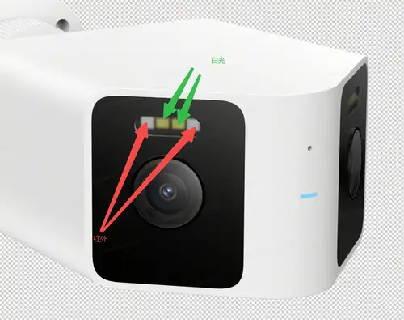
A: The infrared night vision light of the Xiaomi Outdoor Camera CW100 Dual is located as shown below:
1. The infrared night vision lights (marked with red arrows in the image) are positioned on both sides of the camera lens. These lights support night-time surveillance by enabling the camera to capture clear images in low-light or no-light conditions;
2. The white daylight LEDs (marked with green arrows) are located above the lens and provide supplemental lighting for full-color video in low-light environments.
17. Q: Can the bracket on the Xiaomi Outdoor Camera CW100 Dual be removed?
A: The bracket on the Xiaomi Outdoor Camera CW100 Dual is not removable. It features an integrated cable-through design, offering a more streamlined appearance and easier installation.
18. Q: What scenarios is the Xiaomi Outdoor Camera CW100 Dual suitable for?
A: The Xiaomi Outdoor Camera CW100 Dual supports wide-angle monitoring with dual left-right views covering over 180° of the scene. It is ideal for use in areas such as front/back yards, farms, warehouses, and other large outdoor spaces.
19. Q: Why does the image appear misaligned when using the Super wide view mode on the Xiaomi Outdoor Camera CW100 Dual?
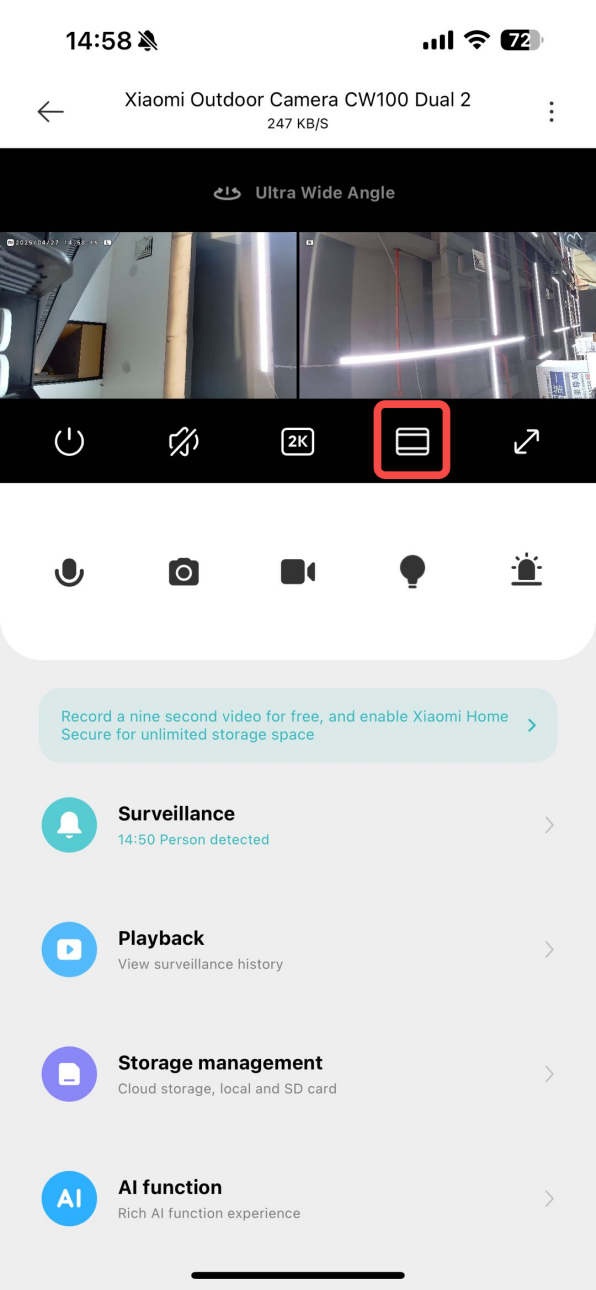
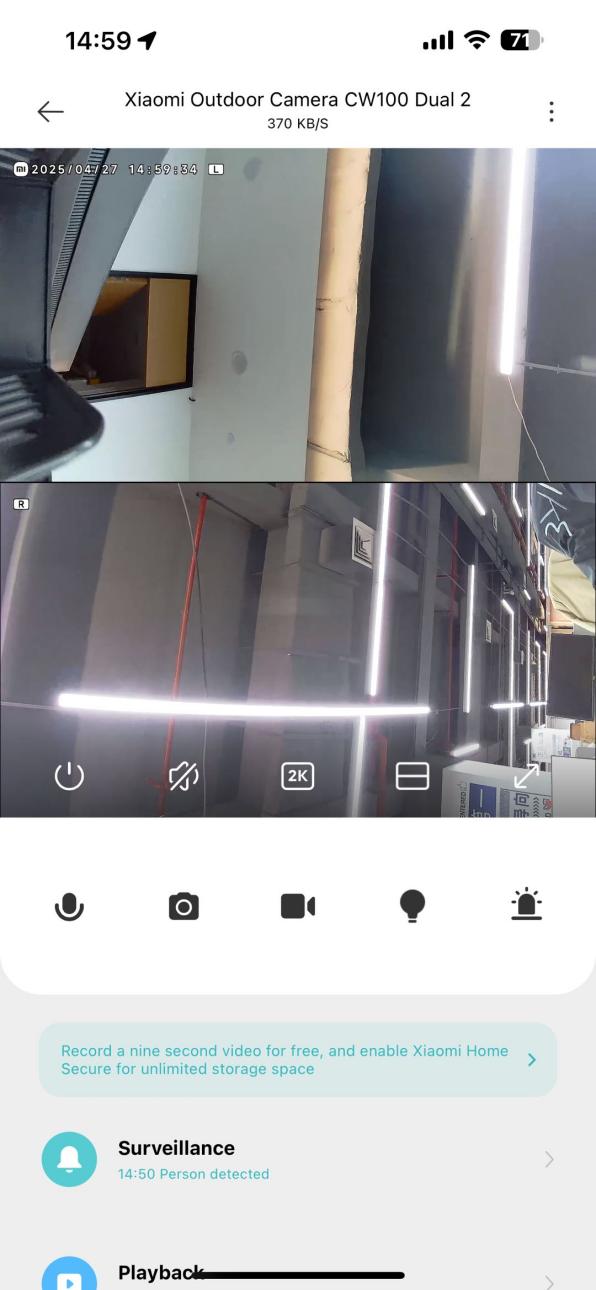
A: The Xiaomi Outdoor Camera CW100 Dual supports Super wide view mode, which covers a field of view of over 180°, allowing you to see the entire scene in one combined image. Due to optical limitations, some stretching or stitching deviations can occur in the overlapping areas. This is a normal effect caused by the wide-angle image stitching process. If this affects your viewing experience, you can switch to the split-view mode, which displays the upper and lower camera feeds separately for improved clarity.
20. Q: What Bluetooth features does the Xiaomi Outdoor Camera CW100 Dual support?
A: The Xiaomi Outdoor Camera CW100 Dual supports Bluetooth BLE 5.2 for pairing and connection. However, it does not support Bluetooth Mesh gateway functionality, as this feature requires a separate hardware design that is not included in this product.
A: The quality certification label for the Xiaomi Outdoor Camera CW100 Dual can be found on the sticker located at the bottom-right corner on the back of the product packaging.
12. Q: Does the Xiaomi Outdoor Camera CW100 Dual require a power connection, or is it battery-powered?
A: The Xiaomi Outdoor Camera CW100 Dual requires a power connection to operate. It does not contain a built-in battery and must be plugged into the power supply. Please make sure to use the original 12V 1A power adapter.
13. Q: Does the Xiaomi Outdoor Camera CW100 Dual support two-way audio communication?
A: Yes, the Xiaomi Outdoor Camera CW100 Dual is equipped with a built-in microphone and speaker, allowing you to engage in two-way audio communication via the Mi Home/Xiaomi Home APP on your smartphone.
To use the two-way audio communication, please refer to the following steps:
Open the [Mi Home/Xiaomi Home APP] >> enter the camera >> tap the call icon to start a voice conversation. Tap the icon again to hang up.
14. Q: What are the precautions of when using the Xiaomi Outdoor Camera CW100 Dual?
A: Please note the following precautions when using the Xiaomi Outdoor Camera CW100 Dual:
1. The camera is designed to operate in temperatures ranging from -30℃ to 60℃. Do not use the product in environments with temperatures beyond this range;
2. This product is a precision electronic device with an IP66 rating. Do not use it in overly humid environments or places where it can be exposed to water, as this could affect normal operation;
3. The included power adapter is not waterproof and is intended for indoor use only. Do not use it in excessively damp environments or where it can come into contact with water;
4. The power adapter operates in a temperature range of -30℃ to 45℃. Avoid using it in temperatures beyond this range;
5. To ensure optimal image quality, avoid placing the lens too close to reflective surfaces such as glass or white walls, which can cause the image to appear too bright in the foreground and too dark in the background;
6. If connecting via Wi-Fi, make sure the installation location is within the Wi-Fi coverage area. Install the camera where the Wi-Fi signal is strong;
7. When switching night vision on or off, the camera will activate the infrared filter, which can produce a slight clicking sound, which is normal;
8. If the power cable is damaged, please contact the after-sales service center to request replacement by a professional to avoid any hazards;
9. For safety, it is recommended to install the camera no higher than 2 meters;
10. To protect the video feed from being viewed or stolen, please set a secure password after binding the device ([Settings] >> [Additional settings] >> [Security settings]) and update it regularly;
11. Ensure that the camera is installed with the speaker facing downward to prevent rainwater from accumulating in the speaker cavity and affecting sound performance;
12. After removing the waterproof cover (for resetting the device or inserting/removing a microSD card), make sure to properly reseal the cover to prevent water ingress and ensure normal operation.
15. Q: What does the indicator on the Xiaomi Outdoor Camera CW100 Dual mean?
A: The meanings of the indicator on the Xiaomi Outdoor Camera CW100 Dual are as follows:
1. Keeping in blue: Connected successfully/Working normally;
2. Blinking in blue: Network error;
3. Blinking in orange quickly: Waiting for connection;
4. Blinking in orange slowly: Updating.
16 Q: Where is the infrared night vision light located on the Xiaomi Outdoor Camera CW100 Dual?
A: The infrared night vision light of the Xiaomi Outdoor Camera CW100 Dual is located as shown below:
1. The infrared night vision lights (marked with red arrows in the image) are positioned on both sides of the camera lens. These lights support night-time surveillance by enabling the camera to capture clear images in low-light or no-light conditions;
2. The white daylight LEDs (marked with green arrows) are located above the lens and provide supplemental lighting for full-color video in low-light environments.
17. Q: Can the bracket on the Xiaomi Outdoor Camera CW100 Dual be removed?
A: The bracket on the Xiaomi Outdoor Camera CW100 Dual is not removable. It features an integrated cable-through design, offering a more streamlined appearance and easier installation.
18. Q: What scenarios is the Xiaomi Outdoor Camera CW100 Dual suitable for?
A: The Xiaomi Outdoor Camera CW100 Dual supports wide-angle monitoring with dual left-right views covering over 180° of the scene. It is ideal for use in areas such as front/back yards, farms, warehouses, and other large outdoor spaces.
19. Q: Why does the image appear misaligned when using the Super wide view mode on the Xiaomi Outdoor Camera CW100 Dual?
A: The Xiaomi Outdoor Camera CW100 Dual supports Super wide view mode, which covers a field of view of over 180°, allowing you to see the entire scene in one combined image. Due to optical limitations, some stretching or stitching deviations can occur in the overlapping areas. This is a normal effect caused by the wide-angle image stitching process. If this affects your viewing experience, you can switch to the split-view mode, which displays the upper and lower camera feeds separately for improved clarity.
20. Q: What Bluetooth features does the Xiaomi Outdoor Camera CW100 Dual support?
A: The Xiaomi Outdoor Camera CW100 Dual supports Bluetooth BLE 5.2 for pairing and connection. However, it does not support Bluetooth Mesh gateway functionality, as this feature requires a separate hardware design that is not included in this product.
APP Related
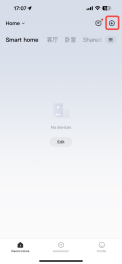
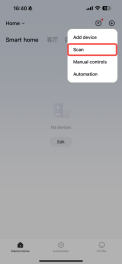
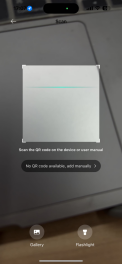
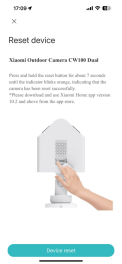
21. Q: How to connect the Xiaomi Outdoor Camera CW100 Dual to the Mi Home/Xiaomi Home APP?
A: To connect the Xiaomi Outdoor Camera CW100 Dual to the Mi Home/Xiaomi Home APP, please follow these steps:
1. Take the camera out of the packaging and place it on a flat surface;
2. Connect the power adapter to a power source, then insert the power cable into the camera’s power port and ensure it's securely connected;
3. Once powered, the camera’s orange indicator will remain steady. After about 20 seconds, you will hear a voice prompt: “Please use your phone to scan the QR code on the device body (You can scan it using a Xiaomi phone’s scanner or the code on the base of the camera), then you will hear a voice prompt: “waiting for connection.” At this point, use the Mi Home/Xiaomi Home APP to add and bind the device;
4. Go to the [Mi Home/Xiaomi Home] APP >> tap [+] at the right top of the screen >> tap [Scan] >> scan the QR code located on the camera’s base;
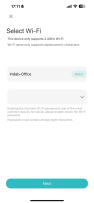
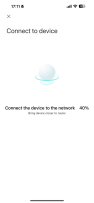
5. When the APP displays the binding interface, no reset or button press is required for first-time setup. Proceed by tapping [Device reset] >> your phone will begin searching for the camera >> choose a 2.4GHz Wi-Fi network, enter the Wi-Fi password >> tap [Next] >> keep your phone close to the device during this step. Wait a few moments. You will hear the camera prompts: “Wireless network connected successfully, account binding successful”;
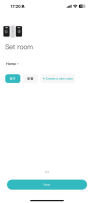
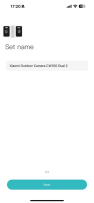
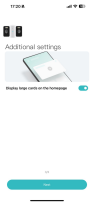
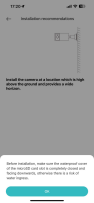
6. The APP will show device added successfully. Tap [Done], select a usage scenario, and name the device. The camera will confirm: “Account binding successful, you can start using now”;
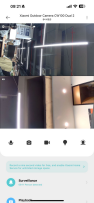
7. Tap [Start] to complete the process;
Note:
1. Device binding: Supports Bluetooth pairing (Bluetooth BLE 5.2) for discovery;
2. Device network access: Supports both 2.4GHz Wi-Fi and wired Ethernet connections.
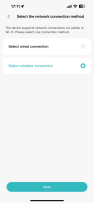
Wired/Wi-Fi network connection process:
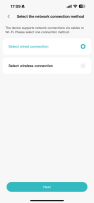
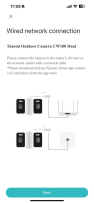
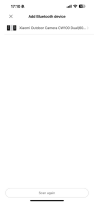
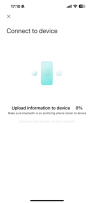
1. [Select the network connection method] >> [ Select wired connection];
2. [Select the network connection method] >> [Select Wi-Fi].
21. Q: How to connect the Xiaomi Outdoor Camera CW100 Dual to the Mi Home/Xiaomi Home APP?
A: To connect the Xiaomi Outdoor Camera CW100 Dual to the Mi Home/Xiaomi Home APP, please follow these steps:
1. Take the camera out of the packaging and place it on a flat surface;
2. Connect the power adapter to a power source, then insert the power cable into the camera’s power port and ensure it's securely connected;
3. Once powered, the camera’s orange indicator will remain steady. After about 20 seconds, you will hear a voice prompt: “Please use your phone to scan the QR code on the device body (You can scan it using a Xiaomi phone’s scanner or the code on the base of the camera), then you will hear a voice prompt: “waiting for connection.” At this point, use the Mi Home/Xiaomi Home APP to add and bind the device;
4. Go to the [Mi Home/Xiaomi Home] APP >> tap [+] at the right top of the screen >> tap [Scan] >> scan the QR code located on the camera’s base;
5. When the APP displays the binding interface, no reset or button press is required for first-time setup. Proceed by tapping [Device reset] >> your phone will begin searching for the camera >> choose a 2.4GHz Wi-Fi network, enter the Wi-Fi password >> tap [Next] >> keep your phone close to the device during this step. Wait a few moments. You will hear the camera prompts: “Wireless network connected successfully, account binding successful”;
6. The APP will show device added successfully. Tap [Done], select a usage scenario, and name the device. The camera will confirm: “Account binding successful, you can start using now”;
7. Tap [Start] to complete the process;
Note:
1. Device binding: Supports Bluetooth pairing (Bluetooth BLE 5.2) for discovery;
2. Device network access: Supports both 2.4GHz Wi-Fi and wired Ethernet connections.
Wired/Wi-Fi network connection process:
1. [Select the network connection method] >> [ Select wired connection];
2. [Select the network connection method] >> [Select Wi-Fi].
Does it help?
Yes
No