

How to use the Child lock function on the Mijia Refrigerator Cross Door 510L?
The Mijia Refrigerator Cross Door 510L features the child lock, which is a safety feature designed to prevent children from accidentally changing settings. Once activated, it disables the control interface, ensuring that temperature settings and other functions remain secure.
To use the Child lock function on the device, please refer to the following steps:
1. Press and hold the Mode button for 3 seconds to enable or disable the Child lock feature;
2. The lock icon lights up or goes off correspondingly;
3. Once the Child lock feature is enabled, all buttons are inactive except for the Mode button;
4. You can also turn on/off the Child lock in the Mi Home/Xiaomi Home APP.
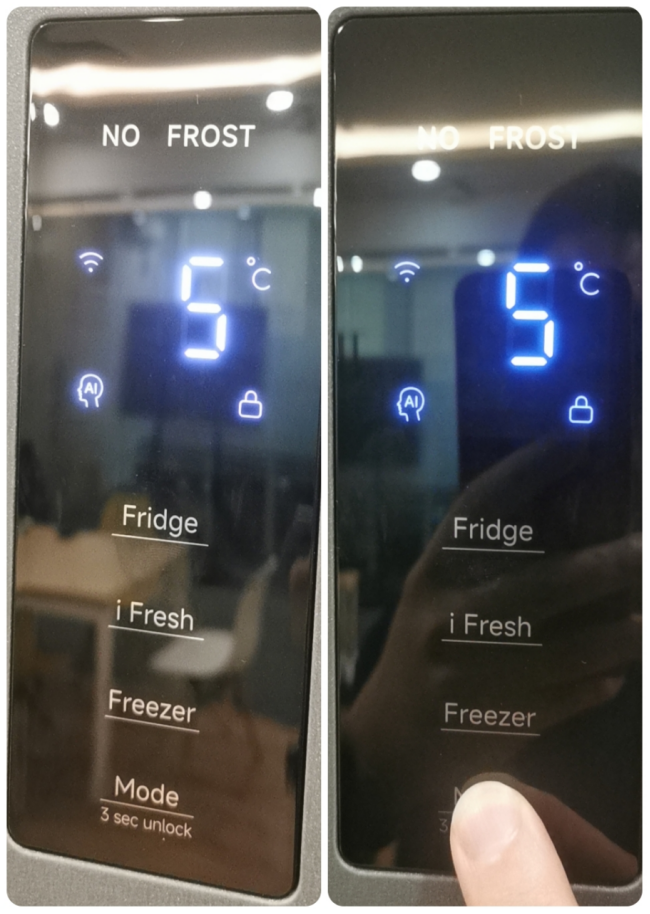
To use the Child lock function on the device, please refer to the following steps:
1. Press and hold the Mode button for 3 seconds to enable or disable the Child lock feature;
2. The lock icon lights up or goes off correspondingly;
3. Once the Child lock feature is enabled, all buttons are inactive except for the Mode button;
4. You can also turn on/off the Child lock in the Mi Home/Xiaomi Home APP.
Does it help?
Yes
No