

What to do if the Xiaomi Smart Desktop Air Circulation Fan cannot connect to Wi-Fi?
If the Xiaomi Smart Desktop Air Circulation Fan cannot connect to Wi-Fi, please refer to the following methods:
Method 1:
1. First confirm that the Wi-Fi network connected to the mobile phone is the same as the network to which the device is connected;
2. Then confirm whether the connected Wi-Fi network is 2.4GHz. The device does not support connecting to 5GHz network;
3. Whether the Wi-Fi network and password selected in the Mi Home/Xiaomi Home APP are correct.
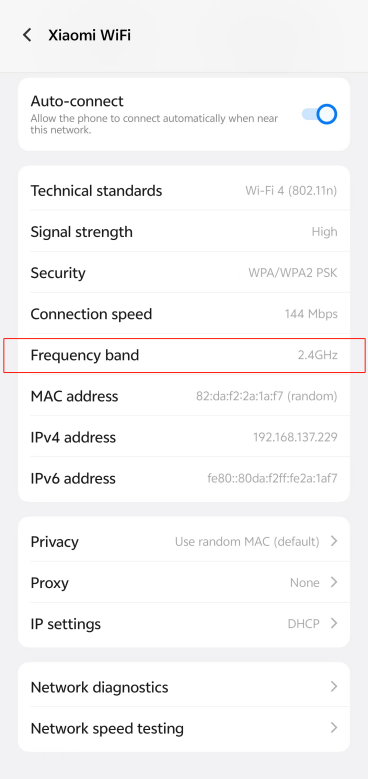
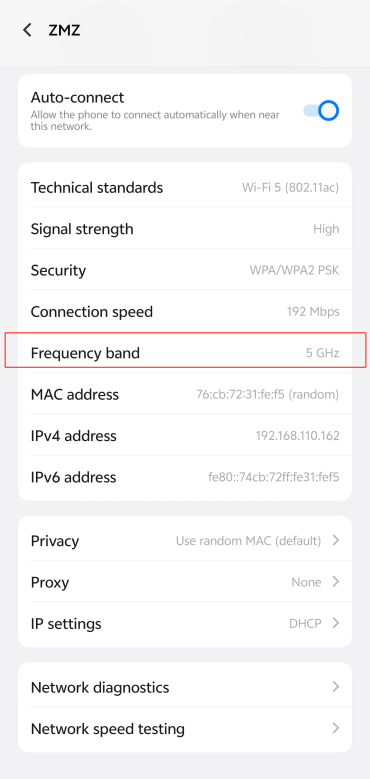
2.4GHz Network 5GHz Network
Note:
Take an Android phone as an example:
Enter the phone's [Settings], enable the [Wi-Fi] settings, find the Wi-Fi network that the phone is currently connected to, and navigate this Wi-Fi to display the Wi-Fi information.
Method 2:
1. Check if the Wi-Fi is in the waiting state, simultaneously press and hold the Standby Button and Mode/Speed Button, and the Wi-Fi indicator flashes;
2. Check if the home network is a 2.4GHz signal;
3. Check if the entered password is incorrect;
4. Try to keep the fan close to the router, or use the mobile phone hotspot to check the router cause;
5. If the problem still exists, please apply for after-sales inspection.
Note:
The Xiaomi Smart Desktop Air Circulation Fan supports network control and is compatible with most personal routers on the market.
However, it should be noted that the wireless network of the router has the following requirements:
1. You need to enable the Bluetooth and Location functions of your phone before connecting to the network;
2. The Xiaomi Smart Desktop Air Circulation Fan can only connect to a 2.4GHz Wi-Fi network and does not currently support a 5GHz Wi-Fi network (some 5GHz networks will not work if mixed with 2.4GHz networks);
3. The Wi-Fi encryption method must be WPA or WPA2 as the WEP is not supported;
4. The router needs to have DHCP enabled. It does not currently support specifying a static IP, web authentication, or enterprise-oriented 802.1X.
Method 1:
1. First confirm that the Wi-Fi network connected to the mobile phone is the same as the network to which the device is connected;
2. Then confirm whether the connected Wi-Fi network is 2.4GHz. The device does not support connecting to 5GHz network;
3. Whether the Wi-Fi network and password selected in the Mi Home/Xiaomi Home APP are correct.
2.4GHz Network 5GHz Network
Note:
Take an Android phone as an example:
Enter the phone's [Settings], enable the [Wi-Fi] settings, find the Wi-Fi network that the phone is currently connected to, and navigate this Wi-Fi to display the Wi-Fi information.
Method 2:
1. Check if the Wi-Fi is in the waiting state, simultaneously press and hold the Standby Button and Mode/Speed Button, and the Wi-Fi indicator flashes;
2. Check if the home network is a 2.4GHz signal;
3. Check if the entered password is incorrect;
4. Try to keep the fan close to the router, or use the mobile phone hotspot to check the router cause;
5. If the problem still exists, please apply for after-sales inspection.
Note:
The Xiaomi Smart Desktop Air Circulation Fan supports network control and is compatible with most personal routers on the market.
However, it should be noted that the wireless network of the router has the following requirements:
1. You need to enable the Bluetooth and Location functions of your phone before connecting to the network;
2. The Xiaomi Smart Desktop Air Circulation Fan can only connect to a 2.4GHz Wi-Fi network and does not currently support a 5GHz Wi-Fi network (some 5GHz networks will not work if mixed with 2.4GHz networks);
3. The Wi-Fi encryption method must be WPA or WPA2 as the WEP is not supported;
4. The router needs to have DHCP enabled. It does not currently support specifying a static IP, web authentication, or enterprise-oriented 802.1X.
Does it help?
Yes
No