

Xiaomi Smart Standing Air Circulation Fan FAQ
Overview
1.Q: What do the Xiaomi Smart Standing Air Circulation Fan package contents include?
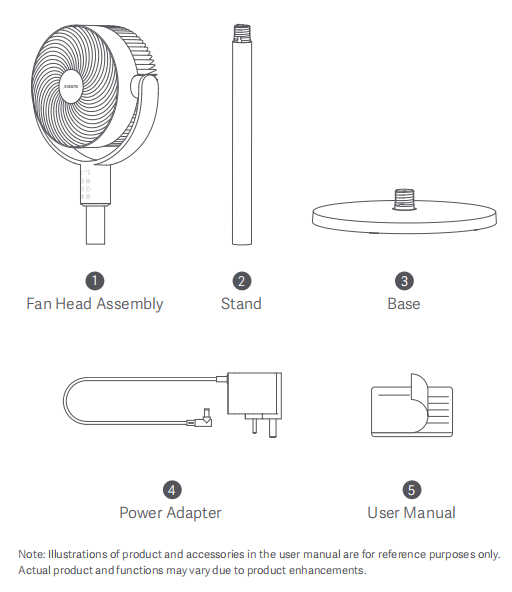
A: The packaging list of the Xiaomi Smart Standing Air Circulation Fan includes Fan Head Assembly × 1, Stand × 1, Base (including counterweight) × 1, Power Adapter × 1, and User Manual × 1.
Note:
The illustrations of products and accessories in the User Manual are for reference only. Due to product enhancements, actual products and features will vary.
Product Introduction and Usage
1.Q: How to turn on and off the Xiaomi Smart Standing Air Circulation Fan?
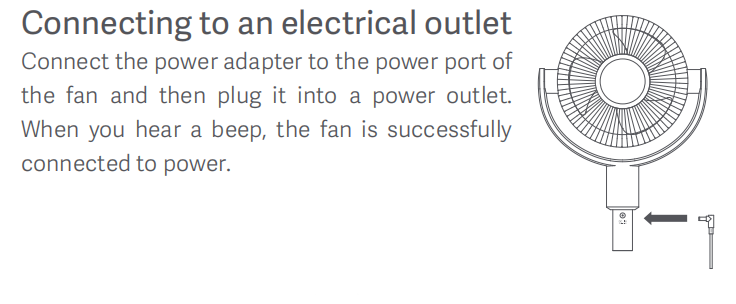
A: Connect the power adapter to the power port of the fan and then plug it into a power socket. When you hear a beep, the fan is successfully connected to power.
2.Q: How many buttons does the Xiaomi Smart Standing Air Circulation Fan have?
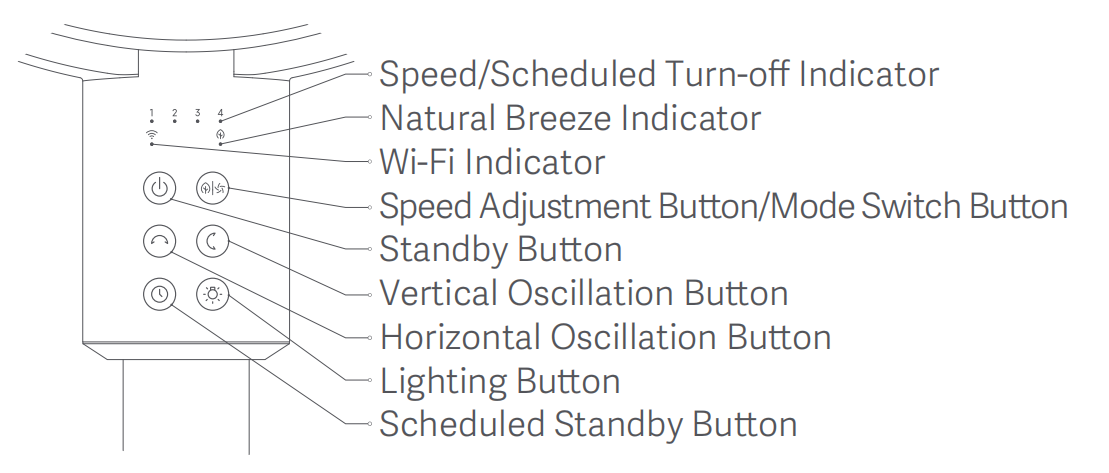
A: There are six buttons of the Xiaomi Smart Standing Air Circulation Fan, namely the Standby Button, Speed Adjustment Button/Mode Switch Button, Horizontal Oscillation Button, Vertical Oscillation Button, Scheduled Standby Button and Lighting Button.
3.Q: How to switch modes of the Xiaomi Smart Standing Air Circulation Fan?
A: Press and hold the [Speed Adjustment Button/Mode Switch Button] to switch between direct breeze mode and natural breeze mode. The natural breeze indicator turns off in the direct breeze mode and remains on in the natural breeze mode. The next time you turn on the fan, it will default to the mode used when you last shut it down.
4.Q: Does the Xiaomi Smart Standing Air Circulation Fan support shutdown memory?
A: The Xiaomi Smart Standing Air Circulation Fan supports shutdown memory. When you turn it on again after powering off, the mode or speed will be the last used one.
5.Q: How to turn on and off the Child lock on the Xiaomi Smart Standing Air Circulation Fan?
A: To turn on or off the Child lock, please refer to the following steps:
1. Press and hold the [Speed Adjustment Button/Mode Switch Button] + [Scheduled Standby Button] for 7 seconds at the same time to cycle on/off the Child lock;
2. Connect to the [Mi Home/Xiaomi Home] APP >> tap the three-dot icon in the upper right corner of the fan interface >> tap [Child lock] to turn on/off the Child lock.
Note:
When the Child lock is on, press any button on the body, all indicator lights flash twice, accompanied by two "beep" beeps, and the fan does not respond to the corresponding button operation. The Child lock can be removed after powering off and then powering on again; when the Child lock is on, the Mi Home/Xiaomi Home APP can perform any operation.
6.Q: How to set the timing shutdown of the Xiaomi Smart Standing Air Circulation Fan?
A: To set the timing shutdown of the Xiaomi Smart Standing Air Circulation Fan, please refer to the following steps:
1. Press the [Scheduled Standby Button] for 2 seconds to cycle switching Timer gears: 1 hour, 2 hours, 3 hours, 4 hours, and disabled. After setting the corresponding timing, the timing indicator will light up for 5 seconds and then return to the original speed mode state.
2. Connect to Mi Home/Xiaomi Home APP >> tap the three-dot icon in the upper right corner of the fan interface >> tap the Schedule and set the maximum timer time of 8 hours.
1. When the indicator shows ●●●●, it means the Timer function is disabled;
2. When the indicator shows ☀●●●, it means the timing time is 1 hour, and the fan will automatically shut down after 1 hour;
3. When the indicator shows ☀☀●●, it means the timing time is 2 hours, and the fan will automatically shut down after 2 hours;
4. When the indicator shows ☀☀☀●, it means the timing time is 3 hours, and the fan will automatically shut down after 3 hours;
5.When the indicator shows ☀☀☀☀, it means the timing time is 4 hours, and the fan will automatically shut down after 4 hours.
Note:
1. Mi Home/Xiaomi Home APP can achieve up to 8 hours of timing shutdown.
2. ☀ means the indicator is on; ● means the indicator is off.

7.Q: How to turn on the Horizontal Oscillation of the Xiaomi Smart Standing Air Circulation Fan?
A: 1. Press the [Horizontal Oscillation Button] on the device to turn on or off the Horizontal Oscillation;
2. Connect to [Mi Home/Xiaomi Home APP] >> Navigate the fan interface >> Scroll down and tap the [Horizontal Oscillation] to turn on or off the Horizontal Oscillation.
Note:
1. The Mi Home/Xiaomi Home APP supports setting the Horizontal Oscillation angle to 30°, 60°, 90° and 120°;
2. After the first power-on/Wi-Fi reset or factory reset, the fan will calibrate to the left for 15 seconds. The fan will not shake during the calibration state, so please be patient and wait;
3. After resetting Wi-Fi, the fan oscillation angle defaults to 120°.
8.Q: How to turn on the vertical oscillation of the Xiaomi Smart Standing Air Circulation Fan?
A: 1. Press the [Vertical Oscillation Button] on the device to turn on or off the vertical oscillation;
2. Connect to [Mi Home/Xiaomi Home] APP >> navigate the fan interface >> scroll down and tap the [Vertical Oscillation] to turn on or off the vertical oscillation.
Note:
1. The Mi Home/Xiaomi Home APP supports setting the vertical oscillation angle to 30°, 60°, 90° and 100°;
2. After the first power-on/Wi-Fi reset or factory reset, the fan will calibrate upwards for 15 seconds. The fan will not shake during the calibration state, so please be patient and wait;
3. After resetting Wi-Fi, the fan oscillation angle defaults to 100°.
9.Q: How to clean the Xiaomi Smart Standing Air Circulation Fan?
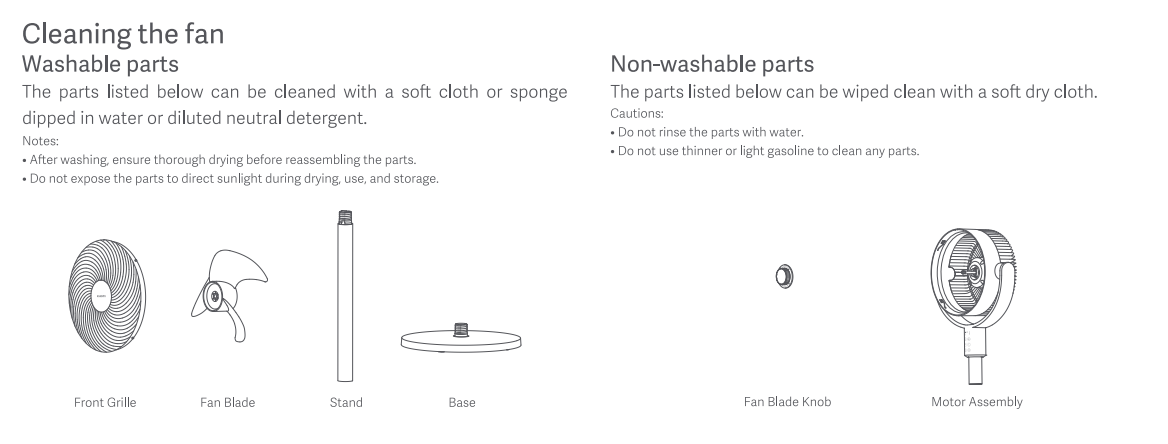
A: When wiping the body and Fan Blade with a clean, soft, damp cloth, you can unscrew the screws on the rear grille to take out the Fan Blade and wash them directly with water, or wipe them with a clean, soft, damp cloth.
Note:
1. Be sure to turn off the device and unplug the power plug before maintenance and cleaning;
2. Make sure the cleaned parts are thoroughly air-dried before installation;
2. Do not disassemble this fan;
3. Do not drop water into the fan;
4. Do not use thinner, light gasoline, toluene, acid detergents, kerosene, alcohol or other chemical agents for cleaning;
5. After rinsing, ensure thorough drying before reassembling the Front Grille, Fan Blade, Stand and Base;
6. Do not expose the Front Grille, Fan Blade, Stand and Bade to direct sunlight during drying, use, and storage;
7. The Fan Blade Knob and Motor Assembly can be wiped clean with a soft dry cloth;
8. Do not rinse the Fan Blade Knob and Motor Assembly with water.
10.Q: Does the Xiaomi Smart Standing Air Circulation Fan support indicators brightness adjustment?
A: The fan supports indicator brightness adjustment.
To turn the indicator on/off, please refer to the following steps:
1. Tap the [Light button] on the body to cycle on/off the indicator;
2. Connect to the [Mi Home/Xiaomi Home] APP >> tap the three-dot icon in the upper right corner of the fan interface >> enable the [Indicators] icon to cycle on/off the indicators.
11.Q: Does the Xiaomi Smart Standing Air Circulation Fan support turning on/off the notification sound?
A: The fan supports volume adjustment of the Notification sound. It can be set in the [Mi Home/Xiaomi Home] APP >> tap the three-dot icon in the upper right corner of the fan interface >> enable or disable the [Notification sound].
Note:
After turning off the notification sound, if the cloud has turned on the notification sound, there will be a "beep" reminder sound when resetting WiFi/restoring factory settings/charging.
12.Q: Can the grilles of the Xiaomi Smart Standing Air Circulation Fan be fixed without installing the grille screws?
A: The grilles can be installed without screws, but it cannot be completely fixed. There is a risk of it falling when the fan is running. Please fix the grilles to ensure the safety of you and others.
Connecting with the Mi Home/Xiaomi Home APP
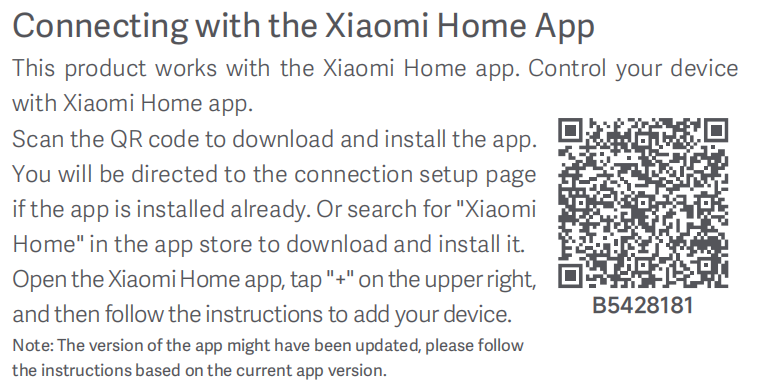
1.Q: How to connect the Xiaomi Smart Standing Air Circulation Fan to Mi Home/Xiaomi Home APP?
A: To connect the Xiaomi Smart Standing Air Circulation Fan to Mi Home/Xiaomi Home APP, please refer to the following steps:
1. Connect the device to the power supply and press the [Standby Button] after power is on. Open the [Mi Home/Xiaomi Home] APP, if you have not downloaded the Mi Home/Xiaomi Home APP, you can scan the [QR code] on the User manual or search for [Mi Home/Xiaomi Home] APP in the [APP store]/[Play Store] APP to download it;
2. After downloading, tap [Login/Register]. After logging in/registering, turn on the [Wi-Fi], [Bluetooth], and [Location] on your phone and allow the Mi Home/Xiaomi Home APP to use these three permissions;
3. (1) After entering the Mi Home/Xiaomi Home APP, turn on the device;
(2) You need to turn on the Wi-Fi function for the first time. Press and hold the [Standby Button] and [Horizontal Oscillation Button] at the same time. After hearing a long "beep", the Wi-Fi indicator blinks, and the Wi-Fi is turned on successfully. Then a new device connection pop-up window will pop up on the Mi Home/Xiaomi Home APP interface;
(3) If it does not pop up, you can also tap [+] icon on the upper right corner of the home interface, select [Add device], and enter the Add Device interface, and a new device connection pop-up window will pop up;
(4) If it does not pop up, you can also swipe down to find the device model of the device or tap the magnifying glass in the upper right corner to search for the Xiaomi Smart Standing Air Circulation Fan and connect it. Select the Wi-Fi network to connect. The network to be connected must be the same as the network connected to the phone and it must be a 2.4GHz network;
(5) After making your selection, enter the Wi-Fi password and tap [Next];
(6) After the connection is successful, select the room where you want to place the device and follow the steps to complete it.
Note:
Please update your Mi Home/Xiaomi Home APP to the latest version and follow the instructions based on the current APP version.
2.Q: How to reset Wi-Fi on the Xiaomi Smart Standing Air Circulation Fan?
A: When connecting for the first time or unable to connect to the Mi Home/Xiaomi Home APP, simultaneously press and hold the [Standby Button] and [Speed/Mode Button] at the same time. When you hear a long beep, the Wi-Fi connection has been reset successfully. Then the fan is awaiting connection.
3.Q: Why can't the Xiaomi Smart Desktop Air Circulation Fan reset Wi-Fi?
A: When you turn on the Wi-Fi of the Xiaomi Smart Standing Air Circulation Fan for the first time and fail to successfully bind to the Mi Home/Xiaomi Home APP within 30 minutes, the Wi-Fi will be automatically turned off. At this time, you need to turn on the Wi-Fi again and then reset it again. You can also press and hold the [Standby Button] and [Horizontal Oscillation Button] for 7 seconds to turn the Wi-Fi on/off.
4.Q: What are the precautions for connecting the Xiaomi Smart Standing Air Circulation Fan to the Internet?
A: The Xiaomi Smart Standing Air Circulation Fan can only connect to 2.4GHz (Wi-Fi IEEE 802.11 b/g/n 2.4 GHz) Wi-Fi network and 5GHz Wi-Fi is not supported.
5.Q: Which settings will be erased after resetting the Xiaomi Smart Standing Air Circulation Fan?
A: After resetting Wi-Fi, the Child lock and Timer switch you set in the Mi Home/Xiaomi Home APP will be erased, and the operating status will change:
1. The direct breeze mode will return to level 1;
2. The oscillation function will be turned off;
3. The oscillation angle will be changed to the default angle.
6.Q: Why does the gear position of the Xiaomi Smart Standing Air Circulation Fan change when switching between natural breeze mode and direct breeze mode?
The two modes have different blowing effects. The direct breeze mode provides a continuous and stable air volume, which can meet the needs for rapid cooling; the natural breeze simulates the outdoor natural breeze mode, with non-uniform wind speed, which is more suitable for long-term use. It is normal for the corresponding wind speeds of the two modes at the same gear to be different. Please choose the mode suitable for the current scene.
FAQ and Troubleshooting
1.Q: What to do if the Xiaomi Smart Standing Air Circulation Fan does not turn on?
A: If the Xiaomi Smart Standing Air Circulation Fan does not turn on, please refer to the following steps:
1. First, when using the standard power supply, confirm that the socket has power (the socket should meet the standard power environment in the current area), and then confirm whether the power adapter is properly connected;
2. When using a non-standard power supply or mobile power supply, confirm whether it is a model that meets the requirements;
3. Check whether the Fan Blade is installed in place and keep the blade clean to avoid dust clogging and affecting work;
4. After reconnecting the power supply, check and press the power switch on the body to try to turn on the device;
5. If the problem still exists, please apply for after-sales inspection.
2.Q: What to do if the Xiaomi Smart Standing Air Circulation Fan button fails?
A: If the Xiaomi Smart Standing Air Circulation Fan button fails, please refer to the following steps:
1. First, check whether the device is powered on normally;
2. Check whether the Child lock function is turned on;
3. Reconnect the power after the power is turned off;
4. If the problem still exists, please apply for after-sales inspection.
3.Q: What to do if the oscillation function of the Xiaomi Smart Standing Air Circulation Fan does not work?
A: 1. When the device is turned on for the first time, it will take some time to find the oscillation angle, it will be completed after shaking 3 times;
2. Check whether the oscillation angle is set in the Mi Home/Xiaomi Home APP;
3. Check whether the fan has any physical damage such as bumps on the exterior;
4. After unbinding, reconnect the APP and check if the function works normally;
5. If the problem still exists, please apply for after-sales inspection.
4.Q: What to do if the Xiaomi Smart Standing Air Circulation Fan automatically shuts down after being turned on?
A: If the Xiaomi Smart Standing Air Circulation Fan automatically shuts down after being turned on, please refer to the following steps:
1. Check if the power supply is disconnected;
2. Check if the power socket has power;
3. Check if the timed shutdown function is turned on;
4. Check if someone else is controlling the device;
5. Re-plug the power adapter;
6. Re-plug it into a socket with power;
7. Turn off the Timer setting;
8. Cancel the sharing function/reset the device;
9. If the problem still exists, please apply for after-sales inspection.
5.Q: What to do if the Xiaomi Smart Standing Air Circulation Fan cannot connect to Wi-Fi?
A: If the Xiaomi Smart Standing Air Circulation Fan cannot connect to the Wi-Fi, please refer to the following steps:
1. Check if the Wi-Fi is in the waiting state, simultaneously press and hold the [Standby Button] and [Speed/Mode Button], and the Wi-Fi indicator flashes;
2. Check if the home network is a 2.4GHz signal;
3. Check if the entered password is incorrect;
4. Try to keep the fan close to the router, or use the mobile phone hotspot to check the router cause;
5. If the problem still exists, please apply for after-sales inspection.
6.Q: How to solve the problem that the wind speed of the Xiaomi Smart Standing Air Circulation Fan suddenly becomes weaker?
A: If the wind speed of the Xiaomi Smart Standing Air Circulation Fan suddenly becomes weaker, please refer to the following steps:
1. Check whether the Natural breeze mode is turned on in the Mi Home/Xiaomi Home APP;
2. Check whether the Timer mode is set;
3. Check whether anyone else is controlling the device on the Mi Home/Xiaomi Home APP;
4. Check whether the power adapter input meets the requirements;
5. If the problem still exists, please apply for after-sales inspection.
7.Q: How to solve the abnormal noise when the Xiaomi Smart Standing Air Circulation Fan is running?
A: If there is an abnormal noise during the operation of the fan, please refer to the following steps:
1. Check whether the grilles are installed properly;
2. Please verify that the Fan Blade locking cover and the rear grille locking cover are properly installed;
3. Check whether there is any foreign matter stuck in the grilles;
4. Check whether there is any foreign matter stuck in the motor;
5. Reinstall the grilles;
6. Reinstall the locking cover;
7. Remove the foreign matter;
8. If the problem still exists, please apply for after-sales inspection.
8.Q: Why does the Xiaomi Smart Standing Air Circulation Fan shake during operation?
A: The fan shakes slightly during operation because the Fan Blade rotates at high speed and generates wind resistance, which causes the Fan Blade to shake slightly. This is a normal phenomenon, so please feel assured to use it.
If the shaking is very obvious, please refer to the following troubleshooting instructions:
1. Check if the grilles are installed properly;
2. Check if there are other items placed on the device;
3. Check if the device is placed in a horizontal position;
4. Check if the Fan Blade is installed properly;
5. Check if the locking cover is installed properly;
6. Install the grilles properly;
7. Remove the items on the device;
8. Place the device in a horizontal position;
9. Reinstall the Fan Blade properly;
10. If the problem still exists, please apply for after-sales inspection.
9.Q: Why does the Xiaomi Smart Standing Air Circulation Fan make an electric current sound when it is running?
A: The motor will make a slight electric current sound when working, which can only be heard when close to the motor. This is a normal phenomenon. If the sound is obvious, please check whether there is any foreign matter inside the fan, remove the Fan Blade, and check whether the abnormal sound comes from the motor or the fan body. If the abnormal sound still occurs after removing the blade, the motor needs to be replaced.
10.Q: How to deal with the odor of the Xiaomi Smart Standing Air Circulation Fan?
A: To deal with the odor of the Xiaomi Smart Standing Air Circulation Fan, please refer to the following steps:
1. Check if there is any odor caused by oil on the Fan Blade. If there is the odor on the Fan Blade, clean the Fan Blade and dry it;
2. Check if there is any other liquid/object dripping on the fan casing, causing the odor. If it is the odor on the casing, clean the casing/Bade;
3. Check if the odor is emitted from the motor. If it is confirmed that the odor is emitted from the motor, disassemble the grilles and Fan Blade, and wipe the odor on the motor rod with a dry tissue;
4. Check if the odor is emitted from the packaging box;
5. If the above cannot solve the problem, please contact after-sales inspection.
11.Q: Why does the power adapter of the Xiaomi Smart Standing Air Circulation Fan become hot during use?
A: It is normal for the power adapter of the fan power adapter to heat up slightly, and this does not affect its safety during use.
12.Q: Why does the Xiaomi Smart Standing Air Circulation Fan sometimes shake its head and pause for a while?
A: When you turn on the device for the first time, reset Wi-Fi/restore factory settings, or turn on the vertical oscillation/horizontal oscillation for the first time, the fan will calibrate upwards/leftwards for 15 seconds. The fan will not shake during the calibration process. Please wait patiently.
1.Q: What do the Xiaomi Smart Standing Air Circulation Fan package contents include?
A: The packaging list of the Xiaomi Smart Standing Air Circulation Fan includes Fan Head Assembly × 1, Stand × 1, Base (including counterweight) × 1, Power Adapter × 1, and User Manual × 1.
Note:
The illustrations of products and accessories in the User Manual are for reference only. Due to product enhancements, actual products and features will vary.
Product Introduction and Usage
1.Q: How to turn on and off the Xiaomi Smart Standing Air Circulation Fan?
A: Connect the power adapter to the power port of the fan and then plug it into a power socket. When you hear a beep, the fan is successfully connected to power.
2.Q: How many buttons does the Xiaomi Smart Standing Air Circulation Fan have?
A: There are six buttons of the Xiaomi Smart Standing Air Circulation Fan, namely the Standby Button, Speed Adjustment Button/Mode Switch Button, Horizontal Oscillation Button, Vertical Oscillation Button, Scheduled Standby Button and Lighting Button.
3.Q: How to switch modes of the Xiaomi Smart Standing Air Circulation Fan?
A: Press and hold the [Speed Adjustment Button/Mode Switch Button] to switch between direct breeze mode and natural breeze mode. The natural breeze indicator turns off in the direct breeze mode and remains on in the natural breeze mode. The next time you turn on the fan, it will default to the mode used when you last shut it down.
4.Q: Does the Xiaomi Smart Standing Air Circulation Fan support shutdown memory?
A: The Xiaomi Smart Standing Air Circulation Fan supports shutdown memory. When you turn it on again after powering off, the mode or speed will be the last used one.
5.Q: How to turn on and off the Child lock on the Xiaomi Smart Standing Air Circulation Fan?
A: To turn on or off the Child lock, please refer to the following steps:
1. Press and hold the [Speed Adjustment Button/Mode Switch Button] + [Scheduled Standby Button] for 7 seconds at the same time to cycle on/off the Child lock;
2. Connect to the [Mi Home/Xiaomi Home] APP >> tap the three-dot icon in the upper right corner of the fan interface >> tap [Child lock] to turn on/off the Child lock.
Note:
When the Child lock is on, press any button on the body, all indicator lights flash twice, accompanied by two "beep" beeps, and the fan does not respond to the corresponding button operation. The Child lock can be removed after powering off and then powering on again; when the Child lock is on, the Mi Home/Xiaomi Home APP can perform any operation.
6.Q: How to set the timing shutdown of the Xiaomi Smart Standing Air Circulation Fan?
A: To set the timing shutdown of the Xiaomi Smart Standing Air Circulation Fan, please refer to the following steps:
1. Press the [Scheduled Standby Button] for 2 seconds to cycle switching Timer gears: 1 hour, 2 hours, 3 hours, 4 hours, and disabled. After setting the corresponding timing, the timing indicator will light up for 5 seconds and then return to the original speed mode state.
2. Connect to Mi Home/Xiaomi Home APP >> tap the three-dot icon in the upper right corner of the fan interface >> tap the Schedule and set the maximum timer time of 8 hours.
1. When the indicator shows ●●●●, it means the Timer function is disabled;
2. When the indicator shows ☀●●●, it means the timing time is 1 hour, and the fan will automatically shut down after 1 hour;
3. When the indicator shows ☀☀●●, it means the timing time is 2 hours, and the fan will automatically shut down after 2 hours;
4. When the indicator shows ☀☀☀●, it means the timing time is 3 hours, and the fan will automatically shut down after 3 hours;
5.When the indicator shows ☀☀☀☀, it means the timing time is 4 hours, and the fan will automatically shut down after 4 hours.
Note:
1. Mi Home/Xiaomi Home APP can achieve up to 8 hours of timing shutdown.
2. ☀ means the indicator is on; ● means the indicator is off.
7.Q: How to turn on the Horizontal Oscillation of the Xiaomi Smart Standing Air Circulation Fan?
A: 1. Press the [Horizontal Oscillation Button] on the device to turn on or off the Horizontal Oscillation;
2. Connect to [Mi Home/Xiaomi Home APP] >> Navigate the fan interface >> Scroll down and tap the [Horizontal Oscillation] to turn on or off the Horizontal Oscillation.
Note:
1. The Mi Home/Xiaomi Home APP supports setting the Horizontal Oscillation angle to 30°, 60°, 90° and 120°;
2. After the first power-on/Wi-Fi reset or factory reset, the fan will calibrate to the left for 15 seconds. The fan will not shake during the calibration state, so please be patient and wait;
3. After resetting Wi-Fi, the fan oscillation angle defaults to 120°.
8.Q: How to turn on the vertical oscillation of the Xiaomi Smart Standing Air Circulation Fan?
A: 1. Press the [Vertical Oscillation Button] on the device to turn on or off the vertical oscillation;
2. Connect to [Mi Home/Xiaomi Home] APP >> navigate the fan interface >> scroll down and tap the [Vertical Oscillation] to turn on or off the vertical oscillation.
Note:
1. The Mi Home/Xiaomi Home APP supports setting the vertical oscillation angle to 30°, 60°, 90° and 100°;
2. After the first power-on/Wi-Fi reset or factory reset, the fan will calibrate upwards for 15 seconds. The fan will not shake during the calibration state, so please be patient and wait;
3. After resetting Wi-Fi, the fan oscillation angle defaults to 100°.
9.Q: How to clean the Xiaomi Smart Standing Air Circulation Fan?
A: When wiping the body and Fan Blade with a clean, soft, damp cloth, you can unscrew the screws on the rear grille to take out the Fan Blade and wash them directly with water, or wipe them with a clean, soft, damp cloth.
Note:
1. Be sure to turn off the device and unplug the power plug before maintenance and cleaning;
2. Make sure the cleaned parts are thoroughly air-dried before installation;
2. Do not disassemble this fan;
3. Do not drop water into the fan;
4. Do not use thinner, light gasoline, toluene, acid detergents, kerosene, alcohol or other chemical agents for cleaning;
5. After rinsing, ensure thorough drying before reassembling the Front Grille, Fan Blade, Stand and Base;
6. Do not expose the Front Grille, Fan Blade, Stand and Bade to direct sunlight during drying, use, and storage;
7. The Fan Blade Knob and Motor Assembly can be wiped clean with a soft dry cloth;
8. Do not rinse the Fan Blade Knob and Motor Assembly with water.
10.Q: Does the Xiaomi Smart Standing Air Circulation Fan support indicators brightness adjustment?
A: The fan supports indicator brightness adjustment.
To turn the indicator on/off, please refer to the following steps:
1. Tap the [Light button] on the body to cycle on/off the indicator;
2. Connect to the [Mi Home/Xiaomi Home] APP >> tap the three-dot icon in the upper right corner of the fan interface >> enable the [Indicators] icon to cycle on/off the indicators.
11.Q: Does the Xiaomi Smart Standing Air Circulation Fan support turning on/off the notification sound?
A: The fan supports volume adjustment of the Notification sound. It can be set in the [Mi Home/Xiaomi Home] APP >> tap the three-dot icon in the upper right corner of the fan interface >> enable or disable the [Notification sound].
Note:
After turning off the notification sound, if the cloud has turned on the notification sound, there will be a "beep" reminder sound when resetting WiFi/restoring factory settings/charging.
12.Q: Can the grilles of the Xiaomi Smart Standing Air Circulation Fan be fixed without installing the grille screws?
A: The grilles can be installed without screws, but it cannot be completely fixed. There is a risk of it falling when the fan is running. Please fix the grilles to ensure the safety of you and others.
Connecting with the Mi Home/Xiaomi Home APP
1.Q: How to connect the Xiaomi Smart Standing Air Circulation Fan to Mi Home/Xiaomi Home APP?
A: To connect the Xiaomi Smart Standing Air Circulation Fan to Mi Home/Xiaomi Home APP, please refer to the following steps:
1. Connect the device to the power supply and press the [Standby Button] after power is on. Open the [Mi Home/Xiaomi Home] APP, if you have not downloaded the Mi Home/Xiaomi Home APP, you can scan the [QR code] on the User manual or search for [Mi Home/Xiaomi Home] APP in the [APP store]/[Play Store] APP to download it;
2. After downloading, tap [Login/Register]. After logging in/registering, turn on the [Wi-Fi], [Bluetooth], and [Location] on your phone and allow the Mi Home/Xiaomi Home APP to use these three permissions;
3. (1) After entering the Mi Home/Xiaomi Home APP, turn on the device;
(2) You need to turn on the Wi-Fi function for the first time. Press and hold the [Standby Button] and [Horizontal Oscillation Button] at the same time. After hearing a long "beep", the Wi-Fi indicator blinks, and the Wi-Fi is turned on successfully. Then a new device connection pop-up window will pop up on the Mi Home/Xiaomi Home APP interface;
(3) If it does not pop up, you can also tap [+] icon on the upper right corner of the home interface, select [Add device], and enter the Add Device interface, and a new device connection pop-up window will pop up;
(4) If it does not pop up, you can also swipe down to find the device model of the device or tap the magnifying glass in the upper right corner to search for the Xiaomi Smart Standing Air Circulation Fan and connect it. Select the Wi-Fi network to connect. The network to be connected must be the same as the network connected to the phone and it must be a 2.4GHz network;
(5) After making your selection, enter the Wi-Fi password and tap [Next];
(6) After the connection is successful, select the room where you want to place the device and follow the steps to complete it.
Note:
Please update your Mi Home/Xiaomi Home APP to the latest version and follow the instructions based on the current APP version.
2.Q: How to reset Wi-Fi on the Xiaomi Smart Standing Air Circulation Fan?
A: When connecting for the first time or unable to connect to the Mi Home/Xiaomi Home APP, simultaneously press and hold the [Standby Button] and [Speed/Mode Button] at the same time. When you hear a long beep, the Wi-Fi connection has been reset successfully. Then the fan is awaiting connection.
3.Q: Why can't the Xiaomi Smart Desktop Air Circulation Fan reset Wi-Fi?
A: When you turn on the Wi-Fi of the Xiaomi Smart Standing Air Circulation Fan for the first time and fail to successfully bind to the Mi Home/Xiaomi Home APP within 30 minutes, the Wi-Fi will be automatically turned off. At this time, you need to turn on the Wi-Fi again and then reset it again. You can also press and hold the [Standby Button] and [Horizontal Oscillation Button] for 7 seconds to turn the Wi-Fi on/off.
4.Q: What are the precautions for connecting the Xiaomi Smart Standing Air Circulation Fan to the Internet?
A: The Xiaomi Smart Standing Air Circulation Fan can only connect to 2.4GHz (Wi-Fi IEEE 802.11 b/g/n 2.4 GHz) Wi-Fi network and 5GHz Wi-Fi is not supported.
5.Q: Which settings will be erased after resetting the Xiaomi Smart Standing Air Circulation Fan?
A: After resetting Wi-Fi, the Child lock and Timer switch you set in the Mi Home/Xiaomi Home APP will be erased, and the operating status will change:
1. The direct breeze mode will return to level 1;
2. The oscillation function will be turned off;
3. The oscillation angle will be changed to the default angle.
6.Q: Why does the gear position of the Xiaomi Smart Standing Air Circulation Fan change when switching between natural breeze mode and direct breeze mode?
The two modes have different blowing effects. The direct breeze mode provides a continuous and stable air volume, which can meet the needs for rapid cooling; the natural breeze simulates the outdoor natural breeze mode, with non-uniform wind speed, which is more suitable for long-term use. It is normal for the corresponding wind speeds of the two modes at the same gear to be different. Please choose the mode suitable for the current scene.
FAQ and Troubleshooting
1.Q: What to do if the Xiaomi Smart Standing Air Circulation Fan does not turn on?
A: If the Xiaomi Smart Standing Air Circulation Fan does not turn on, please refer to the following steps:
1. First, when using the standard power supply, confirm that the socket has power (the socket should meet the standard power environment in the current area), and then confirm whether the power adapter is properly connected;
2. When using a non-standard power supply or mobile power supply, confirm whether it is a model that meets the requirements;
3. Check whether the Fan Blade is installed in place and keep the blade clean to avoid dust clogging and affecting work;
4. After reconnecting the power supply, check and press the power switch on the body to try to turn on the device;
5. If the problem still exists, please apply for after-sales inspection.
2.Q: What to do if the Xiaomi Smart Standing Air Circulation Fan button fails?
A: If the Xiaomi Smart Standing Air Circulation Fan button fails, please refer to the following steps:
1. First, check whether the device is powered on normally;
2. Check whether the Child lock function is turned on;
3. Reconnect the power after the power is turned off;
4. If the problem still exists, please apply for after-sales inspection.
3.Q: What to do if the oscillation function of the Xiaomi Smart Standing Air Circulation Fan does not work?
A: 1. When the device is turned on for the first time, it will take some time to find the oscillation angle, it will be completed after shaking 3 times;
2. Check whether the oscillation angle is set in the Mi Home/Xiaomi Home APP;
3. Check whether the fan has any physical damage such as bumps on the exterior;
4. After unbinding, reconnect the APP and check if the function works normally;
5. If the problem still exists, please apply for after-sales inspection.
4.Q: What to do if the Xiaomi Smart Standing Air Circulation Fan automatically shuts down after being turned on?
A: If the Xiaomi Smart Standing Air Circulation Fan automatically shuts down after being turned on, please refer to the following steps:
1. Check if the power supply is disconnected;
2. Check if the power socket has power;
3. Check if the timed shutdown function is turned on;
4. Check if someone else is controlling the device;
5. Re-plug the power adapter;
6. Re-plug it into a socket with power;
7. Turn off the Timer setting;
8. Cancel the sharing function/reset the device;
9. If the problem still exists, please apply for after-sales inspection.
5.Q: What to do if the Xiaomi Smart Standing Air Circulation Fan cannot connect to Wi-Fi?
A: If the Xiaomi Smart Standing Air Circulation Fan cannot connect to the Wi-Fi, please refer to the following steps:
1. Check if the Wi-Fi is in the waiting state, simultaneously press and hold the [Standby Button] and [Speed/Mode Button], and the Wi-Fi indicator flashes;
2. Check if the home network is a 2.4GHz signal;
3. Check if the entered password is incorrect;
4. Try to keep the fan close to the router, or use the mobile phone hotspot to check the router cause;
5. If the problem still exists, please apply for after-sales inspection.
6.Q: How to solve the problem that the wind speed of the Xiaomi Smart Standing Air Circulation Fan suddenly becomes weaker?
A: If the wind speed of the Xiaomi Smart Standing Air Circulation Fan suddenly becomes weaker, please refer to the following steps:
1. Check whether the Natural breeze mode is turned on in the Mi Home/Xiaomi Home APP;
2. Check whether the Timer mode is set;
3. Check whether anyone else is controlling the device on the Mi Home/Xiaomi Home APP;
4. Check whether the power adapter input meets the requirements;
5. If the problem still exists, please apply for after-sales inspection.
7.Q: How to solve the abnormal noise when the Xiaomi Smart Standing Air Circulation Fan is running?
A: If there is an abnormal noise during the operation of the fan, please refer to the following steps:
1. Check whether the grilles are installed properly;
2. Please verify that the Fan Blade locking cover and the rear grille locking cover are properly installed;
3. Check whether there is any foreign matter stuck in the grilles;
4. Check whether there is any foreign matter stuck in the motor;
5. Reinstall the grilles;
6. Reinstall the locking cover;
7. Remove the foreign matter;
8. If the problem still exists, please apply for after-sales inspection.
8.Q: Why does the Xiaomi Smart Standing Air Circulation Fan shake during operation?
A: The fan shakes slightly during operation because the Fan Blade rotates at high speed and generates wind resistance, which causes the Fan Blade to shake slightly. This is a normal phenomenon, so please feel assured to use it.
If the shaking is very obvious, please refer to the following troubleshooting instructions:
1. Check if the grilles are installed properly;
2. Check if there are other items placed on the device;
3. Check if the device is placed in a horizontal position;
4. Check if the Fan Blade is installed properly;
5. Check if the locking cover is installed properly;
6. Install the grilles properly;
7. Remove the items on the device;
8. Place the device in a horizontal position;
9. Reinstall the Fan Blade properly;
10. If the problem still exists, please apply for after-sales inspection.
9.Q: Why does the Xiaomi Smart Standing Air Circulation Fan make an electric current sound when it is running?
A: The motor will make a slight electric current sound when working, which can only be heard when close to the motor. This is a normal phenomenon. If the sound is obvious, please check whether there is any foreign matter inside the fan, remove the Fan Blade, and check whether the abnormal sound comes from the motor or the fan body. If the abnormal sound still occurs after removing the blade, the motor needs to be replaced.
10.Q: How to deal with the odor of the Xiaomi Smart Standing Air Circulation Fan?
A: To deal with the odor of the Xiaomi Smart Standing Air Circulation Fan, please refer to the following steps:
1. Check if there is any odor caused by oil on the Fan Blade. If there is the odor on the Fan Blade, clean the Fan Blade and dry it;
2. Check if there is any other liquid/object dripping on the fan casing, causing the odor. If it is the odor on the casing, clean the casing/Bade;
3. Check if the odor is emitted from the motor. If it is confirmed that the odor is emitted from the motor, disassemble the grilles and Fan Blade, and wipe the odor on the motor rod with a dry tissue;
4. Check if the odor is emitted from the packaging box;
5. If the above cannot solve the problem, please contact after-sales inspection.
11.Q: Why does the power adapter of the Xiaomi Smart Standing Air Circulation Fan become hot during use?
A: It is normal for the power adapter of the fan power adapter to heat up slightly, and this does not affect its safety during use.
12.Q: Why does the Xiaomi Smart Standing Air Circulation Fan sometimes shake its head and pause for a while?
A: When you turn on the device for the first time, reset Wi-Fi/restore factory settings, or turn on the vertical oscillation/horizontal oscillation for the first time, the fan will calibrate upwards/leftwards for 15 seconds. The fan will not shake during the calibration process. Please wait patiently.
Does it help?
Yes
No