

How to clean the filter of the Mijia Air Conditioner Pro Eco 5-Star 1 PK Inverter?
It is recommended to clean the Mijia Air Conditioner Pro Eco 5-Star 1 PK Inverter every three months. Once the air conditioner is connected to the network, the system will automatically send a cleaning notification.
If you receive a push notification, please follow these steps to clean the filter:
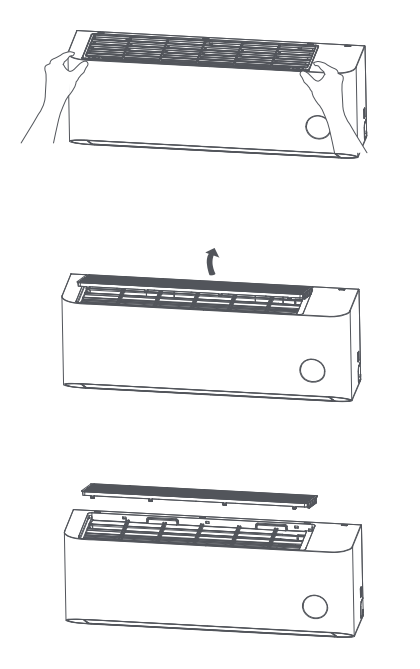
1. As shown in the figure, open the clips at both ends and the middle of the filter, and pull upward to remove the filter;
2. After the filter is removed, use a vacuum cleaner to remove the dust or rinse the filter with clean water;
3. Align the clips with the snapping positions and reinstall the filter correctly.
Note:
1. Do not use wire scrubbers or brushes to clean the air filter to avoid damage;
2. Do not wash the unit with water to prevent malfunctions or electric shock hazards;
3. Do not wash the remote control with water to avoid malfunctions;
4. Do not use alcohol, gasoline, lacquer thinner, polishing powder, essential oils, toothpaste, detergent, or other chemical products or solvents to clean the air conditioner, as they will damage the product;
5. As long as the filter is not damaged or deformed, there is no need to replace it.
If you receive a push notification, please follow these steps to clean the filter:
1. As shown in the figure, open the clips at both ends and the middle of the filter, and pull upward to remove the filter;
2. After the filter is removed, use a vacuum cleaner to remove the dust or rinse the filter with clean water;
3. Align the clips with the snapping positions and reinstall the filter correctly.
Note:
1. Do not use wire scrubbers or brushes to clean the air filter to avoid damage;
2. Do not wash the unit with water to prevent malfunctions or electric shock hazards;
3. Do not wash the remote control with water to avoid malfunctions;
4. Do not use alcohol, gasoline, lacquer thinner, polishing powder, essential oils, toothpaste, detergent, or other chemical products or solvents to clean the air conditioner, as they will damage the product;
5. As long as the filter is not damaged or deformed, there is no need to replace it.
Does it help?
Yes
No