

How to add the Mijia Air Conditioner Pro Eco 5-Star 1.5 HP Inverter plug-in to the Home screen?
Via the Mi Home/Xiaomi Home APP, you can add a shortcut for the Mijia Air Conditioner Pro Eco 5-Star 1.5 HP Inverter to the Home screen. This feature is particularly useful for you. It can give you quick access to the device, strengthen the device’s daily management, and reduce unnecessary operations. After enabling this feature, you will enjoy convenience and have an improved experience.
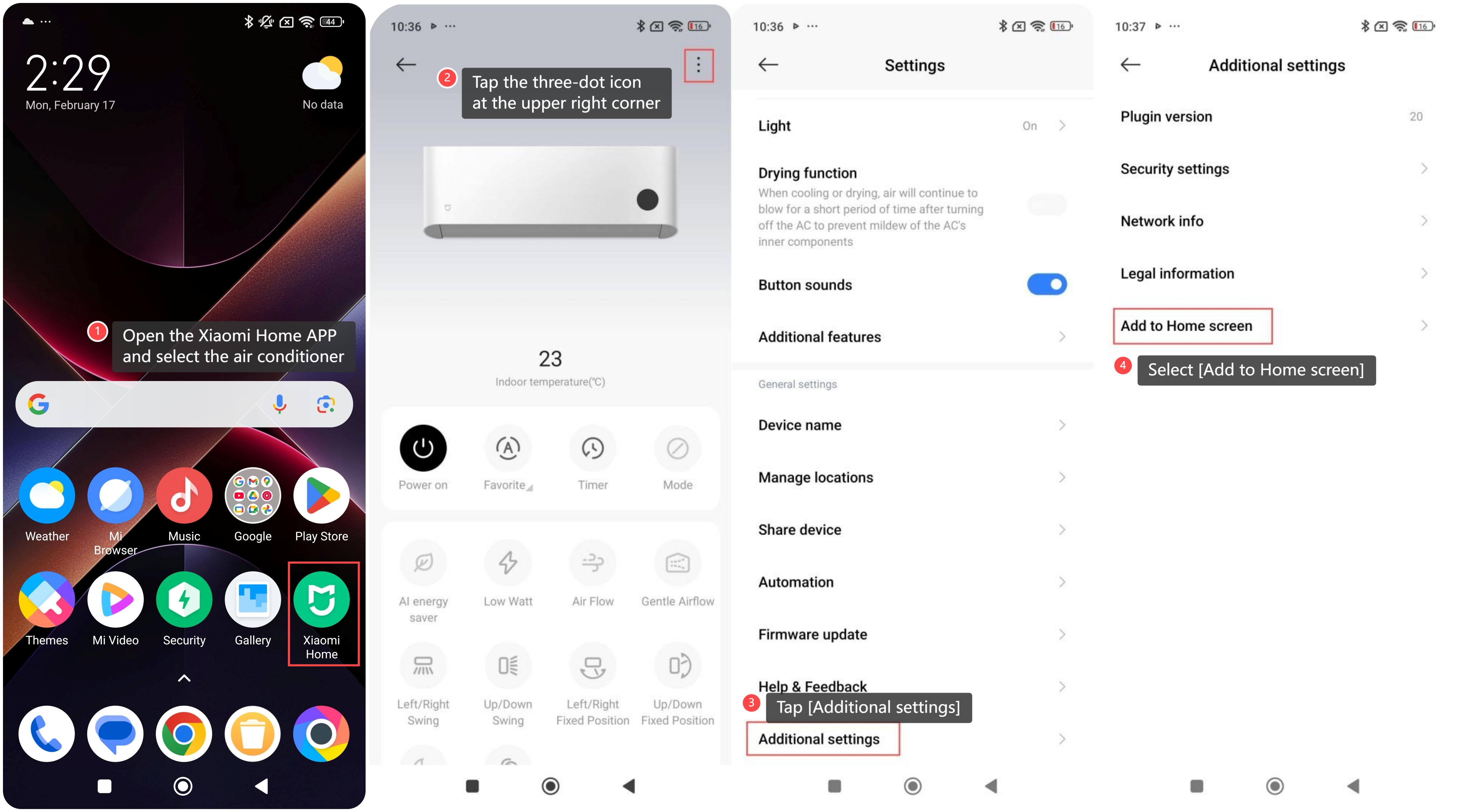
Please follow these steps to add the air conditioner to the Home screen:
1. Open the Xiaomi Home APP and select the air conditioner;
2. Tap the three-dot icon at the upper right corner to enter the settings;
3. Tap [Additional settings];
4. Select [Add to Home screen] to complete the process.
Please follow these steps to add the air conditioner to the Home screen:
1. Open the Xiaomi Home APP and select the air conditioner;
2. Tap the three-dot icon at the upper right corner to enter the settings;
3. Tap [Additional settings];
4. Select [Add to Home screen] to complete the process.
Does it help?
Yes
No