

How to manage the location of the Mijia Air Conditioner Pro Eco 5-Star 1.0 HP Inverter in the Xiaomi Home APP?
The Mijia Air Conditioner Pro Eco 5-Star 1.0 HP Inverter supports managing the location in the Xiaomi Home APP. If you have more than one Xiaomi air conditioner in different rooms or areas, the Xiaomi Home APP lets you manage multiple locations at once, allowing you to control all of your devices with ease. By using the Xiaomi Home APP to manage the location of your air conditioner, you can enhance the convenience, efficiency, and comfort of your space.
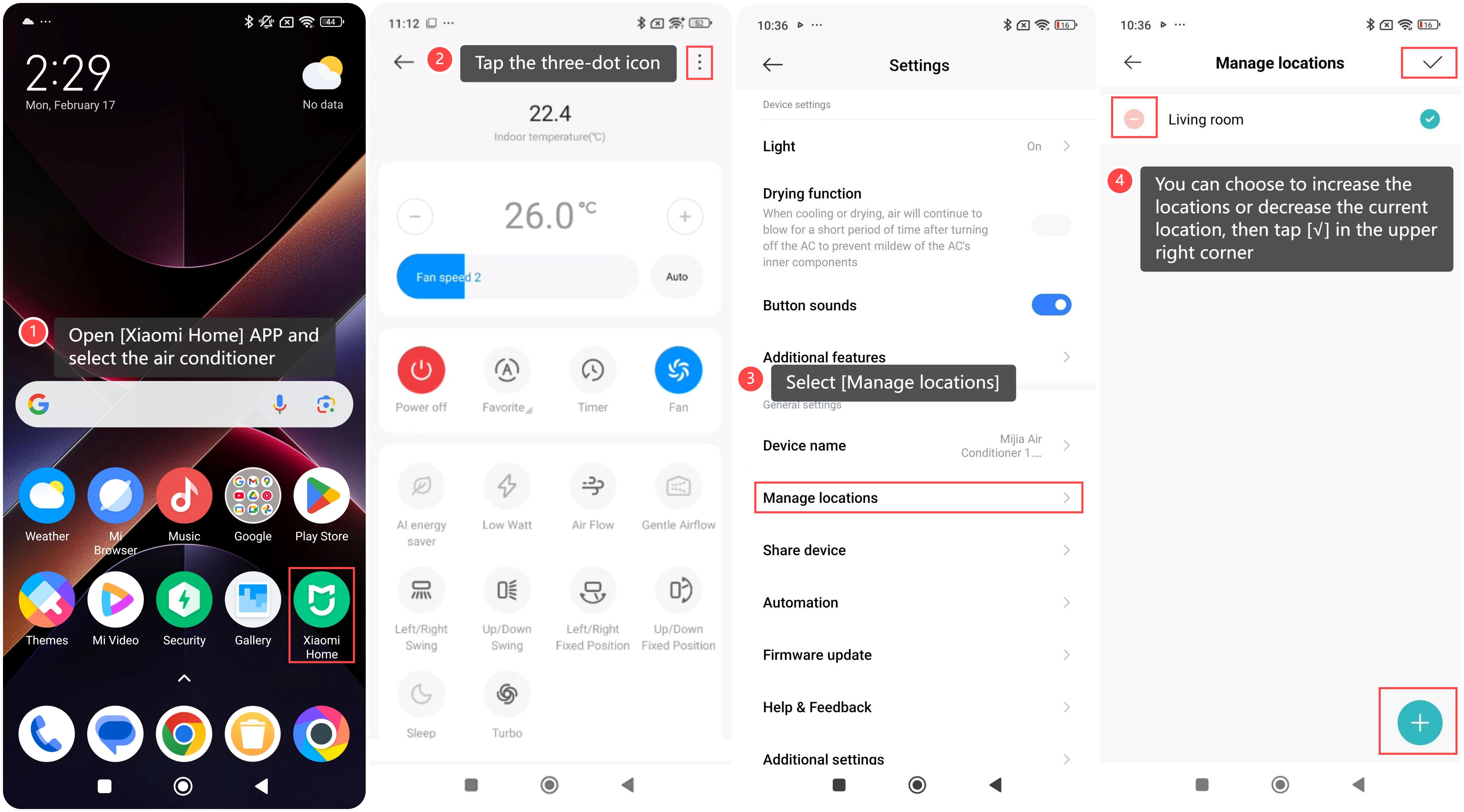
To manage the location in the Xiaomi Home APP, please refer to the following steps:
1. Open [Xiaomi Home] APP and select the air conditioner;
2. Tap the three-dot icon at the upper right corner;
3. Select [Manage locations];
4. You can choose to increase the locations or decrease the current location, then tap [√] in the upper right corner.
To manage the location in the Xiaomi Home APP, please refer to the following steps:
1. Open [Xiaomi Home] APP and select the air conditioner;
2. Tap the three-dot icon at the upper right corner;
3. Select [Manage locations];
4. You can choose to increase the locations or decrease the current location, then tap [√] in the upper right corner.
Does it help?
Yes
No