

How to check and customize the sleep curve of the Mijia Air Conditioner Pro Eco 5-Star 1.5 HP Inverter?
The air conditioner supports the function of sleep curve, which can smartly adjust the sleep time, temperature, fan speed and swing mode. With this function, an excellent and suitable sleep environment will be created through the customized settings on the Xiaomi Home APP.
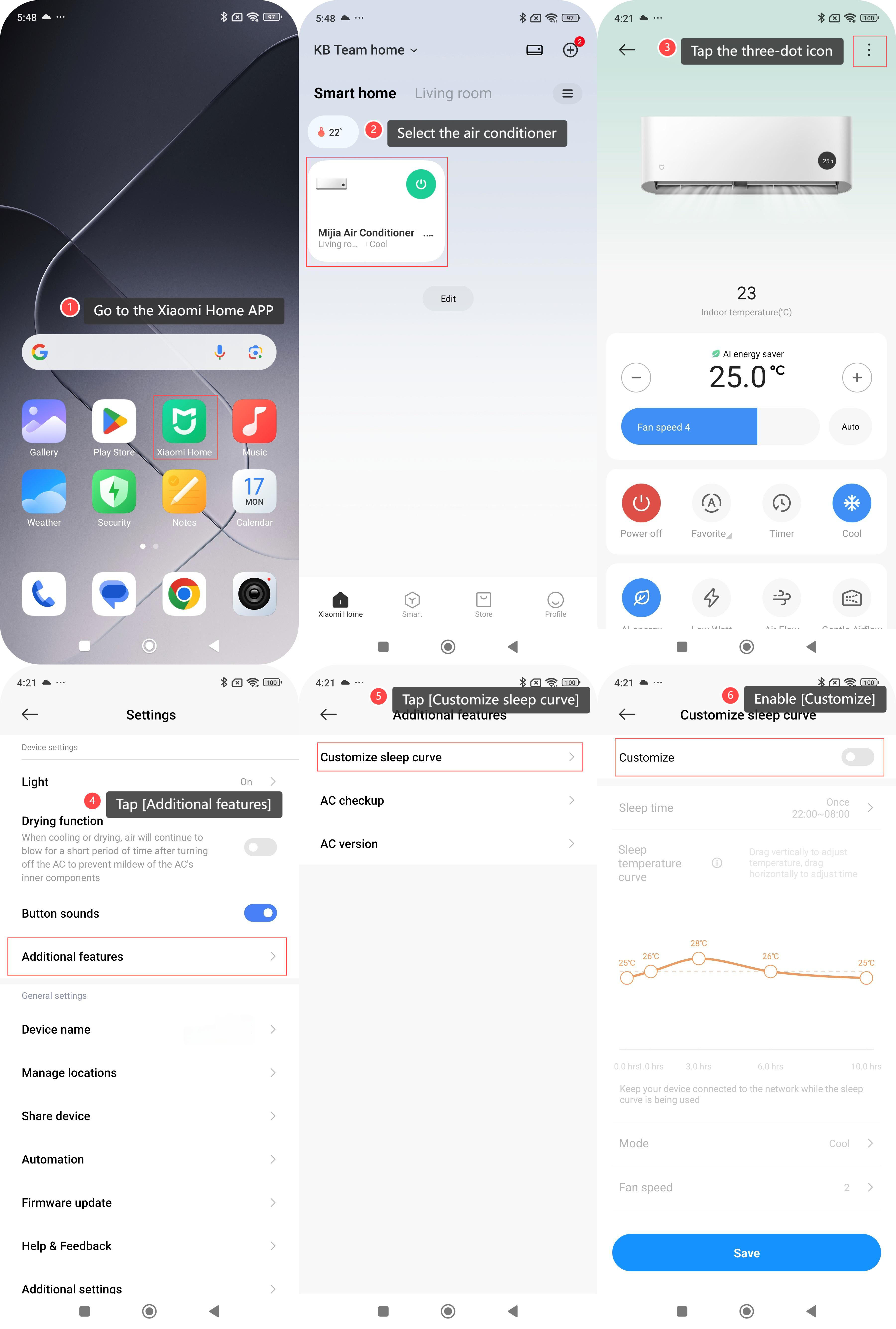
To check the sleep curve of the air conditioner, please refer to the following details:
1. Go to the Xiaomi Home APP;
2. Select the air conditioner;
3. Tap the three-dot icon at the upper right corner;
4. Tap [Additional features];
5. Tap [Customize sleep curve] to check and customize the sleep curve;
6. Enable [Customize] and configure the relevant settings.
To check the sleep curve of the air conditioner, please refer to the following details:
1. Go to the Xiaomi Home APP;
2. Select the air conditioner;
3. Tap the three-dot icon at the upper right corner;
4. Tap [Additional features];
5. Tap [Customize sleep curve] to check and customize the sleep curve;
6. Enable [Customize] and configure the relevant settings.
Does it help?
Yes
No