

How to adjust the screen brightness of the Mijia Air Conditioner Pro Eco 5-Star 1 PK Inverter?
The Mijia Air Conditioner Pro Eco 5-Star 1 PK Inverter offers the option to adjust the screen brightness for better visibility or to reduce light disturbance, especially at night, ensuring that the display is visible during the day while providing a softer, less distracting glow in low-light environments.
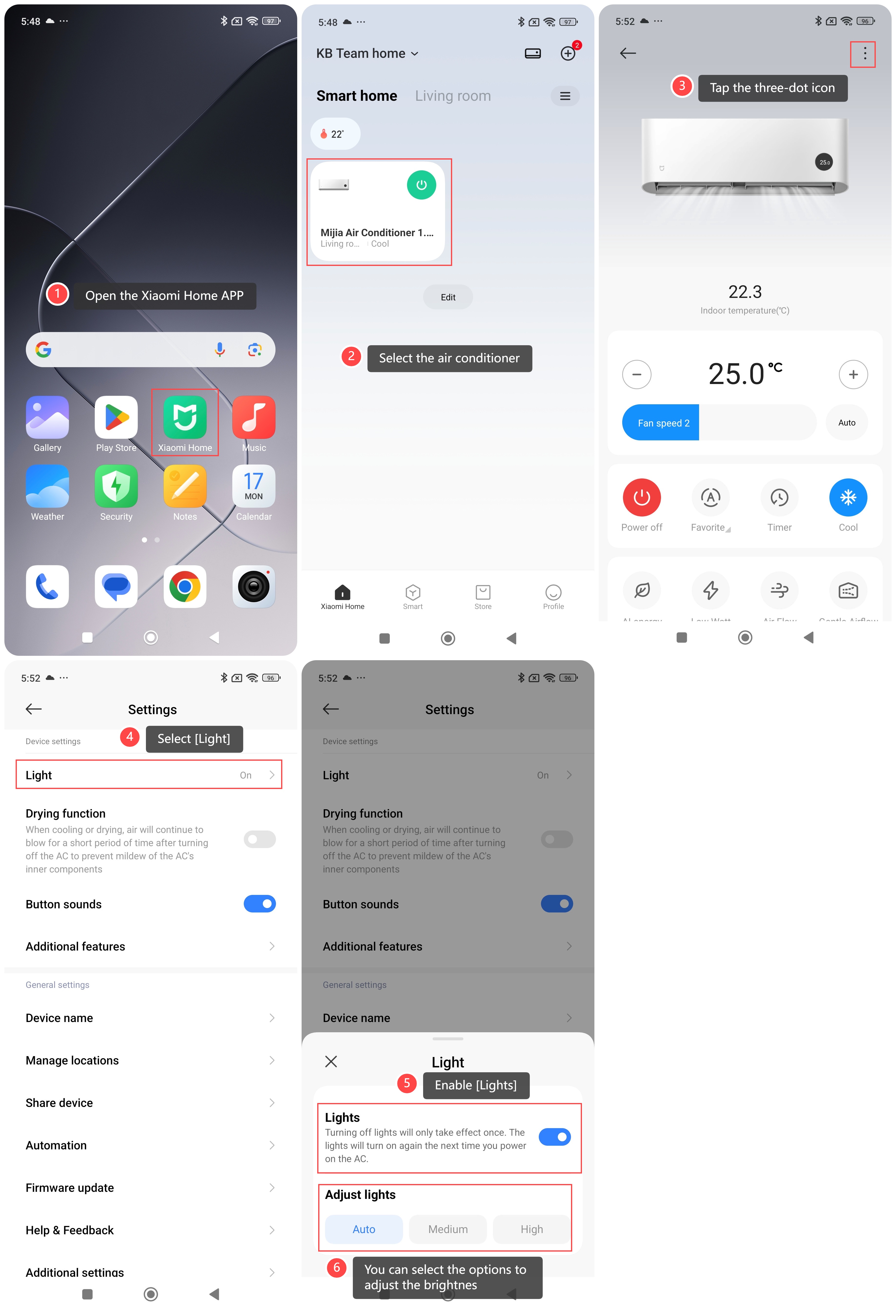
To adjust the screen brightness of the air conditioner, please refer to the following steps:
1. Open the Xiaomi Home APP;
2. Select the air conditioner;
3. Tap the three-dot icon;
4. Select [Light];
5. Enable [Lights];
6. You can select the options: [Auto], [Medium] or [High] to adjust the brightness.
Note:
Before adjusting the brightness, you can also turn the display of the indoor unit on by pressing the light button on the remote control.
To adjust the screen brightness of the air conditioner, please refer to the following steps:
1. Open the Xiaomi Home APP;
2. Select the air conditioner;
3. Tap the three-dot icon;
4. Select [Light];
5. Enable [Lights];
6. You can select the options: [Auto], [Medium] or [High] to adjust the brightness.
Note:
Before adjusting the brightness, you can also turn the display of the indoor unit on by pressing the light button on the remote control.
Does it help?
Yes
No