

How to connect the Mijia Air Conditioner Pro Eco 5-Star 1.5 HP Inverter to the Xiaomi Home APP?
To connect the air conditioner to the Xiaomi Home APP, please refer to the following steps:
1. Open the [Xiaomi Home] APP;
2. Tap the [+] icon in the upper right corner;
3. Choose [Add device];
4. Select the [Air conditioner] to enter the Wi-Fi configuration interface;
5. Follow the instructions for the next step until the icon of successful adding of the device displays.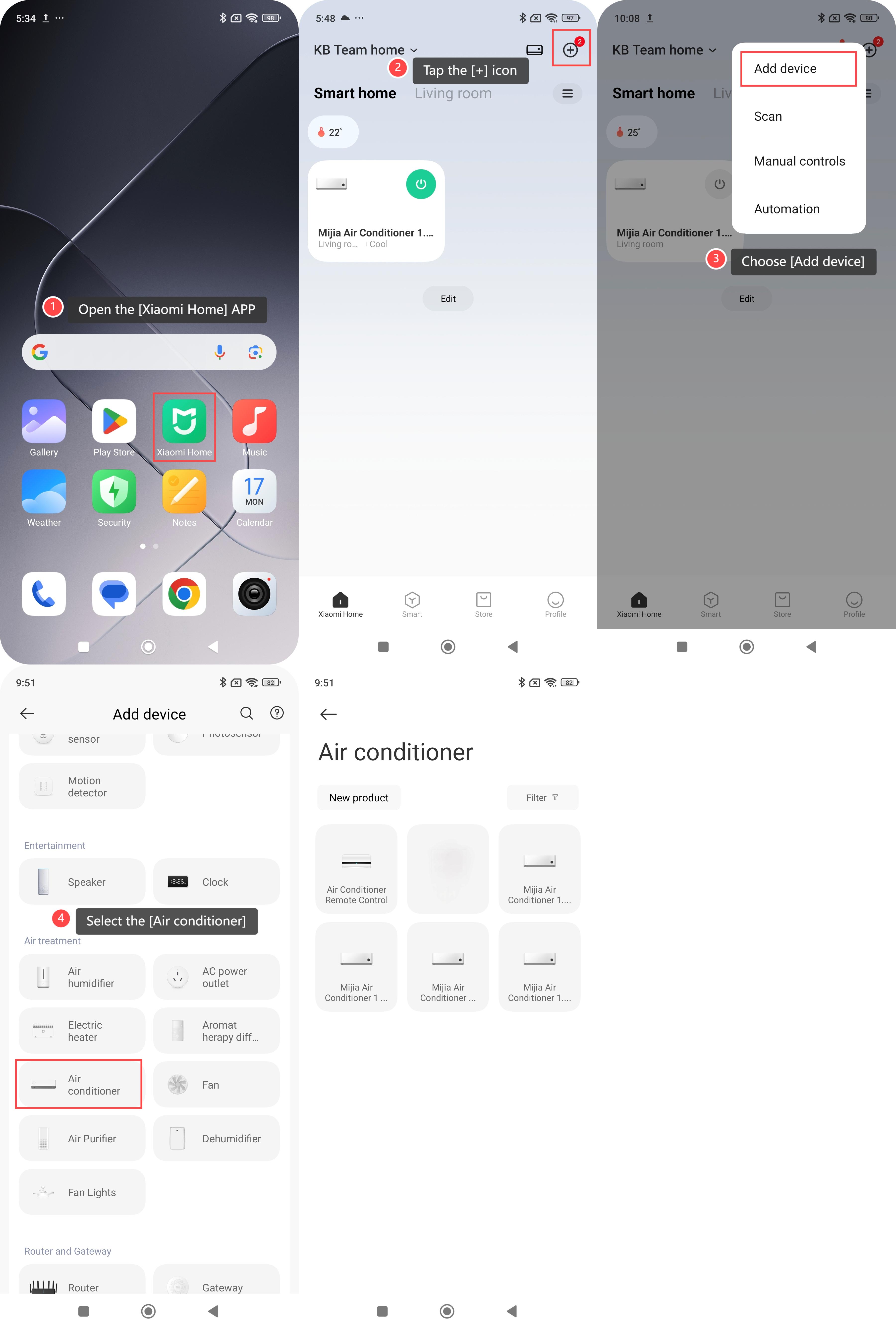
Note:
You can select [Discover nearby devices] or [Add devices manually] in the Xiaomi Home APP on the Android phones to add device. On the iOS phones, you can tap the [+] icon in the upper right corner to manually add device or turn on Bluetooth and select the new device you scanned to add.
Does it help?
Yes
No