

How to set up night vision on the Xiaomi Outdoor Camera AW300?
The Xiaomi Outdoor Camera AW300 features two night vision modes, including infrared night vision and smart full-color night vision. You can choose a proper night vision mode that suits your needs.
To set up night vision of your camera, please refer to the following steps:
1. Open the Mi Home/Xiaomi Home APP;
2. Select the camera;
3. Tap the [...] icon in the upper right corner;
4. Select [Camera settings];
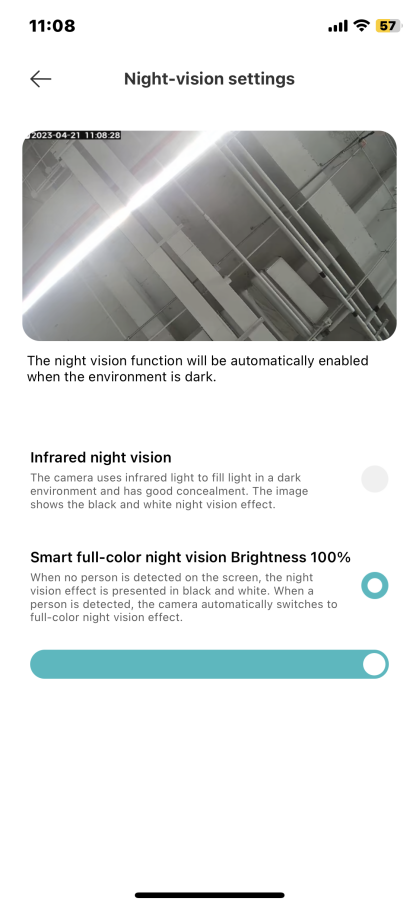
5. Tap [Night-vision settings];
6. Choose [Infrared night vision] or [Smart full-color night vision Brightness 100%] as your preference. If you choose [Smart full-color night vision], you can also adjust the brightness according to your needs.
Friendly tips:
1. When you enable infrared night vision, the camera uses infrared lights to fill light in a dark environment and has high concealment. The image shows the black and white night vision effect;
2. After you choose the smart full-color night vision, when a person is detected, the camera automatically switches to full-color night vision effect. When no person is detected on the screen, the night vision effect is presented in black and white.
To set up night vision of your camera, please refer to the following steps:
1. Open the Mi Home/Xiaomi Home APP;
2. Select the camera;
3. Tap the [...] icon in the upper right corner;
4. Select [Camera settings];
5. Tap [Night-vision settings];
6. Choose [Infrared night vision] or [Smart full-color night vision Brightness 100%] as your preference. If you choose [Smart full-color night vision], you can also adjust the brightness according to your needs.
Friendly tips:
1. When you enable infrared night vision, the camera uses infrared lights to fill light in a dark environment and has high concealment. The image shows the black and white night vision effect;
2. After you choose the smart full-color night vision, when a person is detected, the camera automatically switches to full-color night vision effect. When no person is detected on the screen, the night vision effect is presented in black and white.
Does it help?
Yes
No