

How to connect the Xiaomi Outdoor Camera AW300 to the Mi Home/Xiaomi Home APP?
The Xiaomi Outdoor Camera AW300 can be connected to and controlled through the Mi Home/Xiaomi Home APP, which can also interconnect with other products via the APP.
To connect the camera to the APP, please refer to the following steps:
1. Download and install the latest version of the Mi Home/Xiaomi Home APP;
2. Turn on the power and wait for the orange indicator to flash after the device is turned on;
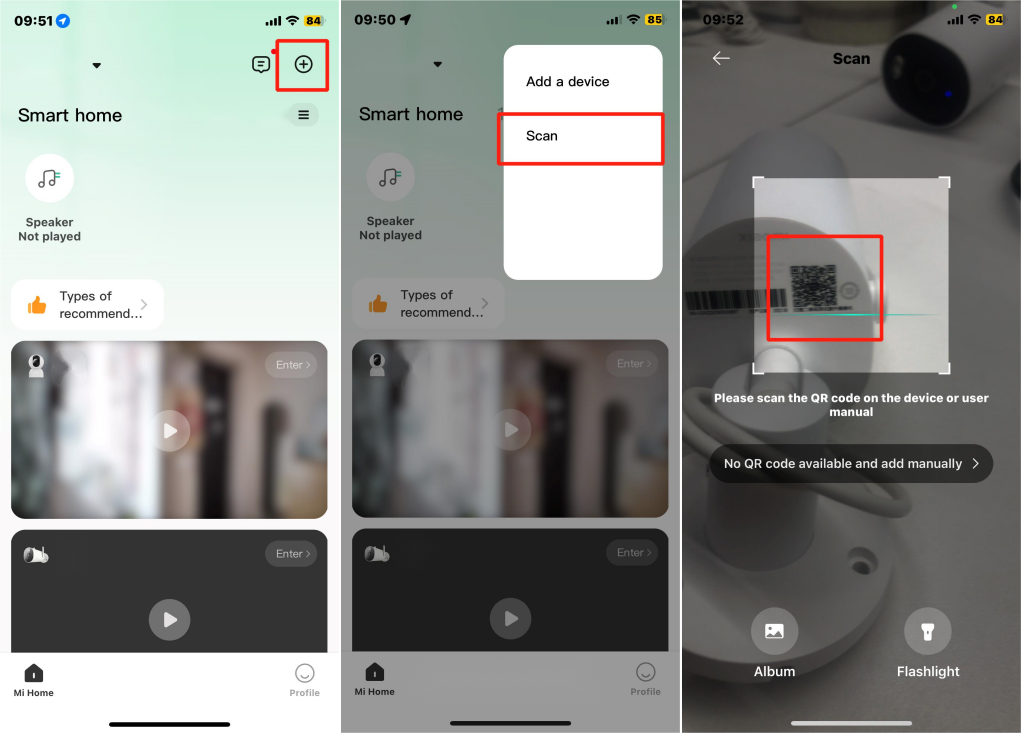
3. Open the home interface of the Mi Home/Xiaomi Home APP, tap [+] >> [Scan] or [Add device] in the upper right corner of the interface, scan the QR code on the camera, and connect the camera according to the APP prompts;
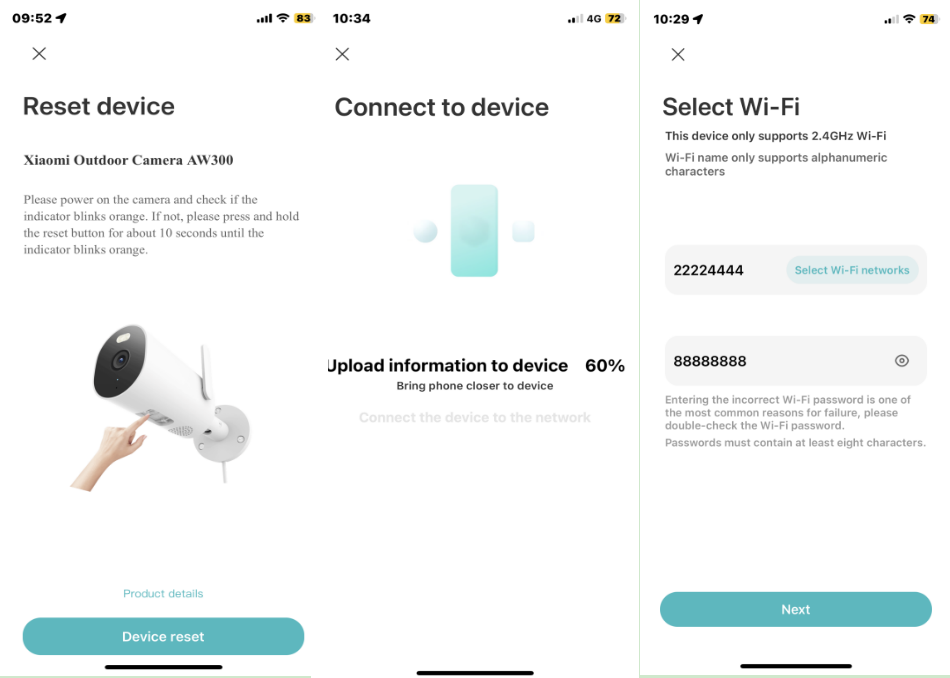
4. If the indicator status is abnormal, please press and hold the Reset Button for more than 10 seconds until the orange light flashes, there will be a prompt tone, and please wait for the connection;
5. During setup, choose a 2.4GHz Wi-Fi network (5GHz is not supported) and wait for the APP to display "Connected successfully". The camera’s indicator will turn into blue, confirming the connection is successful;
6. Choose a room and set the device name in the APP to complete the setup.
Note:
1. This product only supports English or numbers and English numbers mixed names;
2. Due to the upgrade and update of the Mi Home/Xiaomi Home APP, the actual operation can be slightly different from the above description, please follow the current instructions in the Mi Home/Xiaomi Home APP.
To connect the camera to the APP, please refer to the following steps:
1. Download and install the latest version of the Mi Home/Xiaomi Home APP;
2. Turn on the power and wait for the orange indicator to flash after the device is turned on;
3. Open the home interface of the Mi Home/Xiaomi Home APP, tap [+] >> [Scan] or [Add device] in the upper right corner of the interface, scan the QR code on the camera, and connect the camera according to the APP prompts;
4. If the indicator status is abnormal, please press and hold the Reset Button for more than 10 seconds until the orange light flashes, there will be a prompt tone, and please wait for the connection;
5. During setup, choose a 2.4GHz Wi-Fi network (5GHz is not supported) and wait for the APP to display "Connected successfully". The camera’s indicator will turn into blue, confirming the connection is successful;
6. Choose a room and set the device name in the APP to complete the setup.
Note:
1. This product only supports English or numbers and English numbers mixed names;
2. Due to the upgrade and update of the Mi Home/Xiaomi Home APP, the actual operation can be slightly different from the above description, please follow the current instructions in the Mi Home/Xiaomi Home APP.
Does it help?
Yes
No