

Xiaomi Smart Ceiling Light D30 FAQ
Basic Information
1. Q: What are the selling points of the Xiaomi Smart Ceiling Light D30?
A: 1. The Xiaomi Smart Ceiling Light D30 has customized full-spectrum LED, which can improve the indoor light environment;
2. The color rendering index of the Xiaomi Smart Ceiling Light D30 is Ra97, which truly reflects the color of objects;
3. The Xiaomi Smart Ceiling Light D30 refers to the standard of classroom lighting, which makes you more comfortable studying;
4. The Xiaomi Smart Ceiling Light D30 has multiple anti-glare design, which produces a soft light that cares for your eyes and is not harsh;
5. The Xiaomi Smart Ceiling Light D30 has Xiaomi customized ultra-small lens, allowing you to experience 6cm slim aesthetics;
6. The dust-resistant rating of the Xiaomi Smart Ceiling Light D30 is IP50, allowing you to enjoy cleanliness and comfort in every aspect.
2. Q: What is the appearance of the Xiaomi Smart Ceiling Light D30?
A: The appearance of the Xiaomi Smart Ceiling Light D30 is as follows:
The product size is Φ350×60mm, net weight is about 1.2kg.

3. Q: What is the packaging list for the Xiaomi Smart Ceiling Light D30?
A: The package content has Xiaomi Smart Ceiling Light D30 x1, Expansion screw x3, User manual x1, Warranty notice x1.
4. Q: What is the rated power of the Xiaomi Smart Ceiling Light D30?
A: The rated power of the Xiaomi Smart Ceiling Light D30 is 30W.
5. Q: What is the luminous flux of the Xiaomi Smart Ceiling Light D30?
A: The luminous flux of the Xiaomi Smart Ceiling Light D30 is 1700lm.
6. Q: Can the wall switch of the Xiaomi Smart Ceiling Light D30 switch scenes?
A: The wall switch can switch between 3 profiles: bright mode (100%, 5700K), casual mode (100%, 4000K), and night light mode (dimming minimum, 2700K).
You can use the wall switch or the Mi Home/Xiaomi Home APP to turn the light on and off.
7. Q: Can the Xiaomi Smart Ceiling Light D30 change the scene mode of the wall switch?
A: The wall switch can change three preset scenes. After the Xiaomi Smart Ceiling Light D30 is connected to the Mi Home/Xiaomi Home APP, enter the operation interface of the ceiling light, tap [More functions] >> [Wall switch settings], select the desired scene mode, and customize the brightness and color temperature.
8. Q: Does the Xiaomi Smart Ceiling Light D30 support the Flex Switch?
A: Not support.
Installation Related
1. Q: Which ceilings can be equipped with the Xiaomi Smart Ceiling Light D30?
A: The Xiaomi Smart Ceiling Light D30 is only suitable for installation on concrete ceilings, it is prohibited to install on other materials.
2. Q: What are the requirements for junction boxes when installing the Xiaomi Smart Ceiling Light D30?
A: In order not to affect the dustproof effect of the Xiaomi Smart Ceiling Light D30, it is recommended to prefer an IP50 junction box when installing.
APP Related
1. Q: How to reset the Xiaomi Smart Ceiling Light D30?
A: You can quickly switch the wall switch on and off 7 times in 7 seconds, when the Xiaomi Smart Ceiling Light D30 appears to flash, the reset is successful and the light body is restored to the factory state.
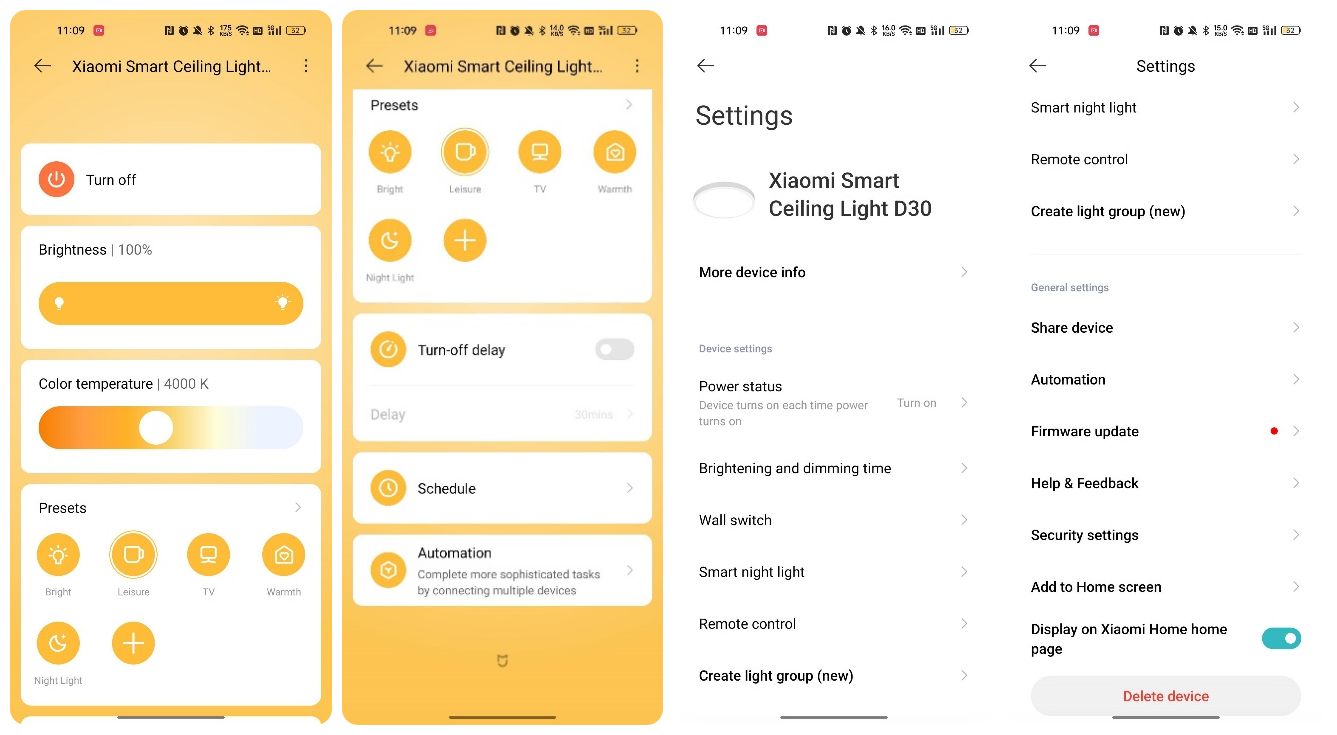
2. Q: How to display the interface after connecting the Xiaomi Smart Ceiling Light D30 to the Mi Home/Xiaomi Home APP?
A: The interfaces of the Xiaomi Smart Ceiling Light D30 after successful connection are as follows:
3. Q: Does the Xiaomi Smart Ceiling Light D30 memorize the previously set state when it is disconnected and then reconnected?
A: The Xiaomi Smart Ceiling Light D30 can memorize the previous state. After the ceiling light is successfully connected, tap […] in the upper right corner to enter the Setting interface, and select [Memory].
4. Q: Can the Xiaomi Smart Ceiling Light D30 be set with a switch gradient duration?
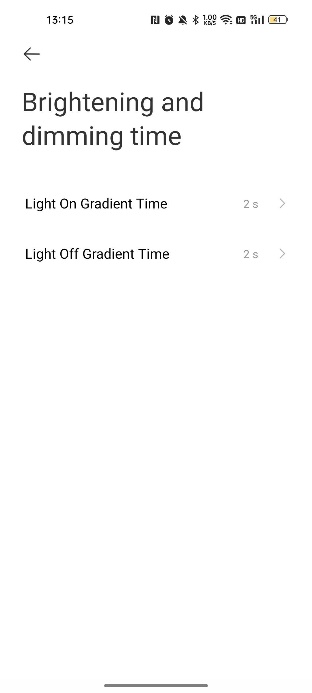
A: After the Xiaomi Smart Ceiling Light D30 is successfully connected to Mi Home/Xiaomi Home APP, tap […] in the upper right corner to enter the Setting interface, and tap [Brightening and dimming time].
The default switch fading time is 2s, and you can choose 0.5s, 1s, or 1.5s.
5. Q: Why does the Mi Home/Xiaomi Home APP prompt that the connection to the Xiaomi Smart Ceiling Light D30 has timed out?
A: 1. The Wi-Fi password is incorrect, it is recommended to reset the Xiaomi Smart Ceiling Light D30 and fill in the correct Wi-Fi password;
2. The network signal is bad, it is recommended to make the Xiaomi Smart Ceiling Light D30 as close as possible to the router and reconnect it a few more times while making sure the network environment is good.
6. Q: What if the Xiaomi Smart Ceiling Light D30 reset successfully, but the phone cannot detect it?
A: Please open the permission in your Android or iOS phone for the Mi Home/Xiaomi Home APP. When you download and use it for the first time, the Mi Home/Xiaomi Home APP needs you to confirm the location permission, please select [Yes] or [Allow].
7. Q: Need the Xiaomi Smart Ceiling Light D30 to reconnect manually if it loses power or disconnects from Wi-Fi manually?
A: There is no need to manually reconnect, it will automatically reconnect after reconnecting power or when Wi-Fi is restored.
8. Q: Does the Xiaomi Smart Ceiling Light D30 support HomeKit or Siri?
A: Not support.
FAQ
1. Q: How to check the SN code of the Xiaomi Smart Ceiling Light D30?
A: The SN code can be viewed on the bottom of the Xiaomi Smart Ceiling Light D30 and on the back of the package box.
2. Q: Why does the Mi Home/Xiaomi Home APP still show the default duration of 2s even after choosing the fade duration for the Xiaomi Smart Ceiling Light D30?
A: The fade duration is selected by scrolling up and down. The time modification can be made only after the scrolling is finished, scrolling too fast will cause the modification to fail.
1. Q: What are the selling points of the Xiaomi Smart Ceiling Light D30?
A: 1. The Xiaomi Smart Ceiling Light D30 has customized full-spectrum LED, which can improve the indoor light environment;
2. The color rendering index of the Xiaomi Smart Ceiling Light D30 is Ra97, which truly reflects the color of objects;
3. The Xiaomi Smart Ceiling Light D30 refers to the standard of classroom lighting, which makes you more comfortable studying;
4. The Xiaomi Smart Ceiling Light D30 has multiple anti-glare design, which produces a soft light that cares for your eyes and is not harsh;
5. The Xiaomi Smart Ceiling Light D30 has Xiaomi customized ultra-small lens, allowing you to experience 6cm slim aesthetics;
6. The dust-resistant rating of the Xiaomi Smart Ceiling Light D30 is IP50, allowing you to enjoy cleanliness and comfort in every aspect.
2. Q: What is the appearance of the Xiaomi Smart Ceiling Light D30?
A: The appearance of the Xiaomi Smart Ceiling Light D30 is as follows:
The product size is Φ350×60mm, net weight is about 1.2kg.
3. Q: What is the packaging list for the Xiaomi Smart Ceiling Light D30?
A: The package content has Xiaomi Smart Ceiling Light D30 x1, Expansion screw x3, User manual x1, Warranty notice x1.
4. Q: What is the rated power of the Xiaomi Smart Ceiling Light D30?
A: The rated power of the Xiaomi Smart Ceiling Light D30 is 30W.
5. Q: What is the luminous flux of the Xiaomi Smart Ceiling Light D30?
A: The luminous flux of the Xiaomi Smart Ceiling Light D30 is 1700lm.
6. Q: Can the wall switch of the Xiaomi Smart Ceiling Light D30 switch scenes?
A: The wall switch can switch between 3 profiles: bright mode (100%, 5700K), casual mode (100%, 4000K), and night light mode (dimming minimum, 2700K).
You can use the wall switch or the Mi Home/Xiaomi Home APP to turn the light on and off.
7. Q: Can the Xiaomi Smart Ceiling Light D30 change the scene mode of the wall switch?
A: The wall switch can change three preset scenes. After the Xiaomi Smart Ceiling Light D30 is connected to the Mi Home/Xiaomi Home APP, enter the operation interface of the ceiling light, tap [More functions] >> [Wall switch settings], select the desired scene mode, and customize the brightness and color temperature.
8. Q: Does the Xiaomi Smart Ceiling Light D30 support the Flex Switch?
A: Not support.
Installation Related
1. Q: Which ceilings can be equipped with the Xiaomi Smart Ceiling Light D30?
A: The Xiaomi Smart Ceiling Light D30 is only suitable for installation on concrete ceilings, it is prohibited to install on other materials.
2. Q: What are the requirements for junction boxes when installing the Xiaomi Smart Ceiling Light D30?
A: In order not to affect the dustproof effect of the Xiaomi Smart Ceiling Light D30, it is recommended to prefer an IP50 junction box when installing.
APP Related
1. Q: How to reset the Xiaomi Smart Ceiling Light D30?
A: You can quickly switch the wall switch on and off 7 times in 7 seconds, when the Xiaomi Smart Ceiling Light D30 appears to flash, the reset is successful and the light body is restored to the factory state.
2. Q: How to display the interface after connecting the Xiaomi Smart Ceiling Light D30 to the Mi Home/Xiaomi Home APP?
A: The interfaces of the Xiaomi Smart Ceiling Light D30 after successful connection are as follows:
3. Q: Does the Xiaomi Smart Ceiling Light D30 memorize the previously set state when it is disconnected and then reconnected?
A: The Xiaomi Smart Ceiling Light D30 can memorize the previous state. After the ceiling light is successfully connected, tap […] in the upper right corner to enter the Setting interface, and select [Memory].
4. Q: Can the Xiaomi Smart Ceiling Light D30 be set with a switch gradient duration?
A: After the Xiaomi Smart Ceiling Light D30 is successfully connected to Mi Home/Xiaomi Home APP, tap […] in the upper right corner to enter the Setting interface, and tap [Brightening and dimming time].
The default switch fading time is 2s, and you can choose 0.5s, 1s, or 1.5s.
5. Q: Why does the Mi Home/Xiaomi Home APP prompt that the connection to the Xiaomi Smart Ceiling Light D30 has timed out?
A: 1. The Wi-Fi password is incorrect, it is recommended to reset the Xiaomi Smart Ceiling Light D30 and fill in the correct Wi-Fi password;
2. The network signal is bad, it is recommended to make the Xiaomi Smart Ceiling Light D30 as close as possible to the router and reconnect it a few more times while making sure the network environment is good.
6. Q: What if the Xiaomi Smart Ceiling Light D30 reset successfully, but the phone cannot detect it?
A: Please open the permission in your Android or iOS phone for the Mi Home/Xiaomi Home APP. When you download and use it for the first time, the Mi Home/Xiaomi Home APP needs you to confirm the location permission, please select [Yes] or [Allow].
7. Q: Need the Xiaomi Smart Ceiling Light D30 to reconnect manually if it loses power or disconnects from Wi-Fi manually?
A: There is no need to manually reconnect, it will automatically reconnect after reconnecting power or when Wi-Fi is restored.
8. Q: Does the Xiaomi Smart Ceiling Light D30 support HomeKit or Siri?
A: Not support.
FAQ
1. Q: How to check the SN code of the Xiaomi Smart Ceiling Light D30?
A: The SN code can be viewed on the bottom of the Xiaomi Smart Ceiling Light D30 and on the back of the package box.
2. Q: Why does the Mi Home/Xiaomi Home APP still show the default duration of 2s even after choosing the fade duration for the Xiaomi Smart Ceiling Light D30?
A: The fade duration is selected by scrolling up and down. The time modification can be made only after the scrolling is finished, scrolling too fast will cause the modification to fail.
Does it help?
Yes
No