

How to open the 240Hz on the Xiaomi TV S Mini LED 55 2025?
The 240Hz feature of the Xiaomi TV S Mini LED 55 2025 is turned off by default and needs to be activated within the HDMI source when required. Once activated, it remains effective within the source, and switching in and out of the source will not turn it off. However, this feature will be turned off if the TV is restarted or put into standby mode, and it will need to be turned on again for subsequent use.
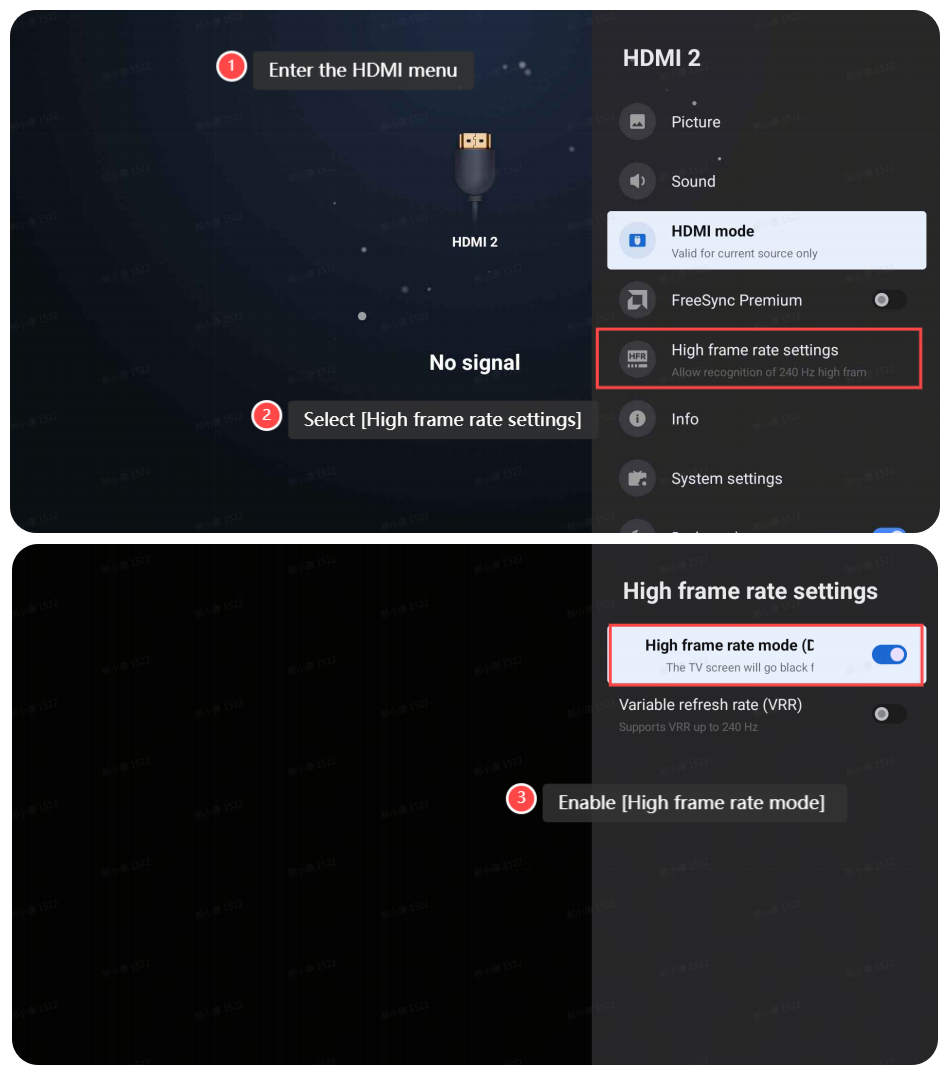
1. Within the HDMI source, use the remote control to enter the HDMI menu;
Note:
1. For Europe/East Asia/Southeast Asia/Indonesia/Middle East & Africa/Latin America regions, press and hold on the [Settings] button to enter the menu;
2. For CIS region, press and hold on the [Patchwall] button to enter the menu.

2. Select [High frame rate settings];
3. Enable [High frame rate mode] to use 240Hz.
Note:
There are 3 HDMI ports, but only HDMI ports 1 and 2 support true HDMI 2.1 mode.
• HDMI 1 - Support 4K - 120Hz (Enhanced) / 4K - 144Hz (freesync) /1080p - 240Hz(DLG)
• HDMI 2 - Support 4K - 120Hz (Enhanced) / 4K - 144Hz (freesync) / 1080p - 240Hz(DLG)
• HDMI 3 - Support 2K - 120Hz (Enhanced) / 1080p - 240Hz(DLG)
1. Within the HDMI source, use the remote control to enter the HDMI menu;
Note:
1. For Europe/East Asia/Southeast Asia/Indonesia/Middle East & Africa/Latin America regions, press and hold on the [Settings] button to enter the menu;
2. For CIS region, press and hold on the [Patchwall] button to enter the menu.
2. Select [High frame rate settings];
3. Enable [High frame rate mode] to use 240Hz.
Note:
There are 3 HDMI ports, but only HDMI ports 1 and 2 support true HDMI 2.1 mode.
• HDMI 1 - Support 4K - 120Hz (Enhanced) / 4K - 144Hz (freesync) /1080p - 240Hz(DLG)
• HDMI 2 - Support 4K - 120Hz (Enhanced) / 4K - 144Hz (freesync) / 1080p - 240Hz(DLG)
• HDMI 3 - Support 2K - 120Hz (Enhanced) / 1080p - 240Hz(DLG)
Does it help?
Yes
No