

How to unlock the Redmi Pad Pro with Bluetooth devices?
To unlock the Redmi Pad Pro with Bluetooth devices is a feature that allows you to unlock your tablet automatically when paired with trusted Bluetooth devices such as smartwatches or other compatible accessories. It adds convenience by allowing hands-free unlocking without needing a password, PIN, or pattern.
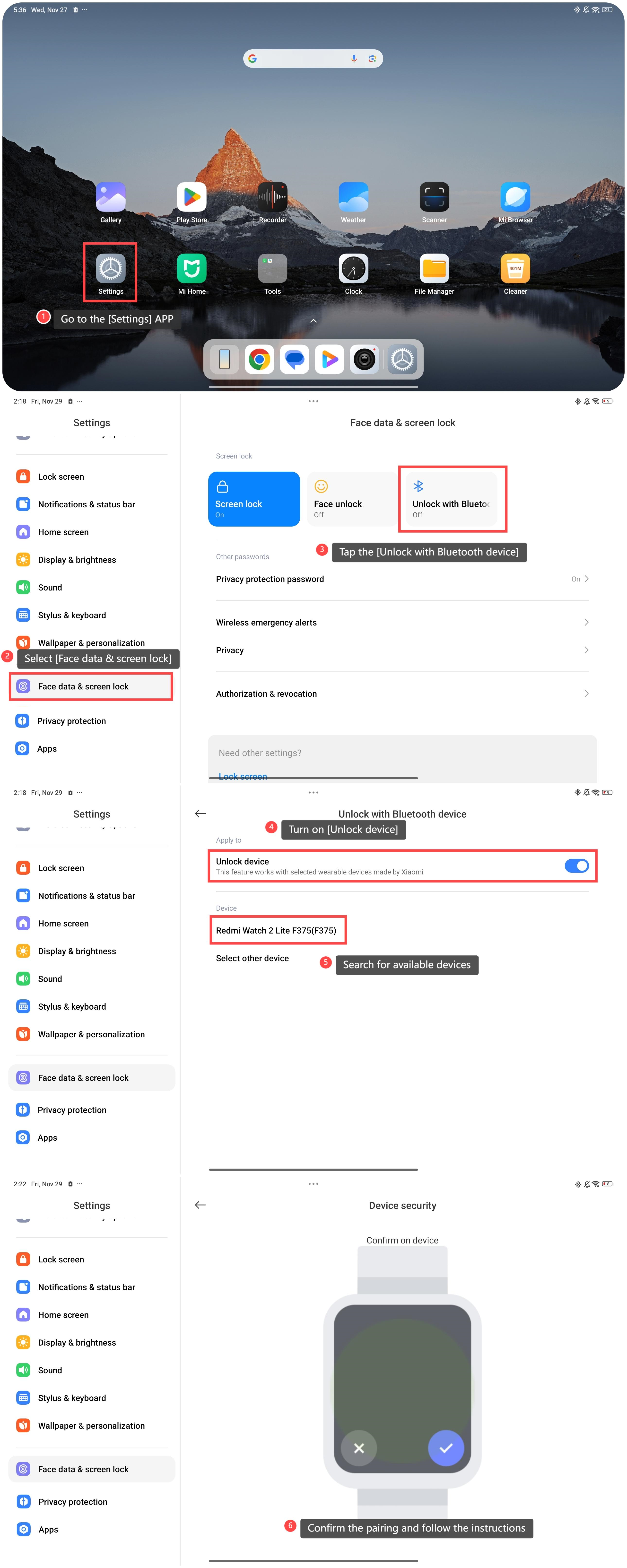
To unlock the tablet with Bluetooth devices, please refer to the following steps:
1. Go to the [Settings] APP;
2. Select [Face data & screen lock];
3. Tap the [Unlock with Bluetooth device];
4. Turn on [Unlock device];
5. Search for available devices;
6. Confirm the pairing and follow the instructions to set it as a trusted device.
Friendly tips:
1. If you use Bluetooth devices such as smartwatches, the tablet can be set to unlock when the devices are within range;
2. Bluetooth unlock relies on proximity. If the trusted device moves out of range, the tablet remains locked, ensuring security.
To unlock the tablet with Bluetooth devices, please refer to the following steps:
1. Go to the [Settings] APP;
2. Select [Face data & screen lock];
3. Tap the [Unlock with Bluetooth device];
4. Turn on [Unlock device];
5. Search for available devices;
6. Confirm the pairing and follow the instructions to set it as a trusted device.
Friendly tips:
1. If you use Bluetooth devices such as smartwatches, the tablet can be set to unlock when the devices are within range;
2. Bluetooth unlock relies on proximity. If the trusted device moves out of range, the tablet remains locked, ensuring security.
Does it help?
Yes
No