

How to wake up the Redmi Pad Pro by tapping screen twice?
To wake up the Redmi Pad Pro by tapping the screen twice is a gesture that allows you to activate the screen by simply double-tapping on it, providing a quick and convenient way to wake the tablet.
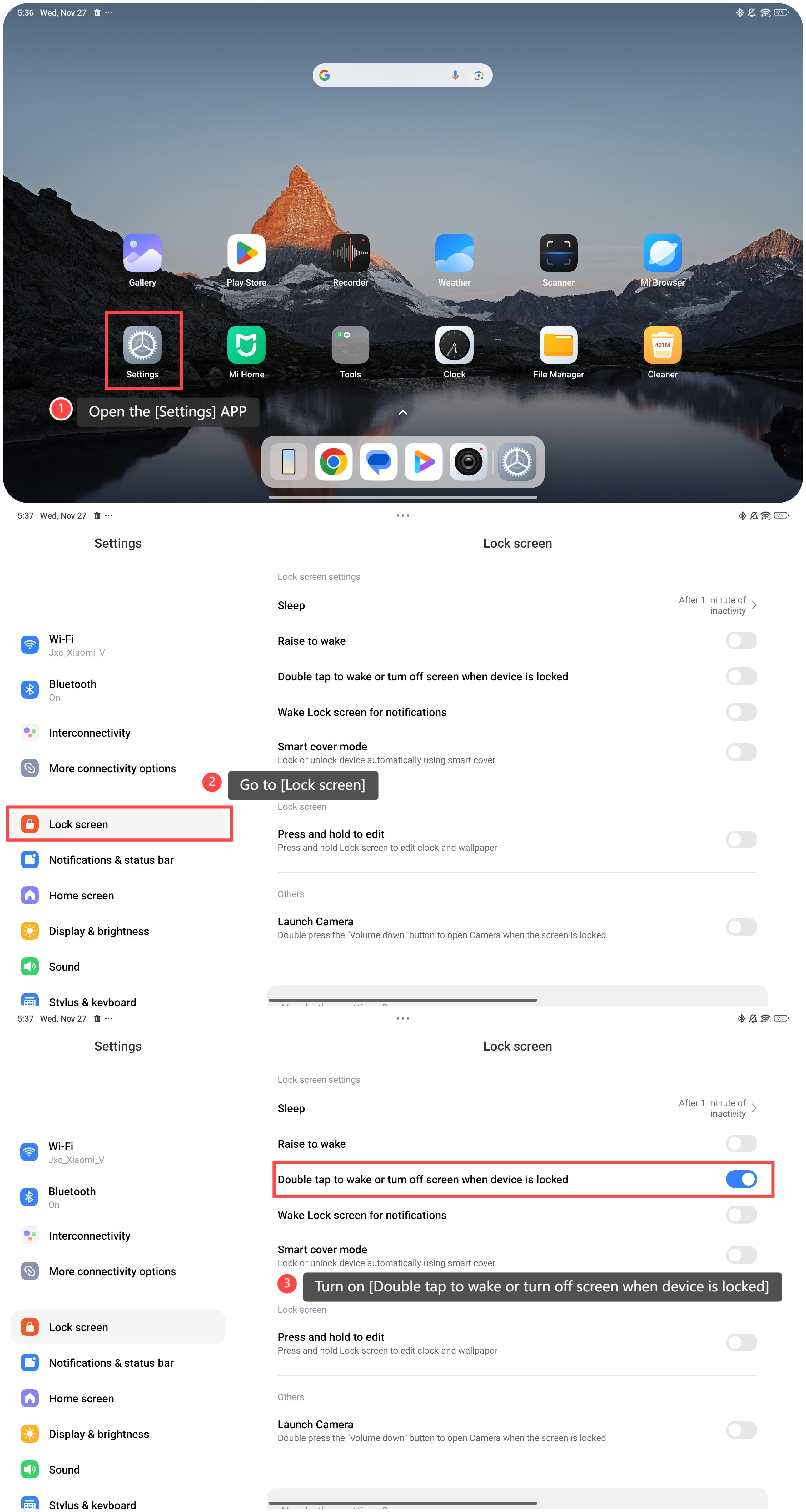
To wake up the tablet, please refer to the following steps:
1. Open the [Settings] APP;
2. Go to [Lock screen];
3. Turn on [Double tap to wake or turn off screen when device is locked].
Friendly tips:
1. Wake the tablet by double-tapping the screen, making it easy to check notifications, time, or ongoing tasks without searching for the power button;
2. It can minimize the usage of the power button, reducing the risk of hardware damage over time.
To wake up the tablet, please refer to the following steps:
1. Open the [Settings] APP;
2. Go to [Lock screen];
3. Turn on [Double tap to wake or turn off screen when device is locked].
Friendly tips:
1. Wake the tablet by double-tapping the screen, making it easy to check notifications, time, or ongoing tasks without searching for the power button;
2. It can minimize the usage of the power button, reducing the risk of hardware damage over time.
Does it help?
Yes
No