

How to edit the carrier name on the Redmi Pad Pro 5G?
The Redmi Pad Pro 5G allows you to edit the carrier name. This helps you customize the carrier name to display something more meaningful to you, such as the name of your company, your favorite network provider, or even a fun nickname. While it doesn’t affect the tablet’s actual network settings or functionality.
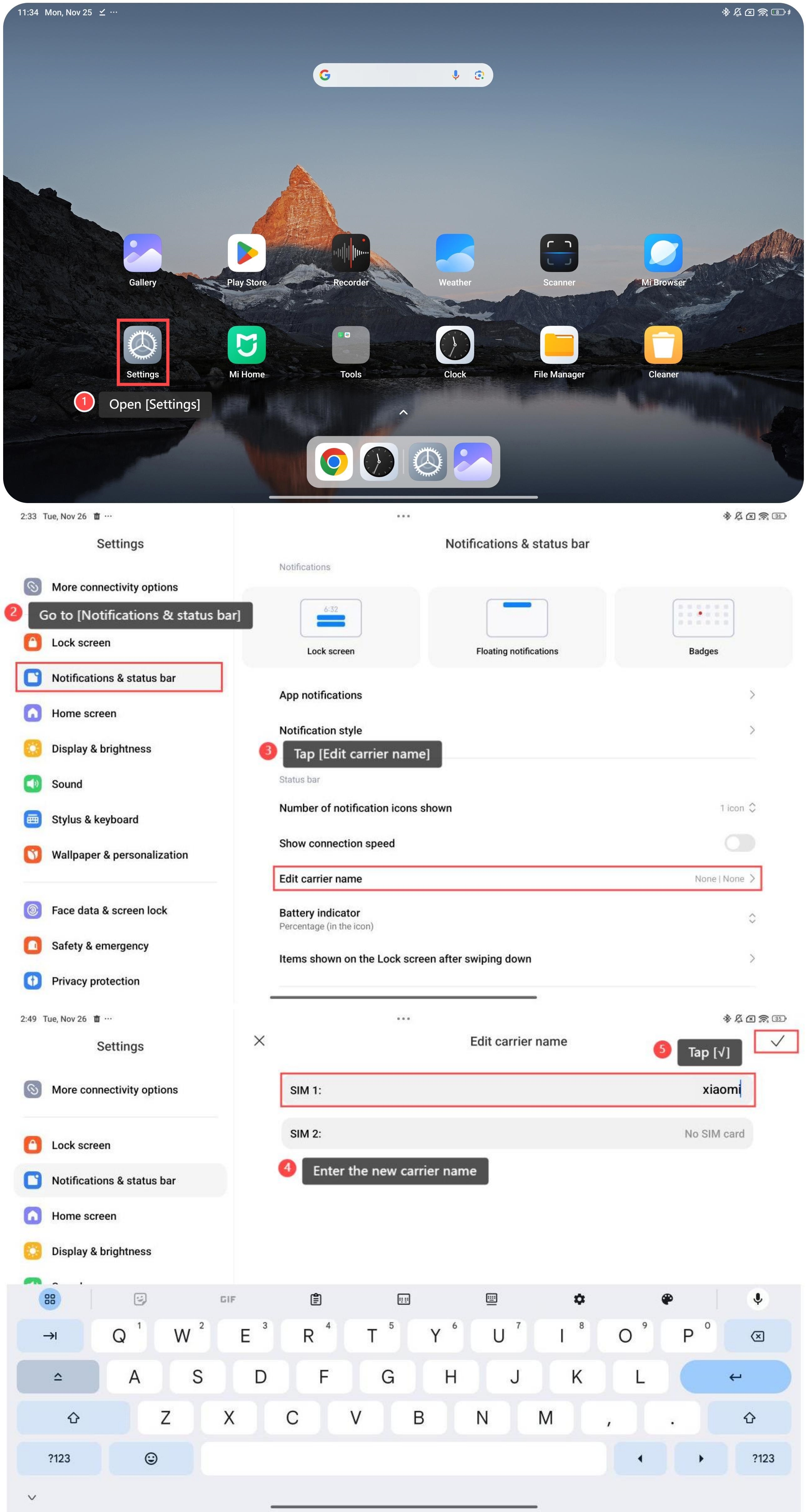
To edit the carrier name, please refer to the following steps:
1. Open [Settings];
2. Go to [Notifications & status bar];
3. Tap [Edit carrier name];
4. Select a SIM card to enter the new carrier name;
5. Tap [√] to save it.
To edit the carrier name, please refer to the following steps:
1. Open [Settings];
2. Go to [Notifications & status bar];
3. Tap [Edit carrier name];
4. Select a SIM card to enter the new carrier name;
5. Tap [√] to save it.
Friendly tips:
If you're using multiple devices or SIM cards, changing the carrier name can make it easier to differentiate between them at a glance, especially in settings where multiple connections are visible.
If you're using multiple devices or SIM cards, changing the carrier name can make it easier to differentiate between them at a glance, especially in settings where multiple connections are visible.
Does it help?
Yes
No