

How to check the certification on the REDMI Pad Pro?
The REDMI Pad Pro comes with various certifications, ensuring that the device meets certain quality, safety, and environmental standards required in the local country or region.
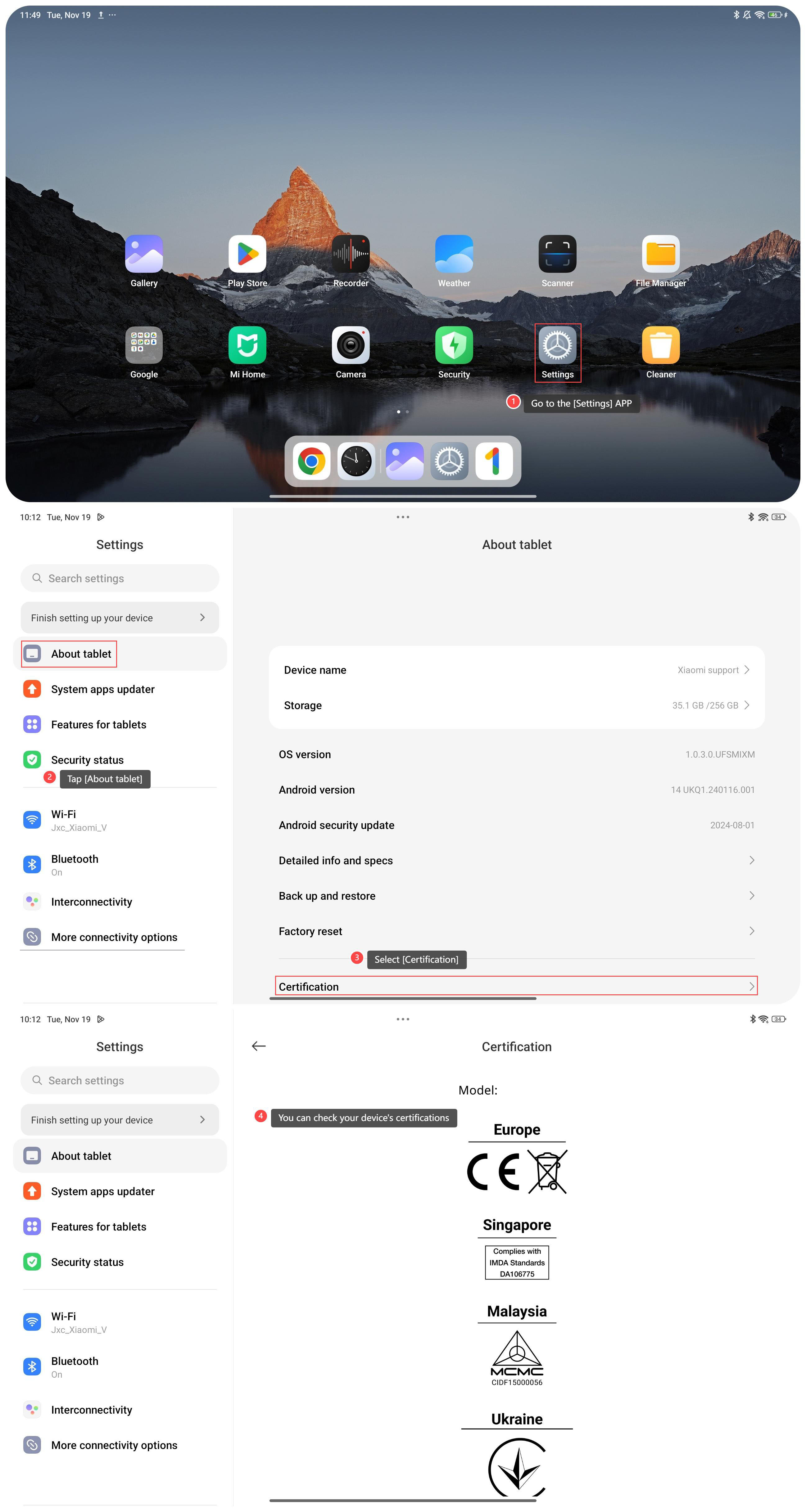
To check the certification on your device, please refer to the following steps:
1. Go to the [Settings] APP on your tablet;
2. Tap [About tablet];
3. Scroll down and select [Certification];
4. On this interface, you can check your device's certifications such as CE, IMDA, MCMC, etc.
Note:
1. CE certification indicates compliance with European Union safety, health, and environmental requirements;
2. IMDA certifications ensure that electronic devices comply with technical and safety standards before they can be sold or used in Singapore;
3. MCMC stands for the Malaysian Communications and Multimedia Commission, which is the regulation of regarding telecommunications devices;
4. NTC certification ensures that the devices comply with technical standards and regulations set by the Philippines government, particularly regarding telecommunications, radio frequency emissions, and network compatibility.
To check the certification on your device, please refer to the following steps:
1. Go to the [Settings] APP on your tablet;
2. Tap [About tablet];
3. Scroll down and select [Certification];
4. On this interface, you can check your device's certifications such as CE, IMDA, MCMC, etc.
Note:
1. CE certification indicates compliance with European Union safety, health, and environmental requirements;
2. IMDA certifications ensure that electronic devices comply with technical and safety standards before they can be sold or used in Singapore;
3. MCMC stands for the Malaysian Communications and Multimedia Commission, which is the regulation of regarding telecommunications devices;
4. NTC certification ensures that the devices comply with technical standards and regulations set by the Philippines government, particularly regarding telecommunications, radio frequency emissions, and network compatibility.
Does it help?
Yes
No