

How to check the MAC address on the Redmi Pad Pro 5G?
The MAC (Media Access Control) address is a unique identifier for the Redmi Pad Pro 5G's network interface and can be used for network configuration or troubleshooting.
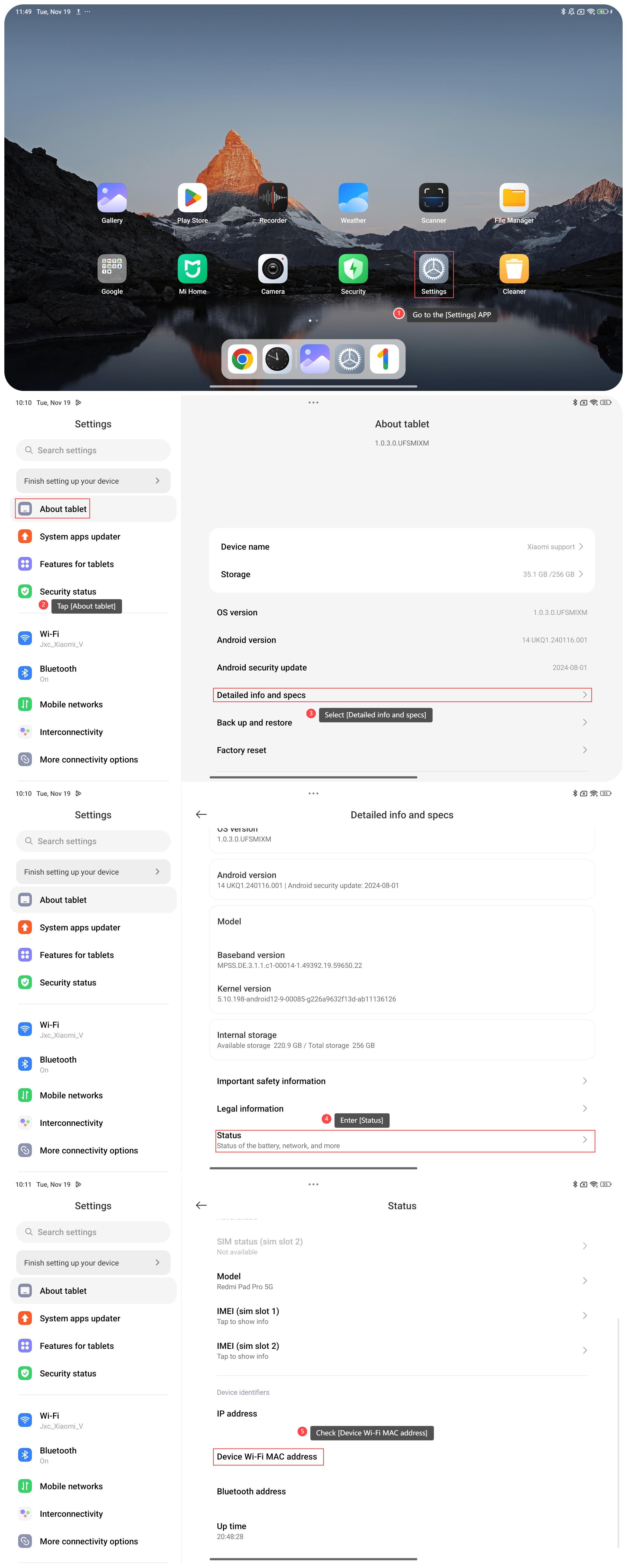
To check the MAC address on the tablet, please refer to the following steps:
1. Go to the [Settings] APP on your tablet;
2. Tap [About tablet];
3. Select [Detailed info and specs];
4. Enter [Status];
5. Scroll down and check [Device Wi-Fi MAC address]. This will display the MAC address of your tablet's Wi-Fi network interface.
Note:
1. When configuring network devices or troubleshooting connectivity issues, knowing your MAC address can be helpful for tasks such as MAC filtering or IP reservation;
2. Always handle your MAC address with care and only share it with trusted parties when necessary.
To check the MAC address on the tablet, please refer to the following steps:
1. Go to the [Settings] APP on your tablet;
2. Tap [About tablet];
3. Select [Detailed info and specs];
4. Enter [Status];
5. Scroll down and check [Device Wi-Fi MAC address]. This will display the MAC address of your tablet's Wi-Fi network interface.
Note:
1. When configuring network devices or troubleshooting connectivity issues, knowing your MAC address can be helpful for tasks such as MAC filtering or IP reservation;
2. Always handle your MAC address with care and only share it with trusted parties when necessary.
Does it help?
Yes
No