

How to enable the sleep breathing score of the Xiaomi Smart Band 9 Active?
The Xiaomi Smart Band 9 Active supports the sleep breathing score function. Snoring or other diseases after sleep (such as obstructive sleep apnea) can cause a significant decrease in blood oxygen saturation. The device determines whether there is shortness of breath during sleep by monitoring the decrease in blood oxygen saturation and sleep quality during sleep. According to the number of times shortness of breath occurs, the corresponding sleep breathing quality score will be given in the Mi Fitness APP. If the sleep breathing quality is poor, it will cause daytime fatigue and drowsiness.
To enable the sleep breathing score, please refer to the following methods:
Method 1:
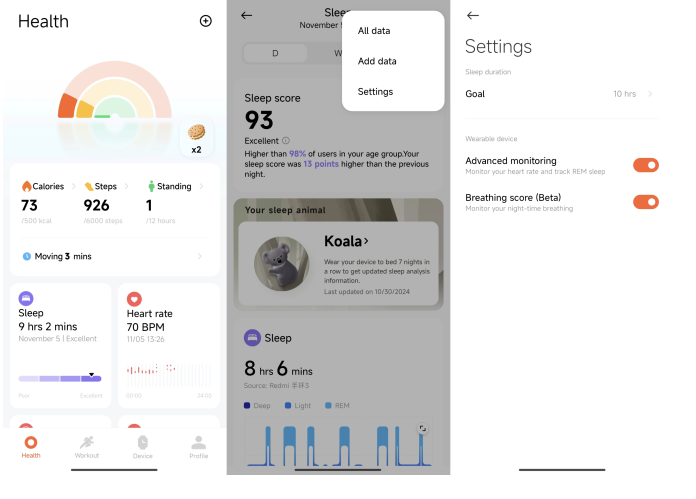
1. Open the Mi Fitness APP;
2. Tap [Sleep] on the home interface;
3. Tap the three dots icon in the upper right corner;
4. Select [Settings] and turn on [Breathing score].
Method 2:
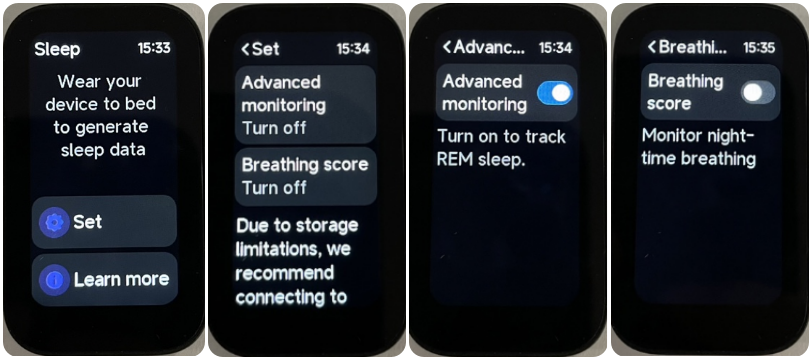
1. Go to the Sleep APP on your band;
2. Tap [Set];
3. Turn on [Breathing score].
Note:
1. Due to the large amount of data generated by the monitoring function, it is recommended to connect to the Mi Fitness APP to synchronize data every day and view the complete sleep records;
2. Turning on the sleep breathing score will significantly reduce the battery life of the band. Please choose whether to turn it on according to your personal needs.
To enable the sleep breathing score, please refer to the following methods:
Method 1:
1. Open the Mi Fitness APP;
2. Tap [Sleep] on the home interface;
3. Tap the three dots icon in the upper right corner;
4. Select [Settings] and turn on [Breathing score].
Method 2:
1. Go to the Sleep APP on your band;
2. Tap [Set];
3. Turn on [Breathing score].
Note:
1. Due to the large amount of data generated by the monitoring function, it is recommended to connect to the Mi Fitness APP to synchronize data every day and view the complete sleep records;
2. Turning on the sleep breathing score will significantly reduce the battery life of the band. Please choose whether to turn it on according to your personal needs.
Does it help?
Yes
No