

What are the interactive operations of the Redmi Buds 6 Pro?
You can touch the touching area on the side of the earbuds to control or slide the Redmi Buds 6 Pro.
Note:
You can change the gestures preferences through Bluetooth settings of the compatible device or the Xiaomi Earbuds APP.
Example of earbuds touching area operations:
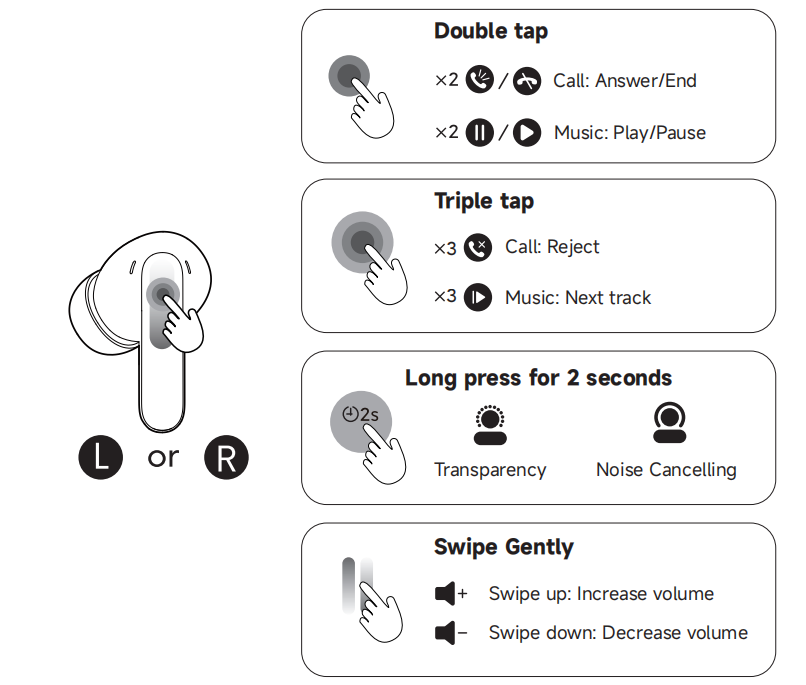
Charging case button control:
Note:
You can change the gestures preferences through Bluetooth settings of the compatible device or the Xiaomi Earbuds APP.
Example of earbuds touching area operations:
| Left earbud/Right earbud | |||
| NO. | Operation | Duration | Description |
| 01 | Double-tap the earbud touching area | 0.2-0.5s | Default to play music/pause, answer calls/end calls |
| 02 | Triple-tap the earbud touching area | After double-tapping, tap again within 0.5s | Default to switch to the next song during playback and reject calls |
| 03 | Press and hold the earbud touching area | 2s | Default to switch to noise cancellation/transparency (to turn off the noise cancellation function need Xiaomi Earbuds APP/change to turn off) |
| 04 | Voice +/- | Touch sliding | Slide up to increase the volume/slide down to decrease the volume |
| Charging case button pressing and holding operation logic (both earbuds in the case) | |||
| Button Operation | Function | Lighting Effect | Description |
| Open the lid and press for 2s | Forced pairing: pair the earbuds with the phone | The indicator flashes in white twice per second until it is paired with the phone. If the pairing is successful, the white light will stay on for 5 seconds. If there is no connection for 1 minute, the earbuds will go into sleep mode and the indicator will turn off. | Pairing the earbuds in the charging case |
| Open the lid and press for 10 seconds | Reset: Clear the phone pairing record, restart the earbuds | Restart to enter pairing mode | Clear Bluetooth connection history |
| Open the lid and press for 20 seconds | Restart: Press and hold for 10 seconds + restart the earbuds | Restart to enter pairing mode | |
| Open the lid and press for 30 seconds (to support after-sales single earbud replacement) | Re-pair the earbuds: Press and hold for 20 seconds + clear the pairing record between the two earbuds and re-pair the two earbuds | Restart to enter pairing mode | Reset pairing between left and right earbuds |
Does it help?
Yes
No