

Why can’t the Xiaomi Smart Band 9 Active be paired with a new phone after it has been unilaterally restored to factory settings?
Please check the possible reasons as follows:
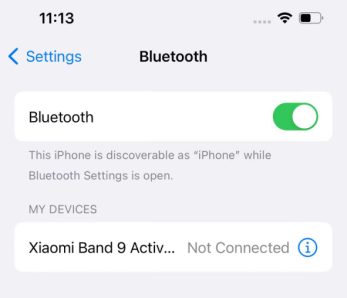
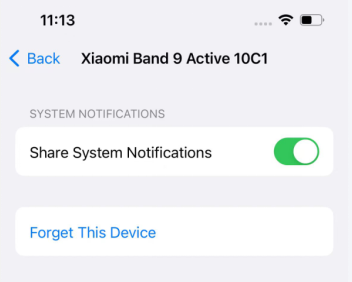
1. When an iOS phone is connected to a device and the device is unilaterally restored to factory settings, the iOS phone system Bluetooth will try to reconnect to the device, and the new phone cannot be able to search it (the iOS phone and the device will always be connected. During the connection period, the new phone cannot be searched. During the disconnection period, the new phone is in scanning mode and can be searched). You need to enter the iOS phone system Bluetooth settings, find the corresponding connected device, and ignore this device. At this time, use the new phone to search and pair it;
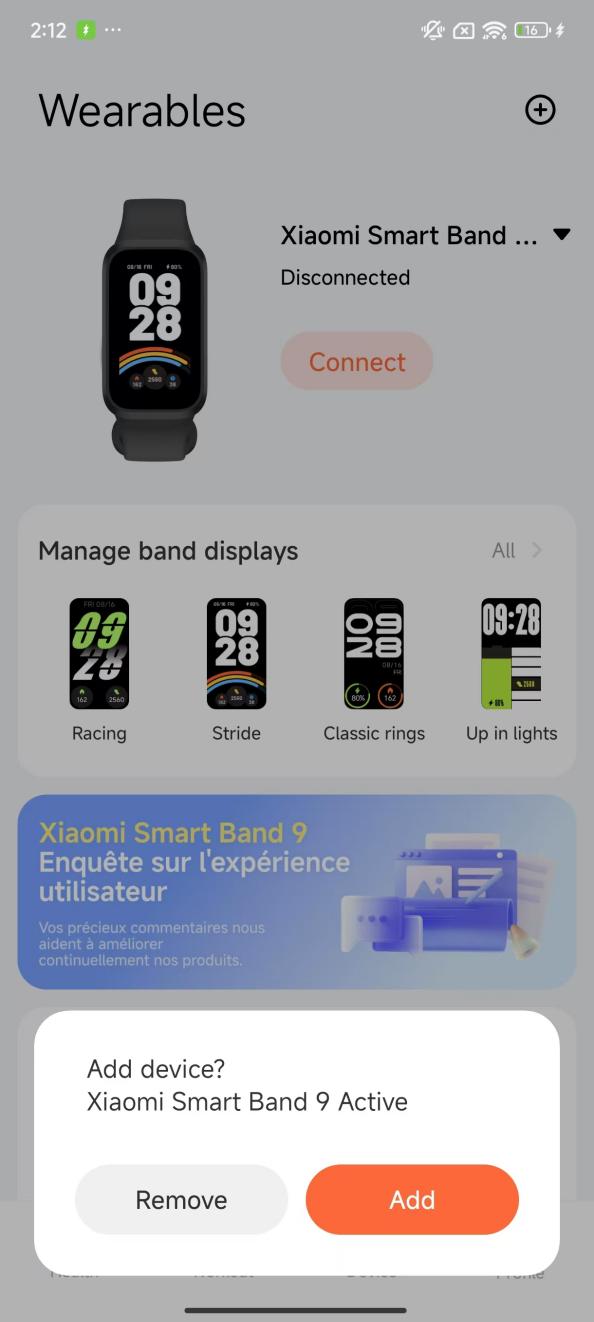
2. When the Android phone is connected to the device and the device is unilaterally restored to factory settings, the Mi Fitness APP will reconnect to the device and prompt you to [Remove] or [Add]. At this time, the new phone cannot search for the device. Tap [Remove] and then search and connect with the new phone.
1. When an iOS phone is connected to a device and the device is unilaterally restored to factory settings, the iOS phone system Bluetooth will try to reconnect to the device, and the new phone cannot be able to search it (the iOS phone and the device will always be connected. During the connection period, the new phone cannot be searched. During the disconnection period, the new phone is in scanning mode and can be searched). You need to enter the iOS phone system Bluetooth settings, find the corresponding connected device, and ignore this device. At this time, use the new phone to search and pair it;
2. When the Android phone is connected to the device and the device is unilaterally restored to factory settings, the Mi Fitness APP will reconnect to the device and prompt you to [Remove] or [Add]. At this time, the new phone cannot search for the device. Tap [Remove] and then search and connect with the new phone.
Does it help?
Yes
No