

How to turn on/off data roaming on the Redmi Pad Pro 5G?
Data roaming on the Redmi Pad Pro 5G allows you to use mobile data services when you’re outside your home carrier’s coverage area, such as when traveling internationally. This feature lets you access the internet, send messages, and make calls using a foreign network. However, it often comes with additional charges, so it’s essential to check your carrier’s roaming policies.
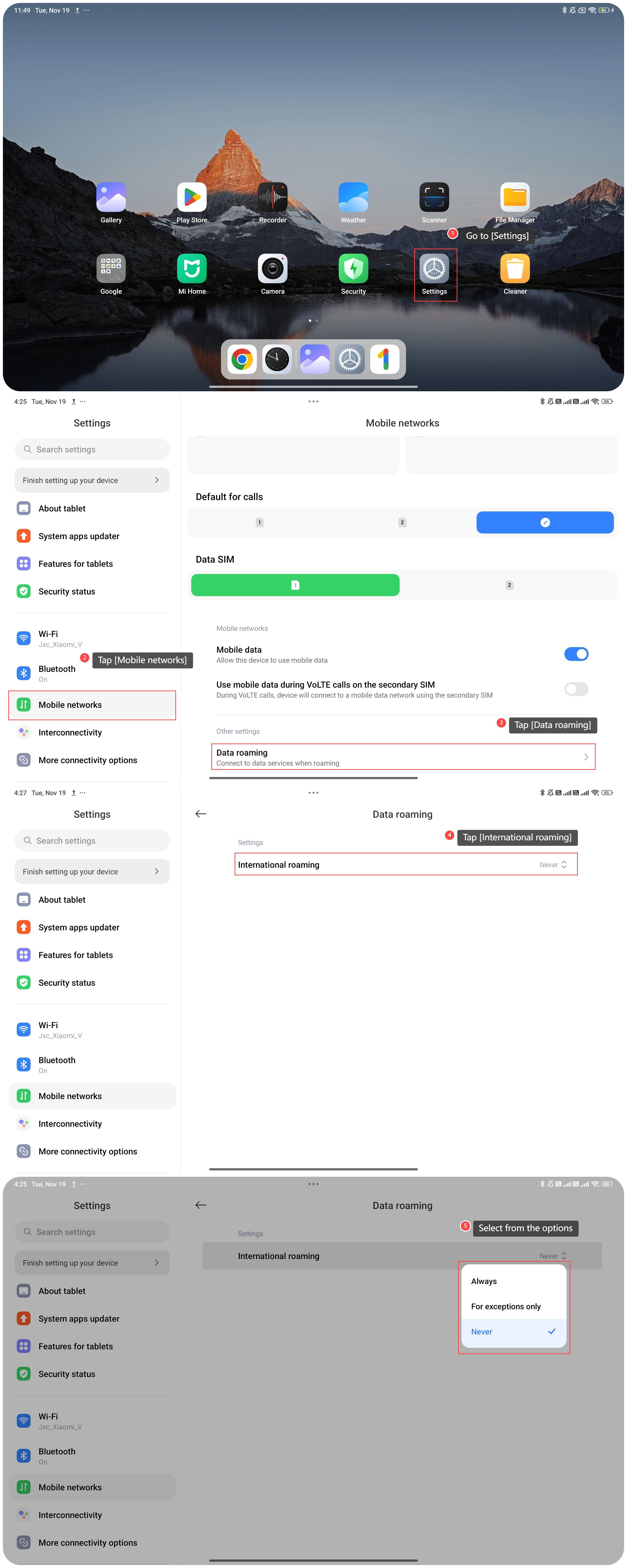
To turn on/off the data roaming, please refer to the following steps:
1. Go to [Settings];
2. Tap [Mobile networks];
3. Tap [Data roaming];
4. Tap [International roaming];
5. Select the options from [Never], [Always] and [For exceptions only] as you prefer.
To turn on/off the data roaming, please refer to the following steps:
1. Go to [Settings];
2. Tap [Mobile networks];
3. Tap [Data roaming];
4. Tap [International roaming];
5. Select the options from [Never], [Always] and [For exceptions only] as you prefer.
Does it help?
Yes
No